





bastl
Members
-
Joined
-
Last visited
Everything posted by bastl
-
@mgutt Welchen Nextcloud Docker nutzt du, wenn ich fragen darf? Hab in Erinnerung, dass in dem von Linuxserver.io (basierend auf Alpine Linux) kein Openoffice Document Server lauffähig ist.
-
@dlandon I updated the UD plugin a couple minutes ago and my UD devices (3 disks and 2 shares) disappeared fom the main tab. In the community apps section it shows as installed, same for the Plus Addon. Pressing the "go to settings" buttons opens an empty page. Any ideas? I'am on 6.9.1 and never had an issue before. I updated almost always if new updates came in. Never saw such an behaviour. What to do now? EDIT: Ok it showed a new update as I finished the post and now it's back to normal. Weird
-
Reeinstalled the plugin, issue is the same. No output on the dashboard 😔
-
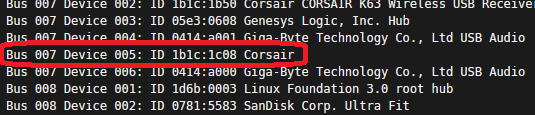
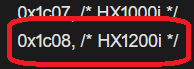
Not sure if this will fix it. Will try. But it looks like its stil recognized. Not sure if the a different USB Bus changes something. The ID (1c08) is the same.
-
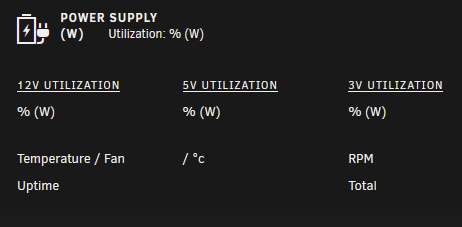
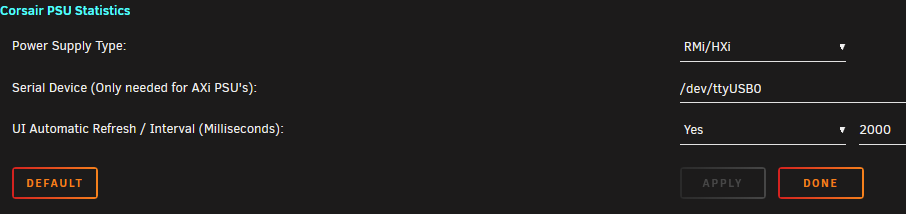
@Fma965 With Unraid Update 6.9.0 and next point release 6.9.1 Your plugin stopped working for me. Nothing changed. I use a H1200i and never had an issue before showing the stats on the dashboard. Any idea how to troubleshoot and to fix it?
-
Small observations I noticed for a couple weeks now. Every morning at 6am I do a automated BTRFS snapshot for my VMs on the cache drive to an UD drive. This works for over a year without any issues so far. What I have noticed starting on 23.11.2020 is that the allocation of the UD drive isn't shown correctly when I visit the main page after the snapshot anymore. The snapshots are created as usual (70-80G per day) but the allocation isn't showing the new values. I see the same values as the day before. Refreshing the main page isn't triggering a rescan of the drive. I am on 6.8.3 and installing plugin updates as they come in, nothing else has changed. Almost every day I check for updates. If I do a "BTRFS sub list /mnt/disks/backupdrive" for the UD drive the values are shown correct again. If I don't do this, the old values are still shown. I never had to do this before. For me this is a small problem, because I have to clean old snapshots once every 1-2 months by hand on the 1,5TB drive to not fully filling it up. @dlandon I know it's not really a big think, but maybe someone can explain me whats the reason for this new behaviour.
-
Same for me. I had 2048 already set in my old config and as shown in your screenshot it's the default value. Does the new SWAG template have a different value? The icon for me also doesn't changed to the new one. Not a big deal.
-
Make sure you optimize your VM especially for first gen TR4. Try not to use cores from different dies for example. You can find a couple tips in the forums how to improve the performance for gaming. However if this helps or not, the game in the current state isn't relly well optimized. I saw some streams with really beefy hardware and it runs like in your case in low 20fps ranges.
-
Today I got a info from "Fix Common Problems" the container "letsencrypt" is deprecated. So far so good, I had already read a couple weeks ago that you guys have to switch the name for the container, but I never changed my setting until today. What I did so far: 1. stop the letsencrypt container 2. backup the config folder in appdata (copied to new folder called swag) 3. edit the old "letsencrypt" container 4. changed the name to swag 5. switch to "linuxserver/swag" repo 6. adjusted the config path to the new folder 7. starting the swag container 8. adjusting "trusted_proxies" in the nextcloud config.php in /appdata/nextcloud/www/nextcloud/config to swag Did I miss something?
-
@Mattaton Unraid 6.9 will be able to read the sensor data from your CPU. Sensor data from Ryzen gen 3 and Threadripper TX40 are currently not fully supported in 6.8.3.
-
@luca2 You can use a modified 7zip version for example. Either you install that modified version or like I did, only use the desired zstd codec in the already installed mainline 7zip version. https://github.com/mcmilk/7-Zip-zstd#zstandard-codec-plugin-for-mainline-7-zip You should be also able to decompress the file using tar https://stackoverflow.com/questions/45355277/how-can-i-decompress-an-archive-file-having-tar-zst
-
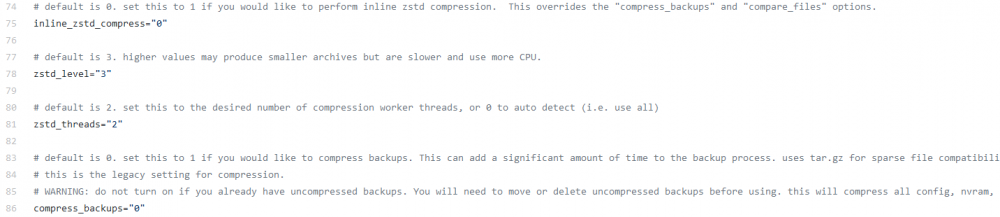
@luca2 Sry, i thought you're using the plugin, what basically has the same functionality and is based on the older script. In the script you can find the zst compession options starting at line 75
-
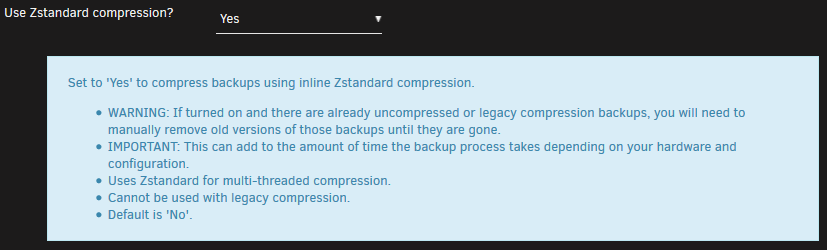
ZST files are compresses vdisk files if you're using the "Zstandard compression" option. Usually the vdisk files is copied first, compressed into a ZST file and the vdisk copy is been removed after compression. In your case there is an older backup in the same folder which isn't compressed. You have to clean your backup destination first or you will end up in 2 big files, wasting space. Check the help!
-
@rachid596 Whenever i read "Starship/Matisse HD Audio Controller" I get tilted. I had spend a couple days till I finally found the solution which was in front of me all the time. Even the block diagram of my board showed the 2 USB audio controllers. RTFM! 😂
-
@CatMilk I had the same issue on my Gigabyte TRX40 board. Passing through the Starship/Matisse HD Audio Controller and starting the VM ended up in Unraid freezing and finally crashing. For me the Starship/Matisse Controller splits into 2 extra sound devices shown as USB audio. One is for the front panel connectors and one for the backside 7.1 connections and can be used by 2 different vms at the same time. Took me some time to figure it out. Check if you also have an extra USB audio device shown up like for me. Maybe Asus did something similar with there layout. FLR patch didn't helped in my case. For reference my post in another thread:

-
@GreenEyedMonster Use the following Docker which does basically the same. Installing MacOS in a VM. Watch SpaceInvaders video and you should be good to go
-
@odiby It's always a bad idea to expose your server directly to the internet. We had a couple people already in the forums which thought it is a good idea to place there servers in a DMZ, no extra firewall or security features of their routers active. And what happened was they got bombarded with thousands of login attempts, flooding the logs, crashing the server. Even with whitlists for accesing the server or 2FA the servers will be flooded with traffic from unknown sources. With no extra infrastructure you won't be able to prevent this from happening. Best practise is to use a vpn to access your data and with wireguard and openvpn you have all the tools you need.
-
Thanks for the quick feature implementation. 👍 Do you have any plans to add a function to show VM specific log files in the future and maybe the system log? AND again another feature request, i know, I'am annoying sometimes, but maybe if you have to much time to spend, have a look into the Corsair PSU statistic plugin. This adds a widget on the dashboard with the stats for the PSU. With this the app for me would be 100% complete. I swear, no more feature requests. 😂 If I can provide you some help, let me know.
-
@IanB No problem dude. Wouldn't be the first time i missed some hidden setting somewhere or an easy step to make something work. "wasted time" was maybe the wrong wording. 😂
-
@Subtletree One of the passed through devices causing this error. Apr 28 18:37:25 Tower kernel: pcieport 0000:00:03.1: AER: Uncorrected (Non-Fatal) error received: 0000:00:03.1 Apr 28 18:37:25 Tower kernel: pcieport 0000:00:03.1: PCIe Bus Error: severity=Uncorrected (Non-Fatal), type=Transaction Layer, (Requester ID) Apr 28 18:37:25 Tower kernel: pcieport 0000:00:03.1: device [1022:1483] error status/mask=00100000/04400000 Apr 28 18:37:25 Tower kernel: pcieport 0000:00:03.1: [20] UnsupReq (First) Apr 28 18:37:25 Tower kernel: pcieport 0000:00:03.1: TLP Header: 34000000 0a000010 00000000 80008000 Apr 28 18:37:25 Tower kernel: pcieport 0000:00:03.1: broadcast error_detected message Apr 28 18:37:25 Tower kernel: pcieport 0000:00:03.1: broadcast mmio_enabled message Apr 28 18:37:25 Tower kernel: pcieport 0000:00:03.1: broadcast resume message Apr 28 18:37:25 Tower kernel: pcieport 0000:00:03.1: AER: Device recovery successful 00:03.1 PCI bridge [0604]: Advanced Micro Devices, Inc. [AMD] Starship/Matisse GPP Bridge [1022:1483] Kernel driver in use: pcieport One of the devices you pass through causing this PCI-bridge to throw an error. It might be the following or one of the 2 USB controllers you're passing through 07:00.0 Non-Essential Instrumentation [1300]: Advanced Micro Devices, Inc. [AMD] Starship/Matisse Reserved SPP [1022:1485] Remove them one by one and test if it helps.
-
@IanB No problem and thanks for the implementation. 👍 I only wasted half an hour stopping the app multiple times, clearing cache, re-adding the server, restarting the phone, reinstalling the app a couple times 😂
-
@IanB on Android? Am I blind? I can't find any settings to enable it.
-
@Leoyzen Thanks for that hint, but it is not in the same group with other devices. IOMMU group 29: [1022:148a] 22:00.0 Non-Essential Instrumentation [1300]: Advanced Micro Devices, Inc. [AMD] Starship/Matisse PCIe Dummy Function IOMMU group 30: [1022:1485] 23:00.0 Non-Essential Instrumentation [1300]: Advanced Micro Devices, Inc. [AMD] Starship/Matisse Reserved SPP IOMMU group 31: [1022:1486] 23:00.1 Encryption controller: Advanced Micro Devices, Inc. [AMD] Starship/Matisse Cryptographic Coprocessor PSPCPP IOMMU group 32: [1022:148c] 23:00.3 USB controller: Advanced Micro Devices, Inc. [AMD] Starship USB 3.0 Host Controller IOMMU group 33: [1022:1487] 23:00.4 Audio device: Advanced Micro Devices, Inc. [AMD] Starship/Matisse HD Audio Controller IOMMU group 34: [1022:1482] 40:01.0 Host bridge: Advanced Micro Devices, Inc. [AMD] Starship/Matisse PCIe Dummy Host Bridge IOMMU group 35: [1022:1483] 40:01.1 PCI bridge: Advanced Micro Devices, Inc. [AMD] Starship/Matisse GPP Bridge IOMMU group 36: [1022:1483] 40:01.3 PCI bridge: Advanced Micro Devices, Inc. [AMD] Starship/Matisse GPP Bridge IOMMU group 37: [1022:1482] 40:02.0 Host bridge: Advanced Micro Devices, Inc. [AMD] Starship/Matisse PCIe Dummy Host Bridge IOMMU group 38: [1022:1482] 40:03.0 Host bridge: Advanced Micro Devices, Inc. [AMD] Starship/Matisse PCIe Dummy Host Bridge IOMMU group 39: [1022:1483] 40:03.1 PCI bridge: Advanced Micro Devices, Inc. [AMD] Starship/Matisse GPP Bridge
-
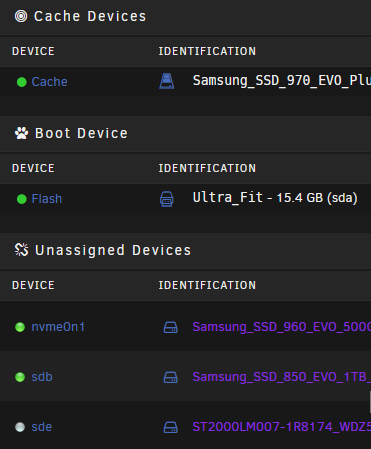
Updated the plugin and the color of the UD devices is slightly different than normal. Are we changing now to a Twitch color theme? 😂
-
@IanB Thanks for that nice app. Purchased, installed, working! 👍 Small feature request: Is it possible to implement a fingerprint or face unlock option when starting the app?



