bastl
Members
-
Joined
-
Last visited
Everything posted by bastl
-
Perfekt. Gerade getestet mit nem alten Stick. Funzt! Nen neuer Stick fürs OS ist bestellt. Am Wochenende wird dann umgestellt. 👍
-
Servus zusammen, ich pack mal meine Frage hier rein, vielleicht kann mir jemand den ein oder anderen Tipp geben. Folgendes habe ich vor. Auf meinem Hauptsystem mit Unraid laufen diverse Dienste wie Nextcloud, Unifi, Bitwarden etc. Da ich den Threadripper auf die Dauer nicht ständig laufen haben will, kam mir die Idee, ich könnt die meisten Dienste ja auf einen low-power MiniPC auslagern. Dort sollte dann ebenfalls Unraid drauf, da mir die Verwaltung über die GUI recht gut zusagt. Nun das Problem. Der MiniPC hat eine 500GB NVME und 2x1TB SSD. Weitere Festplatten passen nicht rein bzw. sind alle Anschlüsse belegt, außer natürlich USB Geräte. Jetzt stellt sich mir die Frage, Docker+VMs laufen nur mit gestartetem Array. In das Array sollte man allerdings keine SSDs packen, da TRIM nicht unterstützt wird bzw. die Parität dadurch geschrottet werden kann. Ich würde bei der Kiste auch ohne Array Disks auskommen, das scheint allerdings nicht zu funktionieren. Besteht die Möglichkeit einen einfachen USB Stick (quasi als Dummy) als einziges Array Device zu nutzen, damit das Array überhaupt gestartet wird? Die NVME würde ich für 1-2 VMs nutzen und die 2x1TB als gespiegelten Pool für die Services und paar Daten die anfallen. Shares nur auf den Pools und absolut nix auf dem Array, geht das? Oder macht es Sinn die NVME als Array zu nehmen? Dann dürfte doch Trim nutzbar sein ohne Parität, oder? Gibt es etwas, was ich dabei übersehe? Irgendwelche Tipps?
-
@Nodiaque As workaround for testing Win11 you can use the following on 6.9.2:
-
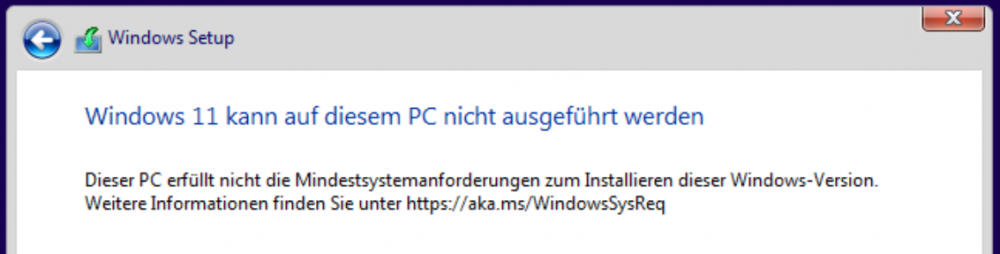
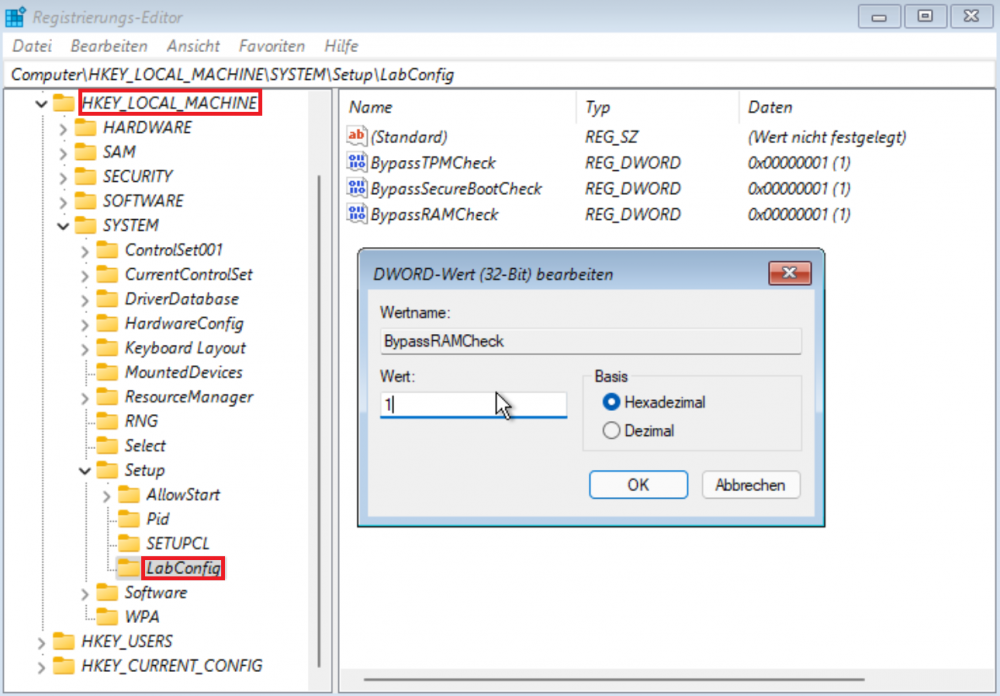
I guess most of you who tried to test the final Windows 11 build might allready noticed, the installer checks for the presence of a TPM module and enabled SecureBoot. If one of them is not present, the installer will halt with the following error directly after the edition selection With shift+F10 open a commandline Enter "regedit" into the cmd and press enter. The registry editor should open up. Navigate to "HKEY_LOCAL_MACHINE\SYSTEM\Setup" create a new key called "LabConfig" on the left side bei right clicking on "Setup" and select new > key ad the following 3 DWORD (32-Bit) entries inside LabConfig on the right. BypassTPMCheck BypassSecureBootCheck BypassRAMCheck Double click each entry and change the hex entry from 0 to 1 After that close the registry editor and the commandline and go one step back to the edition selection screen, select the version you wanna install, press next et voila, Windows 11 should install fine. Doing all this straight after the installer has started on the language selection menue also works. No need to go to the edition selection first. For this to work I used the default Win10 template with a 70G vdisk 4G RAM and 8cores. Nothing else on the template or in the xml has changed. Keep in mind this is only a solution if you want to try the new Windows version. No one at this point can guarantee how long this will work and if a future update will break something. We all know MS is randomly "breaking" things with every update. Some reports say updates might not even possible with this reg tweak in the future, therefore my warning for all those can't await the next Unraid version which propably will come with a fix and an emulated TPM module. only use this for testing Windows 11! Happy testing folks
-
@Falcosc Verify on disk 1 is finished. The file integrity control panel page still shows the the files from disk2 like in the screenshot of my fist post. I have a lot of *.tmp.end files in /var/tmp and a disk2.tmp.end. Some are from august some from today. I renamed the disk2.tmp.end refreshed the page and disk2 export showed "canceled with error". Refreshed the page again. Error is gone. Started a new export of disk2. No errors. I'am kinda confused right now.
-
@Falcosc Maybe it helps to note that I am from germany and some of the files include the german letters Ää Öö Üü and ß for example */mnt/disk2/company/tmp/Präsentation/industrie-medium.png also I have a folder where backups from my android phone are placed, some with the following naming included with an @ for example */mnt/disk2/nextcloud/user/files_versions/.SeedVaultAndroidBackup/1678426041580/kv/@pm@/Y2ibnQudnVXN1cn9tLZleQ.v1614280421
-
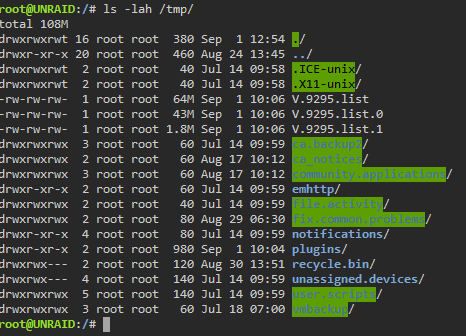
@Falcosc I have no /tmp/disk2* files in that folder and I can't really share the /var/tmp/disk2* filelist with you. I have a lot of personal and work content on that disk, some named with my real name or the name of the company I work for. I can try to remove the personal stuff if it helps. I guess not. On the main tab I only see reads happen on disk one where the verify process is still active. Looks like export for disk2 is already finished. Timestamp for disk2 is short after the time a started the process for a new export.

-
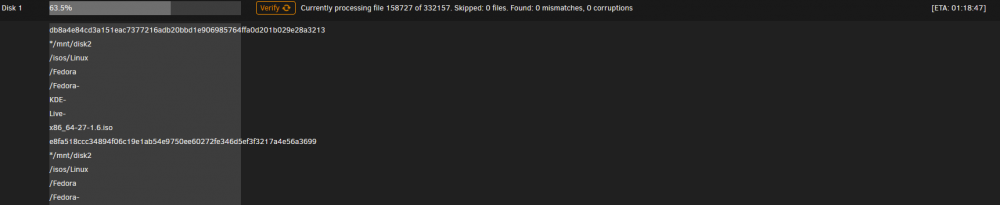
Short report for something weird happened to me. Planned verify task for 2 disks started this morning, 1 disk finished and reported a corruption on disk 2. Verify task on disk 1 still running. The coruppted file in my case was the nextcloud.log file getting flooded. I cleared the logfile, verify on disk 1 still running. I selected disk 2 and started a export task and the following happened in the ui The ui shows as it looks like the full list of files beeing scanned on disk 1. Refreshing the page doesn't help. The counter for processed files is still counting up and constant read speeds on disk 1 showing that the process looks like it's still working. Only the page is messed up.
-
@bonienl 2021.08.24b fixed it. Thanks!
-
@bonienl 24a gives me the same error

-
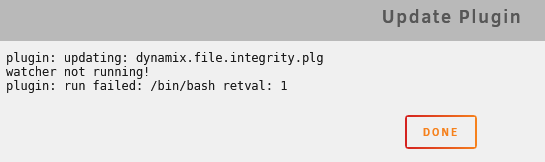
There is another update showing for me right now. current version: 2021.08.23a new version: 2021.08.24 pressing the update button gives me the following error.
-
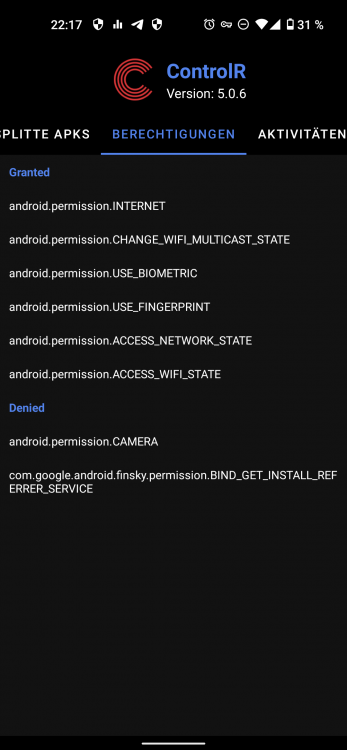
I bet you had that feature already in the app why should it ask for permissions like USE_BIOMETRIC and USE_FINGERPRINT 😂
-
@jbrodriguez I checked a couple other apps for backing up APKs and I found one which backed up all split APKs from that new format and on my main phone V5.0.6 is running now. Thanks for the hint with the new split file format 😘 What's with my feature request? Are you already on it? Just kidding 😂 Would be nice if in the future the app start can be protected by a passcode or via finger print.
-
So if I understand the new format correctly, as a developer delivering new updates is easier and smaller now. You kinda update only parts of the app. But on the enduser device your app still exists as an APK, right? I grabbed that APK and sideloaded it on my main phone and the install went fine. This doesn't explain, why the app won't launch. Did the app permissions changed compared to version 4? Is there a way to force the app to start in a debug mode so I can get some logs for you? Or do you have a test build for me with debug enabled? i'am kinda relativly sure that feature existed. If not, see it as a feature request 😄
-
@jbrodriguez I have another problem with the Android version of the app starting with v5. I Tried 5.0.2, 5.0.4 and yesterday v5.0.6. and none are even starting on my phone. Version 4.17 is still working fine, but let me explain a bit more that might help. My phone is a Pixel5 with the custom AOSP based ROM CalyxOS installed with MicroG services to gain some of the google features like push notifications and access to google services. I don't use any Google accounts on that phone and have no access to the play store directly on this phone. The account I baught your app with is still active and I have to use it on a temporary phone to download app updates for paid apps like yours, back them up and install the apk on my Pixel. This procedure worked flawless for me until v5. The temporary phone is an old Galaxy S3 and is only used for this and is off if I don't need an update. Paid Apps can't be updated with the build in F-Droid or Aurora store under CalyxOS and I'am fine with that. I only have 2 paid apps anyways. App version 4.17 installs fine and works without issues. App version 5 was the first one I coudn't use. Clearing cache of the old version, uninstall it, install newest version, so fine so good. As soon as I try to start your app, nothing happens. No error message, nothing. Is there a way I can help to diagnos the issues and make that app work again? I know I'am a special case, but it would be nice to have an up to date version of your app working again on my privacy friendly phone where everything is working except of your really helpful app, and btw. in which version did you removed the password/fingerprint lock option inside the app? This was a feature I requested some time ago and you implemented it back than 😔
-
First of all, don't use all available cores for your VM and especially not the core 0 and it's HT. Unraid always uses these core for itself to manage stuff in the background. Second thing, you have 2x 6core Xeons in your system, try it first to ONLY use the cores from a single CPU. 1-5 + HT or 6-11 + HT or even less and don't mix the cores from the different CPUs.
-
Is nen Fehler, der nix mit dem Certbot selbst zu tun hat. Da haben die Jungs und Mädels, die SWAG bereitstellen nen Fehler drin gehabt. Bei mir wurde ne yt-downloader.conf bemängelt, die ich selbst nie erstellt oder den dazugehörigen Docker verwendet hab. Auskommentieren, Umbenennen oder löschen der Datei schafft abhilfe. Neustart oder Update des Containers generiert die Vorlagen eh neu. Wer bei der automatischen Erneuerung der Certs mit certbot Probleme haben sollte, sollte auch mal schauen, ob in der Firewall/Router (bei mir Pfsense) nen Geoblocking aktiv ist. Wenn ja, wie bei mir mit aktivem pfBlockerNG GeoIP Filer, dann diesen kurz abschalten und den Container neustarten.
-
i get similar errors since last update which stops SWAG from staring up nginx: [emerg] "proxy_redirect" directive is duplicate in /config/nginx/proxy-confs/youtube-dl.subfolder.conf:22 nginx: [emerg] "proxy_redirect" directive is duplicate in /config/nginx/proxy-confs/youtube-dl.subfolder.conf:22 nginx: [emerg] "proxy_redirect" directive is duplicate in /config/nginx/proxy-confs/youtube-dl.subfolder.conf:22 nginx: [emerg] "proxy_redirect" directive is duplicate in /config/nginx/proxy-confs/youtube-dl.subfolder.conf:22 nginx: [emerg] "proxy_redirect" directive is duplicate in /config/nginx/proxy-confs/youtube-dl.subfolder.conf:22 nginx: [emerg] "proxy_redirect" directive is duplicate in /config/nginx/proxy-confs/youtube-dl.subfolder.conf:22
-
Small report from my side. Yesterday I played around a bit with the leaked win11 build on Unraid VMs. Install on Seabios and OVMF both worked fine. Fresh install of Win11 home without network isn't possible. You need network access on a fresh Home install. Pro works without internet and the use of a local profil is possible Upgrade from Win10 Home to Win11 Home worked without internet access Upgrade from Win10 Pro Seabios or OVMF both worked without any problems Upgrade from Win10 German to Win11 (only available in english) also worked all tests with default Win10 template, only changes I made are on the BIOS versions, 8GB Ram, 60GB vdisk, 6 cores Not sure what the future limitations like secureboot and tpm2 are, the current build is more like a new Win10 version.
-
Make sure you passthrough all parts for the GPU. The GPU itself i guess group20, the Nvidia Audio Controller group21 and the Nvidia USB Controller group22 Edit: I forgot group23 is also part from your GPU
-
I routinely updated the docker today and saw the same error. Not sure if it's because of the update or happened before. Current version for me is 6.1.71
-
Quote from Wikipedia: https://en.wikipedia.org/wiki/HTTP_Strict_Transport_Security
-
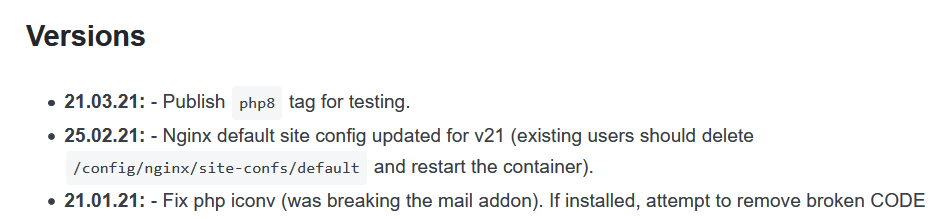
@carnivorebrah @BVD Thanks! same time I found it myself be testing, I got a message for your answers 😅 By digging around and testing I also found the post with the changelog @BoxOfSnoo is refering to https://docs.linuxserver.io/images/docker-nextcloud Removing that file and recreate it was new for me. Never had any issues with my old config before. Last couple updates went fine until today. Renaming the "default" file in "/config/nginx/site-confs" and restarting the docker at first wasn't the solution. Looks like Nextcloud is reading every file in that path when started up. Docker log showed the following and the web ui never came up. So I removed the old default file from that path, restarted the docker and tada, Nextcloud was back and the errors are gone BUT with resetting the file, the "Strict-Transport-Security“-HTTP-Header" setting also was reset and had to be uncommented again. Same happened for "client_max_body_size" which i had configured to 10G before, by default it is set to 512M now. An upload with a 2GB testfile went trough. Weird 🤨

-
@andreidelait I got the same errors like you after the update. The missing indices and the default phone region is easy to fix, but I'am kinda struggling finding the correct file to edit for adjusting the cardav, caldav, webfinger issue. Can you guys please hint me to the correct path where i can find/edit/adjust these entries. I'am kinda confused right now. I know I've edited this before, over a year ago and can't find it anymore. Thanks
-
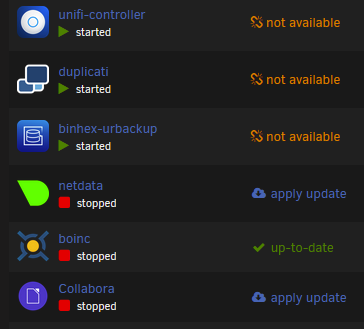
Same here for me, started yesterday. Yesterday i clicked on "check for updates" and mariadb and collabora came up with an update. Only collabora showed not available. After updating mariadb I thought, ok, your internet has stability issues anyways, check again tomorrow. And today it shows the following. Not all are unavailable and Collabora shows a update now. Weird! I've checked pihole if anything came up in the query log, but nothing is blocked. I updated all packages on pihole (on a pi4), updated unbounds local root config, restarted the pi and rechecked for updates. Now only netdata and collabora showed an update, no unavailable ones. Updating netdata wen't fine, recheck for updates and only collabora left with an update. Looks like it works again for me.