





bastl
Members
-
Joined
-
Last visited
Everything posted by bastl
-
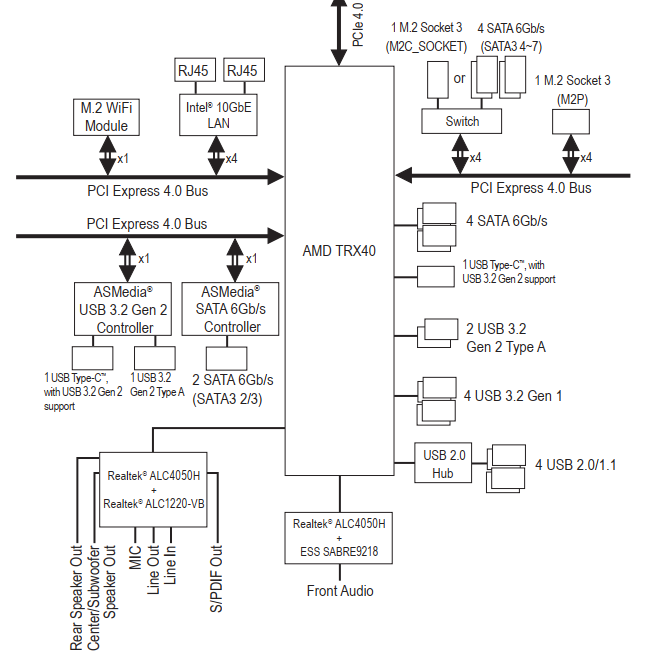
How could I missed that????WTF!!1!!!1 Ok, so during all my testings I completely missed that the Aorus Extreme TRX40 provides 2 USB audio devices The first one is for the front panel audio and the second for the rear 5.1/7.1 audio links. I always tried to passthrough the onboard "[AMD] Starship/Matisse HD Audio Controller" without success. 😑 Both these controllers are connected to the chipset and can be passed through to different VMs at the same time. RTFM 😂 I reverted back to default 6.8.3 kernel and had no issues to passthrough both controllers to different vms, running them simultaneously with 5.1 speakers at the back and headset attached to the front without any issues. No patched kernel needed 👍

-
@Leoyzen First of all thanks for your work to provide custom kernels. 👍 Let me explain the issue i have. I upgraded from a TR4 1950x to a Threadripper 3960x on an Gigabyte Aorus Extreme TRX40 and kinda see the same issues people having with passing through the onboard audio. In my case it's the following device: IOMMU group 42: [1022:1487] 23:00.4 Audio device: Advanced Micro Devices, Inc. [AMD] Starship/Matisse HD Audio Controller root@UNRAID:~# lspci -v -s 23:00.4 23:00.4 Audio device: Advanced Micro Devices, Inc. [AMD] Starship/Matisse HD Audio Controller Subsystem: Advanced Micro Devices, Inc. [AMD] Device d102 Flags: bus master, fast devsel, latency 0, IRQ 154 Memory at b1400000 (32-bit, non-prefetchable) [size=32K] Capabilities: [48] Vendor Specific Information: Len=08 <?> Capabilities: [50] Power Management version 3 Capabilities: [64] Express Endpoint, MSI 00 Capabilities: [a0] MSI: Enable- Count=1/1 Maskable- 64bit+ Capabilities: [100] Vendor Specific Information: ID=0001 Rev=1 Len=010 <?> Capabilities: [150] Advanced Error Reporting Capabilities: [2a0] Access Control Services Capabilities: [370] Transaction Processing Hints Kernel driver in use: vfio-pci With the default 6.8.3 Kernel I have the same issue like other users with an 3rd gen Ryzen. Passing through the onboard audio controller to a VM and starting it up causing the server to freeze/lockup. No matter if I bind the device to vfio or not. Only way to get the server back to a working state is to force a shutdown. Short snippet in the state when the server locks up. I can't pull the full diagnostic at this point, not via ssh nor via webui. Apr 25 15:46:29 UNRAID kernel: vfio-pci 0000:23:00.4: not ready 1023ms after FLR; waiting Apr 25 15:46:31 UNRAID kernel: vfio-pci 0000:23:00.4: not ready 2047ms after FLR; waiting Apr 25 15:46:34 UNRAID kernel: vfio-pci 0000:23:00.4: not ready 4095ms after FLR; waiting Apr 25 15:46:39 UNRAID kernel: vfio-pci 0000:23:00.4: not ready 8191ms after FLR; waiting Apr 25 15:46:48 UNRAID kernel: vfio-pci 0000:23:00.4: not ready 16383ms after FLR; waiting Apr 25 15:47:06 UNRAID kernel: vfio-pci 0000:23:00.4: not ready 32767ms after FLR; waiting Apr 25 15:47:44 UNRAID kernel: vfio-pci 0000:23:00.4: not ready 65535ms after FLR; giving up Apr 25 15:48:16 UNRAID nginx: 2020/04/25 15:48:16 [error] 11486#11486: *1680 upstream timed out (110: Connection timed out) while reading response header from upstream, client: 10.0.0.7, server: , request: "POST /plugins/dynamix.vm.manager/include/VMajax.php HTTP/2.0", upstream: "fastcgi://unix:/var/run/php5-fpm.sock", host: "unraid.local", referrer: "https://unraid.local/VMs" Apr 25 15:48:43 UNRAID kernel: rcu: INFO: rcu_sched detected stalls on CPUs/tasks: Apr 25 15:48:43 UNRAID kernel: rcu: 31-....: (59 ticks this GP) idle=a66/1/0x4000000000000000 softirq=131201/131201 fqs=14340 Apr 25 15:48:43 UNRAID kernel: rcu: (detected by 32, t=60002 jiffies, g=412949, q=631295) Apr 25 15:48:43 UNRAID kernel: Sending NMI from CPU 32 to CPUs 31: Apr 25 15:48:43 UNRAID kernel: NMI backtrace for cpu 31 Apr 25 15:48:43 UNRAID kernel: CPU: 31 PID: 47678 Comm: qemu-system-x86 Tainted: G O 4.19.107-Unraid #1 Apr 25 15:48:43 UNRAID kernel: Hardware name: Gigabyte Technology Co., Ltd. TRX40 AORUS XTREME/TRX40 AORUS XTREME, BIOS F4d 03/05/2020 Apr 25 15:48:43 UNRAID kernel: RIP: 0010:pci_mmcfg_read+0x98/0xa6 Apr 25 15:48:43 UNRAID kernel: Code: 83 fe 02 74 15 41 83 fe 04 74 1a 41 ff ce 75 1d 48 01 d8 8a 00 0f b6 c0 eb 10 48 01 d8 66 8b 00 0f b7 c0 eb 05 48 01 d8 8b 00 <89> 45 00 31 c0 5b 5d 41 5c 41 5d 41 5e c3 81 fa ff 00 00 00 41 56 Apr 25 15:48:43 UNRAID kernel: RSP: 0018:ffffc900122e3cc8 EFLAGS: 00000286 Apr 25 15:48:43 UNRAID kernel: RAX: 00000000ffffffff RBX: 0000000000000ffc RCX: 0000000000000ffc Apr 25 15:48:43 UNRAID kernel: RDX: 000000000000007f RSI: 0000000000000023 RDI: ffffc90008000000 Apr 25 15:48:43 UNRAID kernel: RBP: ffffc900122e3cfc R08: 0000000000000004 R09: ffffc900122e3cfc Apr 25 15:48:43 UNRAID kernel: R10: 0000000000000004 R11: 0000000000000084 R12: 0000000002304000 Apr 25 15:48:43 UNRAID kernel: R13: 0000000000000004 R14: 0000000000000004 R15: ffff888ebcb25b40 Apr 25 15:48:43 UNRAID kernel: FS: 00001524a07b4e00(0000) GS:ffff88902d5c0000(0000) knlGS:0000000000000000 Apr 25 15:48:43 UNRAID kernel: CS: 0010 DS: 0000 ES: 0000 CR0: 0000000080050033 Apr 25 15:48:43 UNRAID kernel: CR2: 000014f97fed62b0 CR3: 0000000f3cf9a000 CR4: 0000000000340ee0 Apr 25 15:48:43 UNRAID kernel: Call Trace: Apr 25 15:48:43 UNRAID kernel: pci_bus_read_config_dword+0x44/0x65 Apr 25 15:48:43 UNRAID kernel: pci_find_next_ext_capability+0x9e/0xc9 Apr 25 15:48:43 UNRAID kernel: ? _raw_spin_unlock_irqrestore+0xc/0x12 Apr 25 15:48:43 UNRAID kernel: pci_restore_vc_state+0x20/0x5c Apr 25 15:48:43 UNRAID kernel: pci_restore_state+0xd0/0x26e Apr 25 15:48:43 UNRAID kernel: pci_dev_restore+0x18/0x34 Apr 25 15:48:43 UNRAID kernel: pci_try_reset_function+0x3f/0x4e Apr 25 15:48:43 UNRAID kernel: vfio_pci_open+0x7e/0x3af Apr 25 15:48:43 UNRAID kernel: vfio_group_fops_unl_ioctl+0x355/0x42e Apr 25 15:48:43 UNRAID kernel: vfs_ioctl+0x19/0x26 Apr 25 15:48:43 UNRAID kernel: do_vfs_ioctl+0x533/0x55d Apr 25 15:48:43 UNRAID kernel: ? __se_sys_newlstat+0x48/0x6b Apr 25 15:48:43 UNRAID kernel: ksys_ioctl+0x37/0x56 Apr 25 15:48:43 UNRAID kernel: __x64_sys_ioctl+0x11/0x14 Apr 25 15:48:43 UNRAID kernel: do_syscall_64+0x57/0xf2 Apr 25 15:48:43 UNRAID kernel: entry_SYSCALL_64_after_hwframe+0x44/0xa9 Apr 25 15:48:43 UNRAID kernel: RIP: 0033:0x1524a1fa24b7 Apr 25 15:48:43 UNRAID kernel: Code: 00 00 90 48 8b 05 d9 29 0d 00 64 c7 00 26 00 00 00 48 c7 c0 ff ff ff ff c3 66 2e 0f 1f 84 00 00 00 00 00 b8 10 00 00 00 0f 05 <48> 3d 01 f0 ff ff 73 01 c3 48 8b 0d a9 29 0d 00 f7 d8 64 89 01 48 Apr 25 15:48:43 UNRAID kernel: RSP: 002b:00007fff5878e818 EFLAGS: 00000246 ORIG_RAX: 0000000000000010 Apr 25 15:48:43 UNRAID kernel: RAX: ffffffffffffffda RBX: 000015241dfc14e0 RCX: 00001524a1fa24b7 Apr 25 15:48:43 UNRAID kernel: RDX: 000015241c9a1520 RSI: 0000000000003b6a RDI: 000000000000001b Apr 25 15:48:43 UNRAID kernel: RBP: 00001524181605c0 R08: 000015241c9a1520 R09: 00007fff5878c783 Apr 25 15:48:43 UNRAID kernel: R10: 0000000000000018 R11: 0000000000000246 R12: 00001524181605c0 Apr 25 15:48:43 UNRAID kernel: R13: 000015241c9a1520 R14: 00007fff5878fa30 R15: 000015241dfc0c00 At this point, the server becomes basically unusable. If I use your custom Kernel "6.8.3-5.5.8-2" you posted 2 pages back and the kernel agument "pcie_no_flr" append pcie_no_flr=1022:1487 vfio-pci.ids=1022:1487,1b21:2142 isolcpus=12-23,36-47 initrd=/bzroot I'am able to passthrough the device to a Windows VM without freezing the whole server, BUT the device isn't shown in the device manager as new device. 1b21:2142 is one of the USB onboard controllers and passthrough is working fine. Drivers are installed in a bare metal Windows install on an NVME which I use in this VM. I can't trigger Windows to show it in the device list. No errors in the VM log except for some warning: 2020-04-25T15:24:26.974831Z qemu-system-x86_64: vfio: Cannot reset device 0000:23:00.4, depends on group 39 which is not owned. 2020-04-25T15:24:29.155826Z qemu-system-x86_64: vfio: Cannot reset device 0000:23:00.4, depends on group 39 which is not owned. IOMMU group 39: [1022:1485] 23:00.0 Non-Essential Instrumentation [1300]: Advanced Micro Devices, Inc. [AMD] Starship/Matisse Reserved SPP The "Starship/Matisse Reserved SPP" isn't bind to vfio or used for passthrough either. Do I have to bind and passthrough that device as well??? Any idea for an workaround to have the onboard audio device to show up in the Windows VM? I really wanna figure this out and maybe try to help @limetech to implement the fix for the onboard audio issue in the next builds hopefully. I'am willing to test to find a solution for this. From all I've read so far, a couple people have issues passing these devices to a VM on the latest AMD platforms. Maybe we can workout a solution thats worth to implement in the future Unraid builds. I've not ried the 6.9 beta build yet. It's kinda the next step for me to try, but I think this won't make any difference. I'll report back soon. Thanks for the help ❤️ syslog_683_default_kernel.txt syslog_patched_5.5.8-2_kernel.txt Win10_VM_log_patched.txt 01_W10.xml IOMMU.txt EDIT: Tried the 6.9 beta 1, same issue as with unpatched 6.8.3 kernel. Same freezes, same errors. No passthrough of the onboard audio possible. After reverting back to 6.8.3 with the patched 5.5.8-2 Kernel I tried a couple combinations of binding and passing through the device in group 39 with no success. Either the "FLR; waiting" error occures and server freezes or VM starts fine without any extra audio device showing up in the device manager.
-
Remove the following section <hostdev mode='subsystem' type='pci' managed='yes'> <driver name='vfio'/> <source> <address domain='0x0000' bus='0x01' slot='0x00' function='0x1'/> </source> <address type='pci' domain='0x0000' bus='0x00' slot='0x06' function='0x0'/> </hostdev> For explanation, the error is complaining to not find the device on bus 01, slot 00 with function 1. As you can see in the <source> section above this is the culprit
-
You propably had. When editing your VM you can switch to xml view, top right corner, and remove the section. Post your xml and the VM logs. In case you don't know which hostdev section to remove. Are there any other devices passed through to the VM?
-
Indeed it is. Thanks for the help 👍
-
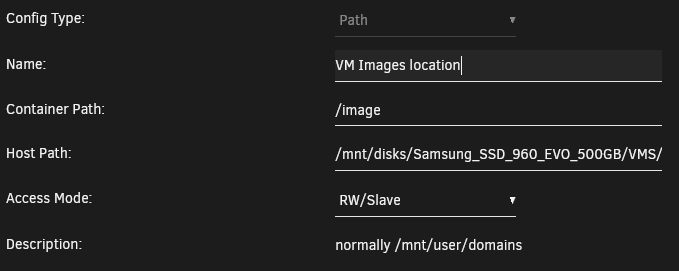
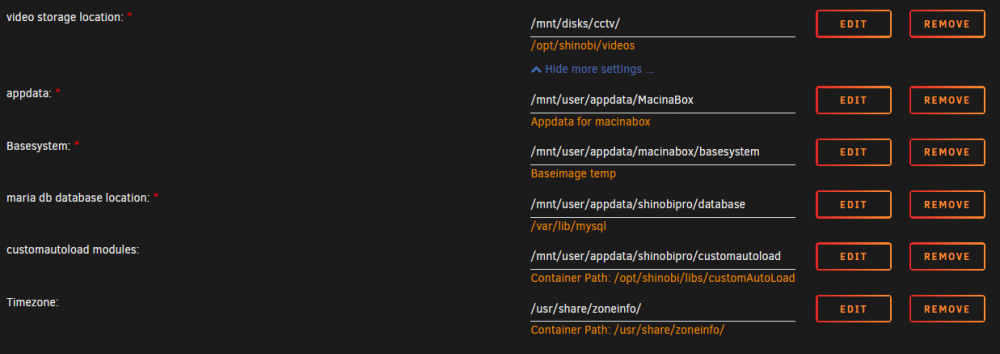
@SpaceInvaderOne After updating to the latest release, FCP gives me the following error: The path on the unassigned device where the vdisks are on is mounted as "RW-Slave" Also worth to mention, there are a couple shinobi paths in the template now which i never added myself. Also I never used shinobi before.

-
@CoZ Check your router if it blocks NAT reflection. For example on pfsense on default accessing the external WAN interface from inside your local private network will be blocked. Most routers have such an option, sometimes called differently. In your example if you try to access your DDNS domain, your router already knows the target IP of the domain, his own public interface and therefore it will be blocked. https://docs.netgate.com/pfsense/en/latest/book/nat/nat-reflection.html
-
@darkside40 I removed it earlier today after the update showed the issue with UD, 2 hours ago. I left the server running and after your post I reinstalled it and no error this time. Maybe bonienl already released a fixed version 🤨
-
I didn't noticed the error in my tests earlier today. I quickly installed the plugin again and now the UD devices are showing up again with the plugin installed. Weird. Nothing changed since my last post.
-
Updated the sleep plugin and the UD stopped showing devices @bonienl I'am currently on 6.8.3. Edit: Removing the "S3 sleep plugin" brought back all devices in UD. Edit2: I can reproduce the issue be reinstalling the plugin fresh from the community apps. UD devices will dissapear.
-
Kinda weird to routinely check your plugin page for maybe one or two updates and apply them. But than you see this First i though maybe it's a late april's fool by one of the devs, you never know 😂 After checking this forum and see the post from @bonienl I realised the update orgy is real. Thanks for the great work again.

-
@IanB Keep in mind in the past we had a lots of users having their servers accessible via the internet WITHOUT a root password. Opening some ports on the router to have access to a docker, some routing misconfiguration et voila, worst case scenario. As a programer you always have to count in a user error or a misconfiguration. A big red warning dialog everytime they use the app to access the server without a password is what I would implement. And NO checkbox "never show again" 😁
-
Better don't support them and give the user a big red warning to set a password!!!
-
There are no web drivers for 10series cards for catalina available and propably never will be. Last MacOS with support for Nvidia cards is High Sierra. 😒
-
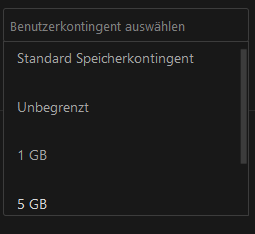
Log in as an admin account and you can set a quota for each user. (Standard, unlimited, 1GB, 5GB, etc.)
-
You're hitting the max speeds of the SSDs. If you need more than 500MB/s you need NVME drives for example on both sides or storage that is able to handle more than that.
-
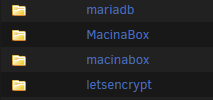
@SpaceInvaderOne First of all a big big thanks for this container and all your useful videos you made. Helped me a lot to get started with Unraid. Now to my main question. I today installed Macinabox for the first time and noticed something. There are 2 folders created in the appdata share. What's the reason for creating 2 shared folders, both empty? Is it supposed to be this way? I quickly pulled the High Sierra install files with your Docker and installed it on an UD drive. Install went fine so far. VM is up and running after adjusting all the paths in the xml.
-
Why is TRACKING enabled by default?
-
@JTok Quick question, is it possible to create encrypted compressed backups?
-
The Linuxserver NC Docker got an update sometime the last hours. I guess he isn't using your docker.
-
@Marshalleq Just an idea. Some routers have "nat reflection" dissabled if even configurable. At least Pfsense has it dissabled on default. What I mean by that? On default if you try to access a services availabe to the internet wie DNS from your local network Pfsense will block it. Maybe thats the reason why these containers aren't able to talk to each other via the domain name of the Nextcloud instance.
-
@Martintheshred This should help you.
-
Still on the 18.0.1 RC build or did you managed it on the stable build?
-
@knex666 Does it work with an own domain and nginx reverse proxy and an valide LetsEncrypt cert?
-
Not that I know of. All reports for a working OnlyOffice are with a external container on Unraid. 😑




