bastl
Members
-
Joined
-
Last visited
Everything posted by bastl
-
Yes, it's a piHole on a Pi4. I never had set that value before, only for troubleshooting today. Doesn't change anything. I changed one of the shares to IP (tried different ones) and after a reboot all shares auto mounted just fine. It's also working if I use the FQDN "DISKSTATION.MYDOMAIN.LOCAL" for the NAS Now the interesting part. I switched back to the original setting done with the gui to search for servers and shares and only use the DNS name DISKSTATION again like in my first post and after a restart it is working now?! BUT the difference between working and not working is, I had the Docker service start set to "no" during my last tests to prevent Jellyfin start scanning the media library all the time. As soon as I enable Docker and restart the server, automount stops working with DNS names. It only works with IP or with FQDN with Docker enabled!!! I checked under Unraids "Management Access" settings and my TLD is set correctly. Looks like the build in check for reachability of the remote shares in UD somehow ignores the set TLD



-
Diagnostics taken after a fresh restart, 10-15min uptime. mini-diagnostics-20230619-1923.zip
-
Same LAN only a unmanged switch between the 2 devices. 10.0.0.4 - Unraid 10.0.0.5 - NAS
-
Latest Unraid Update 6.12 broke something with UD for me. I have 3 NFS shares mounted with UD hosted by a Synology NAS which auto mounted on earlier Unraid versions without any issues. Now after a reboot the shares won't mount and the mount button is greyed out. The logs show the remote server is offline which isn't true. I checked a couple of times the NAS is online, reacts to ping and the shares are also accessible from other devices. Jun 19 15:50:41 mini unassigned.devices: Mounting Remote Share 'DISKSTATION:/volume1/UNRAID'... Jun 19 15:50:41 mini unassigned.devices: Remote Server 'DISKSTATION' is offline and share 'DISKSTATION:/volume1/UNRAID' cannot be mounted. Jun 19 15:50:41 mini unassigned.devices: Mounting Remote Share 'DISKSTATION:/volume1/music'... Jun 19 15:50:41 mini unassigned.devices: Remote Server 'DISKSTATION' is offline and share 'DISKSTATION:/volume1/music' cannot be mounted. Jun 19 15:50:41 mini unassigned.devices: Mounting Remote Share 'DISKSTATION:/volume1/video'... Jun 19 15:50:41 mini unassigned.devices: Remote Server 'DISKSTATION' is offline and share 'DISKSTATION:/volume1/video' cannot be mounted. If I wait and do nothing, nothing changes. Refreshing the main page, nothing. Reboot again, nothing. As soon as I open a web console to the Unraid server and try to ping the IP of the Synology the buttons to mount the shares become available and I can mount the shares by clicking it. Automount don't work What did I miss? Is this a known issue?

-
First of all, thanks for this container. I have a question @sdub In your second post of this thread you showed your config as an example which I used to test it on my system. I have an issue with it. As long as I keep the prefix line in the retention block retention: keep_hourly: 2 keep_daily: 7 keep_weekly: 4 keep_monthly: 12 keep_yearly: 10 prefix: 'backup-' I get the following error during sheduled backups: /mnt/borg-repository: Error running actions for repository Command 'borg prune --keep-hourly 2 --keep-daily 7 --keep-weekly 4 --keep-monthly 12 --keep-yearly 10 --glob-archives backup-* --glob-archives backup-* --list /mnt/borg-repository' returned non-zero exit status 2. Error during prune/create/check. /etc/borgmatic.d/config.yaml: An error occurred borg prune: error: argument -a/--glob-archives: There can be only one. Command 'borg prune --keep-hourly 2 --keep-daily 7 --keep-weekly 4 --keep-monthly 12 --keep-yearly 10 --glob-archives backup-* --glob-archives backup-* --list /mnt/borg-repository' returned non-zero exit status 2. The argument "--glob-archives backup-*" is added 2 times somehow. Why do you add it at the retention section in your yaml file? Is it really needed or is this line save to remove?
-
@Rockikone Kannst du mal zum Test ein paar der Dateien die du sichern möchtest in ein anderes Verzeichnis kopieren, die Berechtigungen auf 777 setzen und dann diese versuchen zu sichern?
-
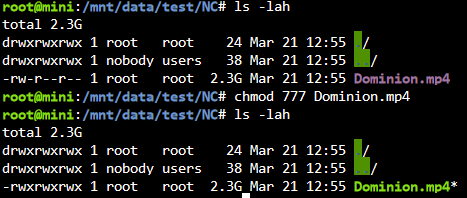
Hab jetzt mal folgendes getestet. Aus dem zu sichernden Nextcloud Ordner hab ich ne Video Datei in den test Ordner kopiert. Desweiteren werden nur ein paar Docker Config Ordner gesichert um die tests zu beschleunigen. Hab dann einige Backups nacheinander erstellt ohne was zu ändern. Wie gehabt, bis auf die Datei "virtio.iso" werden scheinbar alle Dateien erneut übertragen. Dauert auch jedesmal identisch lang. Hab nun die Berechtigungen der Videodatei auf 777 gesetzt und siehe da, Backup is ruckzuck durch und die Datei zählt bei Links hoch. Und siehe da, "du" gibt diesmal auch Werte aus, die Sinn machen. Die 1,8MB sind sicherlich die paar Appdata Files, die erneut gesichert werden. So und nune? 😂

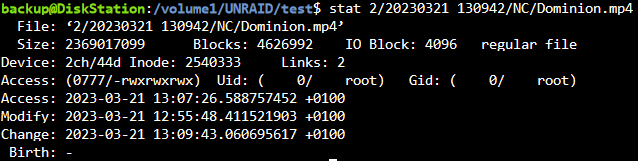
-
Ich habe das log File "/tmp/user.scripts/tmpScripts/rsyncIncrementalBackup/log.txt" mal grob nach "error", "auth", "authentication", "privilege" durchsucht. Hatte die Datei schonmal gelöscht, aktuell 72MB und fast 900k Zeilen, da wird es schwer den Überblick zu behalten. Treffer sind dann aber nur bei Dateien oder Ordner die so benannt sind. In den Zusammenfassungen nach jedem Pfad beinhalten auch keine Fehlermeldungen. Ja. Und hier nochmal zum Vergleich die Berechtigungen im eigentlichen appdata Verzeichnis, was ich als root nach "test" kopiert hatte.
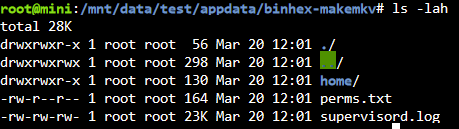

-
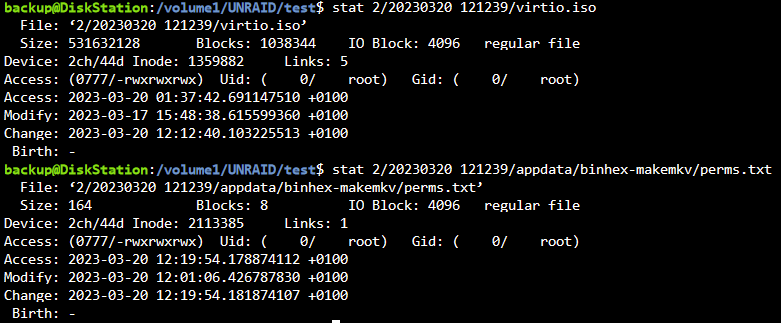
Das war doch schon der Fall, ganz zu Beginn. Alles in einen Ordner zu sichern hatte ich nur bei den letzten Tests getan, sry my bad falls das vielleicht verwirrend war, ändert aber nichts an der Sachlage. Gleiches Bild zeigt sich wie folgt: Hier jetzt nochmal verdeutlicht, was ich gerade teste. Folgende 4 Ordner sollen gesichert werden. Eindeutig 4 verschiedene Ziele. "/boot" "/mnt/remotes/DISKSTATION_UNRAID/test/1" "/mnt/data/test" "/mnt/remotes/DISKSTATION_UNRAID/test/2/" "/mnt/data/backup/ca_backup/flash" "/mnt/remotes/DISKSTATION_UNRAID/test/3/" "/mnt/data/appdata" "/mnt/remotes/DISKSTATION_UNRAID/test/4" Es existieren nun von jedem Ordner 3 Sicherungen. Es wurden keinerlei Änderungen am Script, Berechtigungen oder Pfaden vorgenommen In den ordnern 2 und 3 scheint es Hardlinks zu geben, bei 1 und 4 scheinbar nicht. Ich hab nun testweise von Hand den "/mnt/data/appdata" Ordner in den zu sichernden Ordner "/mnt/data/test" kopiert und dann 2 weitere Sicherungen von nur diesem Ordner erstellt (die anderen 3 Pfade auskommentiert im Script). Die Datei ".../2/.../virtio.iso" zählt jeweils 1 pro Sicherung hoch bei Links, die Dateien in ".../2/.../appdata/ordner/datei" eben nicht. Beide Inhalte sind zwischen den beiden Sicherungen unverändert. Sollte nicht spätestens bei der 2ten zusätzlichen Sicherung von "/mnt/data/test" wo nun zusätzlich "appdata" hineinkopiert wurde, bei erfolgreich erstellten Hardlinks der Counter hochzählen bei Dateien innerhalb des appdata Ordners? Woran kann es liegen, dass von der einen Datei ein Hardlink erstellt wird und ein paar Ebenen tiefer in der gleichen Ordnerstruktur auf einmal nicht mehr? Ich versteh die Welt nicht mehr 😑
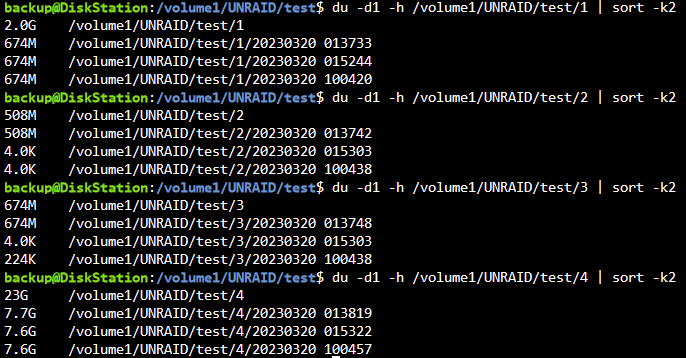
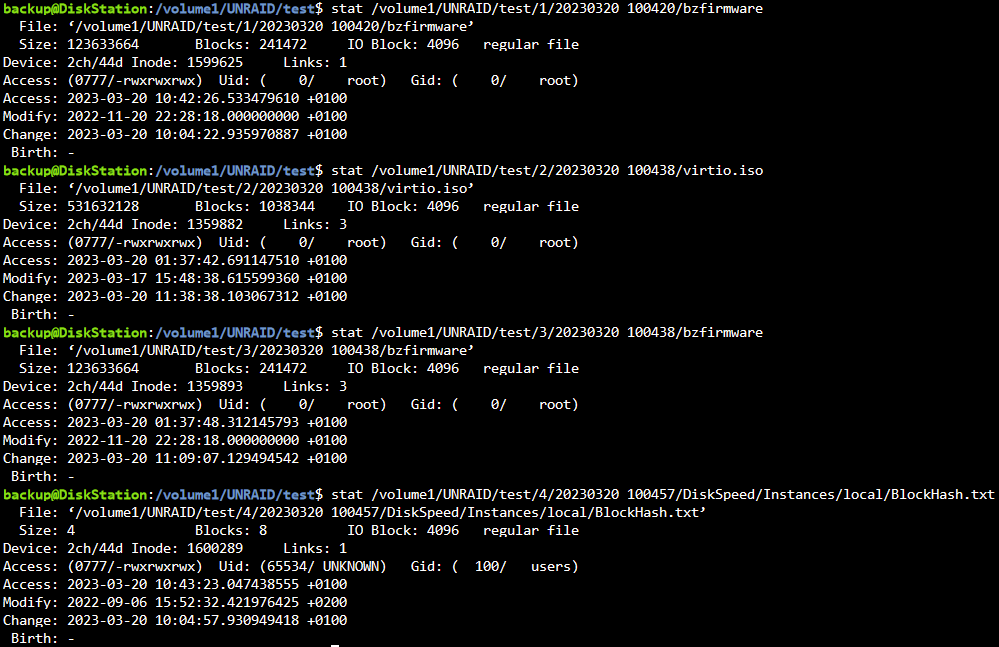

-
Hab ich getestet, leider ohne Erfolg. Ich erhalte jedesmal den Fehler Ich hab nun so einiges durchprobiert. Share auf dem NAS neu erstellt, Zeit-Synchronisation passt, neuer Benutzer, diverse Berechtigungen geprüft, selbst mit maximalen Rechten war nix zu machen. Hab nun die ssh Verbindung erstmal verworfen und nochma den Share als NFS Mount in Unraid als Ziel eingebunden und beim Testen ist mir etwas aufgefallen. Wenn ich den Unraid Share "/mnt/data/test" mit der Datei "libvirt.iso" auf das NFS mount sichere scheint es nun zu funktionieren. Bei 3 Sicherungen gibt mir stats "Links: 3" aus. Mache ich das gleiche mit "/boot" als Source um den USB Stick zu sichern, bin ich wieder bei meinem ursprünglichem Problem, dass jede Sicherung scheinbar vollständig Platz belegt und "Links: 1" angezeigt wird. Gleiches habe ich noch mit einem weiteren Unraid Share getestet, der von dem Docker TDARR benutzt wird, da funktioniert es wieder nicht. Die ersten 3 Sicherungen sind der "test" ordner, die letzten Beiden "/boot" $ du -d1 -h /volume1/UNRAID/test/ 508M /volume1/UNRAID/test/20230319_230436 4.0K /volume1/UNRAID/test/20230319_230453 4.0K /volume1/UNRAID/test/20230319_230550 674M /volume1/UNRAID/test/20230319_231939 674M /volume1/UNRAID/test/20230319_232048 1.9G /volume1/UNRAID/test/ virtio.iso $ stat /volume1/UNRAID/test/20230319_230550/virtio.iso File: ‘/volume1/UNRAID/test/20230319_230550/virtio.iso’ Size: 531632128 Blocks: 1038344 IO Block: 4096 regular file Device: 2ch/44d Inode: 1060159 Links: 3 Access: (0777/-rwxrwxrwx) Uid: ( 0/ root) Gid: ( 0/ root) Access: 2023-03-19 23:04:36.775398397 +0100 Modify: 2023-03-17 15:48:38.615599360 +0100 Change: 2023-03-19 23:05:50.403330135 +0100 Birth: - make_bootable.bat $ stat /volume1/UNRAID/test/20230319_232048/make_bootable.bat File: ‘/volume1/UNRAID/test/20230319_232048/make_bootable.bat’ Size: 1760 Blocks: 8 IO Block: 4096 regular file Device: 2ch/44d Inode: 1060690 Links: 1 Access: (0777/-rwxrwxrwx) Uid: ( 0/ root) Gid: ( 0/ root) Access: 2023-03-19 23:20:55.507531684 +0100 Modify: 2022-11-20 22:27:34.000000000 +0100 Change: 2023-03-19 23:20:55.546531654 +0100 Birth: - Ich bin so langsam fertig mit mein Nerven. Halben Sonntag verdöddelt mit dem Kram. Irgendwie blick ich nicht dahinter woran es liegt. 😒

-
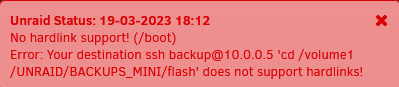
@mgutt Hab jetzt zum Test folgendes als Zielpfade hinterlegt: "/boot" "ssh [email protected] 'cd /volume1/UNRAID/BACKUPS_MINI/flash'" und bekomme beim ausführen des Scripts folgende Meldung: rsync: [Receiver] mkdir "/usr/local/emhttp/ssh [email protected] 'cd /volume1/UNRAID/BACKUPS_MINI/flash'/link_dest" failed: No such file or directory (2) rsync error: error in file IO (code 11) at main.c(789) [Receiver=3.2.7] --link-dest arg does not exist: /usr/local/emhttp/ssh [email protected] 'cd /volume1/UNRAID/BACKUPS_MINI/flash'/hard_link/ssh [email protected] 'cd /volume1/UNRAID/BACKUPS_MINI/flash'/link_dest removed '/tmp/_tmp_user.scripts_tmpScripts_rsyncIncrementalBackup_script/empty.file' rsync: [Receiver] change_dir#3 "/usr/local/emhttp/ssh [email protected] 'cd /volume1/UNRAID/BACKUPS_MINI" failed: No such file or directory (2) rsync error: errors selecting input/output files, dirs (code 3) at main.c(827) [Receiver=3.2.7] Error: Your destination ssh [email protected] 'cd /volume1/UNRAID/BACKUPS_MINI/flash' does not support hardlinks! Script Finished Mar 19, 2023 18:04.54 Full logs for this script are available at /tmp/user.scripts/tmpScripts/rsyncIncrementalBackup/log.txt "does not support hardlinks!" wundert mich ein wenig. Das NAS ist mit BTRFS formatiert.
-
@mgutt Gerade noch mal Schreibrechte kontrolliert. Über nen Unraid Terminal komme ich wie folgt passwortlos auf den Server. IP im Script hinterlegt war nicht die Lösung ssh -p 5022 [email protected] Dateien im Zielverzeichnis kann ich problemlos erstellen und löschen. Auch nochmal geprüft, Pfad passt. /volume1/UNRAID/BACKUPS_MINI/flash/ 4 Dateien extra erstellt unter "/boot" was gesichert werden soll. Half leider auch nicht. Ich verzweifel so langsam. Is bestimmt wieder nur irgend ne Kleinigkeit. Ist der Syntax im Zielpfad wie im Post davor zu sehen evtl. falsch? Normal die Pfadangabe hinter "user@server:/Pfad" bringt auch nen Fehler vom Terminal aus. Muß man da nicht extra nen "cd /Pfad" anhängen um im richtigen Ordner zu landen? Wird das von dem Script automatisch erledigt?
-
Pfadziel: "ssh backup@NAS:/volume1/UNRAID/BACKUPS_MINI/flash" mit folgendem custom ssh Befehl: alias ssh='ssh -p 5022' schmeißt er folgenden Fehler: Auszug aus log.txt Error: ()! Script Finished Mar 19, 2023 17:07.10 Full logs for this script are available at /tmp/user.scripts/tmpScripts/rsyncIncrementalBackup/log.txt Danke schonmal für die Hilfe

-
Vom Terminal aus mit custom Port klappt die passwortlose Anmeldung. Wie geb ich denn den Port in dem Script mit? folgendes funktioniert leider nicht "/boot" "ssh -p 5022 backup@NAS:/volume1/UNRAID/BACKUPS_MINI/flash"
-
@mgutt Aktuell sehen die Einträge für die Pfade wie folgt aus im Script: backup_jobs=( # source # destination "/mnt/data/appdata" "/mnt/remotes/DISKSTATION_UNRAID/BACKUPS_MINI/appdata" "/mnt/data/nextcloud" "/mnt/remotes/DISKSTATION_UNRAID/BACKUPS_MINI/nextcloud" "/boot" "/mnt/remotes/DISKSTATION_UNRAID/BACKUPS_MINI/flash" ) Kann ich den Zielpfad auch wie folgt irgendwie erstellen, direkt über ssh gehen und wie geb ich dann die Zugangsdaten und den non-default Port mit? # source # destination "/boot" "ssh backup@nas:/volume1/UNRAID/BACKUPS_MINI/flash"
-
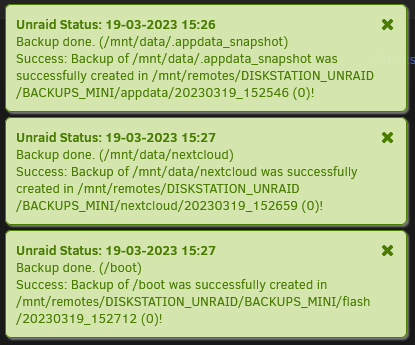
Hab nun 4 Sicherungen auf dem NAS. Ich habe jetzt mal anhand der "Nextcloud_Manual.pdf", die sich nicht geändert haben sollte, in einem User Daten Ordner liegend, wie gewünscht geprüft. Unabhängig welches Sicherungsverzeichnis ich wähle, unter Links steht immer eine 1. Wenn es ein Hardlink sein sollte, wenn ich das richtig verstehe, sollte da eigentlich eine 4 stehen, oder? Ich hab es auch noch mit der Datei "make_bootable.bat" vom gesicherten USB Stick getestet. Gleiches Ergebnis. stat "/volume1/UNRAID/BACKUPS_MINI/nextcloud/20230319_140249/data/Bastl/files/Nextcloud Manual.pdf" File: ‘/volume1/UNRAID/BACKUPS_MINI/nextcloud/20230319_140249/data/Bastl/files/Nextcloud Manual.pdf’ Size: 12765379 Blocks: 24936 IO Block: 4096 regular file Device: 2ch/44d Inode: 1020153 Links: 1 Access: (0777/-rwxrwxrwx) Uid: ( 33/ UNKNOWN) Gid: ( 33/ UNKNOWN) Access: 2023-03-19 14:02:53.095240488 +0100 Modify: 2022-06-24 20:22:53.785054785 +0200 Change: 2023-03-19 14:02:53.459239951 +0100 Birth: - du -d1 -h /volume1/UNRAID/BACKUPS_MINI/nextcloud/ | sort -k2 393G /volume1/UNRAID/BACKUPS_MINI/nextcloud/ 99G /volume1/UNRAID/BACKUPS_MINI/nextcloud/20230317_191825 99G /volume1/UNRAID/BACKUPS_MINI/nextcloud/20230318_121818 99G /volume1/UNRAID/BACKUPS_MINI/nextcloud/20230319_011145 99G /volume1/UNRAID/BACKUPS_MINI/nextcloud/20230319_140249 Bei einem dry-run läuft übrigens die Sicherung mit allen 3 zu sichernden Ordnern in knapp 3min durch. Start 15:25
-
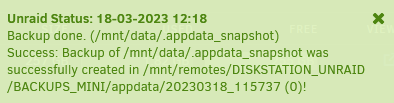
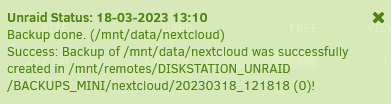
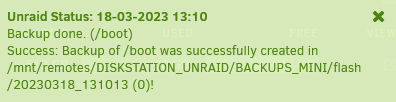
Hallo zusammen. Danke erstmal an @mgutt für das super Script! Ich bin darüber gestolpert, als ich auf der Suche nach einer einfachen Möglichkeit war meine Nextcloud Daten von Unraid auf ne Synology im gleichen Netzwerk zu sichern. Gesagt, getan. Script in User Scripts hinterlegt, auf dem NAS nen Share erstellt, als NFS Share mit UD gemounted, Pfade im Script angepasst und Feuer frei. Wie zu erwarten bei 106GB (knapp 106000 Dateien) hat die erste Sicherung gut über ne Stunde gedauert bis sie durch war. Seitdem hat sich an den Daten auch nicht großartig was geändert. Gesichert wird appdata, der Nextcloud Userdaten Ordner und der Unraid USB Stick. Als ich eben aus Interesse die 2te Sicherung angestoßen hab, hat diese ebenfalls ziemlich genauso lang gedauert wie die initiale Sicherung, knapp über ne Stunde. Sicherung wurde etwa 12Uhr gestartet und war 13:10Uhr fertig. Was mich ein wenig verwundert hat. Hab dann auf dem NAS nach der Größe der Sicherungen geschaut und diese wurde mir dann ziemlich genau doppelt so groß angezeigt, wie die erste Sicherung allein. Ist das normal bei Hardlinks? Eigentlich nein, oder versteh ich da was falsch? Hab ich etwas übersehen? Bin gerade ein wenig ratlos. Am Script selber hab ich nichts weiter verändert, als die Pfade zu hinterlegen, Rest ist default. Falls mich jemand in die richtige Richtung schubsen könnte, woran es liegt, wäre ich sehr dankbar. MfG





-
Hi guys, almost 2 weeks now with 6.11.5 and I got a couple of freezes/crashes of one of my servers. I skipped the first couple 6.11.xx releases and directly upgraded from 6.10.3 to 6.11.5. So far so good. After 2-3 days I found my main server unaccessible in the morning. Main VM with GPU passthrough, idle over night, didn't show any output in the morning and webui also wasn't reachable at this point. SSH access also not possible. Force restart the server and everything worked as usual for another couple days until it crashed again. No access. I than started to log the syslog to my other server and let it run. Now 5 days later I found my main VM again not accessible. The webui was reachable, almost half of the isolated cores from the VM maxed to 100% Restarting the VM didn't work and I had to force shutdown it. Starting it up again brought the following error: Looks like the GPU wasn't reset correctly and I had to restart the whole server again. Navigation in the webui also seemed a bit slow and unreliable. I didn't pulled the diagnostics at this point. Looks like something crashed yesterday evening. Syslog showed the following: Dec 8 19:15:36 UNRAID emhttpd: spinning down /dev/sdd Dec 8 19:15:36 UNRAID emhttpd: spinning down /dev/sdf Dec 8 19:15:36 UNRAID emhttpd: spinning down /dev/sdc Dec 8 19:27:12 UNRAID emhttpd: spinning down /dev/sdb Dec 8 19:37:11 UNRAID emhttpd: read SMART /dev/sdb Dec 8 19:52:51 UNRAID kernel: kernel tried to execute NX-protected page - exploit attempt? (uid: 0) Dec 8 19:52:51 UNRAID kernel: BUG: unable to handle page fault for address: ffff8885fb440000 Dec 8 19:52:51 UNRAID kernel: #PF: supervisor instruction fetch in kernel mode Dec 8 19:52:51 UNRAID kernel: #PF: error_code(0x0011) - permissions violation Dec 8 19:52:51 UNRAID kernel: PGD 2a01067 P4D 2a01067 PUD 63c04a063 PMD 80000005fb4001e3 Dec 8 19:52:51 UNRAID kernel: Oops: 0011 [#1] PREEMPT SMP NOPTI Dec 8 19:52:51 UNRAID kernel: CPU: 17 PID: 60526 Comm: CPU 10/KVM Not tainted 5.19.17-Unraid #2 Dec 8 19:52:51 UNRAID kernel: Hardware name: Gigabyte Technology Co., Ltd. TRX40 AORUS XTREME/TRX40 AORUS XTREME, BIOS F4d 03/05/2020 Dec 8 19:52:51 UNRAID kernel: RIP: 0010:0xffff8885fb440000 Dec 8 19:52:51 UNRAID kernel: Code: 00 00 00 00 00 00 00 00 00 00 00 00 00 00 00 00 00 00 00 00 00 00 00 00 00 00 00 00 00 00 00 00 00 00 00 00 00 00 00 00 00 00 <00> 10 31 04 00 c9 ff ff 00 00 00 00 00 00 00 00 c0 02 a8 07 81 88 Dec 8 19:52:51 UNRAID kernel: RSP: 0018:ffffc90004397d20 EFLAGS: 00010246 Dec 8 19:52:51 UNRAID kernel: RAX: 0000000000000000 RBX: ffff8885fb440000 RCX: 0000000000000001 Dec 8 19:52:51 UNRAID kernel: RDX: 0000000000000800 RSI: 0000000000000000 RDI: ffff8888e940a300 Dec 8 19:52:51 UNRAID kernel: RBP: ffff888107a80000 R08: ffff88817aa16488 R09: 0000000000000000 Dec 8 19:52:51 UNRAID kernel: R10: 0000000000000000 R11: 0000000000000000 R12: 0000000000000001 Dec 8 19:52:51 UNRAID kernel: R13: ffff8885fb440070 R14: 00017bcf3ea92684 R15: 0000000000000000 Dec 8 19:52:51 UNRAID kernel: FS: 0000148f763ff6c0(0000) GS:ffff88902d440000(0000) knlGS:0000000000000000 Dec 8 19:52:51 UNRAID kernel: CS: 0010 DS: 0000 ES: 0000 CR0: 0000000080050033 Dec 8 19:52:51 UNRAID kernel: CR2: ffff8885fb440000 CR3: 0000000967ea0000 CR4: 0000000000350ee0 Dec 8 19:52:51 UNRAID kernel: Call Trace: Dec 8 19:52:51 UNRAID kernel: <TASK> Dec 8 19:52:51 UNRAID kernel: ? kvm_arch_vcpu_runnable+0xce/0x149 [kvm] Dec 8 19:52:51 UNRAID kernel: ? kvm_vcpu_check_block+0x26/0x8b [kvm] Dec 8 19:52:51 UNRAID kernel: ? kvm_vcpu_block+0x72/0xcb [kvm] Dec 8 19:52:51 UNRAID kernel: ? kvm_vcpu_halt+0x95/0x23d [kvm] Dec 8 19:52:51 UNRAID kernel: ? kvm_arch_vcpu_ioctl_run+0x12f3/0x1506 [kvm] Dec 8 19:52:51 UNRAID kernel: ? pollwake+0x61/0x7f Dec 8 19:52:51 UNRAID kernel: ? wake_up_q+0x44/0x44 Dec 8 19:52:51 UNRAID kernel: ? __wake_up_common+0xae/0x11c Dec 8 19:52:51 UNRAID kernel: ? kvm_vcpu_ioctl+0x192/0x5a4 [kvm] Dec 8 19:52:51 UNRAID kernel: ? wake_up_q+0x44/0x44 Dec 8 19:52:51 UNRAID kernel: ? __seccomp_filter+0x89/0x313 Dec 8 19:52:51 UNRAID kernel: ? vfs_ioctl+0x1e/0x2f Dec 8 19:52:51 UNRAID kernel: ? __do_sys_ioctl+0x52/0x78 Dec 8 19:52:51 UNRAID kernel: ? do_syscall_64+0x6b/0x81 Dec 8 19:52:51 UNRAID kernel: ? entry_SYSCALL_64_after_hwframe+0x63/0xcd Dec 8 19:52:51 UNRAID kernel: </TASK> Dec 8 19:52:51 UNRAID kernel: Modules linked in: nfsv3 nfs cmac cifs asn1_decoder cifs_arc4 cifs_md4 dns_resolver dm_mod dax xt_CHECKSUM ip6t_REJECT nf_reject_ipv6 ipt_REJECT nf_reject_ipv4 ip6table_mangle ip6table_nat iptable_mangle vhost_net tun vhost vhost_iotlb tap veth xt_nat xt_tcpudp xt_conntrack xt_MASQUERADE nf_conntrack_netlink nfnetlink xfrm_user xt_addrtype iptable_nat nf_nat nf_conntrack nf_defrag_ipv6 nf_defrag_ipv4 br_netfilter xfs nfsd auth_rpcgss oid_registry lockd grace sunrpc md_mod it87 hwmon_vid ip6table_filter ip6_tables iptable_filter ip_tables x_tables bridge stp llc ixgbe xfrm_algo mdio btusb btrtl btbcm gigabyte_wmi wmi_bmof mxm_wmi btintel bluetooth edac_mce_amd edac_core kvm_amd kvm crct10dif_pclmul crc32_pclmul crc32c_intel ghash_clmulni_intel aesni_intel crypto_simd cryptd rapl ecdh_generic ecc corsair_psu ahci libahci ccp nvme i2c_piix4 input_leds led_class nvme_core joydev i2c_core k10temp thermal wmi button acpi_cpufreq unix [last unloaded: xfrm_algo] Dec 8 19:52:51 UNRAID kernel: CR2: ffff8885fb440000 Dec 8 19:52:51 UNRAID kernel: ---[ end trace 0000000000000000 ]--- Dec 8 19:52:51 UNRAID kernel: RIP: 0010:0xffff8885fb440000 Dec 8 19:52:51 UNRAID kernel: Code: 00 00 00 00 00 00 00 00 00 00 00 00 00 00 00 00 00 00 00 00 00 00 00 00 00 00 00 00 00 00 00 00 00 00 00 00 00 00 00 00 00 00 <00> 10 31 04 00 c9 ff ff 00 00 00 00 00 00 00 00 c0 02 a8 07 81 88 Dec 8 19:52:51 UNRAID kernel: RSP: 0018:ffffc90004397d20 EFLAGS: 00010246 Dec 8 19:52:51 UNRAID kernel: RAX: 0000000000000000 RBX: ffff8885fb440000 RCX: 0000000000000001 Dec 8 19:52:51 UNRAID kernel: RDX: 0000000000000800 RSI: 0000000000000000 RDI: ffff8888e940a300 Dec 8 19:52:51 UNRAID kernel: RBP: ffff888107a80000 R08: ffff88817aa16488 R09: 0000000000000000 Dec 8 19:52:51 UNRAID kernel: R10: 0000000000000000 R11: 0000000000000000 R12: 0000000000000001 Dec 8 19:52:51 UNRAID kernel: R13: ffff8885fb440070 R14: 00017bcf3ea92684 R15: 0000000000000000 Dec 8 19:52:51 UNRAID kernel: FS: 0000148f763ff6c0(0000) GS:ffff88902d440000(0000) knlGS:0000000000000000 Dec 8 19:52:51 UNRAID kernel: CS: 0010 DS: 0000 ES: 0000 CR0: 0000000080050033 Dec 8 19:52:51 UNRAID kernel: CR2: ffff8885fb440000 CR3: 0000000967ea0000 CR4: 0000000000350ee0 Dec 8 20:07:12 UNRAID emhttpd: spinning down /dev/sdb Dec 9 01:40:11 UNRAID crond[2357]: exit status 1 from user root /usr/local/sbin/mover &> /dev/null Dec 9 02:40:22 UNRAID emhttpd: read SMART /dev/sdd Dec 9 02:40:22 UNRAID emhttpd: read SMART /dev/sdf Dec 9 02:40:22 UNRAID emhttpd: read SMART /dev/sdc Again, server restart, VM started fine and now for the first time server crashed while using the VM, only serching the web for this issue. During earlier crashes I wasn't using the VM. And again no access at all. This time syslog showed the following: Dec 9 11:05:57 UNRAID emhttpd: spinning down /dev/sde Dec 9 11:07:08 UNRAID emhttpd: spinning down /dev/nvme0n1 Dec 9 11:07:08 UNRAID emhttpd: sdspin /dev/nvme0n1 down: 25 Dec 9 11:09:11 UNRAID emhttpd: spinning down /dev/sdb Dec 9 11:10:50 UNRAID webGUI: Successful login user root from 10.0.0.7 Dec 9 11:11:43 UNRAID emhttpd: read SMART /dev/sdb Dec 9 11:17:52 UNRAID kernel: general protection fault, probably for non-canonical address 0x65894c085589e79d: 0000 [#1] PREEMPT SMP NOPTI Dec 9 11:17:52 UNRAID kernel: CPU: 42 PID: 32551 Comm: CPU 13/KVM Not tainted 5.19.17-Unraid #2 Dec 9 11:17:52 UNRAID kernel: Hardware name: Gigabyte Technology Co., Ltd. TRX40 AORUS XTREME/TRX40 AORUS XTREME, BIOS F4d 03/05/2020 Dec 9 11:17:52 UNRAID kernel: RIP: 0010:se_update_runnable+0xc/0x1b Dec 9 11:17:52 UNRAID kernel: Code: 14 fd e0 6a 16 82 8b 04 02 e9 95 80 b6 00 66 90 31 c0 e9 8c 80 b6 00 b0 01 e9 85 80 b6 00 48 8b 87 80 00 00 00 48 85 c0 74 0a <8b> 40 14 48 89 87 88 00 00 00 e9 6a 80 b6 00 48 63 ff 48 c7 c0 00 Dec 9 11:17:52 UNRAID kernel: RSP: 0018:ffffc900014efc58 EFLAGS: 00010002 Dec 9 11:17:52 UNRAID kernel: RAX: 65894c085589e789 RBX: ffff8881ac251c00 RCX: 00000000000000a1 Dec 9 11:17:52 UNRAID kernel: RDX: 0000000000000000 RSI: 000000000000000c RDI: ffffffff8109fc2b Dec 9 11:17:52 UNRAID kernel: RBP: ffffffff8109fc2b R08: ffff88810ab53f80 R09: 0000000000000095 Dec 9 11:17:52 UNRAID kernel: R10: 0000000000000000 R11: 0000000000000000 R12: ffff88810ab53f00 Dec 9 11:17:52 UNRAID kernel: R13: 0000000000000009 R14: 0000000000000009 R15: 0000000000000001 Dec 9 11:17:52 UNRAID kernel: FS: 00001543ecdff6c0(0000) GS:ffff88902da80000(0000) knlGS:0000000000000000 Dec 9 11:17:52 UNRAID kernel: CS: 0010 DS: 0000 ES: 0000 CR0: 0000000080050033 Dec 9 11:17:52 UNRAID kernel: CR2: 00000253018bf000 CR3: 00000001ade8a000 CR4: 0000000000350ee0 Dec 9 11:17:52 UNRAID kernel: Call Trace: Dec 9 11:17:52 UNRAID kernel: <TASK> Dec 9 11:17:52 UNRAID kernel: dequeue_entity+0x35/0x215 Dec 9 11:17:52 UNRAID kernel: dequeue_task_fair+0x91/0x282 Dec 9 11:17:52 UNRAID kernel: __schedule+0x15a/0x5f6 Dec 9 11:17:52 UNRAID kernel: ? kvm_apic_has_interrupt+0x37/0x7a [kvm] Dec 9 11:17:52 UNRAID kernel: schedule+0x8e/0xc3 Dec 9 11:17:52 UNRAID kernel: kvm_vcpu_block+0x7b/0xcb [kvm] Dec 9 11:17:52 UNRAID kernel: kvm_vcpu_halt+0x95/0x23d [kvm] Dec 9 11:17:52 UNRAID kernel: kvm_arch_vcpu_ioctl_run+0x12f3/0x1506 [kvm] Dec 9 11:17:52 UNRAID kernel: ? pollwake+0x61/0x7f Dec 9 11:17:52 UNRAID kernel: ? wake_up_q+0x44/0x44 Dec 9 11:17:52 UNRAID kernel: ? __wake_up_common+0xae/0x11c Dec 9 11:17:52 UNRAID kernel: kvm_vcpu_ioctl+0x192/0x5a4 [kvm] Dec 9 11:17:52 UNRAID kernel: ? wake_up_q+0x44/0x44 Dec 9 11:17:52 UNRAID kernel: ? __seccomp_filter+0x89/0x313 Dec 9 11:17:52 UNRAID kernel: vfs_ioctl+0x1e/0x2f Dec 9 11:17:52 UNRAID kernel: __do_sys_ioctl+0x52/0x78 Dec 9 11:17:52 UNRAID kernel: do_syscall_64+0x6b/0x81 Dec 9 11:17:52 UNRAID kernel: entry_SYSCALL_64_after_hwframe+0x63/0xcd Dec 9 11:17:52 UNRAID kernel: RIP: 0033:0x1547f9ed8d38 Dec 9 11:17:52 UNRAID kernel: Code: 00 00 48 8d 44 24 08 48 89 54 24 e0 48 89 44 24 c0 48 8d 44 24 d0 48 89 44 24 c8 b8 10 00 00 00 c7 44 24 b8 10 00 00 00 0f 05 <89> c2 3d 00 f0 ff ff 77 07 89 d0 c3 0f 1f 40 00 48 8b 15 91 d0 0d Dec 9 11:17:52 UNRAID kernel: RSP: 002b:00001543ecdfdc48 EFLAGS: 00000246 ORIG_RAX: 0000000000000010 Dec 9 11:17:52 UNRAID kernel: RAX: ffffffffffffffda RBX: 000000000000ae80 RCX: 00001547f9ed8d38 Dec 9 11:17:52 UNRAID kernel: RDX: 0000000000000000 RSI: 000000000000ae80 RDI: 0000000000000029 Dec 9 11:17:52 UNRAID kernel: RBP: 00001543f7a29f00 R08: 000055faab99b9a0 R09: 0000000000000000 Dec 9 11:17:52 UNRAID kernel: R10: 00007ffdf47e9080 R11: 0000000000000246 R12: 0000000000000000 Dec 9 11:17:52 UNRAID kernel: R13: 0000000000000000 R14: 0000000000000000 R15: 0000000000000000 Dec 9 11:17:52 UNRAID kernel: </TASK> Dec 9 11:17:52 UNRAID kernel: Modules linked in: dm_mod dax nfsv3 nfs ip6t_REJECT nf_reject_ipv6 xt_CHECKSUM ipt_REJECT nf_reject_ipv4 ip6table_mangle ip6table_nat xt_nat xt_tcpudp iptable_mangle vhost_net tun vhost vhost_iotlb tap veth xt_conntrack xt_MASQUERADE nf_conntrack_netlink nfnetlink xfrm_user xt_addrtype iptable_nat nf_nat nf_conntrack nf_defrag_ipv6 nf_defrag_ipv4 br_netfilter xfs nfsd auth_rpcgss oid_registry lockd grace sunrpc md_mod it87 hwmon_vid ip6table_filter ip6_tables iptable_filter ip_tables x_tables bridge stp llc ixgbe xfrm_algo mdio btusb btrtl btbcm btintel gigabyte_wmi wmi_bmof mxm_wmi bluetooth edac_mce_amd edac_core kvm_amd kvm crct10dif_pclmul crc32_pclmul crc32c_intel ghash_clmulni_intel aesni_intel crypto_simd cryptd rapl ecdh_generic ecc corsair_psu ahci libahci ccp nvme i2c_piix4 input_leds led_class joydev nvme_core i2c_core k10temp thermal wmi button acpi_cpufreq unix [last unloaded: xfrm_algo] Dec 9 11:17:52 UNRAID kernel: ---[ end trace 0000000000000000 ]--- Dec 9 11:17:52 UNRAID kernel: RIP: 0010:se_update_runnable+0xc/0x1b Dec 9 11:17:52 UNRAID kernel: Code: 14 fd e0 6a 16 82 8b 04 02 e9 95 80 b6 00 66 90 31 c0 e9 8c 80 b6 00 b0 01 e9 85 80 b6 00 48 8b 87 80 00 00 00 48 85 c0 74 0a <8b> 40 14 48 89 87 88 00 00 00 e9 6a 80 b6 00 48 63 ff 48 c7 c0 00 Dec 9 11:17:52 UNRAID kernel: RSP: 0018:ffffc900014efc58 EFLAGS: 00010002 Dec 9 11:17:52 UNRAID kernel: RAX: 65894c085589e789 RBX: ffff8881ac251c00 RCX: 00000000000000a1 Dec 9 11:17:52 UNRAID kernel: RDX: 0000000000000000 RSI: 000000000000000c RDI: ffffffff8109fc2b Dec 9 11:17:52 UNRAID kernel: RBP: ffffffff8109fc2b R08: ffff88810ab53f80 R09: 0000000000000095 Dec 9 11:17:52 UNRAID kernel: R10: 0000000000000000 R11: 0000000000000000 R12: ffff88810ab53f00 Dec 9 11:17:52 UNRAID kernel: R13: 0000000000000009 R14: 0000000000000009 R15: 0000000000000001 Dec 9 11:17:52 UNRAID kernel: FS: 00001543ecdff6c0(0000) GS:ffff88902da80000(0000) knlGS:0000000000000000 Dec 9 11:17:52 UNRAID kernel: CS: 0010 DS: 0000 ES: 0000 CR0: 0000000080050033 Dec 9 11:17:52 UNRAID kernel: CR2: 00000253018bf000 CR3: 00000001ade8a000 CR4: 0000000000350ee0 Dec 9 11:17:52 UNRAID kernel: note: CPU 13/KVM[32551] exited with preempt_count 2 Dec 9 11:18:26 UNRAID webGUI: Successful login user root from 10.0.10.107 Dec 9 11:23:58 UNRAID unassigned.devices: Successfully mounted 'sde1' on '/mnt/disks/VMs_backup_hdd'. Dec 9 11:23:58 UNRAID rsyslogd: action 'action-2-builtin:omfwd' resumed (module 'builtin:omfwd') [v8.2102.0 try https://www.rsyslog.com/e/2359 ] Dec 9 11:23:58 UNRAID unassigned.devices: Adding SMB share 'VMs_backup_hdd'. Dec 9 11:23:58 UNRAID webGUI: Successful login user root from 10.0.10.107 Dec 9 11:23:59 UNRAID emhttpd: /usr/local/emhttp/plugins/user.scripts/backgroundScript.sh "/tmp/user.scripts/tmpScripts/icon sync/script" >/dev/null 2>&1/usr/local/emhttp/plugins/user.scripts/backgroundScript.sh "/tmp/user.scripts/tmpScripts/ping Diskstation on boot/script" >/dev/null 2>&1 Dec 9 11:23:59 UNRAID emhttpd: Starting services... Dec 9 11:23:59 UNRAID emhttpd: shcmd (50): /etc/rc.d/rc.samba restart Dec 9 11:23:59 UNRAID wsdd2[8800]: 'Terminated' signal received. Dec 9 11:23:59 UNRAID wsdd2[8800]: terminating. Dec 9 11:24:01 UNRAID root: Starting Samba: /usr/sbin/smbd -D Dec 9 11:24:01 UNRAID root: /usr/sbin/nmbd -D Dec 9 11:24:01 UNRAID root: /usr/sbin/wsdd2 -d I found a couple reports from users using some torrent dockers with some similar freezes which I can kinda exclude. The only dockers I run on startup are duplicati and binhex-urbackup which basically do nothing when the server crashes. Scheduled backup jobs don't overlap with the server crashing. At least not with the last 2 crashes today. Such crashes and freezes never happened before to the server. Nothing changed software or hardware wise. It all started with the upgrade from 6.10.3 to 6.11.5. Maybe someone can have a look into the syslog and the diagnostics and can point me in the right direction to fix this. Thanks unraid-diagnostics-20221209-1252.zip
-
How to update the "Collabora Online - Built-In CODE Server"? Currently as Nextcloud admin it shows an update to version 22.5.301 is available. Updating other apps no problem, but trying to update the Collabora app I'am ending up stuck in maintenance mode. I've waited half an hour but it won't recover. Forcing "maintenance:mode --off" doesn't help. Nextclouds UI won't be accessible. Restarting the docker won't helpe neither. Fortunately I had a working backup. any ideas?
-
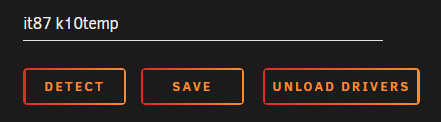
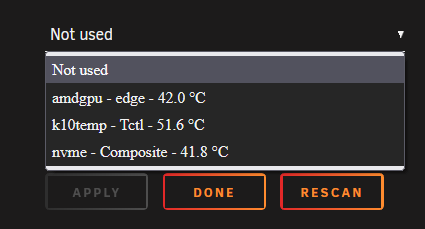
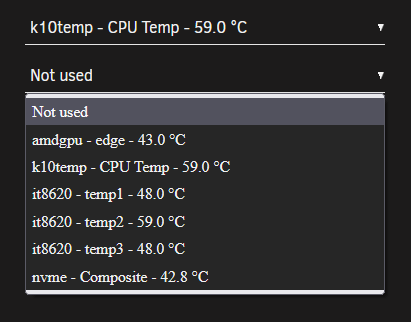
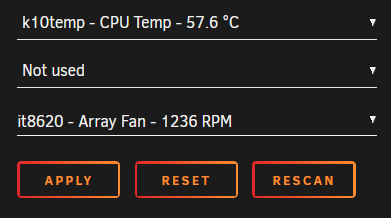
First of all big thanks @bonienl for all your usefull plugins and the great work for the cummunity!!! 🥰 As usual on a new Unraid box, the "dynamix system temp" plugin is a must have. I installed it, went to the settings page, pressed Detect and nothing happened. Same after a reboot. No drivers have been detected or loaded. After searching around and a little help from @ich777 I found a solution and thought I post a small How2 in case someone else finds this useful. for reference my initial post: My new system is a MinisForum HM90 mini PC. Specs: Ryzen 9 4900H (Renoir Zen 2) with Radeon RX Vega 8 Graphics 2x 16GB Kingston 3200 DDR4 Kingston 512GB NVME (cache for VMs) 2x Samsung 870 1TB SSD (data-pool for system, appdata and files) random flash stick as dummy array disk Unraid 6.10.3 installed plugins: Dynamix System Temperature GPU statistics Nerd Tools Radeon Top Nuvoton NCT6687 Driver Unassigned Devices and all sorts of other useful stuff + a couple dockers (Nextcloud, Jellyfin ...) sensors gave me the following output: root@mini:~# sensors amdgpu-pci-0600 Adapter: PCI adapter vddgfx: 1.32 V vddnb: 874.00 mV edge: +44.0°C slowPPT: 4.00 mW k10temp-pci-00c3 Adapter: PCI adapter Tctl: +60.2°C nvme-pci-0100 Adapter: PCI adapter Composite: +43.9°C (low = -0.1°C, high = +84.8°C) (crit = +94.8°C) running "sensors-detect" showed: root@mini:~# sensors-detect # sensors-detect version 3.6.0 # System: BESSTAR TECH LIMITED HM90 [Default string] # Kernel: 5.15.46-Unraid x86_64 # Processor: AMD Ryzen 9 4900H with Radeon Graphics (23/96/1) This program will help you determine which kernel modules you need to load to use lm_sensors most effectively. It is generally safe and recommended to accept the default answers to all questions, unless you know what you're doing. Some south bridges, CPUs or memory controllers contain embedded sensors. Do you want to scan for them? This is totally safe. (YES/no): YES Silicon Integrated Systems SIS5595... No VIA VT82C686 Integrated Sensors... No VIA VT8231 Integrated Sensors... No AMD K8 thermal sensors... No AMD Family 10h thermal sensors... No AMD Family 11h thermal sensors... No AMD Family 12h and 14h thermal sensors... No AMD Family 15h thermal sensors... No AMD Family 16h thermal sensors... No AMD Family 17h thermal sensors... No AMD Family 15h power sensors... No AMD Family 16h power sensors... No Hygon Family 18h thermal sensors... No Intel digital thermal sensor... No Intel AMB FB-DIMM thermal sensor... No Intel 5500/5520/X58 thermal sensor... No VIA C7 thermal sensor... No VIA Nano thermal sensor... No Some Super I/O chips contain embedded sensors. We have to write to standard I/O ports to probe them. This is usually safe. Do you want to scan for Super I/O sensors? (YES/no): YES Probing for Super-I/O at 0x2e/0x2f Trying family `National Semiconductor/ITE'... No Trying family `SMSC'... No Trying family `VIA/Winbond/Nuvoton/Fintek'... No Trying family `ITE'... Yes Found `ITE IT8613E Super IO Sensors' Success! (address 0xa30, driver `to-be-written') Probing for Super-I/O at 0x4e/0x4f Trying family `National Semiconductor/ITE'... No Trying family `SMSC'... No Trying family `VIA/Winbond/Nuvoton/Fintek'... No Trying family `ITE'... No Some systems (mainly servers) implement IPMI, a set of common interfaces through which system health data may be retrieved, amongst other things. We first try to get the information from SMBIOS. If we don't find it there, we have to read from arbitrary I/O ports to probe for such interfaces. This is normally safe. Do you want to scan for IPMI interfaces? (YES/no): YES Probing for `IPMI BMC KCS' at 0xca0... No Probing for `IPMI BMC SMIC' at 0xca8... No Some hardware monitoring chips are accessible through the ISA I/O ports. We have to write to arbitrary I/O ports to probe them. This is usually safe though. Yes, you do have ISA I/O ports even if you do not have any ISA slots! Do you want to scan the ISA I/O ports? (yes/NO): yes Probing for `National Semiconductor LM78' at 0x290... No Probing for `National Semiconductor LM79' at 0x290... No Probing for `Winbond W83781D' at 0x290... No Probing for `Winbond W83782D' at 0x290... No Lastly, we can probe the I2C/SMBus adapters for connected hardware monitoring devices. This is the most risky part, and while it works reasonably well on most systems, it has been reported to cause trouble on some systems. Do you want to probe the I2C/SMBus adapters now? (YES/no): YES Using driver `i2c-piix4' for device 0000:00:14.0: AMD KERNCZ SMBus Module i2c-dev loaded successfully. Next adapter: SMBus PIIX4 adapter port 0 at 0b00 (i2c-0) Do you want to scan it? (yes/NO/selectively): yes Client found at address 0x50 Probing for `Analog Devices ADM1033'... No Probing for `Analog Devices ADM1034'... No Probing for `SPD EEPROM'... Yes (confidence 8, not a hardware monitoring chip) Probing for `EDID EEPROM'... No Client found at address 0x51 Probing for `Analog Devices ADM1033'... No Probing for `Analog Devices ADM1034'... No Probing for `SPD EEPROM'... Yes (confidence 8, not a hardware monitoring chip) Next adapter: SMBus PIIX4 adapter port 2 at 0b00 (i2c-1) Do you want to scan it? (yes/NO/selectively): yes Next adapter: SMBus PIIX4 adapter port 1 at 0b20 (i2c-2) Do you want to scan it? (yes/NO/selectively): yes Next adapter: AMDGPU DM i2c hw bus 0 (i2c-3) Do you want to scan it? (yes/NO/selectively): yes Next adapter: AMDGPU DM i2c hw bus 1 (i2c-4) Do you want to scan it? (yes/NO/selectively): yes Next adapter: AMDGPU DM i2c hw bus 2 (i2c-5) Do you want to scan it? (yes/NO/selectively): yes Next adapter: AMDGPU DM i2c hw bus 3 (i2c-6) Do you want to scan it? (yes/NO/selectively): yes Next adapter: AMDGPU DM aux hw bus 1 (i2c-7) Do you want to scan it? (yes/NO/selectively): yes Next adapter: AMDGPU DM aux hw bus 2 (i2c-8) Do you want to scan it? (yes/NO/selectively): yes Next adapter: AMDGPU DM aux hw bus 3 (i2c-9) Do you want to scan it? (yes/NO/selectively): yes Now follows a summary of the probes I have just done. Just press ENTER to continue: Driver `to-be-written': * ISA bus, address 0xa30 Chip `ITE IT8613E Super IO Sensors' (confidence: 9) Note: there is no driver for ITE IT8613E Super IO Sensors yet. Check https://hwmon.wiki.kernel.org/device_support_status for updates. No modules to load, skipping modules configuration. Unloading i2c-dev... OK root@mini:~# "k10temp-pci-00c3" looked like this is the CPU temp sensor for the 4900H. As ich777 pointed out 'ITE IT8613E Super IO Sensors' might also be something to look at. It's actually the chip managing the fan speeds. First thing I did, I compared it with my other AMD build (Threadripper TRX40 plattform) where I also have Dynamix System Temps installed. In the plugin folder on the TRX40 Unraid flash disk I found a couple files that are missing on the new box. /boot/config/plugins/dynamix.system.temp drivers.conf: it87 k10temp sensors.conf: # sensors chip "it8792-isa-0a60" ignore "fan1" chip "it8792-isa-0a60" ignore "fan2" chip "k10temp-pci-00c3" label "temp1" "CPU Temp" chip "it8792-isa-0a60" label "temp1" "MB Temp" chip "it8792-isa-0a60" label "fan3" "Array Fan" Same "k10temp-pci-00c3" as on my new HM90 box. So I manually created the "drivers.conf" on the new system with the same drivers to load (it87+k10temp). After that I went back to the "Dynamix System Temperature" settings page and it87 + k10temp showed up as available drivers. Be careful don't press detect or the entry will be removed again. Pressing save and the sensors should be available to select now but a sensor for the fan speed is still missing. A quick restart of the box and still only the k10temp, gpu and nvme sensors showed up. In another forums thread a user with a Terramaster box had the solution for me. Forcing another id did the trick and the fan speed showed up and a couple other temp sensors. modprobe it87 force_id=0x8620 Unfortunately this will not survive a system reboot. You have to add that line on your go file located in the config folder on your Unraid flash disk. nano /boot/config/go #!/bin/bash # Start the Management Utility /usr/local/sbin/emhttp & # load driver for System Temp to show fan speeds modprobe it87 force_id=0x8620 If someone knows what these other 3 temp sensors are showing, let me know. @limetech In the release notes for 6.6.0-RC1 you stated: - removed CONFIG_SENSORS_IT87: ITE IT87xx and compatibles - it87: version 20180709 groeck Linux Driver for ITE LPC chips (https://github.com/groeck/it87) Are there any new drivers available which replaced these old it87 ones that I can use instead or which can you implement and auto load in Unraid? And another question: @bonienl is there an easier way for people to load these drivers by clicking "detect" and not doing it by hand?
-
quick update in case someone stumbles across this. This sensor is the fan sensor. I will do a full writeup and link it here, when all is sorted out. Thanks again EDIT: solution you can find her
-
save my sunday and give me the driver pleeeeeeeease ... just kidding 😂
-
You're right. Sry for that. Next post will be in the depending forum. Open the PC is no problem, but without removing the cooler you can't really see the motherboard at all 😂
-
Thanks for the quick answer. I already searched the forums. 😂 searching for "4900H" brings up nothing. "HM90" only a single guy with boot issues "minisforum" a couple people asking for compatibility, passthrough and setup for unraid, nothing related not sure where to start. "sensors" gives me the following output root@mini:~# sensors amdgpu-pci-0600 Adapter: PCI adapter vddgfx: 699.00 mV vddnb: 874.00 mV edge: +45.0°C slowPPT: 1000.00 uW k10temp-pci-00c3 Adapter: PCI adapter Tctl: +61.0°C nvme-pci-0100 Adapter: PCI adapter Composite: +47.9°C (low = -0.1°C, high = +84.8°C) (crit = +94.8°C) "k10temp-pci-00c3" might be the CPU temp sensor for the 4900H. If i stress the CPU it spikes up. Question is how to load/unload the driver and set it up correctly for the plugin to register and how do I find the fan sensor. questions questions question 🙄 running "sensors-detect" root@mini:~# sensors-detect # sensors-detect version 3.6.0 # System: BESSTAR TECH LIMITED HM90 [Default string] # Kernel: 5.15.46-Unraid x86_64 # Processor: AMD Ryzen 9 4900H with Radeon Graphics (23/96/1) This program will help you determine which kernel modules you need to load to use lm_sensors most effectively. It is generally safe and recommended to accept the default answers to all questions, unless you know what you're doing. Some south bridges, CPUs or memory controllers contain embedded sensors. Do you want to scan for them? This is totally safe. (YES/no): YES Silicon Integrated Systems SIS5595... No VIA VT82C686 Integrated Sensors... No VIA VT8231 Integrated Sensors... No AMD K8 thermal sensors... No AMD Family 10h thermal sensors... No AMD Family 11h thermal sensors... No AMD Family 12h and 14h thermal sensors... No AMD Family 15h thermal sensors... No AMD Family 16h thermal sensors... No AMD Family 17h thermal sensors... No AMD Family 15h power sensors... No AMD Family 16h power sensors... No Hygon Family 18h thermal sensors... No Intel digital thermal sensor... No Intel AMB FB-DIMM thermal sensor... No Intel 5500/5520/X58 thermal sensor... No VIA C7 thermal sensor... No VIA Nano thermal sensor... No Some Super I/O chips contain embedded sensors. We have to write to standard I/O ports to probe them. This is usually safe. Do you want to scan for Super I/O sensors? (YES/no): YES Probing for Super-I/O at 0x2e/0x2f Trying family `National Semiconductor/ITE'... No Trying family `SMSC'... No Trying family `VIA/Winbond/Nuvoton/Fintek'... No Trying family `ITE'... Yes Found `ITE IT8613E Super IO Sensors' Success! (address 0xa30, driver `to-be-written') Probing for Super-I/O at 0x4e/0x4f Trying family `National Semiconductor/ITE'... No Trying family `SMSC'... No Trying family `VIA/Winbond/Nuvoton/Fintek'... No Trying family `ITE'... No Some systems (mainly servers) implement IPMI, a set of common interfaces through which system health data may be retrieved, amongst other things. We first try to get the information from SMBIOS. If we don't find it there, we have to read from arbitrary I/O ports to probe for such interfaces. This is normally safe. Do you want to scan for IPMI interfaces? (YES/no): YES Probing for `IPMI BMC KCS' at 0xca0... No Probing for `IPMI BMC SMIC' at 0xca8... No Some hardware monitoring chips are accessible through the ISA I/O ports. We have to write to arbitrary I/O ports to probe them. This is usually safe though. Yes, you do have ISA I/O ports even if you do not have any ISA slots! Do you want to scan the ISA I/O ports? (yes/NO): yes Probing for `National Semiconductor LM78' at 0x290... No Probing for `National Semiconductor LM79' at 0x290... No Probing for `Winbond W83781D' at 0x290... No Probing for `Winbond W83782D' at 0x290... No Lastly, we can probe the I2C/SMBus adapters for connected hardware monitoring devices. This is the most risky part, and while it works reasonably well on most systems, it has been reported to cause trouble on some systems. Do you want to probe the I2C/SMBus adapters now? (YES/no): YES Using driver `i2c-piix4' for device 0000:00:14.0: AMD KERNCZ SMBus Module i2c-dev loaded successfully. Next adapter: SMBus PIIX4 adapter port 0 at 0b00 (i2c-0) Do you want to scan it? (yes/NO/selectively): yes Client found at address 0x50 Probing for `Analog Devices ADM1033'... No Probing for `Analog Devices ADM1034'... No Probing for `SPD EEPROM'... Yes (confidence 8, not a hardware monitoring chip) Probing for `EDID EEPROM'... No Client found at address 0x51 Probing for `Analog Devices ADM1033'... No Probing for `Analog Devices ADM1034'... No Probing for `SPD EEPROM'... Yes (confidence 8, not a hardware monitoring chip) Next adapter: SMBus PIIX4 adapter port 2 at 0b00 (i2c-1) Do you want to scan it? (yes/NO/selectively): yes Next adapter: SMBus PIIX4 adapter port 1 at 0b20 (i2c-2) Do you want to scan it? (yes/NO/selectively): yes Next adapter: AMDGPU DM i2c hw bus 0 (i2c-3) Do you want to scan it? (yes/NO/selectively): yes Next adapter: AMDGPU DM i2c hw bus 1 (i2c-4) Do you want to scan it? (yes/NO/selectively): yes Next adapter: AMDGPU DM i2c hw bus 2 (i2c-5) Do you want to scan it? (yes/NO/selectively): yes Next adapter: AMDGPU DM i2c hw bus 3 (i2c-6) Do you want to scan it? (yes/NO/selectively): yes Next adapter: AMDGPU DM aux hw bus 1 (i2c-7) Do you want to scan it? (yes/NO/selectively): yes Next adapter: AMDGPU DM aux hw bus 2 (i2c-8) Do you want to scan it? (yes/NO/selectively): yes Next adapter: AMDGPU DM aux hw bus 3 (i2c-9) Do you want to scan it? (yes/NO/selectively): yes Now follows a summary of the probes I have just done. Just press ENTER to continue: Driver `to-be-written': * ISA bus, address 0xa30 Chip `ITE IT8613E Super IO Sensors' (confidence: 9) Note: there is no driver for ITE IT8613E Super IO Sensors yet. Check https://hwmon.wiki.kernel.org/device_support_status for updates. No modules to load, skipping modules configuration. Unloading i2c-dev... OK
-
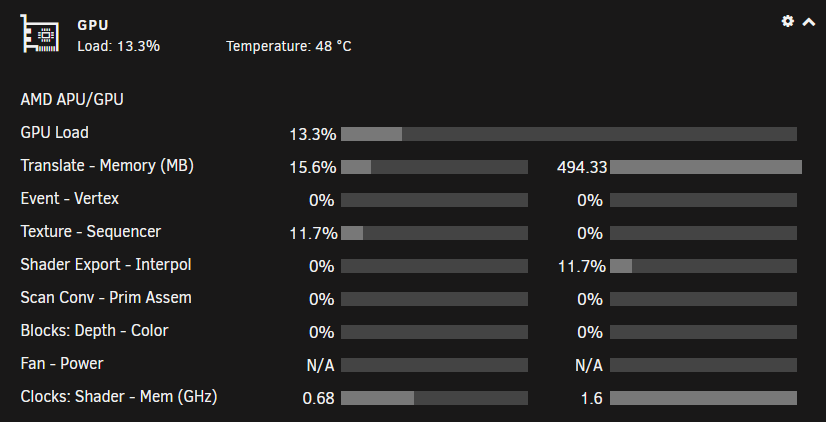
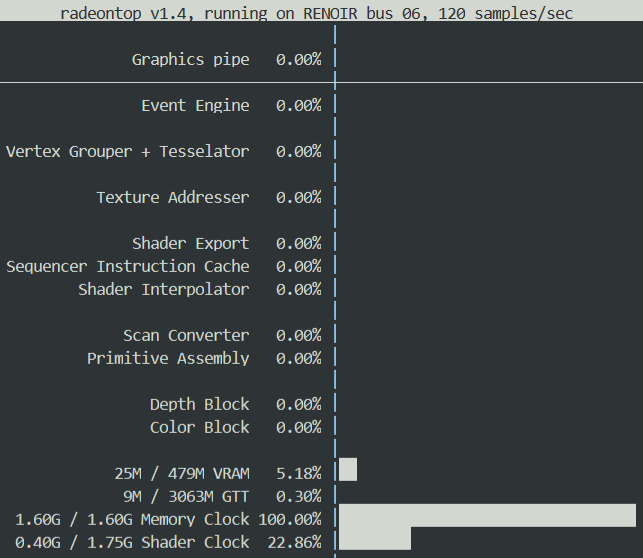
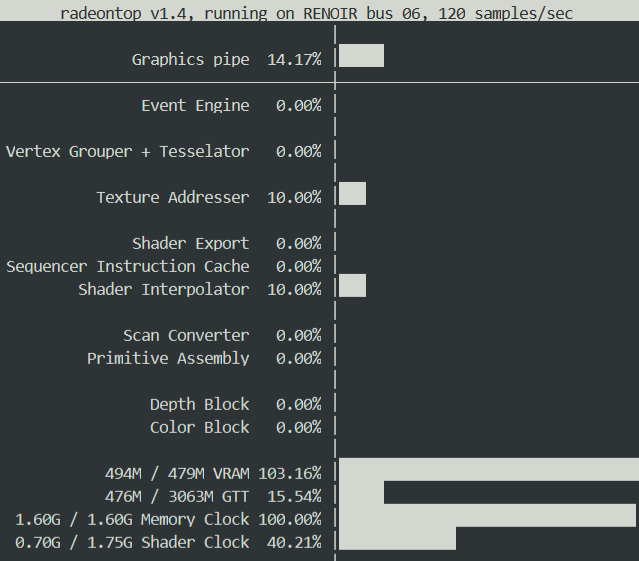
Hi @ich777 First of all, big thanks for your version of Jellyfin. I use it on my new small Unraid media server build on an MinisForum HM90 mini PC. It uses an Renoir Zen 2 based Ryzen 9 4900H with Radeon RX Vega 8 Graphics. After some issues with your default port mappings 8096 > 8096 and 8920 > 8920 I now have access to the WebUI. I had to adjust the Ports to 18096 and 18920 for me to have access. Not sure whats wrong with the default mappings and my network config. I tried bridged, br0 and a custom network, same problem on all of them with the default ports. I installed the "Radeon TOP" and "GPU statistics" plugins to check the stats on the dashboard and with "radeontop" via terminal. Jellyfin statistics is showing the transcoding with 65fps. GPU statistics 4k source: radeontop idle: radeontop transcoding 4K source file: It looks like the GPU transcoding is working even without the adjustment of the go file. 👍 Jellyfin statistics is showing the transcoding with 65fps. I have also installed the "Dynamix System Temperature" and your "Nuvoton NCT6687 Driver" plugin. Unfortunately the temperature plugin doesn't find any drivers, so I have no fan or CPU temp monitoring available. Any ideas what I'am missing? If I shoud test some stuff for you, please let me know. Maybe you can add the 4900H to the list of supported hardware. 😉