





Michael_P
Members
-
Joined
-
Last visited
Everything posted by Michael_P
-
Didn't realize that it could be done with an already redballed drive, good to know!
-
Mar 16 17:00:38 Vault kernel: oom-kill:constraint=CONSTRAINT_NONE,nodemask=(null),cpuset=4e0f2f0ae2b3ce3726f066094658260181d73d646f202553374007b5a8ed8ef5,mems_allowed=0,global_oom,task_memcg=/,task=mprime,pid=982959,uid=0 Mar 16 17:00:38 Vault kernel: Out of memory: Killed process 982959 (mprime) total-vm:60540420kB, anon-rss:54740064kB, file-rss:1120kB, shmem-rss:2560kB, UID:0 pgtables:107432kB oom_score_adj:0 It's in the OOM message in the syslog
-
Could explain the goofy USB issues too
-
definitely a possibility, nothing would be logged if it lost power. As for RAM, you can run memtest on it. flaky hardware can be tricky to troubleshoot
-
Mar 16 23:11:28 unraid kernel: x86/PAT: frigate.detecto:3408520 map pfn RAM range req uncached-minus for [mem 0x1d6490000-0x1d6493fff], got write-back Mar 16 23:11:28 unraid kernel: x86/PAT: frigate.detecto:3408522 map pfn RAM range req uncached-minus for [mem 0x3335d0000-0x3335d3fff], got write-back Besides this, I don't see anything crazy - try turning off containers one at a time or run it in safe mode for a bit to see if you can narrow it down - else it's probably a power issue or hardware
-
Are you commanding the shutdowns, like the one from yesterday?
-
Looks like the diags were captured after reboot, try mirroring the syslog
-
Yep, mprime ran it OOM - FCP will warn you about it until you reboot and clear the log
-
Yep Not sure what you mean
-
If you can get the data off of it, you can just new-config parity with the new 12tb parity drive - assuming you trust the rest of the drives
-
That would be a Bad Idea™️ Replace the failing drive first
-
In maintenance mode, run a file system check on it (click on the drive), and follow the instructions
-
You should also fix the corruption on your NVME
-
Moreso now that it's being debated against ChatGPT

-
-
Normal users will be fine with a consumer drive as far as writes go
-
Normal users will be fine with a consumer drive as far as writes go


-
You should ask this question in the thread for whatever container you're using, like binhex's for example
-
It will be in the config for unmanic - I don't use it so I can't point you right to it, but look for the directory it's using for working cache and map that in the docker container's settings to a disk If you want to keep using RAM as cache, you can try doing less transcodes at once
-
Looks like you have too many VMs running using too much RAM - take another look at how much you're allocating to them, you don't appear to have enough left for the host. You can re-boot to clear the log so FCP stops warning you about the past OOM event
-
Should be able to set it up in 'settings/ups settings' - this is how I have mine set up for my backup server:
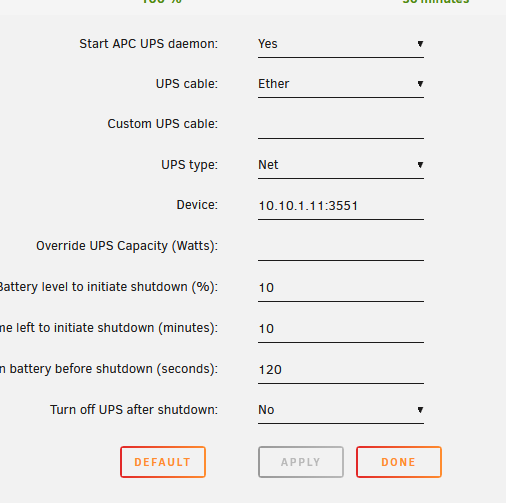
-
You don't need more RAM, unmanic is transcoding to RAM so re-configure it to transcode to disk.
-
I was wondering why it completely shutdown after a reboot request, so that makes more sense
-
The log would say if it was initiated by the power button, and it's doing a reboot so I'd say it's a script
-
By default it only uses 1/8th of system RAM Docker treats limits as a suggestion, you have to add extra flags to force it to respect RAM limits (which has the downside of possibly crashing the host) In this case, that java process ran away with all the available RAM (much higher than the set 16GB Limit) and the OOM reaper killed it accordingly





