cammelspit
Members
-
Joined
-
Last visited
Everything posted by cammelspit
-
As much as I would LOVE to do this right now, its bed time for me, at least I have the internet working on the bedroom HTPC, which you may find interesting to hear that once upon a time it was the pfSense box long ago before i ever put the server together and before I knew what unraid even was. it's like homelab resurrection. At least I can work without fear in the morning, then once im off and all that jazz, i will do exactly what you recommend. Question though, so should I balance as Raid 1 again and then refollow the proper steps or should I do it this way from the command line as you suggest? is there any reason it might be better to balance as Raid1 again? Either way, you have gotten it mounted for me and I will get all my backups confirmed that they are truly up to date, I have been slacking a bit on this and my most recent backup is over a month old on cloud storage. No bueno... I'll let you know how it goes, thanks my dude!
-
connollyserver-diagnostics-20210703-0244.zip Whatever i just did, it mounted at least. I assume by looking at the command that forced the adata back to being the primary drive? Also, holy heck I just realized it's almost 3AM and I work in the morning... I am gonna go hit the shower and check back in here once more tonight but I have to get in bed like, two hours ago. lol Thanks a bunch for trying to help me out here, it is appreciated! I just know so very little about BTRFS.
-
is there any way to use the command line to pull the data off? I mean redoing every docker from scratch is just a ludicrous amount of work I shouldn't have to do at all. I mean, is this a bug in unraid where the GIU is unable to remove a drive form a pool? Because I work tomorrow I had to pull the old bedroom HTPC and installed pfSense on that because the server is 100% down. I know the data is there which is why I wont be doing anything else at all till I can get it mounted and at least pull the data off of it.
-
connollyserver-diagnostics-20210703-0226.zip BTW, now it's totally unmountable. that's it it's just unable to mount anything at all. I even tried remaking the pool, which worked last time, and totally nothing. Following the instructions on how to remove a pool device has now rendered everything unmountable. Fun times...
-
I really wish that worked, as I previously stated, I already did this, and I just tested it out one step at a time based on the link you posted and no dice. Simply put the drive unmountable when the old failing frive is removed from the pool and there is nothing I can do about that. I am at my wits end here, the data is there I just cant get rid of this failing drive and its driving me bananas.
-
Hey, so i had my cache drive start failing almost immediately after I installed a brand new drive and set up a BTRFS raid 1 pool. SO I was under the impression that this meant the data is wholly complete on both drives, however, the I pull the bad drive, the array won't start, I tried putting the good new drive in the pool alone but it still uses the old drive and wont start without it plugged in. Even though unraid doesn't have the old drive mounted, for some reason it is still using it in the BTRFS RAID1 and I don't know what to do to make my cache pool a single drive using ONLY the new drive alone. IMO, the GUI lets me set it as a single drive again so it seems like a pretty big oversight that I can't un-raid the pool again. I can assume I need to do some terminal FU to fix this but I don't know what to do for that. Oh and the old drive is in right now and it does boot up and work temporarily but once it starts having write errors the whole server freezes and since the server runs my pfSense VM for my internet, I work from home, this is a major issue I must have fixed as immediately as humanly possible. Please and thank you to anyone who can help me here!
-
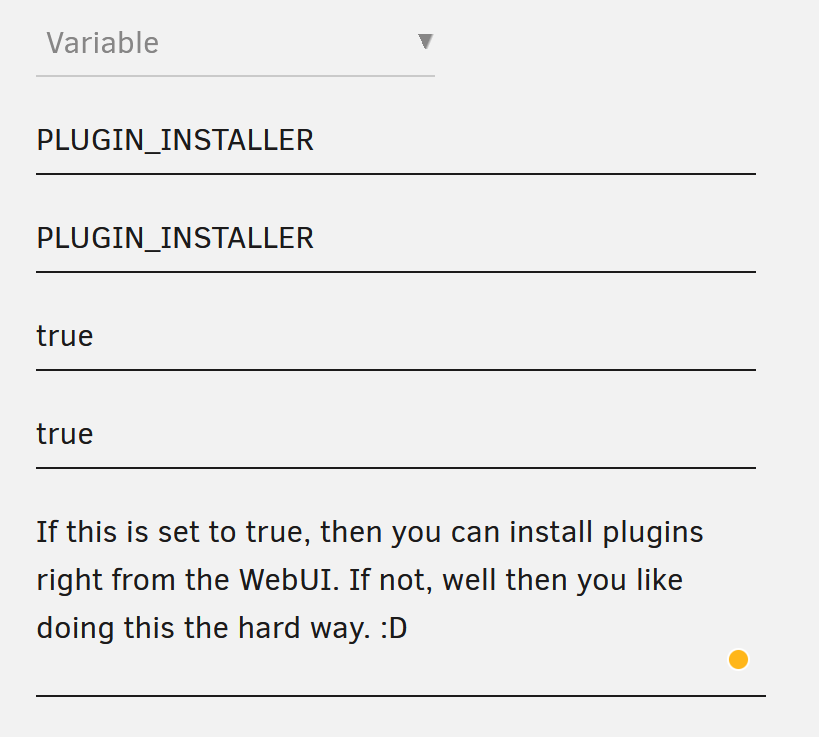
In case anyone wants to be able to use the plugins right from the UI. you have to add the variable yourself. Like this.
-
Looks like it is trying to install GUS from local? I made some major revisions and changes to my server so i decided since I saw this to try GUS since my own custom setup was done years ago, half of it is broken now, 15,000 dockers, it works but it s a mess honestly. Unfortunately I can't get this installed at all, any thoughts?

-
Hello, I have been using this plugin for some time but it seems I have run into a massive issue. Emptying the recycle big deleted the files, but somehow my disk space is not recovered. In Krusader and QDirStat the files are gone but for some reason unraid has not given me my disk space back at all yet and I need some help figuring this out. if I cant get this disk space back then I will have to wipe my cache drive and start over from a backup which is unacceptably terrible of a thought. Any idea why this is happening? I just tested it with 6GB of files and now that space is totally gone and not usable. any idea where I can start? UPDATE: Sorry, please disregard. No only was I mistaken about this plugin not working anymore, I ALSO was able to track down where my extra space was going and it was 100% totally unrelated. There were just multiple coincidences right in a row that made it impossible for me to know any different and led me to an inaccurate assumption. Thanks for the plugin, I love it and will continue to use it regularly! 👍
-
some reason I cant get this thing to convert even one single file. I am testing software for now just to see it work, once and it wont convert one out of a good couple of dozen I have tried already. All of which play just fine all the way through. Anything you can advise I do?
-
I'm just gonna ask since I love your containers and respect the work you do, use a good few of them already. I have already set up the other MineOS docker for unraid and so far it has been working more or less fine, no real issues that I can tell at least, new to this whole Minecraft thing bother for playing the game in general and also for running a MC server. So I guess I want to know, is there any benefit to using your container and going through the rigamarole of switching my files and such over to be used on your container over the other? As in, is it more up to date? That sort of thing... Thanks for your contributions and have a great rest of your day!
-
Spot the heck on there my friend! It's the custom part I was missing. I THOUGHT the turning off of caching was the same but seems I was VERY wrong about that. The instant I added that to the config it started working perfectly and instantly. Thanks a million! I used to use the normal nginx and switched to proxy manager version just because it was quicker and easier to set up new things, especially experimental stuff. I am writing this from work remoting into my main PC just for kicks. Hehe, this is super neat and super useful!
-
Hey, I just got this all set up and I love the idea of using this for remoting into my systems, VMs and such from away but one thing that I just haven't been able to figure out is... I can access everything when I use the server IP and PORT http://10.10.10.99:9191/#/ from a local workstation but when I am using the reverse proxy for it https://remote.[REDACTED].net/#/ it does NOT work properly. The webUI is quick, responsive, no issues. I can VNC all day long and even the RDP works as far as I can tell. What doesn't work is SSH and Telnet. I telnet and SSH into my network infrastructure, among a few other things, and those do NOT work when they are proxied. When I try to connect, the connection will eventually time out and that's all she wrote. I have searched and searched and I just can't figure this part out and it's the only thing holding me back from fully deploying this thing and setting up the more secure authentication methods for actual full time use. I use nginxproxymanager as my proxy and so far I haven't had that be an issue before, honestly, I'm just stuck.
-
Damn fine job on this. Only thing I am really missing over the manual YT-DL over CLI route is being able to easily get the thumbnails, captions and other metadata. Otherwise this is a nice, and more importantly, easy way to do this. I am eagerly awaiting how this app shapes up in the future for those couple niggling prerequisites I need to toss this in full production mode on my server. Thanks a heap for taking the time to do this. Would be epic to be able to scan the directory and make sure each video is present and to fill in the gaps even if they are randomly missing. Friend of mine made a python script that does that sort of thing. Maybe a list of the videos on a channel and the ability to skip? I know these are more wish list items for long in the future but I thought I would add my two cents as to how awesome I can see this thing getting. Again, thanks, and good work!
-
HI! I would like to keep a specific file type on the cache drive during a move operation. long story short, I am downloading a torrent that is pretty large, in fact, it is larger than my cache drive is. I have the torrent client set up to download to a directory that is only of the cache drive first and then once it is finished it will move over to a share that the mover will work on and then it is moved over tot he array. Basically, since I can't fit everything for that one torrent on my SSD cache drive at once, this method doesn't work. So I am looking for a way to keep the partially downloaded files on the cache but to allow the already completed files in this or any torrent to still move even if it has not fully finished, by this I mean *.!qB files. If I can do this, I may just stop using the 'move to this other share so the mover can move it' method I have had in place for so long. Currently I am having to manually move the completed files over to the array and shut off the download while I am manually moving stuff, make 100% sure the file structure is correct, hope I caught all the already finished files, and restart the download. Seeding off the array is fine for me, of course, but downloading to the array partials is 100% a no no for me. I want to keep all the files I copy over full, intact, order, and on the correct drives mover would use, which is a real pain to do manually every time I get close to filling up the cache. Not to mention the IO hits downloading and seeding would have for my poor spinning rust. Any help would be greatly appreciated, THANKS!
-
Have room for two more drives which would kick me barely over the 100TB mark. Maybe I can convince the wife a JBOD enclosure would be nice for Christmas this year? 😜🤞

-
Sorry, not a request for support but thanks! This is exactly what I was hoping for! I use your DelugeVPN container and I use a LOT of other stuff going through the proxy it generates. The only thing is, sometimes, I just need to use a different endpoint and now this makes it easy. Thanks again!
-
Thank you kindly for the clarification. I actually have a spare 120GB SSD laying around, just have used up all my SATA ports or I would go and make it SWAP and temp file storage. With how picky this board is on RAM, I actually have a 32GB kit installed but it only sees 16GB of it, and the cost of a properly compatible 32GB kit it may be time to toss an HBA in there sooner than later. 😀 Thanks again!
-
Can anyone tell me if this still can't work on a BTRFS formatted cache drive? I can create the swap file but it won't start to use it and since these posts are old enough, I have no idea if this is still a problem or not.
-
Firstly, this isn't so much of a support need but rather a question. I have gotten this all up and running and I am super happy, thanks for that, and I have just installed the Plex Data collection docker. Thing is, the Plex data collection docker is using a LOT more CPU than Plex itself is when idle, is this normal? It seems like the data collection docker is spiking in tandem with Plex, however. So I assume it writes to the DB even on the slightest idle process in Plex? Is there to have it write less often, perhaps every 10 or 30 seconds? I think the constant and very often writing to the DB is the cause. Thanks again for making it slightly less of a hassle getting this going on unRAID. 👍 Hee hee... https://snapshot.raintank.io/dashboard/snapshot/lfKTF3DcnAALRkF6aJyQzJjKV9NBayO3
-
Heh, literally 30 seconds ago I figured that out. On to the next step!!! thanks!
-
You ever get this working? I am attempting a new install and get the same error message.
-
Somehow, it fixed itself... I had just rebooted the server but this time I went and just turned the docker engine off and back on while the server was still running and automagically it just started working. Literally no clue but I guess I'm happy now. Strange! 🤣
-
I double checked and no, no other docker is using that port. However, it is listed twice in the deluge-VPN settings when I go to edit the container. Are both of these necessary? Should I try deleting one?

-
just now Deluge-VPN won't start and a reinstall gets this message. root@localhost:# /usr/local/emhttp/plugins/dynamix.docker.manager/scripts/docker run -d --name='binhex-delugevpn' --net='bridge' --cpuset-cpus='2,4,3,5' --privileged=true -e TZ="America/Phoenix" -e HOST_OS="Unraid" -e 'VPN_ENABLED'='yes' -e 'VPN_USER'='******' -e 'VPN_PASS'='*********' -e 'VPN_PROV'='pia' -e 'VPN_OPTIONS'='' -e 'STRICT_PORT_FORWARD'='yes' -e 'ENABLE_PRIVOXY'='yes' -e 'LAN_NETWORK'='10.10.10.0/24' -e 'NAME_SERVERS'='209.222.18.222,37.235.1.174,1.1.1.1,8.8.8.8,209.222.18.218,37.235.1.177,1.0.0.1,8.8.4.4' -e 'DEBUG'='false' -e 'UMASK'='000' -e 'PUID'='99' -e 'PGID'='100' -p '8112:8112/tcp' -p '58846:58846/tcp' -p '58946:58946/tcp' -p '58946:58946/udp' -p '8118:8118/tcp' -v '/mnt/user/':'/data':'rw' -v '/mnt/disks/KEVINPC_g/':'/KPCG':'rw' -v '/mnt/user/appdata/binhex-delugevpn':'/config':'rw' 'binhex/arch-delugevpn' 7287b28e9c3c2b095eac00ca44ca684c0614f4b5d27846d8c9efc2a7710f5360 /usr/bin/docker: Error response from daemon: driver failed programming external connectivity on endpoint binhex-delugevpn (3481502e83b48702f7d3e7eccf79040bbf5a169cc598454c1eac98ba84cbd6ba): Bind for 0.0.0.0:58946 failed: port is already allocated. The command failed. I can't get you a log because it won't even start and gives me an execution error. Any assistance here would be much appreciated. I've had it up and running for literally months and months so it was stable and all I did was restart the server.