





comet424
Members
-
Joined
-
Last visited
Everything posted by comet424
-
ah ok ya no so the copy you posted was for Mitchserver = 2 UD drives and only came up with 1 dup error now mitchFlix server has 0 UD drives has those multiple Duplicate Errors and the Flash Drive folder i showed of the 2 drives but what i mean is the Flash Folder shows the 2 Drives i no longer use in that Server and they are not in the Historical Part.. as i clicked X to remove them a while ago so for my last post techincally i shouldnt have those 2 drives in the Folder correct.. because i dont have any drives in UD and iv already removed the Historical drives from the gui.. the image you used is from her other server.. guess i made things confusing calling one mitchflix and other mitchserver for help sorry if i confusing my dislexia doesnt help either.. it all sounds clear in my head but sometimes i screw it up but in the one post i seperated. both servers in the same post mitchserver = 1 dup error has 2 UD and has the Historal Drive in the Gui mitchflix server = multiple dup errors has 0 UD and has 0 Historical Drive and has the 2 drives in the Flash Plugin folder that maybe causing the dup unknow error?
-
ok thanks.. ya i tried the no quotes mv /mnt/user/Transfer Files or mv /mnt/user/Transfer Files/ that did nothing with Tab or ESC but when i did mv "/mnt/user/Transfer Files" or mv "/mnt/user/Transfer Files/" with " or ' and double ESC single did nothing or the tab did convert it and added the test.txt on the end learn something new everyday 🙂 i appreciate it.. it was working for longest time what i had going on from a google search.. but recently for some reason its been broken alot
-
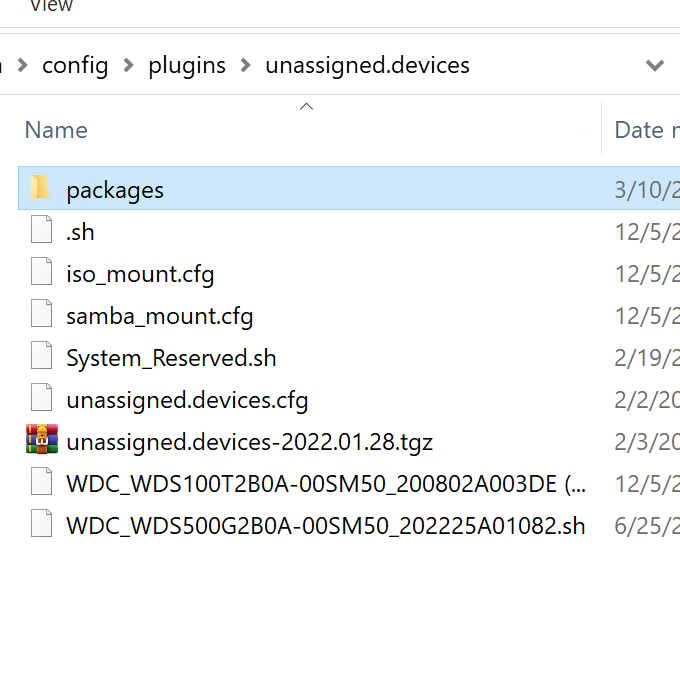
ok so my sisters other server that has no UD devices.. i uninstalled your UD plugin and reboot there was no issues.. i then reinstalled UD plugin and Plus and rebooted the server and the dups are back Feb 3 12:33:06 MitchFlix kernel: BTRFS warning (device <unknown>): duplicate device /dev/sdg1 devid 1 generation 231175 scanned by udevd (7676) Feb 3 12:33:06 MitchFlix kernel: BTRFS warning (device <unknown>): duplicate device /dev/sdb1 devid 1 generation 1578 scanned by udevd (7679) Feb 3 12:33:06 MitchFlix kernel: BTRFS warning (device <unknown>): duplicate device /dev/sdf1 devid 1 generation 297306 scanned by udevd (7693) Feb 3 12:33:06 MitchFlix kernel: BTRFS warning (device <unknown>): duplicate device /dev/sdd1 devid 1 generation 25146359 scanned by udevd (7692) Feb 3 12:33:06 MitchFlix kernel: BTRFS warning (device <unknown>): duplicate device /dev/sdc1 devid 1 generation 23792 scanned by udevd (7677) Feb 3 12:33:06 MitchFlix kernel: BTRFS warning (device <unknown>): duplicate device /dev/sde1 devid 1 generation 662400 scanned by udevd (7690) Feb 3 12:33:06 MitchFlix kernel: BTRFS warning (device <unknown>): duplicate device /dev/sdh1 devid 1 generation 822267 scanned by udevd (7666) Feb 3 12:33:06 MitchFlix kernel: BTRFS warning (device <unknown>): duplicate device /dev/sdi1 devid 1 generation 12859 scanned by udevd (7667) so i looked on her flash drive dunno if it helps i looked in the plugin directory mitchflix-diagnostics-20220203-1236.zip those 2 drives arent installed anymore nore are in the system or historical... could that be causing the dup issues
-
ah ok i did rename the transport data to transport data 1 ya her little server is just a 4 bay.. and she just hot swaps it.. ill re change back to transport data as it was just less spots to adjust things.. but ya never figured out the script error i did get help from squid to change the mv command as it doesnt work like what other google searchs say how to use "mv" but ya ill let ya know more errors if i see
-
ah ok.. i can do that i used to have that.. but figured since both Disks will never be the computer the same time, wouldnt have mattered.. but ok ill change it up and see how it goes and re installed UD
-
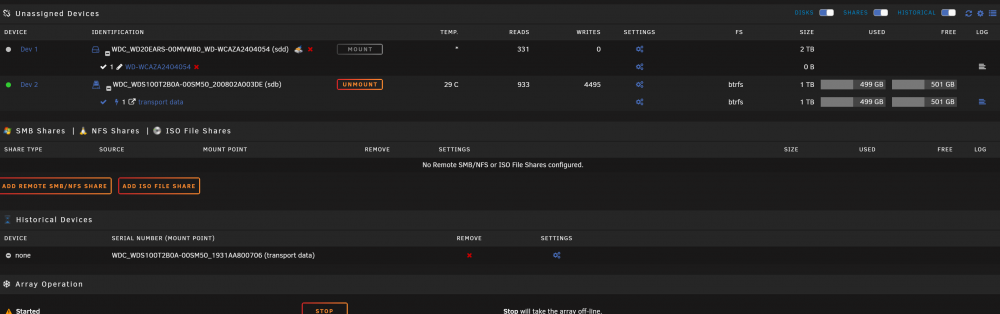
ok i was able to get the old diagnostic with all those duplicates you see.. and a new one where it has just 1 you will see the history one also stay transport data i use 2 SSDs labeled transport data so when i see my sister we swap SSDs and i give her a blank she gives me her stuff wants backed up and when she shoves in it just works.. but i been finding issues lately with MV too that i asked help for so hope that fixes it.. but ya i found that duplicate.. so mitch server gets 1 error but has a couple UD drives mitchflix server gets those multiple duplicates but has 0 UD drives mitchsserver-diagnostics-20220203-1123.zip mitchflix-diagnostics-20220203-1132.zip

-
on my sisters unraid i have a script that up dates hourly.. my sister backups her videos she makes and anything she downloads.. to a ssd she has for me to swap.. so we swap once a week for her backups it was working mv '/mnt/user/Transfer Files/*' '/mnt/disks/transport data' but its not anymore.. theres files in there and it wont transfer... i get error root@mitchsserver:~# mv '/mnt/user/Transfer Files/*' '/mnt/disks/transport data' mv: cannot stat '/mnt/user/Transfer Files/*': No such file or directory but the "Transfer Files" Folder does exist.. i tried googling and they do mv -v ~/mnt.... but that ~ causes issues and -v also cant tranfer all files i was also getting this error "mv: inter-device move failed" so my "Transfer Files" folder is set to my "Download Cache Drive" Only so it keeps her array off... i also use transmission with that drive incase she uses it.. and its set to Drive and Read Write Slave but now i get no files.. transfering.. how do you get it to transfer? Krusader seems to always work but i perfer the script to run hourly or once a day.. but i have files in there and i can do cd '/mnt/user/Transfer Files/' or cd '/mnt/user/Transfer Files' and it will go to the directory and when i type "ls" to list files there are files but the mv sees nothing i tried deleting the "Transfer files" folder in shares after i move the files out.. and then slaped some files in the folder.. and tried again and still gives me there is no files in the Transfer Files folder... is there some other command i need for Unraid? as i googled "mv move command" root@mitchsserver:~# cd '/mnt/user/Transfer Files/' root@mitchsserver:/mnt/user/Transfer Files# ls test.txt root@mitchsserver:/mnt/user/Transfer Files# mv '/mnt/user/Transfer Files/*' '/mnt/disks/transport data' mv: cannot stat '/mnt/user/Transfer Files/*': No such file or directory root@mitchsserver:/mnt/user/Transfer Files#
-
getting duplicate device error.. general chat had me post in here as Safe mode cleared it but rebooted back and its back Feb 3 07:20:27 mitchsserver kernel: BTRFS warning (device <unknown>): duplicate device /dev/sdc1 devid 1 generation 780 scanned by udevd (10061) here is what i posted.. multiple lines and the diagnostic.. as i dont have the diagnostic now on me
-
ah ok.. the safe mode didnt have the issue i rebooted back again normal... it didnt pop up the several duplicates just 1 at the moment.. ill post in there i appreciate the help 🙂
-
ah ok i tried googling how to boot into safe mode.... as i cant access it locallly i work on my sisters server remotely.. under the flash it has some features.. and if i boot into safe mode do i loose network access ?
-
as i remote servicing my sisters servers.. i noticed duplicate device.. dont know how or fix... as i was trying to figure why docker was slow and plex server had the Gray Circle ? but then when you refresh docker it fast and then icon is back.. im pretty sure Plex slows down docker like its slow.. as i mentioned in past docker slowness issues i found topics i wrote but here is the error Feb 2 19:02:00 MitchFlix kernel: BTRFS warning (device <unknown>): duplicate device /dev/sdg1 devid 1 generation 231168 scanned by udevd (7620) Feb 2 19:02:00 MitchFlix kernel: BTRFS warning (device <unknown>): duplicate device /dev/sdb1 devid 1 generation 1573 scanned by udevd (7617) Feb 2 19:02:00 MitchFlix kernel: BTRFS warning (device <unknown>): duplicate device /dev/sdf1 devid 1 generation 297299 scanned by udevd (7619) Feb 2 19:02:00 MitchFlix kernel: BTRFS warning (device <unknown>): duplicate device /dev/sdc1 devid 1 generation 23784 scanned by udevd (7622) Feb 2 19:02:00 MitchFlix kernel: BTRFS warning (device <unknown>): duplicate device /dev/sdd1 devid 1 generation 25146352 scanned by udevd (7615) Feb 2 19:02:00 MitchFlix kernel: BTRFS warning (device <unknown>): duplicate device /dev/sde1 devid 1 generation 662393 scanned by udevd (7616) Feb 2 19:02:00 MitchFlix kernel: BTRFS warning (device <unknown>): duplicate device /dev/sdh1 devid 1 generation 822261 scanned by udevd (7614) Feb 2 19:02:00 MitchFlix kernel: BTRFS warning (device <unknown>): duplicate device /dev/sdi1 devid 1 generation 12853 scanned by udevd (7625) how i fix that? a reboot didnt fix it.. and fix common issues didnt find no errors other then no root password i also checked my sisters other server.. and there is 1 warrently with the duplicate device... my main server i cant check shows no errors or warrnings mitchflix-diagnostics-20220202-1913.zip
-
i been using btrfs she plugs the ssd in her unraid.. and when i get the drive i plug it into my unraid... so i just been using that and still nothing to say complete yet FS: btrfs Executing file system scrub: /sbin/btrfs scrub start -B -R -d -r /dev/sdb1 2>&1 still only says that doesnt say its complete.. doesnt say it crashed no log file nothing.. all i can see is there is no file activity looking at the drive under read and write section here is pic all i can tell is the globe is now a globe wehre it was doing a spinning

-
question... as a removable drive my sister gives me to back up her files.. reason i have 2 ssds i swap with her and both labled transport data is it better to use NTFS? or stick with the btrfs or go xfs when moving files off the array or cache drive the transport ssd i have setup.. what is the better less problem way
-
ah ok as i followed what you said unmount the disk.. then click the lightning bolt to run the system check thats why i said it wasnt working.. ah ok so what i found was even if i do "mv command line or a script " it will run but say if i have Folder test and all the files are in the folder test when it moves over i get the error but it moving all the files that are in the test folder into the root of the folder so a .. of test and i can use Krusader fine its moving the files when i highlight and move.. but ill run that scrub test now then... the lightning bolt does nothing it just sits there as i let it sit there for 30 min and on a SSD i dont think its working ? but ill run the test again running test again.. how long should it take a 1TB ssd? update: i think test is done.. there is no drive activity.. the Window stopped spinning top left beside the 192.168.x.x but it hasnt said its completed i dont see a log file to see any info?
-
so i read what ya said above and i also did a reboot i still get the same error for running the script but you said unmount the drive.. once its unmounted you cant use the Lightning bolt it goes White and is unclickable even when you goto plugins and then to unassigned devices you cant run that scrub on an unmounted drive... once i mount it its clickable and blue but once you unmount its white and unclickable and i still get that error "mv: inter-device move failed" and the sys log is Jan 31 15:40:23 mitchsserver kernel: tsc: Fast TSC calibration failed Jan 31 15:40:23 mitchsserver kernel: ACPI: Early table checksum verification disabled Jan 31 15:40:23 mitchsserver kernel: floppy0: no floppy controllers found Jan 31 15:40:23 mitchsserver kernel: random: 7 urandom warning(s) missed due to ratelimiting Jan 31 15:40:32 mitchsserver rpc.statd[1751]: Failed to read /var/lib/nfs/state: Success Jan 31 15:41:10 mitchsserver kernel: BTRFS warning (device <unknown>): duplicate device /dev/sdc1 devid 1 generation 771 scanned by udevd (10067) Jan 31 15:41:15 mitchsserver root: error: /webGui/include/ProcessStatus.php: wrong csrf_token Jan 31 15:46:14 mitchsserver ntpd[1780]: frequency error 741 PPM exceeds tolerance 500 PPM
-
anyone noticing everytime you restart this version of transmission it now resets the setting.json it no longer saves the settings even if you edit the settings.json load up transmission then restart it will actually erase the settings and start over
-
i guess i cant unmount the drive it wont let me last error logs say an 20 12:35:26 mitchsserver root: error: /plugins/unassigned.devices/UnassignedDevices.php: wrong csrf_token Jan 20 12:35:29 mitchsserver root: error: /plugins/unassigned.devices/UnassignedDevices.php: wrong csrf_token Jan 20 13:08:02 mitchsserver kernel: sd 1:0:0:0: [sdb] Synchronize Cache(10) failed: Result: hostbyte=0x04 driverbyte=0x00 Jan 20 13:08:02 mitchsserver kernel: sd 1:0:0:0: [sdb] Start/Stop Unit failed: Result: hostbyte=0x04 driverbyte=0x00 Jan 25 00:00:52 mitchsserver nginx: 2022/01/25 00:00:52 [error] 26446#26446: *680474 FastCGI sent in stderr: "Primary script unknown" while reading response header from upstream, client: 192.168.0.47, server: , request: "POST /plugins/unassigned.devices/UnassignedDevices.php HTTP/1.1", upstream: "fastcgi://unix:/var/run/php5-fpm.sock:", host: "192.168.1.8", referrer: "http://192.168.1.8/Main" Jan 25 00:00:52 mitchsserver nginx: 2022/01/25 00:00:52 [error] 26446#26446: *680474 FastCGI sent in stderr: "Primary script unknown" while reading response header from upstream, client: 192.168.0.47, server: , request: "POST /plugins/unassigned.devices/UnassignedDevices.php HTTP/1.1", upstream: "fastcgi://unix:/var/run/php5-fpm.sock:", host: "192.168.1.8", referrer: "http://192.168.1.8/Main" Jan 31 13:56:08 mitchsserver unassigned.devices: Unmount of 'sdb1' failed: 'umount: /mnt/disks/transport data: target is busy. ' Jan 31 13:58:52 mitchsserver nginx: 2022/01/31 13:58:52 [error] 26446#26446: *2034844 upstream timed out (110: Connection timed out) while reading upstream, client: 192.168.0.47, server: , request: "GET /plugins/unassigned.devices/include/fsck.php?device=/dev/sdb1&fs=btrfs&luks=&serial=WDC_WDS100T2B0A-00SM50_200802A003DE&check_type=ro&type=Done HTTP/1.1", upstream: "fastcgi://unix:/var/run/php5-fpm.sock:", host: "192.168.1.8", referrer: "http://192.168.1.8/Main" Jan 31 14:35:15 mitchsserver nginx: 2022/01/31 14:35:15 [error] 26446#26446: *2045770 upstream timed out (110: Connection timed out) while reading response header from upstream, client: 192.168.0.47, server: , request: "POST /plugins/community.applications/include/exec.php HTTP/1.1", upstream: "fastcgi://unix:/var/run/php5-fpm.sock", host: "192.168.1.8", referrer: "http://192.168.1.8/Apps" Jan 31 14:52:01 mitchsserver unassigned.devices: Unmount of 'sdb1' failed: 'umount: /mnt/disks/transport data: target is busy. ' Jan 31 14:52:06 mitchsserver unassigned.devices: Unmount of 'sdb1' failed: 'umount: /mnt/disks/transport data: target is busy. ' Jan 31 14:52:09 mitchsserver unassigned.devices: Unmount of 'sdb1' failed: 'umount: /mnt/disks/transport data: target is busy. ' is there a way to force it to unmount or only a reboot will fix it? as i cant physically unplug and plug back in
-
so what does it do that its not safe to the appdata? and i guessing its running.. i did get a unraid unmount error and checked the system log i got these errors on bottom Jan 31 13:56:08 mitchsserver unassigned.devices: Unmount of 'sdb1' failed: 'umount: /mnt/disks/transport data: target is busy. ' Jan 31 13:58:52 mitchsserver nginx: 2022/01/31 13:58:52 [error] 26446#26446: *2034844 upstream timed out (110: Connection timed out) while reading upstream, client: 192.168.0.47, server: , request: "GET /plugins/unassigned.devices/include/fsck.php?device=/dev/sdb1&fs=btrfs&luks=&serial=WDC_WDS100T2B0A-00SM50_200802A003DE&check_type=ro&type=Done HTTP/1.1", upstream: "fastcgi://unix:/var/run/php5-fpm.sock:", host: "192.168.1.8", referrer: "http://192.168.1.8/Main" currently i guess its running it hasnt done anything after FS: btrfs Executing file system scrub: /sbin/btrfs scrub start -B -R -d -r /dev/sdb1 2>&1 dont know how long it take?
-
how do i run a file system check? is that the fix common issues plugin? oh i thought when you turn off dockers it was safe to run appdata as part of new permission?
-
no i only have 129gb used with 871gb free of a 1TB ssd i currently doing a complete New permissions of all drives and all appdata and i stopped all dockers and see what happens if it starts to work again
-
i checked the files too.. so it transfered part of the files too so its like the script or inter-device crashed while it was moving the files half is on the SSD and half still in the documents folder i have i do normally leave the browswer open to the 192.168.1.8 to my sisters unraid sometimes i have 2 windows open and i use pfsense and openvpn to connect over there so i can do remote maintance her server.. but i usually leave it open for days teh browser.. but i also do close it and re load it to help with my chrome or Edge the amount of ram it uses i try to close things then re load too so not sure.. but ya i get on my own server a ton of those wrong error but i never seen the 2 last errors above before figure maybe thats what caused things well the last 4 lines of that error above
-
i dont know if it goes with the log? but in system log i have a whole of the wrong csrf_token errors an 20 12:35:23 mitchsserver root: error: /plugins/unassigned.devices/UnassignedDevices.php: wrong csrf_token Jan 20 12:35:24 mitchsserver root: error: /plugins/unassigned.devices/UnassignedDevices.php: wrong csrf_token Jan 20 12:35:26 mitchsserver root: error: /plugins/unassigned.devices/UnassignedDevices.php: wrong csrf_token Jan 20 12:35:29 mitchsserver root: error: /plugins/unassigned.devices/UnassignedDevices.php: wrong csrf_token Jan 20 13:08:02 mitchsserver kernel: sd 1:0:0:0: [sdb] Synchronize Cache(10) failed: Result: hostbyte=0x04 driverbyte=0x00 Jan 20 13:08:02 mitchsserver kernel: sd 1:0:0:0: [sdb] Start/Stop Unit failed: Result: hostbyte=0x04 driverbyte=0x00 Jan 25 00:00:52 mitchsserver nginx: 2022/01/25 00:00:52 [error] 26446#26446: *680474 FastCGI sent in stderr: "Primary script unknown" while reading response header from upstream, client: 192.168.0.47, server: , request: "POST /plugins/unassigned.devices/UnassignedDevices.php HTTP/1.1", upstream: "fastcgi://unix:/var/run/php5-fpm.sock:", host: "192.168.1.8", referrer: "http://192.168.1.8/Main" Jan 25 00:00:52 mitchsserver nginx: 2022/01/25 00:00:52 [error] 26446#26446: *680474 FastCGI sent in stderr: "Primary script unknown" while reading response header from upstream, client: 192.168.0.47, server: , request: "POST /plugins/unassigned.devices/UnassignedDevices.php HTTP/1.1", upstream: "fastcgi://unix:/var/run/php5-fpm.sock:", host: "192.168.1.8", referrer: "http://192.168.1.8/Main error i get is Moving Download Files To SSD... mv: inter-device move failed: '/mnt/user/documents/transfer' to '/mnt/disks/transport/documents/transfer'; unable to remove target: Directory not empty ill probably do a reboot later
-
anyone know why the device scripts no longer work.. when you mount a drive i have an UD drive with a script and when i hit Mount it no longer is doing "Running" it just sits there i didnt do a reboot.. and i cant physically remove the drive. . as i doing it from remote location but i cant get the script to start anymore.. there is an primary script error when i look at the system logs dunno if the diganostics show anything mitchsserver-diagnostics-20220131-1210.zip
-
i noticed hard drives plugged in suddenly are gone.. on my one server i rebooted.. the server and it brought the drive back.. on the 2nd server i tried pulling the hot swap out and back in and it re detected.. it.. i added diagnostic.. its my one 6TB drive i didnt know which one was which so i pulled both my 6tb drives that are in the UD section tower-diagnostics-20220120-1115.zip
-
has anyone experience the lan cache folder the size is not increasing after 2.16TB of cache data i using 2 lancache dockers pointing to the same directory.. 1 for vpn users 1 for non vpn users i also noticing for a month or over lancache has stopped at 2.16tb in krusader it shows up at 1.9tb but its not longer caching its running says its writting but its not getting bigger and i also sed the cache days to 6000d so it wont need ot ever delete.. as i use it to cache Epic Games for easier re install later but is it limited to 2.16tb?


