comet424
Members
-
Joined
-
Last visited
Everything posted by comet424
-
i use 65" at 3840x 2160 resolution with a 200% increase in the windows settings and i use the majority of the green tab bar i can add one more word and then was hoping to increase the font size of the Tab itself and then reload it... ill check out the unlimited width plugin in too.. i appreciate it.. for now i maxed out and wanted to add more custom tab ones for ease but i wanted a 2nd line would would help.... even if i could add background color and change the regular color.. of the text for each tab... but ill check that plugin to see if it helps
-
a feature request be really nice is.. to have at least 2 Lines of Tab.... i use a 65" screen to see unraid better for my vision and i have multi custom tabs.. but if you were to resize the screen you loose the Tabs.... and you can scroll left to right the window like some webpages but be nice when you have a full roll with tabs takes up the entire line.. that after it would goto the next line.. likes a Windows Notepad Word wrap.. this way i could have 2 maybe 3 rows with the custom tab.. and it would scale to the scaling of the window... and possibly able to increase the Font size of just the Tabs
-
ah ok ill request an os feature then as it be nice to wrap it .. as i use a 65" monitor as i have sometimes hard to read smaller screen and i have several tabs but when i got smaller or resize it wont.. but ill ask for a feature request 🙂
-
i have request ... i notice if you have several custom tabs.. unraid gui page wont resize so you can scroll the window left to right but what be nice is since the Tab bar is only 1 Line if you have multiple tabs and your screen is smaller.. make the Tab Bar 2 Lines so like a Notepad Word Wrap.. so cant fit in the screen not a problem word wrap it.. for me i loose several custom tabs unless i use a big monitor etc and not resize font sizes
-
ya thats what i thought.. i was meaning cuz he mentioned he had pro and supposed to be unlimited but usually that unlimited comment usually ment about the array part.. id like to see his computer case 96 disks...
-
pro license is really not unlimited.. its like what 30 hard drives... either 30 data? or 28 data 2 parity if i remember right.. but then you can add mulit pools maybe of 30 each i dont have that many hard drives to test.. but someone smarter then me probably has the right answer
-
i cant seem to get the h265ize docker to run i installed the defaults and when i run it it wont start i checked the log it tells me this chmod: cannot access '/mnt/user/h265ize/output/init.sh': No such file or directory am i supposed to do something other then install the docker?
-
im getting these php errors not sure why? Feb 11 19:22:18 mitchsserver kernel: ACPI: Early table checksum verification disabled Feb 11 19:22:18 mitchsserver kernel: floppy0: no floppy controllers found Feb 11 19:22:18 mitchsserver kernel: random: 7 urandom warning(s) missed due to ratelimiting Feb 11 19:22:27 mitchsserver rpc.statd[1731]: Failed to read /var/lib/nfs/state: Success Feb 11 19:23:00 mitchsserver unassigned.devices: PHP Warning: parse_ini_file(state/diskload.ini): failed to open stream: No such file or directory in /usr/local/emhttp/plugins/unassigned.devices/include/lib.php on line 351 Feb 11 19:23:03 mitchsserver unassigned.devices: PHP Warning: parse_ini_file(state/diskload.ini): failed to open stream: No such file or directory in /usr/local/emhttp/plugins/unassigned.devices/include/lib.php on line 351 Feb 11 19:23:05 mitchsserver unassigned.devices: PHP Warning: parse_ini_file(state/diskload.ini): failed to open stream: No such file or directory in /usr/local/emhttp/plugins/unassigned.devices/include/lib.php on line 351 Feb 11 19:23:08 mitchsserver unassigned.devices: PHP Warning: parse_ini_file(state/diskload.ini): failed to open stream: No such file or directory in /usr/local/emhttp/plugins/unassigned.devices/include/lib.php on line 351 Feb 11 19:23:11 mitchsserver unassigned.devices: PHP Warning: parse_ini_file(state/diskload.ini): failed to open stream: No such file or directory in /usr/local/emhttp/plugins/unassigned.devices/include/lib.php on line 351 Feb 11 21:07:29 mitchsserver dhcpcd[1686]: br0: failed to renew DHCP, rebinding mitchsserver-diagnostics-20220212-0035.zip
-
so i have question if the gui main page orginally said my 1TB cache pool was full as i couldnt write to it anymore.. it was 46gb and i had min set to 50gb and when i added the 2nd drive as you seen above and it brought down the file size from 1TB less 50gb down to 400 and something gb does that mean there was lost files broken files that unraid said there was files but there wasnt... is that what the scrub is for.. to scan the drive and remove the false file size display.. i remember years ago there was a program for windows were say it says 100gb used but really on a usb that was only 32gb say or can u use TRIM on a spinner drive? as i using a spinner not a SSD and after i moved the files to the array.. and removed the 2TB drive and then formated the 1TB to be a cache pool again.. now when i moved the files back off the array to the download drive.. it no longer reports 1TB used in gui main page but 400 used and like 500 free for the 1TB ... so 500gb was lost in dead etc? and i do regular cleaning of the Recyling Bin so the files werent there.. so what would cause it to balloon a a move from the pool to the array then basiclly a format i guess then move back fixes it? is there a regular scan to clean up the pool? and does this ever happen on the array?
-
so i tried the Raid 0 and Single drive and Best Performance i get the 2.57TB free diskspace yet Used disk space is still 427gb when used disk space should be 800 and something might just just move the 800 gig of files to the array then redo the download pool drive remove the 1TB and then move the 800 gb of files to the 2TB drive it should report 800 gb or will its report 400gb?

-
@ChatNoir that helped alot i see i see its not good to use 1TB and 2TB drives together... Striping the Data Raid 0 says you get 3TB yet 1TB is unusable so stripping data is 2TB usuable.. i guess you loose 1TB of data striping the data between 2 odd ball drives but if its 2 2TB drives no unusable.. if you have 2 1TB thats ok to Stripe data if its 2 2TB drives thats ok to Stripe Data.. but if its 1TB and 2TB drive its not good to strip that data you loose data shows best to keep it a single Disks.. damn odd ball drives i have lol seems if its always an odd ball number you loose data Stripping data no matter what if you had a 2Tb and a 6TB stripped to 8TB only 4TB is usuable and 4TB is unusable too so kinda confusing but i guess best practice ... do not mix drives in the end for cache least not odd balls keep it 2 2 2 or 6 6 6 or 1 1 1 1 sizes when you use a 6TB and 2TB Drive stripped you have 0 disk space you can use in the end Total space for files: 4000 Total raw disk space: 8000 Unusable: 4000 region 0 Usable 4000 Disks/alloc 2 but i guess how it works is 2TB (2TB drive) + 2TB (6TB drive) = 4 usuable and 4TB left on the 6TB is unusable i guess what the raid0 does is basiclly what the parity drive does... only as big as its biggest drive or really smallest drive
-
so its a glitch/bug then and your said Total Capacity.. i said "used space" not "total capactiy" as total capacity is different to used space so what happens if i add a 3rd drive? so be 1TB 2TB 3TB does it take the used diskspace from 800gb (single disk ) to 400gb (2 disks) to 200gb used (3 disks) is that how the math works so in the end its best to get same size drives when doing the mirror mode... as i dont mind the mirror option but i just dont want the gui throwing me errors when math doesnt add up to me its like unraid compressiongs 800 phyiscal data down to 400 gb physical data to me it should still say 800 gb used 500gb free of 1.5TB pool as to me unraid does super compression but thanks for the input learn something everyday if its mixed drive dont do mirror.. only do raid 0 if its same sized drive then u can do mirror propperly i appreciate it...i just dont want gui kicking me any errors etc
-
ok i lost when i had a Single Disk 1TB drive i filled it up so it was 800Gb+ Used (main page and Krusader) when i added a 2nd Disk 2TB to the drive Used Space is now in the 400Gb how did physically 400Gb go missing? cuz shouldnt it be 800GB used 500 gb free 1.5TB pool 800GB used 500 gb free 3.0TB pool cuz the gui is not showing the correct stats of the pool for used gig main page says 1TB actuallly 998gb = 1500 gb (1.5tb) so why is gui page loose 400gb of diskspace at least it should really say 800gb used 500gb free of 1.5tb free the math on the GUI page doesnt add up
-
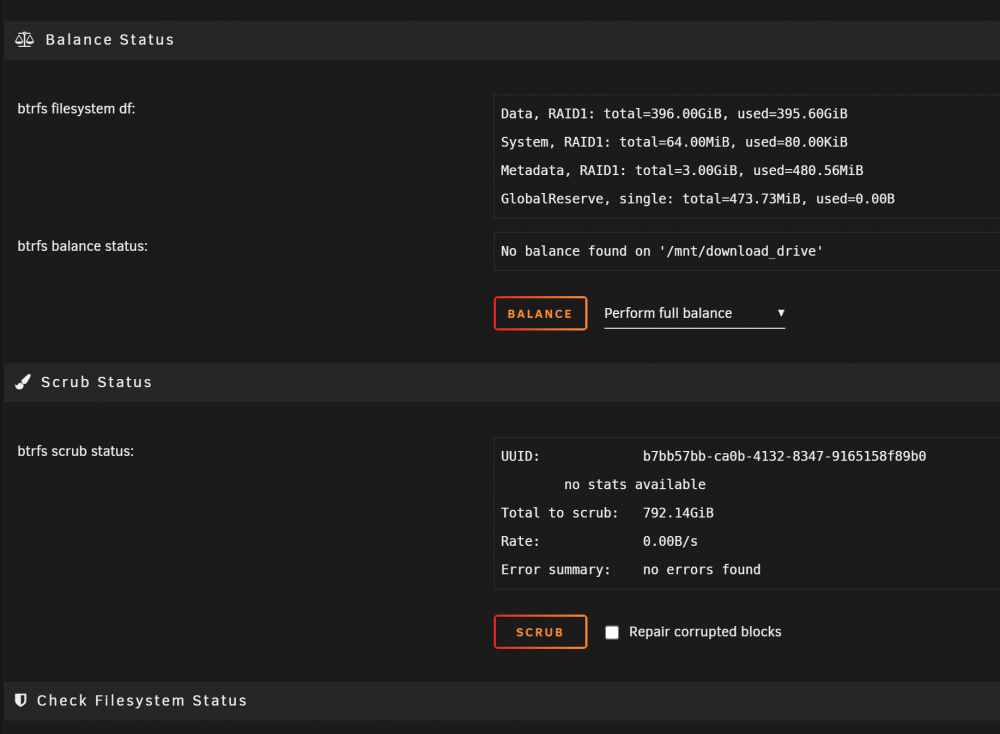
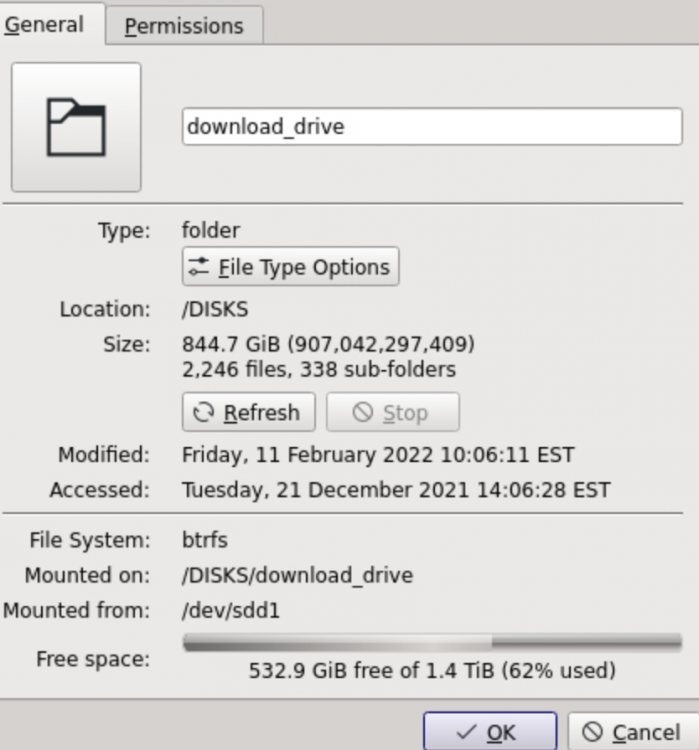
what does a single profile mean? i know when i plugged the drive in it said there was too many profiles and to ignore the error till btrfs done balancing so raid 1 is mirror then right? so shouldnt the diskspace say 844Gb used not 426gb used as the used gbs would be still wrong even if i convert to full space the main page reports the wrong disk space used it says 1.5TB diskspace in a mirror.. but actually when you add up Used + Free space its 998Gb so its 1TB yet its missing 500Gb to equal 1.5TB main page said 426gb used 572gb free Krusader says 844gb used 532gb free the krusader is more accurate then the main page so i clicked that scrub button to see if it will fix the mainpage saying 426 and fix it to 844gb
-
so on my 1 unraid server.. i added a 2nd drive.. my 1TB drive i use to download to filled up. for all windows downloads game updates etc i added a 2nd drive a 2TB to add 3TB but i guess its mirrored? as i only get 1.5TB file size... but the issue says i using 400GB when really im using 800 GB of data... and free space is 500GB i did a reboot and it didnt fix it is there a checker to fix the issue? do i run that scrub button to fix it? krusader shows different... and the raid1: picture that is from clicking the first drive.. the 2nd drive doesnt show it update: i currently clicked the scrub button but dunno if that will fix it?

-
ah ok ya up to date now.. so hopefully no issues.. thanks love the plugin helps soo much 🙂
-
works there.. must be a cache problem or something like in Home Assistant when you change the HACS they tell ya to reload the page.. but seems to be working now.. i always had that issue in past the "change disk mount point" but works now thanks
-
ah ok its working now what i did was refresh what seems maybe its a chrome issue? when i click the "transport data" it actually loaded up the part says "Change Disk Mount Point" so even though it was with the white box.. and you clicked the name it get Change Disk Mount Point" but i had to hit F5 and then it worked.... gonna try if it works on IE
-
which icon lets me browse? if its supposed to be that white box beside the name transport data .. thats unclickable.. i tried changing the setting pass through but that didnt help.. not sure what the pass through does also checked my other unraids the little box is also white unclickable if thats what you mean by browse unless i need to enable something?


-
i dont seem to have that feature browse icon
-
future feature request for UD plugin on the main page.. offer "View" just like you can do for Array, pools , flash so incase you dont do "share" you can least click the File Folder icon to see whats on the unassigned drive .. to see the contents instead of either mounting share or needing to run Krusader to view the drive i tried to see a feature in the UD settings or disk settings if it was Unraid that didnt allow it but couldnt.. but be a nice feature if possible
-
oh ok.. thats transcoding for plex.. i seen videos i did not know u needed a driver figured it just worked.. shows how much i know like for plex i dont use no hardware.. i just stream to xbox or desktop pc.. i dont use cell phones or tablets to watch so i guess i dont need hardware transcoding then? always learning 🙂
-
ah ok i dont remember reading that in the Community Apps page back in 2020 and normally when i goto support page i just goto to the end.. i guess i should read the first page i guess. my bad so what dockers use a graphics card?
-
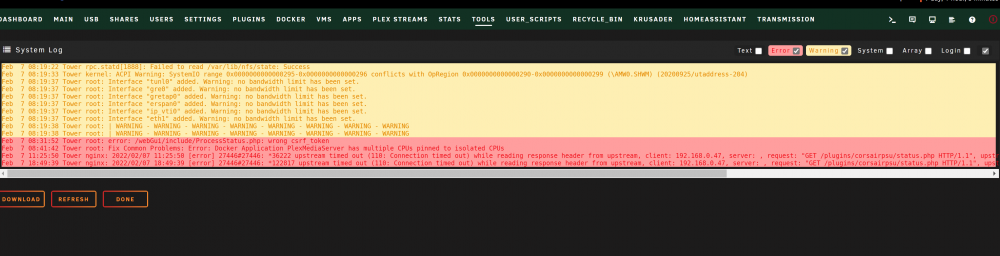
ah ok.. and i had updated my Unassigned devices plugin and i did a reboot.. and got the warning warning warning and i didnt know you had to leave the check box "text" checked to see more.. i usually un check it.. so i can just see warnings and errors.. i used to have a nvidia card in there... for passing VMs but it burned out... and figured i needed the driver for my card... but i 100% never noticed any improvements using the unraid nvida driver when i had a nvida card in for my VMs and if it doesnt help vms when do u need the driver for unraid itself? and i dont know if i have the file manually on the usb or not.. i just remember installing the nvida plugin from CA more then a year or 2 ago.. and that was last time i touched it
-
ah ok well this is all i see for system log.. reason i said it be nice if it would tell me where the error was coming from but i see that other info if i check the "text" box but i never do that as always just list the error and warnings and i dont know half of the stuff in text.. but i see now how you can see it