





comet424
Members
-
Joined
-
Last visited
Everything posted by comet424
-
hi i have trouble understanding all this stuff.. and i try to run nano in the console terminal for the mosquitto but doesnt work i want to do is send home assistant a command to turn on a switch.. but want to run from a user script i have "test" as the topic "turn_on" as a message to turn on "turn_off" as a message to turn off i hjave no idea what i doing... i tried to read the documenations.. is there any docs for a noob so i can run like "mosquitto test/turn_on" something like that .
-
i dont know what i need.. i really dont understand mqtt broker or mosquito which is the server.. i guess broker and mosquito is the client? what i trying to do is i got home assistant running and set up 2 automations.. 1 to turn on a switch and other to turn off the switch for now i use "test" as the topic "turn_on" as the message to turn on switch "turn_off" as the message to turn off the switch works in mqtt part in home assistant to test but i dont know how to do it in unraid.... as i want to run in a script like "mqtt test/turn_on" to turn on the switch "mqtt test/turn_off" to turn off the switch but i tried installing the mqtt and went to the gui page and that didnt help me and i installed the mosquito and well the logs tell me options i domt know i just wanted a command line so what do i need to get what i need to do.. as i dont really know what i need.. and i tried google and it didnt help me
-
i figured it out i had to re load it.. this Thumbs up didnt show up.. guess i need to really reboot windows been up for 3 weeks no reboot
-
i think i did something wrong i connected it gave me welcome and rules but i cant post in welcome... i read the rules but no option to join the chat to ask did i do something wrong says i dont have permission to send messages in this channel but i only have #welcome and rules
-
thank you 🙂 that got me connected i appreciate it 🙂
-
i have discord.. how do i add linuxserver to the discord.. as i have it for unraid
-
can you guys verify if the community app "transmission" is compatible or basiclly defunct i doing an unraid install for a friend and installed transmission but it no longer works. i did have issues before and there is no "unraid" support page only a github and on there they do no want your questions they tell ya to goto transmission website we.. you cant create an account on the transmission website i get these log erros from a clean install ErrorWarningSystemArrayLogin [s6-init] making user provided files available at /var/run/s6/etc...exited 0. [s6-init] ensuring user provided files have correct perms...exited 0. [fix-attrs.d] applying ownership & permissions fixes... [fix-attrs.d] done. [cont-init.d] executing container initialization scripts... [cont-init.d] 01-envfile: executing... [cont-init.d] 01-envfile: exited 0. [cont-init.d] 01-migrations: executing... [migrations] started [migrations] no migrations found [cont-init.d] 01-migrations: exited 0. [cont-init.d] 02-tamper-check: executing... [cont-init.d] 02-tamper-check: exited 0. [cont-init.d] 10-adduser: executing... ------------------------------------- _ () | | ___ _ __ | | / __| | | / \ | | \__ \ | | | () | |_| |___/ |_| \__/ Brought to you by linuxserver.io ------------------------------------- To support LSIO projects visit: https://www.linuxserver.io/donate/ ------------------------------------- GID/UID ------------------------------------- User uid: 99 User gid: 100 ------------------------------------- [cont-init.d] 10-adduser: exited 0. [cont-init.d] 20-config: executing... [cont-init.d] 20-config: exited 0. [cont-init.d] 90-custom-folders: executing... [cont-init.d] 90-custom-folders: exited 0. [cont-init.d] 99-custom-files: executing... [custom-init] no custom files found exiting... [cont-init.d] 99-custom-files: exited 0. [cont-init.d] done. [services.d] starting services [services.d] done. [2022-03-12 10:54:29.113] JSON parse failed in /config/settings.json at pos 902: SPECIAL_EXPECTED -- remaining text "peerport, "p" [2022-03-12 10:54:29.113] transmission-daemon Error loading config file -- exiting. (/home/buildozer/aports/community/transmission/src/transmission-3.00/daemon/daemon.c:825) [2022-03-12 10:54:30.104] JSON parse failed in /config/settings.json at pos 902: SPECIAL_EXPECTED -- remaining text "peerport, "p" [2022-03-12 10:54:30.105] transmission-daemon Error loading config file -- exiting. (/home/buildozer/aports/community/transmission/src/transmission-3.00/daemon/daemon.c:825) [2022-03-12 10:54:31.105] JSON parse failed in /config/settings.json at pos 902: SPECIAL_EXPECTED -- remaining text "peerport, "p" [2022-03-12 10:54:31.105] transmission-daemon Error loading config file -- exiting. (/home/buildozer/aports/community/transmission/src/transmission-3.00/daemon/daemon.c:825) [2022-03-12 10:54:32.106] JSON parse failed in /config/settings.json at pos 902: SPECIAL_EXPECTED -- remaining text "peerport, "p" [2022-03-12 10:54:32.106] transmission-daemon Error loading config file -- exiting. (/home/buildozer/aports/community/transmission/src/transmission-3.00/daemon/daemon.c:825) [2022-03-12 10:54:33.109] JSON parse failed in /config/settings.json at pos 902: SPECIAL_EXPECTED -- remaining text "peerport, "p" [2022-03-12 10:54:33.109] transmission-daemon Error loading config file -- exiting. (/home/buildozer/aports/community/transmission/src/transmission-3.00/daemon/daemon.c:825) [2022-03-12 10:54:34.110] JSON parse failed in /config/settings.json at pos 902: SPECIAL_EXPECTED -- remaining text "peerport, "p" [2022-03-12 10:54:34.110] transmission-daemon Error loading config file -- exiting. (/home/buildozer/aports/community/transmission/src/transmission-3.00/daemon/daemon.c:825) [2022-03-12 10:54:35.111] JSON parse failed in /config/settings.json at pos 902: SPECIAL_EXPECTED -- remaining text "peerport, "p" [2022-03-12 10:54:35.111] transmission-daemon Error loading config file -- exiting. (/home/buildozer/aports/community/transmission/src/transmission-3.00/daemon/daemon.c:825) [2022-03-12 10:54:36.113] JSON parse failed in /config/settings.json at pos 902: SPECIAL_EXPECTED -- remaining text "peerport, "p" [2022-03-12 10:54:36.113] transmission-daemon Error loading config file -- exiting. (/home/buildozer/aports/community/transmission/src/transmission-3.00/daemon/daemon.c:825) [2022-03-12 10:54:37.115] JSON parse failed in /config/settings.json at pos 902: SPECIAL_EXPECTED -- remaining text "peerport, "p" [2022-03-12 10:54:37.115] transmission-daemon Error loading config file -- exiting. (/home/buildozer/aports/community/transmission/src/transmission-3.00/daemon/daemon.c:825) [2022-03-12 10:54:38.118] JSON parse failed in /config/settings.json at pos 902: SPECIAL_EXPECTED -- remaining text "peerport, "p" [2022-03-12 10:54:38.118] transmission-daemon Error loading config file -- exiting. (/home/buildozer/aports/community/transmission/src/transmission-3.00/daemon/daemon.c:825) [2022-03-12 10:54:39.118] JSON parse failed in /config/settings.json at pos 902: SPECIAL_EXPECTED -- remaining text "peerport, "p" [2022-03-12 10:54:39.118] transmission-daemon Error loading config file -- exiting. (/home/buildozer/aports/community/transmission/src/transmission-3.00/daemon/daemon.c:825) [2022-03-12 10:54:40.119] JSON parse failed in /config/settings.json at pos 902: SPECIAL_EXPECTED -- remaining text "peerport, "p" [2022-03-12 10:54:40.119] transmission-daemon Error loading config file -- exiting. (/home/buildozer/aports/community/transmission/src/transmission-3.00/daemon/daemon.c:825) [2022-03-12 10:54:41.121] JSON parse failed in /config/settings.json at pos 902: SPECIAL_EXPECTED -- remaining text "peerport, "p" [2022-03-12 10:54:41.121] transmission-daemon Error loading config file -- exiting. (/home/buildozer/aports/community/transmission/src/transmission-3.00/daemon/daemon.c:825) [2022-03-12 10:54:42.122] JSON parse failed in /config/settings.json at pos 902: SPECIAL_EXPECTED -- remaining text "peerport, "p" [2022-03-12 10:54:42.123] transmission-daemon Error loading config file -- exiting. (/home/buildozer/aports/community/transmission/src/transmission-3.00/daemon/daemon.c:825) [2022-03-12 10:54:43.123] JSON parse failed in /config/settings.json at pos 902: SPECIAL_EXPECTED -- remaining text "peerport, "p" [2022-03-12 10:54:43.123] transmission-daemon Error loading config file -- exiting. (/home/buildozer/aports/community/transmission/src/transmission-3.00/daemon/daemon.c:825) [2022-03-12 10:54:44.126] JSON parse failed in /config/settings.json at pos 902: SPECIAL_EXPECTED -- remaining text "peerport, "p" [2022-03-12 10:54:44.126] transmission-daemon Error loading config file -- exiting. (/home/buildozer/aports/community/transmission/src/transmission-3.00/daemon/daemon.c:825) [2022-03-12 10:54:45.126] JSON parse failed in /config/settings.json at pos 902: SPECIAL_EXPECTED -- remaining text "peerport, "p" [2022-03-12 10:54:45.126] transmission-daemon Error loading config file -- exiting. (/home/buildozer/aports/community/transmission/src/transmission-3.00/daemon/daemon.c:825) [2022-03-12 10:54:46.128] JSON parse failed in /config/settings.json at pos 902: SPECIAL_EXPECTED -- remaining text "peerport, "p" [2022-03-12 10:54:46.128] transmission-daemon Error loading config file -- exiting. (/home/buildozer/aports/community/transmission/src/transmission-3.00/daemon/daemon.c:825) [2022-03-12 10:54:47.130] JSON parse failed in /config/settings.json at pos 902: SPECIAL_EXPECTED -- remaining text "peerport, "p" [2022-03-12 10:54:47.130] transmission-daemon Error loading config file -- exiting. (/home/buildozer/aports/community/transmission/src/transmission-3.00/daemon/daemon.c:825) [2022-03-12 10:54:48.132] JSON parse failed in /config/settings.json at pos 902: SPECIAL_EXPECTED -- remaining text "peerport, "p" [2022-03-12 10:54:48.132] transmission-daemon Error loading config file -- exiting. (/home/buildozer/aports/community/transmission/src/transmission-3.00/daemon/daemon.c:825) [2022-03-12 10:54:49.134] JSON parse failed in /config/settings.json at pos 902: SPECIAL_EXPECTED -- remaining text "peerport, "p" [2022-03-12 10:54:49.134] transmission-daemon Error loading config file -- exiting. (/home/buildozer/aports/community/transmission/src/transmission-3.00/daemon/daemon.c:825) [2022-03-12 10:54:50.135] JSON parse failed in /config/settings.json at pos 902: SPECIAL_EXPECTED -- remaining text "peerport, "p" [2022-03-12 10:54:50.135] transmission-daemon Error loading config file -- exiting. (/home/buildozer/aports/community/transmission/src/transmission-3.00/daemon/daemon.c:825) [2022-03-12 10:54:51.136] JSON parse failed in /config/settings.json at pos 902: SPECIAL_EXPECTED -- remaining text "peerport, "p" [2022-03-12 10:54:51.136] transmission-daemon Error loading config file -- exiting. (/home/buildozer/aports/community/transmission/src/transmission-3.00/daemon/daemon.c:825) [2022-03-12 10:54:52.138] JSON parse failed in /config/settings.json at pos 902: SPECIAL_EXPECTED -- remaining text "peerport, "p" [2022-03-12 10:54:52.139] transmission-daemon Error loading config file -- exiting. (/home/buildozer/aports/community/transmission/src/transmission-3.00/daemon/daemon.c:825) [2022-03-12 10:54:53.140] JSON parse failed in /config/settings.json at pos 902: SPECIAL_EXPECTED -- remaining text "peerport, "p" [2022-03-12 10:54:53.140] transmission-daemon Error loading config file -- exiting. (/home/buildozer/aports/community/transmission/src/transmission-3.00/daemon/daemon.c:825) [2022-03-12 10:54:54.141] JSON parse failed in /config/settings.json at pos 902: SPECIAL_EXPECTED -- remaining text "peerport, "p" [2022-03-12 10:54:54.141] transmission-daemon Error loading config file -- exiting. (/home/buildozer/aports/community/transmission/src/transmission-3.00/daemon/daemon.c:825) [2022-03-12 10:54:55.144] JSON parse failed in /config/settings.json at pos 902: SPECIAL_EXPECTED -- remaining text "peerport, "p" [2022-03-12 10:54:55.144] transmission-daemon Error loading config file -- exiting. (/home/buildozer/aports/community/transmission/src/transmission-3.00/daemon/daemon.c:825) [2022-03-12 10:54:56.146] JSON parse failed in /config/settings.json at pos 902: SPECIAL_EXPECTED -- remaining text "peerport, "p" [2022-03-12 10:54:56.146] transmission-daemon Error loading config file -- exiting. (/home/buildozer/aports/community/transmission/src/transmission-3.00/daemon/daemon.c:825) [2022-03-12 10:54:56.146] JSON parse failed in /config/settings.json at pos 902: SPECIAL_EXPECTED -- remaining text "peerport, "p" [2022-03-12 10:54:56.146] transmission-daemon Error loading config file -- exiting. (/home/buildozer/aports/community/transmission/src/transmission-3.00/daemon/daemon.c:825) [2022-03-12 10:54:57.147] JSON parse failed in /config/settings.json at pos 902: SPECIAL_EXPECTED -- remaining text "peerport, "p" [2022-03-12 10:54:57.147] transmission-daemon Error loading config file -- exiting. (/home/buildozer/aports/community/transmission/src/transmission-3.00/daemon/daemon.c:825) [2022-03-12 10:54:58.148] JSON parse failed in /config/settings.json at pos 902: SPECIAL_EXPECTED -- remaining text "peerport, "p" [2022-03-12 10:54:58.148] transmission-daemon Error loading config file -- exiting. (/home/buildozer/aports/community/transmission/src/transmission-3.00/daemon/daemon.c:825) [2022-03-12 10:54:58.148] JSON parse failed in /config/settings.json at pos 902: SPECIAL_EXPECTED -- remaining text "peerport, "p" [2022-03-12 10:54:58.148] transmission-daemon Error loading config file -- exiting. (/home/buildozer/aports/community/transmission/src/transmission-3.00/daemon/daemon.c:825) [2022-03-12 10:54:59.151] JSON parse failed in /config/settings.json at pos 902: SPECIAL_EXPECTED -- remaining text "peerport, "p" [2022-03-12 10:54:59.151] transmission-daemon Error loading config file -- exiting. (/home/buildozer/aports/community/transmission/src/transmission-3.00/daemon/daemon.c:825) [2022-03-12 10:55:00.152] JSON parse failed in /config/settings.json at pos 902: SPECIAL_EXPECTED -- remaining text "peerport, "p" [2022-03-12 10:55:00.152] transmission-daemon Error loading config file -- exiting. (/home/buildozer/aports/community/transmission/src/transmission-3.00/daemon/daemon.c:825) [2022-03-12 10:55:01.153] JSON parse failed in /config/settings.json at pos 902: SPECIAL_EXPECTED -- remaining text "peerport, "p" [2022-03-12 10:55:01.154] transmission-daemon Error loading config file -- exiting. (/home/buildozer/aports/community/transmission/src/transmission-3.00/daemon/daemon.c:825) [2022-03-12 10:55:02.153] JSON parse failed in /config/settings.json at pos 902: SPECIAL_EXPECTED -- remaining text "peerport, "p" [2022-03-12 10:55:02.154] transmission-daemon Error loading config file -- exiting. (/home/buildozer/aports/community/transmission/src/transmission-3.00/daemon/daemon.c:825) [2022-03-12 10:55:03.155] JSON parse failed in /config/settings.json at pos 902: SPECIAL_EXPECTED -- remaining text "peerport, "p" [2022-03-12 10:55:03.155] transmission-daemon Error loading config file -- exiting. (/home/buildozer/aports/community/transmission/src/transmission-3.00/daemon/daemon.c:825) [2022-03-12 10:55:03.155] JSON parse failed in /config/settings.json at pos 902: SPECIAL_EXPECTED -- remaining text "peerport, "p" [2022-03-12 10:55:03.155] transmission-daemon Error loading config file -- exiting. (/home/buildozer/aports/community/transmission/src/transmission-3.00/daemon/daemon.c:825) [2022-03-12 10:55:04.157] JSON parse failed in /config/settings.json at pos 902: SPECIAL_EXPECTED -- remaining text "peerport, "p" [2022-03-12 10:55:04.157] transmission-daemon Error loading config file -- exiting. (/home/buildozer/aports/community/transmission/src/transmission-3.00/daemon/daemon.c:825) [2022-03-12 10:55:05.159] JSON parse failed in /config/settings.json at pos 902: SPECIAL_EXPECTED -- remaining text "peerport, "p" [2022-03-12 10:55:05.159] transmission-daemon Error loading config file -- exiting. (/home/buildozer/aports/community/transmission/src/transmission-3.00/daemon/daemon.c:825) [2022-03-12 10:55:05.159] JSON parse failed in /config/settings.json at pos 902: SPECIAL_EXPECTED -- remaining text "peerport, "p" [2022-03-12 10:55:05.159] transmission-daemon Error loading config file -- exiting. (/home/buildozer/aports/community/transmission/src/transmission-3.00/daemon/daemon.c:825) [2022-03-12 10:55:06.161] JSON parse failed in /config/settings.json at pos 902: SPECIAL_EXPECTED -- remaining text "peerport, "p" [2022-03-12 10:55:06.161] transmission-daemon Error loading config file -- exiting. (/home/buildozer/aports/community/transmission/src/transmission-3.00/daemon/daemon.c:825) [2022-03-12 10:55:07.161] JSON parse failed in /config/settings.json at pos 902: SPECIAL_EXPECTED -- remaining text "peerport, "p" [2022-03-12 10:55:07.161] transmission-daemon Error loading config file -- exiting. (/home/buildozer/aports/community/transmission/src/transmission-3.00/daemon/daemon.c:825) [2022-03-12 10:55:07.161] JSON parse failed in /config/settings.json at pos 902: SPECIAL_EXPECTED -- remaining text "peerport, "p" [2022-03-12 10:55:07.161] transmission-daemon Error loading config file -- exiting. (/home/buildozer/aports/community/transmission/src/transmission-3.00/daemon/daemon.c:825) [2022-03-12 10:55:08.163] JSON parse failed in /config/settings.json at pos 902: SPECIAL_EXPECTED -- remaining text "peerport, "p" [2022-03-12 10:55:08.163] transmission-daemon Error loading config file -- exiting. (/home/buildozer/aports/community/transmission/src/transmission-3.00/daemon/daemon.c:825) [2022-03-12 10:55:09.166] JSON parse failed in /config/settings.json at pos 902: SPECIAL_EXPECTED -- remaining text "peerport, "p" [2022-03-12 10:55:09.166] transmission-daemon Error loading config file -- exiting. (/home/buildozer/aports/community/transmission/src/transmission-3.00/daemon/daemon.c:825) [2022-03-12 10:55:10.168] JSON parse failed in /config/settings.json at pos 902: SPECIAL_EXPECTED -- remaining text "peerport, "p" [2 so i wanted to know if its gone defunct for unraid what is working is "transmission-nzbtomedia" but not "transmission" so i figured id ask and report it incase its no longer a compatible program with unraid anymore
-
so what does that rooshare mean and actually do..? does that the automount? it places the Share folder of the ud drive.. to the /mnt/user/ directory? is that what that means as i dont understand.. since i never used rootshare? i just use the automount and autoshare option to have the folder pop up in the sambre share
-
ya its a backup its just my sister lives a few hours away so once or twice a week we meet half way and we swap ssds and i store her files.. and i dont think she got static shock but you never know it doesnt tell ya oh just got shocked... damn things i tell ya the Sata Ports are set for Hot Swap in the Bios.. and its a 4 bay slide in.. and i use a Sabrent 3.5 to 2.5 holder that sits inside the tray so i can hot swap the ssd from a 3.5 bay so i wanted to least try to get the files.. windows cant even see the disk guess its cooked and ya i should have enable UD plugin cuz they all work and i helped ya figured the bugs you were having in the UD Plugin a month ago.. and it auto updates everyday... so i not sure what you all mean about the rootshare part and the conf file in your other comment.. i just make sure ud and all plugins up to date and the UD just works.. all i know lol so i guess i best RMA SSD and get another one
-
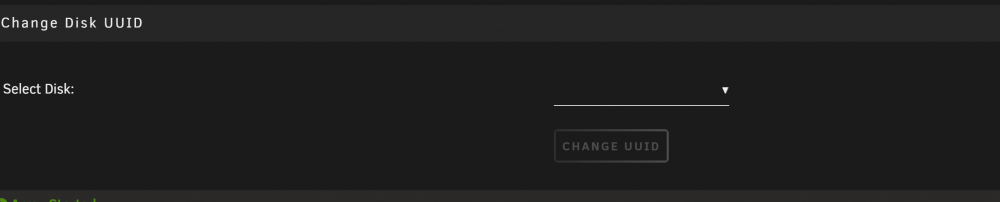
so it didnt happen in latest version also the change uuid grayed out and unclickable is there any way to fix this or is the drive totally gone Mar 11 02:13:21 backupserver kernel: ata1.00: failed to IDENTIFY (I/O error, err_mask=0x40) Mar 11 02:13:36 backupserver kernel: ata1.00: failed to IDENTIFY (I/O error, err_mask=0x40) Mar 11 02:13:52 backupserver kernel: ata1.00: failed to IDENTIFY (I/O error, err_mask=0x40) Mar 11 02:14:20 backupserver kernel: ata1.00: failed to IDENTIFY (I/O error, err_mask=0x40) Mar 11 02:14:35 backupserver kernel: ata1.00: failed to IDENTIFY (I/O error, err_mask=0x40) Mar 11 02:14:50 backupserver kernel: ata1.00: failed to IDENTIFY (I/O error, err_mask=0x40) Mar 11 02:15:18 backupserver kernel: ata1.00: failed to IDENTIFY (I/O error, err_mask=0x40) Mar 11 02:15:33 backupserver kernel: ata1.00: failed to IDENTIFY (I/O error, err_mask=0x40) Mar 11 02:15:48 backupserver kernel: ata1.00: failed to IDENTIFY (I/O error, err_mask=0x40) Mar 11 02:16:16 backupserver kernel: ata1.00: failed to IDENTIFY (I/O error, err_mask=0x40) Mar 11 02:16:31 backupserver kernel: ata1.00: failed to IDENTIFY (I/O error, err_mask=0x40) Mar 11 02:16:47 backupserver kernel: ata1.00: failed to IDENTIFY (I/O error, err_mask=0x40) Mar 11 02:17:15 backupserver kernel: ata1.00: failed to IDENTIFY (I/O error, err_mask=0x40) Mar 11 02:17:30 backupserver kernel: ata1.00: failed to IDENTIFY (I/O error, err_mask=0x40) Mar 11 02:17:45 backupserver kernel: ata1.00: failed to IDENTIFY (I/O error, err_mask=0x40) Mar 11 02:18:13 backupserver kernel: ata1.00: failed to IDENTIFY (I/O error, err_mask=0x40) Mar 11 02:18:28 backupserver kernel: ata1.00: failed to IDENTIFY (I/O error, err_mask=0x40) Mar 11 02:18:44 backupserver kernel: ata1.00: failed to IDENTIFY (I/O error, err_mask=0x40) Mar 11 02:19:11 backupserver kernel: ata1.00: failed to IDENTIFY (I/O error, err_mask=0x40) Mar 11 02:19:27 backupserver kernel: ata1.00: failed to IDENTIFY (I/O error, err_mask=0x40) Mar 11 02:19:42 backupserver kernel: ata1.00: failed to IDENTIFY (I/O error, err_mask=0x40) i use ssd for easier hot swapping transport but maybe hot swapping isnt good? the BIOS is set for hot swap i unmount the SSD and slide it out but maybe they still get corrupt? i know in the 90s when i used dos... we used the program PARK to park the heads of the drives before transporting to lan parties etc.. now i dont know when you power down drives if parks heads on spinners and i dont know if its safe to hot swap ssds buti figured ssds were better this sdd not even a year old it had 1 relocate error but that happened i guess bad sata cable least 5 yr warrenty but like to try to get files off if i can and can you see what the errors mean the mitchserver is where the ssd came out of. it was working before 1pm before my sister had pulled it out.. but i had it unmounted.. does the diagnostic i just took say anything with the errors i see backupserver-diagnostics-20220311-0641.zip mitchsserver-diagnostics-20220311-0655.zip
-
maybe spinner drives are better for hot swapping on regular basis since something happened to SSD ugh.. as i swap with my sisters server.. it was working i unmount and she slides the ssd out of the tray and adapter tray.. and then i get it.. now i cant mount it..
-
i cant get my ssd to mount.. i getting some ata errors.. i tried my other server and same errors.. is the ssd cooked. or can i force a mount etc any info? i took 2 diagnostics 1 and the 2nd one i tried a different sata i tried reboot and a shut down and turn back on but cant access it as i need to get the files off it 3rd one is from my other server.. how can i scan disk like force a mount etc i also getting the other errors now too thats from version 2022.02.27b... gonna update to your latest Mar 10 22:14:04 backupserver kernel: BTRFS warning (device <unknown>): duplicate device /dev/sdb1 devid 1 generation 741242 scanned by udevd (3489) Mar 10 22:14:13 backupserver kernel: ata1.00: failed to IDENTIFY (I/O error, err_mask=0x40) Mar 10 22:14:29 backupserver kernel: ata1.00: failed to IDENTIFY (I/O error, err_mask=0x40) Mar 10 22:14:41 backupserver kernel: BTRFS warning (device <unknown>): duplicate device /dev/sdb1 devid 1 generation 741242 scanned by udevd (3609) Mar 10 22:14:42 backupserver kernel: BTRFS warning (device <unknown>): duplicate device /dev/sdb1 devid 1 generation 741242 scanned by udevd (3609) tower-diagnostics-20220310-2034.zip tower-diagnostics-20220310-2024.zip backupserver-diagnostics-20220310-2135.zip backupserver-diagnostics-20220310-2233.zip
-
@GMAsterAU no i never i ended up just using the board to play with unraid and Truenas.. which truenas is frustrating me.... i think sometimes if it worked.. it only work if i sleeped unraid... but i havent tried in a while.. and i havent updated to the latest bios but i should retry.. as with this pandemic i couldnt afford another compujter so i just use this one to play with things but i should retest it.. i havent bothered to test it.. or update if it has a 2022 bios update if there is one
-
ah ok ill just unpin it all.. i just tried to get best performance and i have some weird cpu usage.. on cpus so just was looking for best performance.. but ill go back to orginal unpinned then i appreciate the help
-
ok so if say you had a 20 core cpu and you split it first 10 for unraid and the other 10 for VMs would you then pin plex from 0-9 cpu cores? and then youd do 10-19 for vms? so which way do you do it then for Plex to use like All the cores so it doesnt struggle.. so i confused why does it choose 8 from the the no isolated.. why does it choose that one when plex isnt pinned i dont understand why it chooses 1 from the isolated and 8 from the non... why wouldnt it be chooseing 1 from the isolated and 9 from the isolated as the lowest cores in the isolated.. i really wish i understood this better.. . do you have a video or documations that really goes into detail.. i confused but i dont wanna to be a bother to you asking questions as im sure.. i know easy for you to understand not soo much to me 😞
-
ok so then if you dont get it OS for me is 0,8 and plex is 1-15 cuz my Plex is like the one at 5:10 ok so then whats the Best Performance then if 0,8 for Unraid and 1-15 for Plex is not Best performance what is the Best Performance then .. just leave it blank? and why is it ok to use have a core? 7,15 if i say have Transmission you cant use 7,15 you can use either 7 or 15 but you cant select both or FCP tells ya multicore... is there a better video for me to learn about best performance for dockers in unraid then wish i understood this stuff better then i thought i did
-
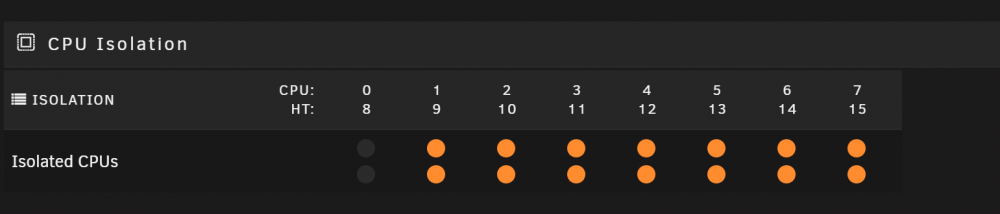
see i followed space invader.. at 5:10 he gives Plex all the isolated cores for max performance but when i do it thats when FCP gives me a hastle https://www.youtube.com/watch?v=f8ieFDCRkLs&t=79s so i confused then so if docker is a subsystem to the OS that means it should run only the Isolated CPUS like i have . so so if i give all the cores except the first one.. does plex run on all the cores or is it only running 1,9 core as i have tried pinning other apps but i can only give a half a core so if i give say Plex CPU 1 and not CPU 1,9 i wont get a hastle. i just trying to get the maximum performance from Unraid like the video but then i get the Common Fix problem and i dont know if its a problem or an ignore problem unless i doing it wrong.. and my vms go on the isolated cores
-
so then i guess i did it wrong... my understanding from how it was done is in the pics below isolated all teh core from unraid except for the first one.. so unraid will only ever use 0,8 and Plex i gave it all the other cores to make sure it ran at full speed thats my understanding from what space invaders older videos in his video about pinning apps... so the way i have it FCP shouldnt give an error from what i followed in his video so from what i have which cpus is plex actually running on just 1,9? or can plex only run 0,8 has to run on the Unraid Core... cuz i followed what he had in the video but i get this error but he does multiple dockers i only pinned the plex... so is the first core then 0,8 or is it 1,9? as i thought i did it right but i guess i did it wrong because i also dont get any errors using the VMs on 1-7 cores.. but if i put on 0,8 then there is a conflict so i figured i did it right so then for my other apps from the Community apps... the ones i installed i left blank no cpu pinning.. what cpus are they running on

-
Feature request.. under details for every app.. say the "recommended CPUs" when i follow space invaders install plex he uses more then 1 cpu but if i do more then 1 cpu i get in the Fix Common issues Docker Application PlexMediaServer has multiple CPUs pinned to isolated CPUs Unless you know exactly what you are doing, pinning a docker application to multiple isolated CPUs will only allow the application to execute on a single isolated core and adjust either the Isolated CPUs or the applications CPU pinning since i dont know what dockers cant use multiple isolated cpus be nice in the community apps details.. says you can use 2+ Isolated CPUS or 0 Isolated CPUS it can handle as i really dont know now.. can plex handle multiple cpus or it cant.. or be nice in the templates of the dockers you install states in there how many cpus it can handle etc.. or be nice a list of all the apps in the community apps. a chart that says Plex can handle up to 6 cpus or Diskspeed can handle 0 insolated cpus just default or like FireFox can handle up to 1 Isolated cpu like a chart so like it be a quick reference chart for someone to easily set etc... so you can easily fix yourself.. and or if say a plex template says it can have 2-6 isolated cpus then the Fix Common issues would see 2-6 and i have like 4 isolated cpus and it wouldnt throw an error then..
-
ok ill do that then thanks i appreciate it
-
ah ok is it hard to switch from openvpn to wireguard? i know i use nordvpn and i read there is no wireguard for it.. ya she seems to work now .. probably some glitch that a reboot didnt work but a delete the folders reboot delete folders again and a reboot seemed to fix the issue.. i know windows is like that sometimes well i guess in unraid i set a directory as "downloads" but lot of times i Capitilize things so in Lucky i type "Downloads" and darn linux is case senstive so you can have 2 same directory but a lower and up case letter that gets confusing.. i just like how windows doesnt care "Downloads" "DoWnLoads" "downloads" all be the same so no conflicts as i couldnt find the files luckybackup did... but krusader showed i had 2 directories "downloads" "Downloads" ya the linux seems better the unbuntu i have tried and puppy linux.. its ok still like windows i have tried the raspberry pi desktop.. back in 90s didnt even have routers... i used to use WinGate and Sygate to share internet to our lan party 7 guys all on a 3.1k connection.. dialup.. kids these days dont know what 3.1k is like and thats if you even get those speeds sometimes 1.4 2.8k 1meg download was like 9 hours lol and i wanna try that opensense.. see if its better then the pfsense and whats the best way to setup my security settings for shares. and backups as i just have everything wide open as it was just easier
-
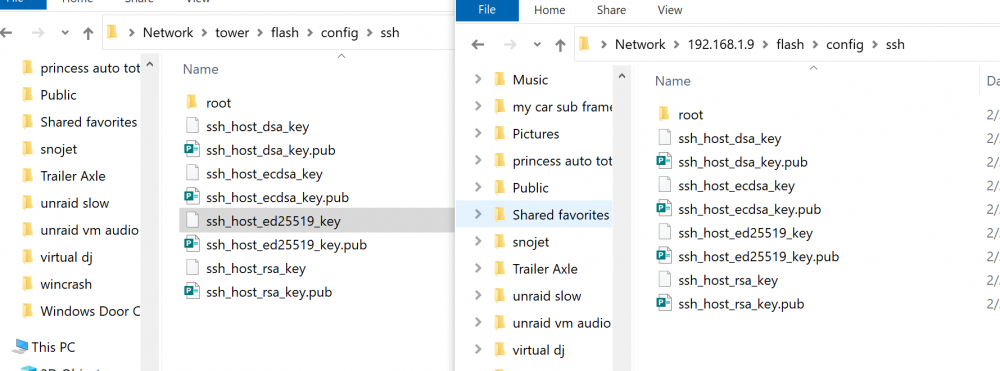
ok its working finally so after doing rm -r /root/.ssh rm -r /boot/config/ssh on both servers and on main server luckybackup console rm -r /root/.ssh i then rebooted the 2 servers for testing purposes 2 times repeating the above just to make sure the folder ssh got recreated.. on both servers with the same files are they important? i recreated tower.pub that worked for the first time now.. but it wont transfer the files what still drives me crazy is file names... on the 192.168.1.9 i have a "downloads" folder but in the luckybackup i did it as "Downloads" and i couldnt find the files through windows shares.. then i ran krusader i seen i had downloads Downloads folders.. so never seem to get used to that.. so easilly able to make mistakes im so used to windows.. up to 2.5 yrs ago or so i was still using Windows 2003 2011 WHS (Windows Home Server) as i scraped using Linux back in 2000 when i was fed up with Redhat and the pain to just mount a CD Rom Drive.. to use it.. but these files in the ssh folder on the flash what are they i didnt have them before but now i do... but least the luckybackup working so i practicing the file copy... the gui is less headache then command line
-
ya i did try renaming the id_rsa 2 files to like tower. and still didnt work rebooted both servers but still asking for password.. so what i gonna do must be a conflict i gonna delete the /root/.ssh folders on all the servers.. gonna delete the /flash/config/ssh folders too and then do a reboot... this way it should boot up with 0 conflict and i can start fresh.. i really dont know why i have so much problems the systems logs never say anything so i can do that change the updates what i was always doing is updating onec a night or once a week but they all did it all the same time.. but i could do it... i know i have rsyncs that are supposed to run every 30 days and delete any files that have changed ... i really dont know if that feature i wrote works lol so what does the wireguard do the openvpn cant do... it took me forever to learn openvpn and the pfsense.. i wish i had learned it when it first came out or even the opnsense.... back in 90s it was Wingate or Sygate and that was a headache enough to share internet and be your router... so gonna do a reboot after i delete all the folders and then re run the keygen hoping it will work.. cuz its getting frustrating i follow it.. but wish unraid would say this file is conflicing with this program and may cause it to not work.. we not at Star Trek erra yet lol... but i defently do that put the backup servers to do it is it ok to also do Main Server to run the backup but the backup server is sleeping.. power it up run luckybackup and then power the backup server off... i not sure how to do that
-
waiting for main server to reboot.. it takes forever to shut down and then power back up but ya i have that template the run as root now.. as earlier template didnt offer that i had to uninstall luckybackup then reinstall it to get the new template.. and then i set it to run as root ya today nothing was working for me unless the pub key was called id_rsa.pub it would only allow ssh in without a password.. if i made a new one called tower.pub i had to constantly add password.. so thats why i been frustrated all day.. hoping now after rebooting main server and the one backup that might solve it but i couldnt reboot all day as it was busy doing other copying and moving from windows so i dont use wireguard.. i use openvpn through Pfsense.. so pfsense does site to site to the remote location of the other pfsense and then i can just acccess directly the 192.168.1.9 from my 192.168.0.x network.. and thats how i been running rsync command line but i wanted to use lucky backup its more graphical display and just be easier so how do you stop randsomware? is that what the snapshots on a freenas is for? so u can go back to a previous backup"? so do you mean put the luckybackup on the backupservers.. and then copy from the main server.. or how you do that? as ya i dont wnat that if all the computers get randsomware or do u mean dont have ssh at boot up only allow it in the luckybackup....... but ya id like to protect my network from randosom ware so 3 of my unraid servers are at Home 2 in the home 1 in my shop on property... and 2 are at my sisters house and and its connected via openvpn through pfsense... and whatever her files gets updated i was having transfer over to my servers.. but i just got also tired of doing the rsync command line drop down boxes is easier for me. but if i can maximize my security id like to learn that too...
-
yes i run it as root but thats not what i said.. as default default is = /root/.ssh/id_rsa <the file > i said ia changed it /root/.ssh/tower_root <the file> and thats when there is issues i hoping a reboot will fix it.. i was running the older version of the template.. and mentioned above i had to uninstall Luckybackup and reinstall it to set run as root to true so if its not the best security perspective... then how do you make all the computers tallk to each other like a Mesh. that every single compuiter has access to each other how do you make that a not a security nightmare? because isnt a mesh better then relying on 1 computer if the 1 computer goes down there is no replication done well if i give root a password... i cant use smb shares as root if i create a couple users as well.. i cant access smb shares... it will not accept the user and password i created... update: mitchflix (backupserver 1) it didnt work still keeps asking for a password in luckybackup gonna reboot the main Unraid Server... its been up for 30 days so hopefully its just glitched i guess i just used to simple dump to the server and not worry about security perspectives its just me.. just copy and copy to 5 other computers for reduncacy so i have 5 servers with all the same files so if 1 or 2 get ruined by water or fire.. and a 3rd one has server failure then 2 other servers are running fine... but i guess in business world its a nightmare... hoping a reboot fixes things.. i really appreciate the help.. as its frustrating when you dont know whats going on.. but ur used to dealing with windows ....



