





comet424
Members
-
Joined
-
Last visited
Everything posted by comet424
-
this happened again today... @JorgeB would you be able to see if these 2 diaganostics the same issue? and if so what is causing it it looks like my guess least in this diagnostic is the mover plugin causing the problems if i scroll down it happens then? or maybe the appdata backup? since the mover runs plugin is after the errors tardis-diagnostics-20260323-1021.zip
-
ya i done the zfs convert folders to datasets , and cache pool, so far i currently on the convert array but for this 1 server i trying on its only got 1 array disk i didnt wanna try this on my 108tb array main server where everything running..so been following his videos to try it.. i also had a memstore error yesterday i noticed on my main server not sure what caused it... so i just testing on this one server incase this zfs causes issues its not big deal.. jus wish hard drives and ssds be cheaper now but keeps going up now
-
i have no idea at the moment just files to backup to the server media files, documents, photos, game installers, app installers family docs videos no business side stuff i just learning snapshots at the moment in his videos... i never tried really cuz when i started with freenas i didnt have enough same size drives and the ecc i needed supposedly i never continuned and i found unraid and went down that route with 6 unraid servers.. as it was basiclly like Windows Home Server where i transitioned from.. i take it the checksums are something it checks the files regullary? i just like to make sure my files are protected from ransomware so thats why i backup so much but then when automated.. the rsyncs probably could delete files on the backup servers if the ransomware erased my files or so.. so always looking to improve things so ya i wish there were some good video setups about the best ways to like fortify your files from an attack like that.. and best schedules.. i just try to watch videos and do my best from that
-
ok i can do that whats your recommendation about zfs on unraid? i just playing around trying spaceinvaderone but i dunno if he really uses it on unraid or not currently i have unraid back up to 1 server daily, 1 week 1 a month.. but always looking better data security any thoughts of the zfs dataset stuff?
-
i have same issue.. is this a memory issue too? and does it say what one is running out of memory etc? almost need a swap file like windows if runs out of memory goes to a swap file tardis-diagnostics-20260322-1146.zip
-
oh ok so should switch back to docker image then and is this overlay2 default ed on as driver says native? learn something new everyday... hopefully sometime this year i finally upgrade 3megabit internet to like fiber 1gb so doing any installs wont take several days at times lol but always still learning this os something new to learn all the time
-
and i read you wanna switch to overlay2 but i dont see it under docker settings
-
@JorgeB ya what does that mean i do use br0.20 10 30 40 for different vlans is it one program that is using 2 different networks its saying? and how does this happen? is it from failed installations and where u gotta re install them as i have extreme dial up internet speeds now a days so dockers are a pain to install as the link u sent about image being corrupt i guess just easier to re install question i dunno if you know.. on my main server i use btrfs and docker directory to solve the out of diskspace but on this machine i learning on its zfs but from what i read you dont want docker directory but a docker image... but that was a few years ago i guess... is this still an issue or not anymore?
-
so i converting my 1 server over to zfs and so far i only done the cache drive that hosts the appdata vms isos docker but i getting another error i tried googling but it didnt help i not sure i only have a hand full of dockers i ran docker network prunethen rebooted but it came back so i dunno how to fix that error root@K-9:~# docker network ls NETWORK ID NAME DRIVER SCOPE c6e6772b39e0 br0 ipvlan local 7ae1fdd1315e br0.10 ipvlan local f343476b9706 bridge bridge local 1044b1a24870 eth1 macvlan local 66fea4528a8c host host local a545fb487f74 none null local root@K-9:~# k-9-diagnostics-20260322-0000.zip
-
guess ill let it finish moving the files and then i guess test a copy from array to cache drive in krusader to see if its copying fast? maybe appdata is always slow to move?
-
ya cuz thats cuz i running mover now from array to cache drive its currently moving the appdata folder ok cleaned up the shares.. i guess they dont always delete?
-
still going slow need to kick its but into gear i guess only way to test is to test with single files like 25 gig or so and that the appdata be always slow as mollases k-9-diagnostics-20260320-1540.zip

-
ok here it is k-9-diagnostics-20260320-1520.zip

-
so i formated the cache drive to zfs i set the shares to go from array to cache and ran mover it instantly stopped.. wasnt working.. i ended up uninstalling cache mover, and cache tunning and set the disk settings to reconstruction write i i re pressed move button.. and seems to be moving back but it went from 1-3 mb/s to a 6-8... 3meg read on the array and a 6-11mb/s write on the nvme didnt improve much... here i figured it would jumped to 100mbs as a secon... wonder what is causing the slowness the ram ran 3 memttests and passed each one no fault so its going to take a way to copy back... i know the disk speed test... but ive never been able to test the cache drives and running "top" in the command line the "wa" fluxuates from 0.0 to 0.5 not sure if those are the good readings for the copy wait or so what i watch a video about slow mover transfers
-
@MowMdown so ive run memtest 2 1/2 times passed 2 times and on its 3rd.. gonna quit if it passes on 3rd.. maybe just a glitch.. i guess ill format the nvme drive and set it to zfs as i wanna try and then copy the dockers vms appdata back to nvme and maybe it will pick up speed using te mover will see. right? but no memory issues
-
currently i running memtest on the server i want to practice zfs and this snap shots so incase my family gets ransomware i can just restore from a previous restore or however my main server is like 10 data drives 2 parity, a cache drive, and a another nvms to just run vms, docker,appdata now my questions are is how would u set them up .. currently my family files are located like /mnt/user/Family Files/<username> and your typical folders documents pictures videos etc and i was thinking of using one of my other spare unraid servers to run zfs then has this data snap shots then backs up to the main server.. or do you wanna convert the main server to zfs and the data... or do you have a like a 2tb cache drive for zfs and then backup to the bftfs array but it saves the zfs snap shots... i new to that i been running btfs like 6 7 years now so i know nothing about the zfs or what i all need.. i only played with zfs on freenas years ago didnt like it and ended up buying 6 unraid servers... for data backup etc... but so supposedly snap shots is better i guess..? and even questions i havent asked that you guys know more about to get the best security currently what i did was main server backs up to 1 unraid nightly.. and then backs up to another weekly.. and 1 monthly and daily offsite... but i dunno if thats the best? of this zfs data set snapshot stuff
-
ok sounds good
-
ah ok so uninstall jellyfin and then reinstall etc i can do that i just experimenting as i going to post a new question about ZFS i have questions for
-
ah ok i know i was trying to get nextcloud aio to install on that server where i just had enough of it.. spent 2 weeks installing uninstallling installing uninstalling.. total bs and then i did get that nextcloud plain but if you copy files to an account on the server side the nextcloud doesnt detect it... you gotta run some docker scan or external storage google ai says yet it doesnt exist in the nextcloud plain so thats a container i was starting stopping like 100 times... best do a reboot today to clear that up for now i shelved it wasnt happy with this nextcloud stuff
-
@MowMdown ah ok i did try the reboot, stop array do the global share mount back on and run mover... no errors but it left files on the cache drive... so i then just used the the dynamic file manager and moved. and got errors right now i rebooted and running memtest and see how it comes out with things... and you dont happen to know from my tardis logs why it just logs text stuff and is that stuff good or bad that shows up so ill let memtest run and see where to go from there rsync: [sender] read errors mapping "/mnt/unraid_files/appdata/Jellyfin/metadata/library/05/058b6f616292697635c6116c836b0c40/poster.jpg": Input/output error (5) rsync: [sender] read errors mapping "/mnt/unraid_files/appdata/Jellyfin/metadata/library/78/78fe47a1df277d424eb6b7416edf32da/poster.jpg": Input/output error (5) WARNING: appdata/Jellyfin/metadata/library/05/058b6f616292697635c6116c836b0c40/poster.jpg failed verification -- update discarded (will try again). WARNING: appdata/Jellyfin/metadata/library/78/78fe47a1df277d424eb6b7416edf32da/poster.jpg failed verification -- update discarded (will try again). rsync: [sender] read errors mapping "/mnt/unraid_files/appdata/Jellyfin/metadata/library/05/058b6f616292697635c6116c836b0c40/poster.jpg": Input/output error (5) rsync: [sender] read errors mapping "/mnt/unraid_files/appdata/Jellyfin/metadata/library/78/78fe47a1df277d424eb6b7416edf32da/poster.jpg": Input/output error (5) ERROR: appdata/Jellyfin/metadata/library/05/058b6f616292697635c6116c836b0c40/poster.jpg failed verification -- update discarded. ERROR: appdata/Jellyfin/metadata/library/78/78fe47a1df277d424eb6b7416edf32da/poster.jpg failed verification -- update discarded. rsync error: some files/attrs were not transferred (see previous errors) (code 23) at main.c(1338) [sender=3.4.1] This moves all the selected sources
-
guess its a global setting i tried the google ai but gotta reboot unraid cuz mover has locked things up as you cant run it with the array on
-
@MowMdown oh ok ill give it a shot see what memtest shows up with i cant seem to fix the mover crashing though share.cfg what does it mean? and how do i create a share.cfg?
-
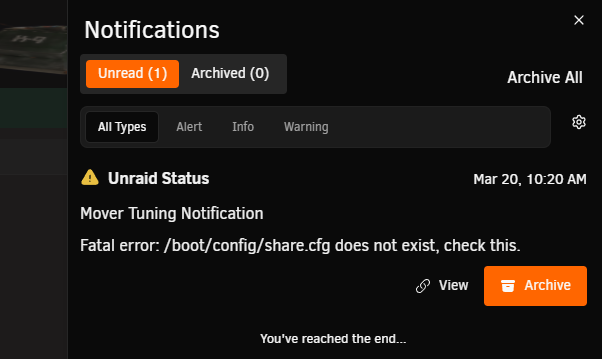
@itimpi so i rebooted the k-9 server and re ran mover but its still locked up i looked at the nofications pop up on the screen and it shows share.cfg issue but i have shares is there a way to fix this and the other others or are the other errors due to the share.cfg issue i re saved each share to update incase that fixes share.cfg i then rebooted and re tried again still cant move instant error as you see... so i not sure how i fix? or do you gotta reformat things?
-
oh and can you look at my main server diagnostic here.. do i need to reboot unraid more often? its been up 18 days.. but there is no error array login messages just text in the diagnostic and i dont really under stand all that whats going on there i just figured id look now and i see its blank mostly except the text tardis-diagnostics-20260320-0742.zip
-
sorry my bad i forgot as i didnt think it would have matter if its just a toggle switch or something.. here is the diagnostic.. i do know how know how long it took to move 74 gig but here is the log file maybe you can see how long it took and if so how i can see in the future too how long it took actually mover is still running but it looks hanged 145mb to go yet nothing is moving so i guess mover has crashed looks like a bunch of errors too not sure what they mean but its complaining about the nvme i guess or the pool or i dunno sometimes i wish teh logs would explain things better sometimes i can never figure it out what its talking about k-9-diagnostics-20260320-0731.zip


