sjoerd
Members
-
Joined
-
Last visited
Everything posted by sjoerd
-
#!/bin/bash # custom echo "copying custom root profile settings.." cp -rvf /boot/config/custom/structure/. /. chmod +x /etc/profile.d/*.sh echo "adding aliasses.." # aliassing vim if $(which vim > /dev/null 2>&1) ; then alias vi='vim' fi echo "done.." |-- go `-- structure |-- etc | `-- profile.d | `-- extravars.sh |-- root | |-- .bash_profile | |-- .mysql | | |-- mysqldump_ontw-k1600gt.cnf | | |-- mysqldump_prod-k1600gt.cnf | | `-- mysqldump_towerpve.cnf | `-- .vimrc `-- usr `-- local |-- bin | `-- netdev_stats.sh `-- etc `-- rc.d `-- rc.netdev_stats (the rc.netdev_stats is not active) #/bin/bash # /etc/profile.d/extravars.sh export BACKUP_PATH=/mnt/user/backup export BACKUP_PATH_DB=$BACKUP_PATH/mariadb export BACKUP_PATH_VM=$BACKUP_PATH/virtual_machines export APPDATA=/mnt/user/appdata export BASHLIB=$APPDATA/scripts/bshlib # /root/.bash_profile # console coloring for kool kids PS1='\[\033[01;32m\]\u@\h\[\033[00m\]:\[\033[01;34m\]\w\[\033[00m\]\$ ' # if this is an xterm set the title to user@host:dir case "$TERM" in xterm*|rxvt*) PS1="\[\e]0;\u@\h: \w\a\]$PS1" ;; *) ;; esac # impersonate a user alias user="su -ls /bin/bash" alias v="ls -lA" # custom alias vi="vim" # fix linedrawing export LANG=C.UTF-8 Soo nothing fancy really - just some extra environments variables and a altered .bash_profile for root and an customized .vimrc - the /root/.mysql/* is for backupscript i got on /mnt/user/appdata/scripts
-
Can please someone from the staff/devs look into this -
-
And again Jun 4 13:32:15 towerpve winbindd[13990]: [2024/06/04 13:32:14.819476, 0] ../../source3/winbindd/winbindd_samr.c:71(open_internal_samr_conn) Jun 4 13:32:15 towerpve winbindd[13990]: open_internal_samr_conn: Could not connect to samr pipe: NT_STATUS_CONNECTION_DISCONNECTED Jun 4 13:32:43 towerpve winbindd[13990]: [2024/06/04 13:32:43.808444, 0] ../../source3/winbindd/winbindd_samr.c:111(open_internal_lsa_conn) Jun 4 13:32:43 towerpve winbindd[13990]: open_internal_lsa_conn: Could not connect to lsarpc pipe: NT_STATUS_IO_TIMEOUT Jun 4 13:52:24 towerpve emhttpd: read SMART /dev/sdk Jun 4 13:52:28 towerpve winbindd[13990]: [2024/06/04 13:52:28.642050, 0] ../../source3/winbindd/winbindd_samr.c:71(open_internal_samr_conn) Jun 4 13:52:28 towerpve winbindd[13990]: open_internal_samr_conn: Could not connect to samr pipe: NT_STATUS_IO_TIMEOUT Jun 4 13:56:36 towerpve winbindd[13990]: [2024/06/04 13:56:32.901265, 0] ../../source3/winbindd/winbindd_samr.c:71(open_internal_samr_conn) Jun 4 13:56:36 towerpve winbindd[13990]: open_internal_samr_conn: Could not connect to samr pipe: NT_STATUS_CONNECTION_RESET
-
Hey guyz - server crashed again yesterday - logging to the syslog mount stopped at 18:46 as you can see May 31 17:54:34 towerpve sshd[10701]: pam_unix(sshd:session): session closed for user root May 31 18:04:36 towerpve emhttpd: read SMART /dev/sdk May 31 18:09:10 towerpve winbindd[13985]: [2024/05/31 18:09:10.198407, 0] ../../source3/winbindd/winbindd_samr.c:71(open_internal_samr_conn) May 31 18:09:10 towerpve winbindd[13985]: open_internal_samr_conn: Could not connect to samr pipe: NT_STATUS_CONNECTION_DISCONNECTED May 31 18:09:44 towerpve winbindd[13985]: [2024/05/31 18:09:44.175119, 0] ../../source3/winbindd/winbindd_samr.c:71(open_internal_samr_conn) May 31 18:09:44 towerpve winbindd[13985]: open_internal_samr_conn: Could not connect to samr pipe: NT_STATUS_CONNECTION_DISCONNECTED May 31 18:46:04 towerpve emhttpd: spinning down /dev/sdk May 31 18:46:59 towerpve winbindd[13985]: [2024/05/31 18:46:58.895567, 0] ../../source3/winbindd/winbindd_samr.c:71(open_internal_samr_conn) May 31 18:46:59 towerpve winbindd[13985]: open_internal_samr_conn: Could not connect to samr pipe: NT_STATUS_IO_TIMEOUT May 31 20:11:32 towerpve root: Delaying execution of fix common problems scan for 10 minutes May 31 20:11:32 towerpve unassigned.devices: Mounting 'Auto Mount' Devices... May 31 20:11:32 towerpve unassigned.devices: Mounting partition 'sdb1' at mountpoint '/mnt/disks/WD2T'... May 31 20:11:33 towerpve unassigned.devices: Mount cmd: /sbin/mount -t 'ext4' -o rw,relatime,nodev,nosuid '/dev/sdb1' '/mnt/disks/WD2T' May 31 20:11:33 towerpve kernel: EXT4-fs (sdb1): recovery complete May 31 20:11:33 towerpve kernel: EXT4-fs (sdb1): mounted filesystem with ordered data mode. Quota mode: disabled.
-
towerpve-diagnostics-20240524-0829.zip
-
That is most likely not causing a servercrash - just a file missing - also. those two dockers are running on that hardware for over a year. The mediawiki-kiwi is the official mediawiki docker from mediawiki.org - I make a unraid docker config for it - totally nothing special The k1600gt_ontw is the wordpress docker from Kru-X (as found in CA) - also nothing special I hope someone from lime could take a look at it
-
Hi, I'm slowly migrating my dockers from old hardware (tower) to newer hardware (towerpve). Memory usage is not even close to 50% (of 16G) and the system it self is not that busy but - since last week I had to hard reset the new server. Before I did that the led of the flask drive was full on - no blinks at all. I dunno if it was writing of reading (or both). Because the syslog is discarded and in this case I did not want to write it to flask I set the server as its own syslog. I also run a tail of the syslog on my workstation as well as the dashboards. Just before the system became unresponsive again I had a ton of winbindd stacktrace kinda messages (also a lot of php-fpm) Migrating the dockers is one thing - i make backups of the data every evening - I can revert back to my old tower if I have to but it's intel gen4 -and rather old. I really hope someone knows what the heck is going on. syslog-tower.txt
-
Anyone got this board (either X13SAE-F or X13SAE) equipped with an Intel Core i9-14900? Are all cores/threads available? My company is willing to provide a small server/workstation homelab for a select group of employees - catch is it must be ordered at a specific reseller - they only have asus or supermicro. The asus board are the gamers type with way too much bs on it. We all want stable board with lost of sata-ports and m2 slots. Apparently this supermicro board is a good match. Would very much want to know if the board can equip this.
-
That cool's - I was not aware about that, still - I want to understand the plg thingy and I already made a couple of classes in python that gather data from the ini-files, and sends them to the lcd using a uart. I usually want to try it myself, if I think its doable with the knowledge I got, before I get "ready-to-go" plugins 🙂. Been tinkering with atmeg and esp for quite some time and thought this would be cool (but as always - whatever you come up with, you are not the first one
-
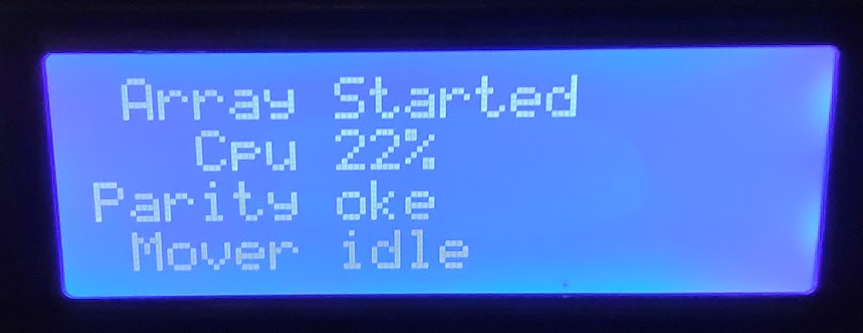
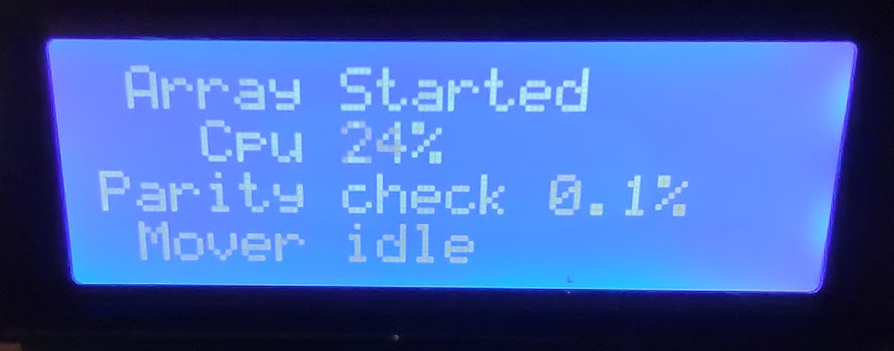
I got two goals here. The first one is obviously to learn more about unraid, slack and how to make unraid plugins. Second goal is more practical: I'm trying to create put a netdev_stats.ini (just a name I came up with) along with al the other ini's in /var/local/emhttp/state that gathers the current bandwidth from various interfaces. As far as I can tell it's not available. Well, third goal is to actually use that ini for a 4x20 lcd display I'm working on to display cpu, parity status, bandwidth maybe how much space is left. For now the raw bash script and rc script only get current rx/tx bytes from the interface, no bandwidth calculation yet although I already had that mechanism working for an other project. Just need to implement that. Output sofar (still need to filter out unwanted/need interfaces) and is refreshed every second: ``` cat /var/local/emhttp/netdev_stats.ini [eth0] rx=19769200081 tx=1175170966119 [bond0] rx=19769200081 tx=1175170966119 [vhost0] rx=17744066178 tx=1125304306954 [docker0] rx=1088068 tx=1328220 [macvtap0] rx=130047218 tx=226070299 [veth1fe2317] rx=774598 tx=827228 [veth6ee30bd] rx=0 tx=2126 [vethd83e77e] rx=130137 tx=1428591 [veth21b8a2c] rx=0 tx=49676 [vethcdc0f00] rx=99847108 tx=3512523901 [veth5b30f33] rx=0 tx=2126 ``` Next iteration is ofc that actual bandwidth is shown on tx/rx. I think only eth0 and/or bond0 are usefull tho. So @ich777 what you are saying is that I should make a txz with the files in their appropriate path and only put the symlinks and chown command in the plg.. Will also check the install plugin page - I have seen that page but faded since we only use the CA nowadays 🙂 @primeval_god I will check those out (also the links @ich777 posted. Disclaimer: the scripts might not 100% bulletproof and maybe some things are not done the right way. netdev_stats.plg netdev_stats.sh rc.netdev_stats
-
Hey guys, I'm trying to understand how the plugin system works. Sofar the only thing I'm trying to achive is "installing" a bash script to /usr/local/bin and the rc script that is needed to start/stop it. The two scripts are working if I copy them manually to their locations. Also had a version that involved copying them to their location by adding them to the flaskdrive and tinker with the go script but the go script is executed way after the plugins got installed. I tried to reverse engineer some plugins and figured that the bash and rc file could be embedded in de .plg. Can't be hard right? After I rebooted the plugin ended up in /boot/config/pluging-error so I expected some logging since nothing showed up in /var/log/syslog. Please tell me where plugin installation logs are. Eg. I'm not creating an elaborate frontend page to start or stop of enable/disable te service, at least not for now since I'm not going to publish it. I just want fire up a script as service when unraid starts - whenever the array is started or not.. Sidenote: I think it would be awesome if limetech would create documentation about how the plugin-system works and what to do and what you deffo should not do -
-
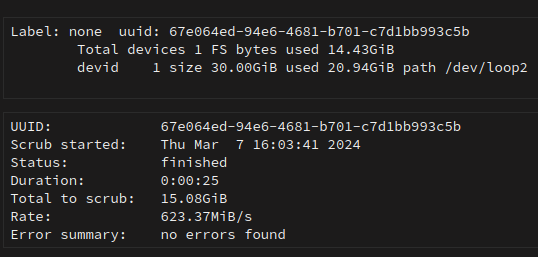
Hey guys, Once a week I check for docker image updates and today the GitLAB-Ce image did not want to update due to the fact that the docker image run out of space. This is kind of weird since various tools (docker container size, unraid_check_docker_script from spaceinvaderone) all tell me there should be enough space left. To continue I added 10G to the image which is now 30G. This is taken after pruning orphaned layers. What I do not understand is why space used says 14.43G (which is about right I think) but the devid section says there is 20.94G in use of the 30G docker image size.. It seems that there is 6G being used somewhere. This is the output of SpaceinvaderOne's script which seems also fine, expect for a lot of unconnected - (or unnamed) volumes. All the volumes I have are mounted to /mnt/user/appdata/something-somthing and are on a nvme cachepool (single nvme) - Yes there are two wordpress containers sharing the same image. unraid_docker_check_script.txt If anyone could tell me where the 6G is and how to reclaim that - would be great (also gives me some extra knowledge if it happens again) Regards Sjoerd
-
oke - then i'll test in with an older stick - got some 64G's laying around -
-
Hey, (tried to find existing topic but did not succeed) The usbstick of my second unraid server is reporting damaged blocks. I tried to fix them but only made it worse. Two years ago I bought the samsung fit 32G (Thanks @SpaceInvaderOne for that awesome video on youtube) but it seems 32G or smaller is very hard to come by these days so - does the 32G limit for the bootflash still stands or would a 64G version work as well? Regards Sjoerd
-
That was not the question 🙂
-
Hey Guys, I have a bunch of bashscripts/libraries (at /mnt/user/appdata/scripts/bshlib/) that I want to map to a container folder (eg /root/bshlib) but I want this path to variable so I already tinkered that the go script to export BASHLIB=/mnt/user/appdata/scripts/bshlib I also added in the advanced section of the docker startup to following: -v "${BASHLIB}":"/root/bshlib". But when I apply it the docker fails to see the environment variable -v '/mnt/user/appdata/mariadb':'/config':'rw' -v "${BASHLIB}":"/root/bshlib" docker: invalid spec: :/root/bshlib: empty section between colons. Yes I have rebooted unraid and yes the variable is present when I login (as root): # env | grep BASH BASHLIB=/mnt/user/appdata/scripts/bshlib When I execute the statement that is in de "Command execution" box is runs fine so.. I think when the docker manager executes the command it has no knowledge of the BASHLIB variable. The variable is exported in de go script and for testing I also added is to /root/.bash_profile (using the go script so it's there after a reboot". I'm planning on using this a lot so if I want (or need) to change the path I don't want to go over all the containers. Regards
-
Hey, I'm tinkering with an 4x20 lcd display so I can show some basic info as disk- and cpu usage. cpu and disk usage is quite simple to get (/local/emhttp or something - found files there that are updated almost every second). But how can I get info if the mover is running or the parity status (oke, checking + percentage, not oke). I want this thing to start when unraid is done booting (so if array wont start i still can see that)
-
I think this should never happen: Nov 9 12:42:41 Athenaeum ntpd[10567]: bind(20) AF_INET 192.168.0.20#123 flags 0x19 failed: Address already in use Nov 9 12:42:41 Athenaeum ntpd[10567]: unable to create socket on br0 (62) for 192.168.0.20#123 Nov 9 12:42:41 Athenaeum ntpd[10567]: failed to init interface for address 192.168.0.20 You sure you not accidentally assigned a static address You also need to look into this on unless you yanked out the plug - crusty wallsocket maybe? Nov 9 11:38:45 Athenaeum apcupsd[5004]: Power failure. Nov 9 11:38:47 Athenaeum apcupsd[5004]: Power is back. UPS running on mains.
-
I can't vote using the pole (no fb - for reasons) - but snapshotting the vm's and reverting them is i.m.h.o a must have - not sure how to implement something like that but i love the way virtualbox or xencenter/server does it - i got no experience with vmware so not how they do it.. (edit: going through this thread it seems I repeated myself) @pras1011 why on earth do you want wifi support? If it's that big of a deal yank in a wifi router and configure it as repeater or something. A server should be (imho) on a wired network. Far more stable that wifi. And if speeds it the thing (wifi6) faster then 1G these days, idunno, then yank in a 2,5 or 10G adapter and replace the switches.
-
Ahh yeah - I figured you did something like that, so I tried to find some documentation on that but failed (or my search failed). Thanks - Thx for the code-snippets. Good boilerplate to start with. I assume your unraid gui runs on 888 ? Would be nice tho if you could post it when it's more user friendly. Would also be awesome if the entire dashboard- and main-page are available in json format by default. Imagine what you can do with that. Not just for home assistant but also for arduino/esp you name it.
-
How did you get all those readings into hassio? Did you make an endpoint/api in unraid to gather them from within hassio using a custom entity. I really would like to have something like that too - esp temp drive/cpu temps and if also if mover or parity check is active. Could you share (if not already - thread kinda huge) them?
-
Ye that works - thanks
-
Moving all my vm related services to my 2nd unraid server where they live as containers so this plugin is very handy but... ...and maybe I overlook this in the documentation: I got a couple of non-docker folders and those are quite heavy on reading and writing (syslog, REST-api call and logging those) and they are not backup-ed. Not entirely sure if aappdata is the correct place for those directories (appdata in on a nvme cachepool). Is there a mechanism that tells the mover to mirror data with the array (or actually sync to the array) instead of moving from or to the array?
-
I got some weird behavior regarding to i915 to on a new motherboard - but that was during boot and unraid did not even get to the boot-selection menu: Turned out I used incompatible memory (kingston hyperx) although memtest86 ran over 24h without any errors. I replaced the memory with cheap-ass memory and did not have any error after. My kernel warning were ofc different but it might be an idea - if you got some spare memory laying around - the swap out and see what happens. You could check if the memory you are using is in the compatibility-list for the board you are using.
-
Can you check which bios/firmware you have and what memory did you equip it with ? I flash the firmware 2 weeks ago and unraid still crashes.. Althoug memtest86 passes over I hate that it that mine doesnt work