sjoerd
Members
-
Joined
-
Last visited
Everything posted by sjoerd
-
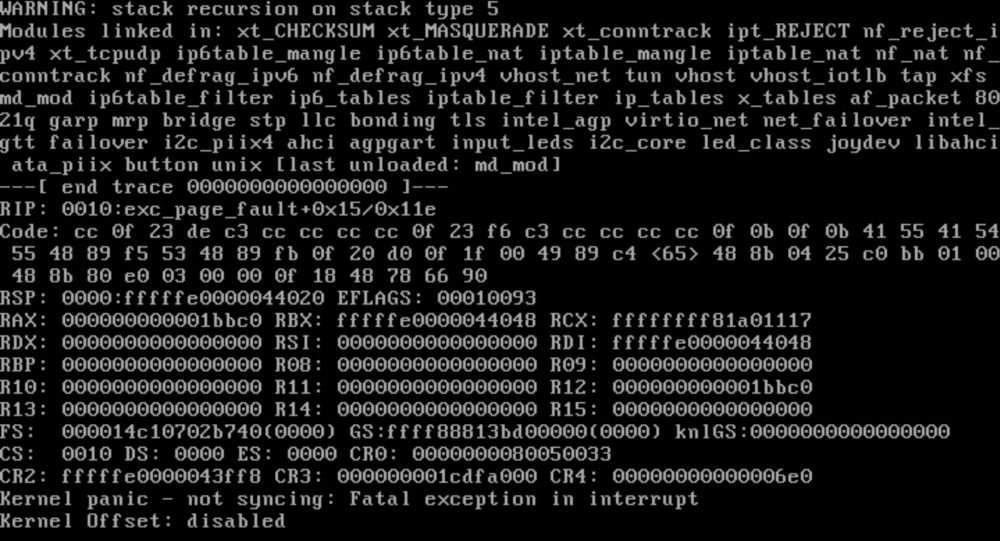
mmm - luckily this is a test rig - after parity check unraid report wrong or missing fs. oh well
-
Euhm.. My unRaid test-server crashed yesterday with a kernel panic. After a reboot the parity-check started. While this was running I wanted to copy some data from my registered unraid server and got this message in de log of the test server. Jan 27 00:15:46 towerpve kernel: XFS (md1): Metadata corruption detected at xfs_buf_ioend+0xac/0x386 [xfs], xfs_inode block 0xa0 xfs_inode_buf_verify Jan 27 00:15:46 towerpve kernel: XFS (md1): Unmount and run xfs_repair Jan 27 00:15:46 towerpve kernel: XFS (md1): First 128 bytes of corrupted metadata buffer: Jan 27 00:15:46 towerpve kernel: 00000000: 00 00 00 00 00 00 00 00 00 00 00 00 00 00 00 00 ................ Jan 27 00:15:46 towerpve kernel: 00000010: 00 00 00 00 00 00 00 00 00 00 00 00 00 00 00 00 ................ Jan 27 00:15:46 towerpve kernel: 00000020: 00 00 00 00 00 00 00 00 00 00 00 00 00 00 00 00 ................ Jan 27 00:15:46 towerpve kernel: 00000030: 00 00 00 00 00 00 00 00 00 00 00 00 00 00 00 00 ................ Jan 27 00:15:46 towerpve kernel: 00000040: 00 00 00 00 00 00 00 00 00 00 00 00 00 00 00 00 ................ Jan 27 00:15:46 towerpve kernel: 00000050: 00 00 00 00 00 00 00 00 00 00 00 00 00 00 00 00 ................ Jan 27 00:15:46 towerpve kernel: 00000060: 00 00 00 00 00 00 00 00 00 00 00 00 00 00 00 00 ................ Jan 27 00:15:46 towerpve kernel: 00000070: 00 00 00 00 00 00 00 00 00 00 00 00 00 00 00 00 ................ Jan 27 00:15:46 towerpve kernel: XFS (md1): metadata I/O error in "xfs_imap_to_bp+0x50/0x70 [xfs]" at daddr 0xa0 len 32 error 117 Jan 27 00:15:47 towerpve kernel: XFS (md1): Metadata I/O Error (0x1) detected at xfs_trans_read_buf_map+0x198/0x26d [xfs] (fs/xfs/xfs_trans_buf.c:296). Shutting down filesystem. Jan 27 00:15:47 towerpve kernel: XFS (md1): Please unmount the filesystem and rectify the problem(s) I'm not sure how to proceed - is this issue fixed by the parity-check or do I need to boot unraid in safe-mode or something. The board I'm running this on is N5105 based equipped with 32G ram - docker and vms functionality is disabled as I'm not going to use that.
-
Hello, Current setup: 12 disks in array (with 2 parity disks) 1 ssd cache pool 2 unassigned disks (for couple of vm's) 2 LSI 9211-8i raid cards (in "dumb"-mode) I'm about the reduce the power consumption of my array by: removing a couple of old and obsolete disks removing one parity disks (got two) -> this one needs to be a data disk again (or at least a spare) physically moving disks to 1st raid controller so I can remove it Not sure how to approach this. I think, due to the vast amount of changes I'm going to make, the procedure would be: Move all data to the disks I want to keep. Backup really important data as well as docker appdata. Stop the array. Physically remove obsolete disks and move the other disk to the 1st raid-controller. And I'm uncertain what the next steps are (i want to keep the cache as it is): boot the server (array is not going to start obviously) new config (which setting) as parity-disk, select the one that is still there (but that parity is invalid ofc) select the remaining disks as array disks. The 2nd parity disk should, if I'm correct (and if i want to use that as data instead of spare),, be visible as unassigned disk and add it to the array.. When that is done I should be able to start the array and the parity will rebuild itself - I'm I close or are there some flaws in the suggested procedure? Regards Sjoerd
-
Excellent blog-post. I live in Europe and my energy-bill is twice my mortgage which is ridiculous. Last month my combined energy-bill (power/gas) got estimated at 1500,-- euro's which is insane. Is half my salary. My current action to reduce power-consumption: CPU governor to power saving. Stop letting unraid decide where and how to scatter the shares: my static and rarely used data is on 3, 3TB drives. They hardly spin up anymore where the family shares are on two 4TB share - they are WD Red but it think they should be replaced with WD Green or some other low-power disks. I got now an old 1.5T and a couple of obsolete 2TB drives that should be removed. Mover scheduled to move once a day (don't want to set that at a lower frequency due to possible data-loss - I got no clue how much power ssd's draws so I might need to set up the cache as a raid 1 cache-pool) 1) and 2) greatly reduced power-consumption. Further actions I want to take is removing disks (and should also make one of the two lsi 9211-8i adapters obsolete) Shrink the array by: Remove one of the two parity drives and use a spare data-disks Remove the unassigned disks and empty disks from the array Further Move the the vm's from 2 unassigned drives to the cache pool When that is done I need to look at the hardware itself - currently on a quite old i7 - although it's TDP is rated a 35Watt's unraid does not need an i7 and nor do the vm's or dockers (nginx proxy manager and gitlab-ce). Also want the server to shutdown at night but my home-assistant and personal website are also on the server so not entirely sure how to deal with that a.t.m. It's just that you cannot by mobile cpu's rated at 10/15Watt's to put into a mitx board..
-
I swapped the drive to an other bay, even to the other cable of the 2nd controle - still same, meanwhile I contacted Kingston and the told me that this is not good and since the drive is brand new I need to get a new one from the shop I bought it.
-
I would like to jump into this thread. Last Friday I received a new Kingston SA400 960G to use as cache pool for the domains (vms). I'm receiving udma crc errors instantly. I got two LSI 92xx 8i controller in my rig - one is completely filled up and the 2nd has now 4 drivers (also 4 drives though the motherboard sata ports. The the LSI controller are attached with 2 hff 87xx cable to the backplane on the enclosure. Since crc are not directly related to the drive (but communication between controller/ssd). I would like to swap the drive (it's a cache pool ssd on a separate pool) to an other bay and see if the crc's disappear, but I'm not sure how to proceed. Do I need to shutdown the server, move to ssd to an other bay and start the server. One of the vm's is running on an unassigned drive. Can I e.g. stop the array, unmount de ssd, move it and then start the array again ?. The ssd is on the same cable as one of my parity-drives btw and that one is running fine. On the other cable of that same LSI controller are two unassigned disks connected, also fine
-
Checkout this thread : And this thread has the answer: You need to hack into the vm's xml - It works as described * I removed the old hotplug usb addon and installed the usbmanager * copy past the xml snippet into the vm's xml devices node <serial type='dev'> <source path='/dev/serial/by-id/usb-dresden_elektronik_ingenieurtechnik_GmbH_ConBee_II_***-***'/> <target type='usb-serial' port='1'> <model name='usb-serial'/> </target> <alias name='serial1'/> <address type='usb' bus='0' port='4'/> </serial> * Hassio does not see it like you are used to but has the following format now: /dev/serial/by-id/usb-QEMU_QEMU_USB_SERIAL_1-****:**:**.*-*-****-port0 (something like that). I assume zigbee2mqtt see it the same since it's how the vm (qemu) sees it now. Without the snippet Hassio detected the stick but could not connect (resulting in timeouts) * Also - not sure, but is the user that zigbee2mqtt is user allowed to access the serial port ?
-
Hey, Upgraded recently to 6.10.3 (from 6.9 - flashdrive was too small so I could not upgrade earlier) - I really love this plugin - moving all static and not frequently accessed data to other disks so the array does not need to spin up all drives - I noticed our "home" share got across 10 disks - silly. During the day only the "home-shares" are accessed and fit well on one disk and I don't want to "pollute" the home-share with data generated from backupscript eg. My question: is there a log keep when DFM can't move files or folders - For instance, 'm trying to move share "a" from disk6 to disk1 and share "b" from disk8 to disk1 and it seems to fail because nothing happens. Moving share "a" from disk6 to disk1 and share "b" from disk11 to disk1 is no problem. So I assume something is preventing the move of those 2 shares but without a log I can't figure out why. Edit: I encountered an issue last night: I think i've seen this question somewhere on the forum - maybe how to deal with it too, but I can't find it. I Tried to delete the versions on disk2 but krusader is not falling for it. I check this thread and also the pdf that's posted on the first page - must be blind 🙂

-
Yes I found that as well a couple of minutes ago - cool beans - thanks!
-
Thank you - I also found the "compute all" - took a fair amount of time but that is exactly what I wanted to see - also "Share is outside the list of designated disks" - Excellent. I love unRAID and it's community.
-
Hello, Is it possible in the current release (running 6.10.3) to see which disks a share is using (and pref also a column with included and excluded disks) As an extended question - I need to move a couple of share of 2 disks because one of them is reporting 75000+ power on hours and both are approx 10 years old.. Since I got more then enough space I want to shrink the array and it's nice to see which shares are partially using those two disks... or which share is using which disks.. It's not practical so swap back to the overview and details page. Edit: I posted this in the wrong subforum. Sorry
-
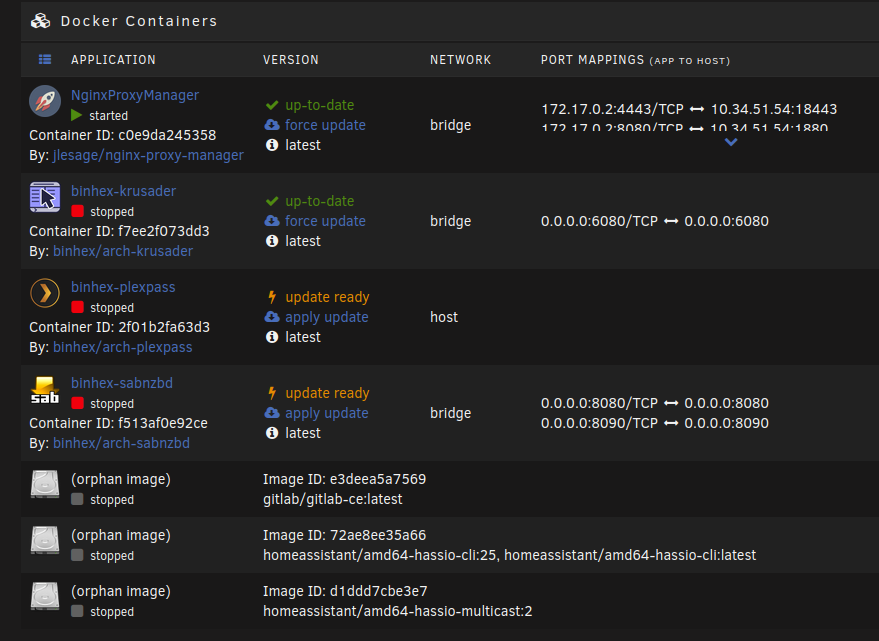
I'm about to panic - I was in the middle of a the update process of the gitlab.ce image when a power-outage occurred.. unRaid is up but not sure how healthy my docker environment is. One thing is for sure that gitlab.ce is definitely not 😞 - It does not even show anymore as installed - only the inactive container - Will the docker pick up everything that was allready there or do I have a serious problem ?? EDIT: Trying this at the moment - not having fun at the moment (because I'm too lazy to sort out my backups) EDIT2: Panic attack over - gitlabce is running fine - no data lost there.. Not sure if this is common knowledge or if this is the best way but I make gitlab.ce backups like this: * Open de console of the gitlab.ce container # cd /var/opt/gitlab/backups (if it does not exist create it) # gitlab-ctl backup-etc --backup-path /var/opt/gitlab/backups # gitlab-backup create The backups can be found at /mnt/cache/appdata/gitlab-ce/data/backups and can be moved to a backupdisc
-
Crap..... plugin: updating: unRAIDServer.plg plugin: downloading: https://unraid-dl.sfo2.cdn.digitaloceanspaces.com/stable/unRAIDServer-6.10.0-x86_64.zip ... done plugin: downloading: https://unraid-dl.sfo2.cdn.digitaloceanspaces.com/stable/unRAIDServer-6.10.0-x86_64.md5 ... done boot device shows 224825344 free but upgrade needs 309918020 plugin: run failed: /bin/bash retval: 1 I guess my 1G flash need replacing....
-
Is it possible to source in other files (with functions and/or presetted variables) into the main "script". I'm tinkering with a script and would like a lot of functions to be in a different file to reduce the size of the actual script and keep the main-script clean and tidy. I noticed scripts that are running have their script copied to /tmp/user.scripts/tmpScripts. Will that affect sourcing in files difficult?
-
@dlandon @ich777 The problem solved it self after "the windows remedy" (reboot the system) - tried restarting the array first but that didn't cut it. Now I see the drive as Dev3 and the gears-icon is now also orange (instead of white) - And as default the drive is not being shared on mount.
-
It's under the settings tab and then User Utilities (bottom of that page) Yes - I also noticed that it didn't show as Dev x (I assumed Dev 3) - By "double arrow" do you mean the "Refresh Disks and Configuration" - I did that a couple of times yesterday. No luck. Not a biggy for no. I still know you to (u)mount it from the terminal if needed as long as UD understands it... Also - what about the "Adding SMB share 'USB_DISC_4T'" line.. I do not recall that happened before.. I also see the disk on the network now and do not want that to happen and I'm not sure how to stop that.
-
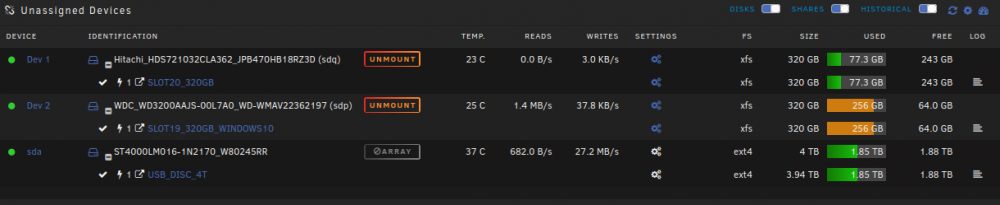
Hi, Can anyone explain the grayed-out "ARRAY" label on my usb drive.. I had it plugged into a usb3 port but lsusb -t showed that its was in fact not usb (although marked blue) so i performed (using the unmount button on UD) to unmount it. Nothing wrong there.. The disk was unmounted and could be remounted using UD. Then I removed the usb-disk and plugged it into a blue usb socketed on the back-plane of the motherboard.. Now lsusb -t shows that it is on a and usb3 hub, but I can no longer mount or unmount it - but it is accessible - And here is a part of the unraid log: Feb 22 16:04:35 Tower kernel: sd 0:0:0:0: [sda] Write Protect is off Feb 22 16:04:35 Tower kernel: sd 0:0:0:0: [sda] Mode Sense: 4f 00 00 00 Feb 22 16:04:35 Tower kernel: sd 0:0:0:0: [sda] Write cache: enabled, read cache: enabled, doesn't support DPO or FUA Feb 22 16:04:35 Tower kernel: sda: sda1 Feb 22 16:04:35 Tower kernel: sd 0:0:0:0: [sda] Attached SCSI disk Feb 22 16:04:35 Tower rc.diskinfo[9404]: SIGHUP received, forcing refresh of disks info. Feb 22 16:04:37 Tower unassigned.devices: Adding partition 'sda1'... Feb 22 16:04:37 Tower unassigned.devices: Mounting partition 'sda1' at mountpoint '/mnt/disks/USB_DISC_4T'... Feb 22 16:04:37 Tower unassigned.devices: Mount drive command: /sbin/mount -t 'ext4' -o rw,noatime,nodiratime,nodev,nosuid '/dev/sda1' '/mnt/disks/USB_DISC_4T' Feb 22 16:04:38 Tower kernel: EXT4-fs (sda1): mounted filesystem with ordered data mode. Opts: (null) Feb 22 16:04:38 Tower unassigned.devices: Successfully mounted 'sda1' on '/mnt/disks/USB_DISC_4T'. Feb 22 16:04:38 Tower unassigned.devices: Adding SMB share 'USB_DISC_4T'. Feb 22 16:04:54 Tower unassigned.devices: Refreshed Disks and Configuration. Feb 22 16:04:54 Tower rc.diskinfo[9404]: SIGHUP received, forcing refresh of disks info. Don't understand this line tho: "unassigned.devices: Adding SMB share 'USB_DISC_4T'." I can browse the file and directories on it by clicking the label and is also accessable from the terminal. Any idea's ?
-
Awesome - will do that Thank you Sjoerd
-
Hey gents.. Where is the .vimrc file located... i need to change the tab-spacing - 8 spaces is ridiculous 🙂 Regards Sjoerd
-
Hi Gents, I want to use a project specific runner to sync submodules. I know everything is in the gitlab docs like (https://docs.gitlab.com/runner/install/docker.html) but i'm not sure how to do that using unraid. Are the runners available in the Gitlab-ce by default or do i need to follow the docs. Bit uncertain how to proceed since I only used dockers from the "Community Applications"-section. Regards, Sjoerd
-
Hello, I would like to see "ccze" being added - would that be possible (https://github.com/cornet/ccze)? It's available from the default ubuntu repo's and rhel (although seems to be missing on rhel8 though but the rpm from rhel also works on rhel 8. Regards Sjoerd
-
Installed this on a couple of days ago - Had no trouble installing this - pretty much runs out of the box just takes some time to startup the first time. Had some trouble registering the first user.. Couldn't figure out first username. But got is all running. Got just a question: In case of a disaster, how do I recover/restore my code. Seems everything resides on the cache in appdata and since that is cache preferred and always active the mover will not move it to the array.. in fact the mover with move it from the array to the cache - I my cache is only about 112GiB which is enough for daily use. But main question - If I need to reinstall the docker for some reason, how can I restore the data and configuration.
-
Hey I got this question/issue I used to run my webserver on baremetal right behind the router. The server (ubuntu 16.x lts) had a the ufw (just iptables wrapper) installed and I had quite a blacklist to prevent known nets and ip-addresses from spamming / hacking the site. Last week I moved the entire website to a vm and all trafic goes through NPM. - apache2 does'nt know where the traffic comes from (yeah, the reverse proxy). When it was not behind the reverse proxy I had this line but that does not work anymore LogFormat "%{X-Forwarded-For}i %l %u %t \"%r\" %>s %b \"%{Referer}i\" \"%{User-Agent}i\"" proxy - ufw does'nt know it either since everything comes from the reverse proxy How can I fix these issues?
-
Script is running as we speak.. Disabled the plugin's cron till it claimed ready
-
I was (ofc) not aware of that. I used the plug-in and seems to be working. I will pick up the new version of autovmbackup too Thanks for bringing that to my attention