sjoerd
Members
-
Joined
-
Last visited
Everything posted by sjoerd
-
Is this from inside the docker (I assume it is)? Can you from inside the docker "touch" something. From within the docker my configs are root:root and 0644. From outside (/mnt/user/appdata/mosquitto) they are also root:root and 0644 but I got a very simple setup and dont even have a /config inside the docker . └── mosquitto ├── config │ └── mosquitto.conf ├── data ├── log ├── mosquitto-unraid-default.conf ├── mosquitto.conf └── passw This is my directory structure - is root from with docker and appdata. I dont think config/mosquitto.conf is being used but mosquitto-unraid-default and the mosquitto.conf on same level are! Just question: What's the benefit of storing the in-memory db - afterall its a msg broker.
-
Morning guys (and ladies) I created little python script that sends data to an arduino nano every second. To make this work I took the following stept: - Installed python3, python3 setup tools and pip from the nerdpack - no issues there - Created the following directory for the python-script and pythons virtual enviroment: /mnt/user/appdata/python/cpuusage - Inside I created the virtual environment with python3 -m venv venv source ./venv/bin/activate pip install --upgrade pip pip install psutil pyserial - Then I copied the script to this directory and started it with python cpuusage-to-serial.py. All good. The display show how busy the server is and follows (h)top quite good. Since I want this to run when the array starts (Its not available because the script is placed on the array - I thought I would not be a good idea to place it on the stick) I created a little user.script: #!/bin/bash #description=Sends cpu usage to arduino nano #arrayStarted=true cd /mnt/user/appdata/python/cpuusage . ./venv/bin/activate python cpuusage-to-serial.py 2>&1 I started to script in the foreground and the script started and the display showed what I expected. After setting the schedule to "At Startup Of Array" and hitting Apply I rebooted the array. After the array got back up the script got started and the display starts to show cpu usage - sweet. But now it gets weird: When I go to user.scripts and abort the script, unraid says "aborted" but the script is still running in the background. Also. whenever I stop the script using user.scripts or let it run. When I want to stop the array I get this message in the log: Oct 27 09:10:47 towerpve root: rmdir: failed to remove '/mnt/user': Device or resource busy Oct 27 09:10:47 towerpve emhttpd: shcmd (279462): exit status: 1 Oct 27 09:10:47 towerpve emhttpd: shcmd (279464): /usr/local/sbin/update_cron Oct 27 09:10:47 towerpve emhttpd: Retry unmounting user share(s)... Oct 27 09:10:52 towerpve emhttpd: shcmd (279466): /usr/sbin/zfs unmount -a Oct 27 09:10:52 towerpve emhttpd: shcmd (279467): umount /mnt/user Oct 27 09:10:52 towerpve root: umount: /mnt/user: target is busy. Oct 27 09:10:52 towerpve emhttpd: shcmd (279467): exit status: 32 Oct 27 09:10:52 towerpve emhttpd: shcmd (279468): rmdir /mnt/user When I kill /mnt/user/appdata/python/cpuusage/cpuusage-to-serial.py the array continues the stopping procedure. I think I need to make this user.script thingy a true daemon but I have no idea how and probably can't because everything is on the stick and having a entire python venv on it is imho not a good idea. I have no idea where to place the script (well except on /boot/config/plugins/user.scripts/scripts but that is rather limited since it only can execute "script" and I though it is not even executed from there. And why does the script not abort like it should? This is the "heart" of the script - I left out all helper methods since they do not matter: def get_cpu_usage(): threading.Timer(SPEED, get_cpu_usage).start() serial_data = [] pct_per_core = psutil.cpu_percent(percpu=True) for core, pct in enumerate(pct_per_core): if core < CORES: level = pct2bar(pct) serial_data.append(str(level)) send_data(f"<{';'.join(serial_data)}>") get_cpu_usage() On my test rig I created a systemd unit-file and works a charm but that's not unraid, not even slack. Any thoughts how to make this work the proper way? I'm not even sure I need to use user.scripts.
-
Hello, Which of the two templates do I need to use? The official (which got updated quite recently) - or the v2 beta? Thanks.
-
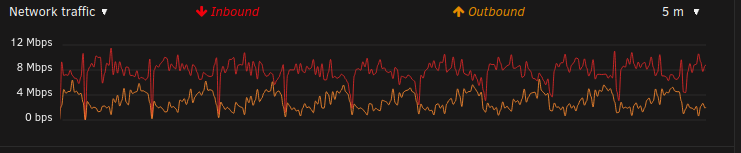
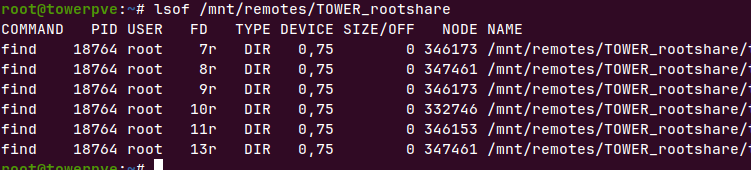
I got a question about folder caching and remote shares I noticed a lot network activity between my two unraid servers. Seems my "slave" that has a mount to root_share on my "master". I could I first not see what or why - then I checked the "master" and showed the more or less the same. When I did an lsof of mount on the slave I showed a folders on remote iterating through the entire directory tree on the master. I checked if I could exclude shares but only local shares can be excluded. Would be very nice if there was an option to exclude files on remote shares.
-
Looks a lot like a home automation (hassio) dashboard, but I could be wrong
-
Hey Team, Thanks for the new release - Update got applied without issues (never having issues upgrading to stable releases) I was hoping on the "take snapshot" feature on the VMS page. I miss this so much. I tried to create them using the terminal but failed
-
Just came across this thread - my cwwk board is still collecting dust after numerous attempts to get it stable... Did you need to hack in kernel parameters or was it stable "out of the box" - if so which bios (or board version if there are any versions) f.y.i. i post quite some items in the topic on servethehome (as Sjoerd obv.) See
-
Any users with this motherboard or particular errors?
-
anyone got a tutorial on how to handle and manage snapshots with virsh or qemu-img on unraid ?
-
Hi Guys, I really need to make use of the virsh snapshots because I need to do some extensive tests on an old rhel6 vm so did some digging how to manage it. I installed an oracle linux 6 vm ( is rhel 6) and after some trial and errors I could successfully create snapshots (having a new snapshot file) and revert to the base image. Is not even that complicated (thought it would be) - to make sure the snapshot is create in the ol6 directory I first cd into /mnt/user/domain/ol6 virsh snapshot-create-as ol6 snapshot0 --description "first snapshot" --disk-only virsh snapshot-current ol6 virsh snapshot-current ol6 --name On disk a file got created "vdisk1.snapshst0" - sweet. The I updated the os with the usual "yum check-update && yum update". The new file got larger during the update process. Sweet. I could easily revert with virsh snapshot-revert ol6 snapshot0. And then when I rebooted unraid virsh no longer knows about the snapshot.. I assume the snapshot information is kept in memory then rather than stored on the usb ? How can I fix this? -
-
Been trying today with virsh and qemu-img to try it from the cli - Using seabios (does it matter) and qcow2 but if I set current snapshot with virsh for that vm6 and do a dnf update or something else big the data still gets written to the clean base image - same goes for qemu-img.. added a image, no error but the snapshot file is not created after "root@towerpve:/mnt/user/domains/ol6# qemu-img snapshot -c vdisk1_202302161020.qcow2 vdisk1.qcow2". When I check if the snapshot is created: root@towerpve:/mnt/user/domains/ol6# qemu-img info --backing-chain vdisk1.qcow2 image: vdisk1.qcow2 file format: qcow2 virtual size: 12 GiB (12884901888 bytes) disk size: 4.3 GiB cluster_size: 65536 Snapshot list: ID TAG VM SIZE DATE VM CLOCK ICOUNT 1 1676537842 0 B 2023-02-16 09:57:22 00:00:00.000 0 3 vdisk1_202302161020.qcow2 0 B 2023-02-16 10:22:03 00:00:00.000 0 Format specific information: compat: 1.1 compression type: zlib lazy refcounts: false refcount bits: 16 corrupt: false extended l2: false Confused - I tried the virt manager docker but I couldn't find an option to make a snapshot in the first place. I'm not sure how virsh or qemu-img work together with unraid, but I'm using Xen at work which just snapshots an entire vm - no matter how many disk images there are attached to it.. Same goes for virtual box - which I'm using at home (on my workstation). Native support for managing snapshots is most welcome - unraid is quite complete (and when not, you can complete is yourself with plugins), but it kinda bothers me not having this feature - that's the reason why I (almost) moved to proxmox having unraid just as dfs inside it, but that would be counterproductive. I've been thinking about btrfs too but I deliberately did not format the vm cache nvme as btrfs - don't want to go that way: qemu it self can manage snapshots..
-
Those prices are not consumer friendly anymore.. Got my eyes on the Gigabyte z690 UD (or maybe the z790) board. The z690 is around around 190 euro and has 3 nvme and 6 sata which suits my needs. Also it's a standard chipset and the board has not extra fancy bell and whistles. I assume unraid can deal with this motherboard just fine?
-
Wrong thread 🙂 - I'm using nerdtools - not the pack. Apologies
-
Request to add CCZE It is possible to add ccze to the nerdtools ? I am using that a lot on fedora and debian based systems and it would be nice if we could have that in the nerdtools as well.. Reason is that I cannot differ warning, crits and info and such from just plain white text scrolling down my terminal - I'm dyslectic and with this font and density, I just see a mash up of chars. I helps a bit that the syslog window from the web-terminal has colors for diff sections of unraid.
-
Hey guys - got some issues.. Building new test rig * ncdu works fine with ncursus * iftop does not - export TERM=linux does not help * iotop give libffi.so.7: cannot open shared object file: No such file or directory. In this thread someone opted updating libffi would fix it but I cannot found that package in nerdtools
-
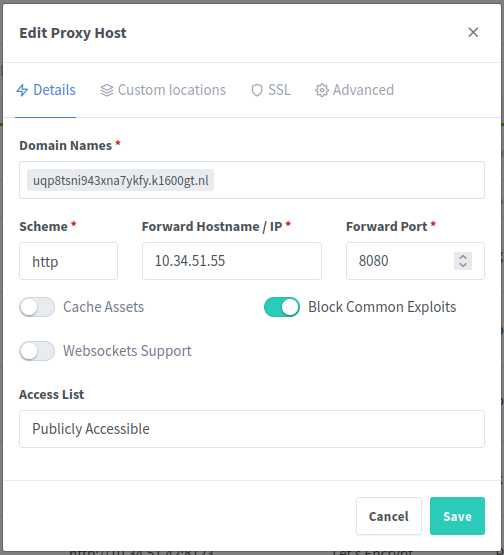
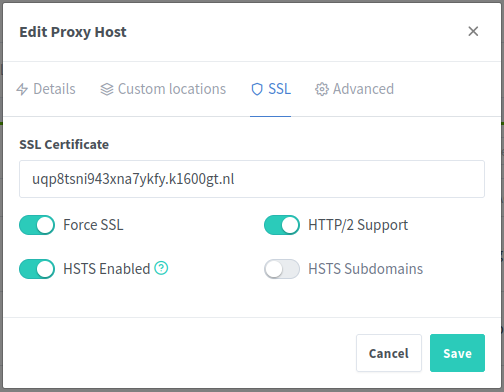
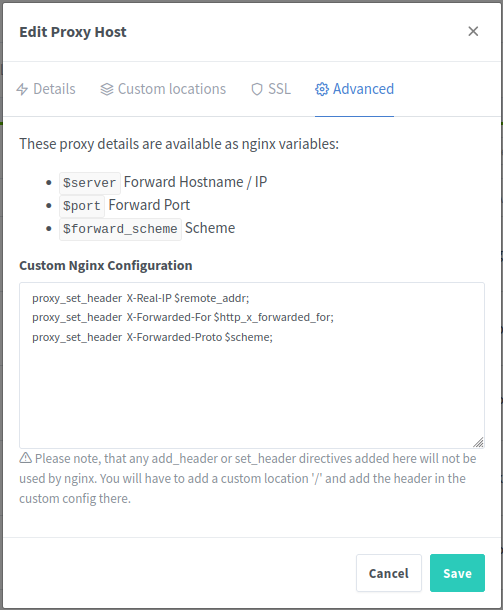
Keep me posted - I was about the revert my own changes but I'll keep it the way it is for the moment. Edit: I can confirm that "hard-coding" the web-address works (as expected): It might be a bit out of scope to explain how to set this up, but is wordpress is suppose to be accessible from the outside. Couple of steps are necessary: Add a new CNAME to your domain. This might take a while for it to work - depending where the domain is registered. Setup the nginx reverse proxy manager (add a proxy-host) to point to the external side of the docker. In my case that's 10.34.51.55:8080. This address:port directs to the wordpress container. Also add the following lines to the nginx custom configuration for the proxy proxy_set_header X-Real-IP $remote_addr; proxy_set_header X-Forwarded-For $http_x_forwarded_for; proxy_set_header X-Forwarded-Proto $scheme; Replace the WordPress- and Site Address to the new address (http since https is not configured yet) At this point you could replace the WebUI url with the new http address so you can check if it works When you can reach the http address just fine, you can configure nginx to add a let's encrypt certificate. Quite easy: Go to the proxy-host in nginx, selected the SSL tab and request a new one for the url. Check "Force SSL", "HTTP/2 support" and "HSTS enabled". You also might want the check "Block common exploits" on the first tab. The request takes a couple of seconds. Important is that let's encrypt can reach the site from the outside though port 80. When this is done you need to update the WebUI url and the two url's in WordPress to https. When you can reach the site though https, you need to replacement the url's that are everywhere in your posts, links etc. I used blue velvet url replacement plugin. I might be possible to you have added (or the theme editor) urls into sections the plugin does not or can not look - to make sure everything is coming from the url you can use the network inspector of the browser (usual F12 brings up developer stuff) Sidenote: nginx proxy manager does not run on my unraid server but as a lxc container (from the exact same image) on my router that is running proxmox with opnsense and hassio as vm and pihole and the nginx proxy manager as lxc container.. I do too much tinkering with unraid and pihole and nginx are a bit too "mission critial" as is opnsense, to be down (well according to my kids and wife) Pictures say more than 1000 words so here they are:

-
Hi, My current build is based around an very old 4th gen i7. Need to upgrade the hardware and scale down the array as it consumes too much power. I'm planning on replacing variety of disks (big/small) to 4x 4TB driver or 3x 6TB - plus 1 parity.. Also going to add 2 nvme's - one for file cache, one for vm's - and I can't remember what @SpaceInvaderOne recommended also placing the dockers on the "vm cache pool". Anyhow.. I recently bought an aliepress nas motherboard having 6 sata ports, 2 nvme bases around an N5105 - added 2x 16G sodimm. Getting unraid to start was painfull - had to add a lot of kernel bootparam.. Adding vm's and docker was doing altight - looked promising but had crashes from time to time and copying some vm's from my current unraid to this testset crashed after couple of Gigs got transferred. Could not get it to work under load - pitty - all in all lost 300,-- euros there (cant reuse the sodimms atm) Soo looking for a normal motherboard having at least 2x nvme (3 better) and at least 6 sata (8 better) *without shared pcie-lanes*. That way I don't have to add an extra disk/raid controller. Most motherboards contain a lot of rgb and overclocking junk I don't want and have those shared pcie-lines between the nvme-slots. I want stability and I do not want to get into the supermicro brand prices. Do such "servergrade" consumer motherboards exist - looking for intel socket 1700 btw. AMD seems to be more powerhungry. The only board that is nice enough (no idea about the costs) is this pretty awesome board from Gigabyte (also gigabyte fanboy so +1 I guess) https://www.gigabyte.com/Enterprise/Server-Motherboard/MW34-SP0-rev-11 - Are there boards similar to this one? - anyone know where the buy this in Europe (where a normal consumer can shop) and how much it costs? - anyone using for unraid but better question is maybe : can unraid handle this board?
-
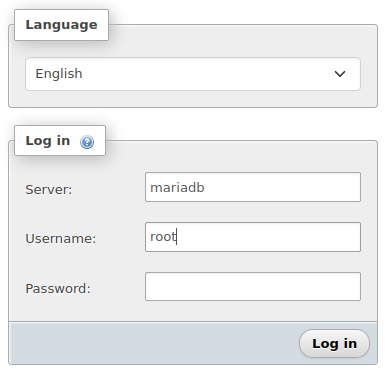
Hey, Not sure if this helps but I had same kind of issue. I took the following steps: * created a new docker network (docker network create web) - could be docker create network web (can't remember) * installed phpmyadmin from linuxserver (networktype: web) -> make sure PMA_ARBITRARY is set to 1 * installed mariadb from linuxserver (networktype: web) * with phpmyadmin 1) create the wordpress database with user/password and 2) then import your wordpress sql backup. Name of the server is the name of the mariadb container - default is "mariadb" - because both are in "web" they should see each other by hostname - if you go to phpmyadmin console you should be able to ping mariadb * install wordpress container (networktype: web) if the import of you wordpress backup went well you can just fill in the server, database, user and password. * if you have an existing wordpress install scp the wp-content of the site to the new site (and do a chown sshd:sshd -R ./wp-content after because after the scp action it like owned by root (my actions at least did that) * when that is done - all urls in your post are probably wrong. You can fix them with * when you are done stop the phpmyadmin container - Only start it when you actually need it. It's a very powerful but also very destructive tool.

-
Mmm - I see, Still weird way - static eq. immutable data should be in the image, but it is true that wordpress updates on the fly. Maybe I need to revert my changes -
-
Mmm - sitehealth of both is "good" - But both still run locally and I disabled REST for security purposes. You have no idea, well I think you have :-), how many hack attempts occurs each day. I run the wp-cerber plugin and wrote a little bash script around it to get all suspicious attempts and dump those ip-address into my opnsense router. What needs to configured correctly is the url. Mixing internal and external url gives errors therefor my current vm (migrating to docker + vm once my new hardware arrived - still running my new unraid-server as testphase on a trial-key with old hardware) can only be reached through the external url - hooray for the ngnix reverse proxy docker 🙂 - I might need to tinker with the docker-setting and change http://[IP]:[PORT:8080]/ to something hardcoded 🙂
-
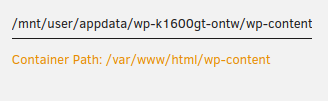
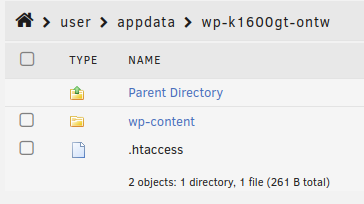
Hey, Ported my test WPress site (was on a ubunut 20.04 vw + mariadb + apache2) to this WP docker container and moved de database to the mariadb container (from lscr.io / linuxserver) repo.. Bit tinkering. Got both containers on a custom network so wordpress can easily see the database). Was quite easy to do - had to import a sql backup I make earlier. Got some question tho.. The container-path points to /var/www/html - which is fine I guess, but also includes the wp-content (which holds the user-data like plugins, themes, uploads). I believe that wp-content should be the only thing on appdata - the rest (imho) should be part of the wordpress image.. I can now temper with the wordpress installation. Normally when you restart the container the container is destroyed and recreated. Could you explain that? What if we receive an updated container? Would it be possible (or even recommended??) to add a volume to /var/www/htlm/wp-content > appdata/wordpress-site1/wpcontent and a link to the /var/www/html/wp-config.php to appdata/wordpress-site1/wp-config.php. Planning on have 3 sites running (test, "live" and an internal which is total different) I mean - that is the power of docker right? - one image, multiple containers with diff settings leaving the same files to the image itself Edit: Yes - that does actually work - I did not find anything on the official docker hub page but this kind of thing normally works as I've done quirks like this myself with my own dockers. To test it a bit further - I stopped the container, pruned it, removed the image. wp-content stays (ofc it does). Then I reinstalled the container from the template (hooray for unraid to save those templates) and I could just visit the site right away. Did found one weird thing. My "live" site (k1600gt.nl) renders well but the version running from the docker does not render a couple of blocks like it should. I checked - nog weird 404's or php error soooo not sure.. Might be a php8 thing since the live site runs 7.4 something. The live one and the docker one are exactly the same - i restored a back of the database and content into the dockers and fixed the url's,
-
Ah I see root@towerpve:~# ping tower ping: tower: Name or service not known root@towerpve:~# ping tower.local PING tower.local (10.34.51.54) 56(84) bytes of data. 64 bytes from tower.local (10.34.51.54): icmp_seq=1 ttl=64 time=0.284 ms 64 bytes from tower.local (10.34.51.54): icmp_seq=2 ttl=64 time=0.232 ms 64 bytes from tower.local (10.34.51.54): icmp_seq=3 ttl=64 time=0.251 ms 64 bytes from tower.local (10.34.51.54): icmp_seq=4 ttl=64 time=0.247 ms towerpve is requesting pihole for tower... should fix that
-
towerpve-diagnostics-20230201-1405.zip
-
Got this error: Feb 1 11:07:34 towerpve unassigned.devices: Mounting 'Auto Mount' Remote Shares... Feb 1 11:07:35 towerpve root: error: /plugins/unassigned.devices/UnassignedDevices.php: wrong csrf_token Feb 1 11:07:37 towerpve root: error: /plugins/unassigned.devices/UnassignedDevices.php: wrong csrf_token Feb 1 11:07:38 towerpve root: error: /plugins/unassigned.devices/UnassignedDevices.php: wrong csrf_token Feb 1 11:07:41 towerpve root: error: /plugins/unassigned.devices/UnassignedDevices.php: wrong csrf_token Feb 1 11:07:44 towerpve root: error: /plugins/unassigned.devices/UnassignedDevices.php: wrong csrf_token Feb 1 11:07:47 towerpve root: error: /plugins/unassigned.devices/UnassignedDevices.php: wrong csrf_token Feb 1 11:07:50 towerpve root: error: /plugins/unassigned.devices/UnassignedDevices.php: wrong csrf_token Feb 1 11:07:52 towerpve root: error: /plugins/unassigned.devices/UnassignedDevices.php: wrong csrf_token Feb 1 11:07:53 towerpve root: error: /plugins/unassigned.devices/UnassignedDevices.php: wrong csrf_token Feb 1 11:07:56 towerpve root: error: /plugins/unassigned.devices/UnassignedDevices.php: wrong csrf_token Feb 1 11:07:59 towerpve root: error: /plugins/unassigned.devices/UnassignedDevices.php: wrong csrf_token Feb 1 11:08:02 towerpve root: error: /plugins/unassigned.devices/UnassignedDevices.php: wrong csrf_token Feb 1 11:08:05 towerpve root: error: /plugins/unassigned.devices/UnassignedDevices.php: wrong csrf_token Feb 1 11:08:07 towerpve root: error: /plugins/unassigned.devices/UnassignedDevices.php: wrong csrf_token Feb 1 11:08:08 towerpve root: error: /plugins/unassigned.devices/UnassignedDevices.php: wrong csrf_token Feb 1 11:09:35 towerpve unassigned.devices: Cannot 'Auto Mount' Remote Shares. Network not available! Seems the share wants to mount before network is up - I got no option the reconnect since it is grayed out. I'm sure I'm not the first one but going though 342 pages is a bit much And don't let name of the unraid-server fool you - it runs directly on bare-metal. Not as vm
-
Hello all, What was a unclean shutdown was actually a crash of the unraid vm I was running inside proxmox. The why: 1) unraid does file-sharing amazingly well, 2) want to get more knowledge of proxmox, 3) already got a proxmox node, 4) this motherboard has 2nvme slots for (one for cache, the other one is for vms on proxmox), 5) has 4 2,5G nics where my old board has only 1 1G nic 6) power consumption. Well in short: unraid kept on crashing after half hour or so. Did not matter if I was using the q35 or i440fx - even tested it with OVMF and SeaBIOS. Did change much.. Yesterday I gave up and removed the proxmox installation from the nvme and booted unraid normally, from usb. The bootprocess did not go much further then unpacking the image - The installation of proxmox needed some tinkering. I had to add xdriver=vesa and nomodeset to the grub_cmdline_linux_default otherwise the proxmox installation would crash on switching to the graphical installer.. But now back to unraid. My knowledge about slackware is limited. Starting unraid os normally would crash - I rebooted and tabbed to add xdriver=vesa and nomodeset to the cmd. After that unraid seemd to be booting but I tried this couple of times but keeps on crashing. Even had an nice amiga 500 copperlist at somepoint - It is deffo not the memory - I equipped the board with two matching quality brand (if kingston is still a quality brand) sodimms and passed memtest flawlessly. Does any unraid devs/engineers can make anything out of this "screenshot" - I really would like unraid to work with this motherboard. I think that there is something unraid does/want that is somehow not allowed since proxmox work (also installed couple of containers in it) and people are reporting that truenas / iESX also works on this motherboard