





Bolagnaise
Members
-
Joined
-
Last visited
Everything posted by Bolagnaise
-
Once again @ich777 thankyou very much for helping us RGB nerds. Your willingness to help this community is amazing.
-
As long as you are running rclone 1.58 or newer then rclone will continue to work normally. Essentially what is happening is google is deprecating the copy paste method for the client ID and secret from the admin console but only for ios,android and some other devices. The method rclone uses in 1.58 to re-authenticate to google is different. TLDR: Ensure your rclone plugin is up to date and everything will continue to work fine.
-
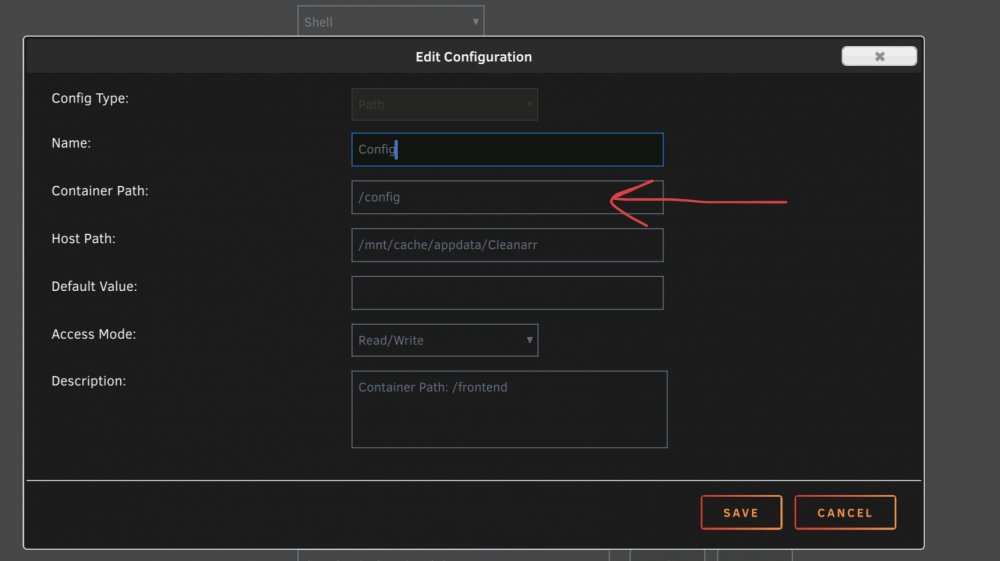
Edit your docker template so that the container path says /config for your config path
-
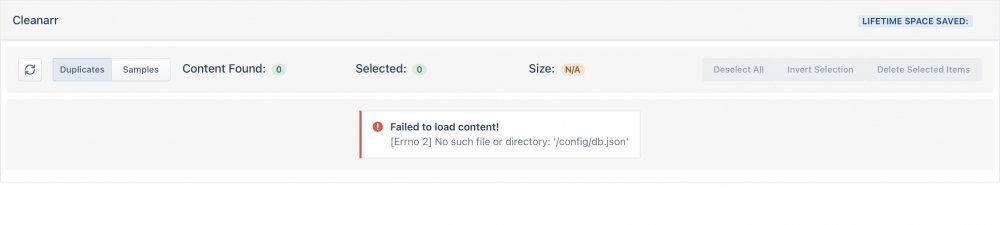
EDIT: Seems the latest build changed the config file path from /frontend to /config, update your docker container path and it will work. This error has popped up. I changed my appdata path from /mnt/user/appdata to /mnt/cache/appdata to bring it line with my other containers and this error appeared. I switched the config path back to the original but the error persists. I also deleted the container and xml from CA and reset up the container from scratch but the same error persists.
-
My server looks like this and i want to disable/change the RAM RGB to white/off. Currently without the kernal patch you cannot control the SMBUS for RAM with ASUS motherboards.
-
Potentially someone really nice like @ich777could develop this into a kernal patch for us unraid users using ASUS motherboards.
-
How would i go about forcing plex to rescan the files if i have setup a basic x265/ac3 encode? Is there a plex plugin on the horizon? Could i just delete the original and force plex to rescan the folder?
-
Just a quick update for anyone looking to implement autoheal in docker, i have found that adding -i to the curl command correctly return the 2OO OK http status for the /identify page, the http return is much shorter so i recommend it. Heres my advanced docker config for my plex server to add the health cmd too. Many thanks again to @Meles Meles --health-cmd 'curl -i --connect-timeout 15 --silent --show-error --fail 192.168.1.100:32400/identify'
-
No problems, i found that that didnt work for me, and i ended up using IPADDRESS:32400/web/index.html as the /identify page returns a blank page for me. I searched for this and found several other people saying the same thing that this page is meant to return some form of information but instead just shows a blank page, either way its been running perfect for a few weeks now thanks to you.
-
Interesting, i had it set too 6.
-
Yeah my friend tried to download around 5 movies all around 10GB each at 1080p 8mbps quality and it caused my plex instance to crash multiple times using the new downloads feature, as already mentioned it seems to store the entire transcoded file in the /transcode mapping folder in its entirety until it’s been downloaded by the client, if the ram becomes full the plex instance will lockup and crash. I’ve switched backed to NVME for my transcode and had him run the same test and the plex server has no issues. Hopefully plex allows us to map a separate downloads folder to store transcoded content that requires downloading in the future.
-
So even with my plex ram cache set to 32G using @mgutt advanced config, im still seeing plex crash when a user tries to download multiple movies. My friend tried to download multiple movies in anticipation for an overseas trip and it was causing the plex instance to crash and the downlaods to fail completly. Looks like im going back to my NVME drive for plex transcodes.
-
Can i ask why your using localhost:32400/identity and not localhost:32400/web/index.html as the website check. I get no response from that webpage when checking it using the curl command.
-
Thank you!
-
Yep, did that.
-
I’m looking for a script that will restart my plex container using curl for those instances where it rarely goes down. I’ve found this script online but I’m not the best at debugging this and cant see to get it to work. #!/bin/bash name=Plex Media Server check and restart description=This script will restart PLEX if it does not respond after two attempts. arrayStarted=true dockerid=$(docker ps -aqf “name=plex”) if [ “$dockerid” == “” ]; then echo “ERR $(date -Is) - Could not get a docker id for docker name \”plex\”.” exit 1; fi Do not check between 1:55am to 2:30am currentTime=date +”%H%M%S” if [[ ! ( “$currentTime” < “015500” || “$currentTime” > “023000” ) ]]; then exit 0; fi firstcheck=$((curl -sSf -m30 https://myserver:32400/web/index.html) 2>&1) if [ “$firstcheck” != “” ]; then echo “WRN $(date -Is) - Plex did not respond in first check, waiting 15 seconds..” sleep 15 secondcheck=$((curl -sSf -m30 https://myserver:32400/web/index.html) 2>&1) if [ “$secondcheck” != “” ]; then echo “WRN $(date -Is) - Plex did not respond in second check either, restarting docker container.” echo “INF $(date -Is) - Stopping docker $dockerid.” docker stop $dockerid echo “INF $(date -Is) - Waiting 15 seconds..” sleep 15 echo “INF $(date -Is) - Starting docker $dockerid.” docker start $dockerid else echo “INF $(date -Is) - Plex docker container responded on second attempt.” fi else echo “INF $(date -Is) - Plex docker container responded on first attempt.” fi`
-
Just got to say, i found scrypted thanks to you, its a godsend for getting my unifi cameras into homekit secure video.
-
How are you doing this? Via User scripts?
-
Installed and running, however my square plugin is deleted nightly and i have to reinstall it daily. Anyway to stop this minor inconvienece? Also, for anyone looking to use reverse proxy, use this subdomain template.
-
https://forums.plex.tv/t/dead-in-the-water-after-version-1-23-6-4810-update-windows-10/730786/20
-
Yep can also confirm version 1.23.3.4707-ebb5fe9f3 stops the crashing loop.
-
i’m having the exact same issue.
-
Perfect, thanks again!
-
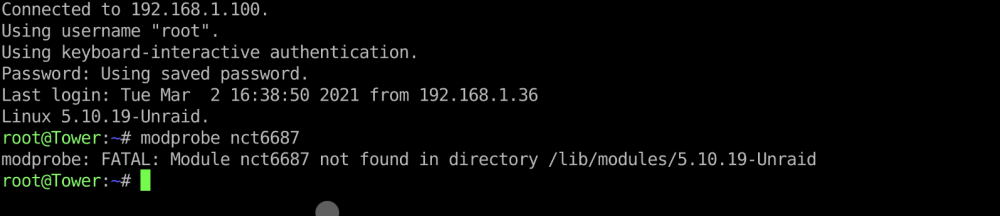
@ich777 No longer works in 6.9.0 stable Heres the output error when running modprobe
-
Are you ok 😀 An OBS NDI CA container would be amazing.





