





JesterEE
Members
-
Joined
-
Last visited
Everything posted by JesterEE
-
"Separate IOMMU" is a deceiving metric for hardware pass through success. Some things are just meant to be together on the board because that's the way the hardware is defined. Them's the breaks. In the "old days", separate IOMMU actually meant something because the hardware vendors just seemingly stuck things arbitrarily together with little rhym or reason. If you look at posts from around 2015 and 2016, that's what I'm talking about. You'd see things like multiple PCIe slots on the same IOMMU which would make passing one all but impossible. That's not really the case today. Usually, stuff is stuck together because it needs to be that way. From personal experience, separating IOMMU on your board is pointless, but if you get different results through trial and error tests, I'd love to hear more about that. And "my post above" is exactly what it sounds like. Both, all, the whole thread really. From the error you're describing it doesn't sound like you actually read the OP/thread and tried the suggested solution. If you're looking for an alternate solution, you're venturing into uncharted territory. Please report back your findings if you find something useful. -JesterEE
-
I'm curious, why do you need the ACS override? Make sure your passing the right USB controller. See my post above and the OP. The audio I can't get to pass through with the current bios. Crossing my fingers for the future. -JesterEE
-
@Djoss I started using this docker today. As always great work! I use a few of your self-contained webUI dockers and I usually want to pipe the networking (VPN) through another docker. When using one docker, this isn't a problem. I just remove the ports in the Unraid template and forward the webUI to the port I want in the VPN docker (i.e. firefox 5800 -> 5800, vpn 5800 -> 1234). However, when using 2 of your webUI dockers routed through the VPN docker together, I can't do it the same way because there will be a port conflict that I can not modify since it's hard coded (i.e. 5800). Do you have any suggestions? If this is not currently possible, I think this is a decent enhancement request. Maybe specify the underlying port with an optionally defined environment variable for advanced configurations? Thanks! -JesterEE
-
@jbrodriguez Thanks for your continued work and support for the community. I have been having an issue running the server since upgrading to 6.8.0-stable LinuxServer.io NVIDIA Build from 6.7.2-stable LinuxServer.io NVIDIA Build. I enable the ControlR server, but it returns Status: Stopped. From a Controlr uninstall, server reboot and fresh Controlr install, here is the only stuff in the log after enabling the Controlr server: I: 2020/01/06 00:55:24 app.go:57: controlr v2020.01.04|2.17.1 starting ... I: 2020/01/06 00:55:24 app.go:65: No config file specified. Using app defaults . .. I: 2020/01/06 00:55:24 app.go:214: cert: found Tower_unraid_bundle.pem I: 2020/01/06 00:55:24 core.go:73: starting service Core ... I: 2020/01/06 00:55:24 core.go:268: Created system sensor ... I: 2020/01/06 00:55:24 core.go:289: Created apc ups ... The controlr.cfg: SERVICE="enable" PORT="2378" CERTDIR="/boot/config/ssl/certs" UPS="enable" If there is something else I can provide to help debug please let me know. -JesterEE
-
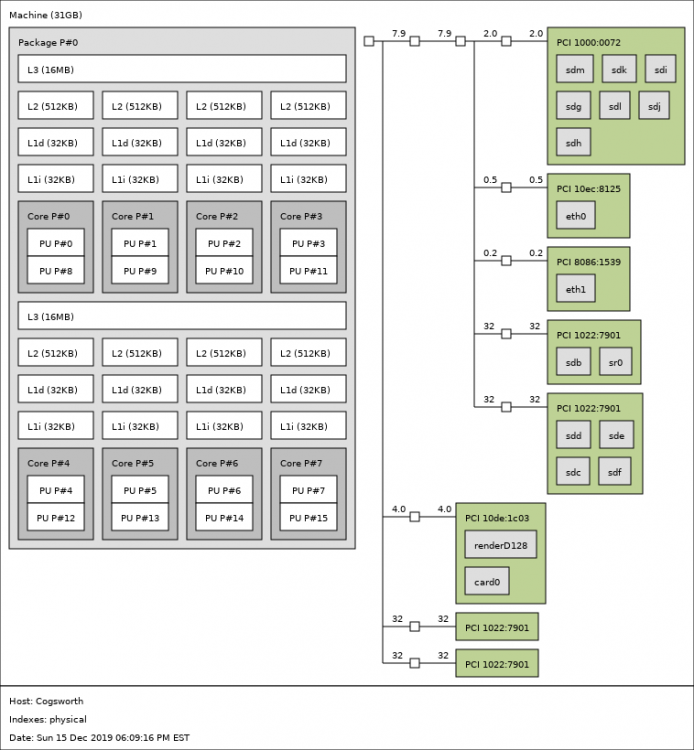
I saw something like this today. I tried it many times with little tweaks to the configs because I didn't believe what I was seeing, but you are right this is a thing! I have a Ryzen 7 3800X on a ASUS ROG Strix x570-E board with bios 1405 AGESA 1.0.0.4 Patch B, and I saw significant input lag/stutter (i.e. mouse cursor skipping) when isolating CPUs from different CCXs. I didn't even have to use them in the VM ... just isolating CPU cores in Unraid from different CCXs and starting the VM using cores for 1 CCX (or both) was enough to cause the lag. Here is my CPU architecture which is similar to yours. I passed the 2nd CCX (cores 4-7 & 12-15) and a HT core from the 1st CCX (cores 3 & 11) leaving the rest of the 1st CCX for Unraid during my testing. This may be more complicated of an issue for me as I am having other VM stuttering issues which I posted about here. But I wanted to validate your finding! You're not crazy! -JesterEE
-
The USB Pass-through bug seems to be on a lot of peoples RADAR.
-
I would love to see the addition of cset shield in the VM Manager as an alternative to the defacto isolcpus requirement for separating compute resources for low latency.
-
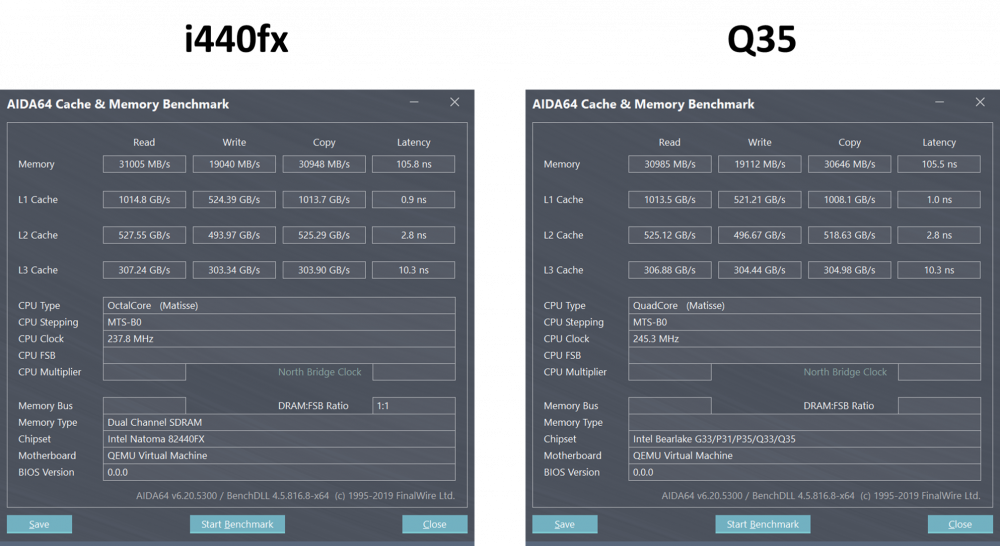
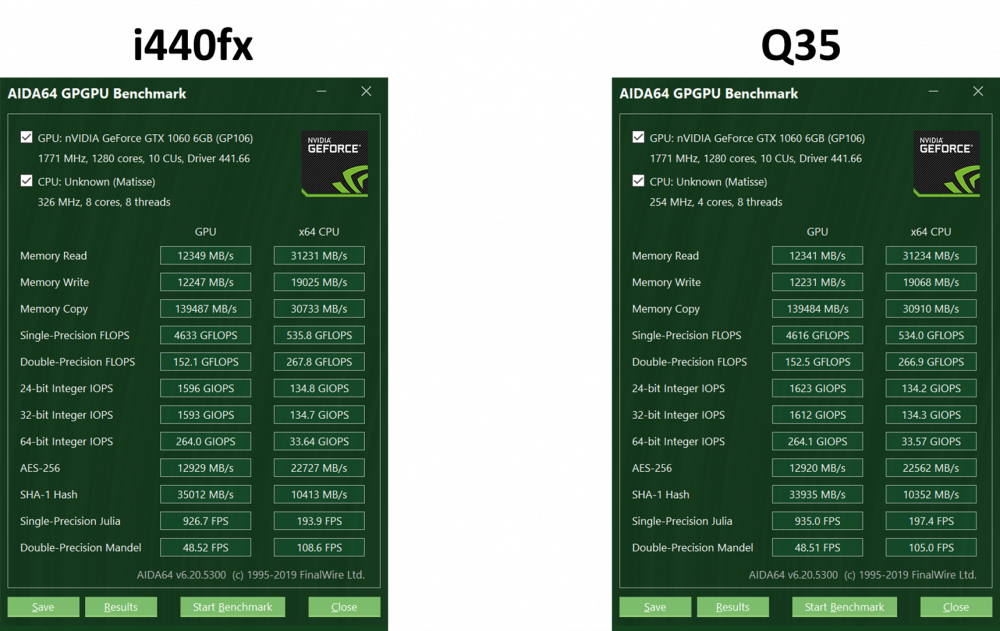
After following this thread I thought I would spin up 2 new, identically configured Windows 10 VMs in Unraid 6.8.0 to see if the i440fx vs Q35 debate shows anything for my system under QEMU 4.1. Originally I had some issues on my QEMU 3.0 i440fx Windows 10 VM with video glitching, so an update was necessary anyway. Before getting entrenched in a VM architecture, I wanted to see which was going to pan out best at the on-set of my new build. For these benchmarks I ran a "gaming oriented" (Hyperv enlightenments, isolated CPUs, emultor pinning, iothread pinning) Windows 10 VM with 4 HT cores of an AMD 3800X in performance mode and pass-through of a Gigabyte NVIDIA GeForce GTX 1060 6GB Windforce. Here are AIDA64 results which show negligible difference in performance between the 2 VMs. Likely, if I ran a statistically relevant number of tests, they would be the same. Notable, in the Q35 VM, NVIDIA System Info reports my PCI-E lanes correctly (x16 PCI-E 3.0 for this card). In the end, I went with the i440fx machine. I'm not saying I agree with getting rid of Q35 as an option. Options are good for everyone (as long as they aren't broken)! Just a data-point. -JesterEE
-
Thanks @Skitals for this post! I was having a tough time configuring my ASUS ROG Strix X570-E for VFIO, and the information you distilled here really helped! For other Unraid users looking to run this board (which I recommend!), the information that @Skitals put forth is basically the same for the ASUS ROG Strix X570-E. I will note the differences I saw in my experience. Note this data was pulled with MB Bios 1405 (11/26/2019) [AGESA 1.0.0.4 Patch B]. UEFI / BIOS Settings: Advanced -> AMD CBS -> IOMMU -> Enabled (Enable IOMMU) Advanced -> CPU Configuration -> SVM Mode -> Enabled (Enable CPU Virtualization) Advanced -> USB Configuration -> XHCI Hand-off- > Enabled (XHCI handled by BIOS [might not be necessary]) Settings -> AMD CBS -> ACS Enable -> Enable (Not an option on the ASUS ROG Strix X570-E) Settings -> AMD CBS -> Enable AER Cap -> Enable (Not an option on the ASUS ROG Strix X570-E) USB Pass-through: This part was all really the same (HUGE THANKS on this part!). As @Skitals did, of the 3 USB controllers on the board, I also tried to pass through the obvious one that was by itself. I played with a TON of settings and recommendations found all over the forums, especially here, (including xen-pciback.hide boot configurations), but none worked with that controller. When trying to boot a VM with this configuration, it would hard lock the server and force me to do a dirty restart 😡. Finally, after finding and trying the recommendation here ... it was quite simple! For this board, the 2 USB controllers that are connected (that you can pass-through) are the 3 Type A and 1 Type C ports below the Ethernet jacks (pictured below) and the internal headers on the motherboard (for routing to the USB connections on the case and/or extenders). The 4 Type A headers between the HDMI/Display Port and the Realtek 2.5G Ethernet/2x USB Type A are the ones that will remain in use for Unraid. I attached my boot drive in the "BIOS" USB position (the one with flash button) and it works just fine. I did not try passing though all the 0b:00.# devices as we need to do with the other controllers (i.e. 06:00.0 06:00.1 06:00.3). I just tried reserving 0b:00.3, but if I did all the devices, I bet this would have worked too. Though, at this point, I'm not going to bother trying. Update 12/24/2019: I wanted to try and get my sound card passed so, I did bother trying to pass through all the 0b:00.# devices (i.e. 0b:00.0 0b:00.1 0b:00.3 0b:00.4). It did not work. Here's a reddit VFIO thread with other people talking about the same problem. Looks like we'll all need a AGESA patch to fix this one. Here are the USB controllers on my IOMMU (from the full list, below): Passed-Though USB Controller [1022:1485] 06:00.0 Non-Essential Instrumentation [1300]: Advanced Micro Devices, Inc. [AMD] Starship/Matisse Reserved SPP [1022:149c] 06:00.1 USB controller: Advanced Micro Devices, Inc. [AMD] Matisse USB 3.0 Host Controller [1022:149c] 06:00.3 USB controller: Advanced Micro Devices, Inc. [AMD] Matisse USB 3.0 Host Controller Unraid USB Controller IOMMU group 29:[1022:149c] 0b:00.3 USB controller: Advanced Micro Devices, Inc. [AMD] Matisse USB 3.0 Host Controller Single (NVIDIA) GPU Pass-through: Also the same. I needed to add the video=efifb:off declaration to get my system to boot and remove the association to my single NVIDIA GTX 1060. Note, this was not required earlier on when working with this board. While I'm not 100% sure what I changed to make this necessary I think I have an idea. I migrated from another setup with a legacy, non-UEFI BIOS. My Unraid USB boot drive was not set up for UEFI (i.e. the tick box in the Flash drive options), and when I first started Unraid after the hardware upgrade, I needed to enable the BIOS option for the Compatibility Support Module (CSM) to get the flash drive to boot. This allowed me to boot Unraid, have the main display on the GTX 1060 show the boot process and drop to a CLI, while also allowing dockers to utilize the NVIDIA card (via the Linuxserver.io Nvidia build of Unraid) and the VM Manager to pass-through the card when booting a VM. When powering off the VM, I was returned to a CLI and everything worked! This was nice ... but I didn't want to use the CSM if I didn't need to. So, after telling the flash drive that I'm using UEFI and switching off CSM in BIOS, I needed to use the video=efifb:off declaration to have the boot process drop utilization of the card. So, no more CLI interface on my main display 😥. Fan Speed Sensors and PWM Controllers: These I didn't play with at all when it didn't work right off in Unraid 6.8.0-stable. There are some kernel patches that need to be applied for this to work with x570 boards and Ryzen 3000 processors that are currently either deployed or optional in the Linux 5.4 kernel. I opened a request to include them in the future builds of Unraid. If you're like me and want them for our setups, drop a like and a comment to let Limetech know there is interest! IOMMU: Here is how my system looks. Note, there is a GeForce GTX 1060 and a LSI SAS2008 HBA installed; everything else is the MB itself. The ACS patch is OFF. MB Bios 1405 (11/26/2019) [AGESA 1.0.0.4 Patch B]. IOMMU group 0:[1022:1482] 00:01.0 Host bridge: Advanced Micro Devices, Inc. [AMD] Starship/Matisse PCIe Dummy Host Bridge IOMMU group 1:[1022:1483] 00:01.2 PCI bridge: Advanced Micro Devices, Inc. [AMD] Starship/Matisse GPP Bridge IOMMU group 2:[1022:1482] 00:02.0 Host bridge: Advanced Micro Devices, Inc. [AMD] Starship/Matisse PCIe Dummy Host Bridge IOMMU group 3:[1022:1482] 00:03.0 Host bridge: Advanced Micro Devices, Inc. [AMD] Starship/Matisse PCIe Dummy Host Bridge IOMMU group 4:[1022:1483] 00:03.1 PCI bridge: Advanced Micro Devices, Inc. [AMD] Starship/Matisse GPP Bridge IOMMU group 5:[1022:1482] 00:04.0 Host bridge: Advanced Micro Devices, Inc. [AMD] Starship/Matisse PCIe Dummy Host Bridge IOMMU group 6:[1022:1482] 00:05.0 Host bridge: Advanced Micro Devices, Inc. [AMD] Starship/Matisse PCIe Dummy Host Bridge IOMMU group 7:[1022:1482] 00:07.0 Host bridge: Advanced Micro Devices, Inc. [AMD] Starship/Matisse PCIe Dummy Host Bridge IOMMU group 8:[1022:1484] 00:07.1 PCI bridge: Advanced Micro Devices, Inc. [AMD] Starship/Matisse Internal PCIe GPP Bridge 0 to bus[E:B] IOMMU group 9:[1022:1482] 00:08.0 Host bridge: Advanced Micro Devices, Inc. [AMD] Starship/Matisse PCIe Dummy Host Bridge IOMMU group 10:[1022:1484] 00:08.1 PCI bridge: Advanced Micro Devices, Inc. [AMD] Starship/Matisse Internal PCIe GPP Bridge 0 to bus[E:B] IOMMU group 11:[1022:1484] 00:08.2 PCI bridge: Advanced Micro Devices, Inc. [AMD] Starship/Matisse Internal PCIe GPP Bridge 0 to bus[E:B] IOMMU group 12:[1022:1484] 00:08.3 PCI bridge: Advanced Micro Devices, Inc. [AMD] Starship/Matisse Internal PCIe GPP Bridge 0 to bus[E:B] IOMMU group 13:[1022:790b] 00:14.0 SMBus: Advanced Micro Devices, Inc. [AMD] FCH SMBus Controller (rev 61) [1022:790e] 00:14.3 ISA bridge: Advanced Micro Devices, Inc. [AMD] FCH LPC Bridge (rev 51) IOMMU group 14:[1022:1440] 00:18.0 Host bridge: Advanced Micro Devices, Inc. [AMD] Matisse Device 24: Function 0 [1022:1441] 00:18.1 Host bridge: Advanced Micro Devices, Inc. [AMD] Matisse Device 24: Function 1 [1022:1442] 00:18.2 Host bridge: Advanced Micro Devices, Inc. [AMD] Matisse Device 24: Function 2 [1022:1443] 00:18.3 Host bridge: Advanced Micro Devices, Inc. [AMD] Matisse Device 24: Function 3 [1022:1444] 00:18.4 Host bridge: Advanced Micro Devices, Inc. [AMD] Matisse Device 24: Function 4 [1022:1445] 00:18.5 Host bridge: Advanced Micro Devices, Inc. [AMD] Matisse Device 24: Function 5 [1022:1446] 00:18.6 Host bridge: Advanced Micro Devices, Inc. [AMD] Matisse Device 24: Function 6 [1022:1447] 00:18.7 Host bridge: Advanced Micro Devices, Inc. [AMD] Matisse Device 24: Function 7 IOMMU group 15:[1022:57ad] 01:00.0 PCI bridge: Advanced Micro Devices, Inc. [AMD] Device 57ad IOMMU group 16:[1022:57a3] 02:02.0 PCI bridge: Advanced Micro Devices, Inc. [AMD] Device 57a3 IOMMU group 17:[1022:57a3] 02:04.0 PCI bridge: Advanced Micro Devices, Inc. [AMD] Device 57a3 IOMMU group 18:[1022:57a3] 02:05.0 PCI bridge: Advanced Micro Devices, Inc. [AMD] Device 57a3 IOMMU group 19:[1022:57a4] 02:08.0 PCI bridge: Advanced Micro Devices, Inc. [AMD] Device 57a4 [1022:1485] 06:00.0 Non-Essential Instrumentation [1300]: Advanced Micro Devices, Inc. [AMD] Starship/Matisse Reserved SPP [1022:149c] 06:00.1 USB controller: Advanced Micro Devices, Inc. [AMD] Matisse USB 3.0 Host Controller [1022:149c] 06:00.3 USB controller: Advanced Micro Devices, Inc. [AMD] Matisse USB 3.0 Host Controller IOMMU group 20:[1022:57a4] 02:09.0 PCI bridge: Advanced Micro Devices, Inc. [AMD] Device 57a4 [1022:7901] 07:00.0 SATA controller: Advanced Micro Devices, Inc. [AMD] FCH SATA Controller [AHCI mode] (rev 51) IOMMU group 21:[1022:57a4] 02:0a.0 PCI bridge: Advanced Micro Devices, Inc. [AMD] Device 57a4 [1022:7901] 08:00.0 SATA controller: Advanced Micro Devices, Inc. [AMD] FCH SATA Controller [AHCI mode] (rev 51) IOMMU group 22:[1000:0072] 03:00.0 Serial Attached SCSI controller: Broadcom / LSI SAS2008 PCI-Express Fusion-MPT SAS-2 [Falcon] (rev 03) IOMMU group 23:[10ec:8125] 04:00.0 Ethernet controller: Realtek Semiconductor Co., Ltd. RTL8125 2.5GbE Controller IOMMU group 24:[8086:1539] 05:00.0 Ethernet controller: Intel Corporation I211 Gigabit Network Connection (rev 03) IOMMU group 25:[10de:1c03] 09:00.0 VGA compatible controller: NVIDIA Corporation GP106 [GeForce GTX 1060 6GB] (rev a1) [10de:10f1] 09:00.1 Audio device: NVIDIA Corporation GP106 High Definition Audio Controller (rev a1) IOMMU group 26:[1022:148a] 0a:00.0 Non-Essential Instrumentation [1300]: Advanced Micro Devices, Inc. [AMD] Starship/Matisse PCIe Dummy Function IOMMU group 27:[1022:1485] 0b:00.0 Non-Essential Instrumentation [1300]: Advanced Micro Devices, Inc. [AMD] Starship/Matisse Reserved SPP IOMMU group 28:[1022:1486] 0b:00.1 Encryption controller: Advanced Micro Devices, Inc. [AMD] Starship/Matisse Cryptographic Coprocessor PSPCPP IOMMU group 29:[1022:149c] 0b:00.3 USB controller: Advanced Micro Devices, Inc. [AMD] Matisse USB 3.0 Host Controller IOMMU group 30:[1022:1487] 0b:00.4 Audio device: Advanced Micro Devices, Inc. [AMD] Starship/Matisse HD Audio Controller IOMMU group 31:[1022:7901] 0c:00.0 SATA controller: Advanced Micro Devices, Inc. [AMD] FCH SATA Controller [AHCI mode] (rev 51) IOMMU group 32:[1022:7901] 0d:00.0 SATA controller: Advanced Micro Devices, Inc. [AMD] FCH SATA Controller [AHCI mode] (rev 51) USB Associations (Before reserving the 06.00.# devices): Bus 1 --> 0000:06:00.1 (IOMMU group 19) Bus 001 Device 005: ID 8087:0029 Intel Corp. Bus 001 Device 004: ID 05e3:0610 Genesys Logic, Inc. 4-port hub Bus 001 Device 001: ID 1d6b:0002 Linux Foundation 2.0 root hub Bus 2 --> 0000:06:00.1 (IOMMU group 19) Bus 002 Device 001: ID 1d6b:0003 Linux Foundation 3.0 root hub Bus 3 --> 0000:06:00.3 (IOMMU group 19) Bus 003 Device 002: ID 0b05:18f3 ASUSTek Computer, Inc. AURA LED Controller Bus 003 Device 001: ID 1d6b:0002 Linux Foundation 2.0 root hub Bus 4 --> 0000:06:00.3 (IOMMU group 19) Bus 004 Device 001: ID 1d6b:0003 Linux Foundation 3.0 root hub Bus 5 --> 0000:0b:00.3 (IOMMU group 29) Bus 005 Device 003: ID 154b:005b PNY Flash Drive (<-- Boot Drive) Bus 005 Device 001: ID 1d6b:0002 Linux Foundation 2.0 root hub Bus 6 --> 0000:0b:00.3 (IOMMU group 29) Bus 006 Device 001: ID 1d6b:0003 Linux Foundation 3.0 root hub Happy Computing!!! -JesterEE
-
Also, IMHO, Deluge is less than graceful about it's shutdown process, which has bit me more than once in the past with various levels of state corruption. Best case, a setting or 2 is lost ... worst case, the torrent states are all lost and I'm left with an empty seed list with dangling files unattached to a torrent 😱😡. The latter (which is REALLY annoying) has yet to happen on my Unraid docker based system, so 🤞. Deluge does create back-ups (one back-up) of config and state files, but it doesn't check for file corruption before doing so. So, if the file(s) get corrupted, upon the next internal back-up task, the back-up file will also be corrupted 😣. I tend to keep clean versions of my config files in the appdata directory that I can revert back to quickly with a simple SSH and cp command. Specifically, the following files: core.conf web.conf I'd recommend other's do the same. The state files are harder since they change often. This is ripe for a Deluge plug-in, but I have not found one that does it and I have more important things to do 😂. -JesterEE
-
Yes, this has been working without modification since my post. Make sure the docker is closed before making the edit or it may be overwritten by the active process.
-
So, this was the wrong way to do it. The right way (in deluge 2) is to look up the localclient host identifier in the hostlist.conf file (in the docker's appdata). The identifier is the first entry on the localclient data structure. It will look something like this: { "file": 3, "format": 1 }{ "hosts": [ [ "b9c637d760f46310352c4324a243ad12", "127.0.0.1", 58846, "localclient", "13f527495ef04a34c6db4146324aaef42432bd2c" ] ] } The entry needed for this example is b9c637d760f46310352c4324a243ad12. Next, take this entry and place it as the default_daemon in the web.conf file. For example: "default_daemon": "b9c637d760f46310352c4324a243ad12", -JesterEE
-
You can, but I don't really see the point. Physical access to the drives gives physical access to the USB key, and your encryption is no longer really helping you keep your data safe.
-
Ok, ya, just did that and I see someone reporting a possible unicode display issue. Though, between my last post and now, I did a hash file export and got additional errors for the same files, this time with the correct path Oct 22 21:28:22 Cogsworth bunker: error: no export of file: /mnt/disk4/Users/bsmith/Eng_archive/XMod/mach/v5/sys/depot/Filters/data_processing/coverlap_g_sdb.fil So, script bug? -JesterEE
-
I ran a full check today and the plugin found some corruption errors. I checked the system log and found that the paths of the files were not complete making it hard to find the offending files for recovery. Here is an example of the output with a mangled path: Oct 22 17:58:39 Cogsworth bunker: error: SHA256 hash key mismatch, t/Filters/data_processing/coverlap_g_sdb.fil is corrupted Has anyone else seen this before? Is it a plugin bug or something I did wrong? -JesterEE
-
Actually ... after understanding the Resilio Sync Features a bit more, it looks like not every node of the swarm needs to have a Pro license to exchange data. Nodes that should have all the shared data (i.e. server clients) can use the free version and nodes that may only need parts of the data and want to use the selective sync capability (i.e. phone, laptop, etc. clients) need the pro version. So, in an Unraid setup, I can have a docker app utilizing the free version of the software for each user (with PUID, PGID, and UMASK set appropriately for each) and not have to worry about ACLs. This would be more of an issue if my user count was in the 10s or 100s, but with single digit users, this is not too big of a problem. This might actually be better in fact because the Resilio Sync database will be unique for each user, and the share files, as well that the database files, can be owned by that user without any additional setup. The only additional complication is more NetworkingFu to access the administration WebUI for each user, but that's manageable. Nevertheless, I agree with the OP in that not having a solid, easy to use, and functional way to have control of the users and groups at the file system level is at the best inconvenient, and at the worst, a security risk. I hope to see this is a future release! -JesterEE
-
Running into the exact same problem ... it's really annoying and requires a lot of manual babysitting the docker update process. Even if this can't change for some reason, it would be nice if the update mechanism took this into account to force update child dockers when parent dockers are updated.
-
@pwm So I came across this post. Can you please verify that you aren't using the setfacl command in your solution? I was trying to set ACLs and although it's "supported" in Unraid (i.e. the command is present), the array isn't mounted with ACL access, so the command won't work for me on 6.7.2 when trying to modify a directory on the array. Thanks. My use case is a bit different. I am using the LinuxServer Resilio Sync docker app and want to keep the file permissions intact while the docker service synchronizes the files between connected nodes in the swarm. The problem is, the docker runs as a specific user:group (nobody:users by default) and not the user that actually owns the files (which I set on the command line). I could run N docker containers of the app for N users (each with $user:users PUID:PGID), but that would require N licenses of the software ... and I'm not about to do that when the 1 license I have is more than fine. I was hoping to run the docker as a sync "super user", that is in the same group as the users that have files syncing ... and have the ACLs keep the PUID while the group inheritance is handled by the groupadd and useradd commands I define in the /boot/config/go file. If I need to use chown commands, I'd have to use cron and/or inotifywait to constantly update the file attributes which would be very far from a viable solution. -JesterEE
-
I can't remember where I read it, I think it was on the git issues log for deluge, but I think this is a deluge issue. I believe the work around was to stop the app, and manually edit the core.conf file with the plugins you want to enable. It looks like this file isn't being properly updated when some plugins are enabled/disabled, so it won't remember the setting the next time the app is launched.
-
Has anyone had any luck setting the default_daemon configuration parameter in the web.conf file in Deluge v2? It's the first time I'm using this docker (and Deluge 2) and the WebUI isn't automatically connecting to the daemon when I set it with: "default_daemon": "127.0.0.1:58846". Thanks -JesterEE
-
I hit the weirdest issue yesterday loading this docker for the first time. On first load, JDownloader seems to need to update from the update server to function. It just so happens that the update server (update.appwork.org) was down at the time! Upon launching the docker and looking at the WebUI, I saw that it was looking for me to change the internet connection method (i.e. Direct Connection or proxy) since it was unable reach the update server and assumed it was a user configuration error rather than the update sever being offline. Upon canceling the connection, a fatal error was received and the program terminated. For posterity, this is the error I received (copied from the log output file, it will look a little different in the WebUI). --ID:1TS:1562019721687-7/1/19 6:22:01 PM - [] -> Exception thrown at org.jdownloader.update.launcher.SecondLevelLauncher.init(SecondLevelLauncher.java:531): org.jdownloader.update.launcher.JDLauncherFailedException: java.lang.NoClassDefFoundError: org/jdownloader/startup/Main at org.jdownloader.update.launcher.SecondLevelLauncher.launchJDownloader(SecondLevelLauncher.java:760) at org.jdownloader.update.launcher.SecondLevelLauncher.init(SecondLevelLauncher.java:513) at org.jdownloader.update.launcher.SecondLevelLauncher.runMain(SecondLevelLauncher.java:247) at org.jdownloader.update.launcher.JDLauncherViaClassLoader.main(JDLauncherViaClassLoader.java:10) at sun.reflect.NativeMethodAccessorImpl.invoke0(Native Method) at sun.reflect.NativeMethodAccessorImpl.invoke(NativeMethodAccessorImpl.java:62) at sun.reflect.DelegatingMethodAccessorImpl.invoke(DelegatingMethodAccessorImpl.java:43) at java.lang.reflect.Method.invoke(Method.java:498) at org.jdownloader.update.launcher.JDLauncher.main(JDLauncher.java:79) Caused by: java.lang.NoClassDefFoundError: org/jdownloader/startup/Main at org.jdownloader.update.launcher.SecondLevelLauncher.launchJDownloader(SecondLevelLauncher.java:700) ... 8 more Caused by: java.lang.ClassNotFoundException: org.jdownloader.startup.Main at java.net.URLClassLoader.findClass(URLClassLoader.java:382) at java.lang.ClassLoader.loadClass(ClassLoader.java:424) at sun.misc.Launcher$AppClassLoader.loadClass(Launcher.java:349) at java.lang.ClassLoader.loadClass(ClassLoader.java:357) ... 9 more If someone else gets this error on first launch, my suggestion is to ping the update server to see if you get a response. If not, try later.
-
I had the same question when Googling around today. After reading @jonathanm's response, I investigated and found this: https://libvirt.org/hooks.html which looks promising! I am interested in the possibility of releasing hardware from other processes (i.e. dockers) I want to provide to a VM, but leave available when not in use. I don't have an UnRaid server (contemplating the migration) so I am interested if this works with the current build of the OS. Care to check and report back @DeeR? -JesterEE



