





AgentXXL
Members
-
Joined
-
Last visited
Everything posted by AgentXXL
-
I installed the plugin on both of my servers. When I went to Management Access under settings, my initial attempt to provision the Let's Encrypt certificates failed, indicating that it was likely my firewall's DNS rebinding protection. To resolve the DNS rebinding issue I went into my firewall config (pfSense) and under DNS Resolver I added the unraid.net domain to the 'Domain Overrides' section. One thing I'm not sure about is where pfSense asks me to provide the DNS 'Lookup Server IP Address' so I just set it to a Cloudflare one for now, as shown on the attached pic. Cloudflare resolves unraid.net so I suspect I'm correct. Then, with the DNS rebinding check corrected, I was able to provision the Let's Encrypt cert for both servers. I then enabled remote access and the flash backup. Flash backup is working for both servers. I also chose custom ports for each server and added port forwarding rules for them to the firewall. When I attempt the Check function, both servers respond with the 'Oops This Unraid Server was unreachable from the outside' message. When I go to the My Servers Dashboard, one server shows that it has Remote Access but choosing it ends up at a browser window/tab that eventually times out before displaying the unRAID webgui. The other unRAID server still shows with a red X and 'Access unavailable'. Not sure what to try next other than the full reset procedure, which unfortunately takes time to ensure reset of user account passwords. That and it's Saturday night so the Plex server is a little busy with users. Any other suggestions?

-
So still no luck... the 'Check' function fails on both of my servers. Tried the 'unraid-api restart' on both, rebooted, still no go. One of the servers shows up as available for remote access when I go to the url using my cell network, but it won't actually connect. After a reboot both servers show up in the My Servers section, one with a checkmark and the other with a red X. The one with the checkmark is the one that shows remote access as available, but won't connect. I'll potentially try the full reset method mentioned but I'll need to let my users finish their Plex sessions.
-
That's why you use a complex password and hopefully eventual 2FA.
-
OK, have added the plugin to both of my servers, configured my firewall to port forward a custom port to each server and added the 'unraid.net' domain to my DNS resolver. I was able to provision with Let's Encrypt and the flash drive backup activation appears successful. Alas even after trying the 'unraid-api restart' in a terminal on each server, I'm still unable to get remote access working. When I try the 'Check' function it fails. When attempting it from a phone using my cellular providers networks (WiFi turned off), I get a 'You do not have permissions to view this page' error for the https://forums.unraid.net/my-servers/ URL. Suggestions?
-
It only needs the bootable partition if your VM is setup to use it for booting. If it's just for data, that 200mb partition is not required.
-
The disk was likely GPT formatted with the vfat 200mb partition left on it. This partition is normally only needed for bootable media, i.e. it's commonly used for the EFI partition on UEFI bootable devices. You can unmount the drive and then you can click on the red 'X' beside the vfat partition to remove it. To be entirely safe, you may want to backup your drive again, remove both partitions, re-format and then re-copy your required data. Note that when you reformat, if the disk is going to be for data storage only, you can change it from GPT to MBR so you'll only have 1 partition. You'll likely want to do the formatting using a partition tool on Windows, Disk Utility on a Mac or Disks on a Linux system.
-
Yes, I took a look and the 1050TI/1660TI/Super are highly inflated in price right now. I'll just have to stick it out until I can get the 3060 or 3070. Which could be a long while - there are reports surfacing that there's a pretty high failure rate on the new 3000 series cards. Combined with the crypto-miners grabbing everything they can, it's likely to be a LONG wait... As an option to try and resolve this, I'm going to re-purpose my old i7-6700K microATX system and try running it with just Plex on a stripped down Linux distro. The i7-6700K does have an iGPU but I'll likely put the GTX970 in it as well, to aid in transcoding when there's a supported format.
-
I was having numerous issues with my old dual Xeon (x5650) setup so I broke down and bought an Intel i9-10940x and x299 motherboard (the only ones that support LGA2066 sockets). Alas the i9-10940x does NOT have an iGPU so I can't use Intel Quicksync.... 😪 My mistake as I didn't look close enough to confirm the i9-10940x had Quicksync support. The reason for choosing to go with a newer Intel CPU was made primarily because I needed more PCIe lanes, which only the 'X' series Core i9 offer. I also went with the Intel as I knew Quicksync could help, but alas not in my case for the processor I chose. A very costly blunder....
-
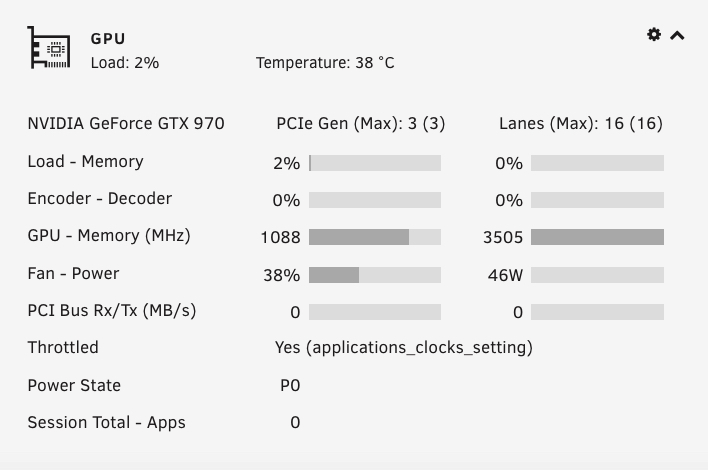
EDIT/UPDATE: while my GTX970 supports x.265/HEVC with YUV 4:2:0 chroma subsampling, it does NOT support x.265/HEVC content with a bit depth higher than 8. A lot of my 4K content is 10 bit, so that's why it's the CPU doing the transcode and not the GPU. Thanks again regardless for the work you've done to assist in enabling HW transcoding. The files I'm transcoding are 4K remuxes ripped to a MKV container from UHD Blu-ray. I already have the GPU Statistics plugin installed but it didn't show me anything about transcoding. Combined with my CPU usage of around 40% across all cores, I'm pretty sure the GPU is not doing any transcoding even though it supports NVENC up to 4K HEVC 4:2:0. I could see this happening if the files were 4K HEVC 4:4:4 but that's pretty rare. The card is a GTX970 which will eventually get upgraded to either a 3060 or 3070 when availability and pricing has settled down. I did not try 'watch nvidia-smi' during a transcode but will give it a try to see if it provides any more details. To confirm, the changes made to the Plexinc official Docker container were: 1. add --runtime=nvidia to the Extra Parameters section 2. add variable NVIDIA_VISIBLE_DEVICES with the correct GPU UUID 3. add variable NVIDIA_DRIVER_CAPABILITIES with setting all Also note that the topic [Plugin] Nvidia Driver mentions finding the UUID by going to Plugins --> Nvidia Driver but it's actually at Settings --> Nvidia Driver. Regardless, thank you for your efforts to make this easier. I'm sure I'll eventually figure it out.
-
EDIT: Found the post where you say you had to disable the container for 6.8.3 by starting from this last page of the topic and then going backwards. Might be worth adding a note to the 1st post in the topic so others will know that the Docker container is only available after upgrading to 6.90 beta 35 or later. I've downloaded the prebuilt 6.8.3 with Nvidia drivers from the 1st post and moved the files into place on my USB flash drive and rebooted. Alas I'm now stuck as I can't seem to find the GPU UUID that's needed to add parameters in the Plex Docker container. EDIT#2: OK, decided to pull the trigger and install 6.9RC2. Installed the Nvidia Plugin using CA and then made the required changes to my Plexinc official Docker container. Transcodes show that they're being done in hardware (the HW indicator is shown), but it appears to be using my CPU and not the GPU (a GTX970). I do have a lifetime PlexPass so I'm pretty sure I've met all the requirements to allow GPU transcoding. Any idea how I can force it to use the GPU? @ich777 Excuse me if I'm blind but I can't seem to find the Docker container via CA anymore - just the plugin which I already have installed. I'm running 6.8.3 still so I could download one of your prebuilt images (just need Nvidia drivers) if the container is no longer available under 6.8.3. Or has the Docker container name changed? Sorry if it's been mentioned elsewhere in this forum topic but 28 pages is a lot to skim through and my searches of the topic haven't found any mention of where the Docker container can be found.
-
I've got an old laptop drive that I can format as APFS and send to you. If you want to contact me by PM with the details on where to send it to, I'll add it to my trip to the post office this week.
-
No rush at all... I was reminded by some users from another discussion that since most of us pass a dedicated USB hub through to the VM, setting UD to passthrough for APFS devices should let the Mac VM see them with no issue. I'll have to try that but there's still the occasional case where it might be useful to have UD+ be able to mount the partition(s).
-
Sorry, was under the weather yesterday so didn't get a chance to test, but WOW, amazingly fast response to add it! Kudos! I just grabbed one of my APFS formatted 'ready to boot' backup drives to try. It's in a USB 3.0 enclosure and when I first plugged it into the system UD/UD+ didn't see it at all. I rebooted the unRAID system and this time it showed up. Alas no joy yet.... since it was a bootable disk it has 2 partitions, EFI and the main one for OS/data. When I try mounting, UD will only mount the EFI partition which is vfat. If I try expanding the partition list and click on the Mount button for the APFS partition it fails. This disk wasn't current anyhow so I decided to try and remove the EFI partition. UD was able to do that with no issues. Alas even with just the single APFS partition, it still won't mount. I went through the syslog and each time it was attached and a mount attempted I get this: I did verify that the newest version of UD+ was installed: Any thoughts or things you want me to try? Thanks!
-
@dlandon Just wanted to say thanks again for all the work you do to support and continue development of UD. I've donated previously but in these tough COVID times I suspect donations slow down. I've just sent a few more bucks your way because I can. As an aside (not because I just donated again), I have a small feature request: it would be a nice addition if you could look into support for Apple's APFS filesystem in UD+. In the past Apple made it very difficult for developers to support APFS but I noticed that Ubuntu 20.10 can now read devices with the APFS filesystem. With lots of users jumping on the bandwagon for @SpaceInvaderOne's MacinaBox, it would be a useful addition, even if read-only. Thanks again!
-
Not sure if anyone else has experienced this, but it's only happened over the last 2 weeks. I've been upgrading drives on my media unRAID, going from 10TB to 16TB. I then use the old 10TB drives to upgrade my backup unRAID. I leave the old 10TB drives alone until the parity rebuild completes successfully on the replacement 16TB drives. Once the 16TB drives have been successfully rebuilt, I then want to run a preclear zero pass on the 10TB drives before re-using them in my backup unRAID. I know it's not really needed to successfully re-use the 10TB drives, but my OCD is better satisfied if I do. As my media unRAID is running on a 10+ year old motherboard/CPU, it only has USB 2.0 so I attach the old 10TB drives to an external USB 3.0 to SATA enclosure so I can run the zero pass on the backup unRAID system. UD has no problem seeing the drive and shows it as XFS formatted. It can be mounted and the contents of the drive are accessible so everything appears to be working correctly. The only thing that I can't seem to do is enable the drive to be shared from its settings page in UD. Just like @vyreks mentioned, clicking Done or Save on the settings page reverts the Share switch to off. I only want to share it so I can do a quick contents compare over the network against the new 16TB drive that replaced it. As I can't get the drive to share, I temporarily put it back in the media unRAID, change the UUID, mount it and then do the quick contents compare with the new 16TB drive. I then re-install it in the USB enclosure and re-attach it to the backup unRAID system via a USB3 port. I then attempt to remove the partition(s) so I can use preclear. For the last 2 x 10TB drives, for some reason UD fails when attempting to remove the partition. I tried changing the mountpoint label and that was successful, but it still failed when attempting to remove the partition. Rather than re-installing it in the media unRAID again, I tried attaching the 10TB drives to my Ubuntu laptop with USB 3 ports and using the Disks utility to remove the partition. It also fails, which seems to indicate that it's something to do with the formatting created when it was formally part of the protected unRAID array. As a last ditch attempt before re-installing the 10TB drives in the media unRAID just to remove the partitions, I tried using my MacBook Pro and the Disk utility, with the 10TB drives still in the USB 3 enclosure. The Mac immediately reports the drive as unrecognized and asks me to 'Initialize' it, which I do. I can then erase the drive - typically I just choose to format it as NTFS as for some reason, Mac Disk Utility won't let you remove all partitions anymore. I can then re-attach the drive to my backup unRAID and now UD is able to remove the partition. And of course I can then run my preclear zero pass. While trying to figure out both the share and remove partition issues, I tried some reboots. I made the mistake of forgetting to grab the logs before rebooting so I don't have any logs to share at this time. I have 2 more of the 10TB --> 16TB upgrades to do so I'll be sure to grab the logs if the same situation occurs. In any case, it seems that something changed in the way UD works when attempting to share or remove partitions. When I did this in the past going from 4TB to 10TB drives, it had no problems with either sharing or removing the partitions. I'm receiving the 16TB drives today so I'll see if the issue persists. In any case, this long-winded post is more of a 'FYI' but I can confirm the same share issue that @vyreks posted above. Any thoughts until I can grab some diagnostics/logs if it happens again?
-
EDIT: Solved my issue.... when I edited the path for completed downloads in your container I inadvertently typed the mountpoint for completed downloads as /CompletedDL. In the SAB .ini file I had this set to /Completed, not /CompletedDL. Simple fix, but I'm still going to blame it on my medical cannabis usage. 🥴 @ich777 Sorry if this has been answered already, but I'm having permission issues with your SABnzbd container. I searched this topic looking for 'permissions sabnzbd' but the results that came back didn't help. I have been using the binhex container which was working with no issues, but it doesn't support use of prerelease or beta builds. As your container does, I decided to give it a try. I backed up my binhex-sabnzbd appdata folder after stopping it from both the webgui and then from unRAID's Docker tab. I set it to not auto-start but left it installed. I then installed your container from CA, adding the paths/mountpoints that I used with the binhex version. I changed the http port to 7070 as 8080 and others were already in use. I also changed from the latest tag to prerelease. The version of SABnzbd pulled was 3.2.0 beta 1. Side note: not specific to your container but I wish installing a container didn't actually start it at the end of a successful install. As it did start right away, I then stopped your version both in the webgui and via the unRAID Docker tab. I then copied the .ini file from the binhex install to your container. SABnzbd started up with no errors after replacing the .ini file so I added a .nzb to test. The incomplete and monitored folder for incoming .nzb files worked properly, but the final folder for completed downloads is throwing permission errors. The folder for completed downloads actually resides on my media unRAID server, whereas the SAB container (and others like it) runs from my 2nd unRAID system. The PID and UID values are the same in both containers, but I did notice that your container has a DATA_PERM variable that by default was set to 770. I've tried changing that to 777 but it made no difference. I also ran the Docker-safe New Permissions tool on the media unRAID to ensure things are OK. I even stopped your container and re-started the binhex version which still works with no permission errors. I used the same paths as in the binhex version, with the final 'Downloads' folder being accessed at /mnt/remotes/mediaunraid/General/Complete. I had some issues with this in the binhex version when Unassigned Devices made the change to mounting remote shares in /mnt/remotes instead of the previously used /mnt/disks. Even though UD puts a symlink to the remote shares in /mnt/disks, I still had to change the path to use /mnt/remotes/ instead of /mnt/disks. And as mentioned above, the binhex container does still work using the /mnt/remotes pathing. This is probably something super-simple but I'm getting nowhere on my own, probably because I'm a little over-medicated from my medicinal cannabis usage. Any idea what might be causing the permission errors when SABnzbd tries to unpack and create folders on my media unRAID? Let me know if you need any screenshots or logs.... thanks!
-
Can this container be upgraded to the beta version(s) of Sabnzbd? One of my indexers gets a lot of cross-posted nzbs that are created by Newsnab and are obfuscated. Supposedly there's a fix for deobfuscation for these posts in the latest beta. I've searched for the term beta in this topic and the forum reports no results. Hopefully I don't have to switch to a different container provider... thanks!
-
Correct, UD (and almost every other OS/addon out there) has little or no support for APFS. Blame it on Apple as it's apparently quite the paperwork headache to get approval to develop utilities that support APFS.
-
Ok, this post will be a little long, but take your time and read through it. Planning a migration like this is often a time and money consuming task. Based on the info you provided, you would easily be able to transfer all of your current unRAID drives and the SSD into a case like the Fractal Design Define 7XL. There are other cases that are a lot cheaper like the $150US Rosewill RSV-L4500, as long as you can live with a rackmount style case. https://www.amazon.com/Rosewill-Rackmount-Computer-Pre-Installed-RSV-L4500/dp/B0091IZ1ZG As for how miniSAS works, each miniSAS port on a LSI HBA is able to provide 4 SATA ports. That's what you use the SFF-8087 to 4 SATA forward breakout cables for. For a HBA like the LSI 9201-16i, there are 4 x SFF-8087 miniSAS ports. Using 4 of the breakout cables will give you 16 SATA connections. unRAID doesn't care about drives being connected to a different SATA port so you'll likely have no issues with migrating your existing unRAID build to a new case. Drives can be connected to your motherboard SATA ports or via the LSI HBA ports, or a combination of both. Personally I like to keep all my unRAID array and cache drives on the LSI cards and only use the motherboard SATA if I need more SATA connections. Unfortunately your motherboard is only capable of PCIe 2.0 speeds so you'll not get the full speed that a PCIe 3.0 or 4.0 motherboard can achieve. Your current CPU and RAM may be usable if you were to upgrade your motherboard, but I suspect you'll be happier going with a new motherboard, CPU and RAM. As for your RAM question, it depends on how many Docker containers and/or VMs you intend to use. If your current unRAID is working well, you probably don't need to add any RAM. Personally though, I would go with a minimum of 16GB just to give yourself a little breathing room for adding future Docker containers or VMs. One issue that you might have is when adding the drives from your existing NAS to your unRAID system. unRAID will require them to be cleared and re-formatted if you want them protected by the unRAID array. Whether the drives on your other NAS are full or not, you'll have to figure out a way to move any required data off the NAS so you can relocate the drives to your unRAID system. If your old NAS used say 4 x 4TB drives, you could buy one 16TB drive and use it to temporarily store your old NAS data. Once you have your required NAS data backed up, you can then move the old NAS drives to unRAID and then let it zero and add them to the array. You can then add the backed up data that was stored on your old NAS to your unRAID array. You could then use the temporary storage location (in the example above, the 16TB drive) for offline backups of your important data. If you have enough free space on your current unRAID build, you could pre-transfer the data from your NAS to unRAID over a network. Definitely something you want to take your time with and plan a way to migrate your existing data and drives from the NAS to unRAID. This isn't as difficult as it sounds, but it is time consuming. I had to do a similar shuffle when moving my data from my old FreeNAS build to my current unRAID build. To simplify it, you might want to add one or more new drives to your unRAID build to give you space to transfer the old NAS data to. That's what I did - I bought 2 new 10TB drives and added them to my unRAID. This gave me enough free space to relocate the files from my old FreeNAS setup. Once the data had been relocated to the unRAID system, I then took the drives out of my FreeNAS and added them to unRAID. UnRAID then cleared/zeroed and formatted them as XFS volumes that were now part of the unRAID protected array, giving me a decent amount of free space for future growth. One other thing to be aware of: if your parity drive(s) on your current unRAID are smaller in capacity than the drives from the NAS, you'll want to do the parity drive upgrade/swap procedure first. I'm sure this is all pretty confusing to you so take your time and plan your new unRAID build and data migration. Here's a basic plan to start you off: 1. Decide on a new enclosure and purchase it. 2. Purchase a power supply that can supply the required SATA power connections, as well as the standard motherboard/GPU power. 3. Procure your new motherboard, CPU and RAM if desired. 4. Purchase your LSI HBA(s) and forward breakout cables. As mentioned above, a single LSI 9201-16i will provide you with 16 SATA connections. 5. Build the new unRAID system and move your unRAID USB drive and array/cache drives to the new system. 6. Purchase or find some storage space to migrate any required data off your old NAS. 7. Once your old NAS data is backed up, move the drives from the old NAS to your unRAID build and let it zero/clear and format them as part of the protected array. 8. If your old NAS data is on an external USB drive or other system, transfer it to your unRAID. Let us know if you have other questions... it's a big undertaking but it's been done by myself and many others successfully.
-
I would not recommend that enclosure for your JBOD device... it appears to only offer eSATA or USB connections. unRAID can be finicky with port multiplier based systems like the one you linked. You mentioned your existing system is a tower PC 'stuffed full of hard drives'. I would spend some time on eBay or checking with local computer surplus shops to see if you can find a used but reasonably priced multi-bay enclosure. I picked up my 36 bay Supermicro CSE-847 locally for $600 CAD, which included the motherboard, dual Xeon CPUs and RAM. Supermicro also has a 24 bay (CSE-846), a 12 bay (CSE-836) or if you really want to go big, there are 45 and 60 drive bay options. Alas these storage chassis produce a lot of heat and can be noisy. Or, because your use case is pretty similar to my backup unRAID system, you could go with a Fractal Design Define 7XL case. The Define 7XL supports up to 18 3.5" drives and can accept motherboards from ITX all the way to e-ATX form factor. I picked up one myself with all the extra drive trays and mounting brackets for about $450 CAD from a local retailer. I'm currently using another 10 year old motherboard with 12GB of RAM with 2 LSI HBAs - one 9201-16i and one 9207-8i. Going this route would provide for up to 24 SATA devices between the 2 LSI HBAs (host bus adapters). If going this route you will require some miniSAS to 4 SATA forward breakout cables like these: https://www.amazon.com/Cable-Matters-Internal-SFF-8087-Breakout/dp/B018YHS8BS The only big concern with using the Define 7XL fully loaded with drives is ensuring you get a power supply that has enough capacity and SATA power connections. Alas all the cabling for both power and SATA makes it difficult to do a really clean build, but it is every bit as functional as my Supermicro CSE-847. As you're not familiar with these systems, feel free to ask any specific questions and I'll try to answer.
-
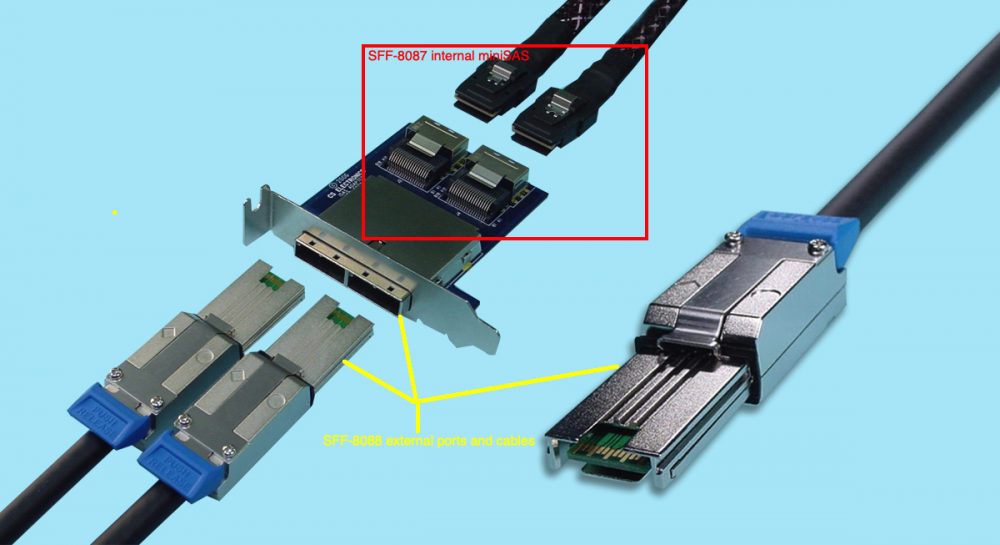
The JBOD enclosure you choose will determine how it's connected to the system that runs unRAID. Assuming your JBOD enclosure has a SAS/SATA backplane, it likely has at least 1 external miniSAS connection. The most common controllers these days are a LSI SAS/SATA HBA with external SFF-8088 ports, like the 9207-8e flashed with IT firmware. These can be easily found on eBay, both in OEM and retail boxed units, some pre-flashed with the IT firmware. It's not overly difficult to flash the HBA, but buying one with it already done for you makes things easier. Otherwise, there are LOTS of sites/YouTube vids covering how to flash the HBA. The HBA will be installed in your system that runs unRAID, preferably in a x8 PCIe slot (PCIe 3.0 or better recommended). You'll then use a SFF-8088 to SFF-8088 cable to connect your system running unRAID to the JBOD enclosure. Here's a pic showing a standard dual port miniSAS adapter that converts the internal SFF-8087 (or sometimes SFF-8643) cabling to SFF-8088, along with a SFF-8088 cable. The one shown accepts the SFF-8087 miniSAS connectors that are used internally in the JBOD and converts to external SFF-8088 ports. On the system end, your SFF-8088 cable will plug into one of the ports on the LSI HBA. As for the system to use as your unRAID host, it can be run on almost any x86/x64 platform. My media unRAID is currently running on a 10 year old dual Xeon motherboard with 48GB of RAM. I'm also planning to convert my enclosure (36 bay Supermicro CSE-847) to JBOD and build a new outboard system. If you're wanting to also use unRAID for VMs and Docker containers, you'll want to try and get a fairly recent system like a 9th gen or later Intel or AMD Ryzen 3000/5000 series. If you're planning to use your unRAID system to host Plex, get a fairly modern motherboard that has at least 2 M.2 NVME slots so you can do a dual cache drive mirror set in unRAID. Also make sure the M.2 SSDs are large enough to handle your Plex metadata and video thumbnails (if you use them). You may want to look into motherboards with 3 M.2 NVME slots if you also think you would like to setup a 'bare metal' VM running on it's own M.2 SSD. If you have more questions about this, reply with the model of the JBOD enclosure and I or someone else can elaborate on what you specifically require. Hope this info helps!
-
Fix Common Problems reported the fact that /mnt/remotes had been created but that's fairly easy to detect. It already scans paths in Docker containers reporting on errors like forgetting to set the path as 'R/W Slave' so it might not be a big ask to add this functionality.
-
I agree with others that using /mnt/remotes is still a good plan. I was able to correct my mount issues after restarting unRAID and of course updating to the latest revision that reverts the change. The symlink idea also came to me while thinking about how to change all my Docker and VM paths that used the /mnt/disks mountpoints. At least using symlinks shouldn't require users to unmount their remote shares before updating.
-
Note that your update to UD has created a mess for remote shares that were already mounted on my media unRAID. The shares lost their connection and report no size or use/free info after applying the update. I am unable to unmount them now so I will have to stop the array and/or restart to see if that will clear the issue. Alas I have a large transfer underway so the troubleshooting will have to wait. On my backup unRAID I unmounted the remote shares BEFORE applying the update. Once the update was done I was able to re-mount. Your update script should have unmounted the shares before changing their mount location to /mnt/remotes. I'll post diagnostics tomorrow if I'm unable to restore the remote shares after the array stop and/or reboot.
-
After a few different trials I now have my script working. In the long run I may have to build myself a custom nzbget container. It seems the changes I have to make to the container must be done each time I have to shutdown or restart the unRAID system. The two changes necessary are to install the Python package manager (pip) and then use it to install the lxml toolkit extension. It's fairly painless though: Pre-requisites: Python 3.x must be used - the binhex container has version 3.7 installed so nothing needs to be added yet. Download the get-pip.py script from https://pip.pypa.io/en/stable/installing/ and insert the script into the container. I used the 'scripts' folder located at /config/scripts. 1. Open the docker container console and change path to where you inserted the get-pip.py script. 2. Install pip by issuing the command 'python get-pip.py' into the container console. 3. Install the lxml extension by issuing the command 'pip install lxml' into the container console. That's it. My docker knowledge grew a bit while working on this issue but I'll admit I'm still a novice. If there is a way for me to make my changes permanent in the binhex-nzbget container, please let me know. Thanks again @binhex for the various containers that you provide.



