





AgentXXL
Members
-
Joined
-
Last visited
Everything posted by AgentXXL
-
I'm dealing with a severe slowdown for parity checks/rebuilds on my media unRAID system. It used to run around 80 - 90 MB/sec until I added some new Exos 16TB drives just over a month ago. Since then my parity check/rebuild speed is around 30 MB/sec. I'm in the process of adding 2 more 16TB drives to replace my old 10TB parity drives that I had re-used for the data array. More details are in the following thread. @JorgeB has been helping and so far it may be that my HBA and older motherboard/CPU combo are the limiting factors. In any case, I've also seen that there is an update available for the parity check tuning plugin. Right now I haven't upgraded it as I'm not sure it can be done while a parity rebuild is still in process. I'm not using the increment section of the plugin at this time but I see references to the plugin in my syslog with the current rebuild underway. Can I safely update the plugin if the parity rebuild is paused? Or should I wait for the rebuild to finish? Thanks again for your plugin @itimpi.
-
Yes, your main unRAID can perform the same function. Note that when the preclear finishes, the signature may not show in the UD webgui until you restart your unRAID system. You may be able to just refresh the UD section of the webgui, but that sometimes doesn't seem to work. A restart is truly the best way to verify that the signature is present before you add the drive to your array. That's why I like using a 2nd system for the preclears - I use an older Dell laptop that has USB 3.0 on it so I can preclear at decent speed and I can verify the signature after a reboot without taking down my production unRAID system.
-
As for avoiding a parity rebuild if you try the test drive, you might be wiser to create another bootable unRAID USB key and use it on a second PC to do the preclear of the test drive in your USB dock. I and others keep a non-activated unRAID USB key handy to do preclears on another system. Once booted all you need to install is the Preclear plugin and Unassigned Devices. This standalone unRAID never needs to be licensed if you're only using it for preclears. Once the drive has been precleared on your 2nd system, power down, disconnect it from your dock and attach it to your production unRAID system via SAS/SATA. If the signature is valid, it will show beside the drive info in the UD section of the webgui.
-
I can only speak for myself, but I'm sure others use the same methodology. I typically buy external USB drives and shuck them for use with my unRAID setups. Yes, I lose out on some warranty coverage (2 or 3 years vs 5 for the bare drives), but the cost savings can make up for that. For example, I picked up 4 x Seagate STEB16000402 16TB USB external drives just over a month ago. All 4 were precleared while still in the factory USB enclosure. When shucked and attached via SAS/SATA, the preclear signature was still present and valid. So, as long as your USB enclosure/dock passes the drive through properly, you shouldn't have any issues. To confirm if it does, you should see the drive model number and serial number in the unRAID/Unassigned Devices webgui. Once the preclear completes, the webgui will show that the drive has a preclear signature. If your USB dock alters the drive model/serial info, then I would suspect that the preclear signature may not be recognized when the drive is added to the array. The only way to be sure would be to try. Your thought on using a small drive to perform the test may be worth the effort. Good luck!
-
I've made a little progress but now I'm stuck again. I use a Mac for most of my tasks and forgot that Textedit works in rich text mode by default. I reloaded my script, converted to plain text and saved. I then re-added the script to the binhex-nzbget container. It's now trying to process the nzb, but can't proceed due to the missing lxml toolkit. Alas neither of the commands given work when issued in the nzbget console shell (command not found errors). See the error below: error Fri Oct 09 2020 20:25:41 xxxxxx: Python lxml required. Please install with "sudo apt install python-lxml" or "pip install lxml". So until I can figure out how to add the lxml toolkit to the docker container, I'm out of luck. @binhex - is there any hope of getting the python-lxml toolkit added to the binhex-nzbget container? If not, I'm thinking about creating a new docker to pre-process the nzb files and then feed them to the binhex-nzget container. If anyone has input on adding python-lxml to the binhex-nzbget container or even a pre-processing container, let me know. Thanks!
-
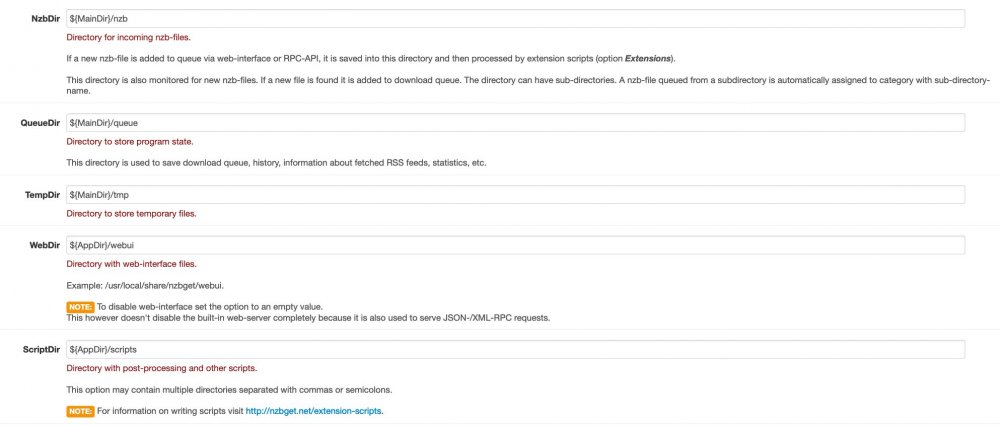
EDIT: Just after I posted this I tried the old 'whereis' command from the nzbget console shell. I issued the command 'whereis nzbget' and sure enough I now found it in usr/local/bin/nzbget. And yes, the default scripts folder is located there so at least half my problem is resolved. Now I just need to determine if Python and lxml are installed. It appears the default scripts (Email and Logger) are also written in Python so it's likely already installed. Just need to ensure it's Python 3.x and that the lxml toolkit is also installed. Note: see next message in this topic for a progress update. Start of original message: I'm sure I'll remember how once I'm told, but I'm having a problem locating the 'scripts' folder in the binhex-nzbget docker container. As shown in the attached screenshot from nzbget settings, the scripts path (and webdir path) is prefaced with $(AppDir), whereas the other folders are prefaced with $(MainDir). It's easy to find the folders from $(MainDir) under the appdata folder for binhex-nzbget. But for all my effort I can't seem to find the folders prefaced by $(AppDir). Sure I could create my own 'scripts' folder by changing the path in settings to $(MainDir) but that would invalidate any scripts already in the container. I need to add a custom script to handle the nzb files from a particular nzb indexer. The script is written in Python so I also need to ensure that Python 3.x is installed. I've opened the shell console for the binhex-nzbget container and have searched through almost every folder I can access to try and find out where $(AppDir) points to. If anyone can help out with locating this folder path, I'd appreciate it. It's likely so obvious I'm overlooking it. Also, I'd like to know if installing Python 3.x and the lxml toolkit for Python is done on the host unRAID OS or if it has to be built into the binhex-nzbget container? Any pointers appreciated.. thanks!
-
Is there a change log for the docker container update that unRAID/Fix Common Problems notified me about? I assume it's to update the qBittorrent client but as the current container has been rock solid, I'm reluctant to upgrade until I'm aware of what's changed.
-
I'm having similar issues with a few docker containers... very slow to start up and reach the running state. Go to the Dashboard tab for your unRAID, click on the binhex-NZBGet docker icon and choose 'Logs'. Your log should show if NZBGet started properly. Here's a snip of a successful start of the container: I'm seeing similar issues with the Firefox docker container where it's VERY slow to process the container startup scripts. I haven't come across a solution yet so I patiently wait until the system shows the successful start in the logs before attempting to open the web UI. At least looking at the logs may give you a clue as to why it's taking so long to startup.
-
I'm also seeing noticeable slowdowns in copy/move functions. FYI - I did not add the :test parameter but installed the latest update as shown in unRAID's docker tab. It looks like this is the test version that you mentioned so it's possible that the unRAID repo is using the wrong image. I'm not sure if others were inadvertently upgraded to this new build of Krusader but if so there's bound to be others reporting it. Back to the transfer speed issue - on the previous version Krusader ran at about the same speed as using Midnight Commander from an unRAID shell. For my system that's typically 60 - 80MB/sec for copies/moves. Now I can only reach those speeds via MC - Krusader seems to run between 12 - 16 MB/sec. @binhex Any thoughts on why Krusader file transfers are slower now? And is there an easy way to rollback to the previous docker image? I'm guessing I can pull the container from your repo manually, but have never done this for any container. Are there hints/tips on how to cleanly rollback and keep my Krusader settings/bookmarks?
-
FYI - it's not just YouTube that's causing this... I've had it happen on a few other pages. Even IMDB created a few of these errors. If I try the same page/links on my natively running Firefox on my Mac, the errors do not occur. It appears to be something specific to the docker.
-
Not sure if you mean the "Main" or the "Dashboard" tab? Regardless I'm seeing any devices mounted by UD on both of these tabs. The full drive details aren't shown on the "Dashboard" tab, just the assigned drive device mountpoint. The "Main" tab shows the full details.
-
Sometimes it's just persistance in refining your search terms. I tried all sort of expressions containing 'dual link' but the majority of the results returned were either from Supermicro (where the manuals don't seem to illustrate a dual link/cascade config) or from IXSystems (FreeNAS/TrueNAS) forums. Even searching dual link here on the unRAID forums didn't get me anywhere. But somehow I finally ended up finding a post discussing it. And with the same scenario as mine, i.e. using a CSE-847 enclosure with 24 port front backplane and 12 port rear backplane. Thanks again @johnnie.black!
-
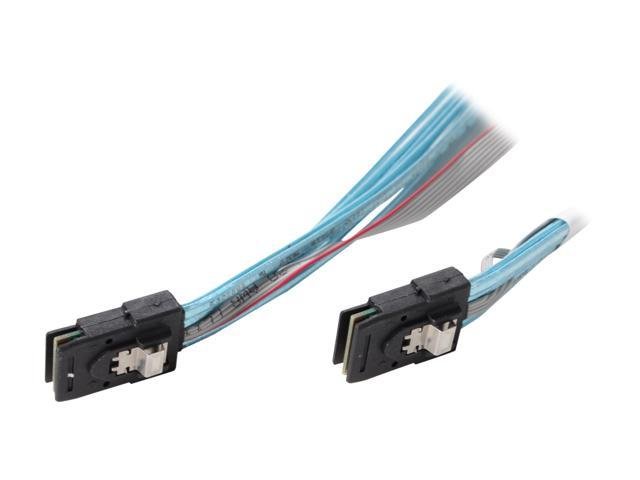
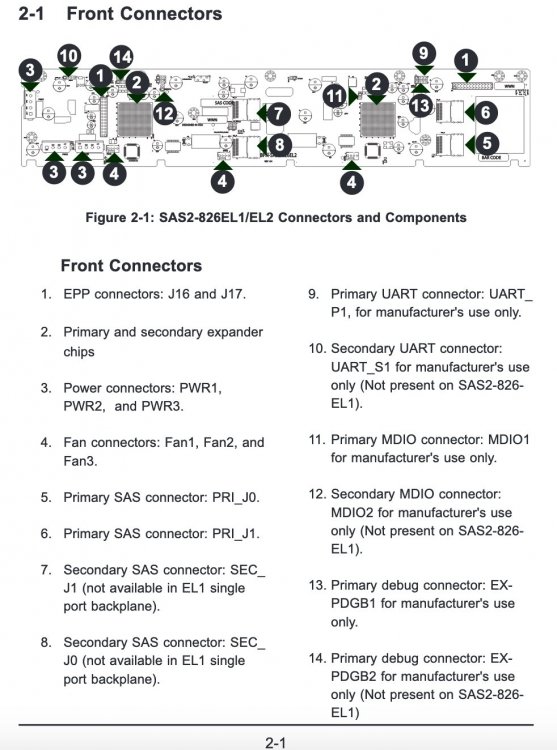
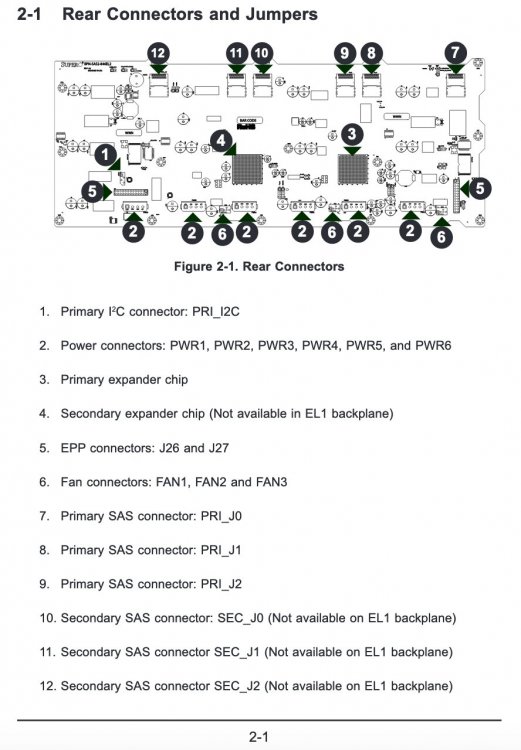
Thank you for that clarification. I kept making the same assumption that only dual controller backplanes work with dual link. The EL1 backplanes in my CSE-847 only have one expander controller. Most of the ones I've seen on eBay and used sites are the same - only one controller and no secondary SFF-8087 miniSAS connectors on the backplane. I can't see any mention of the dual link capability for an EL1 in the backplane/expander manual, but there are 3 SFF-8087 connectors on my 24 port backplane. Right now my system has one port from the LSI2008 HBA going to the front 24 port backplane and the second LSI2008 port going to the 12 port rear backplane. I haven't read a great deal about the backplanes but there are numerous mentions of being able to use multipath I/O on the backplanes with 2 expander controllers. I now understand that means that dual port (EL2 expanders) allow for multiple HBA access to each drive for failover/redundancy. I also note that the cabling from the HBA to the backplane has an extra ribbon cable running alongside the main 4 lane SFF-8087 to SFF-8087 cable (see picture below). I assume that's just one way of building the cables to isolate the 4 SATA compatible lanes from the extra connectivity needed for SAS drives. As I'm only using SATA drives in my setup my standard SFF-8087 to SFF-8087 cables could be used for the cascade connection to the 12 port rear backplane. The manual (linked above and here) mentions that you can improve throughput by using a cascaded setup (section 3-5, page 3-13). Instead of me using 1 port off the LSI2008 HBA for each backplane, I should be able to use the cascade connection from the front 24 port to the rear 12 port. To me that seems more like it would decrease throughput as only 1 HBA port is now being used to connect to both backplanes in the CSE-847. But if dual link is possible, I assume my setup should be something like this: LSI2008 HBA port 0 to BPN-SAS2-846EL1 primary port J0 LSI2008 HBA port 1 to BPN-SAS2-846EL1 primary port J1 BPN-SAS2-846EL1 primary port J2 to BPN-SAS2-826EL1 primary port J0 I also read that while dual-link can improve throughput, many users say that it's a matter of having the right firmware in the backplanes. I'll definitely spend some more time investigating this now. I was reluctant to spend $$$ on a set of EL2 backplanes and now I may not have to. So expect a donation to your 'coffee/beer/hobby' fund @johnnie.black 😀 Thanks again!
-
They have the 36 bay Supermicro CSE-847 that I went with. I picked mine up locally for slightly less than they're charging, mainly because shipping for a big unit like that is almost as much as the server itself. Note that the unit appears to contain the BPN-SAS2-846EL1 (24 bay front) and BPN-SAS2-826EL1 (12 bay rear) backplanes. These are the single controller backplanes so if you want faster disk I/O, you'll want to upgrade them to the EL2 versions at a minimum. Mine also has the EL1 backplanes and my motherboard/CPU combo is 1 generation older than what they carry. UnRAID is working quite nicely, but I'm thinking of upgrading my backplanes and converting the unit to a DAS. Then I can go ahead with my plans to buy a Threadripper setup and equip it with a HBA that can support the dual controller backplanes with higher throughput. The slower disk I/O is the only real complaint I have about mine. Also note that the motherboard compartment on the CSE-847 only accepts low profile adapters/controllers. The rear 12 bays takes up the lower portion of the case. That means it's difficult to upgrade to a modern motherboard/CPU and house it in the server chassis. That's the main reason why I'm considering conversion to a DAS. Let me know if you have any questions about the CSE-847, but I suspect that's what you're leaning towards. Mine has 25 drives installed already - dual parity drives, 20 data drives, 2 x 2TB SSDs in a cache pool and 1 x 1TB SSD mounted with Unassigned Devices for some VMs and Docker containers.
-
I do use the stock path of /mnt/user/appdata/Firefox. Since this issue appeared I've seen anywhere from an immediate startup to sometimes taking over 10 minutes to execute the take-config-ownership.sh and even occasionally the firefox.sh script. I'm clearing my cache more frequently to try and ensure quick startups. Regardless, it's just a minor inconvenience. Let me know if you do have any other thoughts (than permissions) on why it randomly slows down script processing. And yes, it's still occurring with the recent fresh copy of the Docker container, i.e. very little if anything in cache.
-
[Solved]: I'm not sure why it didn't work the 1st time I removed the container, template and appdata/config folder. I made a 2nd attempt and this time everything seems to be working properly. The container starts properly in less than 20 secs now. Of course I did have to restore my bookmarks from backup as well as tweak the Firefox settings. Regardless, the issue reported below is still confusing but I suspect somehow my old Firefox profile got corrupted, even after deleting the entire Firefox folder under appdata. Update: while writing the message below it appears the script continued but it's now stopped at 'generating machine ID'... I gave it some more time to see if it eventually completed and sure enough it eventually completed and lets me access the webgui. Not sure why it's been so slow but perhaps this is something that only happens during the 1st run of a freshly installed container? I'll keep watching to see if I find anything else. Update 2: unfortunately the slow startup of the container still persists. I went as far as removing the container and also my template so I could try a 'stock' install. Alas even with the fresh template, things are still extremely slow. The container seems to take between 15 - 45 minutes to properly start. It's not always the 'take-config-ownership.sh' script that appears to hang - it seems to randomly pause with other scripts as well. None of my other docker containers are experiencing any issues. This one has me stumped so far. Let me know if additional info is needed. ----Original Message---- @Djoss Thanks again for the docker containers you provide. They've been great additions to my workflow with unRAID. Alas I'm running into an odd issue this evening where the Firefox docker says it's started but I can never open the webgui successfully. All I get is the standard message from Firefox 'unable to connect to 192.168.50.80:7814', which is the ip/port that previously worked. My other dockers all seem to be OK, just Firefox. The issue appears to be something related to permissions and ownership. Here's the log from my start of the container: As you can see, it reaches the 'take-config-ownership.sh' execution but appears to hang there indefinitely. I've tried restarts, manual stop/starts with delays between state changes, removing and re-loading the container from CA, even tried rolling back to my nightly backup where everything was working. Alas restoring a previously working Firefox config under appdata still hangs at this point. I did get a warning today that my docker.img file needed to be recreated due to bug from an older version of unRAID, so I went ahead and stopped the Docker service, deleted the old docker.img file and then restarted docker after re-installing all my containers/templates. Alas I'm still getting the same hang. Any thoughts?
-
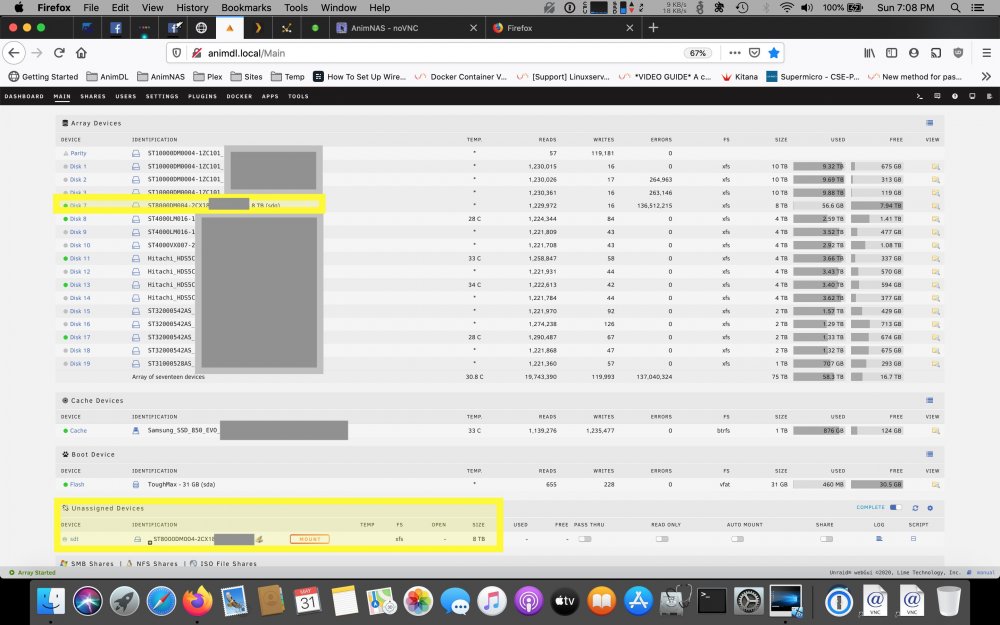
I've come across a new (to me) issue that started a couple days ago. I had one old 2TB drive get marked as bad and emulated via parity. I did a clean shutdown and then swapped out the drive with a new 8TB that had successfully been precleared. Alas when I restarted the system, it saw the new 8TB but 2 more old 2TB drives were listed as missing (yes, I had the array set so it didn't start automatically upon reboot). I tested all 3 of the failed 2TB drives and they spin up but are not recognized, i.e. the Disks utility on my Ubuntu system doesn't even list/show them at all. So no big concern - they were 3 of 7 old 2TB drives that I've been using as scratch space on my backup unRAID box. I'm not overly concerned about lost data as the system is my backup system for items that I want to keep from my main unRAID and it's still running fine. So I decided to do a 'New Config' with the 3 x 2TB drives removed and the new 8TB installed in one of the hotswap bays of one of my Startech hot-swap enclosures (3 x 3.5" in 2 x 5.25" space; https://www.amazon.ca/gp/product/B00HS23QZO/ ). When the parity build/sync started all seemed good but when I checked on it about 2hrs later, the new 8TB drive is throwing constant read errors. I also noticed that the drive is listed as part of the unRAID array but also showed up in UD as per the following screenshot (highlighted in yellow): I did grab diagnostics (had to use terminal and type 'diagnostics' as the unRAID webgui for the System Log showed an error like this user reported back in April: I'm now going to remove the 3 bay hot-swap enclosure and try direct cabling to the new 8TB drive. A 2nd attempt like the 1st failed as well when the 8TB drive appeared to drop off and then got 're-claimed' by UD and the array simultaneously. I thought that UD would ignore devices that are part of the array but the same drive appears in both the array and in UD when the read errors occur. I'm fairly certain that direct cabling will solve the issue and that I have a defective hot-swap enclosure. Regardless I wanted to report it here just in case there's something that you @dlandon want me to look into. I have the diagnostics from both 'failures' but it's certain that the issue was caused when the drive(s) dropped off the bus. Somehow that killed the 3 x 2TB drives but again, no worry as it was backups of data on my main unRAID setup. Let me know if you need further details. Thanks!
-
In my search I found very few cases for those of us that have a 'large' number of disks. There's still a few in the 15 drive range but they're all quite costly. In the end I kept watching local computer recyclers inventory, local classified ads on Kijiji/Craig's List and of course eBay. Managed to find a Supermicro CSE-847 with an x8DTN+ motherboard, dual x5650 Xeons and 16GB of RAM. The CSE-847 is the 36 bay storage chassis from Supermicro. It has 24 bays on front and 12 bays on back. The gotcha is that means the motherboard compartment is only able to accept half-height PCIe expansion cards. It came with a Dell HBA flashed to IT mode. I'm currently only using 22 of the 36 bays so I have lots of room to grow. Alas one issue with the CSE-847 - I want to upgrade the motherboard/cpu/ram to something newer like a Ryzen 3950 or perhaps even a Threadripper setup. Unfortunately with the half-height limitation it's less friendly to adding video cards for pass-through to VMs and Docker containers. Its more popular brother the 24 bay CSE-846 might be a better choice to watch for as it can take full-height expansion cards. Personally I'm considering conversion of the unit to a DAS using the DAS controller available from Supermicro. One other 'gotcha' is being aware of the SAS/SATA expander backplane. My CSE-847 came with the single controller backplanes for both the front 24 bays and the rear 12 bays. This means my disk I/O bandwidth is a little limited. If I'm adding content to the unRAID array, the contention for drive reads/writes does create a bottleneck that sometimes causes slowdowns. If you find a CSE-846/847, make sure to check the SAS/SATA expander backplane to see if they are the dual controller variety. The only other case that I've considered are the Storinator 45 drive chassis. Alas they are quite expensive new and aren't as common on eBay or in the local classifieds. Backblaze uses a lot of these chassis and occasionally give away models that have an expired service contract. Alas you have to be able to pick them up at their offices in California. They won't ship them and the give-aways aren't very frequent. They limit it to one per person so as to make it fair to those who get in the line-up before 'give-away day'. I'm pleased with my CSE-847 but am now watching for a deal on the DAS conversion kit and/or the dual controller SAS/SATA backplanes. Good luck with your continued search!
-
Yes, you can preclear all 4 simultaneously. The average speed I've seen on my systems is a little over 1.1 hours per TB. So each pass over your 2TB drives will take about 2.2 hours. If you do a single pass of the full preclear, that 3 x 2.2 so 6.6hrs to complete. If you trust the drives and don't want to wait that long, just do the zero stage which writes the preclear signature.
-
You need to set the download path (Host Path 2 in the binhex/nzbget config) to a location that's accessible by Sonarr/Radarr/etc. Locations inside the container aren't easily accessible by other apps. You also shouldn't save downloads into the container as it will fill quickly and your container will crash. Set the download location to a folder/share that's available on your unRAID setup. As an example, I created a share/folder called Completed on my unRAID. I then modified the binhex/nzbget config: changed the /data mountpoint label to /Completed and set the path to /mnt/user/Completed. Then in the config for Nzbget (Settings) under Paths, set MainDir to /config and DestDir to /Completed. Then setup the same path/mountpoint (i.e. /Completed pointing to /mnt/user/Completed in my case) for your Sonarr/Radarr/etc container so it can scan and watch for completed downloads.
-
Glad it helped clarify the situation for you. My concern with letting unRAID do the zero is for those few cases where errors are encountered. If a drive has errors while unRAID itself is zeroing the drive, it may or may not get added to the array pool. Early on in my unRAID usage I had numerous errors that were cabling/host controller related. That led to some drives failing with multiple UDMA CRC errors while unRAID finished zeroing and adding them to the pool. Some of the drives went into failure just after finishing the zero and others only after some data had been copied to the array. This meant I had to replace the drive as unRAID was now running in degraded mode. The replacement drive(s) would be rebuilt from parity, taking a considerable amount of time as it would need to reconstruct any data copied to the drive(s) and then zero the rest. And because my problem was really cabling/HBA related, the rebuild from parity can and did occasionally fail as well. Needless to say, it helped me troubleshoot the cabling/HBA issues as I setup another system temporarily just to run preclears. None of the drives actually had any real failures - running the preclear for at least 2 full passes on the other system showed the drives to be OK. That helped me narrow it down to the cabling/HBA. So to clarify, adding an untested or new drive and letting unRAID do the zero is only one pass over the hard drive, whereas a full preclear evaluates each sector 3x per pass - once for the pre-read, once for the zero and once for the post-read. While one pass is better than none, I feel more comfortable doing at least one full preclear. Yes, it takes 3 times as long as letting unRAID do the zero but worth it to me for peace of mind.
-
unRAID will do a clear of a disk that's added to the array if a) it doesn't have a valid preclear signature or b) the format of the drive isn't compatible with the array (usually XFS). If you do use the preclear plugin or Docker, you do two things: 1) By running at least one full pass of preclear on a drive, you tend to discover if the drive has errors that may make it unsuitable for use within the array. This is useful for new drives that you want to validate - if you shuck USB drives like many of us, running the preclear while it's still in the OEM enclosure makes it easier to return/RMA the drive if it does have issues. 2) The other advantage is that a precleared drive is quicker to format and use once added to the array. If you just add the drive without a preclear, unRAID still has to zero the drive before letting you use it as part of the array and that takes time. Preclear just does this while the drive is not part of the array. If you don't use preclear, chances are you'll be fine after unRAID finishes the zero process. Note that you can add drives that are formatted the same as your array (in most cases), but with one disadvantage. Say I have been using my drives on a Ubuntu/FreeBSD/*nix system and have them formatted as XFS (the current unRAID default). If I'm willing to let the system do a full parity rebuild, you can add drives that are already formatted and that contain data - you use the 'New Configuration' tool to force a full parity rebuild. This can save a lot of time in having to copy data into the array, with the caveat being that you'll have reduced speed access to the data while the parity is being built. Personally, I prefer to preclear both old and new drives before adding them to the array. Certainly it's not strictly necessary but I'd rather put a drive in the array that I know has at least passed some basic testing before use. YMMV.
-
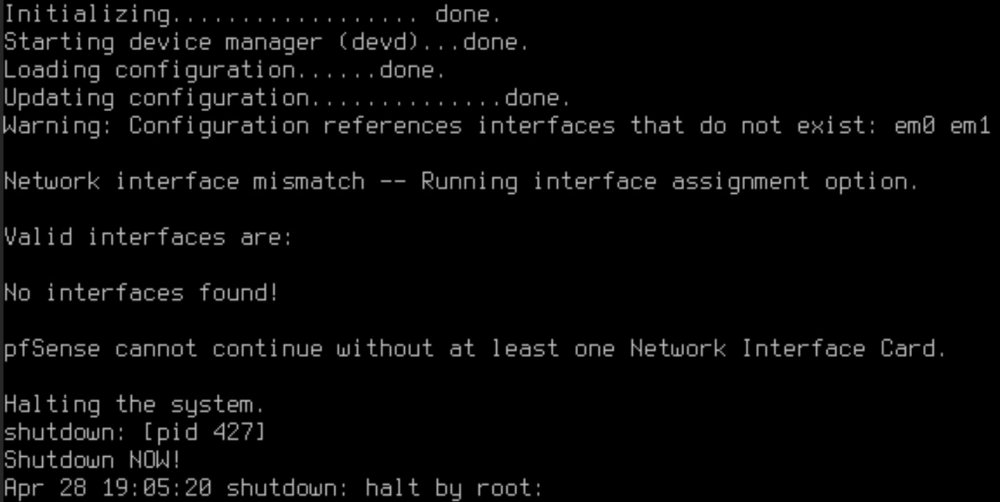
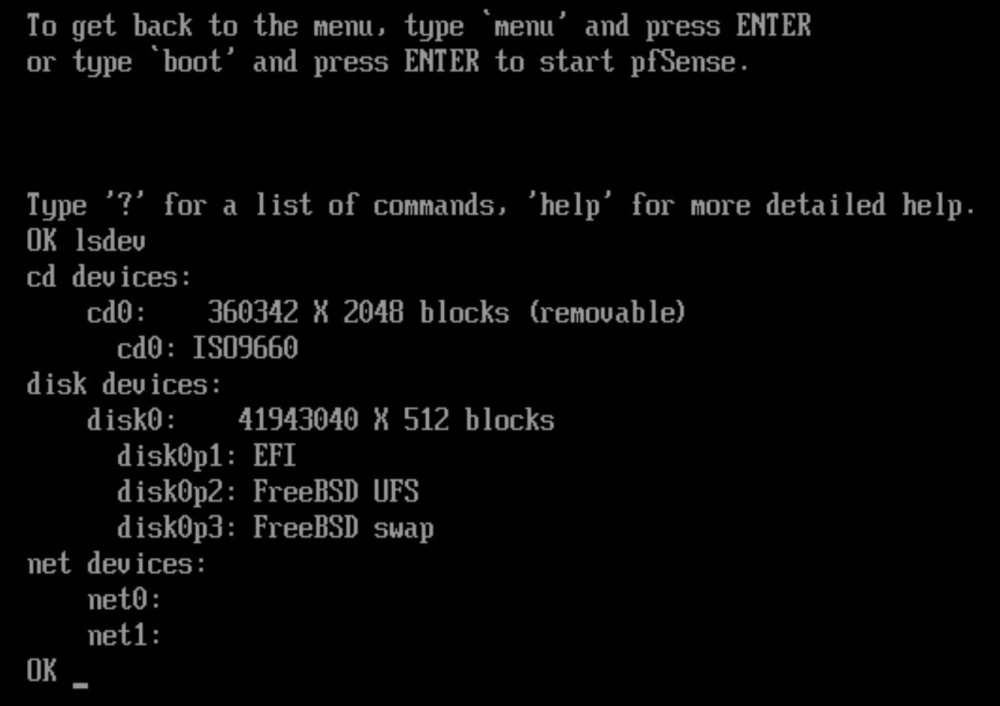
UPDATE @ 3:20pm Mountain: I've finally managed to at least get the Intel dual port 1Gbps NIC passed through to the pfSense VM and for the 1st time I was able to reach the pfSense menu and configure the interfaces. It's not seeing my HP NC523SFP dual port 10Gbps NIC but that's probably a driver/module issue that I can update in the pfSense VM. I've read that others have used the HP (QLogic) 10Gbps adapters so I'm sure I'll eventually figure it out UPDATE #2: did some testing and found that pfSense fails to detect the NICs with QEMU 4.x. QEMU 3.1 is the version that I'm currently using and so far pfSense seems stable. As for the current solution that enabled the Intel NIC: it was as simple as changing the machine type from Q35-4.2 to Q35-2.11 - saw this in one of the many threads that discuss passthrough. It was the only change made to get it to recognize at least the Intel NIC. Original post: I'm having some issues with getting my NICs passed through to the pfSense VM. I've tried both the vfio-pci.cfg/BIND and the vfio-pci.ids=xxxx.yyyy methods. I have two dual port NICs, one an Intel 82571 dual port 1Gbps and the other a HP NC523SFP dual port 10Gbps. Both methods do seem to bind the cards to vfio as unRAID no longer sees them under Network Settings. The initial creation of the VM as per part 3 of the videos works as expected. When the VM reboots at the end of the install, pfSense loads from the vdisk but fails before getting to the pfSense menu options. The error message reported states that 'Configuration references interfaces that do not exist (em0, em1). I never get to the ‘interface assignment’ stage…. I’ve also tried with PCIe ACS override and VFIO allow unsafe interrupts options in VM Settings. When I reboot the VM and hit escape at the loader menu I can issue an 'lsdev' command and it shows the following: Are then net0: and net1: devices 2 of my 4 NIC ports? Where are the other two? I tried with just the Intel dual port card and saw the same result. I then tried with just the HP NC523SFP card by itself, also yielding the same results. As another note, when I try to review the logs of the VM boot, it’s very short and only has the last couple of screens of info prior to the halt. How do I increase the log size for my VM so I can capture all of the messages from start of the boot through to the halt. At least then I can possibly find a cause for my issue. Here's the IOMMU list for my NICs: The onboard dual 1Gbps NICs have a different PCI ID and they are still visible to unRAID and working in a failover bonded pair. Any suggestions on what I need to do to overcome the halt issue for the pfSense VM? TIA!

-
Based on what you've experienced and what's showing from the logs, it looks like you left the appdata and Basesystem paths pointing to the same folder named MacinaboxMojave.... one can be named that, but the second instance should be named something else like MacinaboxMojave2. EDIT: Sorry, thought the image in your reply was the one I posted - and your image shows that you definitely changed the path to something else: 211_mib_macos. But my findings were the same. Assuming you have left the defaults as they stand, there should be a unique folder for each VM under /mnt/user/domains. The fact that it says the install media and vdisk are present means it's definitely still pointed at the same paths as your other Mojave VM. So to verify I just tried changing the paths in my Macinabox Docker container to MacinaboxMojave2 and sure enough I got the same log response you did. There's definitely an issue in the Docker container as it ignored the new paths and just referred to the existing MacinaboxMojave vdisk and install media. I note that the log says the files were put in the /image/MacinaboxMojave/* folder yet in the Docker, there doesn't seem to be a path or mountpoint called /image. I suspect part of the script that runs when the Macinabox Docker container is started is hard-coded to the /image path. I haven't had a look at the Docker container or any of it's components yet, but I suspect it's a simple pathing issue that @SpaceInvaderOne will have to fix.
-
Just curious why you want to use 9p protocol for file access? I've read that 9p isn't very efficient so you might find SMB performance more suitable for your needs. There is a 9p kernel extension for OS X so I assume you've added it to your Mac VMs. If not, then that's something you need to try. Perhaps adding the kernel extension will let OS X see the 9p filesystem and then allow you to mount it or access via Finder. https://github.com/benavento/mac9p





