





AgentXXL
Members
-
Joined
-
Last visited
Everything posted by AgentXXL
-
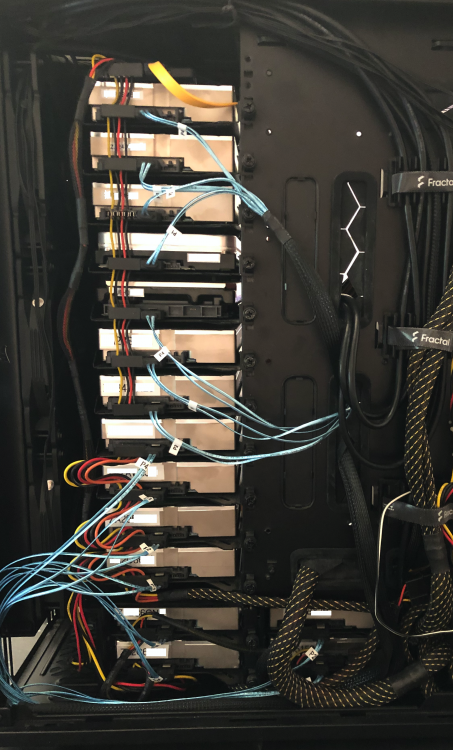
Here's a snapshot of the wiring for the main disk mount area. I actually upgraded my system yesterday - went from a 6th gen i7-6700K to a 12th gen i9-12900K. unRAID has some issues with the 12th gen, but I'll live with them until unRAID goes to a new kernel that better supports all of Alder Lake's features. Specifically the iGPU - for now I'm using a GTX970. As you can see, using the breakout cables with the LSI HBA means you don't have a horrid mess of regular SATA cables. The gotcha is these thinner wires are more prone to breakage, but they're inexpensive so I always keep spares on hand. As I was upgrading the system, I also made a custom power cable for the top 8 drives. The PSU (eVGA 1200W 85+ Gold) has a high power rail that feeds these so no worry about killing the PSU.
-
There's not a lot to complain about with Synology - certainly I think they still provide a decent product line for those that don't want to 'roll their own' with unRAID (or other OSes). That said, I ran FreeNAS (now TrueNAS Core) for many years before jumping ship to unRAID in 2019. I couldn't be more pleased with how it's worked out. As for the LSI HBA info, they are the most reliable and proven way to add SATA ports to an unRAID system. Using them with the breakout cables for discrete drives or using miniSAS SFF-8087 to SFF-8087 for SAS/SATA expanders makes them a great choice. The most common model is the LSI 9207-8i which can use 2 breakout cables for a total of 8 SATA ports. If you were thinking you might want to maximize the storage in a Define 7XL, then a LSI 9201-16i is the better choice as it can do 16 SATA ports with 4 breakout cables. Here's an example link of one from eBay. Also check out 'The Art of Server' website and their eBay store. Note that some have had issues with the OEM models from China but for the most part they're OK. I bought a couple from China and one didn't work properly so I returned it and ordered a retail boxed version from the US. https://www.ebay.ca/itm/133882350555 Also see this section of the unRAID documentation on PCI (and PCIe) controllers. The table may be out of date but the LSI products are still the recommended way to go. https://wiki.unraid.net/Hardware_Compatibility#PCI_SATA_Controllers As for me and needing more storage, it's all about what you intend to use the system for. I've been collecting media since I was 8 years old - almost 50 years worth of TV/movies that's all been digitized or ripped from disc. There's a lot of family pics and video, as well as music, ebooks and more. My media server is in my signature below, as well as the backup server that resides in my Define 7XL. Personally, the case is impressive in its capability, but it's too nice to use for purely storage so I'm planning to repurpose it for a new video editing/flight sim setup. I already have one of the Supermicro CSE-847 (36 x 3.5" bays) for the main media server, but am watching for a CSE-846 (24 x 3.5" bays) to transplant the backup server into. I might get a chance to take some pics of the system cabling and will post them if/when I do. If you have any other questions, feel free to ask.
-
I have a total of 23 drives installed. 20 x 3.5" drives installed, with room for 2 more. I also have 3 x 2.5" SSDs installed. I used all the brackets I ordered and was able to add 1 SSD mounted upside down at the top, along with the 3 x 3.5" drives that are part the normal 18. I also added 1 more 3.5" drive at the bottom of the motherboard compartment, which is where I'll place the other 2 x 3.5" drives if/when needed. Cabling isn't as bad as you might imagine, but it definitely is a candidate for custom cables so it can look a lot cleaner and help with airflow. I use 3 x 140mm fans at the front of the case to suck air in over the hard drives, through the motherboard compartment and then exhausted out the rear. As for cabling, most of my SATA cables are from my LSI 9201-16i which has 4 x SFF-8087 miniSAS connectors. I connect 4 of the SFF-8087 to 4 x SATA forward breakout cables giving me 16 SATA ports. The other SATA ports come from my motherboard and a m.2 to 5 port SATA controller. I haven't done any serious cleanup of the cables as I eventually plan to move the entire setup into another enclosure like a Supermicro CSE-846. The Define 7XL is a great case, but it's also too nice to use purely as a storage server (mine is my 2nd unRAID system, using it for backups primarily).
-
COVID has forced many of us to build out our homelabs so that we can work from home. unRAID certainly isn't what I'd use if I was back at work daily. I just find it odd that it started after one of the last 2 or 3 updates to UD. I have done this same capacity upgrade procedure a couple of times since running rc2 and this is the 1st time I've encountered this problem. What's really annoying is that a drive that has been completely wiped by the manufacturer tools (SeaTools in this instance) still shows up with the 'ARRAY' tag. That's obviously pointing to something that's tracking the drive by s/n or other methods in either unRAID or UD. Very frustrating.
-
I assume you mean the 'refresh' symbol? Tried that numerous times and it hasn't resolved it. Now waiting for users to respond to my reboot notification but that could be hours. And as for rc3, who knows when that will come. Guess I get a forced break from my tasks until then. Do you know which version of UD I could try to roll-back to so I can try to resolve it in the interim?
-
Thanks for the quick response. It's definitely bothersome and until the last few UD updates it hasn't been an issue. In my case the drives were not dropped from the array or disabled - they were replaced while the drives were still fine and just upgraded to higher capacity models. Perhaps you might consider adding some code to UD that will let users 'override' this scenario? At least the option to wipe all partitions from the disk and remove it from historical devices. I'm running 6.10.0-rc2 and have been for a few months and this is the 1st time I've encountered this. I’ve used the same pro-active replacement of the drives before they fail or get dropped from the array a couple of times since I've been on rc2. It's only after the last 2 - 3 UD updates that the issue started. I don't use USB drives in the array and so far I can't recall any times where a SATA connected drive was dropped except when it completely failed. Stopping and restarting the array or rebooting unRAID may work for some but it isn’t a great option when you have numerous users actively accessing data on the server.
-
I've encountered a new issue, or at least it appears to be since my searches on Google and here on the forums haven't revealed anything. 3 days ago I started replacing 3 of my 10TB drives with 3 x new 16TB drives. All went well with the replacements, but I've encountered a problem. I wanted to zero the old 10TB drives so I could use 2 of them to replace a couple of aging 8TB SMR drives on my backup server. I connected the drives to my hot-swap rack on my media unRAID server and UD sees them, but puts an 'ARRAY' label on them. No option to preclear, format or remove partition(s) from the disks. I assumed something odd had been written to the drives so I used SeaTools to 1st try erasing just track zero. That didn't work. I then tried attaching the drives to an Ubuntu system and it sees the drives as XFS formatted, but they are not mountable and xfs_repair doesn't seem to be able to fix them. As a last ditch resort I booted SeaTools and ran a FULL erase of one of the drives. When re-installed in the hot-swap rack, it still shows with the ‘ARRAY’ label and no options to do anything. Something in either UD and/or unRAID itself has likely changed and it’s keeping a list of devices which were previously in the array. As a full zero of the drive with SeaTools didn’t change this behavior, I’m sure it’s not the drives themselves but a code change in UD and/or unRAID. Suggestions?

-
Hello, I updated my Docker container to the latest qBT release (4.4.0) and for some reason it changed some of my config settings. The paths for completed, temporary, copy torrents to and copy finished torrents to folders had all been reset to locations inside the container. It also reset my rate limits on the speed tab. The more serious configuration setting was that it reverted to using any available interface instead of tun0. I caught it after about 2 hrs of run-time. It's working as expected now that I've reset everything, but I just wanted to mention it in case others experience the same issue.
-
Not sure what's going on, but since I've had a terminal session running top for the container, I'm not seeing any lock-ups or freezing. I've even re-added the nzbhydra2 tab which seemed to be responsible as the fault happened much faster. I'll leave it as is with the open terminal session running top and hopefully be able to catch the cause when/if it happens. UPDATE: a day later and it still hasn't locked up again. Almost makes me think that running top in the container console is preventing something from causing the issue. I'll try it without top running to see if the issue persists.
-
The container is default except for the addition of a path. I'll leave it running until it causes the issue again and see what top reports.
-
UPDATE #2: It seems I spoke too soon. The issue with this container has resurfaced, only it's not binhex-nzbhydra2 as that tab was closed. When I woke this morning I went to check and found my CPU cores all maxed at 100% again, with the temperature 1C away from my alert/notification settings. I had left the Firefox container running as I suspected it was the nzbhydra2 container, but it appears that's not the case. As soon as stopped the container, my CPU cores went back to normal. So, I'm still seeing an issue with this container. I'm still seeing nothing in the container logs except xdamage notifications, but that happened with previous versions of the container too. I'm also seeing nothing in the unRAID syslog. Perhaps I should try completely removing the container, /appdata folder and template and re-creating from scratch? Any other suggestions? Previous Update: looks like it's something related to the new version of the browser/Alpine Linux that doesn't like a particular local web app - binhex-nzbhydra2. I've closed its tab and since doing that, I haven't seen any lockups and the Firefox container has been running for at least 40 mins. NZBHydra2 did occasionally hang in the older Firefox version, requiring me to stop the page and reload so this may be related. Original Message: Is anyone else seeing issues where the latest release of the container seems to lock-up? Everything starts out fine when I first start the container but after a random time (10 - 30 mins), the container suddenly becomes unresponsive. All my cores on my i7-6700K (8 threads total) are maxed at 100% when the lock-up occurs. I've tried clearing the browser cache on both the host and inside the container, but no resolution so far. There's nothing noticeable in the container logs to indicate the cause of the issue. This only started after the most recent update. Note that I can't even leave the container running as idle, i.e. not actively using it. While idle it still will result in the same lock-up with all cores of the CPU at 100%.
-
Sorry I didn't get back to you sooner. My problem started worsening and affected both servers so this led me into a long session of troubleshooting. Ended up that a mistake I made while trying to install a new 10Gbe NIC in my backup unRAID led to numerous network failures. Finally figured out thanks to my roommate reviewing the situation - I had swapped the MAC addresses of the onboard and the new 10Gbe in `/config/network-rules.cfg'. This affected my network but it seemed to slowly build into more and more failures. Regardless, I've managed to get everything working again and will happily admit to my error. Thanks again for UD and UD+.
-
I'm not using encrypted disks but everything I've read so far on 'return code = -13' indicates it's a credentials problem and that's why the disk won't mount via SMB or NFS.
-
I'm having a new issue that's cropped up since I tried to get a 10Gbps NIC working in my backup unRAID server two days ago. A 1TB SSD that's mounted using UD is set to auto-mount and share for its settings. It mounts locally with no issues. Since playing around with the NIC and eventually pulling it and falling back to the onboard 1Gbe NIC, that drive is no longer mountable via SMB or NFS. I get this message: Dec 1 15:54:51 MYNAS kernel: CIFS: VFS: cifs_mount failed w/return code = -13 I see in syslog the mount command appears to be looking for a credentials file that doesn't exist. Funny thing is I also mount my main unRAID share and it works, but there's no credential file found at /tmp/unassigned.devices for it either. The mount command looks like this: /sbin/mount -t 'cifs' -o rw,noserverino,nounix,iocharset=utf8,file_mode=0777,dir_mode=0777,uid=99,gid=100,credentials='/tmp/unassigned.devices/credentials_MYSSD' ‘//MYSERVER/MYSSD' '/mnt/remotes/MYSERVER_MYSSD' How is UD mounting my unRAID share when there's no credentials file for it? At least it works, but no luck tracking down the credentials issue for the 1TB SSD. Thoughts or suggestions? Thanks in advance!
-
I use Mover with the Mover Tuning plugin so I could move files based on age. I try to keep my 'new releases' for movies, tv and music on the unRAID cache pool for 2 weeks. This has the advantage of faster disk I/O for concurrent streams, especially helpful for remote users that often need transcoded versions. Once the popularity of the items fades, I'm fine moving it to the slower array and 2 weeks seemed to be a workable time frame. I tend to move a lot of data manually as well, so that takes care of moving some files from cache to array. I can create a scheduled script to run from the User Scripts plugin so Mover itself isn't critical. But I'm still on the fence on how to best implement these new NVME drives - stick with the default BTRFS mirror set, use a XFS mirror set or lastly, use a ZFS mirror set.
-
OK, my mistake... I thought that the video @SpaceInvaderOne did on 'Native ZFS' showed the ZFS pool mounted as a Pool Device. I've just re-watched it and the zpool members are indeed showing up under Unassigned Devices. So my next question is this: can I set the mountpoint for the zpool to be /mnt/cache? Of course after I've removed the existing SSD which is mounted there. Will unRAID still recognize this mountpoint from a Mover standpoint? I'm guessing no unless there's a way to mount the zpool (which will be the 2 x 2TB NVME drives in a mirror set) as a disk to replace the existing SSD. EDIT: I hadn't finished re-watching the 'Native ZFS' video and near the end he discusses using a symlink to mount the zpool for share use. It looks like it's possible to map the zpool to /mnt/cache, but still unsure if Mover or any other tasks won't see it as the cache. Sure, I can go and edit all my shares and all my Docker templates to point to another location. But hopefully after creating a symlink unRAID still sees the zpool as the cache pool for the shares I've selected to use it. Thanks for the responses @Marshalleq, @JorgeB and @muddro!
-
So to clarify, shares that use the single drive cache pool all have that warning currently. My understanding is that unRAID detects the mirror set if using BTRFS so you no longer get the warning. But it won't do this if I decided to go with ZFS? I've been using BTRFS for my single drive cache pool since I started using unRAID about 2.5 years ago. I guess I'm one of the lucky ones as other than actual drive failure, I've never experienced any BTRFS errors that couldn't be corrected by a scrub. Are the folks that report issues with BTRFS using single or multi-drive pools? I do remember the stability of ZFS from my FreeNAS days, but I'm tempted to hold off until unRAID adds native support for it.
-
For my main unRAID cache I'm about to replace my single 2.5" 2TB SSD with 2 x 2TB NVME. If you create a cache pool using ZFS, specifically a mirrored ZFS pool of the 2 x 2TB NVME, does unRAID detect this so that you no longer get the 'Some or all files are unprotected' warning for shares that use the pool? I used ZFS in my FreeNAS days, and intend to build a high-speed ZFS scrub pool for video editing eventually. For now, I'm just looking at replacing my existing single cache drive with a mirrored 2 drive pool. I'm planning to stick with BTRFS but the ZFS snapshot functionality is something I'm interested in. To my knowledge, BTRFS also supports snapshots but it's all command-line and not officially supported by unRAID. The same is true for ZFS - also command-line to use snapshots. Are there any good reasons to choose ZFS over BTRFS? Neither have native unRAID snapshot support and I've been OK with my scrubs of the single drive BTRFS cache. I know others have reported issues with BTRFS and some of those users have even gone with XFS for the main cache drive/pool.
-
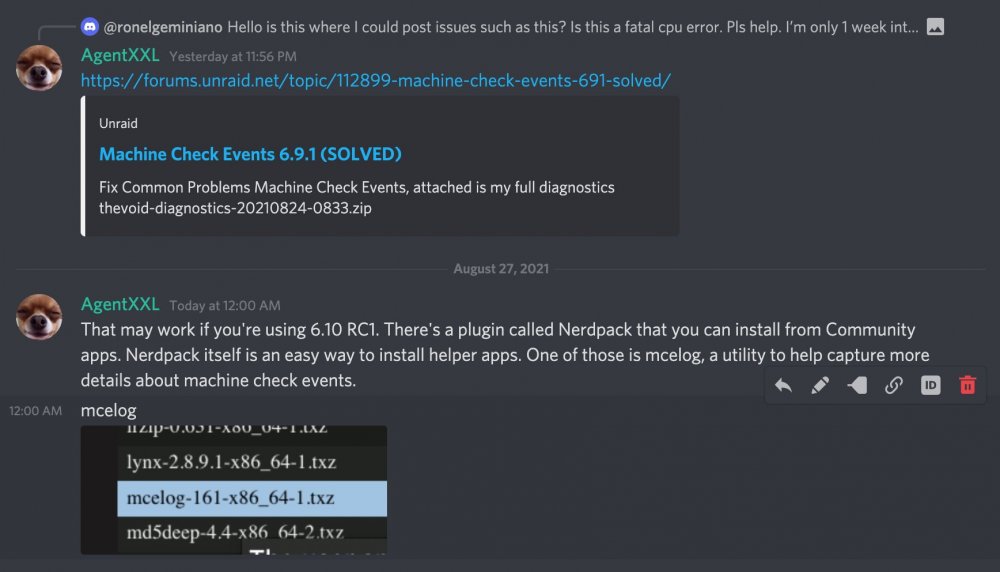
I posted this over in the official unRAID Discord for you... this is just a pic of that.
-
@dlandon I see the issue on Firefox 91.0.2 but it doesn't happen in Safari 14.1.2. It's really not a major issue so I wouldn't fret over it. Just more an FYI.
-
@dlandon I've still been following this thread through email notifications about new posts, but I haven't seen mention of a very minor bug I've encountered. I'm running 6.10 RC1 and when you click the refresh icon in UD, all disks are displayed with their partitions shown. Even though all of the disks have the 'Show Partitions' switch set to off. A reload of the tab in the web browser restores it back to no partitions shown for the disks that have it disabled. Again, very minor but I'm sure you know that those of us with OCD can become focused on the smallest of issues. 🤣
-
As @TexasUnraid said, the CLI tools have no issue. So for now I select the Krusader Docker container and open a console vs the web GUI. From the console it's easy enough to use 'unrar e myfile.rar' which has worked perfectly every time I've needed it. I'm curious though - as I'm still running unrar from the Krusader container, you would think that using the console and the CLI tools would have the same memory issue but they don't. At least there's a simple workaround and it's rarely needed anyhow. I'll also occasionally use Windows and the old standby QuickPAR to try and repair a rar set if the unRAID version of the par tools didn't work.
-
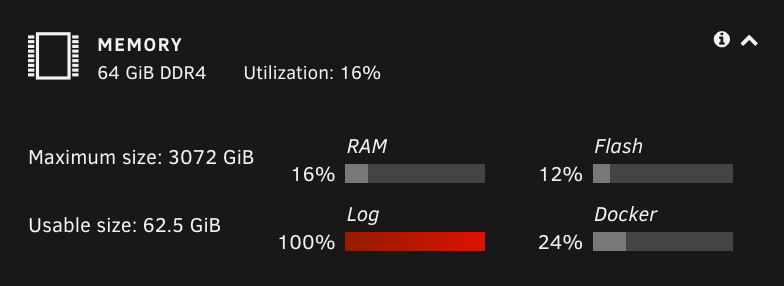
[SOLVED] I waited until the preclears were finished before restarting. Both preclears were successful and after the reboot have been added to the array. As expected after a reboot, my /var/log folder is now only using 1% of available space. Still wish I could figure out why the log was considered full even though I had plenty of available RAM. Start of Original Message: I started a zero-only pass of preclear on two new 16TB drives yesterday evening. When I woke this morning I had a message from Fix Common Problems about an error with my setup. That error is a full /var/log folder. When I checked the unRAID log, it's being flooded with the following: May 12 04:40:56 AnimNAS preclear_disk_ZL2E3RCH[24492]: tput: unknown terminal "screen" May 12 04:40:56 AnimNAS preclear_disk_ZL2E3RCH[24492]: tput: unknown terminal "screen" May 12 04:40:56 AnimNAS preclear_disk_ZL2E3RCH[24492]: tput: unknown terminal "screen" May 12 04:40:56 AnimNAS preclear_disk_ZL2E3RCH[24492]: tput: unknown terminal "screen" May 12 04:40:57 AnimNAS preclear_disk_ZL2E3RCH[24492]: tput: unknown terminal "screen" May 12 04:40:57 AnimNAS preclear_disk_ZL2E3RCH[24492]: tput: unknown terminal "screen" May 12 04:40:57 AnimNAS preclear_disk_ZL2E3RCH[24492]: tput: unknown terminal "screen" The last log entry was from 4:40:57 this morning when the system declared the log as 100% full. This doesn't make sense as my understanding is that /var/log resides in RAM when unRAID is loaded. I have 64GB of RAM on the server and it's only showing 16% used, but the dashboard tab also shows the Log at 100% full. The preclear is 72% complete on both drives and they're still in their USB enclosures until the zero completes successfully. I know a restart will clear the logs but I haven't done one yet as I'm unsure if pausing the zero runs will survive the reboot? Am I safe to reboot after pausing the zero runs? Any idea why my syslog is full of those errors? TIA for any assistance...
-
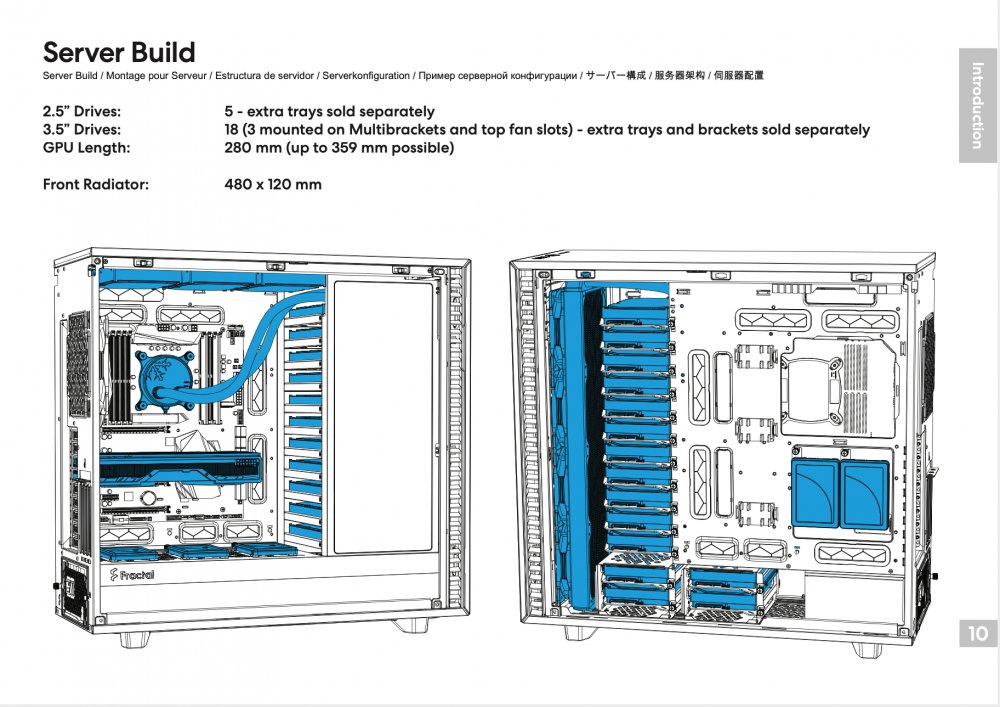
Just to help anyone else looking to do a Fractal Design Define 7XL build, here's the build info I used to fully equip it for maximum storage: Solid black model with 6 HDD/SSD trays + 2 SSD brackets + 2 Multibrackets included 5 x 2-pack HDD trays (10 additional trays) 2 x 2-pack multibrackets (4 additional multibrackets) https://www.fractal-design.com/products/cases/define/define-7-xl/Black/ https://www.fractal-design.com/products/accessories/mounting/hdd-kit-type-b-2-pack/black/ https://www.fractal-design.com/products/accessories/mounting/universal-multibracket-type-a-2-pack/black/ I bought from a local Canadian reseller - Memory Express. Total came to $420 CAD before taxes when I purchased but prices do fluctuate. Main Case (solid black model): https://www.memoryexpress.com/Products/MX81096 Extra trays: https://www.memoryexpress.com/Products/MX00113324 Extra multibrackets: https://www.memoryexpress.com/Products/MX00113330 You can see in the attached pic that you can mount 15 x 3.5" drives in trays (1 spare tray left over). 3 x 3.5" are mounted at the top upside down with multibrackets. I added 2 more 3.5" drives on multibrackets with stick on legs at the bottom of the motherboard compartment where they show 3 x 2.5". I used my last spare multibracket to mount another SSD upside down above the column of 11 x 3.5" drives - there's just enough space, but not if you want to do a water cooling radiator setup as shown in the manual.
-
Yes, both methods work to prevent the DNS rebinding issue. I did add the custom option lines to that section on my pfSense box, but it didn't resolve the DNS rebinding issue. Even after waiting an hour for things to clean up. Only when I added it to the section I mentioned did the provisioning work. What's unusual is that one of my unRAID systems is being seen as available (green in My Servers) whereas the other one is still red. Yet the port forward rules are identical other than the port number. I haven't had the time to play with it anymore yet, but will soon. I'll try the hash url and report back later. Thanks!




