





ghost82
Members
-
Joined
-
Last visited
Everything posted by ghost82
-
Attach diagnostics after failing with the gpu
-
Start by attaching diagnostics so we can see if the vm and gpu are correctly configured. If you have multiple vm remember to tell us what is the name of the vm we should look at.
-
Is this really hanging or unraid is reacheble from an external device through ssh or web gui? If it really hangs you should enable syslog server, so it can log things even if it crashes; syslog inside diagnostics will log only the current boot errors (if any). Once you have the syslog you should analyze it.
-
Really no idea....I'm sorry. e1000* adapters are the oldest ones and they should be the most compatible, in my linux boxes I have no issues with these types of adapters. I would check the firewall configuration, or maybe there are issues in the os or issues with network configuration inside the os. As far as the vm, the adapter is recognized and plugged, why it's not up on boot...I don't know..
-
I know that "consumer gpus" were not supported (for example all geforce and low end quadro, like the k620); this was not an issue with the gpu itself but with the drivers; if the drivers detect that the gpu is running on a vm it didn't work correctly; workarounds include hiding the hypervisor in the vm. But this is no more true, from nvidia driver v465, now the drivers should behave correctly for all gpus, consumer and enterprise (enterprise gpus were always supported). Unfortunately there's nothing I could find about the k620, so I can't say for sure if it will work or not. I don't think so, the main thing is how the bios of the gpu interacts. A vfio capable gpu with a bugged vbios could not work.
-
pci=noaer in your syslinux configuration.
-
I agree, but this is for amazon warehouse, not amazon, i.e. object returned by other people and sold again. If bought "new" from amazon there should be little risk.
-
What is 192.168.0.250? br0 interface on unraid has ip 192.168.0.203. If 192.168.0.250 is online it could be that ping requests are blocked by a firewall, for example if I remember well pinging a windows 10 machine doesn't work by default because of ICMP settings. This is an issue with your network or your ubuntu installation and not related to vms. The fact that your router has settings for dhcp doesn't mean that the vm will get an ip if it's misconfigured. Again, if you want to continue commenting, write in english, use a translator if you aren't able to write in english.
-
I don't think so...if you look close you can see it's sold by Samsung store on Amazon. Although there could be a possibility to have counterfeit things from amazon (especially from amazon wharehouse, "second hand"), it's quite reputable company.
-
Not saying it will work for sure, but don't rely 100% on that post, it's from a moderator of the nvidia forum and it's from 2018. Remember that at that time nvidia did not allowed to passthorugh officially any gpu.
-
Try to add also the other components of the gpu to the vm, replace this: <hostdev mode='subsystem' type='pci' managed='yes'> <driver name='vfio'/> <source> <address domain='0x0000' bus='0x65' slot='0x00' function='0x0'/> </source> <address type='pci' domain='0x0000' bus='0x00' slot='0x06' function='0x0' multifunction='on'/> </hostdev> <hostdev mode='subsystem' type='pci' managed='yes'> <driver name='vfio'/> <source> <address domain='0x0000' bus='0x65' slot='0x00' function='0x1'/> </source> <address type='pci' domain='0x0000' bus='0x00' slot='0x06' function='0x1'/> </hostdev> with this: <hostdev mode='subsystem' type='pci' managed='yes'> <driver name='vfio'/> <source> <address domain='0x0000' bus='0x65' slot='0x00' function='0x0'/> </source> <address type='pci' domain='0x0000' bus='0x00' slot='0x06' function='0x0' multifunction='on'/> </hostdev> <hostdev mode='subsystem' type='pci' managed='yes'> <driver name='vfio'/> <source> <address domain='0x0000' bus='0x65' slot='0x00' function='0x1'/> </source> <address type='pci' domain='0x0000' bus='0x00' slot='0x06' function='0x1'/> </hostdev> <hostdev mode='subsystem' type='pci' managed='yes'> <driver name='vfio'/> <source> <address domain='0x0000' bus='0x65' slot='0x00' function='0x2'/> </source> <address type='pci' domain='0x0000' bus='0x00' slot='0x06' function='0x2'/> </hostdev> <hostdev mode='subsystem' type='pci' managed='yes'> <driver name='vfio'/> <source> <address domain='0x0000' bus='0x65' slot='0x00' function='0x3'/> </source> <address type='pci' domain='0x0000' bus='0x00' slot='0x06' function='0x3'/> </hostdev>
-
ok, as you can see the ethernet controller is there, at 02:01.0, named ens1 (mac: 52:54:00:1e:82:b3). So, for what it concerns the vm settings there's nothing wrong, and the "issue" is in ubuntu itself The interface is down, how are you managing connections? with networkmanager or with networkd? Try to put the interface up: ip link set dev ens1 up then rerun the ip addr comamnd and see if it's up and if it gets an ip.
-
Run: lspci in a terminal of the Ubuntu serveur web vm. Run: ip addr in a terminal of the Ubuntu serveur web vm. Paste here the outputs. Please write in english, otherwise this post will be moved somewhere else.
-
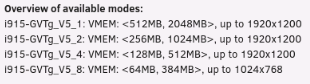
What mode are you running? v5_8 is limited to 1024x768.
-
From the logs: Jun 3 12:07:41 MYDEEDEE kernel: pci 0000:0a:00.0: vgaarb: setting as boot VGA device The 1060 is choosen as boot vga by the host. However, after this, it is successfully attached to vfio, so it should work. The vm is correctly configured and also the vfio options. I would try to add also allow unsafe interrupts in settings --> vm Did you try to install the latest nvidia drivers with the gpu passed through connecting to it through remote desktop installed inside the vm? If you have old nvidia drivers or no drivers installed there could be no output. Are you 100% sure the vbios is working? Even if the infamous nvidia error 43 could be caused by nvidia detecting the gpu running in a vm (only with old drivers), you may also change in the xml from this: <features> <acpi/> <apic/> <hyperv mode='custom'> <relaxed state='on'/> <vapic state='on'/> <spinlocks state='on' retries='8191'/> <vendor_id state='on' value='1234567890ab'/> </hyperv> <ioapic driver='kvm'/> </features> to this: <features> <acpi/> <apic/> <hyperv> <relaxed state='on'/> <vapic state='on'/> <spinlocks state='on' retries='8191'/> <vendor_id state='on' value='1234567890ab'/> </hyperv> <kvm> <hidden state='on'/> </kvm> <vmport state='off'/> <ioapic driver='kvm'/> </features>
-
This should be the symptom that the gpu is in use by the host. Although the vbios is correct adding it with the gpu in use by the host will not solve the issue. txt attachments are 99% of the time useless, full diagnostics saved after running the issues may help.
-
oh sorry, didn't notice it was stripped in my copy/paste. And it works with this code? Strange that it does, without the multifunction='on' argument, as you setup the 2 disk blocks as a multifunction device, one at 00:04.0 and the second one at 00:04.1. Should be: <devices> <emulator>/usr/local/sbin/qemu</emulator> <disk type='file' device='disk'> <driver name='qemu' type='raw' cache='writeback'/> <source file='/mnt/user/domains/001 Windows 10/vdisk1.img'/> <target dev='hdc' bus='virtio'/> <boot order='1'/> <address type='pci' domain='0x0000' bus='0x00' slot='0x04' function='0x0' multifunction='on'/> </disk> <disk type='file' device='disk'> <driver name='qemu' type='raw' cache='writeback'/> <source file='/mnt/user/domains/001 Windows 10/vdisk2.img'/> <target dev='hdd' bus='virtio'/> <address type='pci' domain='0x0000' bus='0x00' slot='0x04' function='0x1'/> </disk> Or maybe unraid rearranged the addresses itself automatically.
-
You don't have any passthrough...if you have a double address error you changed something in your vm, because in your diagnostics bus 0 slot 5 function 0 was not in use. Replace 'Windows 10' vm with this: <!-- WARNING: THIS IS AN AUTO-GENERATED FILE. CHANGES TO IT ARE LIKELY TO BE OVERWRITTEN AND LOST. Changes to this xml configuration should be made using: virsh edit 8bcc8d23-ffe1-fb51-40ee-59169d8bac9e or other application using the libvirt API. --> <domain type='kvm'> <name>Windows 10</name> <uuid>8bcc8d23-ffe1-fb51-40ee-59169d8bac9e</uuid> <metadata> <vmtemplate xmlns="unraid" name="Windows 10" icon="windows.png" os="windows10"/> </metadata> <memory unit='KiB'>3670016</memory> <currentMemory unit='KiB'>3670016</currentMemory> <memoryBacking> <nosharepages/> </memoryBacking> <vcpu placement='static'>3</vcpu> <cputune> <vcpupin vcpu='0' cpuset='2'/> <vcpupin vcpu='1' cpuset='34'/> <vcpupin vcpu='2' cpuset='4'/> </cputune> <os> <type arch='x86_64' machine='pc-i440fx-4.2'>hvm</type> </os> <features> <acpi/> <apic/> <hyperv mode='custom'> <relaxed state='on'/> <vapic state='on'/> <spinlocks state='on' retries='8191'/> <vendor_id state='on' value='none'/> </hyperv> </features> <cpu mode='host-passthrough' check='none' migratable='on'> <topology sockets='1' dies='1' cores='3' threads='1'/> <cache mode='passthrough'/> <feature policy='require' name='topoext'/> </cpu> <clock offset='localtime'> <timer name='hypervclock' present='yes'/> <timer name='hpet' present='no'/> </clock> <on_poweroff>destroy</on_poweroff> <on_reboot>restart</on_reboot> <on_crash>restart</on_crash> <devices> <emulator>/usr/local/sbin/qemu</emulator> <disk type='file' device='disk'> <driver name='qemu' type='raw' cache='writeback'/> <source file='/mnt/user/domains/Windows 10/vdisk1.img'/> <target dev='hdc' bus='virtio'/> <boot order='1'/> <address type='pci' domain='0x0000' bus='0x00' slot='0x04' function='0x0'/> </disk> <disk type='file' device='cdrom'> <driver name='qemu' type='raw'/> <source file='/mnt/user/isos/virtio-win-0.1.217-2.iso'/> <target dev='hdb' bus='ide'/> <readonly/> <address type='drive' controller='0' bus='0' target='0' unit='1'/> </disk> <controller type='pci' index='0' model='pci-root'/> <controller type='ide' index='0'> <address type='pci' domain='0x0000' bus='0x00' slot='0x01' function='0x1'/> </controller> <controller type='virtio-serial' index='0'> <address type='pci' domain='0x0000' bus='0x00' slot='0x03' function='0x0'/> </controller> <controller type='usb' index='0' model='ich9-ehci1'> <address type='pci' domain='0x0000' bus='0x00' slot='0x07' function='0x7'/> </controller> <controller type='usb' index='0' model='ich9-uhci1'> <master startport='0'/> <address type='pci' domain='0x0000' bus='0x00' slot='0x07' function='0x0' multifunction='on'/> </controller> <controller type='usb' index='0' model='ich9-uhci2'> <master startport='2'/> <address type='pci' domain='0x0000' bus='0x00' slot='0x07' function='0x1'/> </controller> <controller type='usb' index='0' model='ich9-uhci3'> <master startport='4'/> <address type='pci' domain='0x0000' bus='0x00' slot='0x07' function='0x2'/> </controller> <interface type='bridge'> <mac address='38:7a:0e:12:a1:2f'/> <source bridge='br0'/> <model type='e1000-82545em'/> <address type='pci' domain='0x0000' bus='0x00' slot='0x05' function='0x0'/> </interface> <serial type='pty'> <target type='isa-serial' port='0'> <model name='isa-serial'/> </target> </serial> <console type='pty'> <target type='serial' port='0'/> </console> <channel type='unix'> <target type='virtio' name='org.qemu.guest_agent.0'/> <address type='virtio-serial' controller='0' bus='0' port='1'/> </channel> <input type='tablet' bus='usb'> <address type='usb' bus='0' port='1'/> </input> <input type='mouse' bus='ps2'/> <input type='keyboard' bus='ps2'/> <graphics type='vnc' port='-1' autoport='yes' websocket='-1' listen='0.0.0.0' keymap='en-us'> <listen type='address' address='0.0.0.0'/> </graphics> <audio id='1' type='none'/> <video> <model type='qxl' ram='65536' vram='65536' vgamem='16384' heads='1' primary='yes'/> <address type='pci' domain='0x0000' bus='0x00' slot='0x02' function='0x0'/> </video> <memballoon model='virtio'> <address type='pci' domain='0x0000' bus='0x00' slot='0x06' function='0x0'/> </memballoon> </devices> </domain>
-
As you already found, there's no network defined in the vm, so no network card in the vm. Try to add it manually, in the xml view add after this: <controller type='usb' index='0' model='ich9-uhci3'> <master startport='4'/> <address type='pci' domain='0x0000' bus='0x00' slot='0x07' function='0x2'/> </controller> this block: <interface type='bridge'> <mac address='38:7a:0e:12:a1:2f'/> <source bridge='br0'/> <model type='e1000-82545em'/> <address type='pci' domain='0x0000' bus='0x00' slot='0x05' function='0x0'/> </interface> Type is bridge, name br0, model is e1000-82545em for maximum compatibility, if you have virtio drivers installed you can change it to virtio or virtio-net. The reason the network setting lacks is unknown, can you attach a screenshot of the gui?
-
I can't see anything wrong in the configuration, that is what I would do. I would try these steps: 1. backup the xml 2. switch from gpu passthrough to qxl/vnc 3. boot the vm and connect to the unraid built in vnc 4. enable remote desktop inside the vm 5. shutdown the vm, remove qxl/vnc and enable again gpu passthrough, preserve buses, multifunction 6. connect to remote desktop and see in device manager if gpu is detected, if there are errors, etc, install the nvidia drivers if needed Not sure if you already done this, or if the issue is only a black screen or if the vm is not booting at all. Are you 100% sure that the vbios ok? If nothing works maybe slot 2 will be better..
-
Yes, sorry, that is correct, can you reattach diagnostics after this change?
-
Hi, that are related to qemu guest agent, which is probably not installed in the guest; the qemu guest agent is not mandatory, its functions are to manage some services of the virtual machine, like shutdown, reboot, etc without relaying on acpi commands. As far as the network is concerned there's nothing wrong in the network settings, the virtual machine is using a virtio-net virtual adapter, br0 bridged to eth0, network 192.168.0.x/255.255.255.0. I would start to: 1. see in the guest the available networks/ip addresses with ifconfig or ip addr commands 2. maybe your guest lacks virtio drivers, install virtio drivers or change in the xml the network type from virtio-net to something standard, like e1000-82545em. <interface type='bridge'> <mac address='52:54:00:1e:82:b3'/> <source bridge='br0'/> <model type='e1000-82545em'/> <address type='pci' domain='0x0000' bus='0x03' slot='0x00' function='0x0'/> </interface>
-
When you are in the uefi shell type exit, you will access ovmf bios, select continue, then press a key to boot from the cd rom iso.
-
Note that this should be a new 6500 xt and unfortunately there is still no driver in mac os, so it wont work. Maybe in future versions of mac os the driver will be added.
-
never done this but you may try one of these: 1. from windows, search 'system configuration' app, boot tab, check 'os boot information' and 'boot log', or 2. in a cmd type: bcdedit /bootdebug {bootmgr} on bcdedit /bootdebug on bcdedit /debug on This should enable debug for windows boot manager, bootloader and kernel


