





MammothJerk
Members
-
Joined
-
Last visited
Everything posted by MammothJerk
-
I also would like to know how to run tailscale on this container so that i can connect to it from outside of my network. i am able to get it working by setting "-u 0:0" in extra parameters instead of "-u 99:100" but im not so sure that is intended. for now i just tailscale into the server itself instead of the specific container which seems to work.
-
i removed the GPU from the jellyfin container and haven't gotten another crash yet... ill keep testing.
-
Did you ever resolve this? i have the same issue GTX 1080 Nvidia Driver Version: 580.126.18 nvidia-persistenced in go file, pcie_aspm=off pcie_port_pm=off in syslinux, set gen 3 on the pcie slot When this happens it locks up my jellyfin container and forces me to do an unclean shutdown. lspci | grep -i nvidia still shows my GPU connected but nvidia-smi throws this error: Unable to determine the device handle for GPU0: 0000:01:00.0: Unknown Error i also got these errors before adding the syslinux line for ASPM, they just preceded the NVRM ones. after adding the syslinux line these messages disappeared: I thought i could use my old 1080 for some light transcoding without having to buy a new GPU, i know it is old but it should still be supported on the 580.x branch right? Diagnostics attached. venasaur-diagnostics-20260311-0202.zip
-
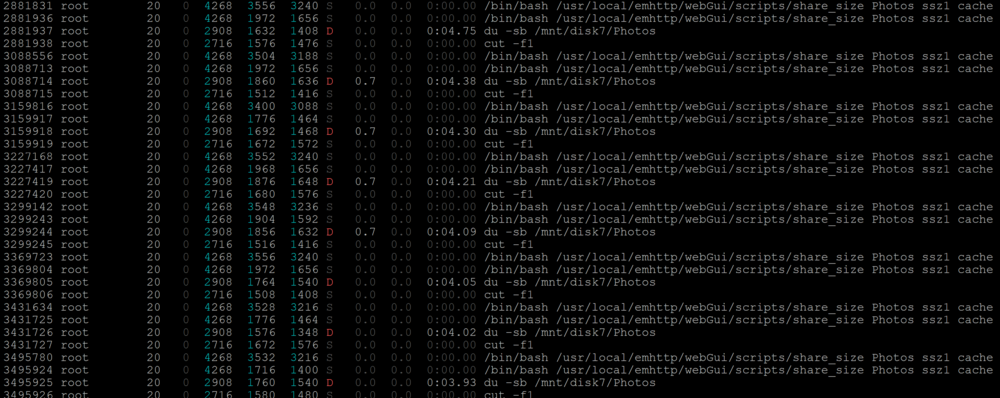
after just 2 hours of uptime i first stopped all dockers and then tried to stop the array The problem occurs with share_size script preventing the array from stopping successfully. i SIGTERM'ed the PIDs in htop to be able to successfully stop the array. i then disabled docker in settings (VMs was already off), i ticked the box for 'reboot in safe mode' and rebooted. 2 hours later i was able to stop the array with no issue. i then rebooted again (without enabling docker or VMs) waited 2 hours again stopped the array without issue. i re-enabled the docker service and then started the array. i instantly got those du -sb... commands in htop. on a hunch i stopped my hass-unraid docker and about 5-10 minutes later the du commands disappeared from htop. it would appear the hass-unraid docker is polling the shares for their sizes and with a share with multiple small files like my photos share it is taking a long time for the scan to finish thus not letting the array stop without finishing those commands. ill bring it up to the author. https://github.com/IDmedia/hass-unraid/issues/48
-
looks to be related to my issue as well... https://forums.unraid.net/topic/197450-cannot-stop-array-pool-or-dataset-is-busy-share_size-script/
-
unraid 7.2.3 diagnostics attached I am almost always unable to get a clean shutdown in unraid because of the "pool or dataset is busy" issue. to get around this issue and let the server shutdown correctly i have to connect via SSH and through htop sigkill a bunch of processes stuck on "/mnt/disk7/Photos" it appears the share_size script is getting stuck on this disk for some reason. Any ideas to fix this? could it be a broken file or is the script running into issues
-
i noticed after updating to the 7.2.0-beta i would no longer see any notifications without having to open the new notifications sidebar so i ran a test and it seems like the notification will disappear in a couple seconds ignoring the settings. During the test i also noticed that it is missing both the description and date info which was visible in older versions. They did however add the "open" button if a link is sent through the notification - which is nice.😊 running /usr/local/emhttp/webGui/scripts/notify -s "Test Complete" -d "Test has been completed" -l "/Main" in the terminal Here is the old notification from 7.0.1 and here is the new one from 7.2.0-beta Here are my settings in 7.2.0-beta.2, it is completely removed in 7.2.0-beta.3 Hopefully this can be fixed
-
New BIOS v4302 released mentions further microcode fixes. hopefully that fixes my issue of degrading 14900k's within 1-3 months 🫠
-
Just updated unraid from 7.0.1 to 7.1.4 and i started sometimes getting unraid syslog errors when a torrent changes download folder. deluge changes the torrent state to "error" and the "status" bar says "Error: Failed to move download folder: Numerical result out of range". this was also reported in 7.1.0 but for a different container so im unsure if its specifically a delugevpn issue or an unraid issue. if you believe this is a delugevpn issue i can proceed with the logs etc.
-
i just updated from 7.0.1 to 7.1.4 and i started to get these errors as well, they have different values though so it might not be the exact same issue as you're describing and they dont repeat. Jul 7 08:50:37 VeNASaur shfs: fuse: bad error value: -2132114223 Jul 7 08:51:36 VeNASaur shfs: fuse: bad error value: -1999095008 Jul 7 08:51:47 VeNASaur shfs: fuse: bad error value: -1987571494 Jul 7 08:54:57 VeNASaur shfs: fuse: bad error value: -2096408835 Jul 7 08:55:06 VeNASaur shfs: fuse: bad error value: -2007817299 Jul 7 08:55:13 VeNASaur shfs: fuse: bad error value: -1937627260 For me the issue seems to originate with the binhex-delugevpn container. Sometimes when a torrent is moved to a different folder it causes an error "Error: Failed to move download folder: Numerical result out of range"
-
after a month of usage without issues (other than the inotify segfault) i just got another full on crash, nothing in the syslog IPMI logged an OS_stop event 🫠
-
10 days later i got another segfault... hopefully a fluke.... Mar 12 16:39:13 Tower kernel: inotifywait[80561]: segfault at 0 ip 000000000040288b sp 00007ffc253d0550 error 4 in inotifywait[402000+2000] likely on CPU 3 (core 4, socket 0)
-
Another new CPU on warranty... issue is fixed again.
-
Does anyone know what going on with the H5Viewer here? 😊 This green flashing only seems to happen after booting into unraid. The BIOS screen, and the bootup screens have no issues, neither does the unraid boot menu where you can choose memtest and safe mode. unplugged the VGA cable from the IPMI card and it seems to have fixed this issue.
-
the 2nd option is preferable for me personally.
-
So if i get this right: previously if you accessed the rootshare through SMB and deleted a file that was symlinked to(/from?) an exclusive share, you were unable to send this file to the recycle bin? i never make use of symlinks so this wouldn't affect me, any way to keep the old behaviour other than keeping the downgrade? maybe a warning or such...
-
What issues was this causing exactly? It used to just not show the exclusive shares in the shared rootshare which worked fine for me. now it seems i either have to individually share each unraid share or disable exclusive shares. If i have to i would go with option one but for now i reverted to the older version which still works fine.
-
Are these CPUs really only supposed to last for 3 months and then break? or am i getting extremely unlucky with the SKUs? This is now my 3rd broken 14900k throwing segfaults and kernel panics after 2-3 months of usage and it's starting to feel like i should completely step away from this setup and get something more reliable...
-
No *arrs running, no webuis connected, no thinclients connect, still crashes. this time "aborted" instead of "segmentation fault" though. also not sure if this is the cause of the crash or the reaction to the crash... Extension modules: zope.interface._zope_interface_coptimizations, _dbus_bindings, libtorrent, _cffi_backend, GeoIP, rencode._rencode (total: 6) 2025-01-24 22:37:10,910 DEBG 'watchdog-script' stderr output: /home/nobody/watchdog.sh: line 281: 6605 Aborted nohup /usr/bin/deluged -d -c /config -L "${DELUGE_DAEMON_LOG_LEVEL}" -l /config/deluged.log 2025-01-24 22:37:10,942 DEBG 'watchdog-script' stdout output: [info] Deluge not running 2025-01-24 22:37:10,949 DEBG 'watchdog-script' stdout output: [info] Attempting to start Deluge... [info] Removing deluge pid file (if it exists)...
-
after updating to unraid 7 i've noticed deluge crashing constantly. it could also have to do with changes in the *arrs since i keep them up to date but i'm not sure since i am unable to reproduce the crashes consistently. After these "crashes" (the thinclient disconnects and i am unable to instantly reconnect, and a bunch of torrents get paused) it doesn't seem like the docker container itself is what is restarting but deluge within the container is whats restarting. this is also causing all the *arrs to be unable to connect to the client and i have to manually restart the delugevpn docker container for the *arrs to be able to access it again. here are some errors that i can see in the docker log for delugevpn 2025-01-21 10:54:07,833 DEBG 'watchdog-script' stderr output: Traceback (most recent call last): File "/usr/lib/python3.13/site-packages/deluge/decorators.py", line 200, in addCallbacks self.activate() File "/usr/lib/python3.13/site-packages/deluge/decorators.py", line 192, in activate d = defer.Deferred.fromCoroutine(self.coro) File "/usr/lib/python3.13/site-packages/twisted/internet/defer.py", line 1326, in fromCoroutine return _cancellableInlineCallbacks(coro) File "/usr/lib/python3.13/site-packages/twisted/internet/defer.py", line 2172, in _cancellableInlineCallbacks _inlineCallbacks(None, gen, status, _copy_context()) --- <exception caught here> --- File "/usr/lib/python3.13/site-packages/twisted/internet/defer.py", line 2003, in _inlineCallbacks result = context.run(gen.send, result) File "/usr/lib/python3.13/site-packages/deluge/core/core.py", line 772, in get_torrents_status torrent_ids = self.filtermanager.filter_torrent_ids(filter_dict) File "/usr/lib/python3.13/site-packages/deluge/core/filtermanager.py", line 179, in filter_torrent_ids status = self.core.create_torrent_status( File "/usr/lib/python3.13/site-packages/deluge/core/core.py", line 734, in create_torrent_status status = self.torrentmanager[torrent_id].get_status( File "/usr/lib/python3.13/site-packages/deluge/core/torrent.py", line 1036, in get_status for key in keys: builtins.TypeError: 'Core' object is not iterable 2025-01-21 11:02:41,138 DEBG 'start-script' stdout output: 2025-01-21 11:39:34,291 DEBG 'watchdog-script' stderr output: Fatal Python error: _PyEval_EvalFrameDefault: Executing a cache. Python runtime state: initialized Thread 0x000014683a6ff6c0 (most recent call first): File "/usr/lib/python3.13/threading.py", line 359 in wait File "/usr/lib/python3.13/queue.py", line 202 in get File "/usr/lib/python3.13/site-packages/twisted/_threads/_threadworker.py", line 48 in work File "/usr/lib/python3.13/threading.py", line 992 in run File "/usr/lib/python3.13/threading.py", line 1041 in _bootstrap_inner File "/usr/lib/python3.13/threading.py", line 1012 in _bootstrap Current thread 0x00001468a1de1b80 (most recent call first): File "/usr/lib/python3.13/site-packages/deluge/core/filtermanager.py", line 200 in get_filter_tree File "/usr/lib/python3.13/site-packages/deluge/core/core.py", line 789 in get_filter_tree File "/usr/lib/python3.13/site-packages/deluge/core/rpcserver.py", line 334 in dispatch File "/usr/lib/python3.13/site-packages/twisted/internet/base.py", line 1090 in runUntilCurrent File "/usr/lib/python3.13/site-packages/twisted/internet/base.py", line 705 in mainLoop File "/usr/lib/python3.13/site-packages/twisted/internet/base.py", line 695 in run File "/usr/lib/python3.13/site-packages/deluge/core/daemon.py", line 161 in start File "/usr/lib/python3.13/site-packages/deluge/core/daemon_entry.py", line 119 in run_daemon File "/usr/lib/python3.13/site-packages/deluge/common.py", line 1355 in run_profiled File "/usr/lib/python3.13/site-packages/deluge/core/daemon_entry.py", line 138 in start_daemon File "/usr/bin/deluged", line 8 in <module> Extension modules: zope.interface._zope_interface_coptimizations 2025-01-21 11:39:34,291 DEBG 'watchdog-script' stderr output: , _dbus_bindings, libtorrent, _cffi_backend, GeoIP, rencode._rencode (total: 6) 2025-01-21 11:40:02,744 DEBG 'watchdog-script' stderr output: /home/nobody/watchdog.sh: line 281: 714 Aborted nohup /usr/bin/deluged -d -c /config -L "${DELUGE_DAEMON_LOG_LEVEL}" -l /config/deluged.log 2025-01-21 11:40:02,771 DEBG 'watchdog-script' stdout output: [info] Deluge not running 2025-01-20 06:12:27,023 DEBG 'watchdog-script' stderr output: Unhandled Error Traceback (most recent call last): File "/usr/lib/python3.13/site-packages/deluge/common.py", line 1355, in run_profiled return func(*args) File "/usr/lib/python3.13/site-packages/deluge/core/daemon_entry.py", line 119, in run_daemon daemon.start() File "/usr/lib/python3.13/site-packages/deluge/core/daemon.py", line 161, in start reactor.run() File "/usr/lib/python3.13/site-packages/twisted/internet/base.py", line 695, in run self.mainLoop() --- <exception caught here> --- File "/usr/lib/python3.13/site-packages/twisted/internet/base.py", line 705, in mainLoop self.runUntilCurrent() File "/usr/lib/python3.13/site-packages/twisted/internet/base.py", line 1074, in runUntilCurrent self._insertNewDelayedCalls() File "/usr/lib/python3.13/site-packages/twisted/internet/base.py", line 1020, in _insertNewDelayedCalls heappush(self._pendingTimedCalls, call) File "/usr/lib/python3.13/site-packages/twisted/internet/base.py", line 225, in __lt__ if isinstance(other, DelayedCall): builtins.TypeError: 'async for' requires an object with __aiter__ method, got bool Even with all the *arrs offline i'm getting this error in the logs every now and then which crashes deluge 2025-01-22 21:09:28 Control Channel: TLSv1.3, cipher TLSv1.3 TLS_CHACHA20_POLY1305_SHA256, peer certificate: 4096 bits RSA, signature: RSA-SHA256, peer temporary key: 253 bits X25519 2025-01-22 21:17:46,101 DEBG 'watchdog-script' stderr output: /home/nobody/watchdog.sh: line 281: 1818 Segmentation fault nohup /usr/bin/deluged -d -c /config -L "${DELUGE_DAEMON_LOG_LEVEL}" -l /config/deluged.log 2025-01-22 21:17:46,127 DEBG 'watchdog-script' stdout output: [info] Deluge not running 2025-01-22 21:17:46,134 DEBG 'watchdog-script' stdout output: [info] Attempting to start Deluge... [info] Removing deluge pid file (if it exists)...
-
Another new 14900k and the issue seems to be fixed.
-
BIOS 4001 just released.
-
Safe to assume its the CPU again then? another call trace after 16 hours of parity checking, heres the logs again. diagnostics after the call trace:
-
i had one crash a couple of weeks ago that i didn't attribute to anything specific, the server just rebooted by itself at some point. Today i got the same behavior of the docker containers still being available and transferring data, but the unraid webUI was completely inaccessible even after restarted php/nginx. After the crash i started a parity check that ran for about 2 hours before i saw the kernel: Call Trace: in the syslog, 2 hours later the parity check showed "estimated completion in 1200 days". at this point the webUI was still accessible and i was able to stop all my containers and then the webui became unresponsive again, but i was able to reboot from the SSH terminal. This does look like the same issue again with a new CPU and the updated BIOS. Does the syslog show anything different then last time? 1st crash: 2nd crash: Diagnostics if needed:
-
I grabbed an LSI 9207-8i from the ebay seller theartofserver




