





MammothJerk
Members
-
Joined
-
Last visited
Everything posted by MammothJerk
-
overnight it did another "real crash" where i wasn't able to connect via ssh, webui, or even the physical keyboard. the syslog looked like this: ill reformat the zfs cache and see if that helps.
-
unraid: 6.12.11 asus Pro WS W680-ACE IPMI: bios 3701 14900k I noticed my server started hanging a couple of days ago with no configuration changes on my end. i restarted the server and a couple hours later it crashed again. I had recently heard that some intel CPUs had some instability, i went to the mobo manufacturers website and installed the latest BIOS update 3701. a couple hours later it crashed again. I tried downloading diagnostics but it seems to hang on the flash drive i have a syslog server setup on another server and it stops updating as well. in this so called hung state i can see the disk activity on /main and i can navigate to /settings and /tools but if i go to /dashboard the webui is blank and it will not load, at this point i cannot navigate back to /main without having to reload php with /etc/rc.d/rc.php-fpm reload even weirder is i have homeassistant running in a VM and some docker containers that don't appear to be affected at all. but even then there are a couple of docker containers that seem to load indefinitely even though they dont seem to outright crash. From what i can see when trying to create the diagnostics it stops on the zpool status which seems to indicate there is an issue there. But then in the syslog there seems to be a lot of different stuff like segfaults, tainted kernel, and call traces. any ideas what issues i'm having here?
-
any ideas?
-
It would appear (at least in my case) that the cache SSD (kingston a400) was not of sufficient quality for my usecase. i switched to a pair of kingston kc3000 nvme SSDs and the issue is completely gone. My dockers feel more responsive than ever. Although they are hitting pretty high temps (60-70c) so i might have to pick up some heatsinks for them 😬
-
tried this, 3 hours later its still barely installed half of the containers from CA, so i doubt thats the fix. I was unable to download diagnostics without first rebooting the server, the download webui log would show up but would not populate anything, it would only show the three dots animation and the rest of the dialog was blank. After rebooting the download worked in just a couple seconds. going to try recreating diagnostics after docker containers are installed, will edit ------------------- Installed all containers from CA without issue, but i got a lot of "Execution error" dialogs when trying to start them from the docker webui. all dockers running, webUI noticeably sluggish, 20-30% CPU usage. trying to add a container takes over 10 minutes, the webui is completely unresponsive while the container is being added. Here are the diagnostics:
-
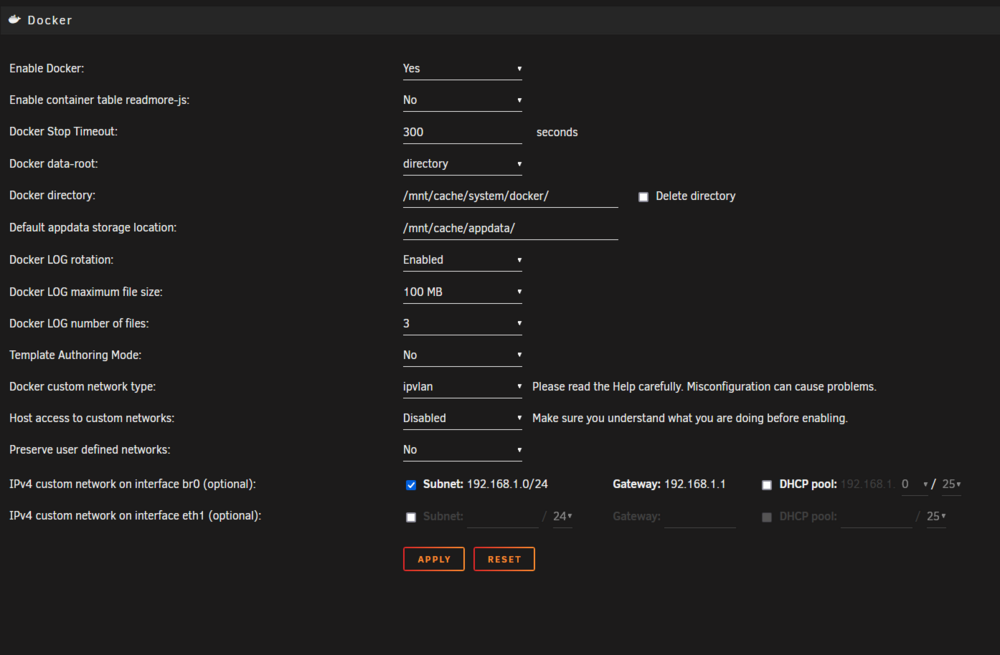
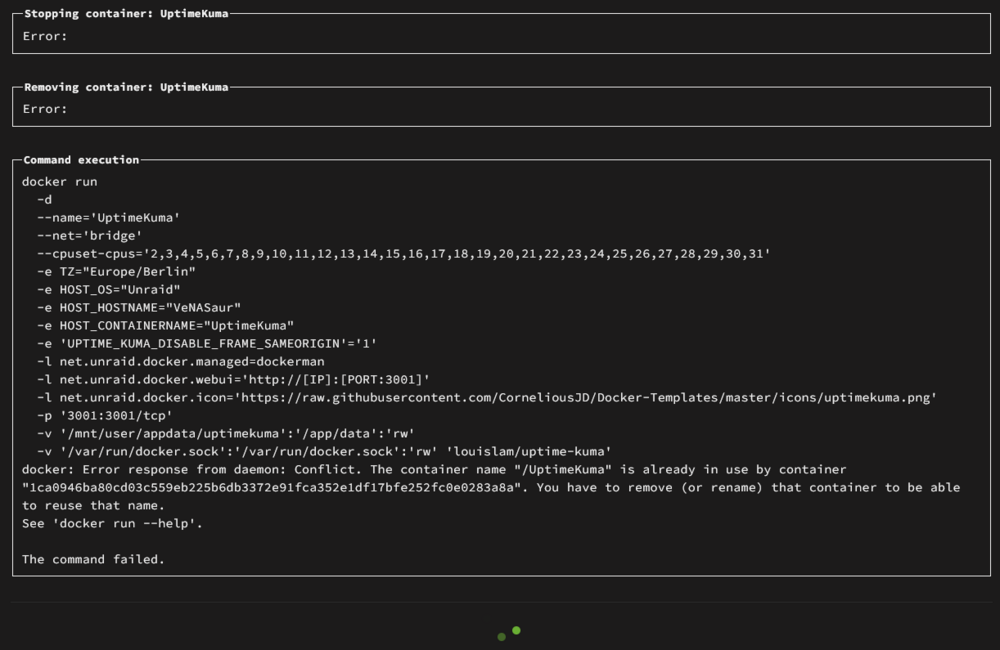
I don't edit my docker containers that often so i couldve had this issue for weeks/months without realizing it, but it has definitely been noticeable in the past couple of days that updating docker containers is taking FOREVER and most of the times its not even working at all. It also seems to take ages to stop the containers and sometimes it even goes past the set timeout and forces an unclean shutdown. This is a very typical error when updating a container: things i've tried: rebooting server changing dns deleting the docker directory and reinstalling all containers from CA (reinstalling the containers felt a bit slow but it didn't freeze the entire server). uninstall the ipmi plugin turn off autostart from all containers the only thing that seems to have helped is to turn off autostart from all containers, which let me edit a couple of them without freezing the server. But when i got to the 5th container or so it started freezing again. heres a snippet from the syslog when trying to edit the sonarr and then sonarr4k containers. Jun 9 06:55:45 VeNASaur kernel: usb 1-6: reset full-speed USB device number 4 using xhci_hcd Jun 9 06:55:45 VeNASaur kernel: usb 1-13: reset high-speed USB device number 6 using xhci_hcd Jun 9 06:59:36 VeNASaur kernel: docker0: port 5(vethc279c8b) entered blocking state Jun 9 06:59:36 VeNASaur kernel: docker0: port 5(vethc279c8b) entered disabled state Jun 9 06:59:36 VeNASaur kernel: device vethc279c8b entered promiscuous mode Jun 9 06:59:47 VeNASaur kernel: eth0: renamed from vetha0f7368 Jun 9 06:59:47 VeNASaur kernel: IPv6: ADDRCONF(NETDEV_CHANGE): vethc279c8b: link becomes ready Jun 9 06:59:47 VeNASaur kernel: docker0: port 5(vethc279c8b) entered blocking state Jun 9 06:59:47 VeNASaur kernel: docker0: port 5(vethc279c8b) entered forwarding state Jun 9 07:25:33 VeNASaur nginx: 2024/06/09 07:25:33 [error] 12249#12249: *13611 upstream timed out (110: Connection timed out) while reading response header from upstream, client: 192.168.1.100, server: , request: "GET /plugins/ipmi/include/ipmi_temp.php?unit=C&dot=. HTTP/2.0", subrequest: "/auth-request.php", upstream: "fastcgi://unix:/var/run/php5-fpm.sock", host: "192.168.1.111", referrer: "https://192.168.1.111/Docker/UpdateContainer?xmlTemplate=edit:/boot/config/plugins/dockerMan/templates-user/my-Sonarr.xml" Jun 9 07:25:33 VeNASaur nginx: 2024/06/09 07:25:33 [error] 12249#12249: *13611 auth request unexpected status: 504 while sending to client, client: 192.168.1.100, server: , request: "GET /plugins/ipmi/include/ipmi_temp.php?unit=C&dot=. HTTP/2.0", host: "192.168.1.111", referrer: "https://192.168.1.111/Docker/UpdateContainer?xmlTemplate=edit:/boot/config/plugins/dockerMan/templates-user/my-Sonarr.xml" Jun 9 07:25:33 VeNASaur nginx: 2024/06/09 07:25:33 [error] 12249#12249: *13611 upstream timed out (110: Connection timed out) while reading response header from upstream, client: 192.168.1.100, server: , request: "GET /plugins/unassigned.devices.preclear/assets/sweetalert2.js?_=1717910096010 HTTP/2.0", subrequest: "/auth-request.php", upstream: "fastcgi://unix:/var/run/php5-fpm.sock", host: "192.168.1.111", referrer: "https://192.168.1.111/Docker/UpdateContainer?xmlTemplate=edit:/boot/config/plugins/dockerMan/templates-user/my-Sonarr.xml" Jun 9 07:25:33 VeNASaur nginx: 2024/06/09 07:25:33 [error] 12249#12249: *13611 auth request unexpected status: 504 while sending to client, client: 192.168.1.100, server: , request: "GET /plugins/unassigned.devices.preclear/assets/sweetalert2.js?_=1717910096010 HTTP/2.0", host: "192.168.1.111", referrer: "https://192.168.1.111/Docker/UpdateContainer?xmlTemplate=edit:/boot/config/plugins/dockerMan/templates-user/my-Sonarr.xml" Jun 9 07:25:46 VeNASaur nginx: 2024/06/09 07:25:46 [error] 12249#12249: *13611 upstream timed out (110: Connection timed out) while reading upstream, client: 192.168.1.100, server: , request: "POST /Docker/UpdateContainer?xmlTemplate=edit:/boot/config/plugins/dockerMan/templates-user/my-Sonarr.xml HTTP/2.0", upstream: "fastcgi://unix:/var/run/php5-fpm.sock:", host: "192.168.1.111", referrer: "https://192.168.1.111/Docker/UpdateContainer?xmlTemplate=edit:/boot/config/plugins/dockerMan/templates-user/my-Sonarr.xml" Jun 9 07:31:46 VeNASaur kernel: br-ee7a2a4499c0: port 1(vethf120004) entered blocking state Jun 9 07:31:46 VeNASaur kernel: br-ee7a2a4499c0: port 1(vethf120004) entered disabled state Jun 9 07:31:46 VeNASaur kernel: device vethf120004 entered promiscuous mode Jun 9 07:32:47 VeNASaur kernel: eth0: renamed from vethf1a01fc Jun 9 07:32:47 VeNASaur kernel: IPv6: ADDRCONF(NETDEV_CHANGE): vethf120004: link becomes ready Jun 9 07:32:47 VeNASaur kernel: br-ee7a2a4499c0: port 1(vethf120004) entered blocking state Jun 9 07:32:47 VeNASaur kernel: br-ee7a2a4499c0: port 1(vethf120004) entered forwarding state Jun 9 07:32:47 VeNASaur kernel: IPv6: ADDRCONF(NETDEV_CHANGE): br-ee7a2a4499c0: link becomes ready Jun 9 08:43:53 VeNASaur nginx: 2024/06/09 08:43:53 [error] 12249#12249: *24791 upstream timed out (110: Connection timed out) while reading response header from upstream, client: 192.168.1.100, server: , request: "GET /plugins/ipmi/include/ipmi_temp.php?unit=C&dot=. HTTP/2.0", subrequest: "/auth-request.php", upstream: "fastcgi://unix:/var/run/php5-fpm.sock", host: "192.168.1.111", referrer: "https://192.168.1.111/Docker/UpdateContainer?xmlTemplate=edit:/boot/config/plugins/dockerMan/templates-user/my-Sonarr4K.xml" Jun 9 08:43:53 VeNASaur nginx: 2024/06/09 08:43:53 [error] 12249#12249: *24791 auth request unexpected status: 504 while sending to client, client: 192.168.1.100, server: , request: "GET /plugins/ipmi/include/ipmi_temp.php?unit=C&dot=. HTTP/2.0", host: "192.168.1.111", referrer: "https://192.168.1.111/Docker/UpdateContainer?xmlTemplate=edit:/boot/config/plugins/dockerMan/templates-user/my-Sonarr4K.xml" Jun 9 08:43:53 VeNASaur nginx: 2024/06/09 08:43:53 [error] 12249#12249: *24791 upstream timed out (110: Connection timed out) while reading response header from upstream, client: 192.168.1.100, server: , request: "GET /plugins/unassigned.devices.preclear/assets/sweetalert2.js?_=1717914796079 HTTP/2.0", subrequest: "/auth-request.php", upstream: "fastcgi://unix:/var/run/php5-fpm.sock", host: "192.168.1.111", referrer: "https://192.168.1.111/Docker/UpdateContainer?xmlTemplate=edit:/boot/config/plugins/dockerMan/templates-user/my-Sonarr4K.xml" Jun 9 08:43:53 VeNASaur nginx: 2024/06/09 08:43:53 [error] 12249#12249: *24791 auth request unexpected status: 504 while sending to client, client: 192.168.1.100, server: , request: "GET /plugins/unassigned.devices.preclear/assets/sweetalert2.js?_=1717914796079 HTTP/2.0", host: "192.168.1.111", referrer: "https://192.168.1.111/Docker/UpdateContainer?xmlTemplate=edit:/boot/config/plugins/dockerMan/templates-user/my-Sonarr4K.xml" Jun 9 08:43:56 VeNASaur nginx: 2024/06/09 08:43:56 [error] 12249#12249: *24791 upstream timed out (110: Connection timed out) while reading upstream, client: 192.168.1.100, server: , request: "POST /Docker/UpdateContainer?xmlTemplate=edit:/boot/config/plugins/dockerMan/templates-user/my-Sonarr4K.xml HTTP/2.0", upstream: "fastcgi://unix:/var/run/php5-fpm.sock:", host: "192.168.1.111", referrer: "https://192.168.1.111/Docker/UpdateContainer?xmlTemplate=edit:/boot/config/plugins/dockerMan/templates-user/my-Sonarr4K.xml" Jun 9 08:44:01 VeNASaur nginx: 2024/06/09 08:44:01 [error] 12249#12249: *24791 upstream timed out (110: Connection timed out) while reading response header from upstream, client: 192.168.1.100, server: , request: "POST /plugins/unassigned.devices.preclear/Preclear.php HTTP/2.0", subrequest: "/auth-request.php", upstream: "fastcgi://unix:/var/run/php5-fpm.sock", host: "192.168.1.111", referrer: "https://192.168.1.111/Docker/UpdateContainer?xmlTemplate=edit:/boot/config/plugins/dockerMan/templates-user/my-Sonarr.xml" Jun 9 08:44:01 VeNASaur nginx: 2024/06/09 08:44:01 [error] 12249#12249: *24791 auth request unexpected status: 504 while sending to client, client: 192.168.1.100, server: , request: "POST /plugins/unassigned.devices.preclear/Preclear.php HTTP/2.0", host: "192.168.1.111", referrer: "https://192.168.1.111/Docker/UpdateContainer?xmlTemplate=edit:/boot/config/plugins/dockerMan/templates-user/my-Sonarr.xml" the webui never got past the "progress" page and i had to close the page, and still 10+ minutes after i closed that tab the webui is still not responding. but if i then reload php with /etc/rc.d/rc.php-fpm reload the webui instantly starts responding again. here are my docker settings: I recently updated to a 14900k and i did not have this issue before so im not sure what the issue might be, though i did a bit of troubleshooting when trying to set the CPU pinning so i mightve changed something... Any ideas?
-
Do you have any insight into how to use an "exclusive share" in delugevpn? writing to the cache through the FUSE file system is really bad for me and peaks my CPU usage during "big" writes 10MB/s+ Setting the /mnt/user/downloads share to an exclusive share completely solves this issue. However it creates a new issue where passing /mnt/user/ to the container no longer shows the download share (which is i think the expected behaviour for exclusive shares). I then have to explicitly pass through /mnt/user/downloads to the container but now all the torrents do a copy+delete and creating issues and wasted operations. I'm wondering if maybe its possible to pass through the downloads directory as /mnt/cache/downloads but treat moves to /mnt/user/* as still being on the cache and executing atomic moves? I'm not sure if i'm making sense or if a missing something that would make this easier. thx
-
looks like you can only set it to a range 300-1800 but not disable it completely, bummer

-
I had to use 2500 and the reload command was different /etc/rc.d/rc.nginx reload /etc/rc.d/rc.php-fpm reload found from a different thread Now it works though. Any reason why the limit is so "low"? I doubt that i'm the first to run into this issue with only 32 cores and 63 containers. Perhaps a better error message should be put forth... Anyways, thanks for the help!
-
I recently got this motherboard as well and i've ran into a couple of questions that i'm unable to figure out on my own. (most other questions have been answered in this topic, thanks!) How do the power and reset switches work? do i have to choose to control the power via IPMI OR the power/reset buttons on the chassi? can i not do both somehow? I just didn't read the instructions clearly and skimmed over the CHA section 😂 Is it possible to disable the IPMI webui session timeout? unfortunately doesn't look like it's possible. Has anyone successfully connected 4 sata drives with a SAS backplane with a reverse breakout cable to the 4 SATA ports on the motherboard? i'm wondering if my cables are junk or if the SAS backplane of my chassi is incompatible (somehow)

-
[05-Jun-2024 00:50:08 UTC] PHP Warning: PHP Request Startup: Input variables exceeded 1000. To increase the limit change max_input_vars in php.ini. in Unknown on line 0 trying to update 63 containers with 32 cores would seem to be the issue here? guessing i need to change the max_input_vars in php.ini wherever that may be stored
-
tried firefox, chrome, and edge. same issue any idea what UpdateOne.php is a reference to?
-
I was hoping i could avoid that 🫠 oh well.
-
Already tried that, didn't help.
-
Recently i installed a new motherboard and CPU with more cores than my old one. At first when trying to update the cpu pinning it didn't work when pinning all the cores to certain containers, but it did work when only pinning cores 1-8. Now it doesn't work at all and whenever i hit apply the change doesn't apply and i get this error in the syslog: I'm not sure what UpdateOne is. i've checked all my plugins for updates, ive rebooted the server a couple of times, i've restarted the docker service, i've booted into safe mode, Nothing seems to help. I am able to change the pinning if i go per container but i really want to avoid that if i can.
-
these are the cables i got: https://www.inline-info.com/en/products/cable/sas/5539/inline-sas-cable-mini-sas-sff8087-to-4x-sata-direct-ocr-0.5m the description says "(= straight through = reverse breakout, OCR)" I tried some normal OCF cables as well but they do not work either as expected. Maybe ill have to contact the retailer and see if they sent me the wrong cables...
-
i'm not sure, this is my chassi: https://www.inter-tech.de/productdetails-144/2U-2412_EN.html one SFF-8087 + one molex to four SATA + four SATA power
-
Did you ever get this working? i'm having a similar issue where with (MB) Sata <-> Sata (Disk) the disks show up and work fine but putting it in my case with a SAS backplane and reverse breakout cables it doesnt work (MB) Sata <-Reverse breakout-> SFF8087 (Backplane) Sata <-> Sata (Disk)
-
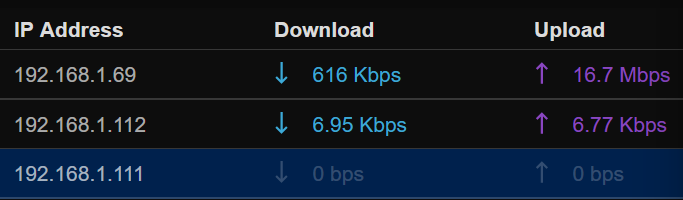
I'm trying to figure out why my container doesn't see the network traffic for the unraid server it is running on (192.168.1.111) i did not change anything in the docker template, running "11notes/unifi:8.1.113-unraid" I believe i set up the container without changing any settings other than disabling automatic updates.
-
The CPU temp is pretty much stable at around 50C, does this look like the IO problem then? I have a 9201-16i coming in soon for expanding my setup as opposed to the onboard sata ports so maybe that will help? my cache drive is a kingston a400 960g, maybe adding another one in to the pool would help with the speed? my normal array drives are a bunch of wd red 20TB's but as the issue is only with the cache drives im not sure they are relevant. Any ideas of tests that i could do to troubleshoot this better?
-
Unraid: 6.12.4 X10SL7-F - Dual Gigabit Ethernet LAN ports via Intel® i210AT Intel® Xeon® CPU E3-1231 v3 @ 3.40GHz 32gb ddr3 ecc memory My usual CPU usage is around 30-40% with 50 containers running and i've noticed that the cpu usage on all cores hits 100% whenever i'm downloading anything at high speeds (20MB/s+). This is so bad that almost everything else on the server stops working, if i'm downloading and trying to update my docker containers the updates per container can take up to 10 minutes each. It usually brings the rest of the containers to a crawl as well, i cannot open plex or jellyfin, i cannot open radarr/sonarr either, they will just open the webui "loading" pages where they say something like "loading battlestation" and this similarly will just keep loading upwards to 10 minutes. and forget about doing any operations like imports and renames. The downloads are writing to the cache so the parity calculations shouldn't be a factor, even looking at the parity when the cpu is at 100% shows no writes being made. I tried stopping all containers except for resilio sync and still all cores are pinned at 100% when downloading at 40-50MB/s to the cache pool. pausing the downloads immediately brings down the cpu usage to about 10%. I've tried looking at the CPU usage via top but it never shows more than 20% being used by resilio sync even though the unraid webui shows 95-100% on all cores is this expected behavior? does this CPU always hit 100% usage when downloading at around 50MB/s in other systems? does it have something to do with the NIC? is it unraid? is it the filesystem? Thanks.
-
Thanks!
-
The feature of mandatory auto-closing of notifications was added in 6.12.0. I would like for this to be an optional change as in adding a toggle for this behavior, possibly in Settings -> notification settings. (maybe a 3s|5s|10s|off dropdown or something.) Seems like an unnecessary change and i would like to get the old behavior back.
-
[17.06.2023 10:14:07][GoAccess-NPM-Logs][debug] Tar out: tar: /mnt/user/appdata/Nginx-Proxy-Manager-Official/data/logs/proxy-host-2_access.log: file changed as we read it; tar: /mnt/user/appdata/Nginx-Proxy-Manager-Official/data/logs/proxy-host-3_access.log: file changed as we read it [17.06.2023 10:14:07][GoAccess-NPM-Logs][error] tar creation failed! More output available inside debuglog, maybe.
-
Thank you for (hopefully) fixing the issue with reapperaing notifications. I very much dislike having to go into 3 separate sub-menus to clear my new notifications. Is there a way to turn off this autoclosing behaviour? i can't see anything within notification settings mentioning it.




