Helmonder
Members
-
Joined
-
Last visited
Everything posted by Helmonder
-
Works perfectly ! WOW ! Now I can check this out before going for an M1 🙂
-
Did anyone succeed in logging in to the appstore ? Or is there another way to get apps in there ? I miss my office..
-
Wauw.... that works really well ! I am guessing that signing in with my apple ID is not a good idea ?
-
I would also do a cache, but for what is was originally meant for: for cache..
-
Unraid is running totally in memory, you would need to put a startupscript somewhere in /boot.. Wondering however... What is your use case for running unraid on a laptop ?
-
Purevpn is continuing to give troubles.... I just registered an openvpn account with MULLVAD. Worked out of the box.... Also does WIRESHARK by the way... Would be nice if we could get the option to use that within the container also ? (EDIT) BTW... MULLVAD is -extremely fast... I am getting 60MB/s where purevpn would give me 5/6 MB/s for the same content..
-
I was just about to get backblaze subscription when I saw this... Great tool and thanks for the unraid integration !
-
Just noticed that Dynamix cache dirs is listed as beiing not known to Community Applications.. Seems like an error ? Probably one of the plugins almost everyone is using ? Issue Found: dynamix.cache.dirs.plg is not known to Community Applications. Compatibility for this plugin CANNOT be determined and it may cause you issues.
-
Though not as extreme as this in a couple of years I have also experienced three times failure with btrfs.. corruption of some kind that could not be fixed.. Had to reformat the whole system.. Last time I just formatted in XFS.. Works fine..
-
Thanks. I will keep you posted. VPN provider helpdesk does not understand the issue at all Keeps asking for my settings page 🙂
-
No... still not working... But if you think its on the side of the vpn provider I guess I just leave it alone for a couple of days, see if it comes back... Thanks very much for your help !
-
Herewith ! I read it gives an AUTH FAILED in there.. Password has not been changed in over a year though... Just changed it just to be sure, did not make a difference, new password also ended up in the credentials file in the openvpn folder.. So that part works.. supervisord.log
-
Thanks ! Its starting up now. Will wait for 5 min and get back to you !
-
Using purevpn and trying to use the dutch endpoint
-
For some reason I cannot reach the webpage of the gui anymore... Setting VPN to no makes it work again but this has been working for a very long time... I think it stopped working yesterday evening.. I have pihole running but it is not active for my dockers (they use cloufflare dns) so it should not be the issue... No other firewall is in between.. What could this be ? With some pointers in some direction I will be able to fix it but have no idea where to look now..
-
Did someone change ? Cannot get pihole to work anymore... Had it working in bridge mode over the normal unraid ip address... Now refuses to install... ?
-
Whoops... this is the message I am getting ! No boot... I rebooted and tried again... Worked without an issue.. So file system corruption does not seem a likely cause ?
-
Just woke up to a crashed system, different effect then the last time (See previous post below) Diagnostics are attached. Last error in the log was: Jan 5 06:20:19 Tower shfs: fuse internal error: unable to unhash node: 562319961 Jan 5 06:20:19 Tower shfs: fuse internal error: unable to unhash node: 562319961 Where in previous cases the errors made the total system unavailable now the webinterface is still running but there are no exported shares at all.. When I look on terminal I can still see the diskshares, and there also is the "user0" share, but no "user share". I will now reboot. -> reboot worked, system back up, no parity check started.. Which in itself might be something to look at.. System probably crashed in such a way that it could not determine that a parity issue could exist ? I will start one myself. tower-diagnostics-20200105-0835.zip
-
Snapshops they way I figured it was meant is for VM's and dockers.... For data it is indead not very usefull.. Though probably not difficult to implement on top of vm and docker..
-
-
Same here.... not working any more..
-
I have been having issues with CA for some weeks, looks like I found the issue.. Installing CA (and i presume using it) sends requests to raw.githubusercontent.com . This site is blacklisted in pihole by default. When reading what that url does it is a mystery to me why it is blacklisted to be honoust... Anyone any idea ? I have now whitelisted it and everything is fine again.
-
Hi, I am using Syncthing to sync my main unraid server to my backup system. Works great. I recently made some networking changes to my system and where my unraid servers (and with that dockers) used to be connected with 1gig utp, the situation is now as follows: Main server is connected with 10G SFP+ to my internal network, running on 192.168.1.0/24 Backup server is connected with 1GB SFP+ to my internal network, running on 192.168.1.0/24 The main server and backup server have a direct connection with 10G SFP+, these have their own network: 10.10.10.0/24 (primary .1, secundary .2) The two syncthing dockers have ip addresses in the 192.168.1.0/24 What I now would like to do is have both syncthing dockers communicate over the 10G private network between the two servers while I can still reach the servers on their 192.168.1.0/24 address. The interfaces all work, if I give the dockers a 10.10.10.0/24 address then they sync fine but the webgui is not reachable anymore.. Any idea how I could do this within a docker ? In the end I could use two VM's but I am pretty happy with the docker setup and would like to keep that..
-
Anyone ?
-
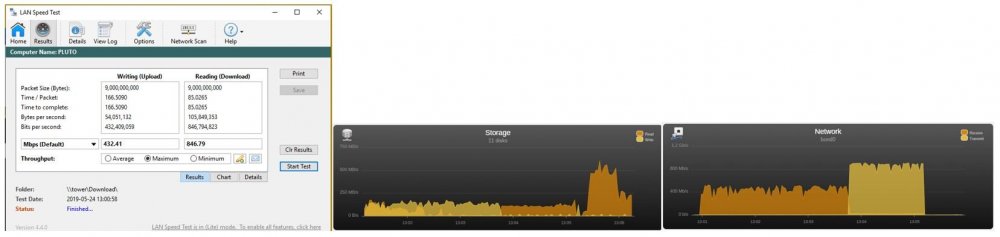
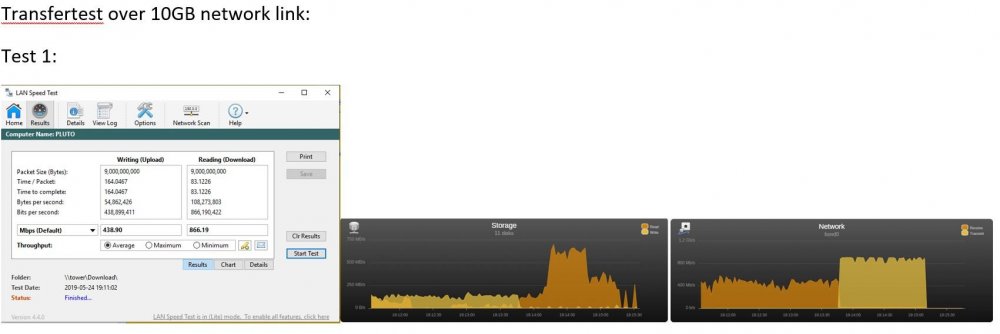
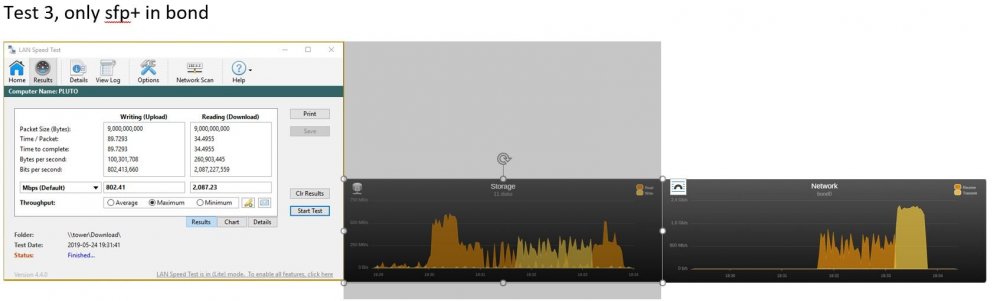
I just added a mellanox sfp+ interface and gbic to both my pc and my unraid server. Both are connected to a Mikrotik 10gig switch. The whole systems functions and I do have an increased transfer speed. However... I used to have an active-backup bond as network connection, this used to be 2 1gig utp network connections and things were fine. Initially I changed the bond and interface assignment to have the 10gig mellanox as eth0 with eth3 (the old primary utp 1gig) in the bond. When I set it up like that my transfer speeds seem to be limited by the speed of eth3.. I solved this for now by removing eth3 from the bond (having a bond now with only eth0 in it), this works and gives a big increase in transfer speed. Ofcourse I would like to get my bond back.. Is there some way of making this work with the 10gig beiing the primary link that is allways used and the 1 gig only used when the 10gig fails ?