





birdsofprey02
Members
-
Joined
-
Last visited
Everything posted by birdsofprey02
-
Closing this out and marking resolved for archive. I had thousands and thousands of memtest errors. Unfortunately, my memory banks are under the CPU heatsink/fan, so its a pain to narrow down the culprit. Ended up buying 4 new banks. Also bought all new breakout cables and added two nvme drives for fun. Not sure if this was a normal course of action, but my 9211-8i HBA card had really old firmware/bios installed. Upgraded that to the latest I could find.
-
Thank you. I have 4 sticks of 16GB DDR 3600 ram = 64GB. Just started memtest and within 10 minutes have 5000+ errors. Is it worth narrowing down which DIMM or should I just replace them all? I'll also replace all the SAS breakout cables at the same time.
-
Looking to resolve a potential hardware issue, just not sure which device... I'm struggling between symptoms and root cause. I've had a few lockups over the past 2-3 weeks, created a diagnostics file below, but inside the zip, I also included the full log since Oct 11th. On Oct 11th, clearly something was locking up and having an issue. It ran smooth for a day or two and then this morning (10/17/2025) I woke up to a system freeze. I definitely have a faulty USB backup enclosure that I decided to reformat and pre-clear, and the lockup happened during pre-clear. I'm ready to abandon the USB, but wanted to find root cause. The "old" USB drive is indicated as STATUS_Backup_Old (spelling error for name of server STRATUS). Theres definitely suspicious kernel errors last night and this morning. Also noted, last week, I had numerous BTRFS errors with my Docker image so I moved to directory on the ZFS pool (SSDs) and switched to Overlay2. I don't think I have the logs go back that far as they weren't properly being written to a directory for sustainment. stratus-diagnostics-20251017-0712.zip
-
Rebooted regular mode and continued to see messages. <before I posted this forum> I rebooted in safe mode and the messages did not occur while in safe mode. I rebooted back to normal mode again and currently not seeing new invalid .page format log messages. Fixed itself? OR did rebooting in safe mode and back to regular mode iron out an issue?
-
Diag attached. It seems like the error is only appearing when I'm actively in the GUI. stratus-diagnostics-20250430-1610.zip
-
Had an issue earlier today where the webGUI wasn't showing drives or dynamic content (like date/time/CPU usage, etc.) Saw many posts recommending a reboot or just a restart of nginx. A full reboot didn't help. The GUI would eventually load the content after waiting a minute or two. I removed the unRAID Connect Plugin and all is well again. Content is showing quicky and as expected. When figuring out what was wrong, I received hundreds and hundreds of the following error: Apr 29 21:02:33 <servername> webgui: Invalid .page format: webGui/Notifications.page That error existed before I removed the Connect plugin, and has persisted after the plugin. If I click the notifications bell (remember I have unRaid Connect removed), and look at my historical notifications, it looks like every one is there from 2019 to today, I guess I never delete them. How can I fix the repeating error and is this all related to my issues with Connect?
-
I have all the same symptoms. On 7.0.1, don't know when it stopped working, but it used to work. I de-activated, re-activated, activated, removed the cert, had the cert re-created. Just says "failed to sync flash backup."
-
I recently tried using this unRAID template. First, I hit permission errors on the /loki WAL during initial startup. Noticed the image was 2 years old and changed it to the "latest" tag and re-pulled. Now during initial startup, I hit a few deprecated parameters from the local-config.yaml file suggested in the https://github.com/natcoso9955/unRAID-docker/blob/master/configs/loki/local-config.yaml file. failed parsing config: /etc/loki/local-config.yaml: yaml: unmarshal errors: line 18: field max_transfer_retries not found in type ingester.Config line 38: field enforce_metric_name not found in type validation.plain line 43: field max_look_back_period not found in type config.ChunkStoreConfig. Use `-config.expand-env=true` flag if you want to expand environment variables in your config file I researched each one and remediated. Now I'm hitting a schema validation error that says I am using schema v11 and need to upgrade to v13 and then several other field issues. With over 1,000,000,000 downloads on this, I feel like this is a me problem. Whats the best way forward to get a new setup rolling?
-
I ended up taking the "new" usb disk and loading it with stock unRAID OS, then copied over the /config folder. The system booted just fine. Since I didn't think the original usb disk was bad and I didn't want to blacklist a good usb stick with a new key<>uuid pair, I re-loaded stock OS on my original usb, copied the /config there too and it booted just fine. The only thing I'm noticing so far is that my rclone config didn't keep. Outside of that, seems like we're all good now. Thanks for leading me on a path.
-
Update: I grabbed a new USB stick (sandisk cruzer 16gb usb2.0), same type/brand as my existing unRAID usb. - Installed a vanilla clean install of unRAID onto USB via unRAID USB creator and I was able to get into the syslinux loader (great!) - Used same USB stick from previous step and used unRAID USB creator to make a USB from my connect flash backup and it halts at mobo splash again I don't think its a bad USB, but something on my original usb AND the backup thats causing this. If I removed the - from EFI- folder on the backup, do I need to run "make bootable" afterwards?
-
without the unRAID usb plugged in, It continues to post and enters BIOS. I’ve tried an alternate OS on a usb stick, and that launches as well. It’s not liking something on my particular unRAID stick.
-
I had been running an old supermicro motherboard X9SCL and E3 1230 processor for about 5-6 years and decided to upgrade this week. New system is all put together but I can't get unRAID to boot. The motherboard recognizes the UEFI SanDisk but as soon as I proceed from bios, it just hangs at a Aorus splash screen. I pulled a few PCI cards out (extra GPU and my HBA card) and no difference. Gigabyte Aorus Z690 Elite AX DDR4 flashed to latest Dec 2023 bios Intel i5-13500 64GB DDR4 ram - I created an Ubuntu24 install USB and it launched into grub with no issues and GUI worked fine - My unRAID usb had EFI~ folder and I changed it to EFI - I noticed there is a file on the USB (at the top level) called syslinux.cfg~ and it has a ~ tilda after it. I don't see this on the generated backup file, just on my good USB stick. On the backup, I only see this in a folder called syslinux and it has no tilda. Various settings I've tried - Platform Power Management enabled or disabled with Native ASPM enabled - Internal graphics enabled IGFX - SPD Write DISABLE - TRUE - Legacy USB support - enabled - XHCI Hand-off - enabled? - USB Mass storage driver support - enabled - Port 60/64 emulation - enabled? - Enable VMD Controller - disabled? - Sata Controllers - Enabled -Agressive LPM support - disabled - Intel Platform Trust Technology PTT - enabled -VT-d Enabled -Trusted Computing - Security Device Support ENabled -Secure Boot - disabled - Security Option - Setup? no idea - Boot Option #1 - UEFI SanDisk, Partition 1 (SanDisk) - FastBoot - tried both Disabled and enabled - Windows 10 Features - OtherOS - CSM Support - disabled Not really sure where to go from here.
-
Out of Memory Error popped up last night, never seen one before. Haven't noticed any degradation or killed processes. Uptime of 45 days... time for a reboot? stratus-diagnostics-20240526-0713.zip
-
Thankful I saw this message thread. I have been dealing with macvlan traces for 2 weeks now and finally had some time to get logs situated and written to a share. Found this, this morning: Dec 4 09:05:32 stratus kernel: macvlan_process_broadcast+0xbc/0x12f [macvlan] Dec 4 09:05:32 stratus kernel: process_one_work+0x1ab/0x295 Dec 4 09:05:32 stratus kernel: worker_thread+0x18b/0x244 Crashed right after. I just switched to ipvlan moments ago, but I did NOT reboot until I just saw this thread. Hope this works now!
-
I have multiple vLANs setup on my unRAID server. Over 30 containers and none of them are running on the same IP as unRAID except maybe the Cloudflare Tunnel container. I don't think there's a requirement anywhere that docker containers have to run on the same IP as the host. The containers can all still talk to each other.
-
I've tried both with the extended URL, with just http://192.168.70.56:3000 and with http://192.168.70.56:3000/ still same error. I've restarted the container, stopped and started. Not really sure what else to try.
-
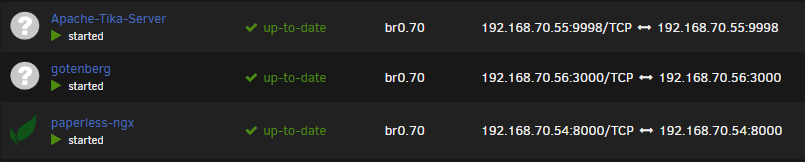
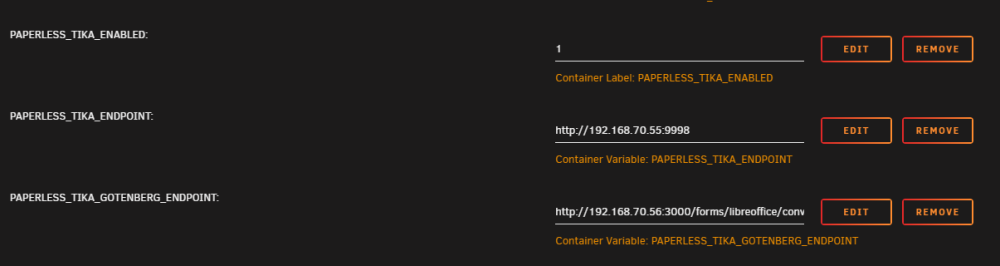
I just got everything installed and have been getting things sorted. My attempt at sending some Word docs (.docx) has failed. I've tried uploading into the GUI and copied into the consume directory and both fail with file extension not recognized. Here is the error: I've configured the paperless-ngx docker file to point to Tika and Gotenberg by following this thread. Here are my settings: Here are the containers, pulled from the unRAID community applications: I can hit the API on Tika server, not sure how to test Gotenberg, but then again, I don't really know what process actually allows recognition of the docx file. Lastly, I did try other Word docs and same result. (text files and PDFs are processing correctly). Appreciate any recommendations, thanks!

-
Thanks, I had another docker image fall victim to this pro Thanks. I just came here for this. Had another docker image fall victim. Here is the thread on the reason for the patch:
-
I decided to mess with this app today because I have a desktop in my basement that I rarely use and thought it would be nice to remote in after waking it up. I too got the same errors as those above. Mainly, the HTTP ERROR 500. I went into the container and read the actual apache logs and PHP had trouble parsing the parameters from unRAID. The Fix: I simply added quotes to my entries in unRAID template for Name/IP/MAC After this, I could hit the simple apache GUI. Also note, I have this on a different network than my PC that I wanted to wake up. I had to go in and adjust the pre-defined windows firewall settings on the desktop and allow icmp ping from my docker vLAN. Though, the container did send the WOL message to my PC and wake it up, because this happens before the OS is online. But if you want it to stop sending the WOL messages, it will need to get echo request replies.
-
I walked through this a few times and maybe the simplicity of the container has obscured something important to me. If I want this to point to one specific container ie. Nginx proxy manager and I made the service https://npm:443 then and my subdomain like: blah.mydomain.net then that would make it so everytime I was on the internet, I could hit my nginx proxy manager by going to blah.mydomain.net? All of my NPM services are set to service1.mydomain.net or service2.mydomain.net, etc. (using internal DNS); How do I lock this down so that I can only access some of the services in the nginx proxy? Do I need to create ACLs in Nginx? I want granularity on what the tunnel can access inside the network/host. Also, with my example above, what URL do I use to access a service... If I go to blah.mydomain.net how will Nginx know where I really want to go? Would I instead need to be attempting to hit service1.blah.mydomain.net? I'm fuzzy on the DNS internally here.
-
Haven't downloaded this yet, but I might try it out to do something for me: I am going to have family throw some of their photos into a directory. I'd like that to be monitored and then on intervals, have the picture (or video) files be picked up and moved to new folders and organized into sub folders based on file creation year/month/day. Not when the file was copied to the directory, but based off when the image/video was originally taken. Can this do that out of the box?
-
I think the CDN issue was a different user, not me. My problem was a missing state.php file. I just logged back into unraid tonight and the small yellow exclamation triangle is gone. Didn't make any changes, I guess it eventually just went away on its own.
-
Rebooting has eliminated the issue. I was on the latest revision before reboot. All appears to be working now, though I noticed a yellow exclamation triangle in the corner now when I click on the drop down... It says UPC_ENV . local but I figured maybe that was because I have it on local mode?
-
I'm getting an odd error just under a minute that continuously repeats. I've attached a few examples below to show the frequency: It goes back as far as May 19th, at least thats as far as I can see. Jul 25 20:55:53 stratus nginx: 2021/07/25 20:55:53 [error] 22063#22063: *17214854 FastCGI sent in stderr: "Primary script unknown" while reading response header from upstream, client: 127.0.0.1, server: , request: "GET /plugins/dynamix.unraid.net/include/state.php HTTP/1.1", upstream: "fastcgi://unix:/var/run/php5-fpm.sock:", host: "localhost", referrer: "http://localhost/Settings/NetworkSettings" Jul 25 20:56:38 stratus nginx: 2021/07/25 20:56:38 [error] 22063#22063: *17214854 FastCGI sent in stderr: "Primary script unknown" while reading response header from upstream, client: 127.0.0.1, server: , request: "GET /plugins/dynamix.unraid.net/include/state.php HTTP/1.1", upstream: "fastcgi://unix:/var/run/php5-fpm.sock:", host: "localhost", referrer: "http://localhost/Settings/NetworkSettings" Jul 25 20:57:23 stratus nginx: 2021/07/25 20:57:23 [error] 22063#22063: *17215585 FastCGI sent in stderr: "Primary script unknown" while reading response header from upstream, client: 127.0.0.1, server: , request: "GET /plugins/dynamix.unraid.net/include/state.php HTTP/1.1", upstream: "fastcgi://unix:/var/run/php5-fpm.sock:", host: "localhost", referrer: "http://localhost/Settings/NetworkSettings" I'm also getting an email notification every morning super early... These started more recent, maybe July 7th. Subject: cron for user root /usr/bin/run-parts /etc/cron.daily 1> /dev/null Body: error: unable to open /var/log/nginx/error.log.1 for compression: Permission denied Not sure if that email notification just started because I'm overloading the error logs. - MyServers appeared to be working ok for me; I logged out of it just now and back in and now it says that my server is offline and I can't connect to the mothership. I don't have remote access enabled, but didn't seem like that was an issue before I signed out and in. (I actually don't need remote access on, just wanted my server to send stats upstream. It appears that a flash backup was just made, so that seems to be working ok.
-
Yes! I would love to set max size for a particular share as well! +++++1



