





Jokerigno
Members
-
Joined
-
Last visited
Everything posted by Jokerigno
-
Hi Jorge, sorry for late replay. I had the chance today to build a net usb try and use it. As expected it shutdown immediatly. So it's definitely a config issue. What approach do you suggest?
-
Hello Everyone, I recently switched from a server to another and since then my server hangs when I click on shutdown or reboot. GUI becomes unresponsive, services are shut down but the machine is still on. Any hint? Attached diagnostics. joshua-diagnostics-20250904-2233.zip
-
OK I'll try later today. Do you need to have new logs maybe?
-
There's a way to test it without a connected monitor?
-
Hello everyone, I switched my server from a setup to another and this new maching hangs on shut down. I tried to read the attached diagnostics but for me is like egyptian.. Can someone please help me? Thanks in advance joshua-diagnostics-20250727-1540.zip
-
Hello Everyone, I bought a Tecnoware UPS ERA PLUS 1500 and hit auto config after plugin into unraid. Now I see the load and status but no battery charge. Below details /etc/nut/ups.conf [ups] driver = "nutdrv_qx" # alternately: blazer_usb nutdrv_atcl_usb port = "auto" vendorid = "0001" productid = "0000" product = "MEC0003" vendor = "MEC" # bus = "001" # device = "003" # busport = "013" I found an open inssue on NUT github to a similar hw:https://github.com/networkupstools/nut/issues/747 Can someone please help me understand if I can see the missing details? Thanks nut-debug-20250720094531.zip
-
hello everyone can someone help me to undestand why my soulseek instance stopped working yesterday? I made no changes. Below the docker run command: docker run -d --name='slskd' --net='dockernet' --pids-limit 2048 -e TZ="Europe/Berlin" -e HOST_OS="Unraid" -e HOST_HOSTNAME="Joshua" -e HOST_CONTAINERNAME="slskd" -e 'SLSKD_REMOTE_CONFIGURATION'='false' -e 'PORT'='5030' -e 'SLSKD_UPLOAD_SLOTS'='10' -e 'SLSKD_UPLOAD_SPEED_LIMIT'='1000' -e 'SLSKD_SLSK_USERNAME'='jokerigno' -e 'SLSKD_SLSK_PASSWORD'='candyman' -e 'SLSKD_SLSK_DESCRIPTION'='A Soulseek user' -e 'SLSKD_SLSK_DIAG_LEVEL'='None' -e 'SLSKD_USERNAME'='jokerigno' -e 'SLSKD_PASSWORD'='candyman' -e 'SLSKD_DOWNLOADS_DIR'='/downloads' -e 'SLSKD_INCOMPLETE_DIR'='/incomplete' -e 'PUID'='99' -e 'PGID'='100' -e 'SLSKD_UMASK '='000' -e 'CA_TS_FALLBACK_DIR'='/app' -l net.unraid.docker.managed=dockerman -l net.unraid.docker.webui='http://[IP]:[PORT:5030]/' -l net.unraid.docker.icon='https://raw.githubusercontent.com/manuel-rw/unraid-templates/master/templates/slskd/logo.png' -p '5030:5030/tcp' -p '5031:5031/tcp' -p '50300:50300/tcp' -v '/mnt/user/appdata/slskd/':'/app':'rw' -v '/mnt/user/downloads/temp/':'/incomplete':'rw' -v '/mnt/user/downloads/slskd':'/downloads':'rw' -v '/mnt/user/media/music/':'/data':'rw' --user 99:100 'slskd/slskd:latest' and the error in log that stop the container at boot Invalid configuration: Directories: The Incomplete field specifies a directory '/incomplete' that exists, but is not writeable. The Downloads field specifies a directory '/downloads' that exists, but is not writeable. I checked folders permission (/downloads/temp and /downloads/slskd) and are 0777 owner nobody group user.
-
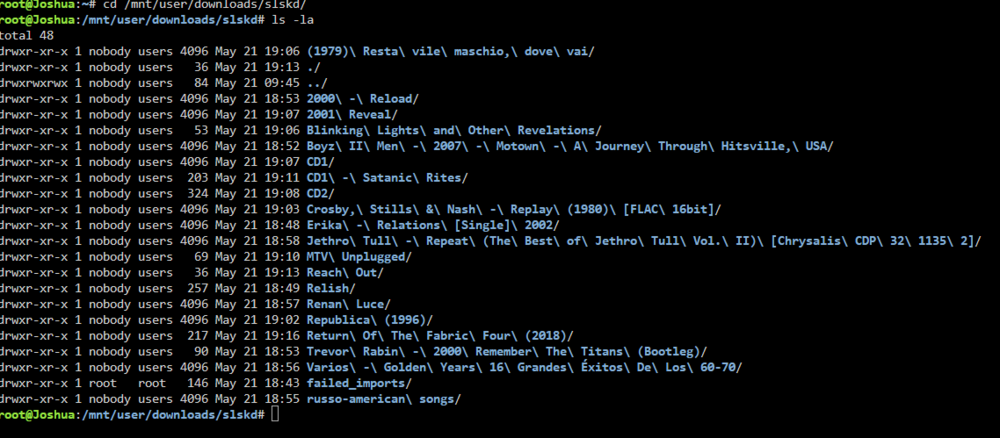
Hi sorry I just saw this reply. Below the results: new folder are created by nobody users. It is correct?
-
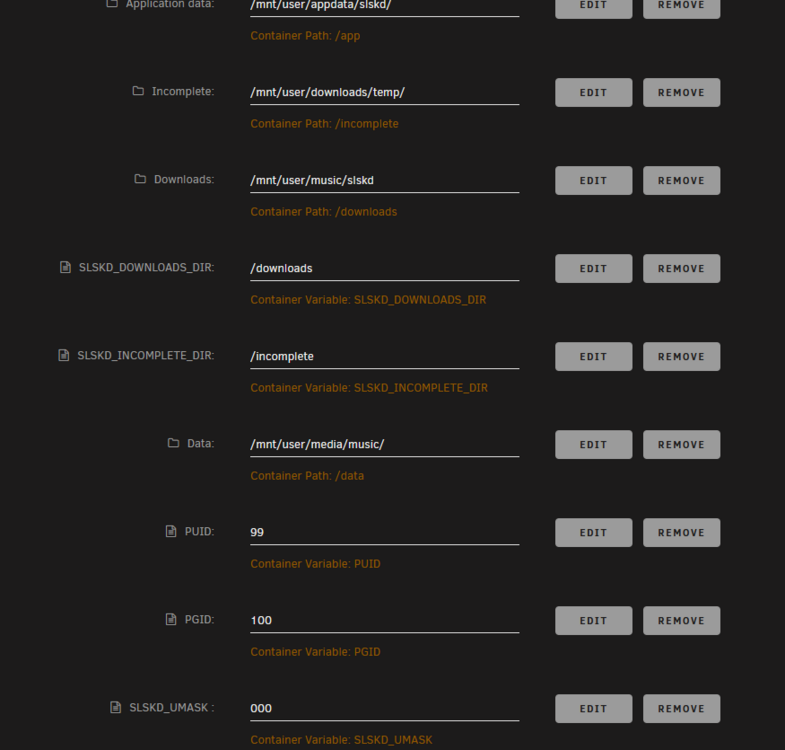
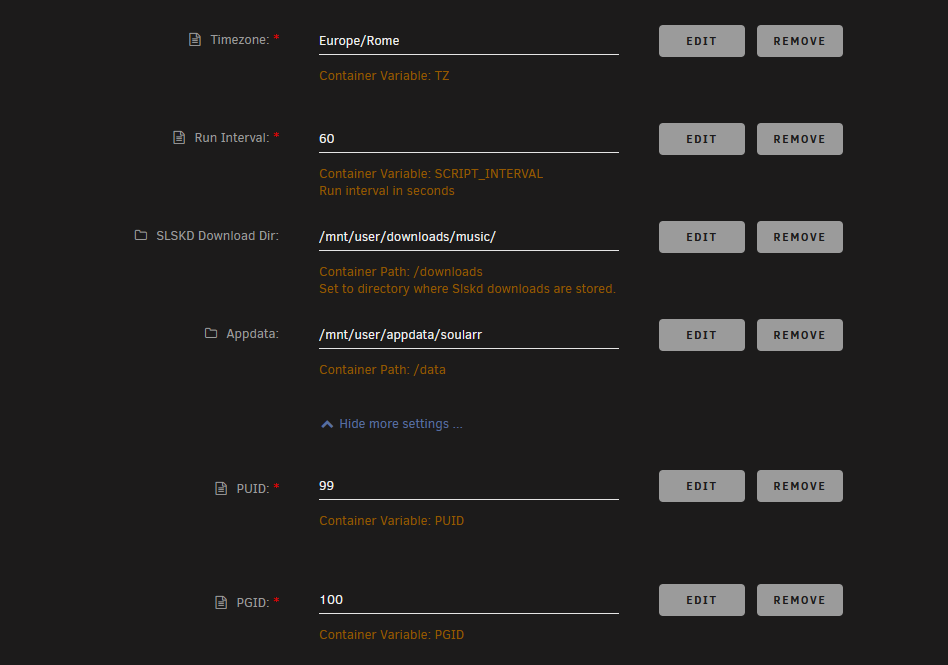
Hi all, I'm struggling from several weeks to setup correctly sonarr with soulseek and lidarr without success. I followed the guide here but maybe there's still something I miss. Below screenshots of my unraid templates in order to show you my setup: Soularr Soulseek Lidarr Any advice?? Thanks!

-
Hello everyone, some months ago I build a VM for Ventura but, don't know why, does not work anymore. I'm going to restart but I was wondering if with the new 7.1 VM features some changes are required. Any hint? Thanks
-
HI @JPDVM2014, I just followed your guide here https://github.com/JPDVM2014/soularr to have solarr. It seems to work partially because artist are catched and music downloaded but then are not imported in lidarr. Do I need to change "--"user 99:100" without quotes in "Extra Parameters" also inside Lidarr container maybe? Thanks
-
Hi, I’m running my Unraid server on a Dell T20 that, till today, is performing rock solid. I found this offer on eBay for a T5810 and I was looking for your advice if the update is worth or not. https://www.ebay.it/itm/116398962667?mkcid=16&mkevt=1&mkrid=711-127632-2357-0&ssspo=vNSQL1qwSdi&sssrc=4429486&ssuid=rECRImxyQT2&var=&widget_ver=artemis&media=COPY Below my goal to reach with the update: Have the change to run Mac VM (that now is struggling) Be able to transcode (my T20 does not have any graphics card) Be ready to run ollama or other llm for the next local ai evolution ( I want to dismiss google home and go full local with home assistant) Last but not least: if I go with the migration can I simply unplug / plug hdd from old to new dell machine or need some other step? Thanks in advance
-
Hi, i just received a brand new WD RED Plus HDD to replace one failed HDD in my array. Because it comes from Amazon I tried to run pleclear to check disk quality. First attempt took 24h to first step then 2nd step was not progressing and after another 24h I decided to stop and reboot: 2nd attemp is running now but no changes: At this moment status is the following Zeroing: 0% @ 0 MB/s (10:10:00) Can someone point me in the right direction? I want to be able to check disk before adding to the array. Thanks in advance
-
Hi all, Yesterday I finally finished installing vm in my Unraid server following the YouTube video (ever if some passage - for example the EFI part - was a bit different. I rebooted then my VM and now it is stuck at boot: I see Apple logo and the bar at 33% . No changes or progression in at least 3 hours. Before last tentative I clicked on recover and was able to reach the setup guide page but frankly I don’t want to start from scratch once again. Any suggestions? Thanks in advance
-
Hi, it seems, that it should be possible to remove cursor . I tried adding a variable but it does not works. Any suggestion? Thank you in advance

-
HI, I don't know why but after lasts updates UI is no longer available: The connection has timed out below the logs: I tried to connect to http://192.168.2.102:80 but I received the timeout message. I did not changed anything in my template. Any suggestion?
-
Hi, with the "Discover" function of Plex I think is time that I get rid of all the stuff I can see on regular streaming services. So I landed to Excludarr. I saw that it is possible to run it as docker container so I made a template that looks as the following: <Container version="2"> <Name>Excludarr</Name> <Repository>haijeploeg/excludarr</Repository> <Registry>https://hub.docker.com/r/haijeploeg/excludarr/</Registry> <Network>bridge</Network> <MyIP/> <Shell>sh</Shell> <Privileged>false</Privileged> <Support>https://hub.docker.com/r/haijeploeg/excludarr/</Support> <Project/> <Overview>Excludarr excludes streaming services from Radarr and Sonarr Converted By Community Applications Always verify this template (and values) against the support page for the container https://hub.docker.com/r/haijeploeg/excludarr/</Overview> <Category/> <WebUI/> <TemplateURL/> <Icon/> <ExtraParams/> <PostArgs/> <CPUset/> <DateInstalled>1655199120</DateInstalled> <DonateText/> <DonateLink/> <Description>Excludarr excludes streaming services from Radarr and Sonarr Converted By Community Applications Always verify this template (and values) against the support page for the container https://hub.docker.com/r/haijeploeg/excludarr/</Description> <Networking> <Mode>bridge</Mode> <Publish/> </Networking> <Data/> <Environment> <Variable> <Value>true</Value> <Name>GENERAL_FAST_SEARCH</Name> <Mode/> </Variable> <Variable> <Value>IT</Value> <Name>GENERAL_LOCALE</Name> <Mode/> </Variable> <Variable> <Value>netflix, amazon prime video, Disney Plus</Value> <Name>GENERAL_PROVIDERS</Name> <Mode/> </Variable> <Variable> <Value>xxxxxxxxxxxxxxxxxxxxxxxxxxxxxxxxx</Value> <Name>TMDB_API_KEY</Name> <Mode/> </Variable> <Variable> <Value>http://192.168.xxx.xxx:7878</Value> <Name>RADARR_URL</Name> <Mode/> </Variable> <Variable> <Value>xxxxxxxxxxxxxxxxxxxxxxxxxxxxxxxxx</Value> <Name>RADARR_API_KEY</Name> <Mode/> </Variable> <Variable> <Value>false</Value> <Name>RADARR_VERIFY_SSL</Name> <Mode/> </Variable> <Variable> <Value/> <Name>RADARR_EXCLUDE</Name> <Mode/> </Variable> <Variable> <Value>true</Value> <Name>Community_Applications_Conversion</Name> <Mode>{3}</Mode> </Variable> <Variable> <Value>http://192.168.xxx.xxx:8989</Value> <Name>SONARR_URL</Name> <Mode/> </Variable> <Variable> <Value>xxxxxxxxxxxxxxxxxxxxxxxxxxxxxxxxx</Value> <Name>SONARR_API_KEY</Name> <Mode/> </Variable> <Variable> <Value>false</Value> <Name>SONARR_VERIFY_SSL</Name> <Mode/> </Variable> <Variable> <Value>Bing</Value> <Name>SONARR_EXCLUDE</Name> <Mode/> </Variable> <Variable> <Value>false</Value> <Name>CRON_MODE</Name> <Mode/> </Variable> </Environment> <Labels/> The problem is that when I run nothing happens ( I think because there's no defalut command to be send at startup). Did anyone managed to make ti work? Thank you in advance
-
use --restart unless-stopped then
-
yes Cam has a rule that should be restrict to lan only. But both camera and server are in the same subnet: 192.168.2.xxx
-
Hi @JonathanM can you please specify? I have a security cam that has the possibility to setup a custm NTP server but it asks me Server adress and port. I tried to change adress to my unraid server local address and let default port (123) but it doesn't work. Any hint? TY
-
Hey, any update? I can't find any working solution.
-
Hi all, I don't know what happened but my log is flooded of this message: 220306 19:20:14 mysqld_safe Logging to '/config/databases/2372ce5ce2c1.err'. 220306 19:20:14 mysqld_safe Starting mariadbd daemon with databases from /config/databases and now nexcloud, and db in home assistant doesn't work anymore. I tried the following solution but it didn't work: docker exec -it mariadb bash mv /config/log/ /config/log-old/ exit docker restart mariadb Any hint?
-
Maybe the message can be retained so status is maintained at reboot?
-
Ok it make sense. Thank you for your feedback . It can be set to somehow save (retain?) last status so it is maintained at reboot? Inviato dal mio iPhone utilizzando Tapatalk
-
Hi all, after a reboot all dockers seems to be offline in Home Assistant. But becomes available after a while (1 h or so). Anyone has a suggestion?


