





Jokerigno
Members
-
Joined
-
Last visited
Everything posted by Jokerigno
-
Update: Don't know why but I followed this guide ( ) adding modprobe i915 chmod -R 777 /dev/dri to go file and Frigate now works again.
-
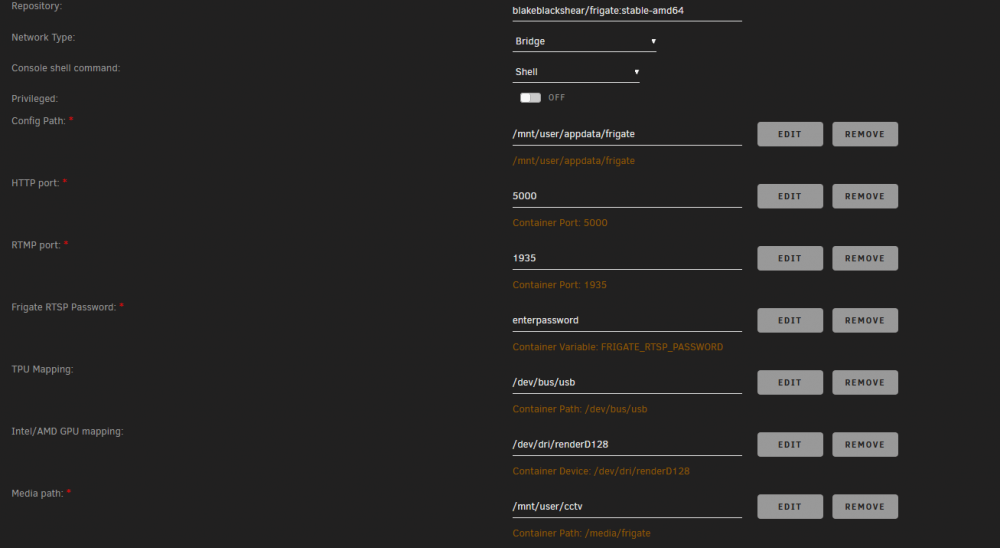
I tried modifing config with just mqtt 1 camera e detectors but still I see error in building the container: root@localhost:# /usr/local/emhttp/plugins/dynamix.docker.manager/scripts/docker run -d --name='frigate' --net='bridge' -e TZ="Europe/Berlin" -e HOST_OS="Unraid" -e 'FRIGATE_RTSP_PASSWORD'='enterpassword' -p '5000:5000/tcp' -p '1935:1935/tcp' -v '/mnt/user/appdata/frigate':'/config':'rw' -v '/mnt/user/Media/frigate':'/media/frigate':'rw' -v '/tmp/frigate':'/tmp/cache':'rw' -v '/etc/localtime':'/etc/localtime':'rw' --device='/dev/bus/usb' --device='/dev/dri/renderD128' --shm-size=5G 'blakeblackshear/frigate:stable-amd64' cc6093a248943b695bffe696d9da014ae29f9b52fdb2c388f9926ae90d3c9cce docker: Error response from daemon: error gathering device information while adding custom device "/dev/dri/renderD128": no such file or directory. (this time I made no changed to the template) Any hint on why the dev/dri is not found?
-
It still does not start I also tried to delete container and redownload it from CA (hoping in a correct template): the first time I see this error when building the container: docker: Error response from daemon: error gathering device information while adding custom device "/dev/dri/renderD128": no such file or directory. But then after few tentatives it worked (but container does not start still)
-
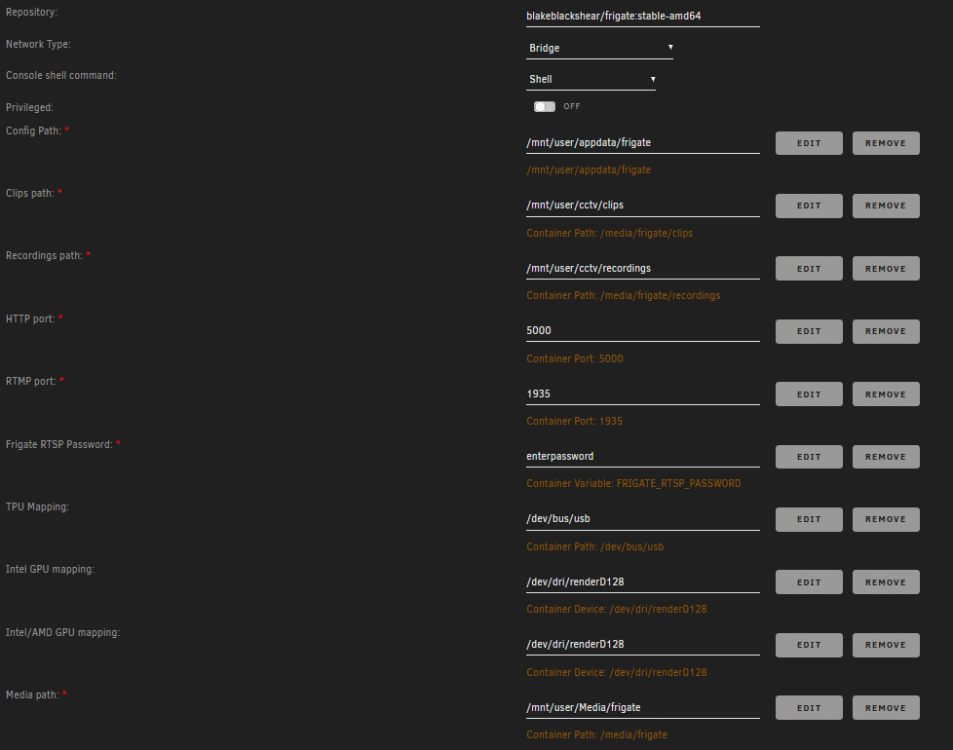
Sorry I completely lost this message. Here's the config.yml #frigate sample config.yml mqtt: # Required: host name host: 192.168.2.100 # Optional: port (default: shown below) port: 1883 # Optional: topic prefix (default: shown below) # WARNING: must be unique if you are running multiple instances topic_prefix: frigate # Optional: client id (default: shown below) # WARNING: must be unique if you are running multiple instances client_id: frigate # Optional: user user: xxxxxxxxxxxx # Optional: # NOTE: Environment variables that begin with 'FRIGATE_' may be referenced in {}. # eg. password: '{FRIGATE_MQTT_PASSWORD}' password: xxxxxxxxxxx # Optional: interval in seconds for publishing stats (default: shown below) stats_interval: 60 cameras: soggiorno: # ffmpeg: ffmpeg: hwaccel_args: - -hwaccel - qsv - -qsv_device - /dev/dri/renderD128 inputs: - path: rtsp://192.168.2.115:8554/unicast roles: - detect - clips # - path: rtsp://192.168.2.118/ch0_1.h264 # roles: # # - detect # - clips # width: 3840 # height: 2160 width: 1920 height: 1080 fps: 5 rtmp: # Required: Enable the live stream (default: True) enabled: false clips: # Required: enables clips for the camera (default: shown below) # This value can be set via MQTT and will be updated in startup based on retained value enabled: True # Optional: Number of seconds before the event to include in the clips (default: shown below) pre_capture: 5 # Optional: Number of seconds after the event to include in the clips (default: shown below) post_capture: 5 # Optional: Objects to save clips for. (default: all tracked objects) objects: - person # - car # Optional: Camera override for retention settings (default: global values) retain: # Required: Default retention days (default: shown below) default: 10 # Optional: Per object retention days objects: person: 15 # Optional: Configuration for the jpg snapshots written to the clips directory for each event snapshots: # Optional: Enable writing jpg snapshot to /media/frigate/clips (default: shown below) # This value can be set via MQTT and will be updated in startup based on retained value enabled: true # Optional: print a timestamp on the snapshots (default: shown below) timestamp: true # Optional: draw bounding box on the snapshots (default: shown below) bounding_box: true # Optional: crop the snapshot (default: shown below) crop: False # # Optional: height to resize the snapshot to (default: original size) # height: 175 # Optional: Camera override for retention settings (default: global values) retain: # Required: Default retention days (default: shown below) default: 10 # Optional: Per object retention days objects: person: 15 objects: track: - person # - cat # - dog # - car veranda: # ffmpeg: ffmpeg: hwaccel_args: - -hwaccel - qsv - -qsv_device - /dev/dri/renderD128 inputs: - path: rtsp://xxxxxxxxx:[email protected]:554/cam/realmonitor?channel=1&subtype=0 roles: - detect - clips # - path: rtsp://192.168.2.118/ch0_1.h264 # roles: # # - detect # - clips # width: 3840 # height: 2160 width: 1920 height: 1080 fps: 5 rtmp: # Required: Enable the live stream (default: True) enabled: false clips: # Required: enables clips for the camera (default: shown below) # This value can be set via MQTT and will be updated in startup based on retained value enabled: True # Optional: Number of seconds before the event to include in the clips (default: shown below) pre_capture: 5 # Optional: Number of seconds after the event to include in the clips (default: shown below) post_capture: 5 # Optional: Objects to save clips for. (default: all tracked objects) objects: - person # - car # Optional: Camera override for retention settings (default: global values) retain: # Required: Default retention days (default: shown below) default: 10 # Optional: Per object retention days objects: person: 15 # Optional: Configuration for the jpg snapshots written to the clips directory for each event snapshots: # Optional: Enable writing jpg snapshot to /media/frigate/clips (default: shown below) # This value can be set via MQTT and will be updated in startup based on retained value enabled: true # Optional: print a timestamp on the snapshots (default: shown below) timestamp: true # Optional: draw bounding box on the snapshots (default: shown below) bounding_box: true # Optional: crop the snapshot (default: shown below) crop: False # # Optional: height to resize the snapshot to (default: original size) # height: 175 # Optional: Camera override for retention settings (default: global values) retain: # Required: Default retention days (default: shown below) default: 10 # Optional: Per object retention days objects: person: 15 objects: track: - person # - cat # - dog # - car motion: mask: - 1920,1080,1920,315,1839,202,1575,459,1695,656,1271,904,968,1080 - 0,0,0,392,155,656,635,465,1006,354,1176,0 - 1861,59,1861,113,1441,108,1442,52 balcone: # ffmpeg: ffmpeg: hwaccel_args: - -hwaccel - qsv - -qsv_device - /dev/dri/renderD128 inputs: - path: rtsp://192.168.2.118/ch0_0.h264 roles: - detect - clips # - path: rtsp://192.168.2.118/ch0_1.h264 # roles: # # - detect # - clips # width: 3840 # height: 2160 width: 1920 height: 1080 fps: 5 rtmp: # Required: Enable the live stream (default: True) enabled: false clips: # Required: enables clips for the camera (default: shown below) # This value can be set via MQTT and will be updated in startup based on retained value enabled: True # Optional: Number of seconds before the event to include in the clips (default: shown below) pre_capture: 5 # Optional: Number of seconds after the event to include in the clips (default: shown below) post_capture: 5 # Optional: Objects to save clips for. (default: all tracked objects) objects: - person # - car # Optional: Camera override for retention settings (default: global values) retain: # Required: Default retention days (default: shown below) default: 10 # Optional: Per object retention days objects: person: 15 # Optional: Configuration for the jpg snapshots written to the clips directory for each event snapshots: # Optional: Enable writing jpg snapshot to /media/frigate/clips (default: shown below) # This value can be set via MQTT and will be updated in startup based on retained value enabled: true # Optional: print a timestamp on the snapshots (default: shown below) timestamp: true # Optional: draw bounding box on the snapshots (default: shown below) bounding_box: true # Optional: crop the snapshot (default: shown below) crop: False # # Optional: height to resize the snapshot to (default: original size) # height: 175 # Optional: Camera override for retention settings (default: global values) retain: # Required: Default retention days (default: shown below) default: 10 # Optional: Per object retention days objects: person: 15 objects: track: - person # - cat # - dog # - car motion: mask: - 1920,0,743,0,728,278,869,440,1079,707,1409,1080,1920,1080 # detectors: # cpu1: # type: cpu # cpu2: # type: cpu detectors: coral: type: edgetpu device: usb # detectors: # coral_pci: # type: edgetpu # device: pci and attached screenshot of the config ( I don't know other ways to share it) Thank you
-
Hi, I don't know why after a period of perfect work now my docker is not starting anymore. The only message I receive is Execution error Server error In appdata folder there's no log and no log is available when selection log from container gui in unraid. Any hint? PS: I noticed a new variable for FRIGATE_RTSP_PASSWORD but there's no descrition at all? I tried to update my config for all rtsp streams but how can I write it down when I need to login to a stream with user and pass? This is my config at the moment: - path: rtsp://user:[email protected]:554/cam/realmonitor?channel=1&subtype=0 Thank you in advance
-
I will!
-
Hi all, it happens sometimes (once a month) that webgui become unresponsive with 500 Internal Server Error (nginx). Some of the dockers become unresponsive too while others are still available. I tried to collect diagnostics via ssh but it never complete so the only solution it is a shutdown (even if I try with poweroff but it does shutdown gently because at boot I still see the parity check). Any hint?
-
I've searched around and it seems that other post regarding wireguard are about setting it up. In my case I ask support cause it is broken. Do you refer to a post in particular that can link me?
-
Thank you! I will search for this setting in bios.
-
Shutdown starts few seconds after power loss in order to have enough time to save everything.
-
I monitor the battery age and change it after 18-24 months in order to have enough energy to shutdown.
-
Hi all, some nights ago my unraid server shut down due to a power loss. I manually switched it on ( I have to change some setting in the bios I suppose) and leave for a quick vacation. I tried to connect to my home using WireGuard (that was working till now) but there's something wrong. I can connect but no traffic is generated (only few kb sent 0 received). I know that the service is on because vm and dockers works well and are reacheable via internet so I really don't know how to fix it. Any hint?
-
Hi all, I have a Unraid server running on a Dell Poweredge T20 behind a APC Back-UPS ES 700. Everything is on it (vpn -home assistant etc). I noticed that when there’s a power loss ups is only able to keep server on for 2-3 minutes so I made the setting to shutdown gently as soon as it enter in battery mode. And here begin problems: If it a real powerloss o a fake powerloss (for example due to a thunder) server turns off and stays off until I manually switch on. It’s ok most of the time if I’m home but it’s very annoying if I’m on vacation. What’s are your suggestions? Duplicate vpn to use poweronlan? Change ups? Change some setting in unraid or in bios? Thank you in advance for your suggestions
-
+1 on this. I have same issue with Firefox on win10 but no problem when using chrome on same machine.
-
Hi, I have a question before installing. Looking at the template I understand that I should open a port for Syncserver Public URL. Can I use it with swag reverse proxy instead? Basically I have a custom domain. I can set a subdomain like firefox.customdomain.it and let nginx in swag do the proxy from external to localhost:5000 (even I don't found any proxy conf in swag folders...). What do you kindly suggest? Thank you in advance!
-
I finally found my issue. It was power save cpu setting. After changed to on demand everything started working again as expected.
-
hi, did you find any working solution? I'm struggling with same issue...
-
Did you find any solution for it? I have same issue as you
-
Hi, I just started to playing with this container and have some question. First is about template. I see this I think is an error right? Moreover do I need to add intel gpu mapping if I use coral usb? I can't start container if /dev/dri... is added.

-
I do. And during this I'm inable to download diagnostics via cli.
-
good to know. I wish I was aware of it some week ago!
-
I wan't looking for highest performance. But as you know, because we spoke a lot in past days, power save in 6.9.2 produce issue that were not in 6.8.3. So if not in the plugin something else has changed because behavior changed. I will follow you advise as always. I just wanted to post what was my issue and the way I fixed it.
-
Hi, I don't know id this plugin is still maintaned but I would let you know that "Power Save" inCPU Scaling Governor causes 2 main issues: VMs and docker are generally much slowers (I checked boot time in my only VM and it is 10 time slower). Some container (in my experience Unraid-Api and ZoneMinder) are unusable because when on they cause 100% peak in every CPU.
-
Just to let you know that I found out my issue. I share for others in my situation. Basically all was generated by a plugin. This post saved my day.
-
ok, thank you!



