





DuzAwe
Members
-
Joined
-
Last visited
Everything posted by DuzAwe
-
Hey ich77, is this for me or the Plugin? I already have power-top from slackware pkgs installed. Just be nice to have it in the plugin
-
Could Power-top be added? Added on 10-10-22, Thanks.
-
DUDE! This helped! Turns out you need or at least I needed "" around my password. Thanks for the help and all the work you do 👍
-
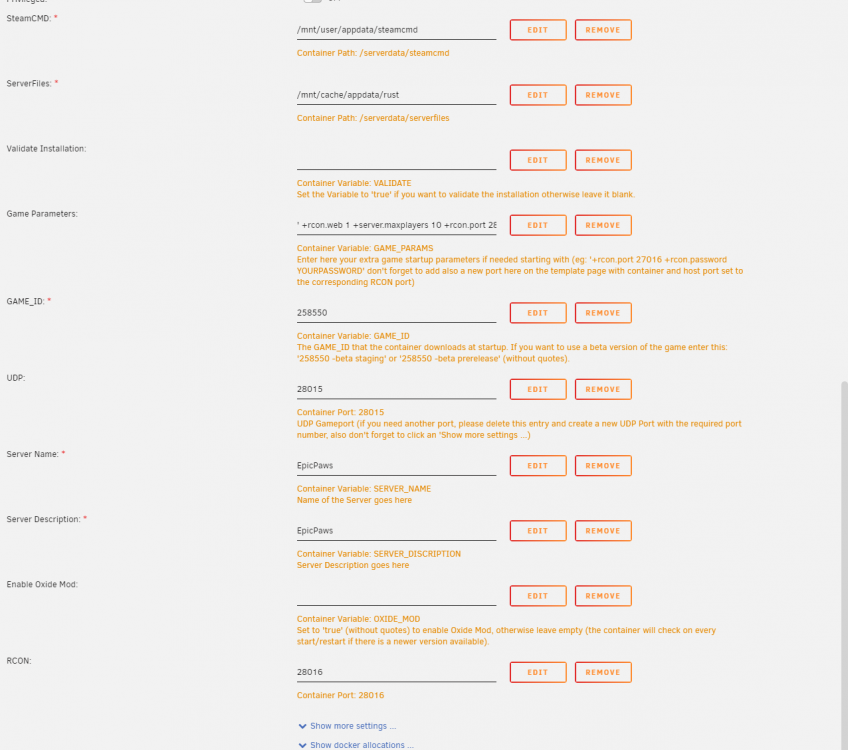
In that wonderfull way that tech doesn't do what it should. It aint working. Here is a snapshot of the settings just to make sure I haven't done anything wrong.
-
Thanks, Do you know which directory to put the .cfg in. The guides I keep finding are for windows. I have tried those two and its a no go. I am using 192.168.0.27:28016 and APassword. Do I have to do something with unraid for WebSockets?
-
Been banging head off this for a few days. I can not for the life of me get rcon to work with the rust container. Have Game Parameters: '+server.maxplayers 10 +rcon.port 28016 +rcon.web 1 +rcon.password apassword' and a new port set up TCP 28016. I cant get any kind of useful logs which has broken me. I have used your plugin o try and connect along with a host of other rust based options. Just never connects. Also where is hell is the server.cfg for rust? I cant find it.
-
I have v2 setup and the node. Added the nvidia parameters to my node docker(plex works with my 1060Super). Selected the Winsome H265 NVENC plugin, turned on a gpu worker is its "working" but unraid netdata isnt showing any processes on nvenc. So I am not quite sure if its actually working on GPU. I have a cpu worker disabled currently.
-
Files dont seem to be ignored in my set up I have tried .log, .nfo, .tgz, .tmp and *.log, *.nfo, *.tgz, *.tmp. Keep getting alerts about .nfos changing. Either ts a bug or I am doing something wrong.
-
I had it set up as a script installing and running as a cron with Userscripts. Just follow the install instructions on the repo. I have stopped using it as I have issues with macvlan crashes since moving to 6.9.
-
Its just one of those things I guess with so many variables in set up it could be anything causing the issue to express for some and not others. I had (hoping its fixed now) with the Vlan issue locking up my box every few days. If it helps at all firmware on my LSI is the most recent 20 something I think. Need to update my sig I also swapped to ECC memory in the last few weeks due to issues with BTRFS.
-
I have almost all Seagate drive and have had no issues.
-
Unsure if this error is to be expected or not? Trying to overclock and when I use nvidia-settings I get the below. No issues using smi.
-
Is it possible to create this gravity-sync as a plugin or would it be better suited as a user script? I have added it manually and ran it with userscript a few times now. But Am aware that update will likely wipe it every time and it persisting between updates is likely dependent on a plugin.
-
Docker was in read only mode and could not restart server this morning. After attempting to restart docker/the array and then the whole box I had to force a shut down. After everything started back up it all seems to be working again. I had been smooth sailing before moving to rc2 thelibrary-diagnostics-20210102-1234.zip
-
I've run the import for just about two days now and there are still no Photos in my library? I've pointed the import directly at the folder containing everything.
-
👍 Thanks that is plenty to go off
-
Hey Squid, So does that mean that if your using br0 you cant change port mappings on the host side? Say for example using something like cloudflared for DNS over HTTPs and need to use port 53 instead of 5053, that its impossible.
-
Sorry to wake an old thread, But was there ever any headway made on this. I'm facing the same issue.


