





Espressomatic
Members
-
Joined
-
Last visited
Everything posted by Espressomatic
-
Like a bad idea. Spend 1/2 the amount and replace the system after 7 years. Or spend 1/4 and replace it 4 times - or buy more storage.
-
You're not missing anything, it's as simple as that. You can also take down (port down) the other NIC in the same Network settings.
-
Do you know if the hardware is any good? IMO, try booting another distro, like a live-boot Ubuntu, and try your ARR apps there. See if there are any problems. Then come back to booting Unraid.
-
IMO, I still maintain misconfiguration is present here. What's going on is outside the scope of the plugin and this thread, IMO. As they say, you're out over your skis. This is not a knock whatsoever on your experience nor expertise, which is surely greater than mine, but it's not insignificant that no one else seems to be seeing such behavior, at the very least not complaining about issues that can be traced back to what you're seeing being the root cause. Hopefully by communicating through code on Github what you're seeing, or rather expecting, can be better described. I've been trying to follow along out of sheer curiosity. In the meantime: Tailscale plugin github: https://github.com/dkaser/unraid-tailscale Tailscale open source code base github: https://github.com/tailscale/tailscale My approach to Tailscale is KIS - keep it simple. And thus far it's working well with different machines spread across different subnets and locations, all behaving harmoniously. Not withstanding some hiccups with updates that necessitated resetting and re-establishing the tailnet.
-
News to me. I don't accept DNS - and if I did it would be the exact same IP because that's what I have set in Tailscale as my global DNS. And in not accepting DNS, I have previously had no issues using FQDN/hostnames and DNS queries over the tailnet to/from any machine. I have 4 Unraid servers, my phone which works fine WiFi or 4G/5G, and my Mac which works fine on my LAN or from someone's else LAN, including public or hotel WiFi. I didn't mean to imply that this had anything to do with this issue, just that it's really (REALLY) strange to include both a private and public DNS server. They're used, at best, randomly. If you don't care about DNS, then why include a private one at all? Just use multiple public ones. If you do care, because you have private addresses to resolve, then you CAN'T be specifying a public DNS at the same level as the provite one. You need to use a forwarder or a local resolver with forwarding.
-
I'm going to suggest that you have some significant misconfiguration leading to the issues you're seeing. Hopefully EDA can sort you out. Aside from Tailscale, my other question is why are you using/advertising local private and public DNS at the same time? 192 and 8.8.8.8?
-
Advertising AND accepting routes is also puzzling on the same client. I only accept DNS on machines that can't get my local DNS settings (advertised on my LAN via DHCP) - so that means only machines that are not on the LAN, like my Mobile or my Macbook or a cloud VPS. BUT, I've also configured the advertised Global DNS setting in Tailscale Admin to be ONLY my LAN's DNS - exactly the same as my LAN's DHCP advertises. If the Unraid machine sits on the LAN, there's no need to accept TS DNS nor routes (it's already on the LAN and using DHCP) - IMO, having those settings ON/active is generally a misconfiguration.
-
What is the status of this project today, in comparison to non-server based tools like Launchbox and PlayNite? Looking at it from the perspective of someone who collects/manages every North American mainstream console plus Arcade.
-
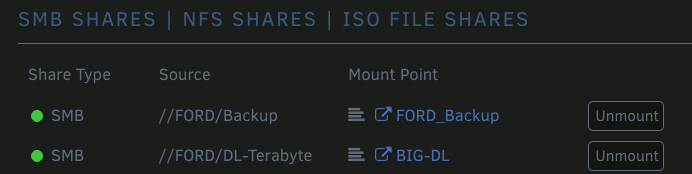
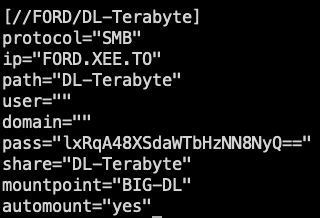
Here are a couple of captures showing the Share name and Mount Point Name:


-
More than answers, looking forward to your future developments!
-
If you can mention it, I'll ask it: Is there any talk of possibly bringing LXC support into Unraid in an official capacity, sort of like what they did with the Tailscale plugin? As a complete aside, Proxmox is truly the Devil's Arsehole when it comes to usability. H E double-hockey-sticks is it bad.
-
I can offer some suggestions specific to NPM, but it's kind of shooting in the dark without seeing how you've configured the connection to OPN. Instead however, I'll suggest an alternative... How about removing OPNSense from NPM and instead use OPN's own ability to provision a certificate? In your forwarder or resolver you change the IP of your OPN FQDN to its actual IP instead of NPM's. I run pfSense myself and don't run that through NPM, letting it renew its own cert via ACME
-
1. Yes 2. You're not running Windows. The benefits of which cannot be overstated. I'd be here all night writing about what Unraid offers, but you can get a glimpse simply by browsing the website and reading everything that's new in Unraid 7. 3. No. It runs from RAM. It's loaded from USB when you start the machine or reboot.
-
All fixed and posted above. Version 1.5
-
OK, that's the issue I outlined above. Almost done with a fix - and it'll also display the renamed mountpoint in its output.
-
You're going to have to give me an example so I can take a look into the specifics. The way it's done now isn't "hard coded" but uses the info that UD puts into its mount list. The content pulled from that list is completely variable, and if UD ever changes it, this script will continue to work. It doesn't care what the names are. I just tested making a new mount and then renaming the mount point (BIG-DL) like so: This is what UD puts into its mount file: I use the IP and path to construct what UD lists under the "Source" in the UI, which works regardless of what the mount point is named. I did find ONE issue with this, given the recent changes I've made. When checking if the mount already exists, the "Source" isn't the same as the mountpoint, so it thinks the share isn't mounted. Then trying to mount it again fails. I can search additionally for mountpoint and then put that in a variable so the output above can read "as BIG-DL" and the mount check should work.

-
Let me review the code and the share list file...
-
OK, fixed. I simplified the way I checked for mounted shares. I was previously using the mount command to check/test which caused that output.
-
Let me see what I can do. It's checking now, but the check needs to be reworked to not show those messages.
-
This is a Tailscale plugin thread. It used to be in the Plugins sub-forum. So now it looks like there's a new Tailscale-specific sub-forum where this thread lives. Which means new threads for Tailscale-specific issues (not necessarily plugin-related) can be started at the top of the sub-forum: https://forums.unraid.net/forum/111-tailscale/
-
No, not at this time. Its hierarchy lives on another Unraid system, on a ZFS volume. That volume can go to sleep, but when working correctly, that just prevents the thumbnails from rendering until it wakes. I may have conflated two different issues when I first posted as it's been a while since I noticed the issues and left it for a while before finally repairing yesterday. Yesterday afternoon I repaired the permissions not in Immich's data store path (other server via SMB share) but in the appdata hierarchy. I can't actually recall if I've seen this issue multiple times or on an ongoing/repeating basis. The one that I know has happened many times I can't attribute to permissions on the data store, but on startup Immich will complain that it can't locate the ".immich" file inside one of the paths. For example ,inside "encoded-video." This happens when the volume is active and not sleeping and when it's properly mounted on the Immich Unraid system, accessible both from the UI and terminal without errors. In this case, I've been able to restart the Immich stack and everything will usually start working again. Yesterday's issue didn't resolve with a restart and only after manually changing permissions and ownership did everything go back to working as expected - appdata path.
-
What on the system can be possibly changing the permissions for folders/files used by immich? Every week or so I notice immich is no longer working and logs for one part of the stack show that file(s) can't be read/found. Or simply that a directory can't be accessed with permission denied. I've seen owner go to UNKNOWN and group bounce between root and users. I've seen directory permissions owner-only. I've reset everything to nobody/users and blanket 777 - everything works right now. Waiting to see when it next breaks.
-
My recommendation remains: Tailscale Netbird, IMO, isn't ready for prime-time until they remove the reliance on third party software. And to top it off, I've yet to see the iOS client work. At all.
-
Unfortunately, no. I'd further avoid trying to manually copy config files and databases. I've done this successfully in the past, but I've also done it unsuccessfully a couple of times. One of those times everything seemed to work for a couple of months, but then I found that Certbot wasn't able to renew anything - which I found out was due to some key mismatch in one file per certificate - this isn't something you want to be trying to fix in a rush at the last minute. Just set up a parallel install and manually recreate everything. It didn't take me very long for 20-something hosts and about 10 certificates.
-
In my most recent message above, I was testing from my MacBook using the native TS client software. On the same LAN I have 4 Unraid machines, all with Tailscale plugin activated. In addition, I'm running Tailscale inside my pfSense VM and inside my Nginx Proxy Manager LXC. Outside my LAN, I have a VPS at Ionos that is running the Tailscale Linux client, somewhere in the US. I had been advertising my local LAN subnet from one of the Unraid machines since the start - this is required to allow a TS client outside the LAN to access the LAN. Every Unraid TS plugin had "IP Forwarding" turned on which I believe may have been default when installed. Everything was peachy. With the VPS set to "Accept Routes" and act as an Exit Node, I was able to access the DNS on my LAN from the VPS, as well as ping my local machines. Likewise I could use the VPS exit node as a nice cross-border VPN from any machine, including my Macbook and iPhone (when home or out on cellular). All machines were set NOT to use Tailscale DNS. Tailscale was set to use my local LAN's DNS resolver as Global DNS anyway. Using the VPS or one of the Unraid machines as an Exit Node stopped working at some point. I don't know when, but I hadn't been making any changes to TS setup/config. The issues I had previously described with Unraid machines showing DNS queries for other machines also came up - maybe at the same time. That's what I first noticed because it was very obvious in AGH logs. I fixed the DNS issues but Exit Nodes still didn't work. So last night I uninstalled all TS plugins from all Unraid systems and turned off TS on all other systems. I brought TS back online one system at a time, but not on Unraid - only the VPS, the Mac, LXC and pfSense. I'm finding that to use the VPS Exit Node from my Mac, in addition to advertising the LAN subnet (from some LAN system), I now also have to turn on "Use Subnet Routes" on my Mac. I didn't need to do that before. And considering the subnet route is my LAN CIDR, I have no idea why I need to now. If I advertise the route from my pfSense installation (which runs unbound DNS forwarder) then it doesn't work. My Mac won't be able to connect to the internet when I use the exit node. If I instead advertise the route from my LXC which runs the reverse proxy, it will work and I can access everything from my Mac through the Exit Node: Internet sites, my LAN machines, dockers, etc. My internet IP correctly shows up as that of the VPS in the US. So that's where I am right now. I'll reinstall the Unraid plugins next and verify that everything remains working. Bottom line however is that this is not how it used to work just a couple of months ago.




