





BRiT
Members
-
Joined
Everything posted by BRiT
-
All scripts should be well behaved and handle the spawning and reaping of child processes themselves. It is their own responsibility. I suggest serious scripters put together a template using best practices to make it easier for other scripters to not fall into the common pitfalls.
-
I dont use this, yet, but DZMM has shared many of his setups and others have said they have separate setup because the number of files, especially for music or personal backups.
-
That's what many already do, use multiple team drives.
-
Thumbs Up Where?
-
Norton and Symantec are absolute trash. So many better alternatives out there. I still wouldn't use it when it was free from my ISP. But I understand the temptation to use what's free.
-
If you want protection for write once read many media (video or music), look into using the Immutable File attribute, mentioned many times on these forums.
-
Then you're running Plex Plugin and not Plex Docker ?
-
No need to stop sharing SMB, just stop using WSDD. It's an option in the UI.
-
Probably based on whatever slackbuilds has available or whatever was already available as package for archaic Slackware distro.
-
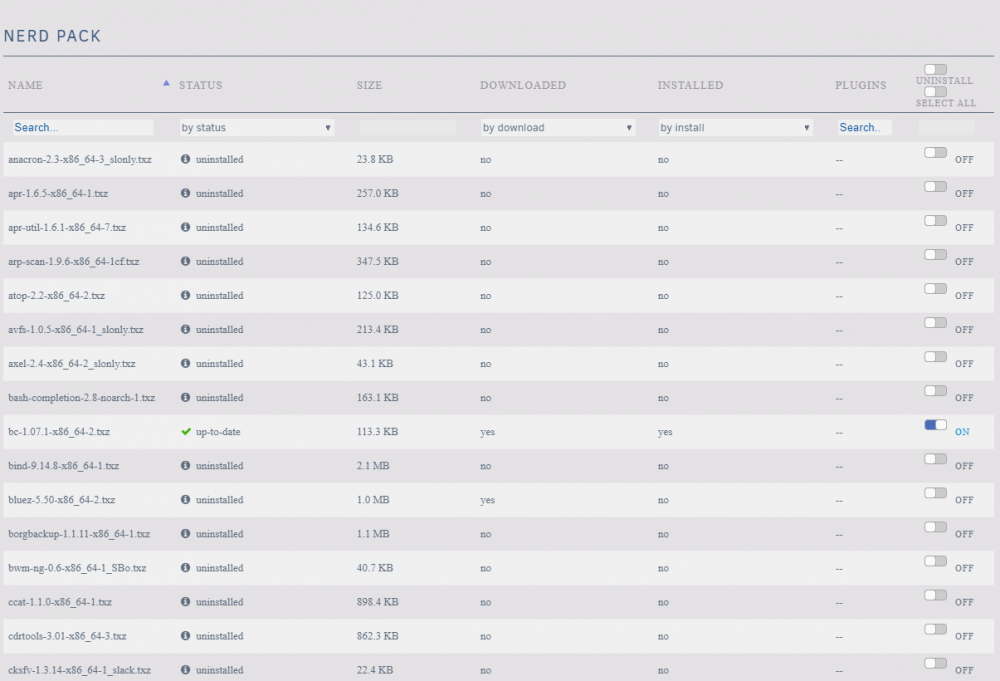
Install Community Applications, once installed use Community Applications to install Nerd-Pack Plugin, then go to Nerd-Pack settings to select BC to install. http://tower/Settings/NerdPack
-
I updated my docker container and it's running Server version 4.4.0.40 and All Is Fine. No issues at all.
-
Oh, I just check again today and emby says there is a new version of their server. I guess my auto-update didn't trigger yet, so I'm still running an older version. I'll let you know how things go if/when my system updates.
-
You prob need to update to 6.8.x to get latest versions from nerdpack.
-
Working fine for me, and lately I've been watching more movies than ever. I'm running with Direct-Play clients (Roku Ultras) with various 1080p material. What issues are you having?
-
The only sure way to prevent this is to disable wsdd in your unraid settings.
-
Also make sure you have the correct date and time set on your system.
-
Next to explore: RClone and unlimited cloud storage from Google Team Drives.
-
For some reason Linux itself changes the BIOS computer time to UTC, so you need to do all BIOS scheduling in UTC time.
-
That is why many have requested support for multiple arrays within a single system.
-
But its not false positives at all. The files really don't match the checksums.
-
-
Or he could switch it to a "w"; technically removing the "v" and letting it find newer versions. I'll just show myself the way out...
-
For the record, I highly recommend no one surfs the internet using the unRaid GUI boot mode and included web browser and no one exposes their server to the internet. In my opinion, those two issues are more dangerous than disabling these mitigations.
-
They did not solve the legal issue with Oracle, they're rolling the dice and hoping they wont be sued. Linus Torvalds own personal take on it: https://www.phoronix.com/scan.php?page=news_item&px=Linus-Says-No-To-ZFS-Linux https://www.zdnet.com/article/linus-torvalds-avoid-oracles-zfs-kernel-code-on-linux-until-litigious-larry-signs-off/
-
I'm trying to see ways of how you could but keep running into legal issues. Perhaps you could share the way forward without running into legal issues that you found?




