





BRiT
Members
-
Joined
Everything posted by BRiT
-
You can't just dismiss the huge Oracle court system win concerning API Copyrights. If the court case isn't overturned, I have no doubts Oracle will unleash lawsuits everywhere over every thing they have APIs for including Java and ZFS. There is no way of moving on unless that court case is overturned.
-
Not a fan of BTRFS but at least BTRFS doesn't bring legal issues with it like anything Oracle owns or touches, such as ZFS. I wouldnt touch anything Oracle if I was a company like Limetech.
-
I'm not certain of the parameter on the parity check, I know it's NOCORRECT for non-correcting parity check, so I'm guessing it's CORRECT for correcting parity check. # get the week number of the year without any padding weeknumber=$(date +%-V) # see if it's an even multiple of 4 by using modulo arithmetic, 0 means multiple of 4 forthweek=$((($weeknumber)%4)) if [ "$forthweek" -eq "0" ]; then # invoke parity check here /usr/local/sbin/mdcmd check CORRECT &> /dev/null fi
-
Probably need to do the following 2 steps. Watch out for the second step, it's a dozy. 1. Disable parity check schedule. 2. Write your own custom bash script scheduled to run every Saturday. Inside this custom script, determine the week of the year and if divisible by 4 then kick off a parity check, otherwise exit. Hint for day of year (ISO, Monday start, 01-53) /bin/date +%V
-
Easier to use the user.scripts plugin to manage customizations than to modify the go file. Search for it in Community Applications.
-
This bug where WSDD for Samba Discovery pegs 1 CPU core at 100%:
-
Upgraded from 6.8.0 a few days back without issue -- still have WSDD disabled, have not tried to see if it's still a CPU HOG or not.
-
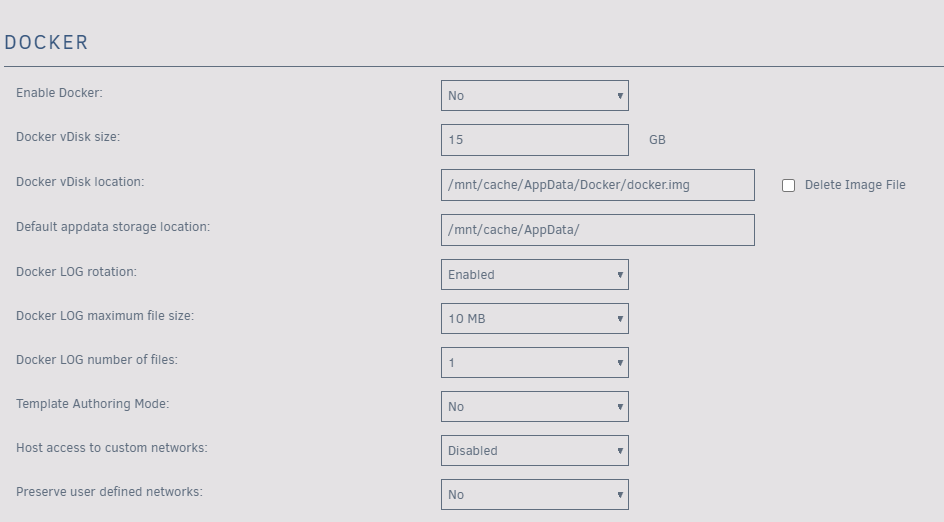
In the UI settings for Docker? You first need to stop Docker in order to be able to make changes there. Maybe also changes in any particular mappings for RADAR to use /mnt/cache/ for temporary paths etc.
-
I think he's saying to set it as /mnt/cache/appdata instead of /mnt/user/appdata.
-
Have you tried reverting changes to your network.cfg file on the flash drive? I think there's been a few posts in here detailing that. If you want community help you're probably going to have to post full diagnostics zip file to your next post.
-
Depending on the age and health of those drives, it might be prudent to do preventative maintenance and replace the 3TB with 8TB, 10TB, or 12TB drives. Be sure to run smart tests on the drives first before looking into options of adding even more drives.
-
Problem begins with Disk 29 then Disk 0, reads and write issues. Dec 28 17:35:19 Void kernel: mpt2sas_cm0: log_info(0x31110d01): originator(PL), code(0x11), sub_code(0x0d01) ### [PREVIOUS LINE REPEATED 6 TIMES] ### Dec 28 17:35:19 Void kernel: sd 8:0:0:0: [sdb] tag#6204 UNKNOWN(0x2003) Result: hostbyte=0x00 driverbyte=0x08 Dec 28 17:35:19 Void kernel: sd 8:0:0:0: [sdb] tag#6204 Sense Key : 0x2 [current] Dec 28 17:35:19 Void kernel: sd 8:0:0:0: [sdb] tag#6204 ASC=0x4 ASCQ=0x0 Dec 28 17:35:19 Void kernel: sd 8:0:0:0: [sdb] tag#6204 CDB: opcode=0x8a 8a 00 00 00 00 02 35 7e e8 c0 00 00 04 00 00 00 Dec 28 17:35:19 Void kernel: print_req_error: I/O error, dev sdb, sector 9487444160 Dec 28 17:35:19 Void kernel: md: disk29 write error, sector=9487444096
-
It worked well for 6.7.3. However 6.8 flipped the tables on tunables. Things may yet change again once 6.9 final hits, it all depends on what Limetech implements to address the performance decreases in parity build and check times some users on 6.8 have reported.
-
Hell no, no SystemD at all.
-
Cleanliness is next to godliness. The only large quantity of data to be backed up from inside AppData is an Emby Media Library, and even with that all the real metadata and images are stored at the same level as the media so it's decentralized when compared to things like monster Plex DBs (for instance: /mnt/user/Movies/movie_name/* or /mnt/user/TV/tv_name/*). Any and all of my development databases are backed up using native sql tools.
-
By comparison, my backup of AppData takes 75 SECONDS. Dec 16 03:00:02 REAVER CA Backup/Restore: ####################################### Dec 16 03:00:02 REAVER CA Backup/Restore: Community Applications appData Backup Dec 16 03:00:02 REAVER CA Backup/Restore: Applications will be unavailable during Dec 16 03:00:02 REAVER CA Backup/Restore: this process. They will automatically Dec 16 03:00:02 REAVER CA Backup/Restore: be restarted upon completion. Dec 16 03:00:02 REAVER CA Backup/Restore: ####################################### Dec 16 03:01:14 REAVER CA Backup/Restore: ####################### Dec 16 03:01:14 REAVER CA Backup/Restore: appData Backup complete Dec 16 03:01:14 REAVER CA Backup/Restore: #######################
-
Your backup is taking over an hour, more like 82 minutes... Starting at 5am and ending around 6:21 am. Dec 17 06:21:34 NAS2 CA Backup/Restore: ####################### Dec 17 06:21:34 NAS2 CA Backup/Restore: appData Backup complete Dec 17 06:21:34 NAS2 CA Backup/Restore: #######################
-
Dec 17 05:00:01 NAS2 CA Backup/Restore: ####################################### Dec 17 05:00:01 NAS2 CA Backup/Restore: Community Applications appData Backup Dec 17 05:00:01 NAS2 CA Backup/Restore: Applications will be unavailable during Dec 17 05:00:01 NAS2 CA Backup/Restore: this process. They will automatically Dec 17 05:00:01 NAS2 CA Backup/Restore: be restarted upon completion. Dec 17 05:00:01 NAS2 CA Backup/Restore: ####################################### Dec 17 05:00:01 NAS2 CA Backup/Restore: Stopping duckdns Dec 17 05:00:05 NAS2 CA Backup/Restore: docker stop -t 60 duckdns Dec 17 05:00:05 NAS2 CA Backup/Restore: Stopping lidarr Dec 17 05:00:10 NAS2 CA Backup/Restore: docker stop -t 60 lidarr Dec 17 05:00:10 NAS2 CA Backup/Restore: Stopping medusa Dec 17 05:00:23 NAS2 CA Backup/Restore: docker stop -t 60 medusa Dec 17 05:00:23 NAS2 CA Backup/Restore: Stopping PlexMediaServer Dec 17 05:00:45 NAS2 CA Backup/Restore: docker stop -t 60 PlexMediaServer Dec 17 05:00:45 NAS2 CA Backup/Restore: Stopping radarr Dec 17 05:00:50 NAS2 CA Backup/Restore: docker stop -t 60 radarr Dec 17 05:00:50 NAS2 CA Backup/Restore: Backing up USB Flash drive config folder to Dec 17 05:01:12 NAS2 CA Backup/Restore: Using command: /usr/bin/rsync -avXHq --delete --log-file="/var/lib/docker/unraid/ca.backup2.datastore/appdata_backup.log" /boot/ "/mnt/user/B../" > /dev/null 2>&1 Dec 17 05:01:17 NAS2 CA Backup/Restore: Changing permissions on backup Dec 17 05:01:17 NAS2 CA Backup/Restore: Backing Up appData from /mnt/user/appdata/ to /mnt/user/Backups/unraid [email protected] Dec 17 05:01:17 NAS2 CA Backup/Restore: Using command: cd '/mnt/user/appdata/' && /usr/bin/tar -cvaf '/mnt/user/Backups/unraid [email protected]' --exclude "DarkStat" --exclude "headphones" --exclude "home-assistant" --exclude "jackett" --exclude "medusa" --exclude "officialplex" --exclude "radarr" --exclude 'docker.img' * >> /var/lib/docker/unraid/ca.backup2.datastore/appdata_backup.log 2>&1 & echo $! > /tmp/ca.backup2/tempFiles/backupInProgress Dec 17 05:43:12 NAS2 CA Backup/Restore: Backup Complete Dec 17 05:43:12 NAS2 CA Backup/Restore: Verifying backup Dec 17 05:43:12 NAS2 CA Backup/Restore: Using command: cd '/mnt/user/appdata/' && /usr/bin/tar --diff -C '/mnt/user/appdata/' -af '/mnt/user/Backups/unraid [email protected]' > /var/lib/docker/unraid/ca.backup2.datastore/appdata_backup.log & echo $! > /tmp/ca.backup2/tempFiles/verifyInProgress
-
You have Auto-Update enabled as well as AppData Backup enabled.
-
One of the days you had an entire drive disappear from md slot 4. What happened there? On most of the days in your syslog it shows jackett docker being auto-uodated and restarted. Does that docker container actually get daily updates?
-
Negative. You can, but you need to put "bash " in front of them. For instance: bash /boot/myscripts/my_custom_script.sh .
-
Everyone posting in here running 6.7.2 should upgrade to 6.8 Stable to at least remove the chance of your slowdown being from the "writes starves reads" bug.
-
Not really needed, just follow written posts. Not explicitly for this setup but very similar.
-
Run it in it's own docker with it's own nginx instance on it's own ip or port.
-
I wonder what triggers the bug to cause wsdd to peg 1 cpu. I ran across this tonight on 6.8 Stable. About the only thing I have running using Samba from other systems is 1 Win10 system that does media scans using 'media center master'. I looked through the syslog but didn't find anything related to it nor any indications of things going sideways, so I didnt gather diagnostics. Instead I disabled WS-Discovery option.

