





tmor2
Members
-
Joined
Everything posted by tmor2
-
Please help. I can't start my Docker service. Here is history: 1. Woke up in the morning to find my Docker space at 100% (overnight all containers where updated). I found this by accident because I could not start one additional app. My total docker space is 20G. 2. I restarted UNRAID 3. When going to DOCKER tab, I saw error message "Docker Service failed to start" 4. When I go to MAIN tab, then click on "Cache", then System, then Docker... I see file "docker.img" with Size 21.5 GB (this is clearly over 20 GB allocated for docker) 5. My cache, flash and all disks have sufficient space. Which option is better?: (A) increase Docker size to, let's say 25 GB by going to Settings->Docker->Disable Docker-> increase "Docker vDisk size" to 25 GB? (B) is there any way I can see which apps are filling what space in the docker? Consider also, when I try to execute in UNRAID cli command "docker system prune -a", I get error message "failed to start daemon: write /var/lib/docker/volumes/metadata.db: no space left on device" (C) Delete docker.img, and recreate it? Thank you!
-
I have a weird issue when creating folder in my nextcloud instance: When I create a folder directly in nextcloud over webgui, I can see that folder in Krusader under nextcloud/[user]/files However, when I create a folder in Krusader under nextcloud/[user]/files, that folder does NOT appear in nextcloud webgui. What could be causing it?
-
Hi, The backup fails. Debug log: 2f65d2e7-dd41-46a0-a376-3145a919b391 Mariadb tar creation fails and flash backup fails. How is this issue solved? (all docker containers are stopped at the same time before backup. No other process on UNRAID is touching or modifying any data) ab.debug.log
-
I have following questions: If someone has been using nextcloud from LINUX repository (for 5 yrs+), is there ANY benefit to use knex666 image? If yes, what are top 3 benefits? How difficult is to change the repositories (dockers), assuming one wants to keep ALL existing data (calendar, bookmarks, contacts,..etc)? If it's easy, are there any simple and explicit STEP-BY-STEP instructions on how to perform the change? Thanks
-
If this was in response to my comment, then I do not understand what you are talking about. Can you explain? Where is "log Variable/Storage" and where is "Template"?
-
FYI: The user, who posted on April 18, 2024 (see just two posts above), seems to have identical problem that I am having. I am unable to access vaultwarden (VW) via MacOS desktop Bitwarden app, and iOS Bitwarden app. MacOS desktop app error: "Failed to fetch" iOS app error: "An error has occurred. Exception message: An SSL error has occurred and a secure connection to the server cannot be made" I do not have any problems accessing VW either via browser (intra- or internet) or via browser add-ons. Moreover, accessing (1) was never an issue with retired bitwarden docker (before it was renamed to vaultwarden). Background store: I installed bitwarden (BW) ~6 years ago. Everything worked well. Access by any means (browser, browser add-on, MAcOS desktop app, iOS app) When bitwarden docker was retired and replaced with VW docker....all I did was reuse the same BW docker, and changed repository to "vaultwarden/server" Today, I installed the new VW docker on UNRAID... set it up the way I set up BW. Access via intra/internet using browser/browser-addon, works fine. However, access is not possible on MacOS desktop Bitwarden app (downloaded from Apple Store) and iOS bitwarden app ATM, I have two dockers in UNRAID running (BW and VW). Both point to the same repository. BW dockers works perfectly fine. VW: issues as explained above Attached are proxy config files from SWAG, and diagnostics files from each docker. The latter seem pretty similar. When I look at both VW and BW DOCKER-specific(!) CLI logs when trying to login to MacOS Bitwarden desktop app: on BW CLI, I can see server responds to when username is entered, then password on VW CLI, server doesn;t respond to anything. It's as if no requests are being made to server at all. How do I solve this issue? Thnx
-
Here is the debug log. Also, I double checked, nothing else, not even Mover, nor any containers, nor any other processes are running during backup. The last successful backup was 2023-09. No changes/updates were made to UNRAID system since then (except Docker/plugin updates). I'm running UNRAID v6.12.9
-
Every one of my back ups fail. I use setting stop all containers, backup then restart. The issue is mariadb app - the backup fails, and as a result, the entire backup fails (eventhough the backup of NO other apps during the process fails) How can TAR creation fail??? How is this error solved? Thanks. Here is error message: [27.03.2024 18:32:53][ℹ️][mariadb] Should NOT backup external volumes, sanitizing them... [27.03.2024 18:32:53][ℹ️][mariadb] Calculated volumes to back up: /mnt/user/appdata/mariadb [27.03.2024 18:32:53][ℹ️][mariadb] Backing up mariadb... [27.03.2024 18:35:51][❌][mariadb] tar creation failed! Tar said: tar: /mnt/user/appdata/mariadb/databases/75813e901614.err: File shrank by 880862549 bytes; padding with zeros
-
-
Docker won't start, installation works. The only thing I changed after installing is time zone and webui port (incl. advanced option "WebUI=http://[IP]:[PORT:8899]") Error in logs says: "2023-08-12T23:57:43-04:00 ERROR cannot write configuration to file: open /updater/data/config.json: permission denied" What is solution?
-
(A) I wanted to manually update from 26.0.5.1 to 27.0.2 using UNRAID terminal. -my docker image was set to lscr.io/linuxserver/nextcloud:version-25.0.2, (this was done several months ago, to resolve issues when migrating v24 to 25 - I didn't realize this after I started erors below). - On UNRAID terminal I executed "docker exec -it nextcloud updater.phar" The updater process started, but it gets stuck at "Delete old files"..Error message says: ********************* [✘] Delete old files failed core/shipped.json is not available Update failed. To resume or retry just execute the updater again. ********************* No matter how often I re-execute "docker exec -it nextcloud updater.phar", I end up with the same error. On the other side, WebGUI: states "Update in process." (B) Following is the version currently installed: www/nextcloud/version.php --> (v 26.0.5.1) www/nextcloud/config/config.php -->(v 26.0.5.1) (C) When I execute following command in UNRAID terminal docker logs nextcloud I get following error listed. ************************ PHP Warning: require_once(/config/www/nextcloud/lib/versioncheck.php): Failed to open stream: No such file or directory in /config/www/nextcloud/cron.php on line 40 PHP Fatal error: Uncaught Error: Failed opening required '/config/www/nextcloud/lib/versioncheck.php' (include_path='.:/usr/share/php8') in /config/www/nextcloud/cron.php:40 Stack trace: #0 {main} thrown in /config/www/nextcloud/cron.php on line 40 ************************ (D) What do I do?
-
After UNRAID update from 6.11 to 6.12.3, poste.io is not working any longer. When I try to start the container, I get pop-up error (in UNRAID GUI): "Execution Error, Server error" I can't access the logs from UNRAID->Docker->Click on poste icon-> select "Logs" Does anyone have a solution to this issue?
-
Hi I am looking for package perl-5_32_0="yes". Is that covered by default in 6.11.0 or not?
-
Hi, thank you for the code. I got just one result (for grep.... thing): perl-5_32_0="yes" How do I find out where is this package component used, and if I really need it? Does 6.11.0. have native support for it? (I don't remember why I installed it, but it must have been from SpaceinvaderOne videos...maybe for settig up VM (and I don't use VMs any longer) Thank you in advance.
-
Hi, I need help RE: nerdpack. I'm still at 6.10.3 and hesitatnt to move to 6.11.0 because of the whole nerd thing issue. I don't remember why I installed nerdpack (likely SpaceinvaderOne videos). Here is an image of those that are installed (attachement). Here are my questions: Do I need these, or can I simply remove nerd package and upgrade to 6.11.0? If I do need them, how do I find out which dockers are using them? If I do need them, what do I do to replace them. When I execute in UNRAID cml: grep yes /boot/config/plugins/NerdPack/NerdPack.cfg, I get JUST one entry: perl-5_32_0="yes" Is this package available as standalone in 6.11.0? (I don't see it in Apps store on 6.10.3) Thank you.

-
Ever since I updated poste.io container in August 2021, all of my emails are being quarantined. In order to IMAP retrieve emails from server to my phone, I need to log in into webUI as admin, go to "Quarantine" tab and click "deliver" next to EACH email. This is very tedious. Does anyone have this problem? Also, under "Blacklist/Whitelist---->Karma Records", all IP addresses are marked as "Bad" connection. The only workaround to manually "delivering" each quarantined email, is whitelisting all incoming IP addresses. That's quite risky. Disabling "Spam Check" and "Antivirus" check didn't solve problem. Any ideas?
-
Ok. that solved the issue for using UNRAID->Docker->Firefox, but this Firefox Docker is just for testing purposes -> I use browser on PC to send torrents to port 811 on UNRAID box. I still can't figure out what is preventing me from accessing port 8112. The chain of data is: PC Browser->PC->Router->UNRAID->docker (Deluge)-> port 8112 PC Browser level: no proxies, no network modifications at all, inherits from PC PC: no proxies, no network modifications at all, inherits from Router Router (pfsense): Special Firewall Rule explicitly permits PC to UNRAID UNRAID: inherits from router Deluge: starts up fine.
-
Thanks for detailed message. So basically, you are saying that WebUI should work, but that network/OS/App is somehow not allowing that? I'm accessing webUI from intranet, (no port forward), using default bridge. Tried 4 browsers, on several different devices, to no avail. No VLANs. One of your questions was interesting.... "3. check firewall and ensure no blocking going on especially if you recently changed your firewall config, if no go:-" ---- I have explicit rule that permits access from pc (LAN1) to UNRAID (LAN2). ---- I did one-two changes on router, around DNS resolver, DNS servers, and DNS over TLS settings; in this case however, it might be a bit odd that I can access WebUIs of all docker containers, except Deluge's....I reverted DNS server changes to old settings, and I could not access Deluge's WebUI. Router logs explicitly show with timestamp, when I was accessing port 8112 on UNRAID from my pc, and the connection was permitted (not blocked) by my router. But this is interesting..... I installed on UNRAID Firefox docker. Using that Firefox, I could access WebUI. However, I then changed network settings in Firefox to use proxy to Deluge's address [MY IP]:8118. When in Firefox I checked "whats my IP", the expected VPN's IP address was displayed, meaning Firefox docker was using Deluge docker's VPN service. When I now tried to access Deluge's webui at port 8112, I could not do so. I'm not sure what to make of this.
-
Attached. supervisord.log
-
Didn't work on my end. Still cannot access WebUI @ [IP]:8112 Updated .ovpn file. Started docker. curl command directly to my VPN provider shows: "You are connected to [VPN provider name] ([SERVER name]). Your IP address is [VPN server address]" Therefore, VPN connection is correctly established. "netstat -an | grep LISTEN" gives ***************** sh-5.1# netstat -an | grep LISTEN tcp 0 0 0.0.0.0:8112 0.0.0.0:* LISTEN tcp 0 0 0.0.0.0:8118 0.0.0.0:* LISTEN tcp 0 0 0.0.0.0:58846 0.0.0.0:* LISTEN tcp 0 0 10.11.0.13:43937 0.0.0.0:* LISTEN ****************** This is odd: IP address for webUI (port:8112) is 0.0.0.0 vs expected 10.10.20.2 Again, all of these issues happened after updating docker on Jul 11. Anyone has suggestions on how to resolve issue with accessing WebUI?
-
I am having exactly the same problem. Using different VPN provider. WebUI worked just fine until this past Sunday when it stopped. The only thing I did was updated docker, like I usually do. When trying WebUI, error message is: "Unable to connect" No changes whatsoever were made to UNRAID.
-
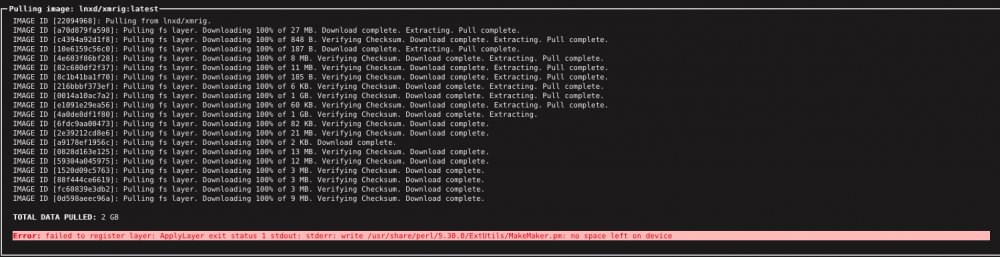
Hello, How do I get past the installation error? See image. Apparently there's no space left on device,...but that's a bit odd: My docker space has 5.4GB free Cache and disks have >1TB space free. Thx
-
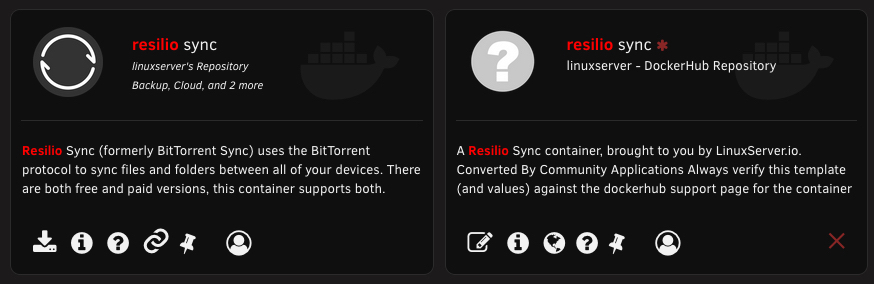
Hi, Meanwhile, I realized that the red "X" stands for "Remove from Private Registry". I guess there are two linux "resilio sunc" apps because these are from two different repositores. (linuxserver vs DockerHub) How do I switch from private to official "resilio sync" without de/install and re-setting up all syncs?
-
I am running 6.9.1. Recently I noticed that CA plugin "Appdata Backup/Restore v2" issued notice within its plugin: "NOTE: USB Backup is deprecated on Unraid version 6.9.0 It is advised to use the Unraid.net plugin instead" I wasn't able to find "Unraid.net plugin" for automated, scheduled backing up of USB in the way that "Appdata Backup/Restore v2" did it. Is manual USB backup now the only way to backup USB configuration?
-
Can someone please explain the difference between these two Resilio apps by linuxserver?? I installed long time ago the one on the right.



