





ConnerVT
Members
-
Joined
-
Last visited
Everything posted by ConnerVT
-
You can use your XP key to activate a fresh install of Windows 11. Need to find a better analogy.
-
No worries. One of my roles at work is supporting a production application used in multiple sites around the world, with developers and QA testers in yet another country. Each week we have a Teams meeting with User/Site support, Program Management and the Dev team. We all look at the application in a slightly different way, and sometimes it takes a few tries for someone to see what you are seeing. I ran the patch, and it no longer displays the warnings related to the External Volumes (which are not part of the backup). I can't run a backup at this time, as I shut down Docker and need my services to stay up. But I have high hopes all will work as expected. Thanks for finding a resolution, as well as for your work on this important plugin.
-
I respectfully disagree. The plugin is "Backup/Restore Appdata", not "Backup Docker Ecosystem". I cannot think of a use case I would wish for this plugin to back up the 20+ TB of files in my Plex Media share. This message should only be applied to check paths which are explicitly listed in the plugin's Main Setting Appdata source(s). If there is something other than that not in the conventional appdata location, this explicit location can also be included here, and then would be captured by the plugin and generate a warning (if used by multiple containers). Anyone using the arrs (likely the most common usage by Unraid servers) will certainly have multiple containers which point to the same location/path.
-
Known bug. He's working on it.
-
Your Xeon certainly isn't the most powerful CPU out there. I was running my Unraid server with Plex on a Ryzen 1500X without much issue, and that is only a bit more powerful than yours. But it comes down to not "Will it run" but more "How you are running it". How many users? On your LAN, or serving files over the Internet? Are clients playing files Direct Play/Direct Stream or are they transcoded? If the media is just being pulled from the drives and sent unchanged to the client/player, the CPU should be more than enough. Once transcoding takes place (you didn't mention you have a GPU) then I could see the CPU getting overworked.
-
The System tile on the Dashboard was revised recently (1 or 2 versions ago). It used to be titled Memory, so I guess this is an improvement. Only RAM and ZFS are actually RAM usage. Flash is the amount of used space on your flash drive. Log is the amount of space used of the allocated syslog file (which is kept in memory).
-
This graph isn't showing you RAM usage. It is how much is being used (both size and percentage of total allocated) of your docker.img file (usually in the system share). Default size is 20GB. 13.9GB is still plenty of room left (70% used). Not sure why it is orange. If you ever do need to increase the allocated size of docker.img, it is easy. Go to Settings > Docker. Disable Docker. Set new larger size. Enable Docker. Profit. Making the file smaller is more work, as it forces you to recreate all of the containers.
-
If you are at the point that you need to swap your flash drive, the few moments it takes to open a cover to retrieve it is inconsequential. The benefits are preventing it from accidental damage, theft, loss, being removed while server is running, ....
-
Definitely. The "00000SANDISK" is the giveaway. They could not even be bothered to make up a unique serial number.
-
Good practice is to never pin/isolate Core 0 for any VM/Docker, as this will usually be used by the bare metal OS. This applies to most every OS, including Unraid. With the number of cores you have, there should be plenty of room for everyone to play nice and have the space they need.
-
Yes. At the bottom of the immich template, click on "+Add another Path, Port, Variable, Label or Device". Follow the instructions for filling these out from the second post from the NVidia Driver support thread.
-
The size used in the Docker image and what is in the appdata folder are two different things. My appdata folder (which is data external to the Docker image) only contains the machine learning folder. I am set up with these three containers from CA: immich, PostgreSQL_Immich and redis (jj9987's container). I assume you have a Nvidia card you are wishing to use, as you mentioned 'cuda'. I have a Nvidia P400 which has been working in immich. I didn't do very much special for the setup (pretty much followed the video I'll link below). For the Nvidia card, make sure you have the Nvidia Driver plugin installed. Then add: --runtime=nvidia in Extra Parameters cuda in MACHINE_LEARNING_GPU_ACCELERATION Your GPU ID in NVIDIA_VISIBLE_DEVICES (copy from the Nvida Plugin page, don't have any leading/trailing space characters all in NVIDIA_DRIVER_CAPABILITIES
-
"Truly Massive Storage" 😁
-
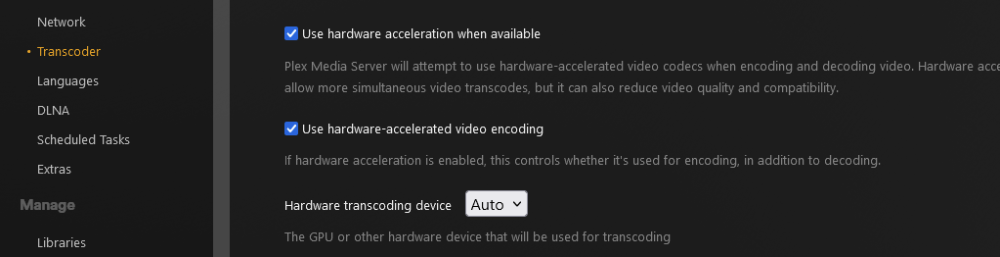
Do you have Plex Pass? Hardware transcoding only works for paid subscriptions. Also, do you have it configured in the Plex apps settings to use hardware transcoding? (Also works fine in the Linuxserver container.)
-
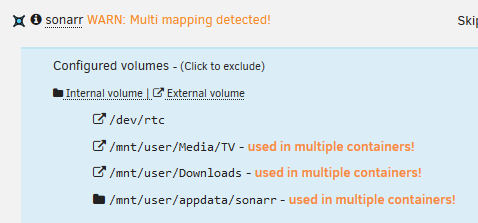
Seeing the same in all of my containers except 3. Those have no appdata configured.
-
OK, I know there are no dumb questions. Just dumb users. I qualify as one. 🤪 Where do I find the log file for this plugin? I only ever see "This log is not existing or empty" in the Status / Log tab.
-
Go to the Docker tab. Scroll to the bottom of the page, and click Container Size. It will show you what each container is using (sorted by size). Check the templates for your heavy hitters to see if things are mapped correctly. Most common is a typo error, or some location which was moved/removed after initially creating the container. 35GB for 38 containers is not unreasonable. Remember that both running and stopped containers are all included in the docker image. Some containers are written to be very light, others tend to be a bit more bloated.
-
For me, rsync and homegrown User Scripts have been the best solution. There are two different backup strategies going on with my server: -- Back up photos, backups from systems/devices on my network (which had previously been backed up to the server), and Unraid backups (such as appdata and flash drive). These go onto one of two external USB drives, which I swap occasionally and keep the idle one in my desk at work. -- Backup of my media files (except 4K movies, just not enough storage space at this time) get backed up to another Unraid server. This backup server sleeps most of the time, only to be woken up every twice a month to mirror sync the media library. There is just over 18TB of data. The initial sync takes some time (at 1 Gb/s network speeds) but the subsequent sync is more in the 15-30 minute range, depending how much was added in the previous 2 weeks. Below is a thread I created when I started the backup server build. The whole thread contains useful conversation, but I linked to the post that has my backup script. Hope it gives you some ideas.
-
Best practices for all Ryzen - Don't manually overclock (allow the CPU to handle it) Set memory timing based on this FAQ. Mind the Single/Dual Rank and the number of DIMMs used. (Also don't go by the marketing speed, but see what the true native speed of the DIMMs you are using). Typical Idle Current is generally the fix for Unraid freezes. Locking up C-States fixes things too, but may be a bit heavy handed/overkill.
-
The LT response gave an answer that was obvious, going from v6 to v7. Even the dimmest user could figure that out, and seems a little bit like spin in what seems to be a thread attempting transparency. My concern is more about going from minor updates, such as 6.12.8 to 6.12.9, which are generally are more for bug fixes than feature enhancement. Looks as that is also to be defined as a "software update" which doesn't seem to be to anyone's benefit - Unraid user or Limetech.
-
If I understand you correctly (and I may be mistaken), I would see this as potentially an issue. Most of the x.xx.Y releases recently (the past few 6.xx releases) have been mostly bug fixes to correct issues not identified by LT in the 6.xx release. There will be some unfortunate Unraid users whose subscription expires shortly after updating to a new major release, only to find there is some major bug impacting their server. I would understand if you need be subscribed to receive an update such as 6.12.x to 6.13, as these releases generally have new or enhanced features, thus justifying the development costs. Also, a bit disappointed you did not directly answer my question as I posted, even after I clearly identified examples that drove me to ask it in the first place.
-
Here you go.

-
I've read through all of the pages of this thread, the blog post, etc. There is one question I haven't seen asked or answered: What exactly qualifies as an Unraid "software update"? Would going from 6.12.8 to 6.12.9? 6.12.8 to 6.13? It would be nice if @SpencerJ or someone from the LT team would answer this.
-
I don't think it is a path issue. Immich doesn't map to many in the template. Two for photos which are on my array in it's own share /mnt/user/immich/ (/photos and /import) and for Appdata (which only contains one folder - machine-learning) in my appdata folder with all of my other dockers. Maybe it is hardware transcoding. I'll need to poke around inside the container at some point, and see where all of this data is stored.
-
Interesting. The 2 GB difference in Writable - May I ask how many photos/videos you have in Immich, and are you using hardware transcoding or machine learning? I currently have my Nvidia Quardro P400 (Cuda) working with it.






