weirdcrap
Members
-
Joined
-
Last visited
Everything posted by weirdcrap
-
I also just got hit with my first case of "Authentication refused: bad ownership or modes for directory /" I have SSH'd into this server every day this week and used my public key. Now, with zero changes on my end, UnRAID says my permissions are wrong. I have a second server with the same exact setup and the public key works fine.... I'm mid appdata backup, I'm going to restart after and see if this persists. I use Termius, but also have putty installed. Updating putty from 0.7.3 to 0.7.4 did nothing to fix the issue. EDIT: While I'm waiting for the appdata backup to finish I've been poking around and I can't find anything wrong with the ownership of any of the files or folders according to output of ls -al. I've even tried re-owning and chmodding the relevant folders as suggested above and on other sites, it makes no difference. Public key auth is just flat out broken for no discernable reason. EDIT: Yeah a reboot fixes it with no changes to my config. Hopefully whatever causes this gets fixed before stable, its alarming to suddenly not be able to connect to your server. Luckily I don't disallow password auth right now, though I would like to turn it off at some point for heightened security.
-
Well I guess I'll stick with the MX500 then, even though just ignoring the issue gives me a deep seeded (seated?) feeling of wrongness lol. Maybe the SmartMonTools update you linked to will resolve this once and for all by adjusting the alerting behavior for this drive. A question about the 860 EVO drive on my LSI and it's lack of TRIM: If I don't ever fill my SSD up (it generally only hovers around 100-200GB used) then will my lack of TRIM support have much of any noticeable performance and/or longevity effects? I've been reading about the subject and people talk about the write amplification implications of not having TRIM or garbage collection for heavily utilized SSDs. However it sounds like if you have lots of blocks without needed data there shouldn't need to be a lot of shuffling around done by the controller firmware, right?
-
@JorgeB So what are good 1TB SATA (Non M.2) SSDs that are known to work well with UnRAID without frustratingly weird firmware issues like my 860 EVO issue or apparently Crucial MX500's randomly reporting bogus bad sectors ? I just bought an MX500 to put into my remote server as a replacement for my other aging 850 EVO. But if it's going to randomly report bad sectors I don't really want anything to do with that and I would rather return it for something else. Intel seems to have all but abandoned consumer line SSDs bigger than 512GB. I don't particularly want to pay a premium for a "data center quality" SATA SSD: https://www.intel.com/content/www/us/en/products/memory-storage/solid-state-drives/data-center-ssds.html I've not had good experience with Kingstons and I don't really know much about the Western Digital line of SSDs. EDIT: So I found the main topic for these crucial drives: So disabling the monitoring for 197 just prevents email/push alerts but it will still track and report bad sectors that stick around in the webui? UnRAID only disables a disk if it fails a write test, so this bug shouldn't cause any sort of disabling issues, right?
-
You are correct on all counts. I have no clue what to make of it, I've recreated the tunnel and peer numerous times... Could this be some sort of weird networking or router tech? My only thoughts would be to turn on allowed connection logging and comparing the "good" connections to the "bad" connections.
-
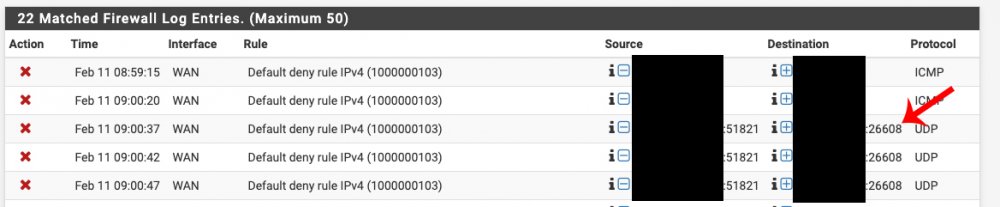
I am still perplexed by why WireGuard is not using the port specified in its config to hit my home server: Why the random ports instead of the defined port that I have a forward for?
-
@clauniaThat is interesting, I have been blaming my setup for the issues. With how widespread WireGuard adoption is becoming and its touted speed I would have thought someone would have noticed this before us if it was in fact being caused by WireGuard. I also wonder why it only seems to affect SSH/RSYNC transfers for me. I can use Windows file explorer to copy data at full speed. I've used up most of my data cap from my ISP for this month so I can't do more testing right now. However next month I plan on re-enabling direct SSH access again with public key only auth setup for a few days of testing and comparing what speeds I can get. I will be quite disappointed if it turns out I can't use WireGuard for backups...
-
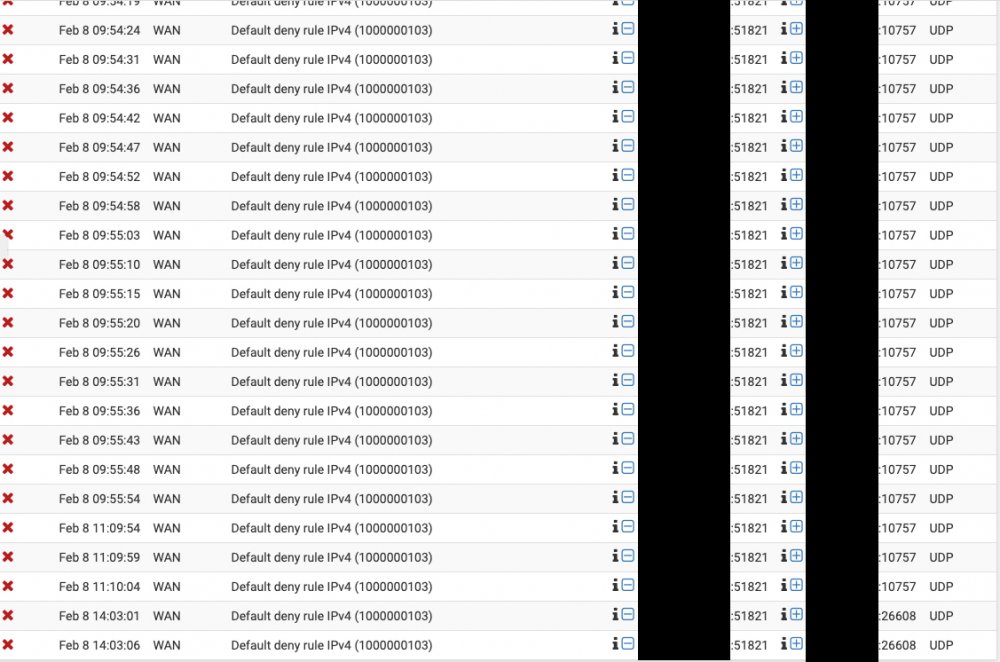
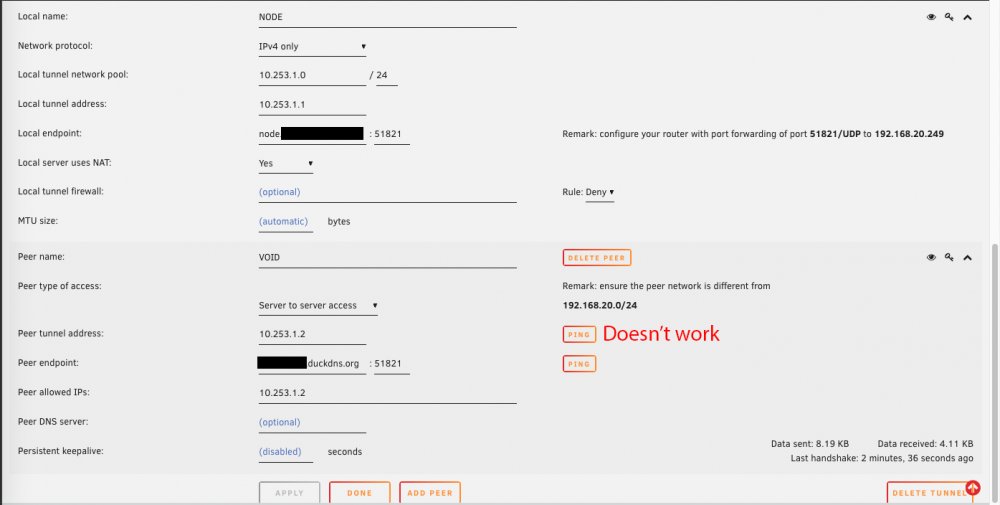
Yeah I thought so as well, I guess i didn't wait long enough for the tunnel to close. I don't get why WireGuard isn't using the ports I defined in the interface to communicate with the endpoints? My port forwards are for 51820 and 51821, but for whatever reason its trying to hit random ports like 49997, 26608, 10757, etc. It feels like I'm missing something really obvious that I've blatantly misconfigured, but I can't figure out what it is. Source is on the left, which is me on NODE trying to ping VOID. Destination is on the right which appears to be NODE trying random ports that the firewall is blocking because those aren't my forwarded ports.
-
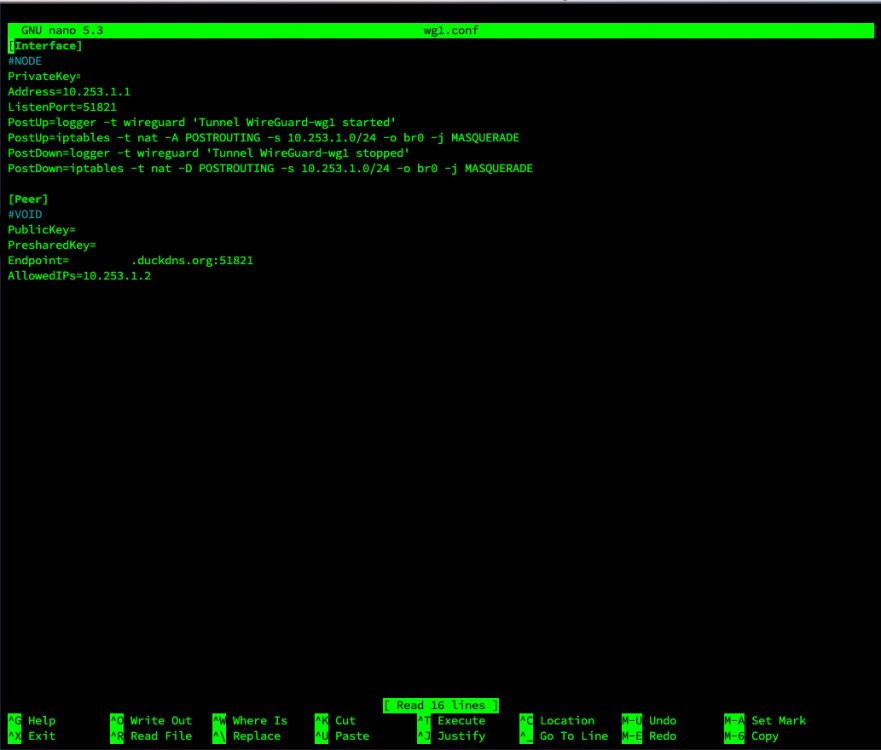
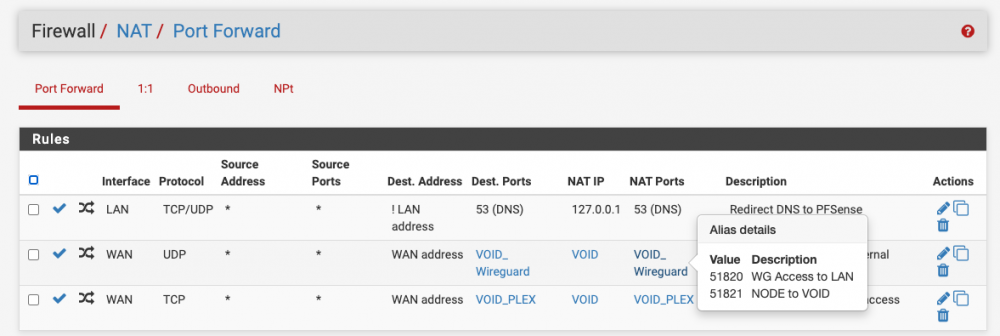
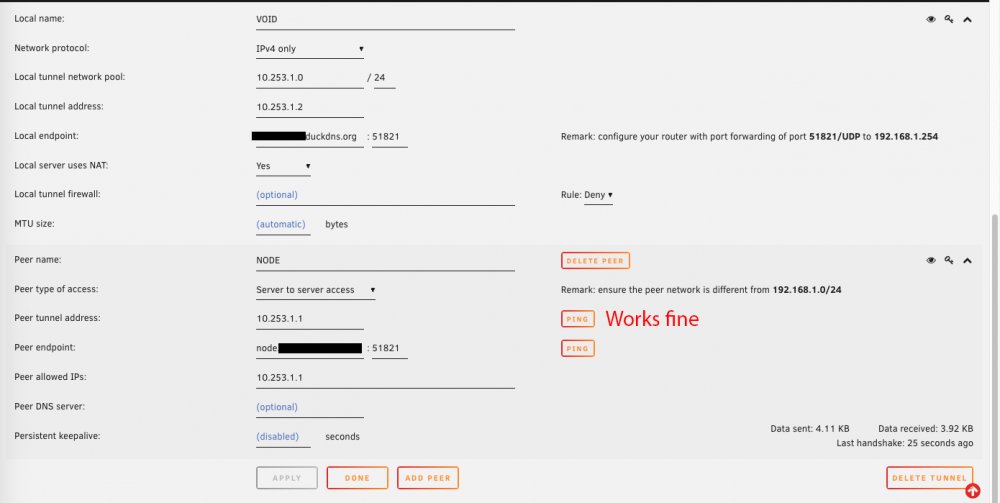
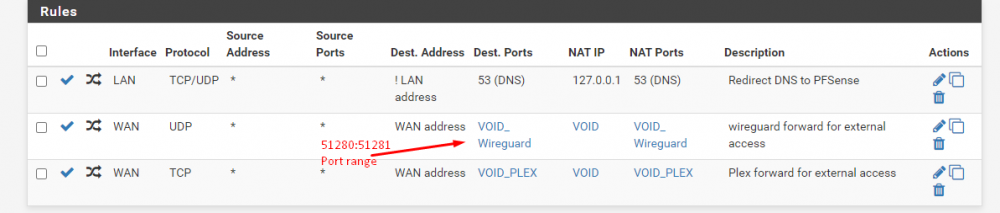
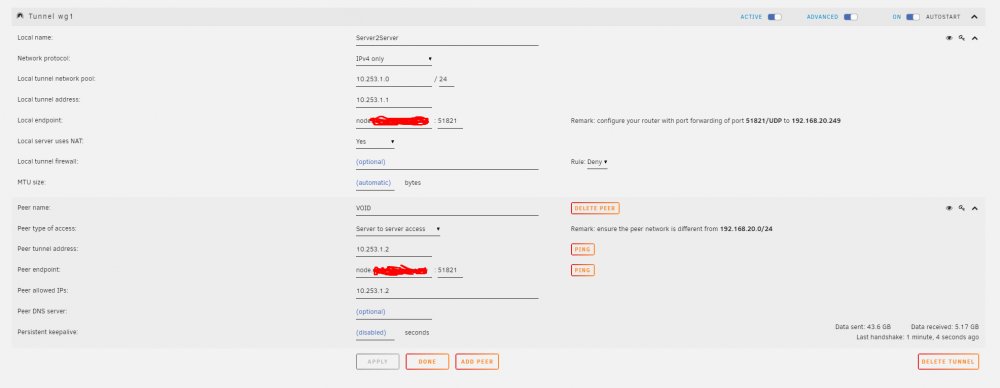
I spoke to LJM42 about this a bit in my other thread but I figured i'd post in the proper thread for help as it still isn't working correctly... I have server to server setup for doing backup and sync activities between two remote unraid servers. My problem lies in that for some strange reason I can only ever start the tunnel from one side of the connection despite my setup being identical (from what I can tell). I've already tried completely deleting the tunnel on both ends and re-creating them. VOID and NODE are both WG1 on their respective servers and have all the properly defined endpoints (see screenshots below). VOID sits behind a PFSENSE box with a 2 port UDP range (51820-51821) forwarded for my two tunnels. I can always start the tunnel (WG1) from VOID. NODE sits behind a Zyxel USG110 with the same 2 port UDP range forwarded. I can never start the tunnel (WG1) from NODE. Once I send a ping from VOID to NODE, then and only then can NODE start talking to VOID. In pfsense when I am attempting to ping from NODE to VOID I am seeing blocked connections in the firewall originating from NODEs endpoint IP/port and coming to VOID but NOT on my forwarded ports so they are getting denied. I assume this is why I can't start the tunnel from the other side but why is it not respecting the set port? Do I just not understand how the ping function works?

-
Well ideally I'd like to make this one work in this system as I'm stuck with it. I have moved it to the LSI controller to see if that helps. If not I may just keep this for an eventual gaming build (whenever the scalping and price crazyness stops) and buy a CrucialMX500. I was reading their marketing and they have TRIM at the firmware level which sounds interesting for scenarios where it may be on an LSI controller. EDIT: Ok so far so good on the LSI. EDIT: Well TRIM fails and throws an error but other than that things appear to be working.
-
Well crap, apparently there is no newer firmware available... EDIT: https://bugzilla.kernel.org/show_bug.cgi?id=203475 Seems to be both TRIM and NCQ related. I TRIM on Sundays so this is almost certainly because of NCQ. Disabling NCQ tanks 4k random performance though which isn't ideal. If I had known the 860 EVOs were going to be such trouble I would never have bought them... I guess I should start buying a different brand of SSD. How would I go about trying to disable NCQ in UnRAID for this disk as a test? EDIT: alternatively, I have not yet tried this drive on the LSI. Loss of TRIM would obviously bypass that issue but what about NCQ? Does the LSI support it?
-
@JorgeB It waited 2 days to resurface but the errors are back, even on a different controller with different sata and power cables... Feb 5 00:45:10 VOID crond[1837]: exit status 1 from user root /usr/local/sbin/mover &> /dev/null Feb 5 01:00:58 VOID kernel: ata7.00: exception Emask 0x0 SAct 0xc0c00041 SErr 0x0 action 0x6 frozen Feb 5 01:00:58 VOID kernel: ata7.00: failed command: WRITE FPDMA QUEUED Feb 5 01:00:58 VOID kernel: ata7.00: cmd 61/08:00:b8:ca:00/00:00:00:00:00/40 tag 0 ncq dma 4096 out Feb 5 01:00:58 VOID kernel: res 40/00:01:00:00:00/00:00:00:00:00/00 Emask 0x4 (timeout) Feb 5 01:00:58 VOID kernel: ata7.00: status: { DRDY } Feb 5 01:00:58 VOID kernel: ata7.00: failed command: READ FPDMA QUEUED Feb 5 01:00:58 VOID kernel: ata7.00: cmd 60/08:30:00:20:cd/00:00:0c:00:00/40 tag 6 ncq dma 4096 in Feb 5 01:00:58 VOID kernel: res 40/00:01:00:4f:c2/00:00:00:00:00/00 Emask 0x4 (timeout) Feb 5 01:00:58 VOID kernel: ata7.00: status: { DRDY } Feb 5 01:00:58 VOID kernel: ata7.00: failed command: WRITE FPDMA QUEUED Feb 5 01:00:58 VOID kernel: ata7.00: cmd 61/08:b0:28:a4:63/00:00:00:00:00/40 tag 22 ncq dma 4096 out Feb 5 01:00:58 VOID kernel: res 40/00:01:00:4f:c2/00:00:00:00:00/00 Emask 0x4 (timeout) Feb 5 01:00:58 VOID kernel: ata7.00: status: { DRDY } Feb 5 01:00:58 VOID kernel: ata7.00: failed command: WRITE FPDMA QUEUED Feb 5 01:00:58 VOID kernel: ata7.00: cmd 61/08:b8:e8:72:65/00:00:00:00:00/40 tag 23 ncq dma 4096 out Feb 5 01:00:58 VOID kernel: res 40/00:01:01:4f:c2/00:00:00:00:00/00 Emask 0x4 (timeout) Feb 5 01:00:58 VOID kernel: ata7.00: status: { DRDY } Feb 5 01:00:58 VOID kernel: ata7.00: failed command: SEND FPDMA QUEUED Feb 5 01:00:58 VOID kernel: ata7.00: cmd 64/01:f0:00:00:00/00:00:00:00:00/a0 tag 30 ncq dma 512 out Feb 5 01:00:58 VOID kernel: res 40/00:01:00:00:00/00:00:00:00:00/00 Emask 0x4 (timeout) Feb 5 01:00:58 VOID kernel: ata7.00: status: { DRDY } Feb 5 01:00:58 VOID kernel: ata7.00: failed command: WRITE FPDMA QUEUED Feb 5 01:00:58 VOID kernel: ata7.00: cmd 61/08:f8:b0:be:00/00:00:00:00:00/40 tag 31 ncq dma 4096 out Feb 5 01:00:58 VOID kernel: res 40/00:01:00:4f:c2/00:00:00:00:00/00 Emask 0x4 (timeout) Feb 5 01:00:58 VOID kernel: ata7.00: status: { DRDY } Feb 5 01:00:58 VOID kernel: ata7: hard resetting link Feb 5 01:00:58 VOID kernel: ata7: SATA link up 6.0 Gbps (SStatus 133 SControl 300) Feb 5 01:00:58 VOID kernel: ata7.00: supports DRM functions and may not be fully accessible Feb 5 01:00:58 VOID kernel: ata7.00: supports DRM functions and may not be fully accessible Feb 5 01:00:58 VOID kernel: ata7.00: configured for UDMA/133 Feb 5 01:00:58 VOID kernel: ata7: EH complete Feb 5 01:00:58 VOID kernel: ata7.00: Enabling discard_zeroes_data Feb 5 01:00:58 VOID kernel: ata7.00: invalid checksum 0xdc on log page 10h Feb 5 01:00:58 VOID kernel: ata7: log page 10h reported inactive tag 1 Feb 5 01:00:58 VOID kernel: ata7.00: exception Emask 0x1 SAct 0x1f8 SErr 0x0 action 0x0 Feb 5 01:00:58 VOID kernel: ata7.00: irq_stat 0x40000008 Feb 5 01:00:58 VOID kernel: ata7.00: failed command: WRITE FPDMA QUEUED Feb 5 01:00:58 VOID kernel: ata7.00: cmd 61/08:18:b0:be:00/00:00:00:00:00/40 tag 3 ncq dma 4096 out Feb 5 01:00:58 VOID kernel: res 40/00:20:00:00:00/00:00:00:00:00/a0 Emask 0x1 (device error) Feb 5 01:00:58 VOID kernel: ata7.00: status: { DRDY } Feb 5 01:00:58 VOID kernel: ata7.00: failed command: SEND FPDMA QUEUED Feb 5 01:00:58 VOID kernel: ata7.00: cmd 64/01:20:00:00:00/00:00:00:00:00/a0 tag 4 ncq dma 512 out Feb 5 01:00:58 VOID kernel: res 40/00:20:00:00:00/00:00:00:00:00/a0 Emask 0x1 (device error) Feb 5 01:00:58 VOID kernel: ata7.00: status: { DRDY } Feb 5 01:00:58 VOID kernel: ata7.00: failed command: WRITE FPDMA QUEUED Feb 5 01:00:58 VOID kernel: ata7.00: cmd 61/08:28:e8:72:65/00:00:00:00:00/40 tag 5 ncq dma 4096 out Feb 5 01:00:58 VOID kernel: res 40/00:20:00:00:00/00:00:00:00:00/a0 Emask 0x1 (device error) Feb 5 01:00:58 VOID kernel: ata7.00: status: { DRDY } Feb 5 01:00:58 VOID kernel: ata7.00: failed command: WRITE FPDMA QUEUED Feb 5 01:00:58 VOID kernel: ata7.00: cmd 61/08:30:28:a4:63/00:00:00:00:00/40 tag 6 ncq dma 4096 out Feb 5 01:00:58 VOID kernel: res 40/00:20:00:00:00/00:00:00:00:00/a0 Emask 0x1 (device error) Feb 5 01:00:58 VOID kernel: ata7.00: status: { DRDY } Feb 5 01:00:58 VOID kernel: ata7.00: failed command: READ FPDMA QUEUED Feb 5 01:00:58 VOID kernel: ata7.00: cmd 60/08:38:00:20:cd/00:00:0c:00:00/40 tag 7 ncq dma 4096 in Feb 5 01:00:58 VOID kernel: res 40/00:20:00:00:00/00:00:00:00:00/a0 Emask 0x1 (device error) Feb 5 01:00:58 VOID kernel: ata7.00: status: { DRDY } Feb 5 01:00:58 VOID kernel: ata7.00: failed command: WRITE FPDMA QUEUED Feb 5 01:00:58 VOID kernel: ata7.00: cmd 61/08:40:b8:ca:00/00:00:00:00:00/40 tag 8 ncq dma 4096 out Feb 5 01:00:58 VOID kernel: res 40/00:20:00:00:00/00:00:00:00:00/a0 Emask 0x1 (device error) Feb 5 01:00:58 VOID kernel: ata7.00: status: { DRDY } Feb 5 01:00:58 VOID kernel: ata7.00: failed to IDENTIFY (I/O error, err_mask=0x100) Feb 5 01:00:58 VOID kernel: ata7.00: revalidation failed (errno=-5) Feb 5 01:00:58 VOID kernel: ata7: hard resetting link Feb 5 01:00:59 VOID kernel: ata7: SATA link up 6.0 Gbps (SStatus 133 SControl 300) Feb 5 01:00:59 VOID kernel: ata7.00: supports DRM functions and may not be fully accessible Feb 5 01:00:59 VOID kernel: ata7.00: supports DRM functions and may not be fully accessible Feb 5 01:00:59 VOID kernel: ata7.00: configured for UDMA/133 Feb 5 01:00:59 VOID kernel: ata7.00: device reported invalid CHS sector 0 Feb 5 01:00:59 VOID kernel: sd 8:0:0:0: [sdh] tag#4 UNKNOWN(0x2003) Result: hostbyte=0x00 driverbyte=0x08 cmd_age=57s Feb 5 01:00:59 VOID kernel: sd 8:0:0:0: [sdh] tag#4 Sense Key : 0x5 [current] Feb 5 01:00:59 VOID kernel: sd 8:0:0:0: [sdh] tag#4 ASC=0x21 ASCQ=0x4 Feb 5 01:00:59 VOID kernel: sd 8:0:0:0: [sdh] tag#4 CDB: opcode=0x93 93 08 00 00 00 00 00 00 10 00 00 00 00 20 00 00 Feb 5 01:00:59 VOID kernel: blk_update_request: I/O error, dev sdh, sector 4096 op 0x3:(DISCARD) flags 0x800 phys_seg 1 prio class 0 Feb 5 01:00:59 VOID kernel: ata7: EH complete Feb 5 01:00:59 VOID kernel: ata7.00: Enabling discard_zeroes_data Feb 5 01:01:59 VOID kernel: ata7.00: exception Emask 0x0 SAct 0x10ff018 SErr 0x0 action 0x6 frozen Feb 5 01:01:59 VOID kernel: ata7.00: failed command: WRITE FPDMA QUEUED Feb 5 01:01:59 VOID kernel: ata7.00: cmd 61/10:18:d0:1f:cd/00:00:0c:00:00/40 tag 3 ncq dma 8192 out Feb 5 01:01:59 VOID kernel: res 40/00:20:00:00:00/00:00:00:00:00/a0 Emask 0x4 (timeout) Feb 5 01:01:59 VOID kernel: ata7.00: status: { DRDY } Feb 5 01:01:59 VOID kernel: ata7.00: failed command: WRITE FPDMA QUEUED Feb 5 01:01:59 VOID kernel: ata7.00: cmd 61/08:20:e0:1f:cd/00:00:0c:00:00/40 tag 4 ncq dma 4096 out Feb 5 01:01:59 VOID kernel: res 40/00:20:00:00:00/00:00:00:00:00/a0 Emask 0x4 (timeout) Feb 5 01:01:59 VOID kernel: ata7.00: status: { DRDY } Feb 5 01:01:59 VOID kernel: ata7.00: failed command: WRITE FPDMA QUEUED Feb 5 01:01:59 VOID kernel: ata7.00: cmd 61/20:60:c0:a4:c5/00:00:05:00:00/40 tag 12 ncq dma 16384 out Feb 5 01:01:59 VOID kernel: res 40/00:01:00:4f:c2/00:00:00:00:00/00 Emask 0x4 (timeout) Feb 5 01:01:59 VOID kernel: ata7.00: status: { DRDY } Feb 5 01:01:59 VOID kernel: ata7.00: failed command: SEND FPDMA QUEUED Feb 5 01:01:59 VOID kernel: ata7.00: cmd 64/01:68:00:00:00/00:00:00:00:00/a0 tag 13 ncq dma 512 out Feb 5 01:01:59 VOID kernel: res 40/00:01:01:4f:c2/00:00:00:00:00/00 Emask 0x4 (timeout) Feb 5 01:01:59 VOID kernel: ata7.00: status: { DRDY } Feb 5 01:01:59 VOID kernel: ata7.00: failed command: WRITE FPDMA QUEUED Feb 5 01:01:59 VOID kernel: ata7.00: cmd 61/20:70:40:a5:c5/00:00:05:00:00/40 tag 14 ncq dma 16384 out Feb 5 01:01:59 VOID kernel: res 40/00:01:00:00:00/00:00:00:00:00/00 Emask 0x4 (timeout) Feb 5 01:01:59 VOID kernel: ata7.00: status: { DRDY } Feb 5 01:01:59 VOID kernel: ata7.00: failed command: WRITE FPDMA QUEUED Feb 5 01:01:59 VOID kernel: ata7.00: cmd 61/20:78:a0:a5:c5/00:00:05:00:00/40 tag 15 ncq dma 16384 out Feb 5 01:01:59 VOID kernel: res 40/00:01:00:00:00/00:00:00:00:00/00 Emask 0x4 (timeout) Feb 5 01:01:59 VOID kernel: ata7.00: status: { DRDY } Feb 5 01:01:59 VOID kernel: ata7.00: failed command: WRITE FPDMA QUEUED Feb 5 01:01:59 VOID kernel: ata7.00: cmd 61/80:80:c0:35:2b/02:00:00:00:00/40 tag 16 ncq dma 327680 out Feb 5 01:01:59 VOID kernel: res 40/00:01:00:00:00/00:00:00:00:00/00 Emask 0x4 (timeout) Feb 5 01:01:59 VOID kernel: ata7.00: status: { DRDY } Feb 5 01:01:59 VOID kernel: ata7.00: failed command: WRITE FPDMA QUEUED Feb 5 01:01:59 VOID kernel: ata7.00: cmd 61/80:88:c0:35:33/02:00:00:00:00/40 tag 17 ncq dma 327680 out Feb 5 01:01:59 VOID kernel: res 40/00:01:00:00:00/00:00:00:00:00/00 Emask 0x4 (timeout) Feb 5 01:01:59 VOID kernel: ata7.00: status: { DRDY } Feb 5 01:01:59 VOID kernel: ata7.00: failed command: WRITE FPDMA QUEUED Feb 5 01:01:59 VOID kernel: ata7.00: cmd 61/08:90:58:75:65/00:00:00:00:00/40 tag 18 ncq dma 4096 out Feb 5 01:01:59 VOID kernel: res 40/00:01:00:00:00/00:00:00:00:00/00 Emask 0x4 (timeout) Feb 5 01:01:59 VOID kernel: ata7.00: status: { DRDY } Feb 5 01:01:59 VOID kernel: ata7.00: failed command: WRITE FPDMA QUEUED Feb 5 01:01:59 VOID kernel: ata7.00: cmd 61/08:98:90:77:65/00:00:00:00:00/40 tag 19 ncq dma 4096 out Feb 5 01:01:59 VOID kernel: res 40/00:01:00:4f:c2/00:00:00:00:00/00 Emask 0x4 (timeout) Feb 5 01:01:59 VOID kernel: ata7.00: status: { DRDY } Feb 5 01:01:59 VOID kernel: ata7.00: failed command: WRITE FPDMA QUEUED Feb 5 01:01:59 VOID kernel: ata7.00: cmd 61/20:c0:20:a4:c5/00:00:05:00:00/40 tag 24 ncq dma 16384 out Feb 5 01:01:59 VOID kernel: res 40/00:01:00:4f:c2/00:00:00:00:00/00 Emask 0x4 (timeout) Feb 5 01:01:59 VOID kernel: ata7.00: status: { DRDY } Feb 5 01:01:59 VOID kernel: ata7: hard resetting link Feb 5 01:02:00 VOID kernel: ata7: SATA link up 6.0 Gbps (SStatus 133 SControl 300) Feb 5 01:02:00 VOID kernel: ata7.00: supports DRM functions and may not be fully accessible Feb 5 01:02:00 VOID kernel: ata7.00: supports DRM functions and may not be fully accessible Feb 5 01:02:00 VOID kernel: ata7.00: configured for UDMA/133 Feb 5 01:02:00 VOID kernel: ata7.00: device reported invalid CHS sector 0 Feb 5 01:02:00 VOID kernel: ata7: EH complete Feb 5 01:02:00 VOID kernel: ata7.00: Enabling discard_zeroes_data Feb 5 01:02:30 VOID kernel: ata7.00: NCQ disabled due to excessive errors Feb 5 01:02:30 VOID kernel: ata7.00: exception Emask 0x0 SAct 0x60000007 SErr 0x0 action 0x6 frozen Feb 5 01:02:30 VOID kernel: ata7.00: failed command: WRITE FPDMA QUEUED Feb 5 01:02:30 VOID kernel: ata7.00: cmd 61/20:00:c0:a4:c5/00:00:05:00:00/40 tag 0 ncq dma 16384 out Feb 5 01:02:30 VOID kernel: res 40/00:01:00:00:00/00:00:00:00:00/00 Emask 0x4 (timeout) Feb 5 01:02:30 VOID kernel: ata7.00: status: { DRDY } Feb 5 01:02:30 VOID kernel: ata7.00: failed command: WRITE FPDMA QUEUED Feb 5 01:02:30 VOID kernel: ata7.00: cmd 61/08:08:e0:1f:cd/00:00:0c:00:00/40 tag 1 ncq dma 4096 out Feb 5 01:02:30 VOID kernel: res 40/00:01:00:4f:c2/00:00:00:00:00/00 Emask 0x4 (timeout) Feb 5 01:02:30 VOID kernel: ata7.00: status: { DRDY } Feb 5 01:02:30 VOID kernel: ata7.00: failed command: WRITE FPDMA QUEUED Feb 5 01:02:30 VOID kernel: ata7.00: cmd 61/10:10:d0:1f:cd/00:00:0c:00:00/40 tag 2 ncq dma 8192 out Feb 5 01:02:30 VOID kernel: res 40/00:01:01:4f:c2/00:00:00:00:00/00 Emask 0x4 (timeout) Feb 5 01:02:30 VOID kernel: ata7.00: status: { DRDY } Feb 5 01:02:30 VOID kernel: ata7.00: failed command: WRITE FPDMA QUEUED Feb 5 01:02:30 VOID kernel: ata7.00: cmd 61/20:e8:40:a5:c5/00:00:05:00:00/40 tag 29 ncq dma 16384 out Feb 5 01:02:30 VOID kernel: res 40/00:01:01:4f:c2/00:00:00:00:00/00 Emask 0x4 (timeout) Feb 5 01:02:30 VOID kernel: ata7.00: status: { DRDY } Feb 5 01:02:30 VOID kernel: ata7.00: failed command: SEND FPDMA QUEUED Feb 5 01:02:30 VOID kernel: ata7.00: cmd 64/01:f0:00:00:00/00:00:00:00:00/a0 tag 30 ncq dma 512 out Feb 5 01:02:30 VOID kernel: res 40/00:01:00:00:00/00:00:00:00:00/00 Emask 0x4 (timeout) Feb 5 01:02:30 VOID kernel: ata7.00: status: { DRDY } Feb 5 01:02:30 VOID kernel: ata7: hard resetting link Feb 5 01:02:30 VOID kernel: ata7: SATA link up 6.0 Gbps (SStatus 133 SControl 300) Feb 5 01:02:30 VOID kernel: ata7.00: supports DRM functions and may not be fully accessible Feb 5 01:02:30 VOID kernel: ata7.00: supports DRM functions and may not be fully accessible Feb 5 01:02:30 VOID kernel: ata7.00: configured for UDMA/133 Feb 5 01:02:30 VOID kernel: ata7: EH complete Feb 5 01:02:30 VOID kernel: ata7.00: Enabling discard_zeroes_data Feb 5 01:02:43 VOID kernel: BTRFS warning (device sdh1): failed to trim 1 block group(s), last error -5 void-diagnostics-20210205-0458.zip Maybe a firmware update will help it get its sh*t together. putting the timeout error into google brings up lots of these: https://bbs.archlinux.org/viewtopic.php?id=168530 https://askubuntu.com/questions/1154493/why-is-my-ssd-periodically-hanging-for-20-to-30-seconds
-
Yeah I've been looking through Google, I was just hoping someone here would have encountered this issue before and would be able to guide me to a solution quicker than I could find one just trying random stuff I find online. A lot of what I find on Google seems to be people expecting rsync to be able to saturate gigabit ethernet consistently, or somehow magically overcome the limitations of their USB 2.0 drive, HDD I/O, CPU, whatever bottleneck they may have: https://serverfault.com/questions/377598/why-is-my-rsync-so-slow https://unix.stackexchange.com/questions/303937/why-my-rsync-slow-down-over-time https://superuser.com/questions/424512/why-do-file-copy-operations-in-linux-get-slower-over-time The consensus online seems to be rsync and SSH are not and were never meant to be the most performant pieces of software out there, which I totally get. There are threads full of alternatives to try. However, in my googling I'm regularly seeing all these people who complain about the slowness of rsync easily achieving the (IMO) very low speeds I'm wanting. Their worst reported speeds are honestly what I'm aiming for here. Like your example from reddit, I'd be absolutely thrilled if I could maintain 7MB/s or even 5MB/s that they complain of in that thread. Everywhere I've seen stats reported, rsync with SSH should be completely capable of maintaining this paltry speed with the encryption & protocol overhead and my so-so hardware. I normally limit my rsync jobs to 5MB/s (--bwlimit=5000) as I have to share bandwidth with other servers where NODE is hosted and I'm positive that it can handle a consistent 5MB/s stream of data both sending and receiving. I'm not seeing high iowaits, CPU, RAM, or anything really when the transfers do slow down. That is what has made this so hard to diagnose, a complete and utter lack of clues. https://www.raspberrypi.org/forums/viewtopic.php?p=1404560&sid=ac2739c958d835a87f2afff7ad0df267#p1404560 This suggestion is interesting, I had not considered that it could be in between network equipment. However I'm able to utilize other TCP heavy protocols at maximum speed like SCP, SFTP, FTP when downloading files from the internet to these servers separately. I simply can't make them talk quickly to each other, for extended periods of time. Finally, I want to say thank you for taking time out of your day to look at this with me. Trying to figure out a problem you've been working on for weeks and weeks requires new perspectives sometimes.
-
Ok the WireGuard issue is fixed, now either server can restart the connection. It shouldn't have mattered but I'm going to start another transfer and see if the WireGuard fix made any difference. I'm really hoping to rally the vast community knowledge here (and reddit), I can't imagine I'm the only person using rsync and ssh in this manner for backups. EDIT: Nope, no difference with the WG issue fixed.
-
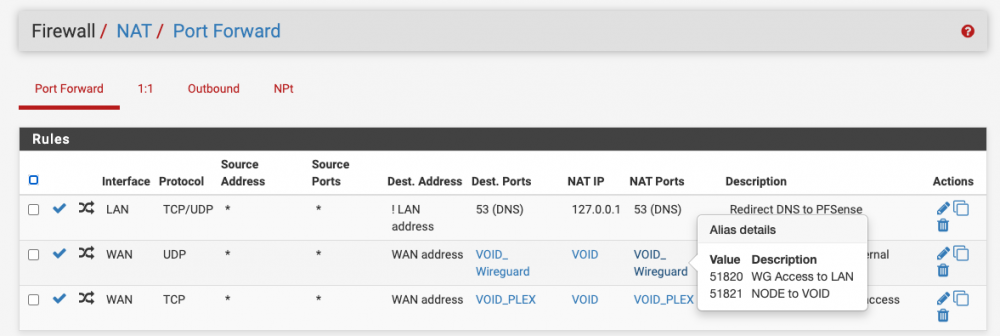
I am, I for some reason thought it was written by one of the unraid admins, I didn't realize it was a user guest blog. Either way I didn't mean to come off like I expected him to come help me, I just meant in comparing my self made setup to theirs I did everything I could "by the book" so to speak. It varies, sometimes I can get through 10-20 files at 1-2GB a pop. Other times the speed will tank half way through the first file. I did test a cache to cache transfer in my flurry of work yesterday. It did not improve the situation from what I recall but I did not document the results well so it bears another test to be sure. I do not unfortunately and the primary server is actually hosted about 4 hours away from me so its not something I can just go and visit on a whim. When I first setup WireGuard I definitely tested this and both ends were able to start the connection so I'm not sure what changed there. My router here with VOID is a pfsense router and from what I can tell my port forwards are setup correctly: I'll look those threads over again as I'll admit my grasp of wireguard when i configured it was tentative at best and its all looking greek to me now looking back at it. I think I see my problem though, on NODE I have the peer address set to the same thing as my local endpoint. The peer for VOID should be my dynamic DNS name for my home IP right? EDIT: Started a cache (NODE) to cache (VOID) transfer and barely made it into the first file before the speed tanked. Meanwhile I've been uploading files from VOID to NODE for the last hour at full speed. 10GB files at 2.8MB/s (the max for my crappy comcast upload). This is the part that drives me nuts, I can't seem to find a pattern to what transfers utilize their full potential speed while others just languish in the land of dial-up.
-
I didn't think to try this until now, when I run multiple transfers in parallel, one slowing down does NOT cause the other to slow down. Why is that? If this was a resource issue (whether CPU, RAM, bandwidth, etc) I would think parallel transfers would be affected equally...
-
@ljm42 I'm noticing an odd behavior with my server to server wireguard tunnel... When I'm signed into NODE, I can't ping VOID initially. Once I start a ping from VOID to NODE however, replies start flowing both ways... This is not something I had noticed before. Should I enable keep alive to prevent this? I'm going to snag a video of this behavior. EDIT: So as you can see in the video, I start to ping VOID's WG IP on NODE and get no replies until I start a ping from VOID to NODE. Then like magic all of a sudden NODE realizes VOID is, in fact, available. I'm to the point in this I'm willing to offer a cash reward if someone can just tell me WTF is wrong with rsync/SSH.

-
I've been troubleshooting an issue with transfer speeds on my servers, and one of the steps was to try and upgrade my main server NODE, to RC2 to match VOID. After doing so, I've noticed my CPU (Intel i7-4770) is way busier than it was on 6.8.3. On 6.8.3, my plex docker could support 8-10 streams. On RC2, my Plex server is choking to death trying to transcode a single episode while I'm the only person online. I get stuttering/buffering and the transcoder is only reporting a 0.8 conversation rate (meaning plex can't transcode fast enough to keep up). If I have more than one person using it, forget about it, its god awful for everyone who tries to use it. I saw some posts (here, here) in the RC2 release thread saying people were experiencing similar issues with their VMs. While I don't run any VMs I do have about 8 dockers and they all feel much much slower and regularly 100% all available cores even for what I would consider light duty tasks. Downgrading to 6.8.3 resolves my performance issues on NODE, plex can keep up with multiple streams and my overall CPU usage over a given time is halved. This is with NO OTHER CHANGES to the system. Steps to reproduce: -upgrade to 6.9.0-RC2 and watch your CPU performance tank. Downgrade to 6.8.3 and it all returns to "normal". node-diagnostics-20210204-0645.zip EDIT: Just found ljm42's post here about the cpu governor in tweaks and tips, mine was indeed on power saver mode so I will test and see if this resolves my performance issues on RC2. EDIT2: Yeah that seems to have done it. I never would have guessed the CPU governor setting got changed, so I'm glad I found that post.
-
It would be really nice if someone, anyone, could come in here and post about their experiences with the RC vs the stable. Is anyone else doing what I'm doing with SSH and RSYNC? Are you having the head smashingly frustrating performance problems I have? Who wrote LimeTech's guide on this? Are they having these kinds of problems? I'm absolutely shocked that in the three weeks I've been posting here about this not a single person has come forward to either confirm or deny that this is a legitimate issue vs something with my setup. I'm sorry for my ranting, I'm beyond frustrated and disappointed that I keep thinking I've found the answer, only to be proven wrong time and time again mere hours later. EDIT: OK so I've got NODE and VOID on RC2 again and NODE is finally behaving itself after discovering my CPU governor setting got changed. I'm not sure what sort of voodoo magic I summoned yesterday when upgrading NODE to RC2 but the performance gains I saw the entire day yesterday disappeared that night. RSYNC over SSH is back to 1MB/s > when using VOID to pull from NODE. Whether dockers are running or not makes no difference. Pushing from NODE to VOID continues to give me my full 10MB/s. I've placed new diagnostics files in the OP. Every single time I think I'm starting to figure out the problem, UnRAID throws me a god damn curveball. So now on 6.9.0-RC2 whether I run the script on NODE or VOID, the performance starts out good and then falls to 1MB/s > or less.
-
alright well I spoke to soon. I was having some issues with my plex docker running poorly on NODE so I rolled it back to 6.8.3 as a test. This appears to have fixed my plex issue but now VOID is only managing to pull about 1MB/s again (I was getting 10MB/s before). I can push from NODE to VOID at full speed as always... It's late and I'm tired of messing with this, if the speed issue continues I may try to upgrade back to 6.9.0-rc2 and see if that makes the problem go away again. Alternatively, could I downgrade back to 6.8.3 on VOID? I can't roll back using the update tool, can I just download 6.8.3 from the website and extract it onto my flash? EDIT: The answer is yes, just replace all the bz files. Downgrading VOID to 6.8.3 to see if it makes a difference. EDIT2: JFC, so I can't downgrade to 6.8.3 on VOID because of the new f*cking partition layout for BTRFS. So my choices are either blow away my cache again (I just upgraded it on Monday), or stay on 6.9.0-RC2 and never know if my problems are because of the beta or not.
-
Yeah it has been an extremely frustrating journey for me, but I'm glad I've finally cracked it. What led me to suspect resource utilization despite no clues that it was resource starved was that, with all other things equal, I could use rsync/ssh to push from NODE at my full speeds while trying to have VOID pull the files resulted in terrible speeds (no matter what protocol I used). So I assumed I had to have some sort of resource limitation where rsync/ssh were running from. It's been running since this morning and speeds are stable, something I could never accomplish over the last couple of months for more than an hour at a time. I've always had Plex monitoring the library for changes, so I'm not sure why it has suddenly become a big deal. The only major plex change that comes to my mind around that time was them adding intro detection to the server. ^This is wrong, the issue is back and as hard to pin down as ever.
-
It's my monthly data transfer and the performance is still crap. I've played with every rsync and SSH option I can think of (--whole-file, --inplace). It doesn't matter if the data goes straight into the array or all gets written to a cache disk first. Copying outside of SSH (ie using Windows file explorer) saturates my bandwidth (full 10MB/s) as expected but SSH can barely manage to maintain 1MB/s EDIT: Copying via rsync/SSH from other servers I have access to do not suffer form performance issues. I'm able to max out my home internet bandwidth. EDIT2: I'm going to try setting up an SSHFS mount between the servers and see if it behaves any differently. I'm grasping at straws here so if anyone has a better idea I'm all ears. EDIT3: SSHFS seemed to work at first, but its speed seems to crater eventually as well. EDIT4: This is driving me up a wall. I have hundreds of gigabytes to transfer and at the horrendous dial-up level speeds I'm getting, I could WALK the files to the backup server faster than I could move them over the internet. EDIT5: I'm playing with NFS shares over WireGuard since I can't figure out what is wrong with my SSH speeds between these two servers. Results are promising though I'm going to have to rescript my entire backup process. EDIT6: I think I cracked it! I never considered stopping the few dockers on the server running the script as the stats in the webui and htop never indicated the CPU was anywhere near busy (it hovered around 10-15%). But sure enough, with everything stopped my speeds are back to normal and have stayed consistent. Specifically, it seems to be Plex's automatic library change scanning that was absolutely crippling my transfer rate. With dockers started and that turned off my speeds are holding steady so far. EDIT7: EDIT6 is wrong, see latest posts.
-
Really? That's interesting, the old one worked great for the last 5 years, not a single error. After the most recent two errors all has been quiet and I have a large data transfer going so I'll have to try this in a couple days. EDIT: and just like that I jinxed myself, tons more errors now. Fantastic. EDIT2: Ok, I shuffled stuff around and put the SSD on the asmedia controller I have the parity drive on and so far so good on boot up. I'll have to start copying data and see if it shows up still. EDIT3: Yeah moving it off the AMD controller solved it. Per usual JorgeB has the answers.
-
I purchased a 1TB Samsung SSD 860 EVO before Christmas and just kind of left it on the shelf till today. Well I installed it in my server to replace an old but reliable 500GB 860 EVO and that's where the trouble started. Upon copying data to the drive I started getting warnings about CRC errors and the SMART stats for it going up and variations of this continue to show up in the logs: Feb 1 11:22:43 VOID kernel: ata6.00: irq_stat 0x08000000, interface fatal error Feb 1 11:22:43 VOID kernel: ata6.00: failed command: WRITE FPDMA QUEUED Feb 1 11:22:43 VOID kernel: ata6.00: cmd 61/e8:40:f8:ce:f0/09:00:02:00:00/40 tag 8 ncq dma 1298432 ou Feb 1 11:22:43 VOID kernel: res 40/00:40:f8:ce:f0/00:00:02:00:00/40 Emask 0x10 (ATA bus error) Feb 1 11:22:43 VOID kernel: ata6.00: status: { DRDY } Feb 1 11:22:43 VOID kernel: ata6.00: failed command: WRITE FPDMA QUEUED Feb 1 11:22:43 VOID kernel: ata6.00: cmd 61/50:48:e0:d8:f0/09:00:02:00:00/40 tag 9 ncq dma 1220608 ou Feb 1 11:22:43 VOID kernel: res 40/00:40:f8:ce:f0/00:00:02:00:00/40 Emask 0x10 (ATA bus error) Feb 1 11:22:43 VOID kernel: ata6.00: status: { DRDY } Feb 1 11:22:43 VOID kernel: ata6.00: failed command: WRITE FPDMA QUEUED Feb 1 11:22:43 VOID kernel: ata6.00: cmd 61/d8:70:30:e2:f0/09:00:02:00:00/40 tag 14 ncq dma 1290240 ou Feb 1 11:22:43 VOID kernel: res 40/00:40:f8:ce:f0/00:00:02:00:00/40 Emask 0x10 (ATA bus error) Feb 1 11:22:43 VOID kernel: ata6.00: status: { DRDY } Feb 1 11:22:43 VOID kernel: ata6.00: failed command: WRITE FPDMA QUEUED Feb 1 11:22:43 VOID kernel: ata6.00: cmd 61/90:78:08:ec:f0/09:00:02:00:00/40 tag 15 ncq dma 1253376 ou Feb 1 11:22:43 VOID kernel: res 40/00:40:f8:ce:f0/00:00:02:00:00/40 Emask 0x10 (ATA bus error) Feb 1 11:22:43 VOID kernel: ata6.00: status: { DRDY } Feb 1 11:22:43 VOID kernel: ata6.00: failed command: WRITE FPDMA QUEUED Feb 1 11:22:43 VOID kernel: ata6.00: cmd 61/f8:80:98:f5:f0/09:00:02:00:00/40 tag 16 ncq dma 1306624 ou Feb 1 11:22:43 VOID kernel: res 40/00:40:f8:ce:f0/00:00:02:00:00/40 Emask 0x10 (ATA bus error) Feb 1 11:22:43 VOID kernel: ata6.00: status: { DRDY } Feb 1 11:22:43 VOID kernel: ata6.00: failed command: WRITE FPDMA QUEUED Feb 1 11:22:43 VOID kernel: ata6.00: cmd 61/e0:a8:90:ff:f0/09:00:02:00:00/40 tag 21 ncq dma 1294336 ou Feb 1 11:22:43 VOID kernel: res 40/00:40:f8:ce:f0/00:00:02:00:00/40 Emask 0x10 (ATA bus error) Feb 1 11:22:43 VOID kernel: ata6.00: status: { DRDY } So I shut it down and swapped out: 3 different SATA cables, 2 molex to sata power adaters, and the port on the board with another working port on the motherboard. When I changed the port on the mobo the error changed somewhat, and appeared when i first booted before copying any data: Feb 1 18:13:05 VOID kernel: ata1.00: READ LOG DMA EXT failed, trying PIO Feb 1 18:13:05 VOID kernel: ata1.00: exception Emask 0x0 SAct 0xffffffff SErr 0x0 action 0x6 Feb 1 18:13:05 VOID kernel: ata1.00: irq_stat 0x40000008 Feb 1 18:13:05 VOID kernel: ata1.00: failed command: READ FPDMA QUEUED Feb 1 18:13:05 VOID kernel: ata1.00: cmd 60/20:20:28:1a:25/00:00:0e:00:00/40 tag 4 ncq dma 16384 in Feb 1 18:13:05 VOID kernel: res 41/84:20:28:1a:25/00:00:0e:00:00/00 Emask 0x410 (ATA bus error) <F> Feb 1 18:13:05 VOID kernel: ata1.00: status: { DRDY ERR } Feb 1 18:13:05 VOID kernel: ata1.00: error: { ICRC ABRT } Feb 1 18:13:05 VOID kernel: ata1: hard resetting link Feb 1 18:13:05 VOID kernel: ata1: SATA link up 6.0 Gbps (SStatus 133 SControl 300) Feb 1 18:13:05 VOID kernel: ata1.00: supports DRM functions and may not be fully accessible Feb 1 18:13:05 VOID kernel: ata1.00: supports DRM functions and may not be fully accessible Feb 1 18:13:05 VOID kernel: ata1.00: configured for UDMA/133 Feb 1 18:13:05 VOID kernel: sd 1:0:0:0: [sdb] tag#4 UNKNOWN(0x2003) Result: hostbyte=0x00 driverbyte=0x08 cmd_age=0s Feb 1 18:13:05 VOID kernel: sd 1:0:0:0: [sdb] tag#4 Sense Key : 0xb [current] Feb 1 18:13:05 VOID kernel: sd 1:0:0:0: [sdb] tag#4 ASC=0x47 ASCQ=0x0 Feb 1 18:13:05 VOID kernel: sd 1:0:0:0: [sdb] tag#4 CDB: opcode=0x28 28 00 0e 25 1a 28 00 00 20 00 Feb 1 18:13:05 VOID kernel: blk_update_request: I/O error, dev sdb, sector 237312552 op 0x0:(READ) flags 0x80700 phys_seg 1 prio class 0 Feb 1 18:13:05 VOID kernel: ata1: EH complete Feb 1 18:13:05 VOID kernel: ata1.00: Enabling discard_zeroes_data It hasn't re-appeared yet, I'm copying more data as a test to see if it happens again. But so far the issue continues to follow the drive, so I think I might have gotten a defective one. Can anyone confirm? Other ideas I could try? On a related note, anyone have any experience with warrantying this type of issue with samsung? Like in idiot I have missed my return window with Amazon. void-diagnostics-20210201-1818.zip syslog-20210201-114006.txt syslog-20210201-161732.txt syslog-20210201-175504.txt EDIT: Still doing it, same errors as before: Feb 1 19:08:20 VOID kernel: ata1.00: exception Emask 0x10 SAct 0x80800000 SErr 0x0 action 0x6 frozen Feb 1 19:08:20 VOID kernel: ata1.00: irq_stat 0x08000000, interface fatal error Feb 1 19:08:20 VOID kernel: ata1.00: failed command: WRITE FPDMA QUEUED Feb 1 19:08:20 VOID kernel: ata1.00: cmd 61/60:b8:00:7e:db/00:00:05:00:00/40 tag 23 ncq dma 49152 out Feb 1 19:08:20 VOID kernel: res 40/00:b8:00:7e:db/00:00:05:00:00/40 Emask 0x10 (ATA bus error) Feb 1 19:08:20 VOID kernel: ata1.00: status: { DRDY } Feb 1 19:08:20 VOID kernel: ata1.00: failed command: WRITE FPDMA QUEUED Feb 1 19:08:20 VOID kernel: ata1.00: cmd 61/60:f8:80:7e:db/00:00:05:00:00/40 tag 31 ncq dma 49152 out Feb 1 19:08:20 VOID kernel: res 40/00:b8:00:7e:db/00:00:05:00:00/40 Emask 0x10 (ATA bus error) Feb 1 19:08:20 VOID kernel: ata1.00: status: { DRDY } Feb 1 19:08:20 VOID kernel: ata1: hard resetting link Feb 1 19:08:21 VOID kernel: ata1: SATA link up 6.0 Gbps (SStatus 133 SControl 300) Feb 1 19:08:21 VOID kernel: ata1.00: supports DRM functions and may not be fully accessible Feb 1 19:08:21 VOID kernel: ata1.00: supports DRM functions and may not be fully accessible Feb 1 19:08:21 VOID kernel: ata1.00: configured for UDMA/133 Feb 1 19:08:21 VOID kernel: ata1: EH complete Feb 1 19:08:21 VOID kernel: ata1.00: Enabling discard_zeroes_data
-
bump, still having issues with this.
-
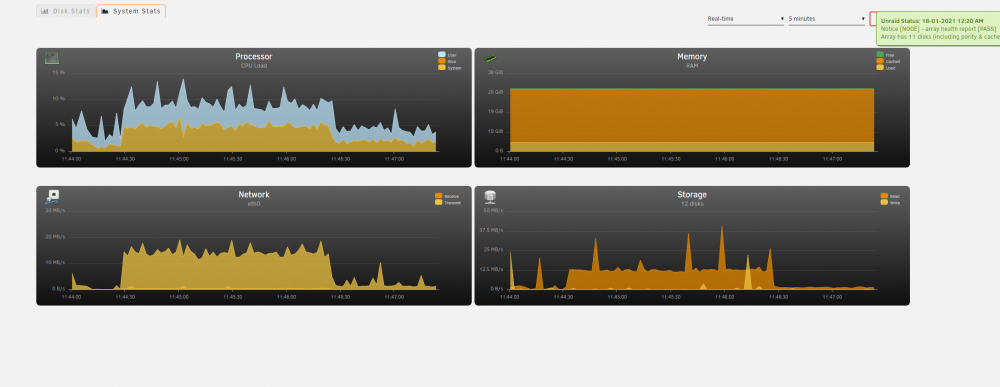
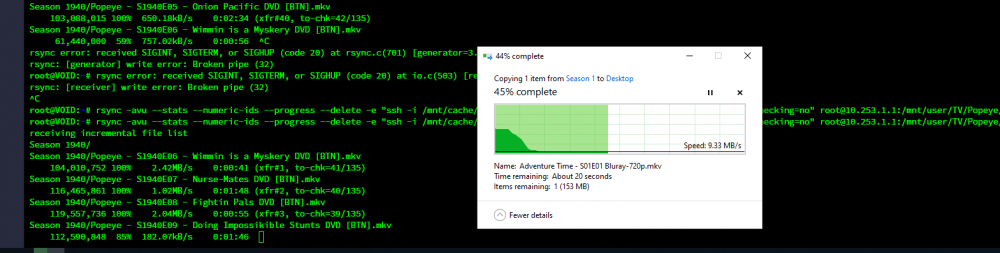
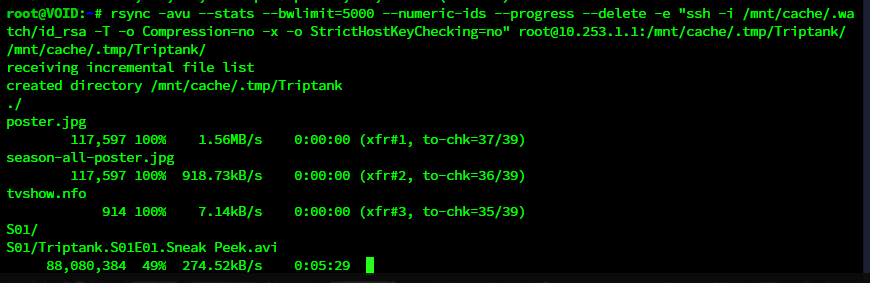
UPDATE 3/3/2021: I have definitively determined my performance issues are caused by WireGuard. I do not yet know if or when I'll find a solution. UPDATE 8/1/2022: This is still very much broken. I try a file transfer every couple of months and it continues to be horribly slow. Using RSYNC over SSH outside the Wireguard tunnel works great and is what I will continue to use until I can figure this sh*t out. FINAL UPDATE 11/24/2022: See my last post here for solution and TL;DR: Let me preface all of this by saying I'm not sure where my issue lies, so I'm going to layout what I know and hopefully get some ideas on where to look for my performance woes. The before times: Before setting up WireGuard I had SSH open to the world (with security and precautions in place) on my main server so that once a month my backup server could connect and push and pull content as defined in my backup script. This all worked splendidly for years and I always got my full speeds up to the bandwidth limit I set in my rsync parameters. Now: With the release of WireGuard for UnRAID I quickly shutdown my SSH port forward and setup WireGuard. I have one tunnel for my administrative devices and a second tunnel which serves as sever2server access between NODE and VOID. NODE is my main server, and runs 6.8.3 stable. It is located on a 100Mbps/100Mbps fiber line. UPDATE: As a last ditch effort I upgraded NODE to 6.9.0-RC2 as well, no change in the issue. VOID is my backup, runs 6.9.0-RC2 and lives in my home on a 400Mbps/20Mbps cable line. In this setup, my initial rsync session will go full speed for anywhere from 5-30 minutes, then suddenly and dramatically drop in speed, down to 10Mbps or less and stay there until I cancel the transfer. I can restart the transfer immediately and regain full speed for a time, but it always eventually falls again. Here is my rsync call: rsync -avu --stats --numeric-ids --progress --delete -e "ssh -i /mnt/cache/.watch/id_rsa -T -o Compression=no -x -o StrictHostKeyChecking=no" root@NODE:/mnt/user/TV/Popeye/ /mnt/user/TV/Popeye/ Here is a small sample of the rsync transfer log to illustrate the sudden and sharp drop in speed: Season 1938/Popeye - S1938E09 - Mutiny Ain't Nice DVD [BTN].mkv 112,422,538 100% 10.80MB/s 0:00:09 (xfr#24, to-chk=58/135) Season 1938/Popeye - S1938E10 - Goonland DVD [BTN].avi 72,034,304 100% 9.76MB/s 0:00:07 (xfr#25, to-chk=57/135) Season 1938/Popeye - S1938E11 - A Date to Skate DVD [BTN].mkv 138,619,127 100% 10.44MB/s 0:00:12 (xfr#26, to-chk=56/135) Season 1938/Popeye - S1938E12 - Cops Is Always Right DVD [BTN].mkv 127,109,972 100% 11.02MB/s 0:00:10 (xfr#27, to-chk=55/135) Season 1939/Popeye - S1939E01 - Customers Wanted DVD [BTN].mkv 114,673,044 100% 10.50MB/s 0:00:10 (xfr#28, to-chk=54/135) Season 1939/Popeye - S1939E02 - Aladdin and His Wonderful Lamp DVD [BTN].mkv 325,996,501 100% 11.69MB/s 0:00:26 (xfr#29, to-chk=53/135) Season 1939/Popeye - S1939E03 - Leave Well Enough Alone DVD [BTN].mkv 105,089,182 100% 11.30MB/s 0:00:08 (xfr#30, to-chk=52/135) Season 1939/Popeye - S1939E04 - Wotta Nitemare DVD [BTN].mkv 149,742,115 100% 754.78kB/s 0:03:13 (xfr#31, to-chk=51/135) Season 1939/Popeye - S1939E05 - Ghosks Is The Bunk DVD [BTN].mkv 114,536,257 100% 675.53kB/s 0:02:45 (xfr#32, to-chk=50/135) Season 1939/Popeye - S1939E06 - Hello, How Am I DVD [BTN].mkv 92,083,730 100% 700.03kB/s 0:02:08 (xfr#33, to-chk=49/135) Season 1939/Popeye - S1939E07 - It's The Natural Thing to Do DVD [BTN].mkv 110,484,799 100% 715.66kB/s 0:02:30 (xfr#34, to-chk=48/135) Season 1939/Popeye - S1939E08 - Never Sock a Baby DVD [BTN].mkv 97,660,132 100% 716.88kB/s 0:02:13 (xfr#35, to-chk=47/135) Season 1940/Popeye - S1940E01 - Shakespearian Spinach DVD [BTN].mkv 102,543,357 100% 632.64kB/s 0:02:38 (xfr#36, to-chk=46/135) Season 1940/Popeye - S1940E02 - Females is Fickle DVD [BTN].mkv 102,363,188 100% 674.34kB/s 0:02:28 (xfr#37, to-chk=45/135) Season 1940/Popeye - S1940E03 - Stealin' Ain't Honest DVD [BTN].mkv 100,702,236 100% 732.80kB/s 0:02:14 (xfr#38, to-chk=44/135) Season 1940/Popeye - S1940E04 - Me Feelins is Hurt DVD [BTN].mkv 111,018,052 100% 672.35kB/s 0:02:41 (xfr#39, to-chk=43/135) Season 1940/Popeye - S1940E05 - Onion Pacific DVD [BTN].mkv 103,088,015 100% 650.18kB/s 0:02:34 (xfr#40, to-chk=42/135) Season 1940/Popeye - S1940E06 - Wimmin is a Myskery DVD [BTN].mkv 61,440,000 59% 757.02kB/s 0:00:56 ^C rsync error: received SIGINT, SIGTERM, or SIGHUP (code 20) at rsync.c(701) [generator=3.2.3] and my accompanying stats page during the same transfer. You can see the sudden decline around 11:46 which coincides with my sudden drop in transfer speed above: I don't see anything telling in the system logs on either server when this speed drop happens. It almost seems like a buffer is filling up and not being emptied quick enough, causing the speed to tank. What I don't think it is: I don't think my issue is with WireGuard or my ISP speeds on either end. While the transfer is crawling along over SSH at sub-par speeds I can easily browse to NODE over WireGuard from my Windows or Mac computer and pick any file to copy over the tunnel and I can fully saturate the sending servers upload with no issues while SSH is choking in the background: Could it have something to do with the SSH changes that took place between 6.8.3 and 6.9.0? None of the changes I'm aware of sound like the culprit but I could be wrong. So besides that I'm pretty much out of ideas on what it could be without just playing with random ssh and rsync options. Let me know if there is some other info I can provide, below are both servers diagnostic files: node-diagnostics-20210204-0751.zip void-diagnostics-20210204-0752.zip EDIT: I just realized LimeTech has a guide about this published: https://unraid.net/blog/unraid-server-to-server-backups-with-rsync-and-wireguard I looked it over and I'm not really doing anything different except not passing -z (compression) to rsync and disabling compression for the SSH connection. a lot of what is transferred for me is video and doesn't compress well so why waste the CPU cycles on it.