





weirdcrap
Members
-
Joined
-
Last visited
Everything posted by weirdcrap
-
Single or dual parity? UnRAID should be smart enough to keep track of your drive locations without you having to do anything special with a single parity disk. Dual parity is something I'm not familiar with as I don't currently use it but it does make a difference. With that in mind you should probably get a copy of your diagnostics zip and take a screenshot of the main tab where all your drives and serial #s are displayed in the current order just in case.
-
Next gen seems to work well enough. Thanks binhex!
-
Just came here to see why the update broke the container and what the deal was with the spinning logo. Also not a fan of the animated logo. Thanks for the quick fix.
-
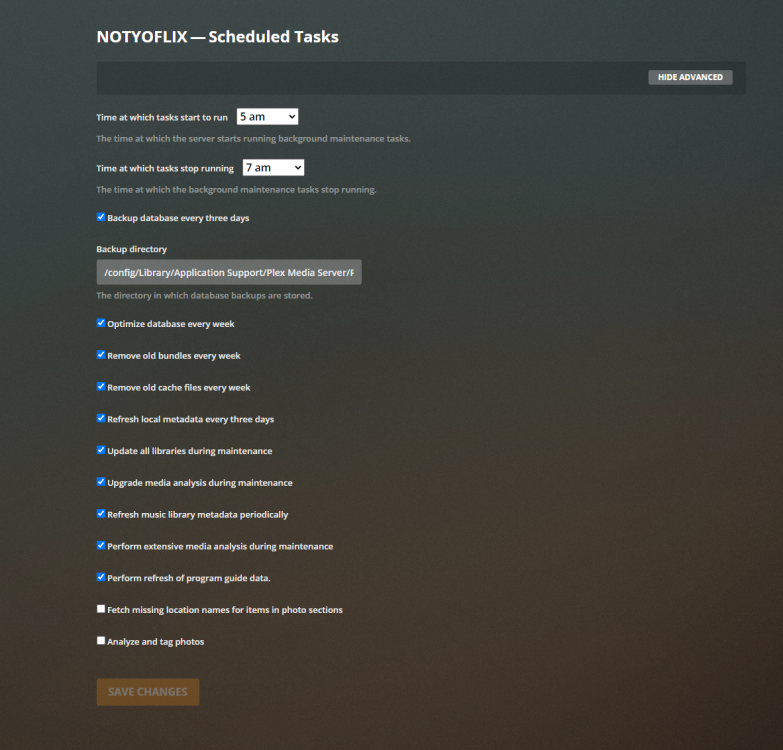
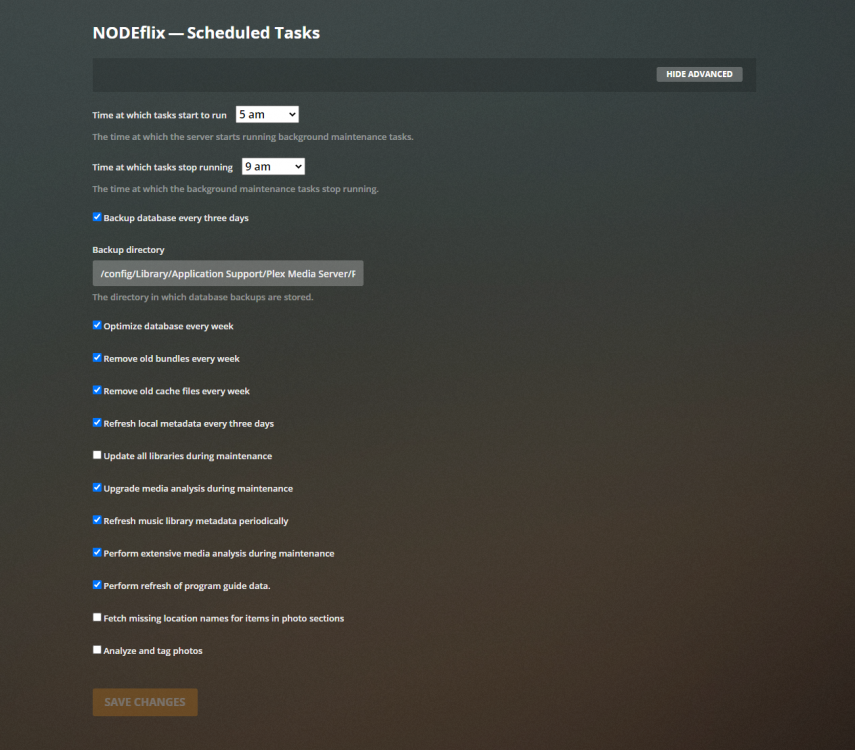
Is anyone else noticing that the plex docker is starting to get killed for Out of Memory errors during Plex's server maintenance window? This morning alone Plex has been OOM reaped dozens of times, sometimes as often as every minute!! https://pastebin.com/8BcJnQ5J This is happening across two different severs with different memory amounts and client loads (both use LSIO Plex docker). The errors begin within minutes of the maintenance window beginning and never appear after the maintenance window has closed. I do have hard RAM limits set in the docker's config, however they have never approached or hit this limit before in normal operation so I'm hesitant to increase the limit (they are in place to prevent runaway RAM consumption by dockers). NODEFlix has an 8GB RAM limit set for the PMS docker NOTYOFLIX has a 6GB RAM limit set for the PMS docker I haven't changed anything about either servers Plex settings or docker configurations recently. The only thing I can think of is Plex's new "Detect Intro" feature runs as a scheduled task so I have disabled it and will monitor to see if the errors return with that setting off. However I don't recall seeing this issue when that feature was introduced, this problem just appeared a few days ago... Attached are both server diagnostic zips. node-diagnostics-20200705-0545.zipvoid-diagnostics-20200705-0545.zip I've posted about my issues over on the Plex forums since this thread is to massive for anything to be seen or addressed. https://forums.plex.tv/t/server-maintenance-leads-to-excessive-resource-utilization/611012/
-
For me it is somewhat different. it is 100% reproducible with Chrome (currently version # 83.0.4103.116 (64-bit)) on Windows 10 v1909, the tunnel goes down and stays down. I just tried with Chrome on my Android (Pixel 3A XL w/ Android 10) over LTE and it also brought down the tunnel and did not restart it. The first set of stop/start is me on Windows 10 adding a test peer then logging in locally and re-enabling the tunnel. The second set was me logging in via my android and removing said peer, which also brought down the tunnel. Connected directly to the web interface via the LAN (not a VPN) I can make changes to the tunnel settings in Chrome on Windows 10 and the tunnel rolls without issue. The tunnel only stops and stays down when I'm managing Wireguard over a Wireguard connection. EDIT: Also happens in latest Firefox on Windows. EDIT2: I tried to manage wireguard over wireguard again this time using RDP Windows to Windows machine that I then use to access the unraid webui. Management over the RDP connection tunneled through WireGuard successfully brought the tunnel down and back up. So my problem seems to be any direct attempt to manage the wireguard server over a wireguard connection results in the tunnel going down and staying down. If I connect to another machine on the LAN over wireguard and use that machine to manage the wireguard server then it seems to go down and come back up gracefully.

-
Is Wireguard supposed to just stop the tunnel and leave it stopped when adding a new peer or making any changes at all really? I setup wireguard remote access to LAN for my phone and PC no problem super easy as advertised. I'm connected over wireguard managing unraid and I go to add a peer, hit apply and the unraid webui stops working because the tunnel has been stopped: Jun 25 09:41:05 Node wireguard: Tunnel WireGuard-wg0 stopped Jun 25 09:43:20 Node webGUI: Successful login user root from xxx.xxx.xxx.xxx Jun 25 09:43:24 Node wireguard: Tunnel WireGuard-wg0 started Thankfully I have other remote access methods to this server so I was able to go in and restart the tunnel but I don't see how this could be by design...shouldn't it be able to gracefully roll the connection? I'll make a new thread if this is unexpected behavior where troubleshooting can be done. EDIT: just got kicked again just trying to change the connection type for a peer that isn't even in use currently. It just stopped the tunnel and left it off... EDIT2: it sounds like depending on how peers are added active session interruption could be avoided: https://manpages.debian.org/unstable/wireguard-tools/wg.8.en.html#COMMANDS:~:text=syncconf EDIT3: I am just so utterly lost on how to make my main server talk to my backup server directly over wireguard. I currently have SSH and rsync running a monthly backup of my data, I would like to stop leaving SSH open to the net but I can't get server to server or remote access to server to work to save my life. I followed your "rough instructions" of setup server to server on one and import on the other but now i have a second tunnel I don't really want. Do I have to have a second tunnel for this to work? Can I not just add the server as a peer to my existing tunnel with my phone and home PC? I got server to server working, still not sure if a second port forward and tunnel was required or not but at least the Chinese will stop spamming my logs with SSH brute force attempts (Key based auth only so it is more aesthetic than a real security concern).
-
Yeah, I ran a second scrub after deleting the corrupted file and it reports no further errors: UUID: cc9f1614-fc5d-406a-8ee7-58a5651dc9ae Scrub started: Thu May 21 07:58:40 2020 Status: finished Duration: 0:02:48 Total to scrub: 75.17GiB Rate: 458.17MiB/s Error summary: no errors found Thanks for reminding me about not being able to repair without a pool, i forgot that was the case.
-
Ok cool so I don't necessarily need to do a scrub repair? Neat I'll just delete the file then. Thanks for the reassurance 😃
-
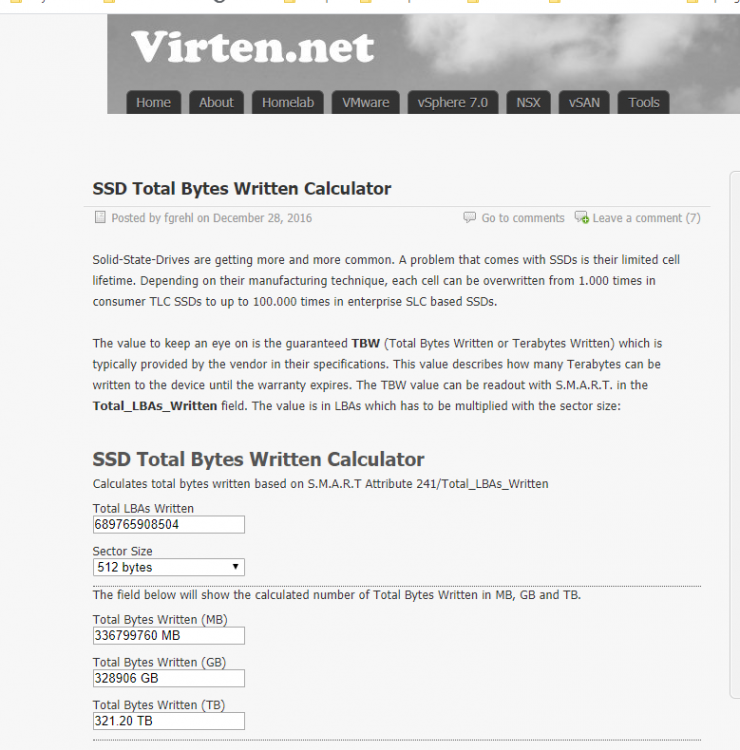
Unraid v6.8.3 void-diagnostics-20200521-0651.zip <--- diagnostics before any troubleshooting. I'm receiving the following error from my cache drive, it is always the same inode #: BTRFS warning (device sdg1): csum failed root 5 ino 156381873 off 143360 csum 0xf58f6015 expected csum 0xf58f6055 mirror 1 I ran a find on the inode # and it is an Emby poster: find /mnt/cache -inum 156381873 /mnt/cache/appdata/EmbyServer/data/collections/Toy Story Collection [boxset]/poster.jpg I just finished a scrub: May 21 07:08:25 VOID ool www[20615]: /usr/local/emhttp/plugins/dynamix/scripts/btrfs_scrub 'start' '/mnt/cache' '-r' May 21 07:10:32 VOID kernel: BTRFS warning (device sdg1): checksum error at logical 1627265449984 on dev /dev/sdg1, physical 57454903296, root 5, inode 156381873, offset 143360, length 4096, links 1 (path: appdata/EmbyServer/data/collections/Toy Story Collection [boxset]/poster.jpg) May 21 07:10:32 VOID kernel: BTRFS error (device sdg1): bdev /dev/sdg1 errs: wr 0, rd 0, flush 0, corrupt 2, gen 0 UUID: cc9f1614-fc5d-406a-8ee7-58a5651dc9ae Scrub started: Thu May 21 07:08:25 2020 Status: finished Duration: 0:03:08 Total to scrub: 75.15GiB Rate: 409.40MiB/s Error summary: csum=1 Corrected: 0 Uncorrectable: 0 Unverified: 0 Should I attempt to repair the corrupted block with BTRFS Scrub? Or should I just delete the affected file and let it be regenerated? I plan on running a memtest later to ensure it isn't bad RAM, though i think if it was bad RAM i would have more than just one bad file after this error going on for over a week. I appear to have at least one pending allocated sector a reserve block used according to SMART for the SSD: void-smart-20200521-0711.zip I wanted to check and see how much data I have written to this cache drive so I found a calculator, this seems wildly out of bounds for a 3 1/2 year old SSD, there is no way I have written 300TB through this drive. BTW, why aren't warnings like this picked up by FCP (Fix Common Problems)? It would be nice to have BTRFS errors reported (a notification generated) for those with cache devices.
-
This thread is massive and not great for receiving support in my experience. You're better off asking in the Plex forums.
-
I have been noticing this as well, I have been ignoring it with no consequences but am curious if there is a resolution... Edit: for about a week now I've also been noticing issues where randomly an item chosen from the ui will spin for up to 10 seconds before loading the poster and Metadata. Sometimes the chosen item will spin for 10-15 seconds before it even shows a percentage (and it doesn't show as playing in the Plex ui). There doesn't seem to be any consistency on what content or content type I try. I've already scanned libraries, emptied trash, cleaned bundles, and optimized my libraries. I see a few slow queries but they don't seem to correspond to when I experience these issues.
-
I am trying to troubleshoot a play back issue with files reporting their codec as "aac_lc" over on the Plex Forums. The Plex team member Movie.Fan is saying that he believes Plex isn't starting properly. Or possibly because Plex is dockerized he isn't seeing the normal startup procedure. Either way this has brought my troubleshooting efforts to a stand still as I don't have the knowledge necessary to explain the difference between docker plex vs non-docker plex and how they startup/shutdown. Any of the LinuxServer.io folks or any docker creator really want to take a stab at assisting me? Is there somewhere in UnRAID I can get the info he wants? It looks like most of the container startup is scripted and isn't very verbose in the docker logs... Relevant thread on plex forums: https://forums.plex.tv/t/error-transcoder-unknown-decoder-aac-lc/409225/ EDIT: Nevermind, apparently one of the new server or web player updates must have resolved my issue. All episodes play back fine now.
-
Winner! I do not, not sure when I lost it or maybe I forgot to ever set it up and I just never noticed until the new dashboard UI.
-
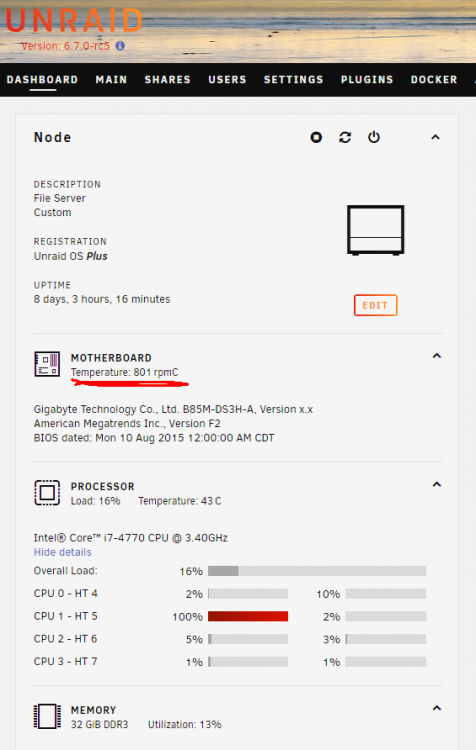
I am seeing what appears to be fan RPMs displayed under the motherboard temperature area. I am on the latest BIOS now (F3, this was taken before I updated) and still have the RPMs showing up in the temp area. Diagnostics: node-diagnostics-20190305-1449.zip Perl is installed and up to date. This does not happen on my server at home which is also on RC5 with the Dynamix system temp plugin but with a different motherboard.
-
This is being handled here as it is a plugin issue: As you can see in (underlined in red) on the current RC5--which is my first RC of this version--I am seeing what appears to be fan RPMs displayed under the motherboard temperature area. I am on the latest BIOS now (F3, this was taken before I updated) and still have the RPMs showing up in the temp area. This does not happen on my server at home which is also on RC5 but with a different motherboard.
-
Ok so I installed the plugin and even after spinning up all drives it detects one drive as spundown. I ran hdparm on each disk and one of the disks on the H200 is reporting a status of "Unknown". The offending disk is /dev/sdg and it is a Seagate NAS HDD. I have another one of the same disk model installed and it reported it's status fine (sdf). EDIT: weird after spinning SDG down and back up it is now detecting correctly. EDIT2: Spoke to soon, left it for a minute or so and now SDG is back to unknown. It seems to snap out of it once I start copying data. root@Node:/home/chris# hdparm -C /dev/sdh /dev/sdh: drive state is: active/idle root@Node:/home/chris# hdparm -C /dev/sde /dev/sde: drive state is: active/idle root@Node:/home/chris# hdparm -C /dev/sdj /dev/sdj: drive state is: active/idle root@Node:/home/chris# hdparm -C /dev/sdk /dev/sdk: drive state is: active/idle root@Node:/home/chris# hdparm -C /dev/sdl /dev/sdl: drive state is: active/idle root@Node:/home/chris# hdparm -C /dev/sdb /dev/sdb: drive state is: active/idle root@Node:/home/chris# hdparm -C /dev/sdf /dev/sdf: drive state is: active/idle root@Node:/home/chris# hdparm -C /dev/sdg /dev/sdg: drive state is: unknown root@Node:/home/chris# hdparm -C /dev/sdg /dev/sdg: drive state is: unknown root@Node:/home/chris# hdparm -C /dev/sdi /dev/sdi: drive state is: active/idle root@Node:/home/chris# hdparm -C /dev/sdd /dev/sdd: drive state is: active/idle
-
Sweet, I'll give it a try then thanks!
-
I was getting ready to try this out but it sounds like it may not work for me either (all my cards are Perc H200s). @Squid Is this a confirmed issue?
-
Just noticed this as well. Glad to know you are working on it. For now I have switched back to the main rutorrent interface.
-
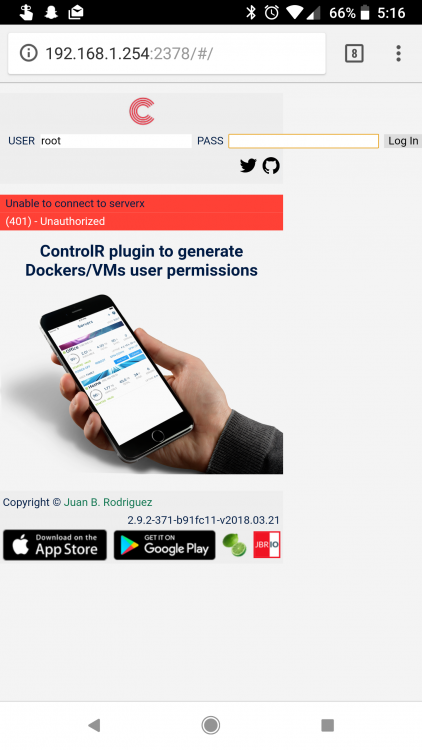
this fixed everything for me too! Edit: OK when I try to login to the plugin webui I get an error (see attached). App is connecting over http and the server is running on port 80 with https set to no instead of auto. Everything in the app on my phone works except for Docker and plugin viewing...which I assume I have to log into to get those working.
-
This and I am now seeing the below error in the syslog: Aug 16 16:10:44 Node sshd[12542]: rexec line 110: Deprecated option UsePrivilegeSeparation
-
Snip. Nevermind.
-
Maybe I am misunderstanding how I should be doing this but I assumed I would be using $DEVICE for my use case. Would what I have outlined below be possible with the scripting capabilities available in UD? Totally hypothetical example to illustrate what I am trying to accomplish: I have a flash drive (/dev/sdg let's say) and it has three partitions: sdg1, sdg2, and sdg3 all of which it needs to boot correctly and load the OS on it. I want to be able to simply give the image file a name (hardcoded in the script, or use the sdg1 part label, or w/e works). Then every time I plug the drive in the script beeps, removes the old image, takes an entirely new image (using DD or whatever you recommend) of /dev/sdg, and then beeps twice when it is finished. The resulting image is saved to my /mnt/user/Backups share. That would be the gist of how I want this to work. Ideally, it should be so basic that it would simply work for most drives and use cases, the only thing I would need to change would be the per-image labels if they were to be hard coded into the script.
-
Is it possible to take the example backup script and change it so that I get a full image of any disk I plug in that has the script enabled? I want to use it for backing up bootable USBs that may contain persistent data I want to archive. I haven't had any luck finding a ready made example I could use yet.
-
I actually have a 10 disk server built in an 804, it works great. I like that: -I can store the SSDs up in the front panel of the case -It has built in fan filters to help keep the insides dust free -It supports large after market CPU coolers like the Cryorig H7 -as someone who's old server is built in a massive Antec 1200 v3 with 20 drives in it that thing is massive, heavy, and unwieldy to carry, even with two people. This thing spreads the weight out throughout the case and is nice and compact. My one complaint is the second cage full of drives is right over the power supply and with a standard sized power supply I barely have enough clearance to get all the drives connected. I am in the market to find a "stout" power supply that will make it not quite so tight.



