Elmojo
Members
-
Joined
-
Last visited
Everything posted by Elmojo
-
There's another thread about part of this in General Support... -It would be great if we could freely arrange the modules on the Dashboard. Specifically, moving things (like the network graph or RAM usage) horizontally between columns. - Also, having the layout stay where it's put, rather than reverting randomly when the page is refreshed would be fantastic. - Perhaps a [Save Layout] / [Restore Layout] option could be integrated?
-
Yes please, this would be awesome. It's one of the features I use most on VMWare Desktop. Knowing I can futz around all I want and just roll back if things get wonky is great.
-
I would love this as well. It would save lots of time when setting up new VMs that are very similar to one another.
-
-
Oh man, I've been wishing for this ever since the first day I booted up! As customizable and configurable as unraid is, it's kinda odd that the main dashboard can't handle column shifts. lol Please add me to the "can we have this feature?" list.
-
No one? Not even a guess? *crickets*
-
That's the thing, I don't have it set to shut down. I selected the snapshot option, which should not be trying to shut down. Before I enabled the snapshot, I tested it the default way (shut down) and it worked fine. I just want it to use snapshots so that it won't take down my camera server while it's doing the backups. Yes, the VirtIO drives are installed. Yes, I read the help info, and my vdisk paths are specified as on cache, as noted in the help tip. The clip you included is from the actual log file. That's what I said is odd, since it doesn't show what the error actually is. Only the on-screen log shows the "internal error" that references the file system thing. I can't figure how or why the logs wouldn't reflect all the info, but here we are. lol
-
I wouldn't have a clue how to get to that share in terminal. I can do it through my regular windows explorer no problem, and I can get to it via MC by browsing to the disk it physically resides on, but beyond that I'm a bit lost, sorry. I looked at the logs, and it's weird. The actual log files show that there was an error, but not what it was specifically. I've attached them for your perusal. If I open the [show log] in the GUI, then it shows mostly the same info, except that I see the actual error I asked about. No idea why they would be different. Here's a clip of the relevant part of the on-screen log, showing the error and surrounding info... 2021-12-06 02:00:02 information: can_backup_vm flag is y. starting backup of BlueIris Server (W10) configuration, nvram, and vdisk(s). sending incremental file list BlueIris Server (W10).xml sent 6,671 bytes received 35 bytes 13,412.00 bytes/sec total size is 6,550 speedup is 0.98 2021-12-06 02:00:02 information: copy of BlueIris Server (W10).xml to /mnt/user/Backup/xVM Backups/BlueIris Server (W10)/20211206_0200_BlueIris Server (W10).xml complete. sending incremental file list 1f335446-855e-7049-961e-043582ac2630_VARS-pure-efi.fd sent 131,247 bytes received 35 bytes 262,564.00 bytes/sec total size is 131,072 speedup is 1.00 2021-12-06 02:00:02 information: copy of /etc/libvirt/qemu/nvram/1f335446-855e-7049-961e-043582ac2630_VARS-pure-efi.fd to /mnt/user/Backup/xVM Backups/BlueIris Server (W10)/20211206_0200_1f335446-855e-7049-961e-043582ac2630_VARS-pure-efi.fd complete. 2021-12-06 02:00:02 information: able to perform snapshot for disk /mnt/cache/domains/Windows 10/vdisk1.img on BlueIris Server (W10). use_snapshots is 1. vm_state is running. vdisk_type is raw 2021-12-06 02:00:02 information: qemu agent found. enabling quiesce on snapshot. error: internal error: missing storage backend for 'file' storage 2021-12-06 02:00:02 failure: snapshot command failed on vdisk1.snap for BlueIris Server (W10). 2021-12-06 02:00:02 failure: snapshot_fallback is 0. skipping backup for BlueIris Server (W10) to prevent data loss. no cleanup will be performed for this vm. 20211206_0200_unraid-vmbackup_error.log 20211206_0200_unraid-vmbackup.log
-
Thanks for the quick reply! I have a share on my array called "xVM Backups" It's at /mnt/user/Backup/xVM Backups/ Is that wrong?
-
I've set up to allow snapshots on my Win10 VM that's running my cameras. I think I've config'd per the instructions, but when the backup runs, the script fails, and the log shows the following error: "error: internal error: missing storage backend for 'file' storage" Any idea what I need to change? It works fine if I allow it to shut down the VM first, but I'd prefer to have it take a snapshot instead, if that will work.
-
Hi all, So I attempted to migrate my cache drive from a 128GB SSD to a 256GB SDD, because I was getting a little low on space. Long story short, it seems to have backfired. I tried following the best guide I could find, which seemed to be this video: All went fairly well, except that Mover took forever, and refused to move everything off my existing cache drive. It left about 60MB of junk. I finally gave up and decided to move it manually. I installed the new drive, did the steps of adding it as cache, formatting, etc... then moved the stray data back to the new cache drive. I then set the domain share to cache-prefer, and invoked Mover....nothing. I did it multiple times. It refuses to move anything. I finally gave up, plus given how long it took to move things off the old cache drive, I decided just to move the appdata via Mover, then use MC to manually move the domains and system folders myself. This approach appeared to work well, in terms of speed anyway. However, the domains folder has blown up from around 80GB before, to nearly 200GB now. I seem to recall reading something a while back that said due to compression or something related to the dynamic nature of the vdisk files, you can't really do what I just did. So how am I supposed to get my domains folder on the new cache drive without breaking things? I tried finding the official guide to replacing a cache drive in the unraid docs, but it appears to be MIA.
-
Does your VPN not require any username or password? It looks like you have pretty much the same issue as me. Look up several posts, and see what binhex suggested for me to fix, maybe it will apply to you as well?
-
Oh man, thanks so much! I finally understand how these mappings work, at least on the most basic level. I didn't have in my mind that it was working like an alias, where whatever the container was calling its "data" directory could physically be most anything you wanted, as long as you pointed to the right place. Your visual example cleared it right up! Now I have it working properly, and the VPN is up and running as well. The only things I have left on the 'to-do' list are to figure out how to migrate to Wireguard, and to make sure it successfully moves completed downloads to the right folder, since it wasn't doing that before. I'm hoping that sorting out these paths will have fixed that 2nd issue. Thanks again to you both for the patient help. Every day, I learn how much a have no clue what I'm doing with this unRAID box, but I love learning it. My next project is to tackle setting up Adguard, but that's a different beast entirely.... lol
-
Thanks man, I'm getting there! I have the port forwarding worked out, with the help of a FAQ from mullvad. My port is assigned and tests as open. I've plugged it into qBT, so that part should be done. As for the pathing thing, does it have to be /data/....? When I was using the non-VPN qBT, I had everything going to a share called "downloads". All my downloader-type apps dump into subfolders of that share. Does this version not support that option?
-
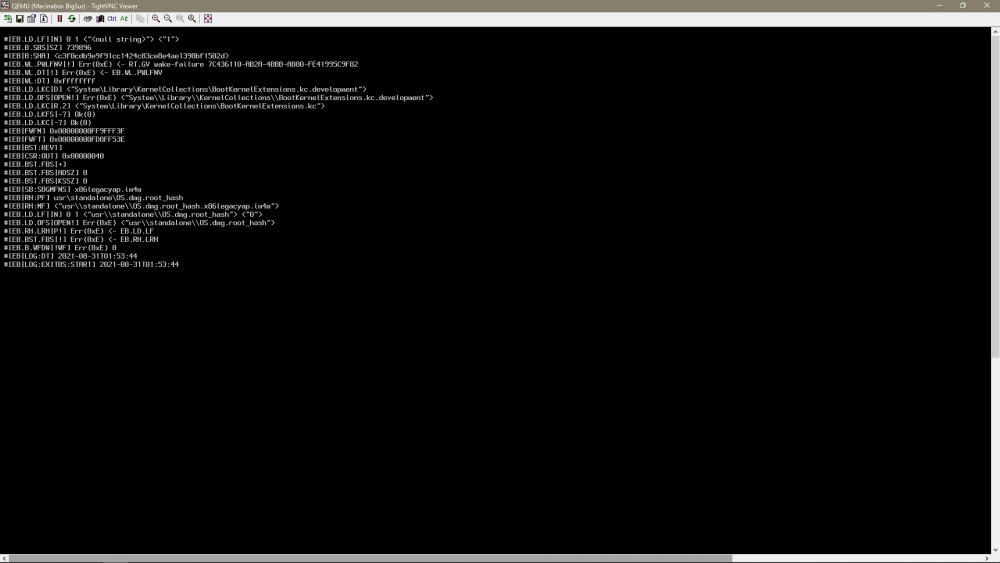
Okay, I've scanned and searched this thread, as well as other places here and there, and I'm really beginning to feel dumb. I'm just trying to setup this qBT docker with Mullvad, and I'm having extremely marginal success. After much reading and piecing together of data, I have the docker installed and running. I can access the webUI via chrome (won't work with FF for some reason?), and I think I have things mostly configured the way they were when I was using the non-VPN version of qBT. By the way, that setup was working fine, and was as fast as my connection allowed, but obviously wasn't safe. Now, however, when I add a torrent, it will parse and start, but it either downloads at a crawl (like in the bytes/sec range), or it'll error out or stall fairly quickly. I don't even know where to begin hunting down the issue. I found the video SIO made about deluge and VPN, but that one's rather old, and for different software, so I was having a hard time following it. Can anyone take pity on an unRAID newb and help me out here? Edit: So I'm seeing that the likely issue is port forwarding, but I can't find anything that spells out how to actually do it with Mullvad. I have a port created from my Mullvad account, I just don't know what to do with the info. I've read the binhex FAQs, and it basically just says "if you don't have PIA, figure it out yourself". lol Also, I'd really like to use Wireguard, if that's an option. I just couldn't find any info about how to set it up, so I figured I'd start with openVPN.So I found QDirStat as an option to browse the contents, and it works great. It's pretty similar to WinDirStat, which I've used for years on PCs. Anyway, the issue now is that some directories it can't scan, telling me I lack required permissions. Same thing when I try to delete certain folders, denied due to permissions. So... how do I log into QDirStat with the proper permission level to allow me to delete the stuff I want gone? I tried searching the docs for that app, but no joy. It mentions the need for permissions, but not how to get them.What does that command do? It doesn't wipe my cache drive or anything, does it? 😆Sorry for the delay, was having surgery yesterday. So I did the 'compute all', and it just shows more of the main folder structure/size overview, but now broken down by drive. It still doesn't show me any of the individual folders (or sizes) on any of those drives. I see that several shares are using the cache drive (which I knew), and that it has about 32GB free. What I need is some way to browse through the entire cache drive, and look at it folder by folder to determine which app or process is eating up all the space. I kinda suspect it's tdarr, since that was the last think I installed, but I can't confirm that, or find a way to purge those files.It will? I don't see where the cache drive is reflected on the shares tab, since I'm not "sharing" any of its contents specifically. At least I don't think I am. I should probably had said that I'm fairly new to this.Ok, cool....that kinda gets me there. Is there any way to see usage stats, (ie how much space is used by each subfolder), like you can do in a windows explorer browser? I'm trying to track down what's suddenly eating up my drive space.So I feel stupid for even asking this, but my searches have all come up empty. My dashboard is suddenly reporting that my cache is 75% full. I haven't been watching it super closely, but I think it's been running about 20-30% previously. I'd like to take a look to see what's on the cache, so I can figure out what might be clogging it up, but for the life of me I just can't find a simple way to view what's installed or residing on that drive. Someone please school me on the simple answer I know I'm overlooking.All I did was watch SIO's video, click through the docker settings as shown in the video, accept all the defaults, and click start. According to the instructions, that should be all that's required to get the basic image up and running. I didn't make any edits to any VM settings. I'm not sure what I could have done wrong, but anything's possible. Since this isn't really anything beyond a curiosity to me, I likely won't put much effort into it. Even if I had a running Mac VM, I don't really have any use for it.Hi all, Does anyone have any input on my issue? I'd like to get this working if possible. See my post from Aug 30, please.So I'm watching the video, trying to install Big Sur, but when I get to the part where I start the VM and launch the VNC remote, it opens the normal window, but after several seconds of "Connecting...", I get the error "Failed to connect to server". I'm sorta stuck, what do I do next? I'm on 6.10RC1, if that matters. EDIT: Update, I was able to get it to connect using TightVNC. However, I now see that the VM is only booting to some sort of console mode, and seems to be showing errors, although I can't make out what it's complaining about exactly. Anyone know what I should try next?