





FreeMan
Members
-
Joined
-
Last visited
Everything posted by FreeMan
-
Fantastic, thank you! Considering the purpose of the docker is to backup and restore files, it seems that setting this to read/write by default would make more sense. It would certainly reduce the panic level when one accidentally deletes large quantities of files...
-
That didn't seem to have fixed it. After reading the docs again, I thought that maybe this would do the trick: That left me with this start command which didn't work: It also left me with an orphaned docker image that I couldn't start or edit. After reinstalling the docker (thanks Squid!) and fixing the /storage mapping, I got this start command, which worked quite nicely: But... it's still mounting the storage location as 'ro'. How do I change that?


-
OK, time to put CP to the test and restore some stuff because user=id10t ... I'm getting an error that "One or more files failed to be restored because the mapping of the /storage volume is read-only." The message continues to state that I should re-create the container with the volume mapped with read/write permissions. I'm in a bit of panic mode, so I haven't fully read through the github linked page, but is this the "umask" setting in the docker config? It's currently set to 000, but it says that it's for "newly created files", so I'm a bit confused on that. I'll read through docs, but I'd be especially grateful for a quick & confirmed answer instead of my slow reading and not 100% sure answer. UPDATE: I've read through the docs, and it seems that I need to add a parameter called "Home:" and set it to "storage/rw" as follows. Is this correct?
-
It most certainly won't be exposed to the world on port 21! Thanks for trying out the id/password. It does seem to be functioning now, so I'll double check security before exposing it externally. Thanks!
-
Grrrr.... After setting my password to "a" and restarting the daemon, it let me connect! This is the password I was using: "40dvYYYhVa" Do you see anything in that that may have caused an issue? I have, of course, changed it already. Of course, if I couldn't log in with that, I wouldn't think anyone else would be able to either... weird. With a different password of similar length, I can now connect. I have no idea why...
-
I changed it to a short (way too short) password with only letters/numbers. I restarted proftpd. Still no dice... This is all I see in the log: The first 4 messages are from where I restarted it after changing the pwd, the last one from where it denied me entry. Have I managed to ban myself after too many failed attempts, so I'm just being rejected flat out?
-
I've got this installed on my backup server. I've created a user named "me" on the server and included "ftpuser /mnt/user/more/stuff" in the description. No matter what I do, I cannot connect to it from FileZilla running on my Win10 machine. Here is the response that I'm getting: I know that the passwords match - I've created one using KeyPass, then I copy/pastad into the User config on the server management page, and also into FileZilla - they're both copied from the same source location. Any recommendations?
-
Thanks for the clarification.
-
What's the difference between "Hash file mismatch" and "Hash file corruption"? I get notifications of both on a somewhat regular basis (they're .NFO files and 99.99% sure it's because Emby is constantly updating the NFOs). I've never had an issue with either Emby or Kodi complaining about the NFO files, so I'm pretty sure it's not an actual problem with them, just changes. Also, since all I ever get is reports on NFO changes, is it possible to exclude a particular file type?
-
And... a reboot fixed it.
-
Where did that voice come from??!?!!???
-
Grrr... nothing (that I can think of) has changed since I installed unRAID and installed other dockers & plugins. I'll have to futz with it. thx
-
Is this manifest as a "502 Bad Gateway" error when trying to install a plugin? That's what I've been getting for the past 3 days or so trying to install @docgyver's SSH Config Tool.
-
Confirmed in my routers "attached devices" page - only 1 device trying to use this IP. Any other thoughts?
-
I'm quite certain they are no IP clashes, but I'll double check when I'm home. I'm pretty sure I pinged it by name and got the correct IP back, but I'll confirm. I've got a port forward from 22222 to 22 on 1.9 so I can access it from outside, but that should be the only thing on the router. Again, I'll confirm. Thanks for continuing to look... Sent from Tapatalk
-
It looks to be the same error. This is a fresh install that's still on a trial license. The only thing I can think of that would come close to interfering with 443 would be the proFTPd plug in, but that shouldn't have anything to do with it at all (it's on port 22). I've got several Dynamix plug in, and I'm running the duckDNS docker to update my dynamic dns and that's about it. I can upload a full diagnostic when I get home this evening, or you can check out the one I attached to a new issue I posted in General Support last evening (roughly 23:00 UTC) nothing has changed set up wise since then. Sent from Tapatalk
-
Thanks! As you can tell, I'm not 100% up to speed on all this, but I'm learning... Sent from Tapatalk
-
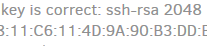
I don't see anything in any of those files that looks remotely like the key I'm being presented with. That key is a bunch of hex pairs like this. Any additional thoughts?
-
I know there have been reports of this not giving consistent speeds. I thought I'd this this in as an example. I recently built a backup server to go off site, but it's still sitting at my house right next to my primary server. Here's the speed test notification I just got. They're both plugged into the same switch going through the same router and the same modem. This is the most extreme difference I've seen. Sometimes they're quite close in speed. Sent from Tapatalk
-
By highlighting the text, of course, I was able to read it all and duplicate the settings from my primary server to my new backup server. In trying to connect to the FTP server on my backup server from the Duplicati docker running on my primary server, Duplicati is asking me to confirm the SSH-RSA2048 key. Where do I go to find the key to confirm it's the right one? I can't imagine it's not, but it's always good to be 100% certain, plus it'll be handy for future reference.
-
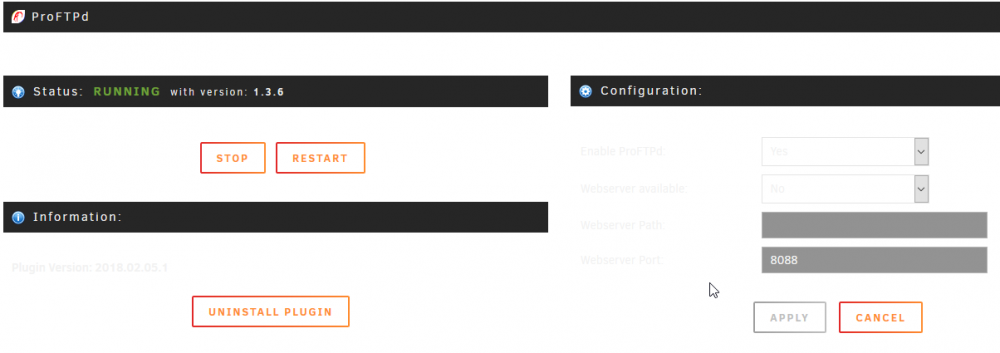
I just updated to unRAID 6.6.0 and the proFTPd settings page is a bit unreadable. I don't know if it's on your end, @SlrG or if it's something to do with @bonienl's excellent new WebGUI, but they're not playing nice together:
-
I set up 2 new subdomains at duckdns and manually set the IPs to 127.0.0.1 for testing. I installed the docker on my backup machine, gave it 10 minutes and nothing changed (even after a logout/login at duckdns). I restarted the docker and it updated the IP immediately. I set it back to 127.0.0.1, waited 5 minutes and it updated to the correct IP again. Installed it on my primary server, did the same IP test and it updated correctly the first time. Now I just need to advertise the new domain to everyone who's accessing my server and away I go. no more changeip.com or their Homing Beacon app running on my Win10 machine. Thanks to LSIO for another great docker.
-
@jbrodriguez here are the results of the debug session on my android phone. Sent from Tapatalk
-
I think I may not have been that clear on this point. When I access the server from my browser I simply have "backup/main" in the address bar. However, I'm not able to access it by name from the ControlR app. I can only access it by IP address. Additionally, the "Automatic" add doesn't detect the server any way I've configured it. I've tried: Port: 80 Username: x Password: *** Secure: (off) and Port: 443 Username: x Password: *** Secure: (on) Both settings end up taking me to the detail screen for my primary server (which was already added to the app) after a couple of seconds. Returning to the servers listing shows only the primary server. Attempting a manual add, the IP Address/Hostname field is pre-filled with what I believe is an IPV6 address followed by "%wlan0". I'm not using IPV6 on my network yet, so I'm not entirely certain what that all represents. I've configured the manual add screen as follows: IP/Host: 192.168.1.9 Port: 80 Username: x Password: *** Server Name: Backup Secure: (off) When I use this, it connects immediately and gives me details about the server but no logs. When I attempt to use this: IP/Host: 192.168.1.9 Port: 443 Username: x Password: *** Server Name: Backup Secure: (on) It doesn't connect to the server at all and again takes me directly to the detail screen for my primary server (as noted above). If I try manually adding with these settings: IP/Host: Backup Port: 443 Username: x Password: *** Server Name: <blank> Secure: (on) I get a red error message under the IP field "Please enter a valid IP address / Hostname" and that's as far as I can go.
-
1) Nothing of interest (personally) in the log file, so it's attached (from server: Backup) 2) On the Backup server, I am running 6.5.3. I just received the 6.6 update notice, but I won't do that yet (unless you think it'll help) so we've got a consistent platform to test against. 3) I have both my main and backup servers added on port 80. I've not tried reconfiguring the main server for https yet. It hasn't had log access for several months, though it did at one point. I'm not sure what particular build of the app or plugin caused it to stop. 4) I have these plugins installed: preclear disks & associated statistics CA, CA-Auto Update, CA-Autostart docker manager Dynamix-File Integrity, Stop Shell, System Buttons, System Info Fix Common Problems Nerd Tools with only Python 2.7, tmux & utempter installed (the last 2 for preclear disk) Speedtest command line tool 5) I have the Disk Speed docker installed 6) I access the server by hostname Note all those apply to my backup server which is brand new, still running on a trial license with no data on it yet (unless otherwise specified). I'm going to go ahead and update my main server to 6.6. I'll test out ControlR to see if I can attach via 443 after that's done, just for kicks. Hope I covered all the questions. Thanks for a great product and fantastic support! controlr.log


