






Everything posted by MAM59
-
One educated guess of me would be that at start time of sshd (VERY early in the boot sequence) there is no V6 interface loaded and ready already. You may try with adding "/etc/rc.d/rc.sshd restart" to your go file (maybe with a "sleep 30" ahead?) and see if it works. Here it works without tricks. but then, maybe because I have a static V6 address? I don't know. root@F:~# ss -tulpn | grep ssh tcp LISTEN 0 128 192.168.0.4:22 0.0.0.0:* users:(("sshd",pid=2240,fd=8)) tcp LISTEN 0 128 192.168.4.4:22 0.0.0.0:* users:(("sshd",pid=2240,fd=6)) tcp LISTEN 0 128 [2001:470:XXXX:1::4]:22 [::]:* users:(("sshd",pid=2240,fd=7))
-
Ich wußte ja gar nicht, von welchem wir hier reden (stand ja eingangs nirgends). Und meine Mobos haben alle verschiedenfarbige LEDs für die einzelnen Komponenten. Aber klar, bei den billigen Dingern wird an allen Ecken und Enden gespart, da sollte man froh sein, wenn es überhaupt eine Anzeige gibt. Und Intel Kram ist eh nicht mein Ding... Ja, wenn alle LEDs gleich sind, was macht Dich so sicher, dass wir hier von "CPU" reden?
-
War ja nur ne Idee (und schadet nicht) 😁
-
Also Leute... vergesst doch erstmal alles, was mit Video Ausgang zu tun hat. Solange da die rote LED brennt, konnte die CPU nicht initialisiert werden. Folgerichtig passiert dann GAR NIX MEHR! Das ist der Zeitpunkt, wo versucht wird, einen passenden Microcode in die CPU zu laden. Und wenn das nicht geht (weil kein kompatibler Code vorhanden ist, oder irgendeine Stromleitung fehlt, oder ein Pin der CPU keinen Kontakt hat), dann ist hier ENDE GELÄNDE. (und nach der roten kommt die gelbe fürs RAM und am Ende ne grüne oder weisse. Erst DANN wird das Bios gestartet und der Bildschirm könnte hell werden)
-
Es gibt auch noch ne ganz triviale Möglichkeit: "BIOS zu alt, bzw. CPU zu neu". Ggf musst Du erst die neueste Bios Version flashen, damit die CPU erkannt und in Betrieb genommen werden kann. Wohl dem, der ein MoBo mit eigener Flash Funktion (ohne CPU) hat. Ansonsten musst Du erstmal ne alte CPU besorgen, einbauen, damit booten, BIOS updaten und dann wieder ausbauen, neue rein... sehr lästig.
-
vermute: "Kein CPU Lüfter". Das mögen manche Bios Versionen so überhaupt nicht... Schliess wenigstens n Dummy an, damit ein Tachosignal anliegt.
-
Also diese "Q-Flash" Funktionen einiger Mobos sind recht simpel: Du lädst ein BIOS auf einen (FAT) USB Stick Du steckst den Stick in ein BESTIMMTES USB Port auf dem Mobo Du schaltest den Strom ein (und drückst dabei den Q-Flash Knopf) Das Mobo braucht dazu weder eine CPU, noch RAM (es ist sogar besser, nichts davon drin zu haben, 2 Fehlerquellen weniger). Allerdings "sieht" man davon recht wenig. Manchmal gibt es irgendwo LEDs die den Vorgang und das Ende desselben signalisieren. Damit kann man auch zerschossene BIOSe "wiederbeleben". (Hab ich bislang aber noch nie benutzt, ich bin eher dafür, Updates "sichtbar" durchzuführen. Aber die Funktion brauchst Du, wenn Du ein "altes" Mobo kaufst und eine "neue" CPU einbauen willst, die bislang noch nicht unterstützt wurde)
-
Na ja, der erste Thread dazu ist schon Jahre her, aber unlängst hatte ich nochmal einen Refresh gemacht unter https://forums.unraid.net/topic/190870-amazon-basic-ups-geht-doch-mit-unraid/#comment-1559044 Danach haben sich einige gemeldet, bei denen der Tipp auch funktioniert hat. Das "Problem" mit Sticks ist allerdings, dass sie keine eigene Stromversorgung haben, somit also keine 5V Kollision auftreten kann. Insofern trifft der Tipp nicht auf Sticks zu. Ich meine nur "probieren schadet nix", man könnte es mal einfach machen und gucken, was passiert. Schlechter werden kann es dadurch auf jeden Fall nicht. (Die USV hat nun auch schon 2 Monate durchgehalten, früher unmöglich) Ja, sowas in der Art war das (genau weis ichs nicht mehr, das war noch zu 5.x Zeiten, danach hatte ich aufgegeben und erst mit 7.0 wieder probiert (die Ausfälle waren ohne Hub weiterhin quasi sofort wieder vorhanden)). (Addon: diese "Spikes", "Notabschaltung" oder wie immer man es nennen will, ist kein "Fehler" der Hardware. Es ist eine Lücke im USB Protokoll. Man hat schlichtweg vergessen zu regeln, wer "Vorfahrt" hat und somit kann jeder Hersteller sich eine eigene Implementation ausdenken. Im Normalfalle gibt es dadurch keine Probleme. Aber es gibt wohl genug Stress mit bestimmter Hardware, so dass die Raspberry Foundation sich entschlossen hat, eine Gegenmaßnahme zu entwickeln. Kann sein, dass neue Raspis demnächst den Schutz gleich mit onboard implementiert haben. Such mal da nach ner Doku, die haben sich recht ausführlich darüber ausgelassen)
-
Der Hintergrund ist eigentlich, dass man kleinere Sticks kaum noch kaufen konnte. Klar ist 32Gb "overdressed", aber wenn es nix mehr anderes gibt? Und 32Gb ist das Limit für FAT. Es geht nun aber auch exFAT, so dass man auch grössere Sticks verwenden kann. Wenn Du also so ein 16gb Dingen in der Ecke rumfliegen hast: NUR ZU! (selbst 8 ist schon zuviel)
-
Der Kernel STEHT, ist BLOCKIERT. Da geht nix mehr! Verstehen tue ich es ja auch nicht, aber offensichtlich ist "Schreiben auf den USB Stick" der Auslöser für die Blockade. Der Kernel selber kennt kein Multitasking. Der ist (muss er zwangsläufig sein) eine single Thread Schleife, die den sogenannten "Scheduler" abarbeitet. Und wenn aus irgendeinem Grund diese Schleife blockiert, ist Ende Gelände. Aber so tief wird der Absturz nicht sein, man kann ja zumindest noch an der Konsole die Screens wechseln und laufende Sessions sind bedienbar. BIS sie irgendeinen Zugriff aufs Dateisystem machen, dann werden sie schlafen gelegt und nie wieder geweckt. ("Deadlock") Ist zwar nun schon ein paarmal passiert, aber bislang nicht reproduzierbar. Deshalb hab ich noch nie was gesagt. Aber wenn nun einer mit denselben Phänomenen vorbeikommt, dann wird die Sache interessant...
-
Die hängende GUI ist doch nur ein Symptom. Die Ursache liegt irgendwo in einer Blockade des USB Sticks. Wenn schon auch SSH Sessions nicht mehr gehen, ist das wohl ein Problem des Kernels und/oder des Dateisystems.
-
Ja, aber Du hast mich "Misstverstanden" :-) (bzw ich habe Details ausgelassen) Ich komme gar nicht mehr zum Reboot. Nach dem Einspielen des Updates per GUI drückt man auf "fertig". Normalerweise kommt dann die normale GUI (und blendet oben "du musst aber rebooten!") ein. Soweit kommt man nicht, der Bildschirm bleibt weiss und der Pausenfüller dreht endlos seine Runden. Auch SSH usw gehen dann nicht mehr. Laufende SSH Sitzungen gibt es zwar noch, aber egal, welchen Befehl man aufruft, die Kiste hängt. Nur die Resettaste belebt die Kiste dann wieder. Es ist also garantiert kein Stromproblem. (Nach dem Reset geht es brav weiter. Das Update ist erfolgreich geschrieben worden, keine Dateien sind beschädigt usw....) Hab nun schon eine KVM Platine eingebaut, damit ich nicht immer runterrennen muss und die Power und Resettaste remote drücken kann...
-
Also ich setze auch einen "Transcent JetFlash 32Gb" (USB3 Stick, aber in USB2 Port) ein. Seit 7.0 hatte ich nun schon mehrfach Probleme. Meist nach Updates weigert sich UNRAID neu zu booten, einmal kam sogar die böse Seite in der GUI : "Kommunikation zum Stick unterbrochen, ich konnte die Lizenz nicht prüfen". Nach einem Reboot (meist eben mit anschließendem Parity Check) gings dann wieder. Ich hatte das anfangs damit abgetan, dass ich eventuell bei Baumassnahmen das Rack (auf Rollen) zu heftig verschoben hatte und dadurch der Stick einen Wackelkontakt im Port bekam. Hab dann den Stick oben aufs Gehäuse geklebt und mit einem 1m USB Kabel an ein hinteres Port angeschlossen. So steht er nicht mehr vor. Aber die letzten beiden Male passierte es trotzdem und eindeutig "ohne Fremdeinwirkung"... Gibt mir auch ein mulmiges Gefühl :-( (PS: mehrfache Überprüfungen des Sticks a la @DataCollector ergaben gar nichts, der Stick ist völlig ok. Scheint mir mal wieder (siehe USV Probleme) der USB Treiber von UNRAID/Linux zu sein...)
-
But this might be accidentally again too... Try to reboot now and let us see what happens...
-
yeah, I said its only a guess. But it may be a combination of both. The spikes were there all the time but the 7.x driver was the first to activate the protection mechanism of the ports.
-
I think this could be a hardware problem. Spend ~20$ and buy a "Raspberry-Pi-USB-Hub" (you will need a power supply too). This will cut off the stick's power from the motherboard and feed it by itself. There MAY BE some spikes coming back from somewhere that kick the "overpower" feature of your MoBo's USB port. Then this port will be shut off until the next reset (of this port, not of the computer). That forces you to do "port hopping" all the time. (But then it is just a GUESS, cheap enough to try it out. The hub already cured some problems with selfpowered devices, but even a non-powered device like a stick can produce problems if the cables are long enough and there are some electrical machines working nearby)
-
No way to tell, I just says that it is this way. Thats why I usually make a big circle around this Linux stuff (the other disadvantage is that every distribution has its own idea WHERE a file should be and WHAT it does). and stay with OSs like Free BSD or so. Here the file locations have not changed within 40 yrs and the included man pages really show what is working and how. UNRAIDs limit have not much to do because it runs in RAM (can other too), it is just "where did it get it base commands from". I still dont understand your reference and example. Looking for "monday" is faily simple to be done in every cron I know: the last "* is day of the week. Put a "1" here and you are fixed to mondays (in every locale). Ok, 1st monday of a month... this can be a bit tricky. I would be lazy and start a script every monday. At the beginning, I would then build up the environment (cronjobs run under their own and often very limited enviroment), and check if the day of week is <7. If not, exit script, done. They tell you to do the check within the crontab already, this is a bad idea as I have pointed out. Very hard to debug which variables are available and which are not. Better start an own script, grab everything you need and then check. Especially "PATH" is not normal under cron, so take care which programs you are calling or set your own PATH.
-
people sadly often forget, that UNRAID (and other Linux-based-distributions) are not "the real thing". I mean, they come with all the standard commands like ls, cron, ntp and so on. But they often ship "crippled" versions. So you cannot simply take a manual from somewhere and expect it to work everywhere. (btw: I don't know if this is true for THIS cron, but there are so many limited commands, I would not be surprised). And the Test string here was not very simple (took me some minutes to guess what it should do, still do not know if it makes sense at all). "crippeled" maybe a bit harsch, often commands work "different" and support not all options from the other versions but sometimes even add a specific option. This is because Linux is just a kernel and everything around it comes from different sources and different developers. Does not mean that it is bad, just lower your expectations...
-
ok, but a NAS with only ~2Tb ? sounds.... hmmm (let me say it this way: "mine is 100Tb larger..." 😃)
-
if you really just want the backup feature, I would also take a look at a rasperry PI with an external USB Disc (removable) attached. Just install SAMBA, create a share and let the clients write to the external thing. (I use some water-proof, password protected, crypted, drives by sandisk for instance. The data security is handled within the device already)
-
There is nothing bad about the idea, as long as the offered capacity is enough for you. Create an RAIDZ Pool, add a share and you are done. My note was just a warning about giving away some benefits without need.
-
be careful! Usually ONE of those two slots is limited to 1 lane only. This means, if you set up a mirror pool, speed will be limited to that slow slot. You may get only SATA speed anymore then. (some others are limited to "just for wifi" on the 2nd slot. take this warning seriously too) So, before you buy, read the specs CAREFULLY!
-
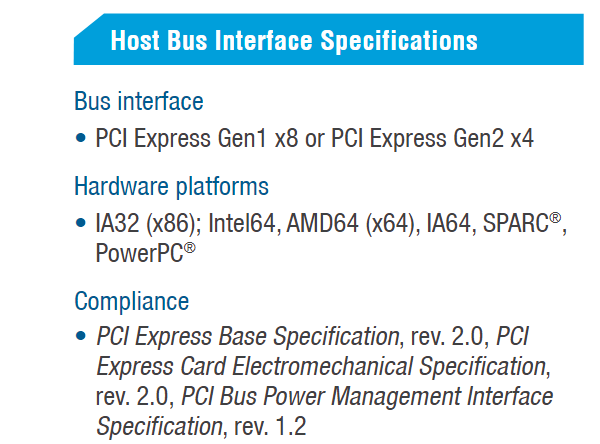
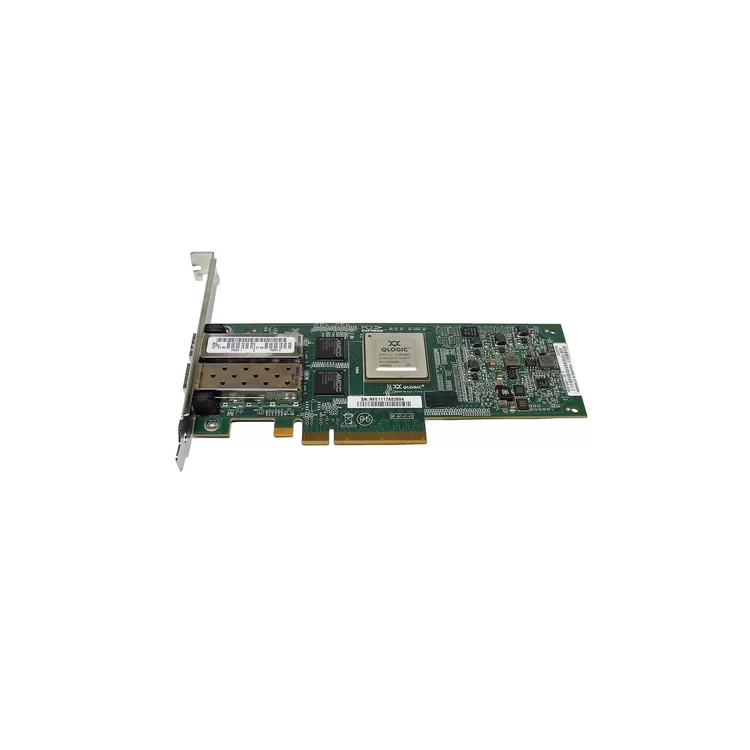
There are two versions of this card: If he has got the Gen1 x8 one I see very little hope to get it to run in modern MoBos which usually offer 4x slots now. And, the card has no extra room for an NVMe like the log implies. But maybe turning the ghost off helps. he should try and report.
-
easy to find: [ 38.920720] qla2xxx [0000:01:00.2]-00fb:41: QLogic QLE8152 - QLogic PCI-Express Dual Channel 10GbE CNA. [ 38.920819] qla2xxx [0000:01:00.2]-00fc:41: ISP8001: PCIe (5.0GT/s x8) @ 0000:01:00.2 hdma+ host#=41 fw=5.04.01 (48d4). [ 38.921075] qla2xxx [0000:01:00.3]-001d: : Found an ISP8001 irq 19 iobase 0x0000000098f2e96b. [ 38.943388] qla2xxx [0000:01:00.3]-ffff:42: FC4 priority set to NVMe It has found the NIC, it sees that it demands an 8x Slot, you have none. Instead you have a NVMe that occupies that lanes that go to the 4x slot (read the Manual for your Motherboard CAREFULLY! and look for footmarks!!!). The Mobo switches to the NVMe and turns off the NIC so either rearrange your slots if possible, get rid of that NVMe or get Hardware that offers enough lanes to run all the devices (hard to find currently, most of the boards are "overequipped", cheap but marketing effective)
-
I would rather look a the software. Throw out "plex" and use something else instead. My Kodi never missed a file so far...



