






Everything posted by MAM59
-
BTRFS is said to produce trouble, USB connected drives are said to produce trouble. Together they may give double-trouble... keep this in mind. Note that there is also an "OpenZFS" version for windows in the development. It is usable already and it can mount UNRAID zfs disks (at least single ones) for now. So a ZFS formatted drive can also be used on Windows directly now.
-
You mean, it DOES work, but not instantly? (my english is limited, not too complicated sentences pls)
-
have you tried CTRL-F5 ? (forcing a page request, sometimes the browser's cache is stuck)
-
Hmm, what should this be good for? With your setup the normal way would be to put both cards into ONE bridge (br0). So packets from your windows PC can be forwarded to devices on the other card without any routing tricks. Also both cards would share ONE IP address. I do not understand what you think you might get from your setup? (shutdown, delete network.config and network.rules from the stick. reboot, add eth1 to br0 and you are done)
-
as you can see from your logs, eth0 keeps on trying to establish a 10G link, why? And, for sure, with 5G "cripple net" you need to run it with flow control turned on, else you will notice a lot of lost packets (slowdowns). But the other side also needs to honor flow control, check it out. it looks like you have a 10GbE connection on eth0 ???? Maybe a bad and not complying cable is the issue of your problems. Get a REAL (not a "raw cable" labeled!!!) CAT 8.1 on with less than 10m Length. This should work for a while. maybe for longer. Everthing below or longer (yeah I know, the marketing tells you "up to 30m". They are lying as usual) is a high risk. btw, i cannot find boot infos in your diagnostics... maybe i am blind or you never rebooted before you took the diagnostics???
-
Note that not all 10G SFP+ modules with RJ45 are capable of running 2,5G or 5G too. Look into the specs of the things you have bought! (older ones only know about 10G because the other speeds were not invented then. They also use the 10G protocol, but "with pauses" (5G has 2 Pauses within one cycle, 2,5G has even 3). so watch out what you are ordering! There are no "converters", there are native modules that can (or cannot) run those speeds.
-
Never trust a hyped AI...
-
in the app page you can find realtek drivers. look out for your special chipset (812 is too short, should be 4 numbers) Cannot find any details, so look into your logs for the used chip (or post diagnostics here).
-
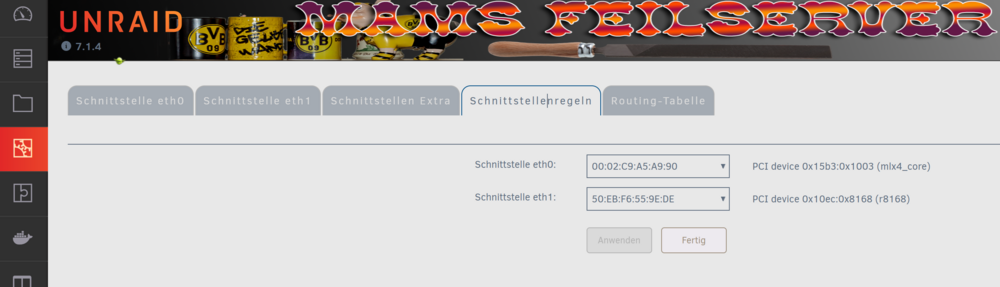
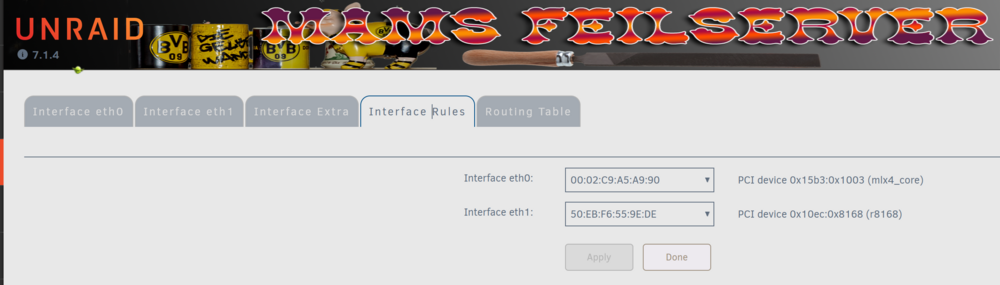
You man need more than one active card to make the tab appear... bzw
-
This is a major error! You should never use a "static" address within an existing DHCP range. The DHCP Server may give the address to somebody else and if UNRAID comes up, it tests and notices that it is already in use. UNRAID may therefore give up and end with no network Lower the range in your router, reboot everything and it should work. the correct way to do is is to let all the cards "live" in BIOS, go to UNRAID's networking settings and edit "network rules". Here you can define which card (MAC address) is "eth0" and so on. This setting will be applied on every reboot (your BIOS maybe reset after an update and the cards may become active again then) no Be aware that not many 2.5Gbe cards are available in UNRAID. For some of them you need to load an extra driver. (Some are recognized but do not work correctly) Check this out.
-
I found this in you diagnostics: Jul 22 10:47:41 CSNas kernel: system 00:03: [mem 0xfeda0000-0xfeda0fff] has been reserved Jul 22 10:47:41 CSNas kernel: system 00:03: [mem 0xfeda1000-0xfeda1fff] has been reserved Jul 22 10:47:41 CSNas kernel: system 00:03: [mem 0xfed20000-0xfed7ffff] could not be reserved Jul 22 10:47:41 CSNas kernel: system 00:03: [mem 0xfed90000-0xfed93fff] could not be reserved Jul 22 10:47:41 CSNas kernel: system 00:03: [mem 0xfed45000-0xfed8ffff] could not be reserved Jul 22 10:47:41 CSNas kernel: system 00:03: [mem 0xfee00000-0xfeefffff] could not be reserved Jul 22 10:47:41 CSNas kernel: system 00:04: [io 0x2000-0x20fe] has been reserved But I dont know if it is important, I am no INTEL Guy, so I am not used what is "normal" during that boot phase. My AMD Boxes can reserve all the blocks they are asking for, so maybe some Intel Specialist can clear this up?
-
hmm, but this pattern implies that there are addressing problems for (at least) the video ram, or the gpu is seriously broken... strange.
-
your screenshot lets me think of a serious memory problem... Did you already run memtest?
-
Das wird hier etwas off-topic. Deshalb nur kurz & knapp: das wäre MEINE Anspruch/Erwartung. Jeder kann selber definieren, was er gerne davon hätte. Ich bin ein alter Computer-Dino, ich habe noch nie "externe Anbieter" verwendet (die gab es damals allesamt noch gar nicht), hier läuft alles zuhause und in Eigenregie. Meine "personal-EDV" hat in den letzten 40 Jahren schon so manchen Hype gesehen, nicht mitgemacht und trotzdem überlebt. Und ja, UNRAID ist einer davon, aber mit wenigen definierten Aufgaben. Und inzwischen ist der Cloud Kram ja auch wohl wieder vorbei und man moved zurück "on-premise"... (gut, dass ich gar nicht ausgewandert bin, spar ich mir den Rückweg). Ich mache Dinge eben nicht, weil sie "in" sind, sondern weil ich einen praktischen Nutzen für mich und meine Benutzer darin sehe.
-
Nein, hat sich nichts geändert. Es geht halt nur um die Erwartungen. Die Speed im LAN ist "sehr bescheiden" (über Internet fällt das so nicht auf) Ich hätte z.B. den Anspruch, Bilder von meiner Kamera(*) von unterwegs automatisch hochzuladen, dann lokal zuhause mit Photoshop zu bearbeiten. Dabei gibts dann bei jedem Bild "permission denied", weil NC eben die Dateien mit "falschen" (bzw. "anderen") Benutzer / Berechtigungen anlegt, und sie so über SMB nicht beschreibbar sind. Also: ÄNDERN. Dann bearbeiten, dann WIEDER ÄNDERN (sonst ist NC traurig). Am Ende gibts dann immer ne Kopie der Datei, weil das einfach zu lästig ist. Und das ist eben nicht der Sinn einer Cloud. (*) Kamera mit WLAN, nicht vom Händi. Du willst behaupten, Du könntes die NC Datenplatte als Share freigeben und stressfrei damit arbeiten? Sag mir bitte WIE???
-
Was schlägst Du vor? Ich bin da offen für Empfehlungen
-
Na ja, dann brauch ich ja kein UNRAID dafür... Der "besondere Charme" so einer Installation wäre ja, NC von extern zu verwenden, aber intern die data dir per (SMB) Share freizugeben und auf den lokalen Computern direkt einzubinden, statt über lahmes webdav zu schnecken. Die Akzeptanz der User (und des Admins) war hier halt nicht da, wofür hat man ein 10Gbe LAN bei den Clients, wenn der Transfer im Schneckentempo erfolgt? Für die üblichen Anwendungen "Händifotos automatisch ablegen" ist NC ja ok, aber dann will man die Fotos auch lokal weiterverarbeiten. Und dabei klemmt es dann an allen Ecken und Kanten. Aber gut, muß jeder selber wissen, wie leidensfähig er ist.
-
Nein, hast Du nicht. Die VM würde ja weiterhin die Dateien im UNRAID Array ablegen, damit bleiben die Berechtigungsprobleme erhalten. (Du kannst natürlich nur in der VM speichern, aber dann wäre das Vergnügen schnell beendet)
-
Du kannst Dir natürlich selber einen Docker machen und dabei darauf achten, dass Nextclouds www-data und Unraids nobody denselben ID haben. Hat bislang aber noch niemand gemacht, soweit ich weis. (ach ja, der User alleine reicht nicht, auch die Gruppe muss stimmen, da Nextcloud andere Berechtigungen für die Gruppen verwendet, als Unraid. Das "klemmt" dann aber erst, wenn verschiedene User von Nextcloud versuchen, sich gegenseitig Schreibberechtigung für einige persönliche Dateien geben wollen) Was geht, ist Nextcloud auf ein unassigned Device von Unraid zu installieren, und keinen Share dafür einzurichten. Aber das ist ja meist NICHT das, was man will... Also, ich hab so ziemlich alle Konfigurationen durchprobiert, keine davon war irgendwie befriedigend. Da ich hauptsächtlich nur die Kalender/Termine zwischen ein paar Geräten synchronisiert haben wollte, hab ich am Ende NextCloud ganz rausgeschmissen und durch das harmlose Baikal ersetzt (das kann nur Kalender/Termine). Würde ich nochmal NextCloud haben wollen, würd ich dafür einen extra Server (mit FreeBSD oder so) nehmen, mit einem RAID-Z, einen LAMP Stack draufpacken und Nextcloud von Hand dazugeben. Hatte ich ein paar Jahre lang stabil laufen, aber irgendwann werden dann die Platten zu klein usw. Da kam ich auf die böse Unraid Idee... Griff ins Klo...
-
Gar nicht. Nextcloud und UNRAID passen nicht so recht zueinander. Bislang trifft es Dich nur bei Crontab, aber dasselbe Problem tritt bei ALLEN Userdateien auf, die Nextcloud anlegt. Sobald UNRAID einmal "die Berechtigungen aufräumt" (kann man manuell anstossen, wird aber bei bestimmten Problemen im Dateisystem auch automatisch gestartet), sind die Dateien für Nextcloud nicht mehr beschreibbar. Es gibt keinen Docker, der Nextcloud wirklich auf UNRAID stabil laufen lässt. (Du kannst natürlich dann hingehen, und jedesmal von Hand die Berechtigungen wieder für Nextcloud Zugriff zurückbiegen, aber das wird mit der Zeit recht häufig und recht langweilig...)
-
The usual way would be to remake it on windows with the unraid flash tool (playing back your backup that you have surely made before or downloaded from unraid.net). If this works, nothing is really lost. (before, copy the /config folder of the stick to your windows box, a 2nd "backup")
-
Yeah, S@$§! happens (often) :-( But as Jorge said: post new diagnostics WITH that drive. If it is out the array now, make it a pool device and fill it up a bit.
-
Sometimes it is enough to push the stick a bit or move the computer a bit too fast / hard. USB loses connection, the stick is considered to be dead. If you are lucky this is just a false news. Reboot and all will be fine again. If no luck, the stick is really dead, you may try to rebuild it in a different computer, or, at worst, you need a new stick and transfer the backup and license. But first, hope for the best and reboot. If it does come up again, your chances are good! (BTW: if the port is locked by hardware failures (for instance due to maximum current exceeded) its not enough to just reboot. Power down completely, shut off the box, wait a few seconds and then turn it back on again)
-
More likely its a problem with the browser's cache, hit CTRL-F5 to clear it. (it happens often after an update of UNRAID, your browser thinks the old session is still active and does not reload certain details of the UI)
-
I'm afraid, you cannot prevent the pool to spin up on boot time. This is, because UNRAID needs to check out, if all configured drives are available and in working condition. You can set spin down time for every disk seperately (go to the "start" page, click on a single drive and set the time for something else but "standard" (all standard-setted drives use the central spin down time, here you can override it for a single drive)) But less than 15min is not available, and also not really usefull too. Spinup/down wears out the drives too. Some "Enterprise" type drives even hate it and break ealier. Also the spinup/down feature is implemented by a cron job which runs every 15mins or so. Starting it more often will produce more stress and consume more energy. Keep in mind that a real RAID(Z?) pool needs to be treated as a single drive. It makes no sense for individual settings because in every read or write action all drives are involved (in UNRAID arrays only the actually used data drive and maybe the parity drive(s) are involved. Other members can keep on sleeping) So I think, in your situation the setting is useless (but of course you can still set other drives to standard setting and all array drives to 15mins)


