






Everything posted by MAM59
-
unlikely that he is able to pull diagnostics it looks like your *.bz files do not match! The OS complains about missing libraries, no way to start user mode. download ALL bz files (including the crc files) for your version and put them onto the stick. (Or, in case you wanna downgrade, go to the "previous" folder and copy all the files to the top level, then reboot)
-
REDIS ist eine Datenbank im RAM! Da gibt es keinen Pfad und auch keine Daten zu sichern. Nach einem Neustart sind immer alle Daten weg. Ist auch nicht so schlimm, ReDis wird meist nur für Caches verwendet.
-
Na ja, heutige Boards haben aber meist 2 oder gar 3 "richtige" M.2 Slots auf dem Mobo. Dort könnte man natürlich dann diese ASM1166 Dinger reinpacken und so auf 12 oder 18 Ports kommen mit relativ wenig Verlust (*). Natürlich ist dann keine NVMe Festplatte als Cache mehr möglich, es sei denn, man steckt sie in den 16x Slot... (oder man hat noch einen 4x Slot) Für diese Spielereien ist INTEL nun wirklich die schlechte Wahl. Da hat AMD mehr auf der Pfanne. (*) wenn die Kühlkörper der Boards entfernbar oder nicht vorhanden sind. Ansonsten kriegt man wohl kaum die SATA Kabel da hin... (ich hab in so einem Fall schon mal zur Eisensäge gegriffen)
-
Lucky you! You still have hair to pull :-) 🤣 But I agree, the "spin down" idea does not seem to be the culprit... Sorry, I am out here then...
-
not really odd. Disks take a different time to spin up, maybe you have caught a really slow one? Also, it makes a great difference if you spin them up one after the other or all at the same time. (You can control this by setting up "spin up groups", all drives within a group will be waked up at the same time. drives outside the group only wake up if they are accessed.)
-
Nextcloud ist eine empfindliche Blume... Als "eierlegende Wollmilchsau" fährt es sehr oft gegen irgendeine Wand und bleibt hängen. Man muss unbedingt bedenken, dass NextClound und UNRAID nicht zusammenpassen, zumindest, wenn man die Nextcloud Daten in einen Unraid Pool oder Array ablegen will. Und sie auf ein "undefined Device" zu packen macht nun auch nicht wirklich glücklich. Egal welcher Docker / welche Version, Nextcloud wird Ärger bereiten irgendwann...
-
Usually this effect happens if disks (some) have been spun down. The wakeup on access takes a lot of time (20-40s depending on the drive), some programs are impatient and give up waiting telling you that they cannot access that folder. Try to disable Disk Powerdown and see if your Problem vanishes. (also get rid of "powertop" if you use it, it does no good job on 7.x)
-
I guess not. UNRAID is totally "dead" in this situation. Only the power/reset button brings it back to life. (thats why I have not complained about it yet, you get nothing to show anybody...) Also writing MORE to the already weak stick greatly raises the chance to kill it completely.
-
the thing he sees is: * he does the update over LAN with a browser * every step is shown normally * at the end he presses the done button to close the update window * normally the dashboard will come up again and allow him to reboot properly * but in this case just an empty window (top and side menus still visible, but the middle is just white and empty) is shown and no clicks work anymore. ssh also does not function anymore then. The monitor will show just the last messages, no errors, no warnings (and of course: no go anymore too)
-
Yeah I had this too once or twice recently with the 7x version. In my case I have moved the USB Stick accidentally. (moved the whole rack, obviously something has been bended or so) The update still was written but afterwards nothing could be read anymore (strange but can be reproduced) Solution is to pull out the Stick, place it back in correctly and reboot. Mystically the updates were done (but of course, you will be fined by the automatic parity check afterwards)
-
nein, kann man nicht. Ich hab den Fehler mit dem falschen Tastaturlayout schon seit 2 Jahren bei LT gemeldet, es interessiert offensichtlich niemanden dort 😞 (PS: "slim" kenn ich auch nicht, er meint aber wohl die lokale GUI Konsole. Also Tastatur und Monitor anschliessen, dann UNRAID in den GUI Modus booten und sich vor Ort anmelden) PPS: ich meine mich dunkel erinnern zu können (seit ich das Problem kenne sind meine Passwört seeeehr überschaubar und simpel geworden), das es doch einen Trick gibt: * GUI Konsole starten * ALT-CTRL-F2 (oder 3,4 oder 5 drücken). Dann schaltet er wieder um auf eine normale Textkonsole * NUN GEHT DIE DEUTSCHE Tastatur!!! * allerdings hilft das ersmal nicht weiter um auf die GUI zu kommen... deshalb: * Per Shell Passwort ändern oder löschen * abmelden * ALT-CTRL-F(weis nicht mehr welche, alle durchprobieren, irgendwann schaltet er wieder um auf die GUI Konsole) * anmelden mit neuem Passwort * LAUT FLUCHEN!!! Alternative: * Stick entnehmen und in einen Windoof Rechner stecken * in der Datei /config/shadow den root Eintrag ändern root@F:/boot/config# cat shadow root:$6$Q9NuyANLIwDrof8z$X23PbGvpbfO3w2LxjBCU/oXL/IYVKs10Q7p2l6jOGqw.7O7Od/efnv0tFW5h9Q3W//PDkb.ICNUOMeoqczR.:18943:0:99999:7::: * vom ersten "$" zeichen bis vor den nächsten ":" alles löschen (vorher Kopie der Datei anlegen!) also sieht es dann so aus: root@F:/boot/config# cat shadow root::18943:0:99999:7::: (da sind noch einige Zeilen mehr, DIE NICHT ANFASSEN!!!) * Speichern, Stick wieder in UNRAID und booten... * User "root", Passwort "" (NIX, LEER, nur RETURN drücken) * später entweder die Originaldatei zurückkopieren oder besser gleich ein "verträgliches" Passwort neu setzen
-
Are you sure you are talking about "unbalanceD" ? there was an "unbalance" before (without the "D" at the end), this was not compatible with recent UNRAID versions and has been dropped. The replacement was called "unbalanced", there was no automatic update, you have to deinstall the old one and then get the new one.
-
a "laptop" hdd once focussed on "saving battery power". It runs slower as a normal drive and also shut itself off every few seconds of idle time. This can drive you crazy in a server environment. But, of course, if you think you can stand it, you can dare to use it. But don't expect a race horse then...
-
oh, sorry @Uleepera, then I will switch to the other version. Get your hands on "Tips&Tweaks", its very useful too. Tnx for your work. @Squid: cannot find the version you are talking off. Or is it too still limited to <7.00 UNRAID and therefore not shown in CA ? Found it after removed the "incompatible" flag in CA, but it is not limited to <7. Hmm...
-
Bin nur Semiprofi 🙂😁 Also das mit den Kabeln ist ein wenig blöd, obwohl, die Zeit arbeitet für die (Neu)Kunden... Früher gab es schnöde CAT5e Kabel (bis 1G) mit den dazugehörigen Steckern. Dann gab es zwar schnell bessere CAT6/7/8 Kabel, aber jahrelang keine adäquaten Stecker. D.h Du hast zwar theroritisch ein 10G Kabel, aber durch den unsauberen, nicht korrekt geschirmten, Stecker ging Dir das verloren. Diese Dinger hießen "Rohkabel" und der Einsatz war eine Wundertüte. Seit etwa 2-3 Jahren gibt es nun die korrekten Stecker. Aber die Lager sind leider immer noch voll mit dem alten Schrott. Was man also kauft, ist Glücksache. Wenn man die alten Kabel in eine 10G Buchse steckt, dann wackeln sie etwas (vor und zurückziehen). Das deutet auf ein böses Rohkabel hin. Die richtigen Stecker sind etwas länger (wir reden hier nur von 0,1mm etwa!!!) und sitzen bombenfest nach dem Einrasten. Das kann man so als Eselsbrücke nehmen. Oft steht auch gleich in der Produktbeschreibung "Rohkabel" / "Rawcable". Dann gleich die Finger weg! Ich hab irgendwann mal aufgegeben, "Amazon Basics - mit schwarz/weissem Nylongeflecht ummantelt" hatten sich als korrekt erwiesen. Also hab ich ALLE alten Kabel weggeschmissen und so 100 Stück davon gekauft. Waren gar nicht mal sooo teuer. Hatte vorher so etwa 20 Hersteller/Lieferanten durchprobiert. (Mag sein, dass es noch viele andere gute gibt, ich bin halt bei Amazon hängengeblieben, nachdem sie alle Tests bestanden hatten) Bei 2,5G und 5G soll der Anspruch ans Kabel ja nicht so hoch sein, hier ist aber 10G die geringste Geschwindigkeit 😉
-
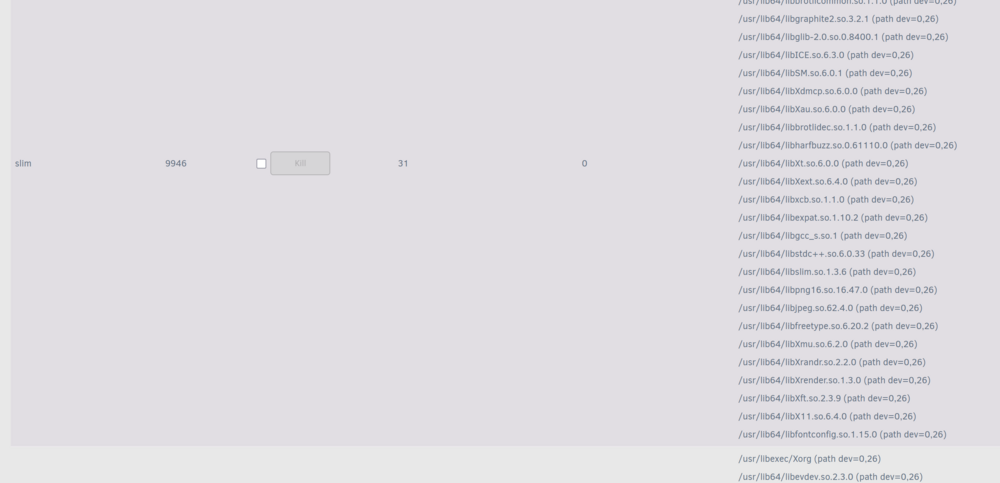
Success 😁 ( I was expecting this. I guess besides the version check there are not many changes yet ? 🙂 ) speaking of changes.... I like to ask for a wish if you are the new genie 🤪 Look: This is just a very small extract from the very long list (VERY LONG!) that open files produces. This might be relevant for some developers, but it is total overkill to normal users. I would like to see a checkmark to hide some kind of files (like "everything with /usr/lib64" or so). This would greatly shorten the list and much easier find the "really" open files for the users. I also thought about an expanding list if you click on the processname, but this does not help much I am afraidl. The most relevant process "smbd" contains hundreds of libs before it shows the first open user files. So better hide a list of directories.
-
Neither am I 🙂 I would guess, there is an installation blocker in the install script that checks the unraid version. Must be right at the beginning, the refuse is instantly. I had the old "open files" installed, it worked even on 7.1.2 But now that I have deinstalled it to test yours, I cannot get it back anymore... (ok, I could use the backup, but that has no style in this case)
-
it refuses to install on >6.99 Is this intended or a bug?
-
4 days of power on? Thats not really much. Not even "burned in" yet 🙂 But then, if you are able to swap, then swap.
-
is this samsung disc your cache SSD? It looks like it died and keeps unraid from starting. Plug it off completly and see if rebooting works again.
-
if you have aknowledged the error count correctly, the warning will go away and show green light again. It will be raised again if the error count goes up again which shows that there is a persistant cabling problem. (or you turn it off as @SlackMaster says, but I would not recommend this. Better fix it. Even if the "error" mostly shows that "something went wrong" but has no actual impact on the data, the needed retransmissions eat up time and slow down the whole system) BTW: it is more or less "natural" that a disk has these kinds of error. It happens accidentally if you unplug or move the cables. The annoying thing is that the drives stores these events, though "mostly harmless" permanently and nags you with them if you set up a new system.
-
turn it on and wait for the next crash to happen. Without it, all messages are gone after the reboot you did.
-
diagnostics? (hopefully syslog "save to usb" was turned on before)
-
I did not invest much time, waited for ages. but this thread looked "alike" so I dared to ask. I know its harmless and I can ignore it. I just thought you would say somethink like "OF COURSE! just hit... and... and..." 🙂 Obviously this is not the case, so we can forget it again for the next 20yrs 🙂 The system temp plugin shows nct6755 whereas sensors tells me about nct6798-isa-0290. Which, once again, is very puzzling to me again... But temps and fan speeds are shown (just the pwm management does not work from the fan plugin, but its also not needed, bios does a good job). So there is nothing to complain or fix, just this strange message...
-
Hmm, sure about the no-go, have to check user scripts... No user script does even come close to kernel modules here, only "cleanup syslog" and other cleanup tasks. But then it must have been several kernels already, the message first appeared ages ago already I think on UNRAID 6.x. I will try the plugin... root@F:/boot/config# modprobe nct6687 modprobe: ERROR: could not insert 'nct6687': No such device so far, so good (the errormessage changed 🙂 ) What next? I wanna get rid of them completely



