






MAM59
Members
-
Joined
-
Last visited
Everything posted by MAM59
-
I would guess this is the relevant part: Mar 21 16:05:06 SAN01 kernel: ixgbe 0000:04:00.0: 2.000 Gb/s available PCIe bandwidth, limited by 2.5 GT/s PCIe x1 link at 0000:00:1c.3 (capable of 32.000 Gb/s with 5.0 GT/s PCIe x8 link) You have put the Intel 10G card into a slot with single PCIe 2.0 lane. She needs at least 4 lanes PCIe 3,0 (or even 8 lanes? the line is not really clear about this) Fact is, the card is running in a mode "slow as a dog", it can never transfer 10G this way. I guess under heavy load it just gives up and shuts off. (Note that not all slots on your MoBo that MAY LOOK like beeing "large" also are electrically connected too. Look into your manual to see in which slot this card needs to be placed)
-
Sorry to have to correct you, I just tried it out, it worked! * stop the array * go to the array tab * unassign all array drives (set drive to "no disk") * set # drives to "none" (it will only appear if you have unassigned all drives before) * start the array (no array anymore)
-
Clear the Browser's Cache (Usually CTRL+F5) that should fix it. It often happens after a reboot of UNRAID, but it is totally harmless too.
-
Other method: stop array - set all members to "no disk" - set # array drives to "none" - start array (yeah, sounds silly, but you always need to start the non existant array...)
-
Sorry, can't help you. All this VPN and Firewall stuff is too much error prone to even allow an educated guess.
-
Your setup is very dangerous and risky. This is because you rely on services that are needed at boot time, but dockers and vms are started last in UNRAID. So it is quite a lot hanging, waiting, timeout until UNRAID comes up completely. The result is more or less unpredictable. It may take an hour or more until all services have been launched and come to a stable condition after a lot of retries. Even worse, these services will be turned off again if you dare to stop the UNRAID array later on! Good that at least the PI Hole is not on UNRAID, but putting the default Gateway/Firewall there is a really big mistake (I assume the PIHole uses this one too, so it does not help to be on its own device) I understand what you are trying to accomplish with this setup, but sadly, it will never be stable on UNRAID. Think of getting another box and move those essential things away from UNRAID. (BTW: you did not supply diagnostics, but I guess you forgot to set the hook "allow host access to dockers". Thats why the pings are blocked. Could also be a wrong/missing firewall rule for the docker's network)
-
Ja, das ist nun mal bei FritzBoxen so... Die interessiert nicht wirklich die IP Adresse, die gehen nach der MAC Adresse. Und die sind bei Dir nunmal gleich. Du musst den NPM nicht auf einer Fake Adresse laufen lassen, sondern im "Host Modus" (also mit der IP von UNRAID). Vorher musst Du dazu aber die UNRAID GUI auf andere Ports verschieben, so dass 80 und 443 für NPM frei werden (sonst keine Letsencrypt Zertifikate). Alternativ geht auch den Docker mit MACvLAN zu betreiben und ihm eine eigene MAC zuzuweisen. Aber da gab es früher Stress mit, deshalb bleib ich lieber bei der sauberen Host Methode.
-
Depends on where the data directory is located. If on an UNRAID share/array then YES 😞 You see, NXC's and UNRAID's file permissions don't go together. There is a big risk that they may be damaged by some common tool and then you get problems on either side. An UNRAID backup tool cannot read NXC data (that's why AIO comes with its own backup, but for me it makes no real sense to keep data doubled on the same machine). Or you run UNRAID's "Fix Docker Safe Permissions" tool that will allow access for UNRAID but prevent AIO even from starting anymore. As long as you do not tamper with any of them, AIO works ok... But for me its a too high risk to be cut off from data or cloud if accidentally (maybe one day an app like "fix common problems" will reset permissions without asking?) some tool can kill it with the click of a button or via cron. You have to decide yourself if you are willing to take such a risk.
-
sadly no. at least not on UNRAID.
-
yeah I would say "this usb stick is burned". Use a fresh one for a new trial period.
-
try to swap the cards. X550 sounds much better for a server... That TP Link has a realtek 8125 chipset, I'm not sure, but I have seen a lot of driver problems here in this forum. Maybe you should search and read them? Warning for the Intel card in Unraid: I faintly remember it will only offer 1G and 10G speeds (you will notice it if you connect and get only 1G LAN). This is perfectly correct, as I said before already: 2,5G does not exist! But I also remember there is a special driver for it in the Apps section (or somewhere, search the forum) that will allow it to operate at 2,5 or 5G speeds too.
-
dunno... but at least this screenshot does not look right. You WANT FC but the card does not grant it... danger ahead! Port 1 looks ok... I guess this is your PC?
-
no no. all fine. Flow control is ON. Just dont turn it off. But as I said, all other devices need to support and honor it too. This is because "2,5G does not exist". It is an "illegal" speed, it uses 10G encodings and speed. Just it introduces "10G with pauses", from 4 different windows it only uses one (to allow recovery for the cable and to allow cheaper and lower quality chips to be sold). Flow control is needed to tell the partner which one is to look at and which three need to be ignored. (simply spoken, the real encoding stuff is heavily complicated, you would not sleep well anymore if you try to understand it). So without flow control, they talk but many packets are lost and need to be repeated. This seriously drops the throughput rate. But your 400mbs? naah, flow control problems would go down to 50-60Mbs... Why is your CPU "glowing" (100% usage) on some cores? Does not sound very good too...
-
Yeah, does not look very good. Should be like "G" instead of "M"... make sure all your attached devices (computers / switches and so on) have turned on "flow control" and are capable of handling it correctly else I am running out on ideas. Sorry
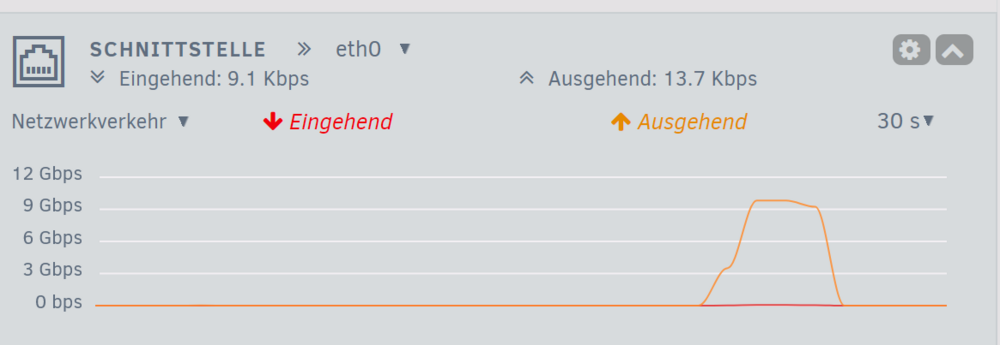
-
for speed tests use a single ssd with an "exclusive mode" share (no array, no cache) This will bypass all the UNRAID filesystem layers and go directly to the drive. create a pool with ONE ssd, create (and share) a share on this ssd. This will automatically generate "exclusive mode" for this share.
-
Here zfs maybe the better option. "They" say btrfs is a bit of unstable, but I do not have bad experiences with it. But btrfs may disappear from Unraid sooner or later, so I would not put a new disk on in anymore. Anyway zfs as a cache pool is ok.
-
This was the usual reaction of the club members that tried it out. If you search the forum, you will find dozens of sad people that tried "hybrid" and finally gave up. XFS in the UNRAID array, ZFS only in seperate pools.
-
Yeah, that was the plan they have dreamed off... but then reality stroke... The article should be deleted fast, its a pure wish (the "hybrid" part of it) and totally outdated. If you like to try it out: you have been warned. If you move back someday: welcome to the club! (the club fastly grew big after release of the feature!)
-
Stay cool. The idea is to update the master container (once an update is available), then start the gui for it (need to logon to "normal" nextcloud and enter admin settings, there is a button to start it) and finally THERE you will find the option to update the slave containers... (Yeah if this sounds complicated, you have understood it). AIO is a p@*n in the @ss and should be elmimimated as soon as you can. (BTW, the option to update will only be available AFTER a complete backup through AIO...)
-
This is usually not an issue with network at all. The slowdowns are a combination of to few RAM, a missing or too slow or not sustainable cache SSD and finally disk speed of the target drives. Can be tricky to find out who is to blame. What happens is that transfers start fast, RAM fills up. During this time the optional cache SSD is written. This usually has a RAM cache too (the better ones), If this cache fills up too because too much data is coming in, write speed drops to real flash speed which is likely around 60/Mbs. There are very few and usually more expensive SSDs that can keep up with high speed for a longer period. For Samsung for instance, the PRO line can do, the EVO line not. But even the price or the name is no guarantee, you should consult recent speed tests. The manufacturers wont tell you the "sustained write rate". Marketing only stresses out peak rates (and do not tell for how long they will be kept).
-
Optimize? easy: do not install it! Overall experience: the worst idea you could ever have! ZFS and UNRAID array cannot go together, they constantly fight each other and finally lock up the machine! The more drives you have, the worse it will get. This is, because ZFS has internal optimizing features that kick in now and then. And if they "cleanup" their ZFS partition, poor UNRAID parity drive(s) have to follow each write command. If many ZFS pools run at the same time, drive 1 will send parity to track 32, drive 1 sends it to track 2345 and so on. The more you have, the more stepping will be needed. This sums up to eating up all the io bandwith, blocking the whole machine. Conclusion: ZFS in UNRAID array is a real NO GO! (RAIDZ Arrays within an UNRAID Array are even more stupid, just a waste of diskspace because both do the same)
-
Sounds good (did not see it before 🙂 ) and promising I'll give it a try too now Hmm, at least it lists all the files within .actors during the scan. Dunno yet if it throws them away afterwards. But it would be less time consuming when skipping the whole directory directly. Update: took a few hours and finally showed that it did not work. All the pics from .actors were included. Too bad, but at least it was an idea to try 🙂
-
First of all: great docker! But to make the best even better, I would like for a small addition: The exclusion list currently only allows full paths, this is less helpful for me. Here every movie has its own subdirectory and within it is another subdir called ".actors". You might already guessed it, it contains the pictures of the players in the movie. And because often some actors play within more than one movie, there are always some duplicates for these pics to be found. In my case over 156996! It can be easily seen that this gives you an overwhelming list to check, with most of the dupes to be correct. I would like to check images, but also like to exclude "*/.actors" from the scan.
-
I would not spend much efford on port aggregation, you will be disappointed by the outcome. It does NOT speed up anything, it just ballances the connection between the two cards. This is only noticeable if using dozens or hundreds of clients that concurrently are transferring data. "active backup" is the only "sane" setting, but it also jut helps against "dog ate the cable" or "housecleaning stripped a cable out of the wall" problems. Or maybe the "its there, so why dont I activate it?" urge-to-play-around problem. In short words: forget it! If you really want more speed, get 10G cards&switches.
-
ach ja, noch wichtig für windows: Die NTP Server haben noch so Optionen wie "192.168.0.3,0x0". Da setzt Microsoft gerne 0x8 oder 0x9 ein. Das sind aber spezielle Windows Dinger (z.b Time.Windows.Com), diesen Dialekt sprechen die meisten Unix basierten Server nicht. Deshalb 0x0 und damit ist dann das reine Basisprotokoll angefordert. (Weis die einzelnen Bits nicht mehr auswendig, auch hierfür dann bitte Doku suchen)


