






Everything posted by MAM59
-
Tried to update remotely (its cold outside, do not want to freeze my butt in the garage), started normally, but unmounting the array got stuck with a non existing file beeing busy. Had to kill shfs after an hour of waiting. But the rest went ok., Then I waited for the box to reappear in the LAN, and soon after, the ping was working again. SSH worked too, but NO WEBINTERFACE (and of course, all the unraid stuff has not been started too) I looked for "emhttpd", but even "which" told me, there was none on the stick anymore! So, what to launch??? I reverted to the old 6.12.14 just by copying "previous" to "/" and rebooting. Reboot got stuck again... had to use the reset switch! 6.12.14 came back up fine again, not even a parity check was needed! Fine. So once more trying to update... this time without a stuck file. Update went ok, rebooting... NO GUI! again. Same procedure as before, no emhttp, no unraid started. just a minimal linux. (this time again I was in the garage, dispite the cold) Reverted to 6.12.14 again, giving up on 7! I have a 7 beta box (fresh install) which works fine, but updating a real one obviously does not work! So, what am I missing (or what did the update forgot to change? "emhttpd" now elsewhere, renamed, whatever???)
-
HP Kiste -> inkompatibler RAID Controller -> für UNRAID nicht geeignet. Einfach und schmerzvoll.
-
Yeah, you also believe everything a politician tells you? You can safely turn it off (and gain a millipercentage) if all speeds are equal within the LAN. But if there is just one partner that is slower, there must be a means to stop a sender from overrunning the poor receiver. In 1G LANs this is often done within (managed) switches but then buffer problems arised and they have invented "flow control" which now allows both partners to know if the line is busy or not. And for 2,5 in 10G LAN this is a lifesaver because (simplyfied, the reality is much more complex!) think of the time slots 1234. Only in one of these a 2,5G card can send and receive. which one? Look at this sample setup: Cards 2 & 4 are just directly connected to each other. But look at the stats... #2 thinks she has a 10G connection (thats correct, because 2.5G does not exist) and #4 knows that its 2.5 only (because she can do no more) This would produce a big mess. And here is where flow control comes in. If #2 as a sender uses the "wrong" slot, #4 halts her. This happens until the right window is guessed and repeats over and over again. In the other direction (2,5->10) it never happens because the 10G card accepts data on every slot. on UNRAID this is showed a bit different: Settings for eth0: Supported ports: [ FIBRE ] Supported link modes: 1000baseX/Full 10000baseCR/Full 10000baseSR/Full Supported pause frame use: Symmetric Receive-only Supports auto-negotiation: No Supported FEC modes: Not reported Advertised link modes: 1000baseX/Full 10000baseCR/Full 10000baseSR/Full Advertised pause frame use: Symmetric Advertised auto-negotiation: No Advertised FEC modes: Not reported Speed: 10000Mb/s Duplex: Full Auto-negotiation: off Port: FIBRE PHYAD: 0 Transceiver: internal Supports Wake-on: d Wake-on: d "Symmetric Receive-only" means that it only looks for overrunning senders but is fast enough to capture all from the line (this is a precaution setting if the LAN contains 25/40/100G devices) But it advertises "Symmetric" meaning it COULD also pace the other side. Anyway, this is a fundamental feature, turning it off sets you to a great risk...
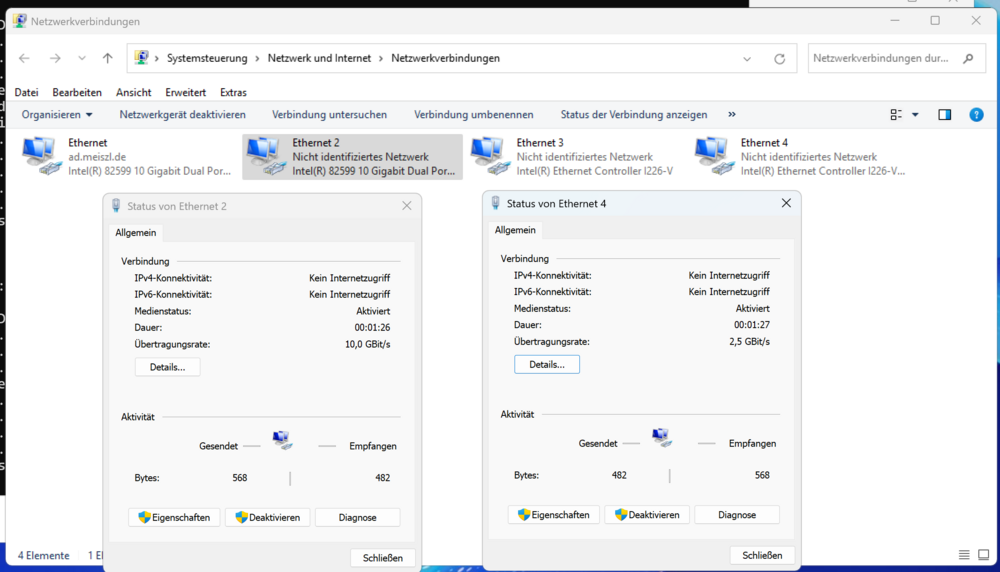
-
never!!! This is the worst you can do to your machines. Read the Text carefully! "Meant for mixed-speed networks". And guess what he has here? 2,5 to 1G If this is not mixed what else should it be? Also, 2,5G alone is "mixed" already because it is just "10G with pauses". It cannot work without flow control. Turn it back on. And make sure every device on the LAN does honor it, else there will be strange lockups, blocades, pauses... Unmanaged switches do not honor it, they just pass on the request in the hope, the next device will be more clever. So this is not reliable. If you daisy-chain even more unmanaged devices it will become even more risky.
-
Hmm, kann es sein, dass da jemand eine falsche Erwartungshaltung an die fast antike Hardware hat? Egal mit welcher CPU, bei RAMs mit nur 1333Mhz (-ECC) ist es fast unmöglich, volle 10G Lan Speed zu empfangen, geschweige denn, sie auch noch wieder irgendwo andershin wieder wegzuschreiben. Da laufen doch in Null-Komma-Nix alle Buffer der LAN Karte über und es wird die weiße Fahne gehisst. (und wieder mal zeigt sich, wozu iperf gut ist: "zu gar nix!". Was nuzt es die Daten über die Leitung zu kriegen, wenn sie danach sofort im Stau stehen)
-
since many versions already unraid ships with an annoyingly misconfigured firefox. English users do not notice it, but if you apply a different language to UNRAID, you are always asked if you want translate it to english (because that is still the OS language, UNRAID only changes the internal GUI translations for the NGINX web pages). While not a real error, this is just an annoying popup that comes up every time you open a new session on the console. After quitting it for the 100th time you are fed up with it! You can prevent the popup with setting "browser.translations.enable" to "false" in about:config. But as we all know, UNRAID does not preserve these settings between reboots. So you can get rid of the popup for some time, but then it strikes back again sooner or later. Limetech should consider to store settings of the basic firefox profile between sessions even between updates. On Windows this can be done by adding a line "defaultPref("browser.translations.enable",false);" to Mozilla.cfg in "%PROGRAMFILES%\Mozilla Firefox" can't find it on UNRAID, but something alike surely will exist.
-
Siehst Du, DA liegt das Problem! Jedes OS, sogar manchmal jede Version eines OSes, kann es für sich selbst festlegen, wie (oder ob überhaupt) es mit der Situation umgeht. Das kann niemand im Vorfeld wissen und selbst wenn Du in einer bestimmten Konstellation einen "Benefit" erkennst, sagt Dir niemand, wie lange er funktionieren wird. Deshalb vermeidet man besser diese Grauzonen und begibt sich auf sicheres Terrain. Ein L3 LAN, eine Karte! Einfach zu merken, einfach für die Fehlersuche ==> "KISS"
-
Ja, ersmal "tausche" die Karten in UNRAID: Hier wurde die 10G Karte "nach vorne" geholt. Als eth0. Danach kannst Du auf den Tab/die Abteilung (je nach GUI Einstellung) "eth1" gehen und findest dann ganz unten rechts als letzten Knopf "port deaktivieren". Damit hat es sich dann mit der 1G Karte. Es wird die genommen, mit der kleinsten Metrik. Sind alle Metriken gleich, "gewinnt" die erste Karte. Das ist übrigens auch gleich bei MacOS. Das von Dir so bewunderte Verhalten ist einfach nur ein Abfallprodukt. WLANs trägt MacOS immer mit einer höheren Metrik ein, 1G Lans mit mittlerer und 10G Lans mit kleiner. Dadurch wird automatisch die "beste" Verbindung gewählt und eine Doppelverbindung stört erstmal nicht. Auch Apple kocht nur mit Wasser (allerdings parfümierten und extrem überteuerten. Quasi "Trinkwasser in Flaschen von Nestlé") Und WLAN mit einer richtigen Netzwerkkarte gleichzusetzen ist auch fragwürdig. Ja, da gehen auch LAN Daten drüber, aber die Funktionen, Latenzen und Protokolle sind komplett anders. Mit "zwei NICs" meine ich zwei GLEICHARTIGE Netzwerkkarten. Deshalb wird auch Dein IPerf Test wohl unterschiedliche Wege/Karten für Hin- und Rückweg nehmen. Kann natürlich auch sein, dass IPerf nur Layer 2 benutzt, aber wie gesagt, die Aussagekraft von IPerf ist sehr limitiert...

-
Jein, natürlich wäre eine eigene Karte etwas hilfreich, aber der Aufwand lohnt sich nicht für die paar Promille Verbesserung. Vieles des Docker und VM Traffic geht eh zum Host (übers RAM), das kommt nie bei irgendeiner Karte an. Und selbst Streaming ist nix, solange Du nicht versuchst 2000 Klienten gleichzeitig zu bedienen 🙂 Es MAG relevant sein, wenn Du da einen FTP Server hinter hast, der stark frequentiert ist. Allerdings macht dabei wahrscheinlich dann eher die CPU dicht und winkt mit der weißen Fahne. Also: kann sein, muss nicht sein. Ich bevorzuge das KISS Prinzip ("Keep it simple and stupid"), das begreift man dann auch noch nach ein paar Jahren.
-
Nein, tut er nicht. Er arbeitet nur auf Layer 2 und weis nix von IP Adressen. Aber egal, ich erkenne, Dir fehlt fundamentales Netzwerkverständnis, da kann ich dann auch nicht mehr helfen und bin hier raus...
-
10G LAN on twisted pair can be very painful. Especially if you do not know the backgrounds, its no toy stuff or "customer grade". First of all you need the right SFP+ modules. "right" means those that are allowed for your device (can be different on both sides). 2nd: the cable! Older CAT5.e cables do not work at all anymore. You need at least CAT7 (better CAT8,1) cables. If you say "the cables are inside my wall", you are usually unlucky. Even for CAT7 cables, there are still so called "raw cables" sold even today. "raw cable" means: the cable is correctly CAT7, but the plugs are not! So these things are not usually useble too anymore. Make sure you get CAT8,1 cables, they are meant for up to 40G LAN, they work well for 10G. 3rd: the length Formerly (1G LAN) up to 90m were allowed, with higher speeds this limit drops. For 10G they SAY its 50m, but from what I have seen, everything >10m is a challenge and risk. Over 30m is russian roulette. So what to do? Switching to Fiber works best. Of course you need different modules and a different cable. But they are rather cheap now already and absolutely stable. If the machines are within close range (up to 3 or 10m) so called DAC cables (with fixed modules on both ends, they are not meant to be put into walls) work well. There are passive and active ones. Whenever you can stick to <=3m and go passive. They are really cheap (compared to the price of 2 modules + cable).
-
Righty right 🙂 Beide Karten haben ein (dasselbe) Default Gateway, also entscheidet die Metrik. Und hier gilt: "wer zuerst kommt, gewinnt". Da die 1G Karte "oben" steht, wird sie bevorzugt. Aber wie gesagt, das ist eh ein völlig falsche Konfiguration, ich vermute, er glaubt, 2,5G wäre "netter" und würde so bevorzugt, aber so funktionieren Netzwerke nun mal nicht. Und nein, die Idee "ach, dann lösche ich mal eins der Gateways" ist auch nicht zielführend, da die Karten im selben Adressbereich sind, gilt ein Gateway immer für beide.
-
Wer weiß, was da alles ins Gehege kommt. Erstmal Aufräumen, dann sehen wir weiter. Sagen wir mal so: "iperf3 ist ein nettes Schätzeisen", aber in einem LAN passiert mehr als diese eine Verbindung. Wenn gleichzeitig zwei andere Kisten einen fetten Transfer machen, geht iperf auch in die Kniee, weil der Switch dicht ist, oder der uplink, oder, oder oder. Iperf ist ein Anhaltspunkt, kein richtiges Messwerkzeug.
-
der "iperf Test" sagt GAR NIX über die Verwendung der Karten unter UNRAID aus. Klar, kann man ihn von Hand zwingen, aber was Windows entscheidet is nicht beeinflußbar. Fakt ist, das mdns von UNRAID nur EINE Adresse bekanntgibt, da kannst Du Knochenwerfen welche. Und was die Klienten im LAN nicht kennen, können sie auch nicht ansprechen. Zwei Karten mit zwei verschiedenen IP Adressen im selben LAN sind immer ein Fehler, wozu soll das gut sein??? Flow Control ist eh Pflicht bei 2,5G, aber ich nehme an, er hat gar nix zum Einstellen am Switch.
-
Du hast aber schon gemerkt, dass Du beide Karten ins selbe LAN konfiguriert hast? *22 und *23. Das ist blanker Unsinn! (oder, wie der Highlander zu sagen pflegte: "es kann nur einen geben!!!") Da kann dann nur Mist rauskommen, bzw. es wird ZUFÄLLIG eine Karte angesprochen. Wohl meist eth0 (1G) weil die Adresse über mdns verbreitet wird. Rupf das Kabel aus der 1G, konfigurier die 2,5G als eth0 und lass die Finger von den Treibern.
-
Dunno what you need, Either AMD Ryzen or Intel Whatever-for-a-lake. Ryzens usually have more PCIe Lanes to offer. For the Mobo look for "bifurbication" but be prepared that there maybe some drawback hidden behind (*) sections in the manual. Many of these boards are "overequipped" which means that if you use a certain device, others have to be shut off (for instance: "if using PCIe Slot #3 SATA 5-8 are not available") This can become quite complicated. I haven't build a new system for over a year so I am not really up to date what stuff is available.
-
LOOOOOOOOOOOOOOOOL! It is called "hot swap" because you can change / open Drives while still running. If you got the right controller (in slot or on Mobo), it signals the os the drive change and allows a graceful shutdown. It has nothing to do with "beeing hot" (in fact, most of these cases come with an additional fan at the back). Bad luck again, I dont know any standard boards that would fit into your case and accept these parts. But they MAY exist somewhere, who knows? To be honest, I also do not believe that your case will give enough cooling for this "glowing" CPU. This will be a real challenge... The RAM too, ECC Ram is uncommon, most CPUs and Mobos do not support it. And it is very expensive too... Also the electricity bill will jump up intensely with these parts, be prepared... Summerize: what you have bought/ordered is meant to be run in a datacenter with active cooling, heavy noise and electrical power to the max. It is nothing somebody would run at home.
-
of course it is! Its a common thing that people "miss" dns settings for NICs beside eth0, but this is harmless. DNS is a protocol above NIC level, it already uses routing. Therefore the DNS settings are "global" for all NICs. Its just a GUI "problem" that the UNRAID designer decided to put these settings into eth0. They should have put them into a seperate section. But its not really wrong too because if you switch on DHCP the manual DNS settings are likely to be overwritten. Anyway, it does not matter, they also apply to ETH4 & 5.
-
Could be a wise descion... That case has 2*5,25" slots as I can see. You can get a hotswap case that fits up to 5*3,5" disks for this. This would allow disk changes/adds without needing a screwdriver.
-
Remember one thing: Manufacturers like HPE or DELL (or Apple too) do not produce "main stream" hardware. They always put in their own stuff, create own drivers, sometimes even need own OS-es. They want to buy their customers to their own products. The machines are good, but work badly or not at all with common stuff that you can buy everywhere. In case of the Controller its not really a big deal, you just need to put in a standard HBA (in "IT" mode!). The tricky (and likely expensive) part is to get a cableset that connects the HBA to the HD slots. If you are lucky, HPE has used "standard" SAS plugs, cables for them ("reverse SATA") can be found on Amazon or elsewhere. If not, bad luck. The same for ILO (the management part). If lucky the ILO VGA connector also shows an emulated VGA for the main computer, if not, you need an additional graphics card. (And I remember older HPE boxes that even needed the ILO to be activated by a license that had be be bought seperate, hopefully they have dropped this stupid behaviour by now) BTW, with the builtin HBA you are usually also limited to insert certified HP hard drives. Normal drives can be rejected or not put into service. There is a list of allowed hard disks in the technical reference. Read it carefully!!!
-
Not only that there is no bifurbication, the machine also comes equipped with a RAID controller that is not usable for UNRAID. Its an avoid, avoid, avoid, device! You may however use an expensive NVMe card (one that comes with its own PCIe switch, do not expect to find them in China) and additional SATA Controllers in the slots. But it will be hard to find a video card that uses less than 16lanes slot (needed for the switch card) So it CAN be done but will be very expensive and many parts of the server are not usable.
-
The Idea Veeah had (and deleted again, why?) also came into my mind. What you have is not a classic router, but a kind of tunneling modem. You have no NAT there, very uncommon today. And it MAY happen, that your provider only allows a certain amount (usually ONE) of devices behind the modem. So it MAY be that you need to buy your own NAT router and hook it up the line. This will serve as the internet gateway for many LAN devices. So better check your contract and see, what you have ordered.
-
you do not have a LAN at all. All your connection is handled over the tunnel. Your IP address is 162.81.* which belongs to the "Knoxville Utility Board" (whatever this is). But your DHCP Server is 10.10.10.1 which is a private address and cannot be reached from the 162.81.* net. (normally) So there must be some tricks nobody can guess how to manage this. You should call the support of your provider and ask how to setup a linux machine. if the data is still correct, contact OrgTechHandle: ROLLI132-ARIN OrgTechName: Rollings, Allen OrgTechPhone: +1-865-558-2026 OrgTechEmail: [email protected] It looks to me as if you do not have a DHCP Server, but use a "DHCP Relay" or something... very strange, never saw a setup like this in the real world before...
-
AAARGGGHHH!!! You are using a Wireguard tunnel and your DHCP Server is "at the other end" of the tunnel. Of course UNRAID cannot reach it (and never will be able to do it) No idea what this is good for and also no idea how to overcome it, sorry.
-
Pls go to your PC, open a cmd window and type in "ipconfig /all" (assuming it is running a kind of windows). Post the output here. Update: also the output of "netstat -nr" could be valuable to take a look at. add it here too pls



