






Everything posted by MAM59
-
Also hat UNRAID mehr als eine Karte??? (Mit nur einer Karte geht Multichannel eh nicht, also ist es egal, ob an oder aus)
-
Dir ist aber schon klar, dass Multichannel nur Sinn macht/funktioniert, wenn beide Partner MEHRERE Netzwerkkarten haben, die dann nicht aggregiert sein dürfen ? Guckst du folgendes Manual: Synology Multichannel Aber, bevor Euphorie entsteht, so richtig viel schneller wird es nicht werden... Und es ist auch eher GEFÄHRLICH, weil Geräte auf die Idee kommen könnten, das wäre eine Switch Schleife und zur Gefahrenvermeidung (Loop detection) ein Port deaktivieren.
-
Although Jorge points out to the real support for NPM, this problem is purely related to UNRAID itself. UPDATE your Unraid to at least 6.9.13, the earlier Versions do not contain Docker to handle native IPv6, they crippled it to NAT too. (And NAT behind NAT is not really a pleasing solution). UPDATE and it should work then!
-
I doubt that an MTU of 9000 will improve anything. it is a myth. It just creates trouble now an then. You should reset it to the default (1500 or 1504 depending on the device) everywhere and see if your problem is gone. There are known problems with large MTUs in UNRAID.
-
Jein 🙂 Das Problem trat mit irgendeinem Update auf ("limited extended memory" verhindert den genauen Verlauf bei mir 🙂 ), dann wurde rumgebastelt und mit 6.12.13 gings dann endlich. Ist gar nicht mal so ein wirkliches UNRAID Problem, sondern lag an "Docker". Ursprünglich konnten Docker gar kein V6, dann haben sie eine Krücke eingebaut mit NAT (SCHAUDER!!!), inzwischen geht nun natives V6 bei Dockern. Es hilft also, öfters mal ein Update zu machen (und die Changelogs zu lesen...)
-
Tscha... sieht echt nach Eigentor aus...
-
ja, das sieht finster aus... Teil 1 ist vordringlich zu bekämpfen, sonst kann Teil 2 ja auch nicht klappen. Also guckst Du in Firewalls, Portfreigaben, usw. Auch in den Dockereinstellungen (geht der Ping/traceroute VON Unraid ZUM NPM?)
-
machma "tracert -6 <deineDomänenUnraid>" im LAN (von einer Windows Kiste aus) bzw "traceroute -6 <deinedomäneunraid>" von Linux aus sollte im idealfalle eine kurze Antwort wie C:\Users\mam>tracert -6 f Routenverfolgung zu F.XXX.de [2001:470:XXXX:1::4] über maximal 30 Hops: 1 <1 ms <1 ms <1 ms F.XXX.De [2001:470:XXXX:1::4] Ablaufverfolgung beendet. geben
-
Maybe my english is too bad, but for me it looks like you have created a dns loop unraid-pfsense-duckdns-unraid(pihole) ? ? ?
-
this is the usual problem called "pihole cannot work for UNRAID itself!" Its because dockers are started last, but at boot time DNS is already needed here and there. These requests time out, some dockers may fail, what happens is more or less random. The manual restart works then because now pihole is up and running. But you cannot control the sequence how they are started, so there will be always a big chance that something fails and needs manual interaction later on. You MAY try to set UNRAID1' DNS to PIHOLE2 (on the other UNRAID) and vice versa. But again, ONE of them will fail if it started without the other already running! You may need to "Turn on UNRAID1", wait a bit, "Turn on UNRAID2", again, wait a bit and finally "Reboot UNRAID1". But this is very time consuming and not very intuitive... The best solution is: "Go out, buy a PI, put PIHOLE onto the PI and let every computer use it".
-
Also die Speicher"Auslastung" von ZFS ist reine Makulatur. Die Anzeige kannst Du vergessen. Sie gibt nur die prozentuale Belegung des ZFS-ARC Caches an, bei Benutzung hat sie halt früher oder später immer 100%. Das hat keinerlei Auswirkungen auf das System. Du erlaubst ZFS eben XXX Mb Ram, und er benutzt sie dann auch (Default=25% des RAMS, per Variable aber einstellbar). Nach einem Reboot ist der Cache natürlich erstmal leer, füllt sich aber recht schnell im Betrieb.
-
You should have set up the ZFS Array with ALL drives as one big ZFS Raid pool (RAIDZ). RAIDZ manages its own parity, no extra drive is needed (indeed, it is slowing down everything because ZFS does not know about it and therefor does not care about it doing its internal "optimizations"). RAIDZ is not that flexible, you cannot add a drive without destroying the existing Array first. Hopefully, you have no data on it yet? Set the number of array disks to 0 then, "start" the array. ZFS will take care of trim by itself. (This will only work for Unraid 7 upwards) (I'm no friend of ZFS, so use it with your own risk)
-
Da liegt der Hund begraben 😉 Du übermittelst damit die IpV6 Adresse von der Fritzbox und NICHT die, des Unraid Servers. Und da, wie Du ja schon weisst, kein NAT vorhanden ist, landen die Anfragen dann eben beim falschen Server. Du musst auf Unraid (oder auf einer anderen Kiste) einen zusätzlichen DDNS Client installieren, der die UNRAID Adresse (und Namen) verteilt. Besser auch die V4 Adresse, da die Fritzbox zu dumm ist, die Einträge zu trennen. Also: bei Fritzbox Registrierung AUS, bei UNRAID AN (Skripte dafür findest Du reichlich). Der Rest sieht mir korrekt aus. (NB: Bei V6 muss sich also jeder Rechner selber registrieren, da in Deutschland ja meist dynamische Präfixe verteilt werden. Das ist lästig, aber machbar. Besser ist natürlich, man hat einen statischen Präfix, so dass man an einer Stelle ein Skript machen kann, dass für alle lokalen Server die Einträge übernimmt. Und da ich seit Jahren statische Adressen habe, kann ich Dir leider kein Beispielskript zeigen...)
-
I'm afraid you are chasing ghosts...
-
this is normal. NVMe have their own power mangement. They power down instantly after not beeing used. Therefor the OS provides no means to do it manually. It is shown as "running", but usually it is not. So, the NVMe is surely NOT your problem.
-
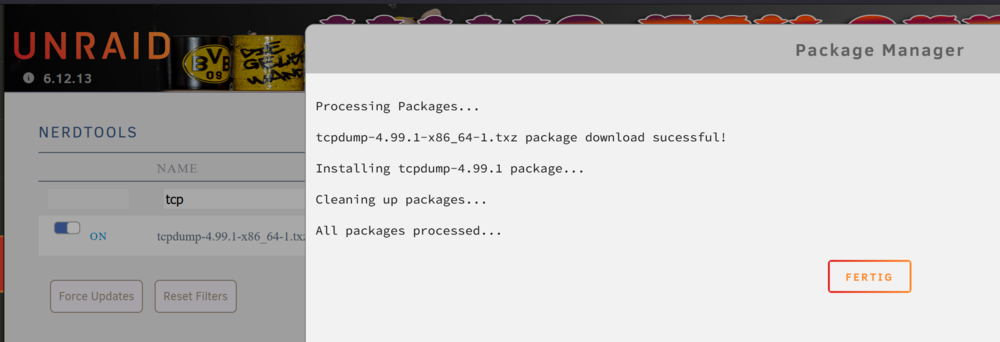
This would be quite tricky because some of those docker networks may not be accessible from the main unraid. Also, tcpdump needs interfaces in special ("promiscuous") mode, again, some of those pseudo LANs may not offer this mode. But I agree, tcpdump is a very helpful tool for network problems. But it also is a complicated one, not suitable for the normal user... I don't believe they will ever include it into the os. But you can use either nerd-tools (as long as it still exists) or drop the package manually into the /boot/extra folder to get it installed automatically after a reboot.
-
syslog
-
This may give you a hint: Oct 31 22:38:07 Tower kernel: bnx2x 0000:08:00.1 eth0: Warning: Unqualified SFP+ module detected, Port 0 from CISCO-TYCO part number 1-2053783-2 This MAY cause troubles, only buy modules that are allowed for this device, else strange things may happen...
-
"nano /config" cannot work, config is a directory you need to do "vi config/config.php" instead. Hmm, what did I use??? as usual ("nano" and "vim" are for wimps 🙂 ) I used "vi"... lemme check again... yeah, "vi" is there, "nano" and "vim" are not in the container. The same is true for occ... in the top folder of the container you need to run "sudo -u www-data ./occ ..." to fire it up (if you run it without sudo it will tell you you should not run it as root and suggests you should use "sudo -u #33 ..." instead. The suggestion is WRONG! you need to use the username "www-data" because the supplied "sudo" does not accept numbers as users as far as I have tested it) Both commands will only work if you open a console for "nextcloud-aio-nextcloud" only!!!
-
If you have installed AIO, there will be several dockers running To get access to the config file, you need to open a console with the "nextcloud-aio-nextcloud" docker (NOT the main one!). There you can find the directory "config" and the usual config.php. Changes do work, but I am not sure, if they are persistant after an update or reboot. (For safety reasons I have copied my changed-one out to the normal filespace so it can be easily copied back if needed) I had no need to add proxy setting, the installation automatically detected my local NPM and installed the proper parameters. But the evil telephone thing and the "default_language" stuff were needed here too.
-
see to find the "solution". But you need to follow the advices step by step, they are not very intuitive. Anyway currently only installation of Hub 8 seems to work though it strongly tells you to try out Hub 9. Setup Hub 8, create a full backup then you may try to update to Hub 9. (didn't try yet, I was glad enough to finally get Hub 8 up and running. But it was everything but "effordless")
-
Yeah also took me a day to find. scroll completly down to the bottom of the page, there is a link "how to uninstall everything completely" Takes you a lot of time, especially if you have other dockers up and running, so double check not to delete anything valuable! Anyway, in the mean time (and after the reset) I found out, what went completely wrong: DO NO SELECT HUB 9 for the new installation! It does not work (yet?) ! Install Hub 8, thats ok and the video will work. But be prepared that there is a lot of manual work left afterwards... at least it is up and running now... NB young Padawan: after initial setup, log in as admin and DO NOTHING. Took over 30mins here until all the internal things started to work correctly. If you are too impatient, you will run into a lot of problems (like calendars not beeing ready yet and so on). These cure themselfs over the time. I am not sure yet if the manual changes I needed to do in the config.php file stay over reboots and updates. would be bad if not because it is very hard to get to that file. We will see.
-
effortless??? I'm sitting 4 hours already trying to start the initial setup... "wrong PHP version", "name does not resolve" (within the containers), very effortless....
-
Forget it! The term "link aggregation" is a misleading marketing gag. It does not aggregate, it just seperates multiple connections (of different clients) onto "more than one" card. No single link can be faster than a single card. No mode will give you what you are looking for. Worst thing you could do is to put cards with different speeds together. This will result in random speeds depending on which card the connection is put on. This "link aggregation" is mostly used (and was developed) for interlinks between switches ("uplinks"). As already proposed by @Espressomatic, the only real way is to put a faster card into your server and get a switch that can handle the higher speeds.
-
The thing is, if it is an option or always there. If it is always on (the manual will hopefully tell you), it would be a wasted 1x slot On the other hand, if you really need that many NVMes (and therefore a lot of PCIe lanes), you may have chosen the wrong company. AMD CPUs usually offer more lanes and there you can also find many MoBos (not the cheapest ones) that support bifurbication. But even there is a restriction sometimes. I have a 5700G and a HyperX Card in the 16x slot. But only 3 out of 4 NVMes can be populated because the internal GPU keeps 4 lanes directly within the processor. They never make it to the slot. Sadly, even knowing about restrictions does not always help, be prepared for surprises. Of course, you could also buy "Lane Monsters" like fat Xeons or Threadrippers. They sometimes offer up to 7 full 16x slots, even with bifurbication. But this is a total other price region. I did not see either because I have used very good cables in the walls here too. But some weeks / months later connections began to reset, rare at the beginning, but increasing more and more. I have tried everything (including new cables in the wall), it only cured the problems for some weeks. After a year I was fed up and did the move to fibre. No problem in the last 4 years now. what a relief. Today's cable maybe more reliable, but you cannot see them and you cannot check them. Just getting a link and transfering some data does not mean a thing at 10G. It works if you are in close range but at 10m already strange things can happen.





