






Everything posted by MAM59
-
Depending on the numbers of CPUs and RAM you gave to the VM you may need to wait much longer than 10min. Be patient young Padawan! Have a coffee and come back in an hour or so.
-
solange Du keine Portweiterleitung vom Router einrichtets, passiert auch nix. (bzw bei V6 den Firewall des Routers offenlässt) Die Steckdosen & Co sind gefährlich, weil sie sich Löcher in den Router schnitzen und damit die Clouds in China usw. anbinden. Was da abgeht, weis keiner so genau...
-
UNRAID ist nicht dazu gedacht, vom Internet aus administriert zu werden. Und für Filezugriff ist "root" eh der nobody pur, der darf garnix, kann man auch nicht freigeben. "Root" ist nur für die Weboberfläche da (bzw für ssh). Das ist kein Riesenmist, das ist so üblich.
-
Das kommt mir reichlich merkwürdig vor... Plattenlesen ist immer lahmer als Ram durchsuchen... Ausser, Du hast so wenig RAM, dass der Kram nicht reinpasst, oder das Cache Modul falsch konfiguriert, so dass es die wichtigen Verzeichnisse gar nicht durchliest.
-
Das kannst Du ohne Spinup und flott schaffen mit den wohlkonfigurierten Plugins "cache_dirs". Das hält und durchsucht die Verzeichnisstruktur im RAM. Musse nur genuch Ram bereitstellen...
-
Ja und sag dann BESCHEID. Vielleicht ist das ja ein allgemeiner Bug, den man mal melden sollte? Da ich hier nix zu dem Thema finden konnte, bzw niemand auf meine Meldung geantwortet hatte, hab ich es erstma unter "MAMi zu doof Error" abgelegt. Aber ich hätte da auch schon eine nette Verwendung für (mich nervt beim Einsortieren neuer Filme, dass man dauernd diese Pausen hat, weil die Verzeichnisse so gesplittet sind. Dauert manchmal 2min bis alle vier Platten nacheinander angeworfen wurden und man weis ja vorher nie, wo diese Daten gerade liegen).
-
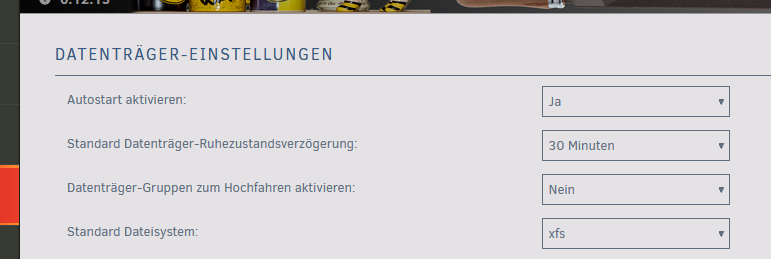
Ja das geht in den Disk Einstellungen. Erstmal den Hauptschalter umlegen: (Also Datenträger-Gruppen zum Hochfahren auf Ja setzen) Danach tauchen bei den einzelnen Disks neue Einträge auf, mit denen man die Disks den verschiedenen Gruppen zuordnen kann (gleicher Name = gleiche Gruppe). Die Spindown Zeit ist für jede Gruppe getrennt einstellbar. Sind sonst nicht sichtbar, deshalb jetzt hier kein Screenshot. Aber, kleine Warnung vorab: Zumindest ich hier hab das Problem, dass jeweils die letzte Disk einer Gruppe niemals Spindown macht. Selbst wenn man sie von Hand runterfährt geht sie sofort wieder an. Das ging mir auf den Keks, deshalb hab ich es hier wieder abgeschaltet. Aber, vielleicht klappt es ja woanders?
-
use 2016 template, it works for 2019 and 2022 too.
-
Na ja, Slartibartfast hat ja auch nie verstanden, was die Leute so an seinen Fjorden fanden... 🙂 Nimms hin und gräme Dich nicht. Wenns wieder auftaucht weist Du ja, wo Du Dir den heilsamen Switch leihen kannst, bzw. welchen man kaufen sollte.
-
Nun ja, unmanaged Switche haben zwei Arten Flow Control Angebote zu bearbeiten: a) der "gute" Switch weis, dass er blöd ist und leitet den erweiterten Header (also MIT Angebot) einfach braun weiter. b) der "böse" Switch erkennt, dass die Header "nicht so ganz normal" sind und holt seinen internen Messias raus: er löscht das Angebot Welchen davon man hat, weis man nicht und kann es schlecht überprüfen. Hier hilft nur das Prinzip Hoffnung. (oder lieber gleich einen managed Switch kaufen, da kann man es sowohl sehen, als auch einstellen)
-
Irgendeiner hat aber gemäs Deinen Logdaten Das kommt ja nicht von ungefähr. und das auch recht häufig. Da versucht es jemand mit falschen Credentials. Wird wohl ne Windowskiste sein steht zu vermuten. Oder versuchst Du von UNRAID einen Share zu mounten???
-
Clientbasiert gibts nicht Und Userbasiert überschreiben die eventuell hinterlegten "Windowsanmeldeinformationen" ggf den aktuellen Windowsbenutzer. Also guck da nochmal rein, lösche, korrigiere oder lege neue an an den entsprechenden Orten. Von alleine taucht "root" nicht auf, den hast Du schon irgendwo eingetragen.
-
versuchst Du da etwa von windows aus als "root" auf UNRAID zuzugreifen??? "root" ist immer verboten, Du musst schon einen anderen User anlegen und dem die SMB Rechte erteilen.
-
I have a Mobo with a 10G and a 2,5G Nic (both Twisted Pair). I do not use any of them, instead I have put a 2 port SFP+ card in the slot an go with fiber instead. CAT cables at high speeds are risky, so I better play it safe. And yeah, there are very few (and usually very dumb) Mobos with SFP+ or QSFP cages out there in the wild. Dunno why.
-
Aaah! Das SMB-Killer-Potential! Bei 2,5G musst Du DRINGEND darauf achten, dass ALLE beteiligten Komponenten "Flow Control" aktiviert haben und auch beherrschen. Sonst reden die Kisten bei der Belegung der Timeslots aneinander vorbei und keiner versteht den anderen (Effekt: kriechender, bis gar kein Transfer). Wenn nur SMB betroffen ist, siehts allerdings mau aus.
-
Also "gaaanz zürück" bei UNRAID ist schwierig, wie ich unlängst lernen musste. Bei den Versionsupdates wurden auch massig Defaults geändert, so dass ein heutiges "clean" System nicht mehr Deinem alten von vor 4 Jahren entsprechen würde. Damit handelst Du Dir u.U neue Fehler ein, die Du noch gar nicht kennst. Besser ist der Ansatz von @alturismo, sukzessive die manuellen Änderungen entfernen, neu booten und gucken... Bei den smb.extras sehe ich nun nichts, was wirklich "böse" aussieht, aber auch nix, was "hilfreich" sein könnte. Das Meiste ist mehr oder weniger Default (Und da kommen wir auf den einleitenden Satz zurück: "Defaults haben sich geändert") aus irgendeiner Periode. Weg damit und Ruhe sollte sein. Den Write Cache zu "optimieren" hat schon vielen Leuten die letzten Haare gekostet, weil keiner sagen kann, in welche Richtung er denn "optimal" ist. Du knallst erstmal 50% des RAMs voll bevor die Platten dann angeworfen werden und einen massiven Blutstau abzuarbeiten haben. Das sieht beim Windows File Transfer erstmal imposant aus, bricht dann aber abrupt und für lange Zeit auf fast 0 zusammen und blockiert das komplette System (was dann wieder zu Blutstau bei anderen Diensten führt). Der andere Ansatz wäre, den Cache schon bei 1 bis 2% zu begrenzen und somit die zu schreibenden Daten klein zu halten und IO Blockaden zu vermeiden. Sieht dann optisch langsamer aus, aber, wenn Du ne Stoppuhr nimmst, ist es bei großen Dateien meist gleich bis sogar schneller. Und andere Dienste können noch nebenher laufen. Quasi ein Smoothy... Oder eben gleich den aktuellen Default lassen. Ist der immer noch bei 10%? (ich kümmer mich da nicht mehr drum)
-
No clue about that. I just said you should look for an existing docker that may solve your needs. Or look for an update of your bot (I cannot really think of really complicated differences between 3.10 and 3.11. Some changes in 3.12 can give more problems in some cases, but also nothing to be too complicated to solve)
-
better look out for a docker version of your bot that comes with the "needed" python. This will not affect the whole system.
-
Looks like you have an "inbetween" BIOS. On the way to disable normale boots at all. Try: * Enable Safe Boot * OS Type: Other OS (not Windows!!!) Also try to put the stick in a different USB Port (try all of them one by one). Some Bioses now limit Boot Devices to certain ports. (other option would be turn off safe boot + enable CSM if still possible) (You've said it is a HP computer... Maybe you should take a look inside? at least their servers offer a dedicated internal USB port for booting... Dunno about the desktop but a little search cannot harm)
-
Aha? then you did not try to boot UEFI at all! Depending on the BIOS, it MAY boot "oldstyle" again (turn on the emulation option), but according to Microsoft the oldstyle will be totally forbidden soon and deleted from the BIOSes. So, try it NOW and if it works, forget BIOS updates for a looong time.
-
It may be that your UEFI Bios is brand new and it blacklists older boot loaders still signed with the "soon-to-run-out" Microsoft Signature. Some PCs have not enough space to hold old and new signatures and they may refuse to boot anything "old" (including Windows DVDs/Sticks). Its a great mess currently done by Microsoft (yeah I know, you want Linux, but the bootloaders still need to be signed by microsoft). Windows' Users usually do not notice it because Microsofts ships the Updates with their normal updates, reflashing parts of the bios without notice. But Linux does not come with this, you need manual Bios updates usually supplied by your MoBo´s manuafacturers (and yes HP is not known for being the most fastest one in this respect) The only current way to "fix it" would be to turn off "safe boot" in the UEFI (Which is usually not desireable). Try it. Also watch out for possible Bios Updates, during the next months they may happen very frequent. (for details about the bootloader problem read an article in the german magazine c`t. But beware it is hard cryptographics stuff not suitable for the simple user!)
-
(can't help you with your "deleted" problem, but...) Pls reconsider the "small files stay on cache" wish. In general it is very unwise because small files allocate much larger space on disk than needed (this is true for all files, but with large files the wasted percentage is almost 0 whereas with small files it can be many 100%). So a cache with only small files will fill up much faster than with mixed/large files. This is true for all file systems because they also manage some kind of blocks and all have a minimum amount of blocksize that will always be used (it once was NOT true for NTFS where content of very small files was already stored in the directory entry of this file, but I dont know if this is still used today anymore).
-
Post new diagnostics before you mess it up again... Let me see which settings are "working" and which one must be adjusted to suite your needs with the desired address. Remember: eth0 is the only thing you need. Leave eth1 unconnected or even deactivate it for now (btw, I will leave quite soon, you will have to wait until tomorrow for answers)
-
just powerdown, pull out the stick, put it into a different computer and go to the /config directory or open an UNRAID shell, go to /boot/config. its the same. there is nothing mysterious
-
I dont understand, sorry. what do you want to see???




