






Everything posted by MAM59
-
good luck! it is complicated...
-
Nextcloud AIO has a builtin backup feature that you can activate from the mastercontainer. It is based on BORGbackup and runs every night. But on UNRAID it is pretty much useless I think because it backs up everything, even the user files that you usually put into an Array. So the backup gets seriously big very soon and if you have another way to backup your UNRAID, data is copied twice or even more (the BorgBackup needs room to. Usually you put it also onto Unraid's file space, so it is backuped once more...) I will soon delete Nextcloud AIO from Unraid and put it onto a seperate PI or something. It does not work well with the rest of the system.
-
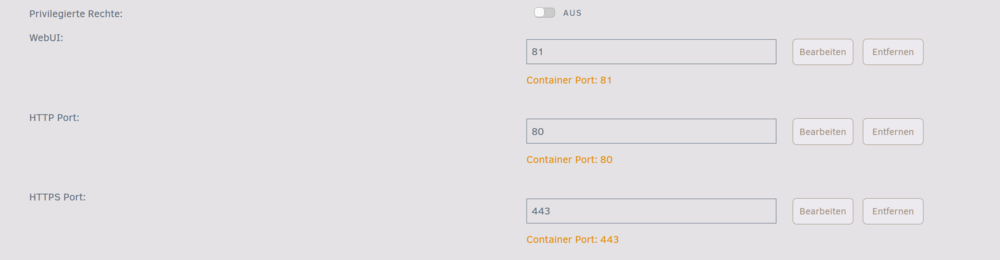
Also wenn NGINX von aussen erreichbar ist, hast Du es falsch aufgesetzt. Das NGINX Webinterface läuft auf Port 81, das darf NICHT freigegeben sein! Du musst stattdessen die Ports 80 und 443 freigeben (vorher das UNRAID Webinterface auf andere Ports umkonfigurieren!), dort werden die Proxyhosts angenommen und weitergeleitet. (man kann die Ports natürlich auch umleiten (aussen 80, innen 8080 usw,) aber das führt meist zu Verwirrungen, Deshalb besser UNRAID "richtig" umkonfigurieren und die Originalports nehmen.)
-
No idea, thats a different issue. I'm out here
-
to get to the mastercontainer you need to log on to nexcloud (UI) with an admin account, then go to "settings". You will find a button to launch the mastercontainer UI. (Yeah, this whole beast is really mystical...)
-
good guess, but leave out the "v". ghcr.io/blakeblackshear/frigate:0.14.0 should do what you want. give it a try (cant harm anything, you can always go back to "latest")
-
The ARC cache only lasts for an hour... but of course, if you switch back and forth all the time, the hour restarts with every switching...
-
Whatever it is good for, your eth0 has multiple (30,40,50) VLANS assigned. So, check your VLANs and remember "less is more" Else the general hint applies: wait! If you switch over to a different card (mac address) it may take up to an hour until all devices in the lan recognise the new mac address. Keep eth1 disabled or unplug it and wait...
-
Nonono, you've got me wrong... There is no parameter that you can set to turn it off. IPV6 works the other way round. Somebody (usually the router) requests SLAAC, the receiving machines just obey. You have to configure your firewall so that the UNRAID host does not get the Router Advertisment Packet (the request) from your router. Unless you have a DHCP6 Server in your LAN, SLAAC must be turned on for the other machines. But to prevent the additional address being set on Unraid, you need to filter out these packets. Try to filter "protocol icmp6, icmptype 134". (note, that by filtering them out you will also prevent Unraid from getting other config data like default gateway (6) and dns servers (6). You have to set them manually too.)
-
I cannot really agree. The config file contains the "wanted" release (mostly "latest"). Without a config UNRAID does not know which version you are requesting. Thats why it gives up if you try to update manually. So the lack of a config surely shows that no update is possible (from within UNRAID. Nextcloud AIO has its own docker for backups and doing updates).
-
The problem then would be that you want "nextcloud-aio-mastercontainer" which also would give you a match to your ignore string. The real problem is that UNRAID says "ready for update" on these containers but if you ask to update it says "no configuration found, cannot update". So this plugin better should check for the docker config.
-
Aaaah! now we found the culprit ! 🙂 You think, you could overrule the RA with a static address, thats wrong. Its no bug, its a feature. V6 is designed to use multiple addresses from different sources, by enabling a scheme you add an address, you do not prohibit others. For instance, you could tell your router to annouce "o" + "m" (#128) which would result for each client to generate an SLAAC address and to ask for another address from a DHCP6 server. You need to keep your UNRAID from receiving these RA packets from your router. Then the SLAAC address will vanish (after a reboot).
-
ZFS Pool ist ok, sagt man. Ich mach da aber lieber einen Bogen drumrum. Ist mir zu unflexibel und potentiell gefährlich. SSDs im UNRAID Array gehen aber auch nicht (lange) gut. Mangels TRIM wirds dann irgendwann. lahm. Es gibt nun aber SSDs mit "Autotrim", die sollten dann auch im UNRAID Array problemlos funktionieren.
-
This is no Problem of IPv6, just the implementation in Linux and Windows is very faulty. The original IPv6 only allows SLAAC "on request", first some OSs started to include it as default, later on they even did not allow to turn it off anymore. So, they have introduced the problem which did not exist before. Windows is even worse, it also has turned on privacy extensions by default, so computers get another, ever-changing, address. But the firewall problem with a static prefix can be easily resolved, just allow ANY outgoing traffic from this prefix and you are done. I only filter incoming stuff. (addon: it MAY be a fault of your router too. If he annouces #64 ('o') in raflags, it tells the clients to use SLAAC. Check it out. But at least Windows does not honor this bit and always activates SLAAC, whatever you do. Linux (including UNRAID) works correctly then, so I would say: check your router!)
-
The main reason is that the license is bound to the serial number (UID) of the USB stick. Other reasons are for instance that everything (including config data) is located on the stick, you can easily pull it out and use it on a different computer. All settings will be there and no need to transfer a license. Having several boot drives would require that every change in config must be synchronized with all others. Sounds complicated... Adding permanent changes is also not too complicated as soon as you got the idea how it works and where to put your things. But its a bit dangerous, so I wont tell you here. Say what you want, the forum can tell you how to do it.
-
the main problem you have is called "chicken & egg". To be short, you can use pihole ON Unraid, but not FOR Unraid. Using it for your router is also delicate, it might work sometimes. The problem is that dockers on Unraid are started last and only if the array is up and running. DNS is a basic thing, already needed at boot time. There will be massive delays, timeouts and unpredictable results if you try to boot up and Pihole is not running yet. Most of them maybe harmless timeouts, but some may also lead to major disfunctions. As I said: UNPREDICTABLE. The best solution would be to get a real Pi and put Pihole onto it, running all the time. (this is also the next and next-next solution, because every try to run it on Uraid will fail). It MAY be possible to install Python and Pihole not as a docker but as a native service on UNRAID. This would be started quite early. But I have not heard about anybody that took this complicated way.
-
so 30yrs less than me 🙂youngster 😁 But within the last 10yrs you may have had a chance to learn that jumbo frames are outdated and obsolete now. The have nothing to do with 10G LAN, they were invented when 1G came up with still dumb NICs. CPUs were hogged by the amount and speed of the incoming packets. Jumbo Frames helped because larger frames meant less frames therefor less computations were needed (CRC checks and so on). Freeing the CPUs a bit. But then NICs grew up and were able to handle the checks and computations now by themselfs (offloading). CPU is not involved at all anymore, it is just informed if a readily checked packet is store savely into a buffer. So the amount of packets does not play any role anymore, even the cheapest NIC from Realtek can do these things today. Jumbo Frames give no benefit, maybe a small percentage in artificial benchmarks like iperf, but not in real life. On the other hand, they only will work at all if ALL members of the Network does know about them and can handle them. Else you will always have "hickups" because a Jumbo Frame could not be stored, is rejected and then MTU is lowered and everything resend. This will make things even slower than with the standard 1500 (The lower MTUs you mention do not appear in LANs at all (unless you force them) they are only used by ISPs that use tunneling protocols and need some bytes to store the tunnel info. For instance I use 1280 for my 4to6 tunnel here)
-
If you have a static prefix, you do not need to worry about this. Just dont publish the SLAAC address and you are done with it. And, as I said already, the same happens on almost ANY other OS I know. No way to turn it off. Usually an address or more do not hurt anybody. The only OSs that really do what you want (and expect, I agree) are BSD based. They just create SLAAC if they are asked for by the router as defined in the RFCs. But Linux (and Windows) are rather poor copys when it comes to networking. They think they "need to help" the user too much in my opinion. This often ends into automatics that have dubious benefit.
-
NO! the X520 is an INTEL card, the mellanox driver would not help a bit! So look for an INTEL driver, but it should be there already. Most likely you have used a wrong slot or BIOS setting for the card. It NEEDS 4 or 8 Lanes (some other can run with less, just slower), it wont work with less. So, read your MoBo's manual CAREFULLY (the "*" sections often reveal things like "if you activate SATA 5-8 Slot #3 will be disabled") and check settings And the mtu setting to 9000 is just a rumour too, it will do nothing or even lead to trouble. LEAVE IT ALONE!
-
also ich nehm für die Docker das erwähnte "APPDATA-Backup" Plugin und für die VMs "VM-Backup" Plugin. Beide sichern ins Array. Das Array selber wird von einem Windowsserver jede Nacht auf Änderungen per robocopy Skript abgesucht (jeweils eine Disk unter "/mnt/diskX", die NVMes auch, die landen aber alle gemeinsam als Unterordner einer großen "normalen" Platte). Somit habe ich ein tagesaktuelles Komplettbackup, räumlich getrennt und im Normalfalle AUS (der Server schaltet sich nach erfolgtem Backup selber ab). Die Daten liegen unkomprimiert auf NTFS (oder ReFS) Platten, so dass sie bei Bedarf von jeder Maschine aus verfügbar sind (ReFS nur von "guten" Windows Editionen). Geht ne Platte kapput, emuliert UNRAID sie erstmal, dann kann man Ersatz ordern und entweder das Backup zurückkopieren, oder UNRAID seinen eigenen Restaurationsjob machen lassen. Geht mehr als eine kapput, muss man auf Ersatz warten und dann zurückkopieren. Beides kam aber bislang nicht vor. Nur, als ich mal bei UNRAID auf ZFS wechseln wollte, war es schneller, die Platte(n) platt zu machen, die Backupplatte in Unraid zu stecken und per unassigned Devices mit einzubinden (kein ReFS!!!). Danach lokales Copy und gut ist... (oder auch nicht, ZFS erwies sich als großer Flop 🤮, nach einer Woche hab ich die Aktion nochmal gemacht, diesmal rückwärts zurück auf XFS...)
-
Nein, nicht wirklich... Er soll bei seinem jetzigen Gehäuse bleiben. Durch die Grösse und die Dämmung funktioniert die Kühlung und der Lärmschutz am Besten. Kenne zwar kein Fractal Design, aber für Arbeitsplätze hab ich hier auch meist die Super-Big-Tower von Be-Quiet, obwohl da gar nix mehr richtig drin ist. Aber damit bleiben selbst aktuelle GraKas unter Last erträglich leise. Je kleiner (und je mehr blankes Blech) son Gehäuse hat/ist, desto lauter wird es.
-
Da ist es ja auch egal, aber er will es neben sich auf dem Schreibtisch haben, das überlebt er nicht (lange). Ich hab hier auch noch sonne olle Möhre 3m neben mir auf dem Tisch, aber die ist AUS und geht nur von 3:30 bis ca 4:00 an um die Daten des Tages zu sichern. Dann wieder AUS 🙂 (und die anderen Dröhnifinskis sind in der Garage und lärmen vor sich hin... Der Raum hat extra schwebenden Estrich und Wände und Decke sind mit Akustikplatten gedämmt. Trotzdem (und ner 24er Betonwand) hört man im Garten noch ein leises Rauschen der Lüfter)
-
egal welchen Papst Du in der Tasche hast, diese Kisten DRÖHNEN und verstärken jedes kleinste Geräusch. Sind halt Blechbüchsen. Da müsstest Du sie schon von Innen mit Dämmatten auskleiden (vor allen Dingen den Deckel), aber darunter leidet die Kühlung immens.
-
Euch ist aber schon klar, dass euch bei den Kisten die Ohren abfallen??? (stören natürlich weniger, wenn man die Hörgeräte abschalten kann...) Diese Rack Gehäuse dröhnen wie Teufel und die Lüfter darin sind ungeregelt und geben immer Vollgas. Das ist nix für ein Arbeitszimmer, sowas gehört in die Garage.
-
8,9Mb/s is much too slow. My Box needs 25hrs each month to check the 72Tb Array (max 18Tb Drive). Starts at 240Mb/s, ends at 140MB/s (inner tracks are slower, thats normal). Average 199Mb/s. But SOMETIMES it catches a bad day and slows down like yours. Stop the check, and restart it. Normally it will jump up in speed again. Dunno what drags him down, but once slow, it wont recover by itself as I have noticed. BTW, if the new drive really was precleared, there is no need for parity to be recalculated. There is a hook "parity is valid" available when adding the drive. It skips the check then. (the choice is only available in the gui if the disk is really precleared and has not been tampered with in between). As pointed out by @itimpi, this happens automatically. So if it did not, you have done something "evil" to the precleared disk in between...


