






MAM59
Members
-
Joined
-
Last visited
Everything posted by MAM59
-
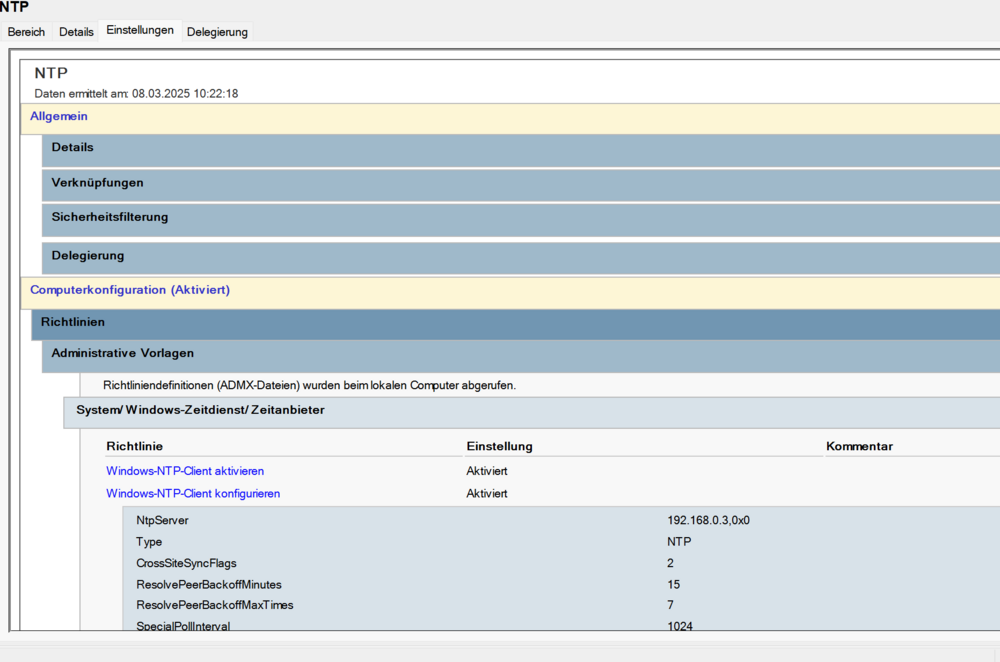
Du musst w32tm auch schon so konfigurieren, dass er ntp auch akzeptiert C:\Users\mam>w32tm /query /status Sprungindikator: 0(keine Warnung) Stratum: 4 (Sekundärreferenz - synchr. über (S)NTP) Präzision: -23 (119.209ns pro Tick) Stammverzögerung: 0.0215984s Stammabweichung: 0.0993635s Referenz-ID: 0xC0A80003 (Quell-IP: 192.168.0.3) Letzte erfolgr. Synchronisierungszeit: 08.03.2025 10:13:32 Quelle: 192.168.0.3 Abrufintervall: 12 (4096s) Hier gibts keine spezielle config, mein ntp server verteilt per broadcast, das kriegen windows Rechner ohne spezielle Konfiguration mit. Ansonsten Gruppenrichtlinie: Aber ohne Domänencontroller musste die in jeden Klienten einzeln einpflegen, kann recht müssig sein. (gibt auch ne "etwas längere" Kommandozeilenvariante. Hab ich aber hier nicht im Angebot, musse selber raussuchen. war irgendwas mit SYNCFROMFLAGS=NTP und NTPSERVER=... )
-
Nein, solange GPS Satelliten über uns kreisen und Signale aussenden 😘
-
Sadly I am suffering from the same effect since a few years already. And yeah, NUT does not really help too, it just retries and reastablishes communications for a few times. But after some days the USB Port ist totally locked up, only a reboot can reenabling it again. The same happens with a raspberry pi 😞 So the idea to put the NUT server onto the PI and make UNRAID just the NUT-Slave did not work either. The UPS' (got 2 of them, both are from Amazon "Amazon Basics") work flawlessly with Windows. The USB Link is stable for months. So I guess there is a serious problem in the USB driver for Linux. But it seems that too few people are affected so nobody takes care of the problem. (Sadly there is no NUT for Windows... else I would have connected the UPS to a 24/7 windows server and made UNRAID its slave once more) After some weeks of try & error I finally gave up. UNRAID is UPS-less here currently. So, if there is a real solution, inform me please.
-
Ja, scheint wirklich Abfragen zu erlauben. War mir bislang nicht aufgefallen. Brauch ich hier auch nicht wirklich, gibt andere Server für sowas.
-
Bist Du sicher, dass UNRAID auch Zeitinfos SENDET??? Hier in der Config (und ich kann mich nicht dran erinnern, jemals da was dran gemacht zu haben) LIEST er nur von einem Upstream Server und ansonsten sind die zur Abfrage erlaubten Klienten nur ::1 und 127.0.0.1 Und mit den Einstellungen in der GUI kann man ihn auch nicht zum Plauschen im LAN überreden... ntpq> pee remote refid st t when poll reach delay offset jitter ============================================================================== 127.127.1.0 .LOCL. 10 l 9d 64 0 0.000 +0.000 0.000 *192.168.0.3 255.76.216.21 3 u 484 1024 377 0.608 -3.223 3.105 ntpq> syssta uptime: 743281 sysstats reset: 743281 packets received: 819 current version: 800 older version: 0 bad length or format: 0 authentication failed: 0 declined: 0 restricted: 3 rate limited: 0 KoD responses: 0 processed for time: 799 Wie man sieht wird jede Fremdabfrage im Keim erstickt und "restricted" hochgezählt. Also hast Du da was dran gemacht oder ist das Wunschdenken???
-
you seem to run an NTP Server on your box (binds to ALL addresses Port 123). And you also seem to start it twice (or try to). This cannot work., So check out for rogue NTPD daemons... (This also can happen if you are running an NTP server and try to force clock synching with ntpdate (per cron?))
-
just disable it in the BIOS/UEFI and you are permanently done with it. The reenabling may happen if the new kernel rearranges found pci device into a different sequence. This can happen all the time and Unraid just notices, that the supposed ETH0 card is now ETH1 or vice versa. To play it safe (and guarantee LAN access after the reboot) it reenables the port. But, as already said, use the BIOS and it wont happen anymore.
-
The key is bound to the serial number of the stick. You cannot move it around freely. There is a procedure how to transfer it to a new stick, but then the old one gets blacklisted. Transfer can be dones once a year, if you need more, you need to contact support and explain to them why it is needed.
-
You are sure you have a Realtek 8125? No sign of it, instead: Jan 24 15:20:07 Tower kernel: Intel(R) 2.5G Ethernet Linux Driver And you are using tailscale ? for what?
-
My serious warning: stay away from Nextcloud AIO, it is a killer (and gets killed every few days) on UNRAID. First of all, uninstalling the dockers wont work, look at the docker's git page there is a "removal instruction" that needs to be followed stricktly. Then, follow the installation advices literally too, it can work, although you will not like the outcome. Even if it is running, it wont run for long because UNRAID's file permissions and Nextcloud's file permissions are different and cannot be set to a common and working value. So either UNRAID cannot read the data or Nextcloud refuses to start at all because permissions have been tampered with (for instance if you click on "set docker friendly permissions" in the GUI). You will not notice it directly but someday you will like to do a backup (Nextcloud comes with its own backup but this is only consuming time and space if the data is within an UNRAID array) or you want to offer them to the LAN with SMB or NFS. Nothing will work!!! So to prevent really painful experiences with potential data loss: STAY WAY! (but read and follow the deinstallation instructions, else there will always be reminders left on your system that prevent future new installations. Maybe someday AIO and UNRAID can play better together)
-
ok, I have disabled the button now and will monitor the syslog if it ever happens again.... (The proposed "switch it with reset button" is not suitable here. Both are side by side and glued together (dunno how to describe it in englisch, all buttons and LEDs are together sealed in a plastic stripe and glued onto the front of the cabinet.))
-
yeah I know, thats why I have set the title to "strange things". Maybe there is a way to tell this daemon that "3 presses in a row" are needed to start shutdown. A single short press is dangerous.
-
Yeah I know, but both are unlikely... The machine is in a 19" rack and the "button" is sealed and so small, that my fingers are too big to hit it, even if I wanted it. And even if you find it, the power to press it is beyond any critter... (ok, a tiger or lion maybe strong enough, but they wont be able to hit it with there claws. Also, there are very few (to no) wild animals running around in my (closed) garage... Maybe a mouse, but as I said, not strong enough) I will keep an open eye at it...
-
After upgrading to 7.0.1 earlier this morning, everything seemed to be ok. But whilst reading the newspaper (electronically, stored on UNRAID) the pdf reader suddenly stopped and after some mins of waiting told me that the share was not available anymore ?!?!? It turned out that whole unraid was "not available anymore". I had to go down to the garage to turn the machine back on. Checking the previous syslog, I found: Feb 26 10:54:22 F elogind-daemon[2104]: Power key pressed short. Feb 26 10:54:22 F elogind-daemon[2104]: Powering off... Feb 26 10:54:22 F init: Switching to runlevel: 0 Whatever this daemon things, there was nobody in the garage and nobody pressed any button! (the rest showed a clean shutdown, nothing bad happened) So what is this and how can I prevent it to happen again? (The garage is quite far away, its cold and raining... I don't want to run there every 2nd hour.)
-
Aber die kannste gar nicht in NPM installieren. Da musse Dir dann schon was Eigenes basteln. NPM ist ja eigentlich nur ein NGINX mit CERTBOT und ein paar Skripten, die die Konfigurationsdateien für NGINX automatisch erzeugen (und per cron den Certbot aufrufen um das Renew zu machen). Ist kein Hexenwerk. Das Namensproblem bleibt Dir aber trotzdem. Der Reverse Proxy nimmt ja alle Verbindungen über dieselber Adresse/Port an und unterscheidet immer nur nach Namen in der Anforderung wohin er weiterleiten soll.
-
na ja, ist ja auch logisch, oder? Du willst die Zertifikate von Letsencrypt. Wo sind die? richtig: im Internet Wie werden die überprüft bei der Ausstellung/Verlängerung? richtig: per Rückwärtsverbindung des Zertifikatiservers (aka: Die prüfen, ob es den Host auch gibt und ob er erreichbar ist). Somit geht das Ganze nur, für "offene" Systeme. (Du kannst allerdings auch die Lebenszeit damit verwenden, rauszukriegen, von welchen Adressen die Tests kommen und nur die im Firewall durchlassen, aber, das ist wahrscheinlich ein sehr müssiges und fehlerträchtiges Unterfangen) Kurzum: man kann nicht alles haben 🙂
-
Also ZFS auf keinen Fall ins Unraid Array! Du hast Deine Kiste noch nie so kriechen sehen vorher! Wie schon erwähnt, ZFS führt dauernd Hintergrundaktivitäten durch, sowas wie Defragmentierung und so weiter. Das führt dann unweigerlich zu Schreibaktionen. Wenn diese ZFS Platte dann Teil des Unraid Arrays mit Parität wäre, müsste jedesmal die Parity neu mitgeschrieben werden. Das alleine ist noch hinnehmbar, aber stell Dir vor Du hast 4 ZFS Platten im Array und jede optimiert so vor sich hin. Die eine schickt den Kopf auf Spur 999, die andere auf 4449 usw. Die Parity Platte muss das alles mitmachen, und nach wenigen Minuten ist Deine Kiste tot, weil sie nicht mehr nachkommt und alle Prozesse stoppt! Das willst Du nicht! Also: wenn UNRAID Array, dann xfs ZFS geht in einem Pool. Man kann mit ZFS auch eigene Arrays mit normalem RAID einrichten, aber niemals mit UNRAID mischen!!!
-
Aber doch wohl nicht dieselben Ports... Der NPM ermittelt die Weiterleitungen anhand der Hostnamen, Du darfst also die internen Seiten dann nicht über IP Adresse aufrufen, sondern musst den Namen nehmen. (Warum jemand allerdings intern unbedingt verschlüsseln will, erschliest sich mir nicht ?!?!?) Und bei den Namen musst Du aufpassen, sie müssen ÜBERALL auflösbar sein, nicht nur intern! Es ist also quasi unmöglich, über NPM einen Host einzubinden, der NICHT über Internet erreichbar ist. (Wenn Die Auflösung / Weiterleitung nicht funktioniert, landest Du je nach Einstellung im NPM entweder auf der "Homepage", einer Fehlerseite oder auf einer zentralen Umleitungsseite. Aber das hast Du ja inzwischen selber rausgefunden 🙂 )
-
yeah, but because the port is disabled now, it does not change a thing (also, since there are no computers and not even a cable attached to that card, it does not make any sense) To "clean" up, I would disable bridging on eth1, set address mode to "automatic" (DHCP) and delete every manual setting (address, gateway etc. The warning at the extras should disappear then too. (Maybe even disable the card in the bios so it does not show up at all anymore)
-
No Problem, I'm used to noobs the last 40yrs already 🙂 First of all, you still have bonding enabled on eth1. TURN IT OFF Then, you have given both cards addresses within the 192.168.1.X net, thats wrong. Either chose a different net for eth1 or turn this card OFF completely (You dont need it, believe me). Best click on "Port Down" for eth1, this will disable the card completely and it does not harm anymore. Interface rules are ok already ("atlantic" is already eth0 thats fine) (btw you have set your comments wrongly eth1 is "1G" and eth0 is "10G")
-
the grey stuff is correct. you first have to free eth1 from bond1 to make it available for bond0 But, as I have already said, you do not need any bonding...
-
No, what you did was to create an bond in active backup mode but only put just ONE card into these bonds. Now, instead of creating a failover configuration, you have TWO bonds with ONE card each (and the same settings). This is just russian roulette... every boot the dice will be thrown. Either put both cards into the same bond ("Member of Bond: eth0,eth1"), or disable bonding completely (it does not make much sense in a home environment) and create "network rules" to define the 10G card as eth0 (and disable eth1).
-
you are sure you are not trying through some kind of reverse proxy???
-
usually not. This is just a warning, and a false one too. You need to adjust the warning / cut off temperatures for this drive in the settings. SSDs (and particually NVMe) can work at much higher temp. Look into the datasheet of your drive. 65 usually works with all drives, some can even sustain 75° and up to 85° peak. Maybe your filemanager action collided with automatic mover in the background? should not happen, but CAN happen...
-
Be prepared that you will need to redo the network settings. It is very unlikely that a new MoBo will contain the same LAN Chips and uses the same PCI bus numbering. So the LAN cards will change and need to be reassigned. The HBA does not matter as long UNRAID can handle the new one. Also, the drive positions does not matter because UNRAID identifies the drives by their ID. You can move them around freely normally... Normally? Yeah there is a small risk that the points above do not work. If the current HBA does not run in "IT" (JBOD) mode but handles the drives himself, it often happens that the "names" (IDs) of the drives are tampered. The new HBA will surely not know how to emulate this so UNRAID sees "new" drives instead of finding back the old ones. In this case you need to delete the old config and start up totally new. (and there is also a risk that the new HBA cannot read the old ones formatting scheme... VERY BAD LUCK!) But as I said, its rare. You can now already take a look at the drive's IDs and if they look "sane" (serial numbers) there should be no problem afterwards.


