





Pete0
Members
-
Joined
-
Last visited
Everything posted by Pete0
-
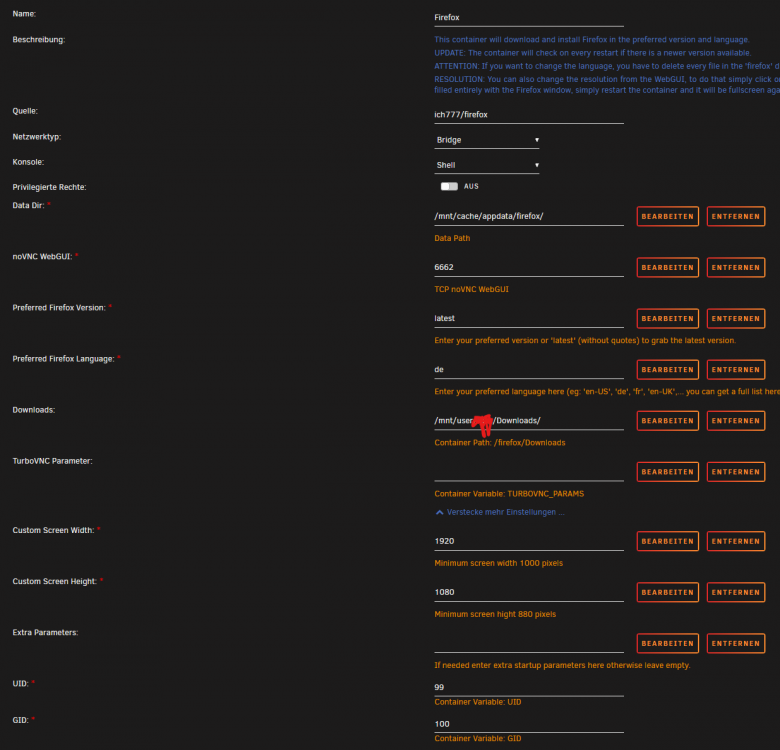
@ich777 some time ago I had this issue Today I am having exact same problem but I think this time I did not mess up any configuration, see picture: Or, at least I hope I did notwhing wrong. Last time I fixed it by removing and reinstalling the contianer. The suggestions you made last time did not help. Not sure what is going wrong here. All I know is that I hadn't the container running for a couple of weeks but the contianer was updated multiple times meanwhile. Edit: a fresh installation fixed it again but having to configure everything again sucks.
-
The german Unraid page shows this link in the "blog" section. Could this be some forgotten news creation? The link leads to an empty page though. https://unraid.net/de/blog/unraid-os-6-10-stable
-
Not sure how stable an unraid RC is but I'd rather stay on stable builds. Missing temperature and fan sensors isn't worth any possible risk.
-
No, I'm on stable.
-
Bekommst du auch Fehler wenn die MX500 nicht im Raid1 läuft sondern statdessen als einzelne Platte als Cache? Bis vor Kurzem hatte ich auch zwei MX500 SSDs in Raid1 genutzt und hatte keinerlei Probleme. Vielleicht ist eine der Platten defekt?
-
You sure thats the MB temperature? It says amdgpu. I think 'MB Temp' is set by the plugin. Or does the internal GPU count as MB temperature? Then I wonder why my CPU temperature is detected but not the internal GPU of the 4350.
-
Same here. The fan plugin does not detect any fan. On my previous board I thought that I did not need the fan plugin for the CPU/case fans to show up. They were all detected by the sensors plugin. I have found one possible workaround to set acpi_enforce_resources=lax But I am not sure if this wise to do so. It has risks and even the page itself does not suggest this workaround.

-
I don't have the fan speed plugin installed. Only the sensors plugin.
-
-
# sensors-detect version 3.6.0 # Board: ASUSTeK COMPUTER INC. ROG STRIX B550-I GAMING # Kernel: 5.10.28-Unraid x86_64 # Processor: AMD Ryzen 3 PRO 4350G with Radeon Graphics (23/96/1) This program will help you determine which kernel modules you need to load to use lm_sensors most effectively. It is generally safe and recommended to accept the default answers to all questions, unless you know what you're doing. Some south bridges, CPUs or memory controllers contain embedded sensors. Do you want to scan for them? This is totally safe. (YES/no): Silicon Integrated Systems SIS5595... No VIA VT82C686 Integrated Sensors... No VIA VT8231 Integrated Sensors... No AMD K8 thermal sensors... No AMD Family 10h thermal sensors... No AMD Family 11h thermal sensors... No AMD Family 12h and 14h thermal sensors... No AMD Family 15h thermal sensors... No AMD Family 16h thermal sensors... No AMD Family 17h thermal sensors... No AMD Family 15h power sensors... No AMD Family 16h power sensors... No Hygon Family 18h thermal sensors... No Intel digital thermal sensor... No Intel AMB FB-DIMM thermal sensor... No Intel 5500/5520/X58 thermal sensor... No VIA C7 thermal sensor... No VIA Nano thermal sensor... No Some Super I/O chips contain embedded sensors. We have to write to standard I/O ports to probe them. This is usually safe. Do you want to scan for Super I/O sensors? (YES/no): Probing for Super-I/O at 0x2e/0x2f Trying family `National Semiconductor/ITE'... No Trying family `SMSC'... No Trying family `VIA/Winbond/Nuvoton/Fintek'... Yes Found `Nuvoton NCT6798D Super IO Sensors' Success! (address 0x290, driver `nct6775') Probing for Super-I/O at 0x4e/0x4f Trying family `National Semiconductor/ITE'... No Trying family `SMSC'... No Trying family `VIA/Winbond/Nuvoton/Fintek'... No Trying family `ITE'... No Some systems (mainly servers) implement IPMI, a set of common interfaces through which system health data may be retrieved, amongst other things. We first try to get the information from SMBIOS. If we don't find it there, we have to read from arbitrary I/O ports to probe for such interfaces. This is normally safe. Do you want to scan for IPMI interfaces? (YES/no): Probing for `IPMI BMC KCS' at 0xca0... No Probing for `IPMI BMC SMIC' at 0xca8... No Some hardware monitoring chips are accessible through the ISA I/O ports. We have to write to arbitrary I/O ports to probe them. This is usually safe though. Yes, you do have ISA I/O ports even if you do not have any ISA slots! Do you want to scan the ISA I/O ports? (yes/NO): Lastly, we can probe the I2C/SMBus adapters for connected hardware monitoring devices. This is the most risky part, and while it works reasonably well on most systems, it has been reported to cause trouble on some systems. Do you want to probe the I2C/SMBus adapters now? (YES/no): Using driver `i2c-piix4' for device 0000:00:14.0: AMD KERNCZ SMBus Module i2c-dev loaded successfully. Next adapter: SMBus PIIX4 adapter port 0 at 0b00 (i2c-0) Do you want to scan it? (YES/no/selectively): Client found at address 0x18 Probing for `Analog Devices ADM1021'... No Probing for `Analog Devices ADM1021A/ADM1023'... No Probing for `Maxim MAX1617'... No Probing for `Maxim MAX1617A'... No Probing for `Maxim MAX1668'... No Probing for `Maxim MAX1805'... No Probing for `Maxim MAX1989'... No Probing for `Maxim MAX6655/MAX6656'... No Probing for `TI THMC10'... No Probing for `National Semiconductor LM84'... No Probing for `Genesys Logic GL523SM'... No Probing for `Onsemi MC1066'... No Probing for `Maxim MAX1618'... No Probing for `Maxim MAX1619'... No Probing for `National Semiconductor LM82/LM83'... No Probing for `Maxim MAX6654'... No Probing for `Maxim MAX6690'... No Probing for `Maxim MAX6680/MAX6681'... No Probing for `Maxim MAX6695/MAX6696'... No Probing for `Texas Instruments TMP400'... No Probing for `Texas Instruments AMC6821'... No Probing for `National Semiconductor LM95233'... No Probing for `National Semiconductor LM95234'... No Probing for `National Semiconductor LM95235'... No Probing for `National Semiconductor LM95245'... No Probing for `National Semiconductor LM64'... No Probing for `SMSC EMC1047'... No Probing for `SMSC EMC1402'... No Probing for `SMSC EMC1403'... No Probing for `SMSC EMC1404'... No Probing for `ST STTS424'... No Probing for `ST STTS424E'... No Probing for `ST STTS2002'... No Probing for `ST STTS3000'... No Probing for `NXP SE97/SE97B'... No Probing for `NXP SE98'... No Probing for `Analog Devices ADT7408'... No Probing for `IDT TS3000/TSE2002'... No Probing for `IDT TSE2004'... No Probing for `IDT TS3001'... No Probing for `Maxim MAX6604'... No Probing for `Microchip MCP9804'... No Probing for `Microchip MCP9808'... No Probing for `Microchip MCP98242'... No Probing for `Microchip MCP98243'... No Probing for `Microchip MCP98244'... No Probing for `Microchip MCP9843'... No Probing for `ON CAT6095/CAT34TS02'... No Probing for `ON CAT34TS02C'... No Probing for `ON CAT34TS04'... No Probing for `Atmel AT30TS00'... No Probing for `Giantec GT30TS00'... No Client found at address 0x50 Probing for `Analog Devices ADM1033'... No Probing for `Analog Devices ADM1034'... No Probing for `SPD EEPROM'... Yes (confidence 8, not a hardware monitoring chip) Probing for `EDID EEPROM'... No Next adapter: SMBus PIIX4 adapter port 2 at 0b00 (i2c-1) Do you want to scan it? (YES/no/selectively): Next adapter: SMBus PIIX4 adapter port 1 at 0b20 (i2c-2) Do you want to scan it? (YES/no/selectively): Client found at address 0x49 Probing for `National Semiconductor LM75'... No Probing for `National Semiconductor LM75A'... No Probing for `Dallas Semiconductor DS75'... No Probing for `National Semiconductor LM77'... No Probing for `Analog Devices ADT7410/ADT7420'... No Probing for `Maxim MAX6642'... No Probing for `Texas Instruments TMP435'... No Probing for `National Semiconductor LM73'... No Probing for `National Semiconductor LM92'... No Probing for `National Semiconductor LM76'... No Probing for `Maxim MAX6633/MAX6634/MAX6635'... No Probing for `NXP/Philips SA56004'... No Probing for `SMSC EMC1023'... No Probing for `SMSC EMC1043'... No Probing for `SMSC EMC1053'... No Probing for `SMSC EMC1063'... No Client found at address 0x52 Probing for `Analog Devices ADM1033'... No Probing for `Analog Devices ADM1034'... No Probing for `SPD EEPROM'... No Client found at address 0x73 Probing for `FSC Poseidon I'... Invalid negative number (-1) in chr at /usr/sbin/sensors-detect line 6351, <STDIN> line 8. No Probing for `FSC Poseidon II'... No Probing for `FSC Scylla'... No Probing for `FSC Hermes'... No Probing for `FSC Heimdal'... No Probing for `FSC Heracles'... No Probing for `FSC Hades'... No Probing for `FSC Syleus'... No Client found at address 0x77 Probing for `Asus Mozart-2'... No Now follows a summary of the probes I have just done. Just press ENTER to continue: Driver `nct6775': * ISA bus, address 0x290 Chip `Nuvoton NCT6798D Super IO Sensors' (confidence: 9) Do you want to generate /etc/sysconfig/lm_sensors? (yes/NO): To load everything that is needed, add this to one of the system initialization scripts (e.g. /etc/rc.d/rc.local): #----cut here---- # Chip drivers modprobe nct6775 /usr/bin/sensors -s #----cut here---- You really should try these commands right now to make sure everything is working properly. Monitoring programs won't work until the needed modules are loaded. Unloading i2c-dev... OK @spl147
-
Any tips for me running a ASUS B550-i Strix Gaming? All I get to work is the CPU temperature. Mainboard and all Fans are missing. If I understand correctly the kernel support for my board gets better with kernen 5.17 but the current 6.10.0 RC4 will only come with kernel 5.15.
-
I think I found the problem. In /boot/config/go I have set powertop to auto tune on startup and it seems like this does not play well with hard drives connected to the controller. On the previous board I only had a optical disc drive connected to it. Thats a bummer, now I will have to rebuild parity and figure out something so I can keep on using powertop.
-
Hello. Some time ago today I have changed my mainboard from an ASRock to an ASUS. The Asus has two less SATA ports and thus I am using a SATA controller card, this one: https://www.delock.de/produkt/90010/merkmale.html?setLanguage=en On the first boot I was glad to see that all drives were detected. The array was not started yet because I start it manually. The first start failed and I have seen multiple I/O errors on always the same drive. It is a drive that is connected on the SATA controller. One of the disks is now marked as disabled. Not sure if the disk is actually failing or the controlelr is not playing well. I powered off the computer and unplugged both WD Red drives connected to the controller and started again. Starting the array shows less errors but the disk remains disabled. I guess the disabled state wouldn't have changed anyway. I will have to rebuild but now I am wondering if I should at all if the controller is not working properly. The diagnostic is attached, hope somebody can help unraid-diagnostics-20220327-2027.zip
-
Thank you for clarification. I will leave the UID everywhere at 99. I deleted the container (including the directory appdata) and reinstalled again. Now everything works fine again. I guess you are right, that I messed up something with the UID. Sorry for that.
-
This was set by me. In that case I might have misunderstood what I was setting there. I have set it to 1000 because this is the user ID for my user in unraid. I got it from /etc/passwd. And I have set it to 1000 because I thought this would write the downloaded files with permissions to my user since the files are downloaded to my users share. Am I wrong here? I changed the UID to 99 but this did not fix the problem.
-
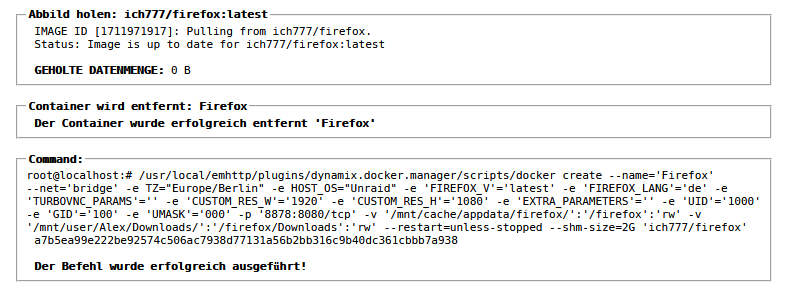
@ich777 I have changes in the template but this settings were running without problems couple of days ago. I did as you asked. Not sure which information you are looking for. That's what it looked like before the update: The update: The problem still persists. Note: I have the access password protected as you have described it in the pinned reply on the first page of this thread.

-
Today when I tryed to start the Firefox docker I was unable to connect to it. It was working fine couple of days ago. Checking the log file I see this in a lopp. ---Firefox v98.0.2 up-to-date--- ---Preparing Server--- ---Resolution check--- ---Checking for old logfiles--- ---Checking for old display lock files--- ---Starting TurboVNC server--- ---Starting Fluxbox--- ---Starting noVNC server--- WebSocket server settings: - Listen on :8080 - Web server. Web root: /usr/share/novnc - No SSL/TLS support (no cert file) - Backgrounding (daemon) ---Starting Firefox--- Unable to init server: Could not connect: Connection refused Error: cannot open display: :99
-
I see. Thank you. I did not yet destroy the drive. I might give it another try soon and check it again.
-
@trurl sorry for not having replied to you. I did not bother with the diagnostics and simply replaced the failed drive with a new one. Currently my system is running fine, no more read/write errors so I guess this topic here is done. Thank you for your help.
-
@Asgard da du dich für meinen Verbrauch interessiert hast.
-
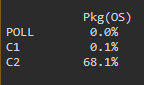
Ich bin heute auch dazu gekommen mein Server kurz zu testen. Zum Testen habe ich ein Brennstuhl Energiemessgerät verwendet. ASRock B550m Pro 4 AMD 3700x 1 Riegel Kingston Server Premier DIMM 16GB, DDR4-3200, CL22-22-22, ECC Keine GPU 2x Seagate 4 TB IronWolf 2x WD Red 4 TB 2x SSD Cruciam MX500 500 GB 4 Gehäuselüfter und ein Lüfter auf dem CPU Kühler Une ein USB2.0 Stick mit Unraid drauf. Kurz nach dem Start, Festplatten waren noch nicht im Spindown hat das Gert etwa 40 Watt angezeigt. Ich habe alle mechanischen Festplatten dann manuell in den Spindown geschickt und das Gerät hat etwa 29 Watt angezeigt. Bei 29, also Idle, sitzt es gerade. Später teste ich mal den Verbrauch, wenn ich ein FIlm schaue oder wenn ich mit Handbrake etwas Encode. Ich muss sagen, dass ich positiv überrascht. 29 Watt ist echt in Ordnung im Idle, oder? Einzig verwirrend ist für mich, dass powertop mir keinen höheren C-State als C2 anzeigt. Ich weiß nicht, ob das normal ist. Sollte es nicht auch in höhrere gehen?
-
Ich sehe in meinem Systemprotokoll den gleichen Fehler. Das trat das erste Mal auf, als ich meine FritzBox als NTP Server gesetzt habe. Alle Einstellungen waren richtig und dennoch sah ich den Fehler. Plus, der Zeitstempel im Systemprotokoll war um einige Stunden falsch. Jetzt habe ich gerade wieder nachgeschaut und finde nichts mehr im Protokoll und der Zeitstempel passt auch. Hast du die Einstellung jetzt erst geändert? Was ich auch gemacht habe ist die Zeit im BIOS nochmal eingestellt über # hwclock --systohc Ich war mir nicht mehr sicher, ob meine BIOS Zeit richtig eingestellt war. Ich hatte aber auch keine GPU mehr verbaut um das zu prüfen. Also bei mir scheint sich das Problem von alleine gelöst zu haben nach einiger Zeit. Ich habe sonst nichts geändert.
-
In Adminer, is there a way to have the server input with a different value than db? In my case the IP to the single database server I have?
-
Sorry to bother again. Yesterday I have replaced the faulty drive with a "new" one. New is in quotes because this is an identical WD Red 4 TB drive to the one that I replaced but this one was unused for about 5 years. It was still sealed. Having added it yesterday and rebuild parity I started about one hour ago to fill it with data and it didn't take long and unraid started to show read errors. Currently it is as 625 read/write errors. This was no problem while the parity was building. Is this drive failing too? Edit: ok, nevermind. It just failed. unraid-smart-20220215-0448.zip
-
Thank you for clarification @JorgeB




