





EdgarWallace
Members
-
Joined
-
Last visited
Everything posted by EdgarWallace
-
Sorry for confusion I caused. I meant that I am getting the same error messages that his screen shot showed. For further clarification I attached the IPMI screen shot
-
It is a Dell PERC H200, please see my signature: unRAID Test & Backup: 6.3.3 Pro, Supermicro X9SCL-F, XEON E3-1240V2, AOC-SAS2LP-MV8 trying to flash a Dell PERC H200 to IT Mode
-
Thanks a lot Fireball, this explains my issues. I am still confused though. This was my first landing page: I clicked in Dell Perc H200 dedicated instructions link: This is where I got the file from and the message "Tested on a stock H310 as well as a H200" made me think that I used the right material. What should I use instead? Thanks a lot.
-
I am having the same issue as yaldex. I was using: How were you solving your issues?
-
Ahh, so similar to the ASUS board that I had. Can anyone who owns this board confirm? thank you very much @saarg.
-
I am having a new board (Supermicro - X11SSL-CF) and installed the System Temp as well as the Fan Auto Control plugin. System Temp was detecting just the coretemp driver, Fan Auto Control wasn't detecting any of my PWM fan controllers. A cross check with the IPMI plugin is showing all relevant information, what have I done wrong?
-
Oh, that easy .... Thank you very much .
-
Is there any way to avoid that nextcloud.log is accessing one of the disks but rather writing to the cache drive? Appdata would be great.
-
I saw that my disk3 isn't spinning down. This is what the File Activity is showing: Disk 3 2017-02-14 09:15 => /mnt/disk3/Cloud_Data/nextcloud.log Is the nextcloud log preventing disk3 from spinning down?
-
Awesome
-
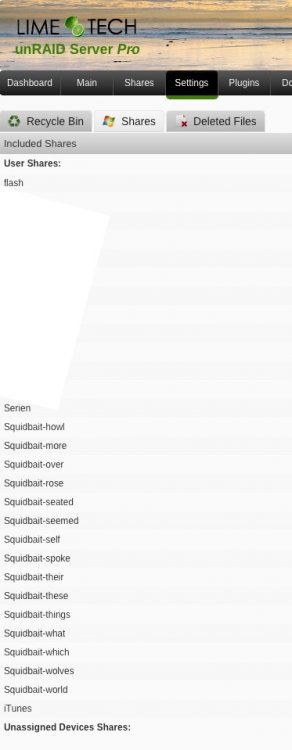
Here you are ... I have already excluded as much as possible. Thank you very much for looking into this.
-
I really like the new "Exclude Shares" option. However the entry field seems to be limited. I was trying the exclude all Ransom Ware shares but it seems that they are too many. Is is possible to exclude all shares of these share with one single entry e.g. Squidbait* ?
-
Are you sure having the lastest firmware installed? I am using a X11SSM-CF, having 1.15 installed and can't see this error in my log.
-
Try a relative folder. ie: only type in emby/cache and emby/metadata Thanks a lot Squid, that was doing the trick... and I had to remove the space between the two items.
-
I have an issue with excluding files. Here is the view on dynamic.file.integrity.cfg: disks="" service="1" method="-b2" cmd="a" exclude=".AppleDB,.Recycle.Bin,AppdataBackup,Cloud_Data,Datenaustausch,Squidbait-animals,Squidbait-back,Squidbait-began,Squidbait-cr ossed,Squidbait-foliage,Squidbait-howl,Squidbait-more,Squidbait-over,Squidbait-rose,Squidbait-seated,Squidbait-seemed,Squidbait-self ,Squidbait-spoke,Squidbait-their,Squidbait-these,Squidbait-things,Squidbait-what,Squidbait-which,Squidbait-wolves,Squidbait-world,TM A,TMO" schedule="0" parity="1" notify="-n" log="-L -f" priority="" folders="" files="*.nfo,*.dump,*.xml,*.tmp" apple="on" place="SystemInformation" The main issue is that nfo, xml and tmp files are still being checked so that 2 disks are showing missing "Build up-to-date" and "Export up-to-date" every day. Anything that I need to correct? Thanks a lot.
-
I would like to understand if I have done something wrong with excluding folders. This is the specific line of BackupOptions.json: "excluded": "/mnt/user/system/docker/appdata/emby/cache, /mnt/user/system/docker/appdata/emby/metadata", However all Emby metadata as well as the Emby cache is being saved every day. Anything I need to correct in the definition above? Thanks a lot.
-
I assume because we've updated the container to V10. (Not V11 yet, Sparklyballs is checking dependencies) Perhaps a fresh install and then copy the relevant bits of config.php might work better. Thanks a lot CHBMB, I activated the apps within the database table. That worked but it is not ideal. That means the issue might be caused by MariaDB (I am using Needo's Docker).
-
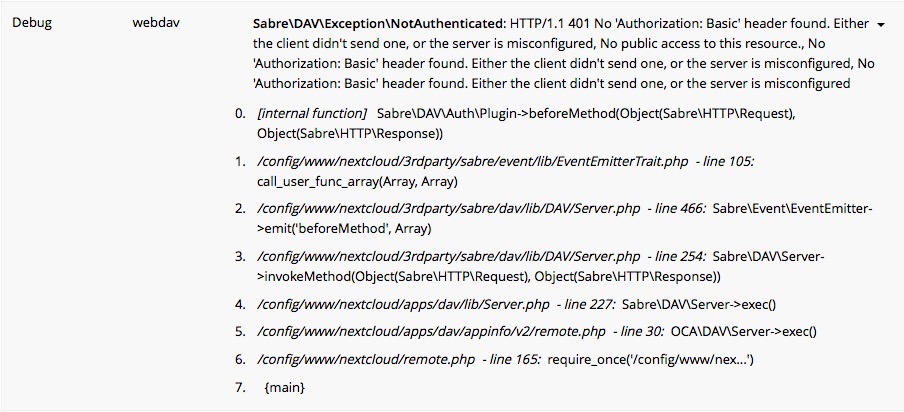
I was trying a couple of things: I removed Nextcloud including all appdata and reinstalled from scratch stopped Nextcloud copied just config.php from my old version started Nextcloud Nextcloud told me that it is forbidden to downgrade to version 9.x This is the file I copied: http://pastebin.com/awawUmLx So I used my backup and have the old status. Interestingly enough both calendar and contacts are syncing but I am getting the error messages below. I guess that I would need a fresh install but why was the approach above not working?
-
No matter what I try - can't get these 2 important apps activated. In fact I can't activate any app :-o According to this link: https://help.nextcloud.com/t/how-to-install-activate-apps-like-mail-contacts-and-calendar/5378/23 here I added these lines into my config.php without any effect: 'appstoreenabled' => true, 'appstoreurl' => 'https://apps.nextcloud.com/api/v0', Is no one else having these issue?
-
Well, I was trying to upgrade the apps via NextCloud menu. File Sync is working just fine so that is an indicator that it left Maintenance Mode (it reported that as well)
-
Great guides CHBMB much appreciated. However I had to stop at the "Once all is confirmed as working" step :-) I just upgraded and having difficulties to activate calendar and contacts: 2016/12/15 08:37:31 [error] 309#0: *1 FastCGI sent in stderr: "Primary script unknown" while reading response header from upstream, client: 192.168.178.21, server: _, request: "PROPFIND /nextcloud/remote.php/webdav/ HTTP/1.1", upstream: "fastcgi://127.0.0.1:9000", host: "192.168.178.28:444" 2016/12/15 08:37:31 [error] 309#0: *1 FastCGI sent in stderr: "Primary script unknown" while reading response header from upstream, client: 192.168.178.21, server: _, request: "PROPFIND /nextcloud/remote.php/webdav/ HTTP/1.1", upstream: "fastcgi://127.0.0.1:9000", host: "192.168.178.28:444" 2016/12/15 08:38:03 [error] 309#0: *12 FastCGI sent in stderr: "PHP message: {"reqId":"0z6FKw2hdXuM52WxHvye","remoteAddr":"192.168.178.21","app":"PHP","message":"touch(): Utime failed: Permission denied at \/config\/www\/nextcloud\/lib\/private\/Config.php#229","level":3,"time":"2016-12-15T07:38:03+00:00","method":"GET","url":"\/nextcloud\/status.php","user":"--","version":""} PHP message: {"reqId":"0z6FKw2hdXuM52WxHvye","remoteAddr":"192.168.178.21","app":"PHP","message":"fopen(\/config\/www\/nextcloud\/config\/config.php): failed to open stream: Permission denied at \/config\/www\/nextcloud\/lib\/private\/Config.php#230","level":3,"time":"2016-12-15T07:38:03+00:00","method":"GET","url":"\/nextcloud\/status.php","user":"--","version":""} PHP message: {"reqId":"0z6FKw2hdXuM52WxHvye","remoteAddr":"192.168.178.21","app":"PHP","message":"chmod(): Operation not permitted at \/config\/www\/nextcloud\/lib\/private\/Config.php#233","level":3,"time":"2016-12-15T07:38:03+00:00","method":"GET","url":"\/nextcloud\/status.php","user":"--","version":""} PHP message: {"reqId":"0z6FKw2hdXuM52WxHvye","remoteAddr":"192.168.178.21","app":"remote","message":"Can't write into config directory!","level":4,"time":"2016-12-15T07:38:03+00:00","method":"GET","url":"\/nextcloud\/status.php","user":"--","version":""} PHP message: {"reqId":"0z6FKw2hdXuM52WxHvye","remoteAddr":"192.168.178.21","app":"PHP","message":"chmod(): No such file or directory at \/config\/www\/nextcloud\/lib\/private\/Log\/File.php#119","level":3,"time":"2016-12-15T07:38:03+00:00","method":"GET","url":"\/nextcloud\/status.php","user":"--","version":""}" while reading response header from upstream, client: 192.168.178.21, server: _, request: "GET /nextcloud/status.php HTTP/1.1", upstream: "fastcgi://127.0.0.1:9000", host: "192.168.178.28:444" 2016/12/15 08:38:25 [error] 309#0: *1 open() "/config/www/nextcloud/images/thumbs/05.jpg" failed (2: No such file or directory), client: 172.17.0.1, server: _, request: "GET /nextcloud/images/thumbs/05.jpg HTTP/1.1", host: "192.168.178.28:443", referrer: "https://192.168.178.28/nextcloud/" 2016/12/15 08:38:25 [error] 309#0: *2 open() "/config/www/nextcloud/assets/js/jquery.min.js" failed (2: No such file or directory), client: 172.17.0.1, server: _, request: "GET /nextcloud/assets/js/jquery.min.js HTTP/1.1", host: "192.168.178.28:443", referrer: "https://192.168.178.28/nextcloud/" 2016/12/15 08:38:25 [error] 309#0: *4 open() "/config/www/nextcloud/assets/js/util.js" failed (2: No such file or directory), client: 172.17.0.1, server: _, request: "GET /nextcloud/assets/js/util.js HTTP/1.1", host: "192.168.178.28:443", referrer: "https://192.168.178.28/nextcloud/" 2016/12/15 08:38:25 [error] 309#0: *1 FastCGI sent in stderr: "Primary script unknown" while reading response header from upstream, client: 172.17.0.1, server: _, request: "GET /nextcloud/images/thumbs/05.jpg HTTP/1.1", upstream: "fastcgi://127.0.0.1:9000", host: "192.168.178.28:443", referrer: "https://192.168.178.28/nextcloud/" 2016/12/15 08:38:25 [error] 309#0: *3 open() "/config/www/nextcloud/assets/js/jquery.poptrox.min.js" failed (2: No such file or directory), client: 172.17.0.1, server: _, request: "GET /nextcloud/assets/js/jquery.poptrox.min.js HTTP/1.1", host: "192.168.178.28:443", referrer: "https://192.168.178.28/nextcloud/" 2016/12/15 08:38:25 [error] 309#0: *2 FastCGI sent in stderr: "Primary script unknown" while reading response header from upstream, client: 172.17.0.1, server: _, request: "GET /nextcloud/assets/js/jquery.min.js HTTP/1.1", upstream: "fastcgi://127.0.0.1:9000", host: "192.168.178.28:443", referrer: "https://192.168.178.28/nextcloud/" 2016/12/15 08:38:25 [error] 309#0: *4 FastCGI sent in stderr: "Primary script unknown" while reading response header from upstream, client: 172.17.0.1, server: _, request: "GET /nextcloud/assets/js/util.js HTTP/1.1", upstream: "fastcgi://127.0.0.1:9000", host: "192.168.178.28:443", referrer: "https://192.168.178.28/nextcloud/" 2016/12/15 08:38:25 [error] 309#0: *3 FastCGI sent in stderr: "Primary script unknown" while reading response header from upstream, client: 172.17.0.1, server: _, request: "GET /nextcloud/assets/js/jquery.poptrox.min.js HTTP/1.1", upstream: "fastcgi://127.0.0.1:9000", host: "192.168.178.28:443", referrer: "https://192.168.178.28/nextcloud/" Any step that I missed? Thanks for any advise.

-
Thanks to gridrunner and Peter_SM. I was able to upgrade my El Capitan --> macOS Sierra. Only issue is that Clover Configurator keep telling me: Current booted revision: 3579 Remote available revision: 3949 Update via Clover Configurator doesn't work. Any ideas? Thanks a lot.
-
Thanks ljm42, this is my understanding here as well.
-
My interpretation is that I am using http://[iP]:[PORT:8096]/emby/ instead of http://[iP]:[PORT:8096]/ which is correct as I am using Emby over a Reverse Proxy
-
I have these messages for 3 dockers since today: As a general rule, if the plugin is not known to Community Applications, then it is not compatible with your server. It is recommended to uninstall this plugin. The webUI the author specified is http://[iP]:[PORT:8096]/ and the webUI you are using is http://[iP]:[PORT:8096]/emby/. This is the case for all Dockers that are connected via reverse proxy. I can certainly ignore these messages the question is why this message is coming up now. I guess that the check of the webUI author's specification is by design and doesn't include the check if a reverse proxy is involved?


