zarkoff
Members
-
Joined
-
Last visited
Everything posted by zarkoff
-
Hi, Thank you for the update. I worked like a charm for me (from 6.2.14).
-
Dear @Frank1940 Ahh !! that's it. After I updated to 6.12.14, my shares showed a strange icon. (like a red round, I didn't think to take a screenshot). So I have edited the shares, and the icon came back to normal, but I didn't realise taht it had also added this strange value to all shares I've edited ! See in the video, when I create a new share, a "by_default" super high value is auto filled... Is there a way to change this ?? 20241203-1931-52.1598715.mp4 Many thanks for your precious help !! I don't think this is linked to the new version to be honnest... ... just a collateral dammage. 🙂
-
Here is my diagnostic zip. Even in file manager, so I don't know what to do... zarklab-diagnostics-20241203-0028.zip
-
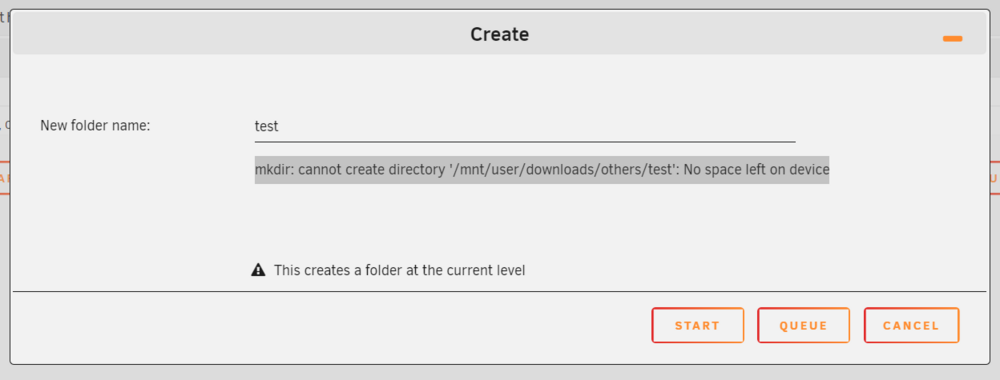
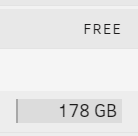
Hi, After the upgrade, I've a problem with Shares (they are public SMB). In Windows I can list and delete files, but if I want to write I've an error message indicating that I don't have enough space (and that's not true). Only 1 share still work, this one is indicating that "Some or All files unprotected" Same with Docker App Krusader (file manager), I can't copy file anymore Krusader can't write. I'm far to be a power user... can you help me correcting this ?
-
hello, I would be interrested by Kyoo - an alternative to Plex/Jellyfin. https://github.com/zoriya/Kyoo/tree/master with an example here https://kyoo.zoriya.dev/fr There is a docker install (https://github.com/zoriya/Kyoo/blob/master/INSTALLING.md) but I do not understand how to use the "env" file. Thank you.
-
Ok I answer to myself: First install "Postgres12.5" docker (define login, password, database name in the template -- example zarkoff, strongpassword, linkwardenDB) Also I used a "Custom Network" instead of "Bridge", --example ip is 192.168.1.80 (port 5432 if you do not change it) Then install Linkwarden, In Network type, put the same "Custom Network" on line DATABASE_URL, put (if you consider all elements in example here) postgresql://zarkoff:[email protected]:5432/linkwardenDB And it works...
-
Ah Ok, so I'll change it back to 'Auto' Many thanks for your help.
-
Ah ok, that's true that I did the change after the update of UD... so at the end I don't know what really solves (update or change in settings), so I suggest you do the both :-). Thank you.
-
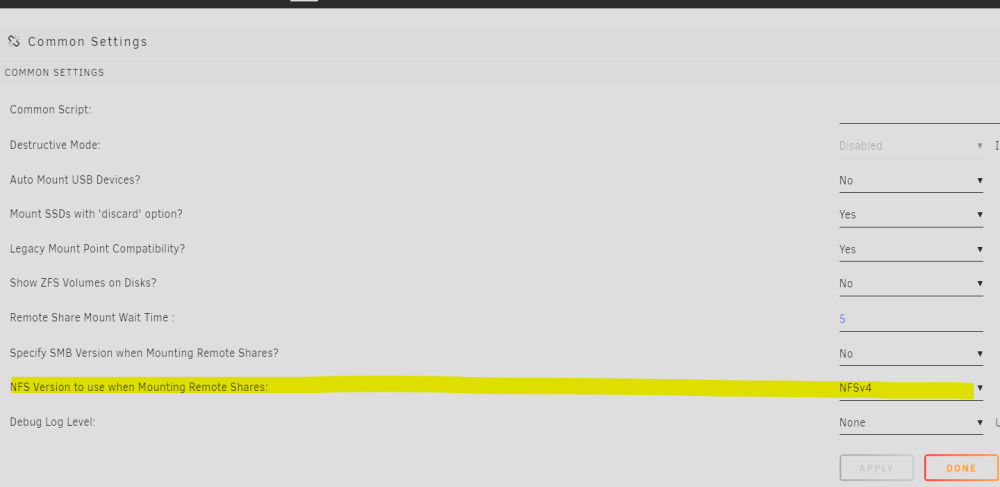
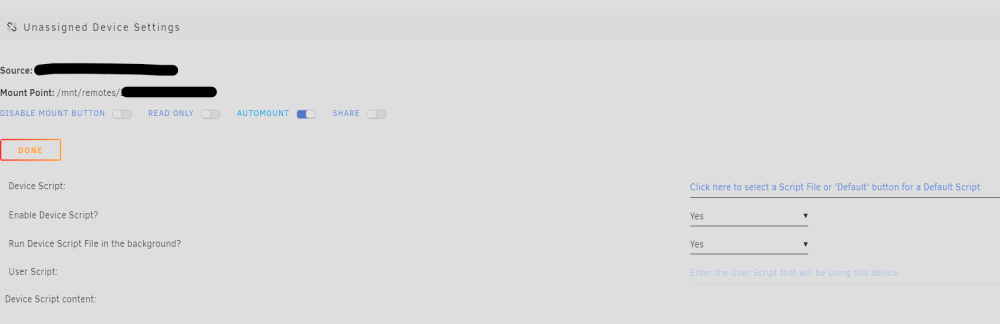
Hello, I confirm it solves my problem too. Many thanks !! attached a screenshot for those who want to do the same change in 'Unassiged Devices' setting too :
-
Hi Thank you for your answer. In Synonlogy (DSM), NFSv2, NFSv3 and NFSv4 are all activated... and I'm not an expert but what I understand is that the version is determined by the way it is mounted. On Synology - DSM (https://kb.synology.com/en-id/DSM/help/DSM/AdminCenter/file_winmacnfs_nfs?version=7)I read this: "When mounting, the parameter -o vers=2, -o vers=3 or -o vers=4 can be added to the mount command in order to specify which NFS version should be used." So is there a way to add this parameter when we try to mount ?? (a modification in Unassigned Devices plug-in for example ?)
-
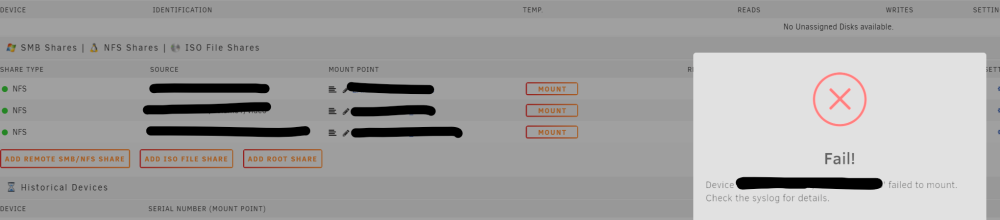
Hello, I have NFS shares since a while and it has always worked until now. Today I've installed 6.12.9 version and since, I can't mount NFS shares anymore (same for SMB). I can detect and find the shares I want to add but impossible to mount them anymore. I've the following message : Device 'xxxxxxxxxxxx' failed to mount. Check the syslog for details. and I don't know what or where to check. Do you know what can I try ? (share are on a Synology NAS, I used them for plex) Syslog says: (xxxxxxx = shares name) Mar 29 21:03:08 Lab unassigned.devices: Mounting Remote Share 'xxxxxxxxxxxxxxxxxx'... Mar 29 21:03:08 Lab unassigned.devices: Mount NFS command: /sbin/mount -t 'nfs' -o rw,soft,relatime,retrans=4,timeo=300 'xxxxxxxxxxxxxxxxxx' '/mnt/remotes/xxxxxxxxxxxxxxxxxx' Mar 29 21:03:08 Lab unassigned.devices: NFS mount failed: 'mount.nfs: Protocol not supported '. Mar 29 21:03:08 Lab unassigned.devices: Remote Share 'xxxxxxxxxxxxxxxxxx' failed to mount. NFS mount failed: 'mount.nfs: Protocol not supported... well does it mean I need to downgrade or something ?
-
Hi, I tried to install but it doesn't work, so maybe I missed a parameter or something (I changed nothing). I noticed "WARNING: Your kernel does not support swap limit capabilities or the cgroup is not mounted. Memory limited without swap." at the end of the Docker command execution. Do you have any advice or any guidance to make it works ? Many thanks

-
Same here, As a workaround, I haver removed the password in the docker (advanced view). I continue to have "HTTPS is required for full functionality" error. But now if I click on Connect in NoVNC webpage, then TMM is displayed like before. (sorry for my english)

-
@ChatNoir Un grand merci pour ce guide détaillé. Je vais me lancer ce week-end et je te dirai si tout s'est bien passé ou si ma famille m'a jeté dehors après mon incapacité à redémarrer Plex.
-
Bonjour, J'ai un unRAID qui tourne très bien mais j'ai acheté une machine un peu plus récente (processeur plus récent, plus de place dans le boitier) d'occasion. Je voulais savoir comment bien migrer ma machine. Est-ce aussi simple que d'arrêter la machine, puis transférer mes 2 disques de l'array dans le nouveau PC, puis booter sur la clé et roulez-jeunesse ou alors c'est un peu plus compliqué que ça ? A savoir, j'aimerai changé le disque cache... peut-être faut-il uiliser le mover pour tout remettre sur les disques de l'array, non ? Enfin bref, quelles sont les étapes à suivre pour éviter un désastre ? Merci.
-
Hello, Effectivement, TinyMediaManager par exemple était réglé en USER_ID et GROUP_ID 1000, j'ai changé pour 99:100, et ça à l'air de fonctionner comme il faut (c'est bien Nobody le "Owner"). La VM continue à utiliser l'utilisateur "toto" mais bon l'essentiel de mon problème était dans les docker donc ca va. Merci beaucoup.
-
Bonjour, J'ai une question sur les "Users" qui effectuent les tâches, que ce soit au travers des dockers, des VMs ou autres. Concrètement j'ai actuellement 2 utilisateurs + root. Par exemple, lorsque ma VM écrit un fichier vidéo via le répertoire partagé sur Unraid, c'est l'utilisateur "toto" qui est utilisé (sans que je ne le demande, alors que je me suis connecté via Root) Après, par exemple je veux lancer le docker TinyMediaManager pour scanner et renommer cette vidéo. Et la TinyMediaManager n'arrive pas à renommer sauf si au préalable je change le "Owner" en "Nobody" et en changeant les permissions en read/write. Une fois renommé, on voit que c'est pourtant l'utilisateur "toto" qui a effectué l'opération. et si la je veux déplacer le fichier via l'application Docker Krusader par exemple, je dois encore une fois changer le owner et les permissions. et pareil Unmanic, je dois à chaque fois passer par la case changement de Owner+Permissions. Bref, je ne sais pas trop où regarder ou faire en sorte que les opérations effectués par les app et VM ne soit pas associées à un utilisateur en particulier pour éviter ce genre de soucis. Auriez vous une idée?
-
Hi, Sorry if this is a very basic question, I'm far to be an expert.... For a longime I had no user on my unRAID, just the root. Now I've created 2 users. And now, when I install a new app or a VM, this is one of the users that is performing all actions on shared folder. And then when I need to move a file or a folder (with Krudader for example) sometimes I have to change the owner for "nobody" if I want this to work (otherwise I ve a permission issue). Do you know how to change the user or let "nobody" performing actions on shared folder in Dockers app ? Thank you.
-
Hello, I just would like to ensure my "recipe" for re-encoding looks good for you ? My goal is to reencode everything that is not HEVC to HEVC (H265), with AAC audio. I want to keep all audio tracks and all subtitles. in Unraid Docker template: no restriction on CPU, RAM or GPU but I put " --device=/dev/dri " in extra parameters). My cpu is i7-6700 (iGPU Intel HD530) with 16go ram Steps are: Remux Video Files (ouput container .mkv) Video Encoder H265/HEVC - hevc_vaapi (INTEL/AMD) (Enable VAAPI HW Accelerated Decoding is "Disabled", Buffer 2048) Audio Encoder AAC (Buffer 2048) Reject File if Larger than Original File Size Metrics Data Panel It works well, except for old AVI files that fails, and some MKV for which I've the following message ; "Filtergraph 'format=nv12|vaapi,hwupload' was defined for video output stream 0:2 but codec copy was selected. Filtering and streamcopy cannot be used together." Do you know what I could change to make it works perfectly whatever the file is.
-
Hi, bon je me réponds à moi-même: J'ai édité le fichier /etc/fstab, et j'ai ajouté: share_unraid /mnt/share_unraid 9p trans=virtio,version=9p2000.L,_netdev,rw 0 0 où share_unraid est le "mount tag" définit dans le template de la VM.
-
Bonjour, S'il y a bien quelque chose que je maitrise mal sur unRAID c'est bien la partie VM que j'utilise surement pas à son maximum (en particulier la partie PCI Devices and IOMMU Groups). Mais surtout j'ai un peu de mal à comprendre comment faire fonctionner le Mount Tag dans une VM linux (en l'occurrence une VM Q4OS, donc une base Debian). Est-ce que quelqu'un pourrait m'expliquer comment faire pour monter les shares dans ma VM en utilisant le Mount Tag (que j'ai appelé "share_unraid" lors de la création de la VM), et ce de manière permanente ? (en gardant à l'esprit que je ne suis pas trop fortiche en linux... (bon je sais entrer des lignes de commande dans le terminal ou éditer des fichiers avec Nano quand même, hein ) ? Merci beaucoup.
-
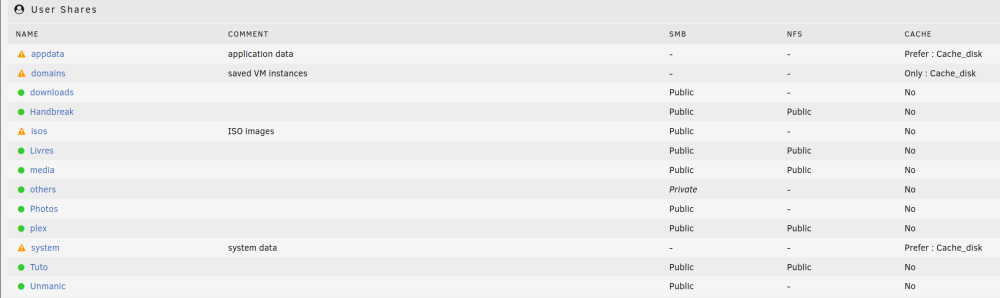
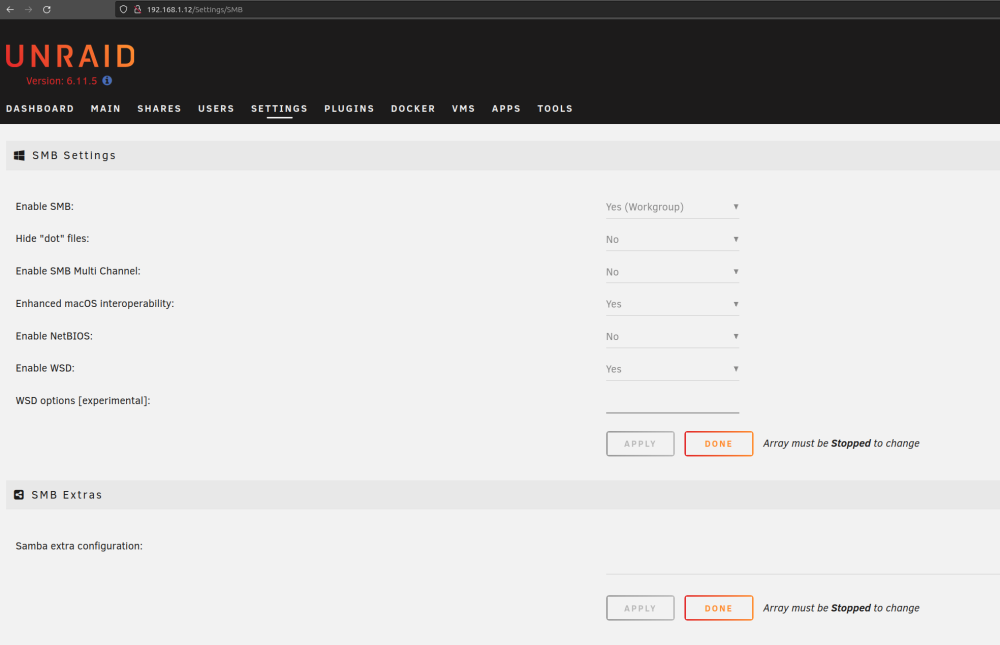
Hi In windows, when I try to reach my server via explorer, I type \\192.168.1.12 it works. I mean, it lists all folder that are "Public". I'm trying to use linux more and more (Ubuntu 23.04, Gnome 44) but if I try to reach smb://192.168.1.12 it asks for login + password, if I put them it fails. but if I try to reach one of the "public" folder smb://192.168.1.12/isos for example and connect as "anonymous" it works... My server doesn't appear in "Workgroup" like my Synology NAS. do you know what is wrong with my settings ? my shares, not all shares are public: my settings: Ubuntu sees the server because it's listed with its Network Name as (Remote Login) and (File Sharing), but if I try to access with my user name and password (in unraid) it fails. "Unable to access location. Failed to retrieve share list form server: Invalid argument" Do you have an idea ?

-
@Djoss Ok many thanks !
-
Hi, Thank you for the application. I need to do some cleaning on my disk and it's a great help. But I have permission problems when I want to delete something. Is there a way to fix this ? I didn't change User ID: 99 nor Group ID: 100, the default value in Docker template... maybe here ?
-
Ok I answer to myself, it could help someone else. here is how to proceed in Dockerized Wordpress and Cloudflare Zero Trust Tunnel (if you don't want to use reverser proxy) install mariadb container (I took the official one) install wordpress container BUT don't run it !! update cloudflare zero trust tunnel redirection (http + localhost:port, no other option to change) go to your subdomain et force url to be sub.domain.com/wp-admin/install.php the initial setup can be done (langage, ...) And voila, it should work.