





Kilrah
Members
-
Joined
-
Last visited
Everything posted by Kilrah
-
Are both the GPU and its audio part bound to vfio?
-
Did you check that container's support thread?
-
VPNs often limit to 1Gbit per user. Getting that on torrents usually means many simultaneous connections and some routers can't cope with that load either.
-
Don't edit the XML, add the 2nd video card using the UI instead?
-
If you really want a VM you can set one up yourself in VM manager, nothing complicated. The inabox stuff is supposed to make it simpler and set everything automatically, but it's... not very good.
-
Possible, 90 seconds docker timeout is really long though, should never really need to go past 60 and encounter that. I use 20.
-
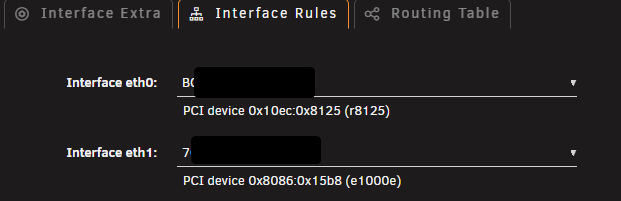
Typically in Interface Rules you'd set the NIC/port you want as main to be eth0. Sounds like having the 4-port card is pointless then?
-
Nothing you change updates existing installations. Installing makes a copy of what it was at that time, done. If changes are required people will have to do them manually, ideally you'd put up a heads-up in your support thread so when something breaks people who go read it to see if other people had the same issue they find an answer/solution. And if it's your own app, minimize them/get things right early.
-
if you do that without deleting the image manually between the down and up it will NOT be updated, it'll just reuse the image that's already there. I.e. the problem seems to be what it says, the registry you tried to pull denied you access, that's what you need to investigate. Maybe the author removed or moved the repo, or privated it, or you exhausted your 100 unauthenticated requests per 6 hours to dockerhub etc.
-
The built-in "use tailscale" is a hack that only works on some containers that are set up in a way that allows the hack to work. See proper methods here https://edac.dev/unraid/tailscale/docker-options/
-
Requests need to be made here https://product.unraid.net/b/community-apps-submission-support
-
What exact url exactly was blocked? Sometimes it's just the icon for an app that triggers that stuff.
-
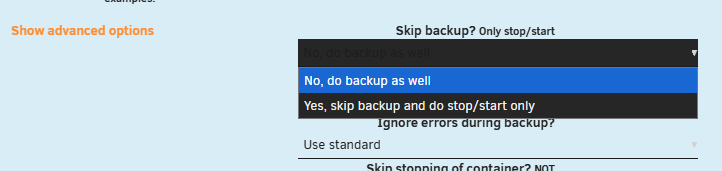
Regular skip completely ignores the container as if it wasn't there.
-
Advanced options.
-
only ca.unraid.net, no https.
-
FYI this is a lot more advanced and actually maintained.See the support thread https://forums.unraid.net/topic/121075-support-paperless-ngx-docker/page/12/#findComment-1635190Possible the PCB has some issue with the SATA connection, and when that drops the USB adapter also drops yes...Depends how it's built, he DAS could simply internally be one USB hub with each drive having its own USB interface connected to it, so each drive could disconnect from the hub individually.It disconnected. Will probably keep happening randomly, that's why USB devices are not recommended for array/pool use. Aug 29 12:36:17 Evergreen kernel: usb 4-1.3: USB disconnect, device number 5Unlikely, but the log spam makes looking for other signs like an unpleasant game of finding a needle in a haystack. And it needs fixing anyway...Look at container uptimes, docker page, toggle advanced view... but seems you're using compose so might need to do that on the command line.Your syslog shows your "pterodactyl0" container restarting every few seconds continuously so start by fixing that, rebooting and repost diags if you still have problems.You selected the proper rocm tag for AMD?


