





Kilrah
Members
-
Joined
-
Last visited
Everything posted by Kilrah
-
When it fails it'll tell you why in the output, look at it... They are orphaned images, not containers, i.e. images that have been downloaded but are not currently being used by any container. That only cares about the appdata folders, not containers or images.
-
Because you entered something wrong and the container fails to build. Can just hit back and correct, or go to apps->previous apps, select reinstall and correct before applying.
-
Memory is only used if there's nothing else needing it.
-
Are you deleting them through samba? that's the only way it'll work, if you delete on the server itself it's completely bypassing that.
-
Main -> Internal Boot -> Boot Parameters tab
-
Correct, if the container hits the limit you've set then it's the one that will be killed for being out of memory. So maybe it might not have been killed if you had set more, but then setting it low enough ensures that no more important stuff gets killed. If you have installed the immich machine learning stuff you probably want to remove that, too tight on 8GB. Run that on another machine with more resources.
-
Well the agent doesn't support unraid, so probably has no idea what it's looking at?
-
Need to check your local market, but look for used/recertified.
-
7.3.2 if your license allows for it.
-
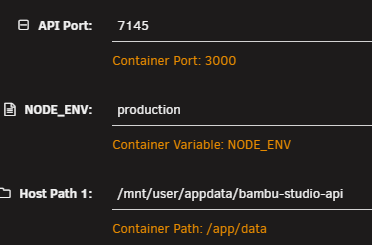
Just add a container and give it the repo address and the ports/vars it needs and a path.
-
You can use tailscale if you wish, sure. Might need some wrangling of the config to allow access through plain http if you don't want to deal with certs.
-
Wait until it updates, looks like it's stuck again.

-
Go check / set the timezone again. 7.3 changed how they're defined.
-
It's when gluetun updates that the issue happens, because then the container the others are supposed to use for networking doesn't exist anymore so they can't start. DockerMan knows that and rebuilds all dependent containers when gluetun updates but the plugin doesn't.
-
No reason it'd have been that big so I still suspect misleading usage reporting, as mentioned du on the docker filesystem is useless, and one of the drawbacks of using docker folder is that since it's right on the drive understanding space usage is pretty much impossible.
-
Disable container autoupdate. When the gluetun container updates (which is shown happening in your log) it makes a new container, so the one referred to by the others then doesn't exist anymore.
-
You seem to have Docker in Folder mode, you can't use du on that, it'll just recurse over shared mounts. Try and see Container usage on the docker page. Also switch the page to advanced mode and remove any orphan images.
-
He often develops/releases stuff along with a video and then moves on to the next thing, never maintaining them.
-
The Enhanced Syslog plugin has a filter to exclude things from being logged but you have to add them manually.
-
Go to Apps, Statistics, Invalid templates, search for gyroidvault, you'll find { "TemplatePath": "/tmp/GitHub/repositoryClone/TeeCodeDev/unraid-templates/templates/GyroidVault.xml", "errors": [ "char '&' is not expected." ], "FirstSeen": null },Looks like (at least) you have an unescaped & , and it's in a changelog block that's also missing the <Changes> start tag. A simple XML validator would catch that.
-
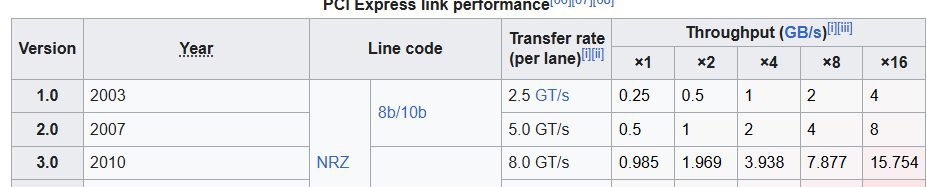
https://www.servethehome.com/lsi-sas-2008-raid-controller-hba-information/ Shows as 5GT/s, so Gen2 in the log
-
SAS2008 is PCIe2 so if it was listed as Gen3 that'd have been a listing error
-
That's a PCIe2 card, working as such. Quadro might get downgraded because of it, or you have to check BIOS settings
-
What cards are we talking of?
-
Looks like mine is already on 3.0.2, did nothing. Current template already has a secret key variable in the advanced section.

