





Kilrah
Members
-
Joined
-
Last visited
Everything posted by Kilrah
-
Since TPM licensing is unavailable for VM installs that's indeed an interesting question...
-
That optical drives are slow, or at least by default tuned to be slow/silent/more error correction rather than fast and noisy. Believe there are some things you can tweak in makemkv but mostly it's a drive firmware thing, AFAIK you need libredrive-compatible drives to tweak for speed.
-
It seems something e.g kernel is now able to extract the real identifiers from usb drives instead of the enclosure identification, which is actually great and worth having to do manual changes. dlandon is also not involved with the standard UD plugins this thread refers to anymore.
-
Click settings, assign the same script, set to automount.
-
tiredofit has moved all their containers to a new nfrastack organization. Need to update the repo. https://github.com/nfrastack/container-freescout
-
All containers updated? Seems to be homeassistant_inabox_v3 causing the issue, which was supposedly fixed some time ago. https://forums.unraid.net/topic/200692-homeassistant-in-a-box-v3-vm-failures/#comment-1637640
-
See the post above yours for where to report issues.
-
UD has lost the assigned script and automount settings for my backup drive. Someone posted another problem with UD in the UD thread. EDIT: Ah, seems something causes udev to now gives the drive's real identifier instead of the enclosure's, so that's why reassigning was necessary. Some people on Discord have had the same problem with usb drives in array/pools which is more annoying.
-
UD has lost the assigned script and automount settings for my backup drive.
-
Just got an update yesterday. What and where? Many plugins have some individual components that are needed in older versions but not newer ones so you'll see that message for the unneeded ones.
-
What RAID type have you selected for it? By default it'd be RAID1 so half the capacity for redundancy.
-
Do we really need a slopped plugin to run docker image prune -f -a? Hopefully does not.
-
Are both the GPU and its audio part bound to vfio?
-
Did you check that container's support thread?
-
VPNs often limit to 1Gbit per user. Getting that on torrents usually means many simultaneous connections and some routers can't cope with that load either.
-
Don't edit the XML, add the 2nd video card using the UI instead?
-
If you really want a VM you can set one up yourself in VM manager, nothing complicated. The inabox stuff is supposed to make it simpler and set everything automatically, but it's... not very good.
-
Possible, 90 seconds docker timeout is really long though, should never really need to go past 60 and encounter that. I use 20.
-
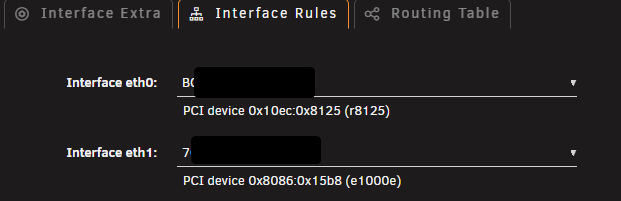
Typically in Interface Rules you'd set the NIC/port you want as main to be eth0. Sounds like having the 4-port card is pointless then?
-
Nothing you change updates existing installations. Installing makes a copy of what it was at that time, done. If changes are required people will have to do them manually, ideally you'd put up a heads-up in your support thread so when something breaks people who go read it to see if other people had the same issue they find an answer/solution. And if it's your own app, minimize them/get things right early.
-
if you do that without deleting the image manually between the down and up it will NOT be updated, it'll just reuse the image that's already there. I.e. the problem seems to be what it says, the registry you tried to pull denied you access, that's what you need to investigate. Maybe the author removed or moved the repo, or privated it, or you exhausted your 100 unauthenticated requests per 6 hours to dockerhub etc.
-
The built-in "use tailscale" is a hack that only works on some containers that are set up in a way that allows the hack to work. See proper methods here https://edac.dev/unraid/tailscale/docker-options/
-
Requests need to be made here https://product.unraid.net/b/community-apps-submission-support
-
What exact url exactly was blocked? Sometimes it's just the icon for an app that triggers that stuff.
-
Regular skip completely ignores the container as if it wasn't there.
